Stuntpickle
Max Output Level: -90 dBFS

- Total Posts : 23
- Joined: 2015/05/03 00:14:38
- Status: offline

99 Problems, but Paying Cakewalk Ain't One
Had I in front of me a button that, when pressed, would instantly incinerate all Cakewalk staff, it would require a monstrous feat of self control to refrain from slapping it ten times. Over the past three days, I have worked exclusively on a single orchestral composition, and in that time, I have made exactly zero progress due to Sonar falling apart over and over and over. In one day, I had five crashes which lost me several hours work -- well, actually one hour of work repeated five times. I am now auto saving every forty-five minutes, a safety measure which, itself, sometimes crashes Sonar.
I see posts where people complain about Sonar being buggy and replies from others who claim to have no problems. My guess is that the people with no problems are using relatively few tracks or samples as I, myself, have no problems in similar situations.
My latest crippling issue is that for some odd reason Sonar refuses to record expression (Ch. 11) data and inserts errant data into tracks arbitrarily. I called support about this, and the tech replied "yeah, that can happen. Don't know why." He advised me to delete the midi track and create a new one, which worked until the issue cropped up again. Now, I can't do anything without some track becoming similarly corrupted. The result is that I have close to zero control over balance, and my violins are launching a spiccatto insurrection against my solo soprano while the bass seems to always be announcing the imminent arrival of Jaws on stage.
Also, all my other lanes get changed and become uneditable. So channel 7, which I used initially to set volume is all out of whack and unchangeable. Also, key switches disappear and, in the case of my trumpets, linger from long ago and resist all attempts to eradicate them. (It's always a pleasant sound when a trumpet doubling a lilting soloist suddenly decides to start playing sforzandos with his tongue wagging out the bell of his horn.)
I'm using quite a few samples from East West, but my computer is nowhere near taxed. It seldom reaches over 60% cpu. My ram hovers around 50%, and all samples are on an SSD. I'm using legit plugins, i.e. not pirated, with a new Windows installation approximately one-week old. The only questionable thing I'm using is tencrazy's channel switcher, which covers a gaping hole in the functionality of Sonar.
If anyone has any advice that doesn't involve starting over yet again, I'd love to hear it. My suspicion is that Sonar just can't handle what I'm throwing at it or I'm missing something completely obvious.
|
Stuntpickle
Max Output Level: -90 dBFS
- Total Posts : 23
- Joined: 2015/05/03 00:14:38
- Status: offline
Re: 99 Problems, but Paying Cakewalk Ain't One
2015/05/30 02:50:42
(permalink)
Ha! Apparently articulations are profane.
|
mudgel
Max Output Level: 0 dBFS

- Total Posts : 12010
- Joined: 2004/08/13 00:56:05
- Location: Linton Victoria (Near Ballarat)
- Status: offline
Re: 99 Problems, but Paying Cakewalk Ain't One
2015/05/30 03:13:42
(permalink)
WI typically use 100 or so tracks with dozens of fx and sometimes a score or more Synths (VSTIs) with generally no problems. On the rare occasion that problems occur it's invariably been tracked back to a plugin or some mixture of Windows and Sonar settings that have come into conflict. Of the problems you see here many are due to user error as there are many new users with little experience here. Others come presenting errors and we collectively help them sort out the problems. There are also a lot of post enquiring of the best way to do something as there are many new features. Certainly don't deny you're having problems but if you can be more specific about the process that brings them about, maybe we can help.
post edited by mudgel - 2015/05/30 03:20:50
Mike V. (MUDGEL) STUDIO: Win 10 Pro x64, SPlat & CbB x64, PC: ASUS Z370-A, INTEL i7 8700k, 32GIG DDR4 2400, OC 4.7Ghz. Storage: 7 TB SATA III, 750GiG SSD & Samsung 500 Gig 960 EVO NVMe M.2. Monitors: Adam A7X, JBL 10” Sub. Audio I/O & DSP Server: DIGIGRID IOS & IOX. Screen: Raven MTi + 43" HD 4K TV Monitor. Keyboard Controller: Native Instruments Komplete Kontrol S88.
|
kevinwal
Max Output Level: -69 dBFS

- Total Posts : 1066
- Joined: 2007/07/27 19:07:43
- Location: Rogers, AR
- Status: offline
Re: 99 Problems, but Paying Cakewalk Ain't One
2015/05/30 03:15:14
(permalink)
I'm in no way able to assist you, but I know that it would help those who might to know what version of Sonar you're running and if it's x86 or x64 version. Also, details about your interface and computer would likely be useful.
Also, are you manually editing midi data or using a keyboard controller? If the latter, you might want to consider increasing the midi buffer size in the preferences page, I've seen that recommendation before. A search on that topic might yield some benefit.
I am pretty appalled that tech support would actually say something like that to you without providing any kind of action plan to resolve your problems. Did they offer anything constructive?
|
Bristol_Jonesey
Max Output Level: 0 dBFS
- Total Posts : 16775
- Joined: 2007/10/08 15:41:17
- Location: Bristol, UK
- Status: offline
Re: 99 Problems, but Paying Cakewalk Ain't One
2015/05/30 03:15:32
(permalink)
You could help us by listing your entire system spec, configuration, interface etc.
I have absolutely no problem running EWQLSO Platinum in a 135 track project with multiple key switching drum maps, extensive use of Midi controllers and about seven instances of Play.
So from my experience, it ain't Sonar that's causing your problems.
CbB, Platinum, 64 bit throughoutCustom built i7 3930, 32Gb RAM, 2 x 1Tb Internal HDD, 1 x 1TB system SSD (Win 7), 1 x 500Gb system SSD (Win 10), 2 x 1Tb External HDD's, Dual boot Win 7 & Win 10 64 Bit, Saffire Pro 26, ISA One, Adam P11A,
|
lfm
Max Output Level: -53 dBFS

- Total Posts : 2216
- Joined: 2005/01/24 05:35:33
- Location: Sweden
- Status: offline
Re: 99 Problems, but Paying Cakewalk Ain't One
2015/05/30 03:58:08
(permalink)
I also more than anything suspect one plugin, or a couple in combination.
And systems specs and config of sample based plugins - all loaded into ram, reading streamed from disk etc.
If in Sonar, maybe autosave in bad moment is a suspect - to make that foolproof is really difficult with all in realtime that can go on.
I only do manual Ctrl S saves instead - frequently - and never while transport is running.
At least to narrow down I would take such precausions - insert/removal of plugins when stopped etc.
And if having ram enough - see to that all is preloaded and not streamed.
|
williamcopper
Max Output Level: -68 dBFS

- Total Posts : 1120
- Joined: 2014/11/03 09:22:03
- Location: Virginia, USA
- Status: offline
Re: 99 Problems, but Paying Cakewalk Ain't One
2015/05/30 04:08:48
(permalink)
I have certainly had my share of mystery controller changes and key-switches being ignored. Unfortunately haven't been able to pinpoint why and how, but I sympathize with your feelings. In trying to adapt to Sonar (since it doesn't adapt very well to me) I've gotten more and more methodical to make sure my key strokes and mouse clicks are where I think they are ... unwanted track and clip and event selection, and unintended modification, are very very very frequent.
|
Stuntpickle
Max Output Level: -90 dBFS
- Total Posts : 23
- Joined: 2015/05/03 00:14:38
- Status: offline
Re: 99 Problems, but Paying Cakewalk Ain't One
2015/05/30 04:26:02
(permalink)
Thanks for replying, guys/gals. To be fair, support actually did help me with the fix, as I said, creating a new midi track and dragging the clip to it. It's just that the problem is so common now and the fix doesn't always work. I'll do my best to answer the questions asked of me. System specs AMD FX 8350 32 GB Ram Samsung 500 GB SSD (latest series) Toshiba 3TB 72k rpm Hard Disk (Not sure of the model) Windows 8.1 auto-update turned on Sonar Professional (whatever the latest update is) EW Hollywood Strings/Woodwinds/Brass/Percussion Gold (using 9 multi-timbral instances of play, the string sections using tencrazy's channel switcher; and the brass, woodwinds and percussion using separate midi tracks for key switch patches on each instrument section) Akai EWI 4000s Akai Max25 I can provide any other info if needed. I have successfully recorded automation with a controller previously. I have the Max25 programmed to control ch. 11 on the mod wheel. When the problem occurs expression registers during recording, i.e. I can see it forming in the track, but it doesn't stick. I also have ghostly expression tracks that appear for no reason as in this pic: 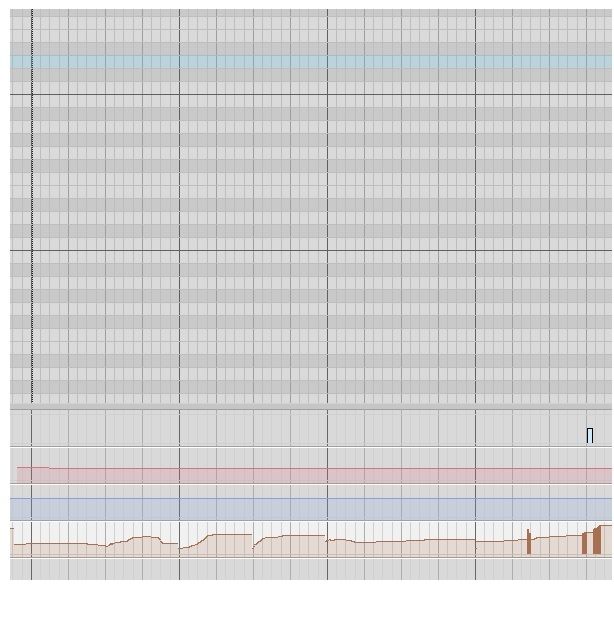 In the above picture, the instrument isn't even playing. I have no idea how the expression info got there. I cannot select the info to delete it, nor can I use the eraser to delete it. I can, however, adjust it manually, but because it's actually hundreds of signals, manual adjustment is not practical. I can sort of draw over it, but this results in one expression lane superimposed over another as in the following pic: 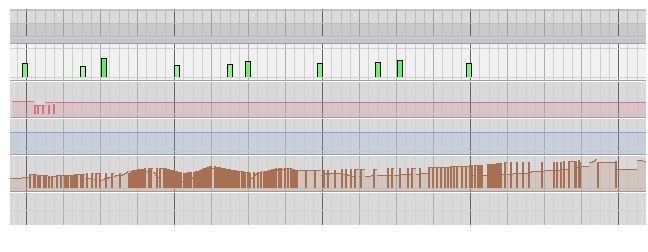 I'll include a screen of my Sonar in case someone spots something obvious in the settings. I know support mentioned enabling automation write, but I have been able to record previously with it off. And enabling it makes no difference with this issue. 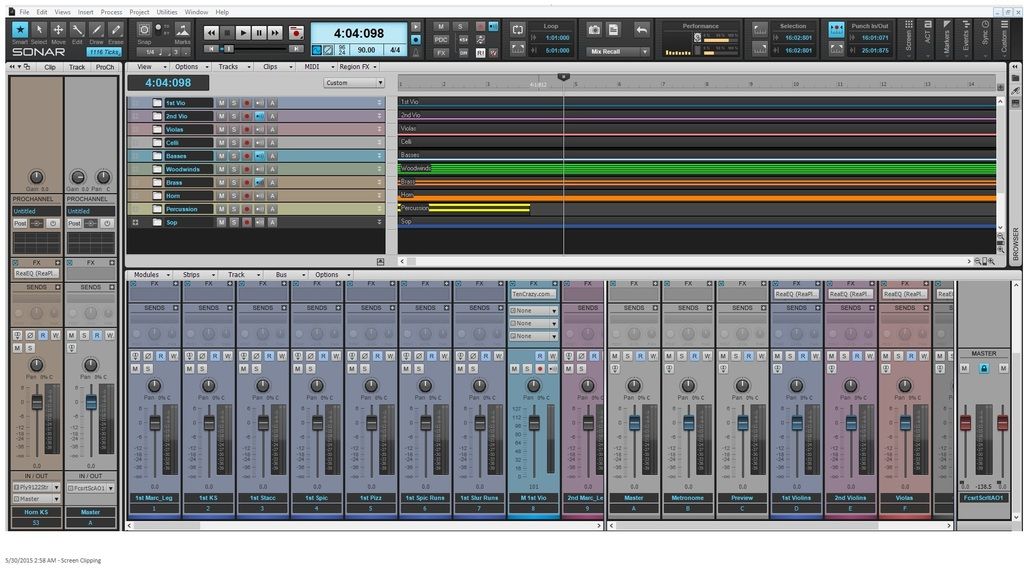
|
williamcopper
Max Output Level: -68 dBFS
- Total Posts : 1120
- Joined: 2014/11/03 09:22:03
- Location: Virginia, USA
- Status: offline
Re: 99 Problems, but Paying Cakewalk Ain't One
2015/05/30 04:55:36
(permalink)
I can confirm the picture you give of the controller ("one expression lane superimposed over the other", as you said). I see that very frequently, and have never identified how to avoid it. I usually fix it by re-selecting the appropriate controller using the selectors on the left in PRV controller pane.
|
Stuntpickle
Max Output Level: -90 dBFS
- Total Posts : 23
- Joined: 2015/05/03 00:14:38
- Status: offline
Re: 99 Problems, but Paying Cakewalk Ain't One
2015/05/30 06:02:53
(permalink)
|
Stuntpickle
Max Output Level: -90 dBFS
- Total Posts : 23
- Joined: 2015/05/03 00:14:38
- Status: offline
Re: 99 Problems, but Paying Cakewalk Ain't One
2015/05/30 06:14:02
(permalink)
Oh, I'm using 64bit windows.
|
John
Forum Host

- Total Posts : 30467
- Joined: 2003/11/06 11:53:17
- Status: offline
Re: 99 Problems, but Paying Cakewalk Ain't One
2015/05/30 06:16:08
(permalink)
Your graphics card can be the source of trouble. Mr. Anderton pointed out awhile back that disabling any audio from the graphics card can solve a lot of strange problems.
|
mudgel
Max Output Level: 0 dBFS
- Total Posts : 12010
- Joined: 2004/08/13 00:56:05
- Location: Linton Victoria (Near Ballarat)
- Status: offline
Re: 99 Problems, but Paying Cakewalk Ain't One
2015/05/30 06:52:59
(permalink)
Audio from the graphics card. what is that?
Mike V. (MUDGEL) STUDIO: Win 10 Pro x64, SPlat & CbB x64, PC: ASUS Z370-A, INTEL i7 8700k, 32GIG DDR4 2400, OC 4.7Ghz. Storage: 7 TB SATA III, 750GiG SSD & Samsung 500 Gig 960 EVO NVMe M.2. Monitors: Adam A7X, JBL 10” Sub. Audio I/O & DSP Server: DIGIGRID IOS & IOX. Screen: Raven MTi + 43" HD 4K TV Monitor. Keyboard Controller: Native Instruments Komplete Kontrol S88.
|
Pragi
Max Output Level: -67 dBFS

- Total Posts : 1173
- Joined: 2010/09/19 11:46:59
- Location: Village of the sun
- Status: offline
Re: 99 Problems, but Paying Cakewalk Ain't One
2015/05/30 06:59:08
(permalink)
Hi, it would also be interesting , which kind of hard drive you are running. Many of the "green" , "eko" aso hard drives are running performance reduced, which is causing problems. regards Pragi
post edited by Pragi - 2015/05/30 07:06:17
|
SpanknCrank
Max Output Level: -90 dBFS
- Total Posts : 47
- Joined: 2007/11/30 10:33:42
- Location: The Shire
- Status: offline
Re: 99 Problems, but Paying Cakewalk Ain't One
2015/05/30 07:03:15
(permalink)
mudgel
Audio from the graphics card. what is that?
some cards with hdmi allow you to use it as an audio output.
|
Karyn
Ma-Ma
- Total Posts : 9200
- Joined: 2009/01/30 08:03:10
- Location: Lincoln, England.
- Status: offline
Re: 99 Problems, but Paying Cakewalk Ain't One
2015/05/30 07:16:48
(permalink)
mudgel
Audio from the graphics card. what is that?
If you connect a TV or monitor with HDMI it can get an audio feed through the HDMI cable. This is connected to your graphics card, the card has drivers loaded that route audio through the graphics card for the purpose of feeding the HDMI link. The intended use is for large screen TVs. All of us use dedicated audio interfaces and professional quality studio monitors so this particular function is never (or rarely) used. It has been demonstrated that removing these drivers can improve Sonars performance. It is unlikely to be the cause of the issues in this thread, but it would not hurt to try.
Mekashi Futo. Get 10% off all Waves plugins.Current DAW. i7-950, Gigabyte EX58-UD5, 12Gb RAM, 1Tb SSD, 2x2Tb HDD, nVidia GTX 260, Antec 1000W psu, Win7 64bit, Studio 192, Digimax FS, KRK RP8G2, Sonar Platinum
|
Stuntpickle
Max Output Level: -90 dBFS
- Total Posts : 23
- Joined: 2015/05/03 00:14:38
- Status: offline
Re: 99 Problems, but Paying Cakewalk Ain't One
2015/05/30 07:36:09
(permalink)
None of my hard disks are green. I know the SSD is the very latest performance drive from Samsung, considered to be the leader in SSD tech. I just looked at the box for the Toshiba HD, but it wasn't helpful. It just said "Toshiba 3.5 Hard disk." However, I know for certain it's not a green drive since when selecting parts initially I chose two substandard drives based on price, and a buddy (an engineer) explained to me the bit about the green drives. Thus, I went with his recommendations, both of which were considered high performance.
|
Stuntpickle
Max Output Level: -90 dBFS
- Total Posts : 23
- Joined: 2015/05/03 00:14:38
- Status: offline
Re: 99 Problems, but Paying Cakewalk Ain't One
2015/05/30 07:41:53
(permalink)
Also, I'm using a Focusrite solo for playback. I'll try to disable my graphics card sound to see if it works, but it sounds like a stretch.
|
Stuntpickle
Max Output Level: -90 dBFS
- Total Posts : 23
- Joined: 2015/05/03 00:14:38
- Status: offline
Re: 99 Problems, but Paying Cakewalk Ain't One
2015/05/30 07:46:57
(permalink)
In the Nvidia control panel, all devices for sound are grayed out and listed as unavailable, which I take to mean no sound is coming from the graphics card.
|
FLZapped
Max Output Level: -87 dBFS

- Total Posts : 152
- Joined: 2003/12/26 07:39:09
- Status: offline
Re: 99 Problems, but Paying Cakewalk Ain't One
2015/05/30 07:53:59
(permalink)
You should probably shut off the auto update feature in Windows.
|
Pragi
Max Output Level: -67 dBFS
- Total Posts : 1173
- Joined: 2010/09/19 11:46:59
- Location: Village of the sun
- Status: offline
Re: 99 Problems, but Paying Cakewalk Ain't One
2015/05/30 07:55:58
(permalink)
Good, that you are now looking into another direction, doesn´t mean that Splat can´t be the reason for your probs, but I´m editing here projects with 78 and more tracks ,4-8 synths aso and heavy duty fx per track-works smooth as butter- you know? good luck
post edited by Pragi - 2015/05/30 08:07:55
|
Pragi
Max Output Level: -67 dBFS
- Total Posts : 1173
- Joined: 2010/09/19 11:46:59
- Location: Village of the sun
- Status: offline
Re: 99 Problems, but Paying Cakewalk Ain't One
2015/05/30 07:59:37
(permalink)
Another idea: At what buffersize/bit depht aso are you running your audiocard?
post edited by Pragi - 2015/05/30 08:07:01
|
Pragi
Max Output Level: -67 dBFS
- Total Posts : 1173
- Joined: 2010/09/19 11:46:59
- Location: Village of the sun
- Status: offline
Re: 99 Problems, but Paying Cakewalk Ain't One
2015/05/30 08:09:09
(permalink)
And: If I understand right, you are running 2 audio interfaces at the same time, the presonus for recording or so and a focusrite for playback..........? I so, try using one ! regards
post edited by Pragi - 2015/05/30 08:15:27
|
Stuntpickle
Max Output Level: -90 dBFS
- Total Posts : 23
- Joined: 2015/05/03 00:14:38
- Status: offline
Re: 99 Problems, but Paying Cakewalk Ain't One
2015/05/30 08:25:17
(permalink)
512 Samples I still have the same problem on different settings.
|
Stuntpickle
Max Output Level: -90 dBFS
- Total Posts : 23
- Joined: 2015/05/03 00:14:38
- Status: offline
Re: 99 Problems, but Paying Cakewalk Ain't One
2015/05/30 08:27:28
(permalink)
I have the Focusrite and an onboard soundcard which I am not using. The focusrite is running at 96k 24 bit depth with 512 samples.
|
Kamikaze
Max Output Level: -45 dBFS

- Total Posts : 3013
- Joined: 2015/01/15 21:38:59
- Location: Da Nang, Vietnam
- Status: offline
Re: 99 Problems, but Paying Cakewalk Ain't One
2015/05/30 08:37:23
(permalink)
Guys I think we are missing the point focusing just on this. StuntPickle, can you let us know more about the other 98 problems, maybe we can help there?
|
komposer
Max Output Level: -89 dBFS

- Total Posts : 52
- Joined: 2013/01/26 18:36:23
- Location: The Mitten
- Status: offline
Re: 99 Problems, but Paying Cakewalk Ain't One
2015/05/30 08:47:44
(permalink)
Stuntpickle
for some odd reason Sonar refuses to record expression
They don't include this feature.
|
g_randybrown
Max Output Level: -40 dBFS

- Total Posts : 3522
- Joined: 2003/12/24 11:30:04
- Location: Las Cruces, NM, USA
- Status: offline
Re: 99 Problems, but Paying Cakewalk Ain't One
2015/05/30 08:56:45
(permalink)
I've seen this before but for me it was user error. By that I mean I was trying to edit controller data without the correct track selected.
Out of curiosity, how many tracks do you have open in PRV in your video?
G. Randy Brown Windows 10, 64 bit, PlatinumIntel Core i7-3770S Asus P8Z77-V LK mobo 4X8GB Corsair XMS3 memory 500 GB Crucial BX100 SSD (OS)two WD Black 1 TB HDDSAPPHIRE DUAL-X 100314-4L Radeon HD 6970 2GB 256-Bit GDDR5 Presonus AudioBox 22VSLyoutube.com/crystalclearnm
|
tlw
Max Output Level: -49.5 dBFS

- Total Posts : 2567
- Joined: 2008/10/11 22:06:32
- Location: West Midlands, UK
- Status: offline
Re: 99 Problems, but Paying Cakewalk Ain't One
2015/05/30 08:59:05
(permalink)
A couple of things.
MIDI. Going on your first post your problems seem to be MIDI rather than audio related, so the audio interface doesn't seem particularly relevant.
The piano roll view screenshot. Are you certain it only contains data from a single MIDI track? If you're viewing more than one track at the same time then that might explain the brown MIDI CC events you can't edit and why you can write over them but they are still there. The new CCs you write being in a different track to the ones you want to alter.
Secondly issues with MIDI turning up in unanticipated or unintended places would seem to indicate a problem with MIDI routing somewhere. Possibly a hardware issue, possibly recording to more than one track without realising it. Possibly related to MIDI channels where data on different channels is being sent to different tracks other than the intended one.
Sonar Platinum 64bit, Windows 8.1 Pro 64bit, I7 3770K Ivybridge, 16GB Ram, Gigabyte Z77-D3H m/board, ATI 7750 graphics+ 1GB RAM, 2xIntel 520 series 220GB SSDs, 1 TB Samsung F3 + 1 TB WD HDDs, Seasonic fanless 460W psu, RME Fireface UFX, Focusrite Octopre. Assorted real synths, guitars, mandolins, diatonic accordions, percussion, fx and other stuff.
|
Stuntpickle
Max Output Level: -90 dBFS
- Total Posts : 23
- Joined: 2015/05/03 00:14:38
- Status: offline
Re: 99 Problems, but Paying Cakewalk Ain't One
2015/05/30 09:15:05
(permalink)
If by "open tracks" you mean how many I'm viewing in the piano roll, then the answer is one. I still have the problem with no midi controllers connected.
|