Jose7822
Max Output Level: 0 dBFS

- Total Posts : 10031
- Joined: 2005/11/07 18:59:54
- Location: United States
- Status: offline

RE: A Few Automation Ideas I Have For Sonar
2009/07/07 13:12:34
(permalink)
ORIGINAL: AL 321
Some nice ideas Jose.
Number 1, the on/off thing... would be nice, but i often get glitches when i switch plugins on and off during playback. Things go out of sync etc. It's worse when looping is enabled. Maybe i just need a better computer. Thanks AL! I think you have a point there. Some plugins do make noises when you turn them ON/OFF during playback. But they don't do it when you bypass them so I'd settle for having a way to automate their bypass button or their GUI's ON/OFF switch. Number 4, hide/show automation... this really should be adressed. I make dance music and it's not unusual for me to have 10 to 15 envelopes on one audio track. This means when i want to edit an envelope, i need to first hide all envelopes and then right-click and show the envelope that i want to edit.
Not the way i want to be working in 2009. I hear ya. Number 5, anchors... i was amazed when i discovered Sonar didn't even have this function. Soundforge's 'Smooth' curve (S-shape) should be easy enough to implement. We should have that at least. I know, they should at least give us one more curve and the Automation Manager in Sonar 9. Those two things shouldn't be hard to implement. And for my own input... clip based/pattern based automation. Like when you change the position of a node and it updates the position of the same node in every following bar? Such a simple little thing, but so devastating to my workflow. Hmm, good idea. It could even be as simple as using a modifier key to temporarily link nodes at any given moment.
|
sscannon
Max Output Level: -81 dBFS

- Total Posts : 497
- Joined: 2006/11/05 00:16:58
- Status: offline
RE: A Few Automation Ideas I Have For Sonar
2009/07/07 14:10:54
(permalink)
ORIGINAL: SongCraft

I love it!!
|
thegeek
Max Output Level: -78 dBFS

- Total Posts : 631
- Joined: 2008/10/02 14:28:00
- Location: Athens,Greece
- Status: offline
RE: A Few Automation Ideas I Have For Sonar
2009/07/10 18:06:14
(permalink)
I agree with all things mentioned ...I just wanted to add a couple features Id definitely like to see (they might even pursuade me to upgrade my Sonar 7)
1.Ability to turn on-off "automation write" while the project is playing (the same way that "R" can be since last version of Sonar)
2.A faster and smarter way to select and re-arrange automations or part of them around the project
3.Modes
As for the "automation modes" I perosnally think Sonar only misses one. Overwrite can easily be achieved by disabling the RD button and enabling "W"." Touch" we can say is the default one...So we really miss the ability of having a track read its already written automation but when the user changes it,it overwrites.I think the easiest way of implementing latch mode into sonar would be a special mode where:
The user selects this "latch"mode.....The project starts playing with automation "RD" on.As soon as the user touches a parameter with "W" on,this parameter switches to "RD" off,so itoverwrites the latest user's movements.then when the user is happy and wishes the automation to carry on as previously writen,he just re-enables "RD" again.Voila,"latch" mode in Sonar idiosyncrasy.Boy id love to see that!
|
Marah
Max Output Level: -71 dBFS

- Total Posts : 975
- Joined: 2009/02/04 21:56:41
- Status: offline
RE: A Few Automation Ideas I Have For Sonar
2009/07/10 18:39:19
(permalink)
|
paul01
Max Output Level: -89 dBFS

- Total Posts : 97
- Joined: 2008/11/25 20:38:44
- Status: offline
RE: A Few Automation Ideas I Have For Sonar
2009/07/10 19:49:56
(permalink)
Yeah that on off thing would be great, especially as a lot of plugins dont have a wet dry knob.
I find my self having to bounce to other clips only small chunks of audio in a track becuase of this. But not when I can set the plugin completly to dry.
Maybe it would be nice if each track had a kinda wet/dry meter ? sorta like the sends. but in this case for plugins like EQ, it would always be left at 100% wet.
Now this could also be done simply by sending the track to an fx buss and using the sends already, but if you already knew you only wanted the fx on 1 individual track, it would be a bit overkill. Plus I know so many people swear by using busses for things like reverb and such, but I always find that some of my tracks require a different type of reverb then what is sitting on the buss.
Like I say, it would be ideal for plugins that do not have a wet dry on them. As I constantly find myself searching for one especially with fx like distortion etc . I cant see any reason why it would be difficult to create ?
|
Jose7822
Max Output Level: 0 dBFS
- Total Posts : 10031
- Joined: 2005/11/07 18:59:54
- Location: United States
- Status: offline
RE: A Few Automation Ideas I Have For Sonar
2009/07/10 19:59:52
(permalink)
ORIGINAL: Marah
Automation lanes.
Oh yeah, that would be nice!
|
John
Forum Host

- Total Posts : 30467
- Joined: 2003/11/06 11:53:17
- Status: offline
RE: A Few Automation Ideas I Have For Sonar
2009/07/10 20:28:04
(permalink)
I have used automation lanes and they are not fun at all. If you have more then one item to automate or if all possible items are presented in their own lane the whole project may be nothing but lanes with an occasional audio track spotted here and there. They take up lots of space. With Sonar as it is now to see the envelopes better simply max out the track.
|
Marah
Max Output Level: -71 dBFS
- Total Posts : 975
- Joined: 2009/02/04 21:56:41
- Status: offline
RE: A Few Automation Ideas I Have For Sonar
2009/07/10 20:40:57
(permalink)
Well that settles that. 
|
Jose7822
Max Output Level: 0 dBFS
- Total Posts : 10031
- Joined: 2005/11/07 18:59:54
- Location: United States
- Status: offline
RE: A Few Automation Ideas I Have For Sonar
2009/07/10 20:44:46
(permalink)
ORIGINAL: John
I have used automation lanes and they are not fun at all. If you have more then one item to automate or if all possible items are presented in their own lane the whole project may be nothing but lanes with an occasional audio track spotted here and there. They take up lots of space. With Sonar as it is now to see the envelopes better simply max out the track.
Hmm...I guess the Automation Manager (where you can show/hide automation in one window) would be the ideal then. Thanks for sharing that John.
|
John
Forum Host
- Total Posts : 30467
- Joined: 2003/11/06 11:53:17
- Status: offline
RE: A Few Automation Ideas I Have For Sonar
2009/07/10 21:07:23
(permalink)
Logic 5.5.1 the last version I was able to use had the same setup as Sonar for automation. It was better implemented, though. It had much of the same things that you are asking for here. Cubase SX 3 had the lanes and I hated them. First thing I was never sure what lanes went with what tracks then as said they took up a lot of room. One track could very easily take up the entire track view with its track and its lanes. Then finding the right lane to work on was not all that easy either. Sonar's way is much better except if you have a lot of different envelopes but by maximizing the track that problem is not such a problem.
The thing about Cubase's lanes was first they were all the same color and were a lot like tracks in a folder in Sonar. I am sure that many loved them as is but by being used to the envelopes superimposed over the data I found it much easier to make a connection of just what I was doing. In the track lanes there was no other data just the envelope.
|
Jose7822
Max Output Level: 0 dBFS
- Total Posts : 10031
- Joined: 2005/11/07 18:59:54
- Location: United States
- Status: offline
RE: A Few Automation Ideas I Have For Sonar
2009/07/10 21:26:18
(permalink)
Yeah, it makes more sense to have the envelopes on the same track as the audio and/or MIDI track. The problem with the current implementation is that hiding/showing multiple automation is a PITA because you have to keep coming back to the same menu again and again. If only Cakewalk implemented an Automation Manager (aking to the current Track Manager), it would make these tasks so much easier. The exception is that the Automation Manager would be better implemented on a track by track (or Bus by Bus) basis as to avoid confusion with automations found on other Tracks/ Busses. So you would select a track, press the Automation Manager shortcut key, and uncheck/check those automations you want to hide/show on this track. It's probably the most elegant way to go about this (and I know Cakewalk likes elegant ;-) Please Cakewalk, give us an Automation Manager 
|
John
Forum Host
- Total Posts : 30467
- Joined: 2003/11/06 11:53:17
- Status: offline
RE: A Few Automation Ideas I Have For Sonar
2009/07/10 21:35:21
(permalink)
Now you see you just gave a very compelling reason for an automation manger. I like it just the way you outlined it too. Neat!
|
Marah
Max Output Level: -71 dBFS
- Total Posts : 975
- Joined: 2009/02/04 21:56:41
- Status: offline
RE: A Few Automation Ideas I Have For Sonar
2009/07/10 22:12:19
(permalink)
ORIGINAL: John
With Sonar as it is now to see the envelopes better simply max out the track.
This is true of course. But envelopes/automation "with Sonar as it is now" (as you say) is minimal, clumsy, flakey, and non-competitive, IMV. If you have more then one item to automate or if all possible items are presented in their own lane the whole project may be nothing but lanes with an occasional audio track spotted here and there. They take up lots of space.
That depends entirely on the implementation. In a smart implementation: - lanes can be individually resized - lanes would have a visually clear subordinate relationship to the track they control and belong to. - an envelope can easily be individually moved, as needed, between its own lane and the its parent track; in the latter case, the lane would be fully hidden (indeed, it would no longer exist.) - individual envelopes, on a per-track basis, can be hidden or made visible, as desired, whether in lanes or in the parent track. - each envelope lane can display an image of the parent waveform (cf. Sonar's bus waveform preview option) that reflects envelope values. They take up lots of space. With Sonar as it is now to see the envelopes better simply max out the track.
First, that's the only way it can currently be done in Sonar. It's not a great solution. Second, what "takes up more space" than "maxing out the track?" Also, an automation manager and envelope lanes are not mutually exclusive. In a smart and creative implementation -- and that's always the key -- each complements and is actually part of the other.
|
Jose7822
Max Output Level: 0 dBFS
- Total Posts : 10031
- Joined: 2005/11/07 18:59:54
- Location: United States
- Status: offline
RE: A Few Automation Ideas I Have For Sonar
2009/07/11 04:35:07
(permalink)
Marah,
Not to brag, but I think I like my Automation Manager idea better. And I agree with John that having automation lanes would complicate things more than they need to. Here are my reasons:
- Multiple automation lanes take up screen realstate. The smaller the screen realstate the harder precision editing becomes.
- If Cakewalk wants to implement multiple automation lanes the right way, they'll need to include a separate button on the track in order to minimize/maximize them (or else it becomes a mumbo-jumbo of tracks, busses and now lanes). However, this increases mouse clicks because not only you have a button to minimize/maximize Tracks/Busses but also a button to do the same with automation lanes. And then more clicking and dragging when you want to resize multiple envelope lanes. On the other hand, having all envelopes residing on the same Track/Bus (as currently implemented) saves you from having to expand multiple lanes when you need to edit something. All you do is expand that Track/Bus with one click and everything is right there.
- The Envelope Manager gives you all the options you need to edit envelopes. You can Hide/Show them as needed. You can group/ungroup them to edit multiple envelopes at once. You can also Mute them individually on the same Track/Bus (IOW, an individual write disable button for each envelope). Or you could even create envelopes by clicking on the Create Envelope button. All this from the same window. Just expand the track (by clicking on the maximize button), open the Envelope Manager (if needed) to choose your settings (or even create envelopes from withing it), and start editing away.
Now, if you were talking about having just 1 automation lane per Track/Bus then I would agree with you. Separating automation from the clips would reduce the amount of mistakes one could make (i.e. mistakingly moving clips instead of enevlopes). So you would have a button on the Track/Bus that exposes all the envelopes. That and the Envelope Manager would be fantastic! I even thought about having an Envelope View that would show all the envelopes on separate lanes. But the problem with this is that it's easier to edit envelopes when you have the clips right next to them. Otherwise, you have to keep track of where to make the changes (which would make us spend more time fixing then doing).
|
Marah
Max Output Level: -71 dBFS
- Total Posts : 975
- Joined: 2009/02/04 21:56:41
- Status: offline
RE: A Few Automation Ideas I Have For Sonar
2009/07/11 05:22:06
(permalink)
Hi Jose. I agree that an Automation Manager like you're describing is a good idea. I just don't see it as mutually exclusive or in conflict with well-implemented lanes. In any case, I think we're in basic agreement that Sonar's automation -- creating, editing, managing, etc -- needs to be made more flexible and less global. And I'll add to that, less menu-driven. Then need to open at least one menu level for each step in a sometimes multi-step configuration is just not very nice. I started posting about Automation Management last year, though I'm sure I wasn't the first. http://forum.cakewalk.com/tm.asp?m=1353102
|
frankandfree
Max Output Level: -82 dBFS

- Total Posts : 447
- Joined: 2008/04/26 11:56:32
- Location: Norddeutschland
- Status: offline
RE: A Few Automation Ideas I Have For Sonar
2009/07/11 10:26:48
(permalink)
Just for the record I want to point out that Logic5.51 platinum indeed did have very nicely thought out automation lanes that fulfilled all of these points: ORIGINAL: Marah
That depends entirely on the implementation. In a smart implementation:
- lanes can be individually resized
- lanes would have a visually clear subordinate relationship to the track they control and belong to.
- an envelope can easily be individually moved, as needed, between its own lane and the its parent track; in the latter case, the lane would be fully hidden (indeed, it would no longer exist.)
- individual envelopes, on a per-track basis, can be hidden or made visible, as desired, whether in lanes or in the parent track.
- each envelope lane can display an image of the parent waveform (cf. Sonar's bus waveform preview option) that reflects envelope values.
The fact that John didn't even notice them may be taken as proof that they can be implemented in a clever way not disturbing those who don't want to use them.
|
shakey.oberon
Max Output Level: -86 dBFS

- Total Posts : 210
- Joined: 2009/07/06 16:06:10
- Location: Cheshire, uk
- Status: offline
RE: A Few Automation Ideas I Have For Sonar
2009/07/11 10:29:15
(permalink)
there should be some way to anchor the automation to the clip, so that it doesn't effect the surrounding data
If anyone has used reason 4, it is really good with this
basically, each envelope has its own lane, and you have a bar at the start of the track to set the parameter to what you want it to default to when there is no other automation information. If you want to create an automation envelope, you have to create a clip region to put it in, and all info stays locked inside that clip to its internal timeline, no matter where you move it. This means that when the automation clip ends, the parameter defaults back to wherever you set it at the start of the lane. This makes it extremely easy to move automation around in the project, without affecting any surrounding envelopes. If you have created some rhythmic automation, you can easily move it along a beat, to see if it sounds better, just like with actual audio or midi clips. Each lane can be tuned on or off at will, and you can move automation clips onto other lanes really simply. Just drag and drop!
Hopefully this makes sense, just look at how reason does it, its brilliant
cakewalk, if you are listening and implement this feature, I will love you forever!!
|
John
Forum Host
- Total Posts : 30467
- Joined: 2003/11/06 11:53:17
- Status: offline
RE: A Few Automation Ideas I Have For Sonar
2009/07/11 10:55:20
(permalink)
ORIGINAL: frankandfree
Just for the record I want to point out that Logic5.51 platinum indeed did have very nicely thought out automation lanes that fulfilled all of these points:
ORIGINAL: Marah
That depends entirely on the implementation. In a smart implementation:
- lanes can be individually resized
- lanes would have a visually clear subordinate relationship to the track they control and belong to.
- an envelope can easily be individually moved, as needed, between its own lane and the its parent track; in the latter case, the lane would be fully hidden (indeed, it would no longer exist.)
- individual envelopes, on a per-track basis, can be hidden or made visible, as desired, whether in lanes or in the parent track.
- each envelope lane can display an image of the parent waveform (cf. Sonar's bus waveform preview option) that reflects envelope values.
The fact that John didn't even notice them may be taken as proof that they can be implemented in a clever way not disturbing those who don't want to use them.
Where are the lanes??? This is the only picture I could find on the SOS site for Logic 5. 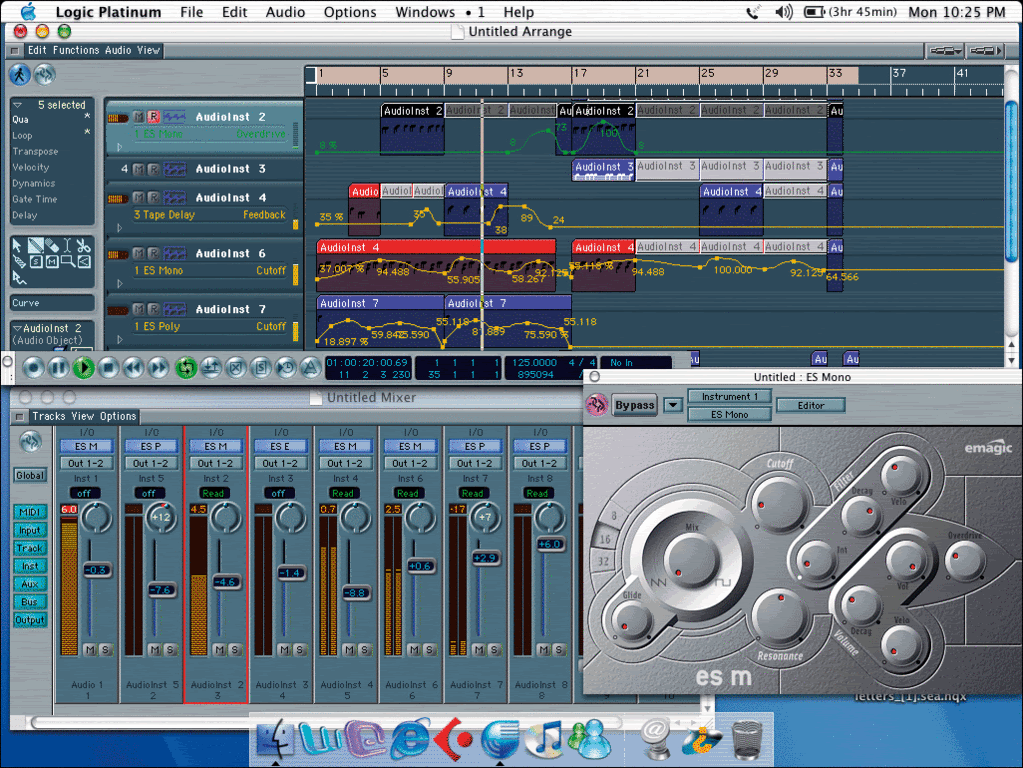
|
AL 321
Max Output Level: -88 dBFS

- Total Posts : 121
- Joined: 2009/04/28 12:48:35
- Status: offline
RE: A Few Automation Ideas I Have For Sonar
2009/07/11 12:01:29
(permalink)
ORIGINAL: Jose7822
Marah,
Not to brag, but I think I like my Automation Manager idea better. And I agree with John that having automation lanes would complicate things more than they need to. Here are my reasons:
- Multiple automation lanes take up screen realstate. The smaller the screen realstate the harder precision editing becomes.
- If Cakewalk wants to implement multiple automation lanes the right way, they'll need to include a separate button on the track in order to minimize/maximize them (or else it becomes a mumbo-jumbo of tracks, busses and now lanes). However, this increases mouse clicks because not only you have a button to minimize/maximize Tracks/Busses but also a button to do the same with automation lanes. And then more clicking and dragging when you want to resize multiple envelope lanes. On the other hand, having all envelopes residing on the same Track/Bus (as currently implemented) saves you from having to expand multiple lanes when you need to edit something. All you do is expand that Track/Bus with one click and everything is right there.
- The Envelope Manager gives you all the options you need to edit envelopes. You can Hide/Show them as needed. You can group/ungroup them to edit multiple envelopes at once. You can also Mute them individually on the same Track/Bus (IOW, an individual write disable button for each envelope). Or you could even create envelopes by clicking on the Create Envelope button. All this from the same window. Just expand the track (by clicking on the maximize button), open the Envelope Manager (if needed) to choose your settings (or even create envelopes from withing it), and start editing away.
Actually, i'm with Marah on this one. The automation manager sounds good, but i would still find it a bit distracting having to click something to show/hide envelopes. Having everything happening clearly on-screen makes it much easier to see what's going on, especially when you have 4 or 5 different fx all being automated at the same time (common in the music i make). It would also help in figuring out what the next creative move should be. Sometimes, with a lot of fx running on a track, it can be hard to work out which fx is having which effect. Being able to clearly see all the envelopes at a glance would fix that, and you would also be able to immediately make creative changes without having to show/hide things, and having to repeat the show/hide clicks when you want to try a different variation, maybe even forgetting what you originally wanted in the first place (which is pretty much what is happening to me at the moment). I have two ideas that i think could work: 1. When you first create automation on a track, Sonar creates a coloured bar directly under the track, maybe about a quarter the height of the track. This bar contains the envelope lane(s). All you would need to do to view all envelopes, is double-click on that bar, and it expands to show all automation. 2. A dedicated Automation view! Like the track view, but instead of showing midi + audio blocks, it shows automation lanes. A simple hotkey could switch between the two views. With either of these methods, you could also have the option of using automation clips/blocks, which would eliminate all the problems people having with copy/pasting automation. You could just drag-copy the blocks. This would also mean i could finally have linked automation clips, which is the one single thing that i want more than anything else in Sonar. Edited for spelling.
post edited by AL 321 - 2009/07/11 12:14:24
|
frankandfree
Max Output Level: -82 dBFS
- Total Posts : 447
- Joined: 2008/04/26 11:56:32
- Location: Norddeutschland
- Status: offline
RE: A Few Automation Ideas I Have For Sonar
2009/07/11 15:02:00
(permalink)
ORIGINAL: John
Where are the lanes??? This is the only picture I could find on the SOS site for Logic 5.
Not many LAP5 pics on the web indeed :) I DIYed one for you. Automation lanes are shown with those nifty little triangle on the track header. Clicking sprouts a lane with a new triangle. Smart as Logic was (is), if there is already automation on the object but not shown, new lanes would come up with these parameters first. 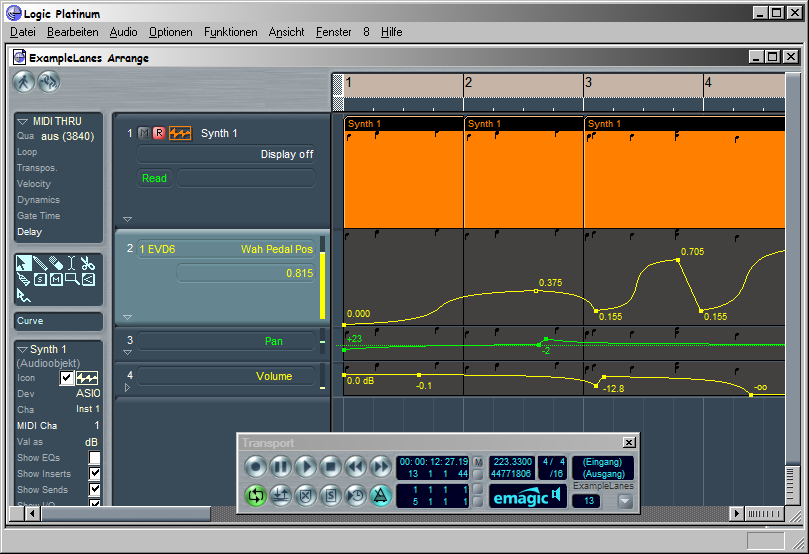 Greetings
|
Jose7822
Max Output Level: 0 dBFS
- Total Posts : 10031
- Joined: 2005/11/07 18:59:54
- Location: United States
- Status: offline
RE: A Few Automation Ideas I Have For Sonar
2009/07/11 15:26:11
(permalink)
ORIGINAL: shakey.oberon
there should be some way to anchor the automation to the clip, so that it doesn't effect the surrounding data
If anyone has used reason 4, it is really good with this
basically, each envelope has its own lane, and you have a bar at the start of the track to set the parameter to what you want it to default to when there is no other automation information. If you want to create an automation envelope, you have to create a clip region to put it in, and all info stays locked inside that clip to its internal timeline, no matter where you move it. This means that when the automation clip ends, the parameter defaults back to wherever you set it at the start of the lane. This makes it extremely easy to move automation around in the project, without affecting any surrounding envelopes. If you have created some rhythmic automation, you can easily move it along a beat, to see if it sounds better, just like with actual audio or midi clips. Each lane can be tuned on or off at will, and you can move automation clips onto other lanes really simply. Just drag and drop!
Hopefully this makes sense, just look at how reason does it, its brilliant
cakewalk, if you are listening and implement this feature, I will love you forever!!
Hmm...I don't own Reason 4 but, if this is the way it works, then I'm gonna change my mind back to liking multiple automation lanes. This sounds like the best way to go about 'em so far. Thanks for sharing :-)
|
Marah
Max Output Level: -71 dBFS
- Total Posts : 975
- Joined: 2009/02/04 21:56:41
- Status: offline
RE: A Few Automation Ideas I Have For Sonar
2009/07/11 15:45:42
(permalink)
ORIGINAL: John
Where are the lanes??? This is the only picture I could find on the SOS site for Logic 5.
I could post a counter example to this. I'm just afraid it would be way too cruel. (At least for so early in the day.)
|
Marah
Max Output Level: -71 dBFS
- Total Posts : 975
- Joined: 2009/02/04 21:56:41
- Status: offline
RE: A Few Automation Ideas I Have For Sonar
2009/07/11 20:12:37
(permalink)
Since we're doing show n tell, here's how brand R handles automation lanes. ORIGINAL: John
Where are the lanes???
Pretty much where you'd expect them to be, easy to identify, easy to edit and manage. 
|
frankandfree
Max Output Level: -82 dBFS
- Total Posts : 447
- Joined: 2008/04/26 11:56:32
- Location: Norddeutschland
- Status: offline
RE: A Few Automation Ideas I Have For Sonar
2009/07/12 18:27:34
(permalink)
I thought I also add a little bragging gif animation. First to bump a worthy thread from being drowned, second to promote the usefulness of (inobstrusive) automation lanes and last but not least to banter John a bit  . Mine's about Logic5's automation to keep things from being one sided :). Emagic definitely had some brilliant ideas worth thinking about. Logic's automation was top notch from the first day on. Here we go, sorry for the heavy compression, I couldn't get it better while keeping the file reasonably small. I hope you get the picture anyway:  Cheers 
|
Jose7822
Max Output Level: 0 dBFS
- Total Posts : 10031
- Joined: 2005/11/07 18:59:54
- Location: United States
- Status: offline
RE: A Few Automation Ideas I Have For Sonar
2009/07/12 20:12:43
(permalink)
Very nice guys! These look great, except I don't like how Logic displays automation parameters all over the envelopes. I like 'em plain and simple :-) I also like Logic's "Move Current Track's Automation Data to Region" feature as shown in this video: http://www.youtube.com/watch?v=gTKMJuQRNYU (FF to 2:50)
|
shakey.oberon
Max Output Level: -86 dBFS
- Total Posts : 210
- Joined: 2009/07/06 16:06:10
- Location: Cheshire, uk
- Status: offline
RE: A Few Automation Ideas I Have For Sonar
2009/07/12 20:20:57
(permalink)
ORIGINAL: Jose7822
ORIGINAL: shakey.oberon
there should be some way to anchor the automation to the clip, so that it doesn't effect the surrounding data
If anyone has used reason 4, it is really good with this
basically, each envelope has its own lane, and you have a bar at the start of the track to set the parameter to what you want it to default to when there is no other automation information. If you want to create an automation envelope, you have to create a clip region to put it in, and all info stays locked inside that clip to its internal timeline, no matter where you move it. This means that when the automation clip ends, the parameter defaults back to wherever you set it at the start of the lane. This makes it extremely easy to move automation around in the project, without affecting any surrounding envelopes. If you have created some rhythmic automation, you can easily move it along a beat, to see if it sounds better, just like with actual audio or midi clips. Each lane can be tuned on or off at will, and you can move automation clips onto other lanes really simply. Just drag and drop!
Hopefully this makes sense, just look at how reason does it, its brilliant
cakewalk, if you are listening and implement this feature, I will love you forever!!
Hmm...I don't own Reason 4 but, if this is the way it works, then I'm gonna change my mind back to liking multiple automation lanes. This sounds like the best way to go about 'em so far. Thanks for sharing :-)
no worries, i've used acid, pro tools, logic, and sonar, but reason is by far the most fun to use for automation also, if you want to automate something you simply hold down alt and click on the parameter and it creates the lane for you, easy. Pro tools does this as well.
|
Jose7822
Max Output Level: 0 dBFS
- Total Posts : 10031
- Joined: 2005/11/07 18:59:54
- Location: United States
- Status: offline
RE: A Few Automation Ideas I Have For Sonar
2009/07/13 20:46:19
(permalink)
|
frankandfree
Max Output Level: -82 dBFS
- Total Posts : 447
- Joined: 2008/04/26 11:56:32
- Location: Norddeutschland
- Status: offline
RE: A Few Automation Ideas I Have For Sonar
2009/07/14 06:24:31
(permalink)
ORIGINAL: Jose7822
I also like Logic's "Move Current Track's Automation Data to Region" feature as shown in this video:
http://www.youtube.com/watch?v=gTKMJuQRNYU (FF to 2:50)
Yes, Logic had this so-called object based automation before track based automation was introduced with 5.0. So they made sure you can convert to and fro with ease. With automation in what Sonar calles "clips" you can loop, cut/copy/paste, slip edit, scale (in time and amplitude), (groove) quantize, transform or use any MIDI FX (like delay or whatnot) with your automation. In short do anything that you can do to a MIDI "clip". Great stuff possible with those automation clips. Logic's environment makes it possible to drive any automation with MIDI from other tracks or a DIY MIDI LFO or whatever mean stuff comes into mind. A huge playground for the electronica fellows. What I find very useful at times is that you can look at and edit both track and object automation in an event editor, just like any old MIDI controller. Slick, that ;) What my gif also doesn't show is that you can of course hide and show all automation at once with one click. Reason's automation seems worth a look as well, too bad I haven't got it. Could you make a short animation of that, or point us to a vid worth looking, shakey?
|
UnderTow
Max Output Level: -37 dBFS

- Total Posts : 3848
- Joined: 2004/01/06 12:13:49
- Status: offline
RE: A Few Automation Ideas I Have For Sonar
2009/07/14 07:54:48
(permalink)
ORIGINAL: Jose7822
Very nice guys! These look great, except I don't like how Logic displays automation parameters all over the envelopes. I like 'em plain and simple :-)
It should be an option. :) Cakewalk Cakewalk if you upgrade automation (which is extremely needed for many reasons) please oh please do an utterly complete and thorough job of it. Take your time to plan it out properly and make sure it at least equals but preferably beats the automation now (and since a long time) available in Logic, ProTools, Cubase, Reaper and the rest. Thank you. :) UnderTow
|
SongCraft
Max Output Level: -36 dBFS

- Total Posts : 3902
- Joined: 2007/09/19 17:54:46
- Status: offline
RE: A Few Automation Ideas I Have For Sonar
2009/07/14 10:45:46
(permalink)
*BUMP* Anyone reading this thread who would like to see envelopes improvements then I suggest submitting to feature request: http://www.cakewalk.com/Support/FeatureRequest.aspx Hi Jose, Since you've started this thread there has been more ideas suggested, maybe it would be neat if you compiled a list all those ideas so that I and others can 'link-to-that-post' to be included in the FR, and although some of us may not use some of those ideas at least they can be made 'optional' or be there but not displayed for example; envelope lanes could be 'whilst not displayed' have envelopes displayed on the clip itself. This would give us more than one way to work with envelopes = (1):Envelope Lanes, and/or (2):Directly on the clip itself followed by anything else new that would be a great improvements to envelopes/automation in either modes (1)+(2).
|