HotCoollMusicGirl
Max Output Level: -71 dBFS

- Total Posts : 991
- Joined: 2004/10/02 20:23:31
- Status: offline
A corrupt audio region was detected and padded with silence
Is anyone familiar with this message? I get it every time I open this one particular project. The project was recently converted from 96k to 44.1k. I can't find any clips that look or sound odd. But it's not really clear what I should be looking for. 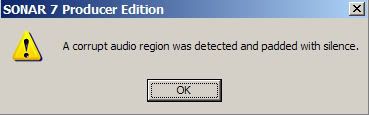 I did a search, but didn't find anything. Thanks!
post edited by HotCoollMusicGirl - 2008/05/05 21:53:44
|
CJaysMusic
Max Output Level: 0 dBFS

- Total Posts : 30423
- Joined: 2006/10/28 01:51:41
- Location: Miami - Fort Lauderdale - Davie
- Status: offline

RE: A corrupt audio region was detected and padded with silence
2008/05/05 22:12:40
(permalink)
Look at the original project, if you still have it and see what is missing. Something in the conversion went wrong and sonar inserted silence in its place. It porbably is a clip.
Cj
|
HotCoollMusicGirl
Max Output Level: -71 dBFS
- Total Posts : 991
- Joined: 2004/10/02 20:23:31
- Status: offline
RE: A corrupt audio region was detected and padded with silence
2008/05/05 22:14:58
(permalink)
Well I located the problem. It was a clip that didn't have any audio data in it. That must have been the "padded with silence" part of the error message. When I looked at its properties, on the Audio Files tab, it showed that if consisted of two files: ProjectName etc, Edit (2).wav ProjectName etc, Mix (16).wav Both of those files are in the audio folder and can be opened in a new Sonar project and play fine. But when referenced for this particular clip in the project they belong to, they cause Sonar to detect "a corrupt audio region." I don't understand how can a clip can have two wave files associated with it? I always thought a clip was either an entire wave file or some a portion of a wave file... but always just one file.
post edited by HotCoollMusicGirl - 2008/05/05 22:40:59
|
HotCoollMusicGirl
Max Output Level: -71 dBFS
- Total Posts : 991
- Joined: 2004/10/02 20:23:31
- Status: offline
RE: A corrupt audio region was detected and padded with silence
2008/05/05 22:20:15
(permalink)
Hi CJ. Ya, I was able to grab the clip from the original project and drop it into the new one (well, I exported it first to create a new file). But there too the single clip referenced two audio files -- I kind of expected that, but still I don't understand how a clip can consist of two files. The help indicates this is normal, when it says that the properties dialog will show... << The audio file(s) that make up the selected clip The pathname(s) the files are stored under >> I don't think I've ever seen that before. Strange how it caused that particular error when I converted.
post edited by HotCoollMusicGirl - 2008/05/05 22:42:09
|
CJaysMusic
Max Output Level: 0 dBFS
- Total Posts : 30423
- Joined: 2006/10/28 01:51:41
- Location: Miami - Fort Lauderdale - Davie
- Status: offline
RE: A corrupt audio region was detected and padded with silence
2008/05/05 22:22:04
(permalink)
The files may be due to because the clip was mixed or frozen atr one time. I'm just guessing, but it seems logical that if you freeze or bounce a clip, you would make another file for it. hope that helps
Cj
|
HotCoollMusicGirl
Max Output Level: -71 dBFS
- Total Posts : 991
- Joined: 2004/10/02 20:23:31
- Status: offline
RE: A corrupt audio region was detected and padded with silence
2008/05/05 22:29:54
(permalink)
Hmmmm... I'm sure it wasn't ever frozen... though what you're saying makes sense.... When I go to the clip in the original file, slip-expand it, and then play it, I see that it was created by bouncing a piece of reversed audio in with normal forward audio, that was at one time part of the same wave as the reversed section before it was actually reversed. But it all appears to be a single clip as far as the wav form goes. Hmmm.... I dunno. Oh well. Everything seems to be working. Thanks!
post edited by HotCoollMusicGirl - 2008/05/05 22:51:17
|
CJaysMusic
Max Output Level: 0 dBFS
- Total Posts : 30423
- Joined: 2006/10/28 01:51:41
- Location: Miami - Fort Lauderdale - Davie
- Status: offline
RE: A corrupt audio region was detected and padded with silence
2008/05/05 22:34:31
(permalink)
Well bouncing it could do that also when reversing it. That probably explains it and its sounding correctly, so dont sweat it. Theres allot about sonar (the inner workings) that ill never understand
Cj
|
bitflipper
01100010 01101001 01110100 01100110 01101100 01101

- Total Posts : 26036
- Joined: 2006/09/17 11:23:23
- Location: Everett, WA USA
- Status: offline
RE: A corrupt audio region was detected and padded with silence
2008/05/06 02:08:02
(permalink)
You'll get this message if the clip has been modified outside of SONAR in such a way as to change its length.
Any message with the word "corrupt" in it sends chills, but it's really not as scary as it sounds and is no cause for alarm.
 All else is in doubt, so this is the truth I cling to. My Stuff
|
HotCoollMusicGirl
Max Output Level: -71 dBFS
- Total Posts : 991
- Joined: 2004/10/02 20:23:31
- Status: offline
RE: A corrupt audio region was detected and padded with silence
2008/05/14 17:55:11
(permalink)
Right. In some cases it doesn't seem to matter. But in some cases, the clips that are triggering these errors are playing back either silence or the wrong portion of the referenced clip. This is after a conversion from 96/24 down to 44/24 using r8brain -- that's the "modified outside of SONAR" you mentioned.
Would be nice if Sonar had a smart conversion function, that would simply clone projects to your specified sample rate. Though I don't know how oftne that is actually done. It can be done manually... but it's a bit of a pain... and not entirely foolproof. (And I kind of like foolproof when it comes to these rarely-done processes.....)
|
brundlefly
Max Output Level: 0 dBFS
- Total Posts : 14250
- Joined: 2007/09/14 14:57:59
- Location: Manitou Spgs, Colorado
- Status: offline
RE: A corrupt audio region was detected and padded with silence
2008/05/14 18:20:48
(permalink)
But in some cases, the clips that are triggering these errors are playing back either silence or the wrong portion of the referenced clip. This is after a conversion from 96/24 down to 44/24 using r8brain HCMG, I did a quick test with the free version of R8brain vs. Sonar conversion when this subject came up in your other post, and the first problem I encountered was that R8brain added about 2 seconds of silence to the front of the track. I don't know if this is what is causing your current problem, but it made R8brain a no-go for me right out of the box, regardless of any advantage it might have in sound-quality over SONAR, or the convenience of batch processing.
SONAR Platinum x64, 2x MOTU 2408/PCIe-424 (24-bit, 48kHz) Win10, I7-6700K @ 4.0GHz, 24GB DDR4, 2TB HDD, 32GB SSD Cache, GeForce GTX 750Ti, 2x 24" 16:10 IPS Monitors
|
bitflipper
01100010 01101001 01110100 01100110 01101100 01101
- Total Posts : 26036
- Joined: 2006/09/17 11:23:23
- Location: Everett, WA USA
- Status: offline
RE: A corrupt audio region was detected and padded with silence
2008/05/14 18:27:42
(permalink)
Ah, I see. The project file keeps track of the details of the file, so when you modify it outside of SONAR you run the risk of confusing SONAR, which has no way of knowing what you've done to the file.
I'd think the only way to reliably convert the SR for a clip would be to import the modified clip, in which case SONAR would note the SR and log that information accordingly. Still not a convenient solution if you have a bunch of clips to convert.
Question: why did you need to SRC an existing clip in the first place? Couldn't you just leave it at 96/24?
All else is in doubt, so this is the truth I cling to. My Stuff
|
HotCoollMusicGirl
Max Output Level: -71 dBFS
- Total Posts : 991
- Joined: 2004/10/02 20:23:31
- Status: offline
RE: A corrupt audio region was detected and padded with silence
2008/05/14 19:59:10
(permalink)
ORIGINAL: brundlefly
HCMG, I did a quick test with the free version of R8brain vs. Sonar conversion when this subject came up in your other post, and the first problem I encountered was that R8brain added about 2 seconds of silence to the front of the track. I don't know if this is what is causing your current problem, but it made R8brain a no-go for me right out of the box, regardless of any advantage it might have in sound-quality over SONAR, or the convenience of batch processing.
Brundlefly, that's interesting... that r8 adds so much silence to the front of the track. I can't say I've specifically noticed that.... that could be because I've not made any direct file to file comparisons of pre and post versions of the same file. But something like that would account for what I'm seeing in some of my post-conversion clips. What I did was, I used r8 to batch convert all the files in the project, keeping the file names the same, and then opened an exact copy of the original cwp file (this was all in a new folder; I've still got my 96 audio intact.) Except for the handful of files that r8 complained about converting (which I posted about here: http://forum.cakewalk.com/tm.asp?m=1374926&mpage=2&key=� ), the new project found all the files without any problem. But in a small number of cases, the clips played the wrong region of the referenced files... and the 2-second padding you mentioned could account for that. But in most cases this wasn't a problem. I haven't checked to see if all the problem clips referenced the same file, but some of them did. This was also when I encountered the problem I posted about at the top of this current thread. Other than that, the projects played fine... the clips were all positioned correctly and exposed the correct wave regions. But it wasn't as smooth a process as I'd hoped for... without batch processing it would have been way too tedious. And the return on investment -- in the form of reduced CPU load going from 96 to 44.1 -- was surprisingly slight. Maybe we're just not supposed to tamper with such things?
post edited by HotCoollMusicGirl - 2008/05/14 20:19:46
|
HotCoollMusicGirl
Max Output Level: -71 dBFS
- Total Posts : 991
- Joined: 2004/10/02 20:23:31
- Status: offline
RE: A corrupt audio region was detected and padded with silence
2008/05/14 20:05:55
(permalink)
ORIGINAL: bitflipper
I'd think the only way to reliably convert the SR for a clip would be to import the modified clip, in which case SONAR would note the SR and log that information accordingly. Still not a convenient solution if you have a bunch of clips to convert.
Indeed. And again, that's why it would be nice if Sonar could do an automated project conversion based on the user's desired project specs.
Question: why did you need to SRC an existing clip in the first place? Couldn't you just leave it at 96/24?
Well that's the thing, I was trying to convert an entire project. Several of them, in fact... 96k was pushing my computer, and a conversion seemed the easiest way to ease solve that.
|
razor
Max Output Level: -59.5 dBFS

- Total Posts : 1557
- Joined: 2004/05/10 16:53:27
- Location: Irvine, CA
- Status: offline
Re: RE: A corrupt audio region was detected and padded with silence
2016/09/28 20:41:39
(permalink)
bitflipper
You'll get this message if the clip has been modified outside of SONAR in such a way as to change its length.
Any message with the word "corrupt" in it sends chills, but it's really not as scary as it sounds and is no cause for alarm.
Hey Bit-- I know your reply was a million years ago, but do you know how to find which file is generating this error? I agree it's not a biggie, but it is a little annoying each time I open a project. Thanks!
Stephen Davis Cakewalk by Bandlab Windows 7 Pro 64-Bit ADK DAW - (out of business 2018) Intel i7 4930K CPU Core i7 SB-E MOBO 16 GB DDR3 RAM 7 TB Storage Layla 3G SoundCard (11.5 ms Roundtrip Latency) UAD-2 DSP WaveLab 8 Pro 64-bit Sound Forge 10 Pro
|
Anonymungus!
Max Output Level: -85 dBFS

- Total Posts : 259
- Joined: 2014/09/05 16:08:43
- Location: Nice, Ca
- Status: offline
Re: RE: A corrupt audio region was detected and padded with silence
2016/09/28 23:26:47
(permalink)
☄ Helpfulby razor 2016/09/29 13:31:38
Hey Razor, I'm not Bitflipper but...
I believe the only way to tell is to open each track tall enough to look at each clip one by one. The one(s) with silenced audio will show no wave, just a line.
Hope you don't have hundreds of clips.
All the best.
Sonar Platinum x64 Lifetime, Windows 10 x64, Intel Quad Core CPU@3.40GHz, 8GB RAM, (2)1.5T Hard Drives, Presonus AudioBox 44VSL, Roland A-500Pro MIDI Controller & lots more stuff
|
tenfoot
Max Output Level: -53.5 dBFS

- Total Posts : 2186
- Joined: 2015/01/22 18:12:07
- Location: Qld, Australia
- Status: offline
Re: RE: A corrupt audio region was detected and padded with silence
2016/09/28 23:49:12
(permalink)
☄ Helpfulby razor 2016/09/29 13:31:55
I often get this message when I edit project waves in Melodyne standalone outside of Sonar and haven't found that it always results in a flat lined wave pic.
I have found that once I resave the project the message does not reappear.
Bruce. Sonar Platinum 2017-09, Studio One 3.5.3, Win 10 x64, Quad core i7, RME Fireface, Behringer X32 Producer, Behringer X32 Rack, Presonus Faderport, Lemure Software Controller (Android), Enttec DMXIS VST lighting controller, Xtempo POK.
|
lapasoa
Max Output Level: -87 dBFS

- Total Posts : 193
- Joined: 2010/07/16 11:29:58
- Location: Venice ITALY
- Status: offline
Re: RE: A corrupt audio region was detected and padded with silence
2016/09/29 12:11:53
(permalink)
☄ Helpfulby razor 2016/09/29 13:31:58
It happened to me when playing with comping editing. Sometime there is quite a bit of confusion, e.g. many lanes clips to erase or to cut and paste. Sometime something goes wrong and you miss it and close the project. When you open the project again, here the message comes. You have to search the audio clip in your last version of the project and import it.
|
razor
Max Output Level: -59.5 dBFS
- Total Posts : 1557
- Joined: 2004/05/10 16:53:27
- Location: Irvine, CA
- Status: offline
Re: RE: A corrupt audio region was detected and padded with silence
2016/09/29 13:12:39
(permalink)
I do have a lot of tracks, and each track may have multiple take lanes--so, I guess it doesn't bother me that much. As I get to the end of the project and start cleaning up each track before mixdown, I know now to look for the no wave form track as the possible culprit.
Thanks!
Stephen Davis Cakewalk by Bandlab Windows 7 Pro 64-Bit ADK DAW - (out of business 2018) Intel i7 4930K CPU Core i7 SB-E MOBO 16 GB DDR3 RAM 7 TB Storage Layla 3G SoundCard (11.5 ms Roundtrip Latency) UAD-2 DSP WaveLab 8 Pro 64-bit Sound Forge 10 Pro
|