joden
Max Output Level: -65 dBFS

- Total Posts : 1263
- Joined: 2007/09/22 17:03:46
- Status: offline
Adjusting MIDI tempo by percentage?
Okay, so I have a midi file that has various tempo changes throughout however overall I want to drop the tempo a bit. Is there a way to do this via,say, percentage? Which would save me having to go in and edit EVERY tempo mapped?
Thanks
|
promidi
Max Output Level: -66 dBFS

- Total Posts : 1220
- Joined: 2014/11/21 18:46:39
- Location: South Australia
- Status: offline

Re: Adjusting MIDI tempo by percentage?
2017/01/21 16:23:50
(permalink)
This can be done using a CAL script. I am pretty sure the following would do it:
(do
(dword time_pos)
(int percentage 100)
(TrackSelect 1 -1)
(getInt percentage "Please neter percentage change required" 20 200)
(= time_pos Thru)
(*= time_pos 100)
(/= time_pos percentage)
(EditFitToTime40 time_pos 0 0)
(TrackSelect 0 -1)
)
Windows 10 64bit fully patched, 16 gig ram . PCR-800 Controller. (Working in Win 10 1809 64bit)CPU: i5 4670. Video: Nvidia GTX560ti (latest drivers). Audio IF: Focusrite 2i2 2nd Gen
Internet always on.
Software: Cakewalk by Bandlab (2018.09 B29)
ASIO mode. 24bit 48khz 256 samples Rapture Pro, AAS GS2, VS-3, EP-4, VA-2, Chromophone 2, Z3TA+ 2, Addictive drums 2, Addictive Keys, Mpowersynth (latest), Iris 2, GPO5, Sampletank 3,
|
Fred Holmes
Max Output Level: -83 dBFS

- Total Posts : 376
- Joined: 2003/11/05 17:17:09
- Status: offline
Re: Adjusting MIDI tempo by percentage?
2017/01/21 19:28:54
(permalink)
Please report back if this works
Thanks,
Fred
|
promidi
Max Output Level: -66 dBFS
- Total Posts : 1220
- Joined: 2014/11/21 18:46:39
- Location: South Australia
- Status: offline
Re: Adjusting MIDI tempo by percentage?
2017/01/21 20:37:42
(permalink)
Unfortunately, Due to a bug in CAL processing in the latest Sonar, the above script does not work. It gives an "Invalid value". It does work in Cakewalk Pro Audio 9, however.
In platinum, a way to adjust tempo map by percentage is to use the Fit to Time command.
1) Do a Select all , Make sure "from" is at the very start of your project.
2) Then menu item, Process | fit to time. make sure the format is set to MM:SS:FF
3) Change the value of "New Thru" to be a percentage of what ever was there originally. Make sure that modify by "tempo map" is selected.
Once you hit "OK", your tempo map should be adjust.
I know this is a convoluted work around, but at least it gives the intended result. The hardest part is working out the new Thru value, which is why I was hoping the CAL script would have worked.
Windows 10 64bit fully patched, 16 gig ram . PCR-800 Controller. (Working in Win 10 1809 64bit)CPU: i5 4670. Video: Nvidia GTX560ti (latest drivers). Audio IF: Focusrite 2i2 2nd Gen
Internet always on.
Software: Cakewalk by Bandlab (2018.09 B29)
ASIO mode. 24bit 48khz 256 samples Rapture Pro, AAS GS2, VS-3, EP-4, VA-2, Chromophone 2, Z3TA+ 2, Addictive drums 2, Addictive Keys, Mpowersynth (latest), Iris 2, GPO5, Sampletank 3,
|
joden
Max Output Level: -65 dBFS
- Total Posts : 1263
- Joined: 2007/09/22 17:03:46
- Status: offline
Re: Adjusting MIDI tempo by percentage?
2017/01/21 21:47:19
(permalink)
Cool, thanks. I'll give that a go! Sorry for late reply was out working.
|
chuckebaby
Max Output Level: 0 dBFS

- Total Posts : 13146
- Joined: 2011/01/04 14:55:28
- Status: offline
Re: Adjusting MIDI tempo by percentage?
2017/01/22 10:07:00
(permalink)
☄ Helpfulby pwalpwal 2017/01/22 12:18:59
when is sonar going to create a tempo track where nodes can be added, exc. this would be so much easier than the tempo view.
Windows 8.1 X64 Sonar Platinum x64 Custom built: Asrock z97 1150 - Intel I7 4790k - 16GB corsair DDR3 1600 - PNY SSD 220GBFocusrite Saffire 18I8 - Mackie Control
|
dilletant
Max Output Level: -88 dBFS

- Total Posts : 121
- Joined: 2009/07/26 12:13:34
- Location: Smolensk city, Russia
- Status: offline
Re: Adjusting MIDI tempo by percentage?
2017/01/22 11:21:16
(permalink)
Not only added and deleted (which is doable now in the tempo view) but modified in various ways! "Scale tempo" has been discussed here on the forum for a long time but in vain. http://forum.cakewalk.com/FindPost/3365873
|
SquireBum
Max Output Level: -84 dBFS

- Total Posts : 347
- Joined: 2013/06/26 13:23:55
- Status: offline
Re: Adjusting MIDI tempo by percentage?
2017/01/22 14:08:08
(permalink)
☄ Helpfulby Klaus 2017/01/22 17:59:28
promidi
Unfortunately, Due to a bug in CAL processing in the latest Sonar, the above script does not work. It gives an "Invalid value". It does work in Cakewalk Pro Audio 9, however.
In platinum, a way to adjust tempo map by percentage is to use the Fit to Time command.
1) Do a Select all , Make sure "from" is at the very start of your project.
2) Then menu item, Process | fit to time. make sure the format is set to MM:SS:FF
3) Change the value of "New Thru" to be a percentage of what ever was there originally. Make sure that modify by "tempo map" is selected.
Once you hit "OK", your tempo map should be adjust.
I know this is a convoluted work around, but at least it gives the intended result. The hardest part is working out the new Thru value, which is why I was hoping the CAL script would have worked.
It appears that the EditFitToTime40 CAL function is the cause of the Invalid Value error. Since the calculations are valid in your script, I think it would be useful to just display the resulting "New Thru" time so a user could use the value in the New Thru field of the Process > Fit To Time... dialog box. The Format would have to be set to M:B:T in the Fit To Time dialog to use them. I tested a project that I had manually tempo mapped containing 26 tempo changes and it worked OK. I hope you don't mind, but I took the liberty of editing your original script: ;;This CAL script calculates a New Thru time based on a user selected change percentage ;;and the current Thru time. ;;CAUTION: The script assumes that the From time is set to 1:01:000. (do (dword time_pos) (int percentage 100) (getInt percentage "Please enter percentage change required" 20 200) (= time_pos Thru) (*= time_pos 100) (/= time_pos percentage) (pause "New Thru time for " percentage "% tempo scaling is " (meas time_pos) ":" (beat time_pos) ":" (tick time_pos)) ) -- Ron
Cakewalk by Bandlab, Sonar Platinum x64 2017.10, X3E, X2a, X1d, 8.5 Windows 10 x64 AMD Phenom II X4 955 3.20 GHz 8 GB Ram Nvidia GeForce 9500 GT Echo Gina 3G
|
dilletant
Max Output Level: -88 dBFS
- Total Posts : 121
- Joined: 2009/07/26 12:13:34
- Location: Smolensk city, Russia
- Status: offline
Re: Adjusting MIDI tempo by percentage?
2017/01/23 07:43:28
(permalink)
Ron, thank you very much! Unfortunately I could not get desired results with your script. I did a simple test. Lets say we have some tempo map with initial tempo 120, then some ritenuto which ends up at 112 bpm. 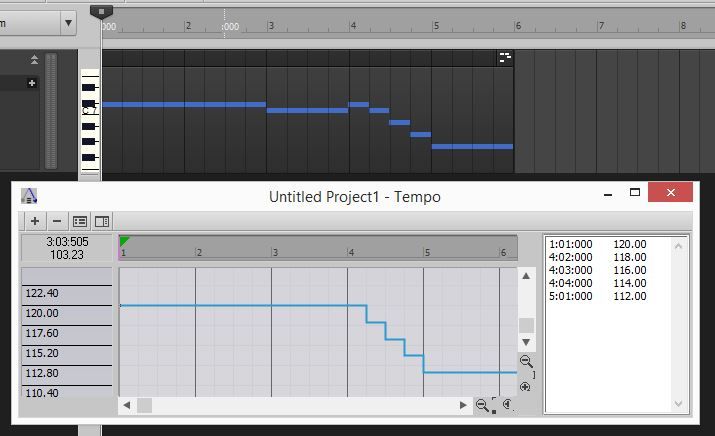 1:1:000 120 4:2:000 118 4:3:000 116 4:4:000 114 5:1:000 112 I want initial tempo to be 114, which is 95% of 120, and change all the following tempos accordingly. Theoretically, new tempo map suppose to be like this: 1:1:000 114 4:2:000 112.1 4:3:000 110.19999 4:4:000 108.3 5:1:000 106.39999 So, I select bars 1 thru 6 (i.e from the beginning to the end of bar 6), and CAL says new Thru time suppose to be 6:2:50. But real map after applying the script looks like this: 1:1:000 113.71 4:2:000 111.81 4:3:000 109.92 4:4:000 108.02 5:1:000 106.13
|
joden
Max Output Level: -65 dBFS
- Total Posts : 1263
- Joined: 2007/09/22 17:03:46
- Status: offline
Re: Adjusting MIDI tempo by percentage?
2017/01/23 09:07:02
(permalink)
This is cool guys!! @ Ron that is some nice work there!
|
brundlefly
Max Output Level: 0 dBFS
- Total Posts : 14250
- Joined: 2007/09/14 14:57:59
- Location: Manitou Spgs, Colorado
- Status: offline
Re: Adjusting MIDI tempo by percentage?
2017/01/23 10:35:07
(permalink)
SquireBum
promidi
2) Then menu item, Process | fit to time. make sure the format is set to MM:SS:FF
(pause "New Thru time for " percentage "% tempo scaling is " (meas time_pos) ":" (beat time_pos) ":" (tick time_pos)))
As Squirebum pointed out, the new Thru time has to be entered in SMPTE format, not M:B:T. You have to calculate total frames, divide that by the percentage (lower tempo means more time), and then convert to hh:mm:ss:ff. If the CAL script can be made to give the new SMPTE time, that would be helpful. I have a spreadsheet that does it.
SONAR Platinum x64, 2x MOTU 2408/PCIe-424 (24-bit, 48kHz) Win10, I7-6700K @ 4.0GHz, 24GB DDR4, 2TB HDD, 32GB SSD Cache, GeForce GTX 750Ti, 2x 24" 16:10 IPS Monitors
|
brundlefly
Max Output Level: 0 dBFS
- Total Posts : 14250
- Joined: 2007/09/14 14:57:59
- Location: Manitou Spgs, Colorado
- Status: offline
Re: Adjusting MIDI tempo by percentage?
2017/01/23 11:04:09
(permalink)
dilletant
So, I select bars 1 thru 6 (i.e from the beginning to the end of bar 6), and CAL says new Thru time suppose to be 6:2:50.
- Original Thru for the sample you gave is 00:0010:06 (306 total frames at 30 fps). - 306/.95 = 322.11 frames (approx.). - The closest you'll get to this since you can't enter fractions of a frame is 00:00:10:22 (~95.03%). Try that. EDIT: Actually, I just tried with the M:B:T time format, and it worked perfectly with the better resolution of ticks giving the exact tempos. Make sure you are selecting 1:01:000 thru 6:01:000 in the timeline before executing, and enter 6:02:050.
SONAR Platinum x64, 2x MOTU 2408/PCIe-424 (24-bit, 48kHz) Win10, I7-6700K @ 4.0GHz, 24GB DDR4, 2TB HDD, 32GB SSD Cache, GeForce GTX 750Ti, 2x 24" 16:10 IPS Monitors
|
SquireBum
Max Output Level: -84 dBFS
- Total Posts : 347
- Joined: 2013/06/26 13:23:55
- Status: offline
Re: Adjusting MIDI tempo by percentage?
2017/01/23 12:40:46
(permalink)
joden
This is cool guys!! @ Ron that is some nice work there!
Glad it helps, but @promidi should get credit for the bulk of the script. -- Ron
Cakewalk by Bandlab, Sonar Platinum x64 2017.10, X3E, X2a, X1d, 8.5 Windows 10 x64 AMD Phenom II X4 955 3.20 GHz 8 GB Ram Nvidia GeForce 9500 GT Echo Gina 3G
|
dilletant
Max Output Level: -88 dBFS
- Total Posts : 121
- Joined: 2009/07/26 12:13:34
- Location: Smolensk city, Russia
- Status: offline
Re: Adjusting MIDI tempo by percentage?
2017/01/23 12:50:26
(permalink)
First, I selected from 1:1:000 thru 6:1:000 and entered 6:2:050 for New Thru.  The results were the same as in my earlier post.  Then out of curiosity I started all over but this time entered 6:2:000 as New Thru  And got exactly what is needed! 
|
brundlefly
Max Output Level: 0 dBFS
- Total Posts : 14250
- Joined: 2007/09/14 14:57:59
- Location: Manitou Spgs, Colorado
- Status: offline
Re: Adjusting MIDI tempo by percentage?
2017/01/23 13:39:19
(permalink)
The percentage is of the total runtime. Changing all tempos by a percentage is not the same as changing the total runtime by a percentage, especially when the tempos are active for different periods of time as in your example. Changing all the tempos by the same percentage would not give the result you want. What Fit to Time is doing is correct to preserve the overall timing of the piece while speeding it up or slowing it down.
SONAR Platinum x64, 2x MOTU 2408/PCIe-424 (24-bit, 48kHz) Win10, I7-6700K @ 4.0GHz, 24GB DDR4, 2TB HDD, 32GB SSD Cache, GeForce GTX 750Ti, 2x 24" 16:10 IPS Monitors
|
dilletant
Max Output Level: -88 dBFS
- Total Posts : 121
- Joined: 2009/07/26 12:13:34
- Location: Smolensk city, Russia
- Status: offline
Re: Adjusting MIDI tempo by percentage?
2017/01/23 14:09:00
(permalink)
I understand that. What I don't understand is why it is so difficult to provide us sonarites with a simple and intuitive tool for tempo manipulating. This is how it's done in DP.  Made for musicians: no scripts, no calculations, just a simple interface and musical terms.
|
JayCee99
Max Output Level: -83 dBFS
- Total Posts : 353
- Joined: 2011/10/01 12:22:42
- Location: Katy, TX
- Status: offline
Re: Adjusting MIDI tempo by percentage?
2017/01/23 14:26:57
(permalink)
I'm not at my computer at the moment. But out of curiosity, is it possible to open the "Event Viewer", filter the tempo changes, copy and paste them into a spreadsheet, manipulate them and then copy them back? Might be a relatively simple workaround.
Sonar Platinum Audio Interface: Focusrite 18i8 ASIO Interface Keys: Korg Kronos 88, Alesis VI25 Windows 8.1 x64 Laptop, 8GB RAM, i7 CPU
|
SquireBum
Max Output Level: -84 dBFS
- Total Posts : 347
- Joined: 2013/06/26 13:23:55
- Status: offline
Re: Adjusting MIDI tempo by percentage?
2017/01/23 14:27:15
(permalink)
dilletant
First, I selected from 1:1:000 thru 6:1:000 and entered 6:2:050 for New Thru.
The results were the same as in my earlier post.
Then out of curiosity I started all over but this time entered 6:2:000 as New Thru
And got exactly what is needed!
The fractional differences between the hand calculated tempos and the CAL script calculations are probably due to the fact that CAL does not handle fractions and does not round off division. Unfortunately, CAL is no longer a supported part of SONAR and we must accept the tools we have. If you take the tempo results of your last Fit To Time where 6:02:000 was used as the New Thru and run Fit To Time again using 6:01:000 as the New Thru, the process will not return your original tempos. They will be: 119.99, 117.99, 115.99, 113.99, 11.99, 111.99, and 111.99. (See screen shot below) The point is that anytime a calculation occurs using a computer language there is always a potential for rounding errors. For my work, 113.71 bpm is close enough to 114 bpm to be acceptable. If you need greater accuracy than the script provides, then you would have to perform the calculations by hand or use something other than CAL to perform the calculations.  Hope this helps, -- Ron
Cakewalk by Bandlab, Sonar Platinum x64 2017.10, X3E, X2a, X1d, 8.5 Windows 10 x64 AMD Phenom II X4 955 3.20 GHz 8 GB Ram Nvidia GeForce 9500 GT Echo Gina 3G
|
brundlefly
Max Output Level: 0 dBFS
- Total Posts : 14250
- Joined: 2007/09/14 14:57:59
- Location: Manitou Spgs, Colorado
- Status: offline
Re: Adjusting MIDI tempo by percentage?
2017/01/23 15:22:09
(permalink)
dilletant
What I don't understand is why it is so difficult to provide us sonarites with a simple and intuitive tool for tempo manipulating.
That can't be answered by anyone here.
SONAR Platinum x64, 2x MOTU 2408/PCIe-424 (24-bit, 48kHz) Win10, I7-6700K @ 4.0GHz, 24GB DDR4, 2TB HDD, 32GB SSD Cache, GeForce GTX 750Ti, 2x 24" 16:10 IPS Monitors
|
dilletant
Max Output Level: -88 dBFS
- Total Posts : 121
- Joined: 2009/07/26 12:13:34
- Location: Smolensk city, Russia
- Status: offline
Re: Adjusting MIDI tempo by percentage?
2017/01/23 15:32:42
(permalink)
rlared
I'm not at my computer at the moment. But out of curiosity, is it possible to open the "Event Viewer", filter the tempo changes, copy and paste them into a spreadsheet, manipulate them and then copy them back? Might be a relatively simple workaround.
There are no tempo changes in the Event List 
|
JayCee99
Max Output Level: -83 dBFS
- Total Posts : 353
- Joined: 2011/10/01 12:22:42
- Location: Katy, TX
- Status: offline
Re: Adjusting MIDI tempo by percentage?
2017/01/23 15:52:57
(permalink)
Darn. I kind of figured that was the case, but thought I'd pose the question anyway. I never really have to deal with multiple tempo changes but I can see how that would be a pain if I needed to.
Sonar Platinum Audio Interface: Focusrite 18i8 ASIO Interface Keys: Korg Kronos 88, Alesis VI25 Windows 8.1 x64 Laptop, 8GB RAM, i7 CPU
|