AnsweredAdjusting the time alignment of a MIDI track (Time+)

Author
synkrotron
Max Output Level: -22.5 dBFS
  • Total Posts : 5263
  • Joined: 2006/04/28 16:21:21
  • Location: Warrington, UK
  • Status: offline
2015/09/30 05:27:18 (permalink)

Adjusting the time alignment of a MIDI track (Time+)

Hi Peeps,
 
I'm currently working on a project that uses both MIDI hardware and VSTi. Not really done this before...
 
I noticed that there was quite a delay on the hardware sequences, more noticeable because of the shorty stabby nature of the sequence.
 
I did expect some delay, but not for it to be so off-putting.
 
I noticed that there is a Time+ setting in the Track Inspector so I looked into this a bit further.
 
Page 314 of the latest reference guide covers this setting, and it seems to work okay.
 
 
I suppose I just want to know, do other peeps here use this "time offset" parameter when working with both hardware and software instruments? And am I doing the right thing, or should I be looking further into my Sonar Preferences?
 
 
cheers
 
andy

http://www.synkrotron.co.uk/
Intel Core™i7-3820QM Quad Core Mobile Processor 2.70GHz 8MB cache | Intel HM77 Express Chipset | 16GB SAMSUNG 1600MHz SODIMM DDR3 RAM | NVIDIA GeForce GTX 675M - 2.0GB DDR5 Video RAM | 500GB Samsung 850 Pro SSD | 1TB Samsung 850 Pro SSD | Windows 10 Pro | Roland OCTA-CAPTURE | SONAR Platinum ∞ FFS| Too many VSTi's to list here | KRK KNS-8400 Headphones | Roland JP-8000 | Oberheim OB12 | Novation Nova | Gibson SG Special | PRS Studio
#1
brundlefly
Max Output Level: 0 dBFS
  • Total Posts : 14250
  • Joined: 2007/09/14 14:57:59
  • Location: Manitou Spgs, Colorado
  • Status: offline
Re: Adjusting the time alignment of a MIDI track (Time+) 2015/09/30 12:51:38 (permalink)
Assuming you're input monitoring the hardware synths, you may just need to lower your ASIO buffer to reduce audio latency if possible. I don't generally find the slight latency of my hardware synths objectionable so long as the audio latency is kept low.
 
As an alternative to Time+, you can use the Timing Offset parameter in preferences to alter the relationship between MIDI and Audio timing (only affects MIDI sent to hardware ports), but this also alters where MIDI is laid down when recording against the audio metronome, so I try to avoid it.
 
Also, keep in mind that the audio latency will be compensated when you record the hardware synth. So if you compensate for it by advancing the MIDI by either method, it may end up sounding too early once you record it.

SONAR Platinum x64, 2x MOTU 2408/PCIe-424  (24-bit, 48kHz)
Win10, I7-6700K @ 4.0GHz, 24GB DDR4, 2TB HDD, 32GB SSD Cache, GeForce GTX 750Ti, 2x 24" 16:10 IPS Monitors
#2
robert_e_bone
Moderator
  • Total Posts : 8968
  • Joined: 2007/12/26 22:09:28
  • Location: Palatine, IL
  • Status: offline
Re: Adjusting the time alignment of a MIDI track (Time+) 2015/09/30 13:24:05 (permalink)
I routinely fee audio from an external keyboard with its own local sounds back into Sonar, and capture its midi to a midi track which plays back and triggers the keyboard to send the audio back.
 
I do not have latency issues with this, where things lag.
 
Is it possible you have latency from effects present in the project, or perhaps WiFi is present on the computer?  What driver mode are you using in Sonar?
 
Could you also list the Sonar-reported latency values in Preferences?  
 
Also, I see you have a mobile processor - many folks have latency spikes from there being WiFi, usually on a laptop, but if on a desktop can also interfere with Windows being able to handle the streaming audio needed for Sonar properly.  IF you have WiFi on your computer, try this:
 
1.  Just prior to launching Sonar, turn off the WiFi or if no switch or function to do that, go into Windows Device Manager and Disable the WiFi there.  (not an uninstall, just a disable of it).
2.  Launch Sonar and see if it fixes the latency issue
3.  When done with the Sonar session and it is closed, go back and turn WiFi back on or Enable it in Windows Device Manager if it was disabled there.  That will restore your WiFi capability.
 
If the above helps but does not fully fix the issues, then plugins and drivers and such can be looked at, as well as running a freeware program called LatencyMon to see what it thinks of your system handling streaming audio, such as needed for Sonar.
 
Thanks, 
 
Bob Bone
 

Wisdom is a giant accumulation of "DOH!"
 
Sonar: Platinum (x64), X3 (x64) 
Audio Interfaces: AudioBox 1818VSL, Steinberg UR-22
Computers: 1) i7-2600 k, 32 GB RAM, Windows 8.1 Pro x64 & 2) AMD A-10 7850 32 GB RAM Windows 10 Pro x64
Soft Synths: NI Komplete 8 Ultimate, Arturia V Collection, many others
MIDI Controllers: M-Audio Axiom Pro 61, Keystation 88es
Settings: 24-Bit, Sample Rate 48k, ASIO Buffer Size 128, Total Round Trip Latency 9.7 ms  
#3
synkrotron
Max Output Level: -22.5 dBFS
  • Total Posts : 5263
  • Joined: 2006/04/28 16:21:21
  • Location: Warrington, UK
  • Status: offline
Re: Adjusting the time alignment of a MIDI track (Time+) 2015/10/01 02:45:20 (permalink)
Hi Dave and Bob
 
Thanks for your replies... Quite a bit to take on there.
 
For starters, I have downloaded the latest version of Latency Monitor, and I will post the results of that a bit later.
 
I have also created a very simple project, with one instance as Hive, which I use to create the base timing bleep, if you like. I altered the preset so that the attack was at zero.
 
I also have a MIDI and audio track for my JP-8000.
 
Each MIDI track has a note played every quarter note.
 
I froze the Hive track and then I recorded the audio from my JP-8000.
 
I was a little bit surprised that the delay was only around 3 ms.
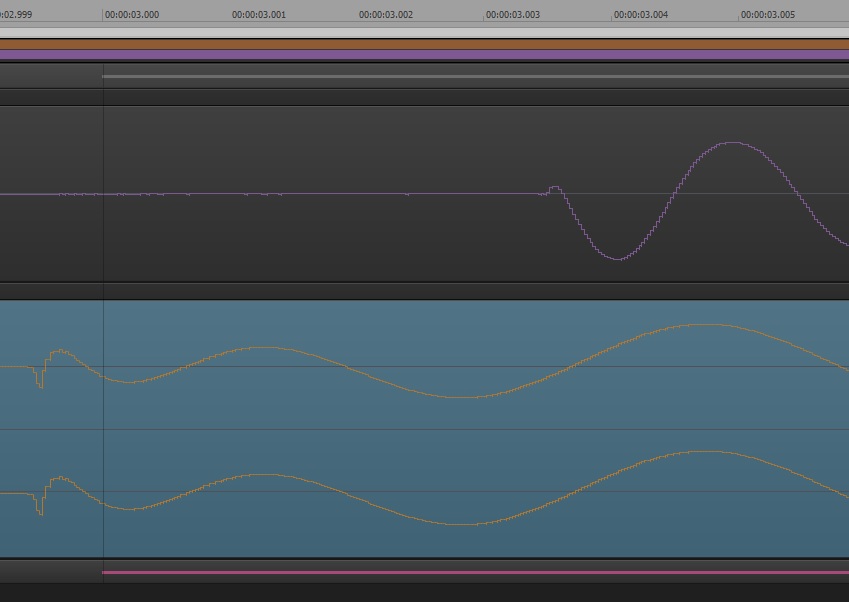


In the picture above, the top waveform is the JP-8000 audio and the bottom waveform is Hive. I set the ruler to milliseconds. As an aside, I don't know why Hive started to play a tiny moment before the MIDI note........
 
So, nothing to complain about there really.
 
I am wondering if the delay issue in my main project is down to some of the effects I am using. I have a couple of Tantra instances, so that may well be causing the delay.
 
 
Here is the Latency Monitor stuff (please excuse the wall of text):-
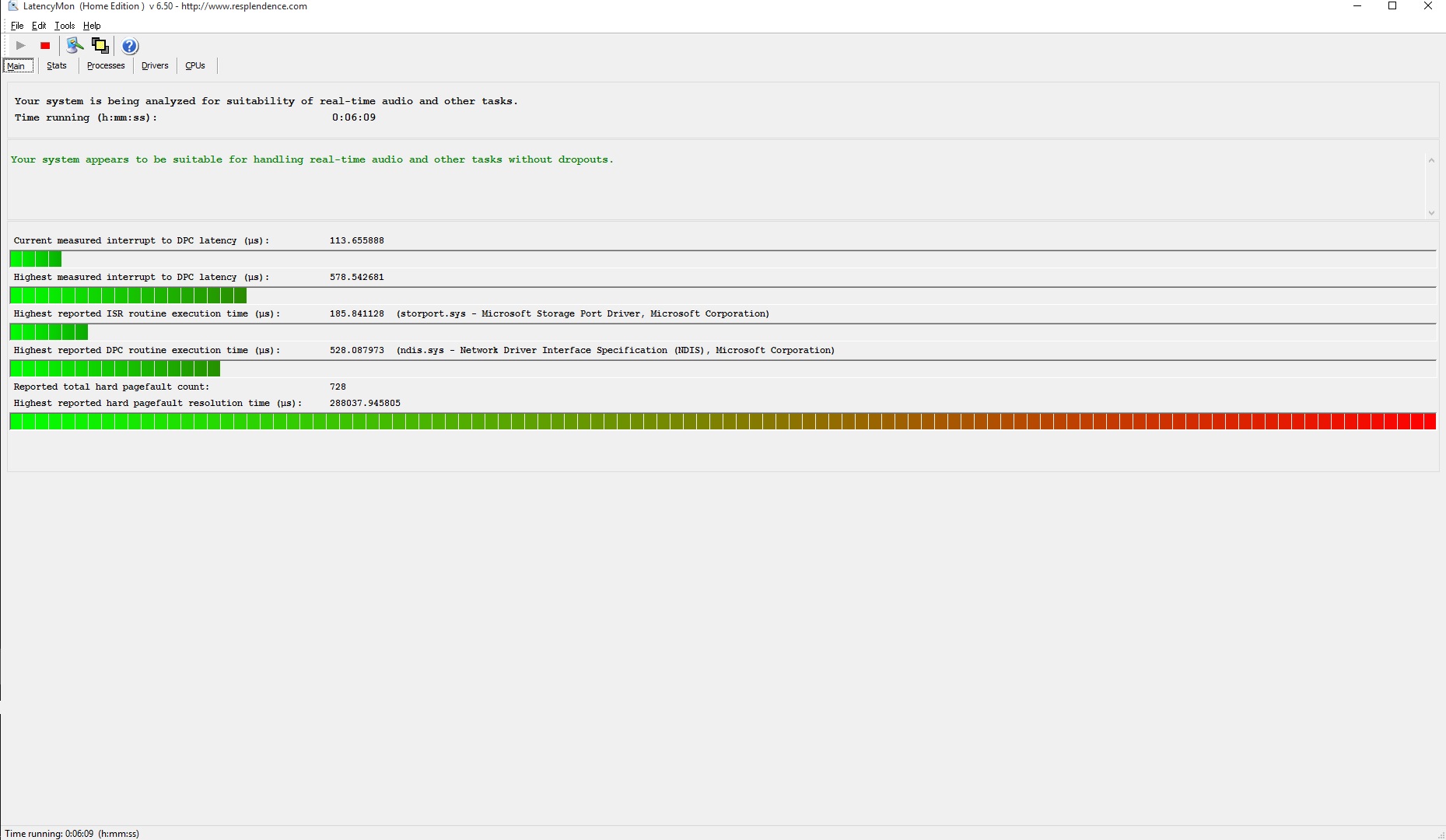


CONCLUSION
Your system appears to be suitable for handling real-time audio and other tasks without dropouts.
LatencyMon has been analyzing your system for 0:07:49 (h:mm:ss) on all processors.
SYSTEM INFORMATION
Computer name: MUSIC
OS version: Windows 8 , 6.2, build: 9200 (x64)
Hardware: P15xEMx, CLEVO
CPU: GenuineIntel Intel(R) Core(TM) i7-3820QM CPU @ 2.70GHz
Logical processors: 8
Processor groups: 1
RAM: 16280 MB total
CPU SPEED
Reported CPU speed: 2694 MHz
Note: reported execution times may be calculated based on a fixed reported CPU speed. Disable variable speed settings like Intel Speed Step and AMD Cool N Quiet in the BIOS setup for more accurate results.

MEASURED INTERRUPT TO DPC LATENCIES
The interrupt to DPC latency reflects the measured interval in which a DPC could execute in response to a hardware request from the moment the interrupt service routine started execution.
Highest measured interrupt to DPC latency (µs): 539.770438
Average measured interrupt to DPC latency (µs): 4.499478
REPORTED ISRs
Interrupt service routines are routines installed by the OS and device drivers that execute in response to a hardware interrupt signal.
Highest ISR routine execution time (µs): 189.906459
Driver with highest ISR routine execution time: storport.sys - Microsoft Storage Port Driver, Microsoft Corporation
Highest reported total ISR routine time (%): 0.003737
Driver with highest ISR total time: storport.sys - Microsoft Storage Port Driver, Microsoft Corporation
Total time spent in ISRs (%) 0.007608
ISR count (execution time <250 µs): 88527
ISR count (execution time 250-500 µs): 0
ISR count (execution time 500-999 µs): 0
ISR count (execution time 1000-1999 µs): 0
ISR count (execution time 2000-3999 µs): 0
ISR count (execution time >=4000 µs): 0
REPORTED DPCs
DPC routines are part of the interrupt servicing dispatch mechanism and disable the possibility for a process to utilize the CPU while it is interrupted until the DPC has finished execution.
Highest DPC routine execution time (µs): 482.985152
Driver with highest DPC routine execution time: ndis.sys - Network Driver Interface Specification (NDIS), Microsoft Corporation
Highest reported total DPC routine time (%): 0.161556
Driver with highest DPC total execution time: RDWM1110.SYS - , Roland Corporation
Total time spent in DPCs (%) 0.308715
DPC count (execution time <250 µs): 1965585
DPC count (execution time 250-500 µs): 0
DPC count (execution time 500-999 µs): 79
DPC count (execution time 1000-1999 µs): 0
DPC count (execution time 2000-3999 µs): 0
DPC count (execution time >=4000 µs): 0

REPORTED HARD PAGEFAULTS
Hard pagefaults are events that get triggered by making use of virtual memory that is not resident in RAM but backed by a memory mapped file on disk. The process of resolving the hard pagefault requires reading in the memory from disk while the process is interrupted and blocked from execution.
NOTE: some processes were hit by hard pagefaults. If these were programs producing audio, they are likely to interrupt the audio stream resulting in dropouts, clicks and pops. Check the Processes tab to see which programs were hit.
Process with highest pagefault count: dwm.exe
Total number of hard pagefaults 2376
Hard pagefault count of hardest hit process: 1056
Highest hard pagefault resolution time (µs): 12870.243875
Total time spent in hard pagefaults (%): 0.020154
Number of processes hit: 12

PER CPU DATA
CPU 0 Interrupt cycle time (s): 17.347117
CPU 0 ISR highest execution time (µs): 189.906459
CPU 0 ISR total execution time (s): 0.277548
CPU 0 ISR count: 84634
CPU 0 DPC highest execution time (µs): 338.623608
CPU 0 DPC total execution time (s): 4.838705
CPU 0 DPC count: 1467379
CPU 1 Interrupt cycle time (s): 13.098695
CPU 1 ISR highest execution time (µs): 84.541203
CPU 1 ISR total execution time (s): 0.007886
CPU 1 ISR count: 3890
CPU 1 DPC highest execution time (µs): 255.781737
CPU 1 DPC total execution time (s): 0.159810
CPU 1 DPC count: 12023
CPU 2 Interrupt cycle time (s): 16.453009
CPU 2 ISR highest execution time (µs): 7.247216
CPU 2 ISR total execution time (s): 0.000013
CPU 2 ISR count: 3
CPU 2 DPC highest execution time (µs): 482.985152
CPU 2 DPC total execution time (s): 5.826763
CPU 2 DPC count: 281315
CPU 3 Interrupt cycle time (s): 21.807012
CPU 3 ISR highest execution time (µs): 0.0
CPU 3 ISR total execution time (s): 0.0
CPU 3 ISR count: 0
CPU 3 DPC highest execution time (µs): 327.219376
CPU 3 DPC total execution time (s): 0.044684
CPU 3 DPC count: 5360
CPU 4 Interrupt cycle time (s): 6.480653
CPU 4 ISR highest execution time (µs): 0.0
CPU 4 ISR total execution time (s): 0.0
CPU 4 ISR count: 0
CPU 4 DPC highest execution time (µs): 377.151448
CPU 4 DPC total execution time (s): 0.245505
CPU 4 DPC count: 74982
CPU 5 Interrupt cycle time (s): 17.247618
CPU 5 ISR highest execution time (µs): 0.0
CPU 5 ISR total execution time (s): 0.0
CPU 5 ISR count: 0
CPU 5 DPC highest execution time (µs): 310.983296
CPU 5 DPC total execution time (s): 0.021756
CPU 5 DPC count: 3067
CPU 6 Interrupt cycle time (s): 7.789937
CPU 6 ISR highest execution time (µs): 0.0
CPU 6 ISR total execution time (s): 0.0
CPU 6 ISR count: 0
CPU 6 DPC highest execution time (µs): 378.736080
CPU 6 DPC total execution time (s): 0.379810
CPU 6 DPC count: 114230
CPU 7 Interrupt cycle time (s): 19.544892
CPU 7 ISR highest execution time (µs): 0.0
CPU 7 ISR total execution time (s): 0.0
CPU 7 ISR count: 0
CPU 7 DPC highest execution time (µs): 349.180401
CPU 7 DPC total execution time (s): 0.066312
CPU 7 DPC count: 7308

http://www.synkrotron.co.uk/
Intel Core™i7-3820QM Quad Core Mobile Processor 2.70GHz 8MB cache | Intel HM77 Express Chipset | 16GB SAMSUNG 1600MHz SODIMM DDR3 RAM | NVIDIA GeForce GTX 675M - 2.0GB DDR5 Video RAM | 500GB Samsung 850 Pro SSD | 1TB Samsung 850 Pro SSD | Windows 10 Pro | Roland OCTA-CAPTURE | SONAR Platinum ∞ FFS| Too many VSTi's to list here | KRK KNS-8400 Headphones | Roland JP-8000 | Oberheim OB12 | Novation Nova | Gibson SG Special | PRS Studio
#4
robert_e_bone
Moderator
  • Total Posts : 8968
  • Joined: 2007/12/26 22:09:28
  • Location: Palatine, IL
  • Status: offline
Re: Adjusting the time alignment of a MIDI track (Time+) 2015/10/01 23:03:07 (permalink) ☼ Best Answerby synkrotron 2015/10/01 23:19:56
Plugin effects can drastically impact latency in a given project, depending on how they perform the effect they are being used for.
 
Typically, effects that use a method of processing called 'Look-Ahead Processing' add quite a bit of latency, because they have to read the audio file ahead of where it is playing, to be able to figure out how to apply their effect.  That adds a lot of latency, so when choosing effects, look into their description a little bit to see if they either use look-ahead processing, or if they indicate that they otherwise chew up a lot of CPU.  Effects like Convoluting Reverbs tend to do this/
 
So with effects that DO add lots of latency, it's not that they cannot be used, it is just WHERE/WHEN they are meant to be used.  Some effects are meant to be used during mixing/mastering, and not during tracking.  To give these kinds of effects enough room to do what they need to do, you have to jack up the ASIO Buffer Size to maybe 1024 or even 2048.  With a buffer that big, you will drive yourself crazy trying to record with the large lag that will be present with a buffer that big.  But, for mixing/mastering you are already done with tracking/recording, so playback doesn't care if there is a lag to start.
 
So, for tracking/recording, I generally set my ASIO Buffer Size of my audio interface to 128, and a Sample Rate of 48000, bit depth 24-bits, and that gives me good performance without lags when I record.
 
When I switch to mixing, I will jack that ASIO Buffer Size up to either 1024 or 2048, and then if I use some of the more resource-intensive plugins, it isn't a problem, but again, I would not attempt to record while running in this manner, just mix/master.
 
Switching back and forth with your ASIO Buffer Size is pretty much something you will just get used to doing for the rest of time, as you switch from recording to mixing.
 
I hope the above helps some, 
 
Bob Bone
 

Wisdom is a giant accumulation of "DOH!"
 
Sonar: Platinum (x64), X3 (x64) 
Audio Interfaces: AudioBox 1818VSL, Steinberg UR-22
Computers: 1) i7-2600 k, 32 GB RAM, Windows 8.1 Pro x64 & 2) AMD A-10 7850 32 GB RAM Windows 10 Pro x64
Soft Synths: NI Komplete 8 Ultimate, Arturia V Collection, many others
MIDI Controllers: M-Audio Axiom Pro 61, Keystation 88es
Settings: 24-Bit, Sample Rate 48k, ASIO Buffer Size 128, Total Round Trip Latency 9.7 ms  
#5
synkrotron
Max Output Level: -22.5 dBFS
  • Total Posts : 5263
  • Joined: 2006/04/28 16:21:21
  • Location: Warrington, UK
  • Status: offline
Re: Adjusting the time alignment of a MIDI track (Time+) 2015/10/01 23:11:01 (permalink)
Hi Bob, yes, it does help, and confirms some of my thoughts...
 
I use Pro-L too, right from the off, although I don't really need to. It just comes "packaged" in my default template.
 
Thanks so much for the time you put into typing that, I really appreciate it
 
cheers
 
andy

http://www.synkrotron.co.uk/
Intel Core™i7-3820QM Quad Core Mobile Processor 2.70GHz 8MB cache | Intel HM77 Express Chipset | 16GB SAMSUNG 1600MHz SODIMM DDR3 RAM | NVIDIA GeForce GTX 675M - 2.0GB DDR5 Video RAM | 500GB Samsung 850 Pro SSD | 1TB Samsung 850 Pro SSD | Windows 10 Pro | Roland OCTA-CAPTURE | SONAR Platinum ∞ FFS| Too many VSTi's to list here | KRK KNS-8400 Headphones | Roland JP-8000 | Oberheim OB12 | Novation Nova | Gibson SG Special | PRS Studio
#6
robert_e_bone
Moderator
  • Total Posts : 8968
  • Joined: 2007/12/26 22:09:28
  • Location: Palatine, IL
  • Status: offline
Re: Adjusting the time alignment of a MIDI track (Time+) 2015/10/01 23:25:35 (permalink) ☄ Helpfulby synkrotron 2015/10/02 02:04:20
No sweat - you can quickly test whether or not you have not chosen wisely for your effects while tracking/recording, by using a shortcut key to toggle all effects off or on.
 
Hitting the letter 'E' on your computer keyboard will tell Sonar to 'Bypass All Effects', and if your latency goes away when you DO turn off the effects, then you know that one or more of the effects loaded into that project are causing latency spikes and are interfering with latency and dropouts and such.
 
(hit 'E' again to toggle effects back on, once you finish testing the above).
 
Bob Bone
 

Wisdom is a giant accumulation of "DOH!"
 
Sonar: Platinum (x64), X3 (x64) 
Audio Interfaces: AudioBox 1818VSL, Steinberg UR-22
Computers: 1) i7-2600 k, 32 GB RAM, Windows 8.1 Pro x64 & 2) AMD A-10 7850 32 GB RAM Windows 10 Pro x64
Soft Synths: NI Komplete 8 Ultimate, Arturia V Collection, many others
MIDI Controllers: M-Audio Axiom Pro 61, Keystation 88es
Settings: 24-Bit, Sample Rate 48k, ASIO Buffer Size 128, Total Round Trip Latency 9.7 ms  
#7
brundlefly
Max Output Level: 0 dBFS
  • Total Posts : 14250
  • Joined: 2007/09/14 14:57:59
  • Location: Manitou Spgs, Colorado
  • Status: offline
Re: Adjusting the time alignment of a MIDI track (Time+) 2015/10/02 14:13:10 (permalink) ☄ Helpfulby synkrotron 2015/10/03 04:02:21
I'm not seeing any unusual MIDI latency in that screenshot. 3ms is actually about as good as it gets for MIDI transmission and synth response delay with a USB MIDI interface, and should not be audible as a timing error or even as a "slapback" echo if your audio latency is also low.
 
At worst, you'll hear a phase error when layering that external synth sound with a VSTi (or playing back the live MIDI-driven synth audio against a recorded clip), and the phase error will vary somewhat from one hit to the next due to 'jitter' inherent in MIDI. That unavoidable phase error/variation isn't usually problematic, and may even add life to layered synth timbres.
 
The bigger factor in how things sound in real-time will be your audio latency. As mentioned earlier, the recorded audio is going to be compensated for input latency so it's hard to say what your real-time response sounds like without knowing the Round-Trip Latency (RTL) of your audio interface. Note that this is different from Deferred Procedure Call (DPC) latency of your PC and O/S which is what LatencyMon measures and is only indirectly related to audio latency.
 
DPC latency affects how low a buffer you can run before you start getting dropouts because the system can't keep the buffer filled. 500us is a little on the high side, but shouldn't prevent you from running an ASIO buffer in the neighborhood of 3ms. Adding in A/D/A conversion and bus/driver latency, you're RTL at that buffer size will probably be adding 8-12ms on top of the MIDI delay, which should still be quite tolerable. SONAR reports RTL in audio preferences based on what the driver reports, but it's best to measure the actual RTL using something like the free CEntrance latency tester (Google it).
 
I like to keep RTL under 6ms for the best possible feel when recording with hardware synths, but I can tolerate quite a bit more.
post edited by brundlefly - 2015/10/02 14:23:39

SONAR Platinum x64, 2x MOTU 2408/PCIe-424  (24-bit, 48kHz)
Win10, I7-6700K @ 4.0GHz, 24GB DDR4, 2TB HDD, 32GB SSD Cache, GeForce GTX 750Ti, 2x 24" 16:10 IPS Monitors
#8
synkrotron
Max Output Level: -22.5 dBFS
  • Total Posts : 5263
  • Joined: 2006/04/28 16:21:21
  • Location: Warrington, UK
  • Status: offline
Re: Adjusting the time alignment of a MIDI track (Time+) 2015/10/03 03:58:25 (permalink)
Hi Dave,
 
Thanks , I've installed that LTU application. I currently have my OCTA-CAPTURE set to 256 samples, only because that was the default. The reported RTL is just over 18ms. If I reduce the sample to 128, the RTL comes down to just over 10ms.
 
I suppose I will just have to try a few different settings and see how it goes. It's a little bit frustrating because this little delays here and there are different for each project.
 
Thanks again for your help
 
cheers
 
andy

http://www.synkrotron.co.uk/
Intel Core™i7-3820QM Quad Core Mobile Processor 2.70GHz 8MB cache | Intel HM77 Express Chipset | 16GB SAMSUNG 1600MHz SODIMM DDR3 RAM | NVIDIA GeForce GTX 675M - 2.0GB DDR5 Video RAM | 500GB Samsung 850 Pro SSD | 1TB Samsung 850 Pro SSD | Windows 10 Pro | Roland OCTA-CAPTURE | SONAR Platinum ∞ FFS| Too many VSTi's to list here | KRK KNS-8400 Headphones | Roland JP-8000 | Oberheim OB12 | Novation Nova | Gibson SG Special | PRS Studio
#9
Jump to:
© 2025 APG vNext Commercial Version 5.1