drewfx1
Max Output Level: -9.5 dBFS

- Total Posts : 6585
- Joined: 2008/08/04 16:19:11
- Status: offline

Re:Analog and digital recordings...... making them sound better..... (From Gearslutz....)
2009/10/10 00:22:04
(permalink)
Jose7822
drewfx1
Well, maybe we should just correct the math, so we can get 20dB of headroom for proper gain staging using Sonar's 64 bit engine. This will help us to get a better, more "analog" mix.
Let's see, 64bit floating point gives roughly 6000dB of dynamic range, so for proper gain staging we should set our trim controls for each track to +5980dB.
If we're only using 32bit floating point, we need to be very careful. Don't set the trims above about +600dB or else you might clip!
drewfx
You're still missing the point. Don't forget music comes from the analod world...Hint: That includes preamps and even the converters from your audio interface. Not to mention the article talks about proper 'Input Gain Staging' before going into the DAW.
Reread the OP. He's talking ITB. And he seems to be assuming that DAW's work at 24 bits internally (which, if true, everything said would make good sense). And it is correct that some plugins might not like really hot levels (though some, but not all plugs that are affected by volume have an input level control anyway). And of course I agree that analog gain staging is vital, as is not pushing your ADC anywhere close to clipping. But people need to understand, digital is not always just like analog. In the analog world, gain staging is important to both keep gear from clipping and to maximize S/N ratio. But you don't have to worry about clipping once you're inside a DAW - only at the DAW's output, and you can just reduce the gain there. And at 24 bits or higher, S/N ratio is not generally an issue either. Different rules apply ITB sometimes. And you should run each plugin at a level where it sounds best, which may be a moderate level, but also may be a little hot, or maybe the plugin isn't affected by level at all. If someone wants to pretend they're working on an analog console for psychological reasons, they can lower Sonar's trims if they want. But they can also just pretend to lower them, because Sonar really doesn't care either way. Digital is not the same as analog, and I don't see why pretending it is will make it sound any better. In the digital world, everything is just math, and, unless you're a plugin doing non-linear processing, the math doesn't change at all when the numbers are bigger or smaller. drewfx
|
Jose7822
Max Output Level: 0 dBFS

- Total Posts : 10031
- Joined: 2005/11/07 18:59:54
- Location: United States
- Status: offline
Re:Analog and digital recordings...... making them sound better..... (From Gearslutz....)
2009/10/10 16:52:25
(permalink)
Drew, I understand what you're saying. But your way of mixing promotes a "no rules apply here" type of mixing, which is why we have this Loudness War mess today. It'd be a different story if the music industry had some type of loudness stardard like the film industry does. We wouldn't have producers pushing the ME's to bring levels higher than before because they would have to obey those standards. And this is what this article, as well as the K-System, promotes. So careful mixing ITB, regardless of how much headroom we get with a 64 bit engine, pays off at the end of the day. You'll get consistent mixes that translate better volume-wise because you're working with certain standards. What's the point of mixing hot if, at the end of the day, I have to bring levels down anyways? It just makes no sense. It is so much easier to work on mixes where you don't have to keep lowering levels everytime you apply an FX, or add another track. The goal is not to pretend to work in an analog mixer, but to produce consistent mixes that sound good. That's the point of the article. Take care!
post edited by Jose7822 - 2009/10/10 16:53:32
Intel Q9400 2.66 GHz 8 GB of RAM @ 800 Mhz ATI Radeon HD 3650 Windows 7 Professional (SP1) x64 Cubase 6.03 x64 Sonar PE 8.5.3 x64 RME FireFace 400 Frontier Design Alpha Track Studio Logic VMK-188 Plus http://www.youtube.com/user/SonarHD
|
The Maillard Reaction
Max Output Level: 0 dBFS
- Total Posts : 31918
- Joined: 2004/07/09 20:02:20
- Status: offline
Re:Analog and digital recordings...... making them sound better..... (From Gearslutz....)
2009/10/10 17:39:03
(permalink)
This is not addressed to anyone in particular.
:-)
Isn't obvious that one should always be observing gain structure and making sure every asset sounds it's best?
How can anyone possibly make that concept so complicated?
all the best,
mike
|
drewfx1
Max Output Level: -9.5 dBFS
- Total Posts : 6585
- Joined: 2008/08/04 16:19:11
- Status: offline
Re:Analog and digital recordings...... making them sound better..... (From Gearslutz....)
2009/10/10 19:17:14
(permalink)
Jose7822
Drew,
I understand what you're saying. But your way of mixing promotes a "no rules apply here" type of mixing, which is why we have this Loudness War mess today. It'd be a different story if the music industry had some type of loudness stardard like the film industry does. We wouldn't have producers pushing the ME's to bring levels higher than before because they would have to obey those standards. And this is what this article, as well as the K-System, promotes.
So careful mixing ITB, regardless of how much headroom we get with a 64 bit engine, pays off at the end of the day. You'll get consistent mixes that translate better volume-wise because you're working with certain standards. What's the point of mixing hot if, at the end of the day, I have to bring levels down anyways? It just makes no sense. It is so much easier to work on mixes where you don't have to keep lowering levels everytime you apply an FX, or add another track. The goal is not to pretend to work in an analog mixer, but to produce consistent mixes that sound good. That's the point of the article.
Take care!
Jose, Just to be clear, I'm not advocating running things hot. The point is, non-linear plugins aside, there is absolutely no difference in a DAW between trimming channels down and boosting the output vs. running channels hot and reducing the output. Technically, it really doesn't (and can't) make it any more or less loud (and thus make more or less sense) either way. What's important in terms of the loudness wars is not overcompressing/limiting/maximizing and leaving some headroom at the output. In terms of plugins, at the track level you would always start below 0dB anyway (assuming you came from an ADC and don't boost things), so you shouldn't run into any trouble with most plugins. The only ones that will be affected are non-linear plugs designed to add "color" or saturation. If you didn't want color or saturation, you probably wouldn't be using that plugin. And you absolutely have to use your ears to decide how much color you want. The only place you really need to be careful is if you send several hot tracks to a sub bus and then place a non-linear plugin at the bus level. I don't have a problem with the idea that we want to use techniques to produce consistant mixes that sound good, and also don't want to produce overly loud, overcompressed mixes (+++). My problem is that the method argued here doesn't make any sense to me. People are claiming it will give you better results, but I have yet to see what I think is a valid reason why that should be so. I mean, if you argued it maximized your fader/meter resolution or something, I might buy that, but talking about maintaining headroom in the mix bus where you have hundreds (or thousands) of dB's of headroom doesn't make any sense. On the other hand, K-System makes sense to me, and Katz argues it well. And I don't advocate "no rules" mixing, but rather just a few simple rules that make sense to me: 1. Don't repeatedly compress things, or apply more than a few dB of gain reduction at a time. 2. Don't ever apply more than a few dB of gain reduction at the master bus. 3. Leave several dB's of headroom at the output. 4. Don't overprocess/oversaturate things. If you add harmonics to everything, you end up with mud. 5. Cut, don't boost (unless absolutely necessary). 6. Use your ears. 7. And as for this discussion: if one track clips during mixing for some reason, don't waste time reducing each and every track (trying to maintain the balance between tracks); just turn down at the bus level so it doesn't clip there. ITB gain staging is not on the list, only because it doesn't make any sense to me. You have plenty of headroom and S/N ratio, so what's the point?. Because we need to do it in the analog world we should do it ITB too, even though we don't need to? In terms of the loudness wars, my deepest darkest fear is that it isn't really an education problem, but rather that people might (gasp) actually like that sound. Peace, drewfx
|
Jose7822
Max Output Level: 0 dBFS
- Total Posts : 10031
- Joined: 2005/11/07 18:59:54
- Location: United States
- Status: offline
Re:Analog and digital recordings...... making them sound better..... (From Gearslutz....)
2009/10/10 22:54:13
(permalink)
Drew,
Everything you've said assumes no one will be using plugins that color the sound when in fact that is the one thing we all strive to use (that magical plugin that will make our songs sound "analog"). You're also dismissing the possibility of using External Inserts, for example. Another example is when bouncing softsynths where having high levels may make them clip. In all of those cases, you need to practice good gain staging ITB. It's like Mike said, why make it harder than it should be? Just because we can doesn't make it right.
As far as the Loudness War goes, I think poor gain staging OTB and ITB is related to it. Not having a loudness standard has driven us to this extreme, which is why we need things like the K-System to keep things under control. Unfortunately, there's really no kind of set rule when it comes to tracking or mixing in digital. It's more of an, "I do it this way and you do it that way" kind of thing. I wish there was a universal guide, similar to Bob Katz' metering method, for these stages too.
Anyways, take care!
Intel Q9400 2.66 GHz 8 GB of RAM @ 800 Mhz ATI Radeon HD 3650 Windows 7 Professional (SP1) x64 Cubase 6.03 x64 Sonar PE 8.5.3 x64 RME FireFace 400 Frontier Design Alpha Track Studio Logic VMK-188 Plus http://www.youtube.com/user/SonarHD
|
j boy
Max Output Level: -48 dBFS

- Total Posts : 2729
- Joined: 2005/03/24 19:46:28
- Location: Sunny Southern California
- Status: offline
Re:Analog and digital recordings...... making them sound better..... (From Gearslutz....)
2009/10/11 00:58:50
(permalink)
It's not just about final "volume" at the main outs. It's about the character of the sound, which we want to present at its optimum.
It's not true that you can change the gainstaging ITB for a given signal, and it will be equally good-sounding just as long as it doesn't clip.
Some people need to spend less time on "theories" and start twisting knobs and listening. It becomes quite apparent when you do.
|
D K
Max Output Level: -66 dBFS

- Total Posts : 1237
- Joined: 2005/06/07 14:07:05
- Status: offline
Re:Analog and digital recordings...... making them sound better..... (From Gearslutz....)
2009/10/11 01:27:23
(permalink)
I brought this thread earlier..and I see the responses are pretty much the same J boy and Jose are exactly correct - quit theorizing about the vast numerical headroom of a digital mix bus, lower your faders,back off the plugin volumes if necessary and hit your ADC to peak at -10 or lower and LISTEN TO THE MIX!!!..then come back and discuss what you HEAR!!...not what your head tells you should be possible or right. I wonder - how many of you who like to argue the theory of this have ever played in a live band (a good one). If you have and have done so for any length of time you will no doubt have come across the paradigm that the tighter the band and execution - The quieter you can play and a tight, relatively quiet/ moderate volume on the stage is far easier to work with and control and produces a loud, punchy and dynamic sound out front. same principal....You veteran stage musicians and FOH mixers know this All of our amps can go to 10 (sometimes 11 :) ) but when we use all that power it normally doesn't sound good does it ?
post edited by D K - 2009/10/11 01:36:13
www.ateliersound.com ADK Custom I7-2600 K Win 7 64bit /8 Gig Ram/WD-Seagate Drives(x3) Sonar 8.5.3 (32bit)/Sonar X3b(64bit)/Pro Tools 9 Lavry Blue/Black Lion Audio Mod Tango 24/RME Hammerfall Multiface II/UAD Duo
|
drewfx1
Max Output Level: -9.5 dBFS
- Total Posts : 6585
- Joined: 2008/08/04 16:19:11
- Status: offline
Re:Analog and digital recordings...... making them sound better..... (From Gearslutz....)
2009/10/11 02:24:40
(permalink)
Jose7822
Everything you've said assumes no one will be using plugins that color the sound when in fact that is the one thing we all strive to use (that magical plugin that will make our songs sound "analog"). You're also dismissing the possibility of using External Inserts, for example. No, I basically have said you have to set levels appropriate to each plugin when the plugin is non-linear (i.e. when the plugin sound varies with level). The problem is, you have no way of knowing what appropriate "gain staging" is for a given plugin without using your ears. As I have said, many plugins that add color have input level/drive/etc. controls at the plugin in order to set optimum levels (external inserts in Sonar are like this - they have Send/Return level controls). For the plugins that don't, you need to use your ears to set the trims to appropriate levels to get the proper amount of color. Setting your trims generically to -6dB (or whatever) might give you the proper level on occaision, but more likely it will be either too low or too hot in a given situation. If we're using a "color" plugin, we probably aren't looking to send the plugin a low level to keep it in its linear range - we want it in the non-linear range (that's why the programmers wrote it to be non-linear, and thus give it "color"). The point is, there is no way of determining what the proper level is without listening. You can't just subtract an arbitrary number from 0dB and say "that will always be perfect for all plugins in all situations, because that's the number that works best on a great sounding analog SSL console". Another example is when bouncing softsynths where having high levels may make them clip.
Agreed. Anytime you leave the DAW, whether via sound card or bouncing to disk (if at 16 or 24 bits), you need to make sure you don't clip. But what does this have to do with setting the trims to an arbitrary level? It's like Mike said, why make it harder than it should be? Just because we can doesn't make it right.
Why set trims lower than they need to be? Just because we can? Because we need to in the analog world, where otherwise we will run out of headroom? You seem to be missing my point here, which is that gain staging is just not the same ITB as in analog. In the analog world, proper gain staging is based on balancing S/N ratio and headroom. You set levels high to maximize S/N, but not too high or you'll run out of headroom. There is a definite "optimium level" in analog. ITB you just set things so they don't clip when leaving the DAW (whether via sound card or writing to file), or where a given plugin sounds best. You don't really have to worry about S/N or headroom. There is no "optimium level" in a DAW's floating point mix bus. And the "optimium level" for a color plugin differs for each plugin (and possibly each situation). Using analog gain staging techniques ITB won't make it sound any more "analog". I'm not trying to be contentious here. I just think the author of the gearslutz article probably mistakenly believed (as many people do) that DAW's do things at 24bits internally, and gave advice based on that flawed premise. Unfortunately, many people with a background in analog audio (even some circuit designing geniuses), don't understand all the details of digital. Many myths exist because sometimes people jump to conclusions without really understanding the intricacies of how digital works. And when someone with great credentials in the analog world makes a statement about how things "work" in digital, it's taken as authoritative even if it's technically wrong. drewfx
|
drewfx1
Max Output Level: -9.5 dBFS
- Total Posts : 6585
- Joined: 2008/08/04 16:19:11
- Status: offline
Re:Analog and digital recordings...... making them sound better..... (From Gearslutz....)
2009/10/11 02:38:19
(permalink)
j boy
It's not just about final "volume" at the main outs. It's about the character of the sound, which we want to present at its optimum.
Agreed.
It's not true that you can change the gainstaging ITB for a given signal, and it will be equally good-sounding just as long as it doesn't clip.
Yes it is true. In digital audio, changing the gain is just multiplying the signal by a number. It doesn't change anything but the amplitude of the signal. And it doesn't matter if you change the levels of multiple channels before you mix them together or afterwards either. It's just simple math and can be proven emperically.
Some people need to spend less time on "theories" and start twisting knobs and listening. It becomes quite apparent when you do.
This is insulting and does not contibute anything here. drewfx
|
Jose7822
Max Output Level: 0 dBFS
- Total Posts : 10031
- Joined: 2005/11/07 18:59:54
- Location: United States
- Status: offline
Re:Analog and digital recordings...... making them sound better..... (From Gearslutz....)
2009/10/11 11:49:24
(permalink)
Drew,
Here's the deal, and the point I'm trying to get across. I understand what you're saying about the amazing headroom we have inside a single and double precision floating point engine. Yeah, it is great to have the ability to go past 0dB FS and not clip, but my argument is that inconsistent gain staging ITB is what makes our mixes inconsistent (hence why I brought up the K-System). It also makes mixing harder because we have to constantly lower volumes ITB to get everything sounding clean wether on the output or inside a plugin's UI. And let's not forget the headroom needed before going into the mastering stage.
Sure, we can just keep lowering things until we meet the desired output level, but why make things harder? Isn't it better when things just fall in the right spot without having to constantly lower the faders? Granted this takes into account that proper gain staging was conducted before going ITB. But you're giving yourself enough headroom to work with without worrying about clipping anywhere. If you're monitoring using the K-System, you can just keep speaker levels as they are because you have enough headroom. So basically, the levels almost take care of themselves if you leave the appropriate headroom all throughout. And this is the point I was trying to get accross. This way you get consistent mixes that are easier to work with.
Take care!
Intel Q9400 2.66 GHz 8 GB of RAM @ 800 Mhz ATI Radeon HD 3650 Windows 7 Professional (SP1) x64 Cubase 6.03 x64 Sonar PE 8.5.3 x64 RME FireFace 400 Frontier Design Alpha Track Studio Logic VMK-188 Plus http://www.youtube.com/user/SonarHD
|
The Maillard Reaction
Max Output Level: 0 dBFS
- Total Posts : 31918
- Joined: 2004/07/09 20:02:20
- Status: offline
Re:Analog and digital recordings...... making them sound better..... (From Gearslutz....)
2009/10/11 20:09:13
(permalink)
"we can just keep lowering things until we meet the desired output level, but why make things harder? Isn't it better when things just fall in the right spot without having to constantly lower the faders?"
The answer seems simple... I want as many bits of each track/performance as possible. Today isn't tomorrow, and throwing away data today by NOT EVEN RECORDING IT is not forward thinking... especially if the reason is convenience.
Having said that... I personally rely on careful observation of the sound quality as the means to determine what the proper recording level should be. There's too many variables to use a rule.
Just my opinion.
|
Jose7822
Max Output Level: 0 dBFS
- Total Posts : 10031
- Joined: 2005/11/07 18:59:54
- Location: United States
- Status: offline
Re:Analog and digital recordings...... making them sound better..... (From Gearslutz....)
2009/10/11 23:11:49
(permalink)
Mike,
But the answer is indeed simple.
You just need to understand what the meters in the analog world translate to when in the digital world. As you know, when your analog gear reads 0dBVU, it means that the signal passing through is at its nominal level (or the level at which it provides the best S/N ratio). This yeilds a clean recording with no coloration. Pushing these levels a little ususally gives the sound a nice color. But you have to realize that, by doing this, you're trading optimal S/N ratio with coloration.
Your signal chain should be set up in a way that 0dBVU = +4dBu = -18dBFS (more or less). How much exactly is based on the amount of headroom built into your converters when it is being fed a +4dBu signal (reading your audio interface's manual should provide you with the correct number). But we also need to consider how much headroom was built into your preamps and any other analog gear used in the signal chain. Otherwise, you might end up pushing your converters too much and negatively altering the S/N there. This can easily happen when people record too hot. Believe it or not, too hot can be as low as -6dBFS PEAK. And this is not even considering intersample peaks which can be as high as 6dB. So you may be already clipping even though your meters show you're not.
Optimizing bitness when recording in digital sounds like the logical way to go about this. But it doesn't consider any of the above mentioned points like S/N ratio and intersample peaks. Or even the fact that you might be stressing your converters by feeding them a hot signal. So you're basically Limiting on input. With 24 bit, there's no need to push things at all. We have an amazing noise floor that goes all the way down to -144dB, so why not take advantage of that? Say you're peaking at -12dBFS, that's still gives you 132dB to work with. OK, you're right, those are theoretical numbers. I'll give you some real numbers and use my interface as an example. The FF400 records about 18.6 bits of clean audio before there is noise in the signal (when set to 24 bits). That's a noise floor of around 112dB. If we set our recordings to peak at -12dBFS then that still gives us 100dB to work with, and we're only trading off 2 bits.
So it is a trade off. You trade off a few bits to get cleaner recordings that'll sound better and avoid clipping. At least to me that makes sense.
Take care! :-)
Intel Q9400 2.66 GHz 8 GB of RAM @ 800 Mhz ATI Radeon HD 3650 Windows 7 Professional (SP1) x64 Cubase 6.03 x64 Sonar PE 8.5.3 x64 RME FireFace 400 Frontier Design Alpha Track Studio Logic VMK-188 Plus http://www.youtube.com/user/SonarHD
|
Da=man
Max Output Level: -88 dBFS

- Total Posts : 150
- Joined: 2009/08/25 05:44:18
- Location: Newcastle, Australia
- Status: offline
Re:Analog and digital recordings...... making them sound better..... (From Gearslutz....)
2009/10/12 07:00:16
(permalink)
mike_mccue
This is not addressed to anyone in particular.
:-)
Isn't obvious that one should always be observing gain structure and making sure every asset sounds it's best?
How can anyone possibly make that concept so complicated?
all the best,
mike
Bingo! It is not rocket science. Just pull down the master if it is clipping. Everything else will remain the same if already mixed correctly. I always try to follow the KISS principle. Keep It Simple Stupid But somehow I get sidetracked searching for more sounds, plug ins, knobs, faders, theories..........
Sonar 8.5.3 PE ( More than a decade of Cakewalk products including Sonar LE, Cakewalk Pro Audio 9 and Home Studio 7) Roland Fantom x8, Yamaha MG82cx Mixer, Edirol MA-15D Speakers, M-Audio 24/96 soundcard, 2.8GHZ Core 2 Duo, 4G Ram, Roland TD-3 VDrums, 09 Band in a Box
|
The Maillard Reaction
Max Output Level: 0 dBFS
- Total Posts : 31918
- Joined: 2004/07/09 20:02:20
- Status: offline
Re:Analog and digital recordings...... making them sound better..... (From Gearslutz....)
2009/10/12 08:44:46
(permalink)
"This yields a clean recording with no coloration. Pushing these levels a little ususally gives the sound a nice color. But you have to realize that, by doing this, you're trading optimal S/N ratio with coloration." We have had this very conversation before. With all due respects, I absolutely disagree with your premise that professional preamps are introducing distortion as you describe. Let's assume 0vU equals +4dBu. The preamps may begin to seem "colorful" at +18dBu and they don't clip until about +26dBu. It is certainly possible for any of us to manipulate the tone in a multi stage preamp. I CAN get Lots of color way below 0dBu if I wish. Drive the input. Saturate the transformer. Open uop the first gain stage. etc. That does not mean a pro preamp can't easily put out clean power beyond +4dBu. They can and do. With all due respects, your premise relies on 1) A idealized myth that at 0vU a audio circuit displays "flat" (implying uncolored, "honest" reproduction) response. The circuits' are by strict definition are ALWAYS colored, they are never flat. Maybe sort of. No. Not really. Having said that... the point is a good preamp doesn't suddenly change it's color characteristics just because you opened it's output a few dB. 2) The operator is incompetent with regards to gain staging before and inside the preamp. This can be very hard to define. Maybe the operator and the musician want it to sound distorted.? and 3) The audio equipment has been been sourced from the "industrial grade" segment of 1970's production audio> Back then the 0vU = +4dBu rating was often skewed by the fact that the circuits only had about 6dB of headroom. Meaning that it clips at +10dBu rather than the +26dBu that is so common in pro gear. 16 extra DB is a "whole bunch". You might enjoy investigating power supplies and how compromises in power distribution in mass produced prosumer gear is the number one source of grainy nasty sound. If there's enough power in the preamp then both the best of the old, and the latest stuff today runs with loads of headroom. If there are analog headroom problems that need improvement it is in the AD/DA appliances. Heck, that's why the big rack mounted two channel units sound great. They have a proper power supply. Recording at what I consider suitable levels ( I prefer that to saying "hot" like you guys do ) is not about S::N. That would be silly. What noise? For me it's about data. It's about having more data to run through filters and its about archiving data for use with anticipated improvements in delivery mediums. If you think you are recording too hot... then you are. Don't record to hot. Record at a suitable level... what ever that means :-) It seems simple. Peace and LOVE! mike
post edited by mike_mccue - 2009/10/12 08:57:07
|
Jeff Evans
Max Output Level: -24 dBFS

- Total Posts : 5139
- Joined: 2009/04/13 18:20:16
- Location: Ballarat, Australia
- Status: offline
Re:Analog and digital recordings...... making them sound better..... (From Gearslutz....)
2009/10/12 08:45:55
(permalink)
This might be a good time to mention levels and the like. The K System metering for quality CD production is at -20 db FS so when we create a tone with a level of -20db FS then we can arrange for the output on the masterbuss to also be -20db FS. In my system here I have a pair of quality VU meters and there are so many reasons for having them. I have them calibrated so they show 0db VU when this is the case. (Track faders and Master fader are all at 0db by the way. The signal on the test tone is recorded at the calibrated level) Calibrated monitor gain is also a very important aspect of this type of work. When the left channel is putting out -20db FS then the calibrated monitor gain comes into force and is set to produce a level of 83 db SPL from the left monitor. The right is also calibrated same way. (A C weighting but the pink noise should be band limited to 500 - 2Khz) Now you should have an accurate mark on your monitor volume and you can call this 0db. Both speakers on will produce about 86 db SPL. Now you have 20 db of headroom over that so you can produce sound levels up to 106 db SPL! Setting levels during recording is easy with a VU meter on the output. Just adjust the gain structure to get the VU showing around 0db VU which is saying the rms level, on the tracks is around -20db FS where you want them. (fast transient peaks slip by the VU meter but they usually only make it to about -6db max on the Sonar track meter where the meters change color) 24 bit recording is a must. Switching the mix buss on to the 64 bit double precision engine is a good thing to do as well when doing the mixdown. If you are mixing you can still keep everything well clear of -4 db or -6db FS. And you can turn your monitor gain up during mixing by + 6db to create mastering levels while mixing. If the client wants a hotter master, then you shift to a different K system reference eg -14 db or even -12 db FS being the 0db VU ref. That is about as high as you want to come to make a failry hot master that still has some dynamc life and remember this is going to 8 db louder than a -20 db FS K System reference. 24 Bit is the key. The actual dynamic range is about 6db less than theoretical. So for 24 bit, it is closer to 138 db but that is still huge. Much better than 16 Bit. Aiming an rms level at -20 db still gives you 118 db of signal to noise ratio and that is pretty good. And you have still got 20 db of headroom above! Its not a bad idea to make some level calibrating tracks and also measure what your sound card is putting out as well when you have got -20 db FS in Sonar for example. A digtal rms ac meter is very useful. I found that after calibrating the system I was able to get more more accurate and repeatable settings for recording and mixing.
post edited by Jeff Evans - 2009/10/12 08:57:35
Specs i5-2500K 3.5 Ghz - 8 Gb RAM - Win 7 64 bit - ATI Radeon HD6900 Series - RME PCI HDSP9632 - Steinberg Midex 8 Midi interface - Faderport 8- Studio One V4 - iMac 2.5Ghz Core i5 - Sierra 10.12.6 - Focusrite Clarett thunderbolt interface Poor minds talk about people, average minds talk about events, great minds talk about ideas -Eleanor Roosevelt
|
The Maillard Reaction
Max Output Level: 0 dBFS
- Total Posts : 31918
- Joined: 2004/07/09 20:02:20
- Status: offline
Re:Analog and digital recordings...... making them sound better..... (From Gearslutz....)
2009/10/12 09:10:14
(permalink)
I have asked for clarification about intersample peaks on many occasions. The way I understand them is that they exist for exactly less than 1 sample. So that means... if I could hear at 44.1kHz I might be able to notice a intersample peak... if I was really paying attention. It's all academic... because I don't get near digital clipping in routine... I'm just curious. Here's an illustration I made a while ago. I'm still asking for suggestions for corrections etc. if I have the concept wrong. The term intersample peak sounds so big time until you start thinking... gee, what's a portion of one sample sound like?

best, mike
post edited by mike_mccue - 2009/10/12 10:04:56
|
The Maillard Reaction
Max Output Level: 0 dBFS
- Total Posts : 31918
- Joined: 2004/07/09 20:02:20
- Status: offline
Re:Analog and digital recordings...... making them sound better..... (From Gearslutz....)
2009/10/12 09:13:18
(permalink)
"I found that after calibrating the system I was able to get more more accurate and repeatable settings for recording and mixing."
I found out that my powered speakers were REALLY REALLY loud.
I have to tame them agressively to keep the room at 82dBSPL.
|
feedback50
Max Output Level: -79 dBFS

- Total Posts : 564
- Joined: 2004/05/31 12:08:15
- Location: Oregon, USA
- Status: offline
Re:Analog and digital recordings...... making them sound better..... (From Gearslutz....)
2009/10/12 09:44:53
(permalink)
Hey Mike,
I'm a little confused about intersample peaks as well. I kind of assumed they are a form of overshoot in the analog side of some D/A converters and the way they smooth the staircase nature of digital in to an anolog-ish output via filtering. From what I've read, it's something that doesn't impact all D/A circuits, but it potentially could impact some of the less expensive or older circuits. I have seen some of the explanations go into flaws in the design of the filtering methods used in some D/As that create the problem. I've also heard that well designed D/As should have enough headroom so that these inter-sample peaks don't necessarily cause a problem.
I guess reagardless of the cause, leaving a bit of headroom in the mix isn't going to be perceived advesely by most listeners, and might make some listeners have a better listening experience depending on their playback equipment.
|
Jose7822
Max Output Level: 0 dBFS
- Total Posts : 10031
- Joined: 2005/11/07 18:59:54
- Location: United States
- Status: offline
Re:Analog and digital recordings...... making them sound better..... (From Gearslutz....)
2009/10/12 11:07:38
(permalink)
Mike, I never said "distortion", I said "color". Technically though, anything that alters the original sound is distortion. So you can say that Color = Distortion. I just never said it the way you implied it, and I think you know that. Also, I didn't say that opening the output stage of a preamp changes its color characteristics. Not sure were you got that either. If you go back to my previous post, you'll see that I stated very clearly that it was important to know how much headroom each analog gear in your signal chain had in order to optimize gain staging. I didn't go about explaining how to accomplish this because each gear has it's own built-in headroom. So again, I'm not sure what we're discussing here since your whole argument is based on things I didn't say. If you wanna get technical about nominal levels then one can argue that even a signal passing straight through a converter is being colored. We know this because each converter has its own sound. So you're right about the signal getting colored even when it is set at nominal levels. So let me rephrase that by saying that, at nominal levels, the signal is at its cleanest state. Is that better? :-) Lastly, as far as Intersample peaks and their importance goes, read here: http://www.cadenzarecording.com/papers/Digitaldistortion.pdf You can skip to page 4 if you want. Take care!
Intel Q9400 2.66 GHz 8 GB of RAM @ 800 Mhz ATI Radeon HD 3650 Windows 7 Professional (SP1) x64 Cubase 6.03 x64 Sonar PE 8.5.3 x64 RME FireFace 400 Frontier Design Alpha Track Studio Logic VMK-188 Plus http://www.youtube.com/user/SonarHD
|
The Maillard Reaction
Max Output Level: 0 dBFS
- Total Posts : 31918
- Joined: 2004/07/09 20:02:20
- Status: offline
Re:Analog and digital recordings...... making them sound better..... (From Gearslutz....)
2009/10/12 11:28:47
(permalink)
Jose when you say:
"As you know, when your analog gear reads 0dBVU, it means that the signal passing through is at its nominal level (or the level at which it provides the best S/N ratio). This yeilds a clean recording with no coloration. Pushing these levels a little ususally gives the sound a nice color. But you have to realize that, by doing this, you're trading optimal S/N ratio with coloration." What are you saying? I'm saying you've got a beefy range of output where the basic "color" tonality of the circuit remains stable and that the range extends well beyond the nominal levels you suggest (I think that what's you're saying) as a limit. As far as S::N in the preamp... it may be a fact that using the preamp to produce more gain creates some noise. I find that the levels are imperceptable or at least neglible when working with most sources. If indeed the track is turned down during the mix then it becomes even less of a problem. If however the noise is ambience from the enviroment heard by the mic... then having more data to work with FFT noise reduction is advantageous and once again you will probably mix down the levels so both the ambient noise and the artifacts from filtering (all filtering actually... EQ, comp etc.) will be minimized. Maybe I didn't understand what you said. I'll go read about intersample peaks. the last time I did I concluded it was problem on SSL desks designed in the 1990's and rarely encountered elsewhere. And I asked the same question I asked above but never found anyone who would entertain it. How long does an intersample peak exist? Is it some portion of a sample? best regards, mike
post edited by mike_mccue - 2009/10/12 11:32:23
|
The Maillard Reaction
Max Output Level: 0 dBFS
- Total Posts : 31918
- Joined: 2004/07/09 20:02:20
- Status: offline
Re:Analog and digital recordings...... making them sound better..... (From Gearslutz....)
2009/10/12 11:47:07
(permalink)
page 4:
"The method used for computing the peak value inside the system however, is not particularly accurate. DAW and digital mixer manufacturers typically take the amplitude of the samples and use these as the basis for the peak meter. The problem with this approach is easily identified: the samples themselves do not represent the peak value of the waveform. The waveform is only complete after the reconstruction process. Until this process has been completed, the waveform is inaccurately represented by the samples. This is the reason that in most DAWs the waveform is represented on the screen as a ‘dot to dot’ connection between sample points. They do not undergo the reconstruction process inside the system, so all that can be represented is the sample points, and for the sake of visual ease, they connect the dots between them with straight lines. They save the reconstruction process for the digital to analog converters and show the user inaccurate information instead."
OK, so that's all sort of obvious. It's my hope that the illustration shown above demonstrates an understanding of what is said in the quoted passage.
So if a system does allow an intersample peak... just how serious a problem is it? If it doesn't cause a logical breakdown and crash the application, or for us probably more practically speaking a plugin then how can one possibly think it's audible in the analog domain?
If it plays through and it's really only a portion of one sample how can anyone be serious that it's audible? 44.1kHz? 48kHz? 88kHz? 96kHz?
It seems to me that there'd be plenty of ugly and perfectly audible flat line clipping to accompany most circumstances that allowed for an intersample peak.
When I consider that with the fact that MOST digital processes have methods of dealing with and avoiding the phenomena (We've all got the SSL meter to check for ourselves right?) it's really hard to take it seriously.
If intersample peaks were a practical reality that caused problems for people than Rick Ruben would be distributing masters with nice civilized dynamics and peaks under -0.6dBFS.
Does anyone know?
How long IS an intersample peak?
best,
mike
post edited by mike_mccue - 2009/10/12 11:49:48
|
seriousfun
Max Output Level: -78 dBFS

- Total Posts : 641
- Joined: 2003/11/07 19:29:54
- Location: SoCal
- Status: offline
Re:Analog and digital recordings...... making them sound better..... (From Gearslutz....)
2009/10/12 11:51:30
(permalink)
mike_mccue
...
How long IS an intersample peak?
best,
mike
An Intersample Peak is a point - no length.
|
Jose7822
Max Output Level: 0 dBFS
- Total Posts : 10031
- Joined: 2005/11/07 18:59:54
- Location: United States
- Status: offline
Re:Analog and digital recordings...... making them sound better..... (From Gearslutz....)
2009/10/12 12:08:53
(permalink)
Mike,
In that phrase you quoted, I was talking about analog gears in general. It means that keeping the signal at a constant 0dBVU, all throughout, gives you the least colored sound and best S/N ratio. If we apply this to pre-amps, it would be the equivalent of adjusting the I/O stages to read 0 dBVU = +4dBu. However, I wasn't implying that one can't push the preamp internally and still output a nomial level. I think this is where the confusion lies, am I right? And yes, the noise I refer to is the internal noise from the preamp. And again, this is all based on the type of preamp one is using as well as its capabilities on how far it can be pushed (which I didn't go into).
As far as your question on Intersample Peaks goes, the peak goes on the entire waveform, not just part of it as shown in your image. Page 5 of the PDF document I linked illustrates this much better than I could explain. Everything about Intersample Peaks is explained in that document, as well as its negative impact and how to prevent them. It's a good read.
Take care!
Intel Q9400 2.66 GHz 8 GB of RAM @ 800 Mhz ATI Radeon HD 3650 Windows 7 Professional (SP1) x64 Cubase 6.03 x64 Sonar PE 8.5.3 x64 RME FireFace 400 Frontier Design Alpha Track Studio Logic VMK-188 Plus http://www.youtube.com/user/SonarHD
|
Jose7822
Max Output Level: 0 dBFS
- Total Posts : 10031
- Joined: 2005/11/07 18:59:54
- Location: United States
- Status: offline
Re:Analog and digital recordings...... making them sound better..... (From Gearslutz....)
2009/10/12 12:16:04
(permalink)
Mike,
Read the whole thing. All your questions are answered in there.
Intel Q9400 2.66 GHz 8 GB of RAM @ 800 Mhz ATI Radeon HD 3650 Windows 7 Professional (SP1) x64 Cubase 6.03 x64 Sonar PE 8.5.3 x64 RME FireFace 400 Frontier Design Alpha Track Studio Logic VMK-188 Plus http://www.youtube.com/user/SonarHD
|
The Maillard Reaction
Max Output Level: 0 dBFS
- Total Posts : 31918
- Joined: 2004/07/09 20:02:20
- Status: offline
Re:Analog and digital recordings...... making them sound better..... (From Gearslutz....)
2009/10/12 13:35:30
(permalink)
Jose, I wish you could explain it better than that article. For example: 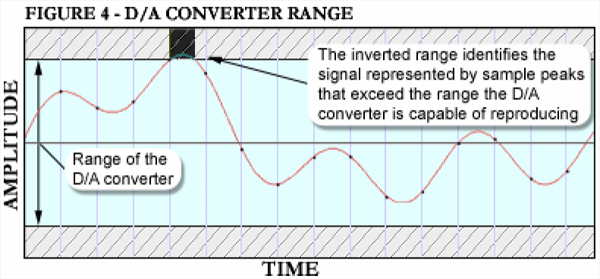 This image clearly shows an intersample peak. What it doesn't emphasize is the obvious... the peak exists within the span of ONE SAMPLE. Maybe that's 1/44,100th of a second. maybe it's shorter than that. I've read similar articles and will read this one, but I can't believe that this point isn't emphasized in the syllabus. As far as I can tell people must think it's obvious so they don't state it but I've come to think that a intersample peak is by it's nature... in between samples. So what would produce that? Can you use the Nyquist theorem to suggest that this phenomena can not occur below half the frequency of the sample rate. A 44.1kHz sine tone could easily do it if you are sampling at 44.1kHz. OK cool. How about a 44.1kHz harmonic on a more familiar waveform... something down in the 4kHz-8Hz with rich overtones. Ok, that could do it. In my illustration I have generously allowed for a more practical circumstance and have suggested that perhaps the peak is a result of a plugin that doesn't have a strategy for dealing with this phenomena. The squared wave is the result of a limiter function. I have illustrated the peak and then suggested that it is corrected by the next sample. I am curious to learn if it takes more than one sample. A white paper on the SSL website suggested to me that the intersample peaking does not persist beyond the initial misunderstood sample reading. If the signal persists as an over for more than a sample it's simply an OVER and should be reported by the analysis metering. And then the blinky red light comes on... so it's no longer a big secret. But if you really want to take it seriously you can use the SSL meter all throughout your DAWs virtual routing and get a feel for it. I totally agree you need to know what's going on every where. OK, I finished that article... it's basically a great big winded pansy massed way of saying that the authors don't like the sound of digital hard limiting. Hey, neither do I. I think they should have elaborated on the realities of intersample peaks before using this quote: "[Nielsen 2003], seven consumer CD players were subjected to tests designed to analyze their ability to reproduce and reconstruct signal levels above full scale (0dBFS). All of the players experienced difficultly dealing with signal levels this high," to make their point. I've pointed it out already. If there is a big, hard limited, "legal" splat up against the 0dBFS ceiling... you are gonna hear it... but that's not the intersample peak... it's the splat. I also think they enjoy lecturing: "It is nearly certain that this constant barrage of distortion that we, the consumers, are hearing on compressed and mastered CDs contributes to the ‘digital harshness’ still reported by the more sensitive audiophiles in the music industry. According to industry insiders, not a single off-the-shelf digital to analog converter chip made today can accurately pass a signal wherein the samples are under full scale but the waveform that they represent exceeds full scale." to folks who can hear the granularity on those high frequencies I mentioned, because it appears in this passage the authors aren't talking about hard limiting on pumped up disco music... they are talking about "digital harshness" that theoretically occurs in the supersonic frequencies on content that is compressed beyond their taste. Frequencies they sense in the playback of the listening systems and seemingly have special knowledge of. Hey, I'm an audiophile too. I Love Sound. all the best, mike
post edited by mike_mccue - 2009/10/12 13:43:01
|
Jose7822
Max Output Level: 0 dBFS
- Total Posts : 10031
- Joined: 2005/11/07 18:59:54
- Location: United States
- Status: offline
Re:Analog and digital recordings...... making them sound better..... (From Gearslutz....)
2009/10/12 14:23:43
(permalink)
Hey Mike,
The article also explains why these Intersample Peaks occur. You'll find this at the bottom paragraph on page 4 and ends at the top paragraph on page 5. Basically, what they're saying is that the way digital sampling works doesn't provide the whole picture of the waveform because samples are being taken every 1/44,100 of a second, assuming we're recording at 44.1KHz. This is why we get a staircase-looking waveform when we zoom in on an audio clip inside of Sonar. The rest of the waveform is being filled in at the output stage when it goes through the D/A process. So this means that a waveform can be shown as legal (below clipping) inside our DAWs, yet be a different story when the actual waveform is reproduced in the analog world.
What you see in the picture is not a squared wave (nor one that suffered limiting). It is the digital representation of a complete waveform. Perhaps this is what's confusing you. That's what the Nyquist Theorem explains, which is why a lot of people still believe that recording at higher sampling rates gives them more resolution because there are more sample points available to reconstruct a waveform. This is simply not true. But I digress.
I guess this could be easily explained with images, but I honestly don't feel like posting them :-P However, if my explanation was not enough, then I'll try harder. Just let me know as I don't mind doing it.
Take care!
Intel Q9400 2.66 GHz 8 GB of RAM @ 800 Mhz ATI Radeon HD 3650 Windows 7 Professional (SP1) x64 Cubase 6.03 x64 Sonar PE 8.5.3 x64 RME FireFace 400 Frontier Design Alpha Track Studio Logic VMK-188 Plus http://www.youtube.com/user/SonarHD
|
The Maillard Reaction
Max Output Level: 0 dBFS
- Total Posts : 31918
- Joined: 2004/07/09 20:02:20
- Status: offline
Re:Analog and digital recordings...... making them sound better..... (From Gearslutz....)
2009/10/12 14:27:15
(permalink)
page 3 states:
"The process of recreating the original waveform involves a filter called a reconstruction filter. This filter removes all content above the Nyquist frequency (half the sample rate). The range below the Nyquist frequency defines the ‘legal’ range of allowed frequencies as frequencies in this range can be accurately reproduced. All frequencies above the Nyquist frequency do not adhere to Nyquist or Shannon’s theorems regarding allowable frequencies, cannot be reproduced and are therefore considered illegal frequencies. Because of mathematical realities observed by Fourier in the 1800’s, and subsequently by Shannon in 1948, when a waveform has all frequencies removed above the Nyquist frequency, the resulting waveform will be the original waveform that was sampled."
I didn't know there were 'illegal" frequencies and always assumed everything between 22.5 and 44.1 was just described somewhat inaccurately but still existed as ripple.
So if "This filter removes all content above the Nyquist frequency (half the sample rate). " it can't be mysterious digital harshness.
It seems the ambiguity that occurs in first sample after a hard limit function has begun is one of the few opurtunities for an intersample peak to occur. I'll repeat either the hard limit is an over and the RED light should be blinking, or it is legal and below 0dBFS and the true intersample peak lasts for one sample before a new data point provides and unambiguous vector.
The accompanying ugly sound of the hard limit should be perfectly obvious and not the great mystery that is suggested by blaming it on a intersample peak.
Which is what my illustration tries to illustrate.
Perhaps it's true that in practice it takes more than one sample "reconstruct" the splat... it's still a splat!
The only seemingly legitimate discussion of intersample peak problems that I have read in the past involve things like integer overruns in the behind the scenes processing that results in applications crashing or making unexpected sounds unrelated to what we recognize as limiting.
If that's not happening to you... you can probably explain why your mix sounds crunchy without ever mentioning intersample peaks.
best,
mike
|
The Maillard Reaction
Max Output Level: 0 dBFS
- Total Posts : 31918
- Joined: 2004/07/09 20:02:20
- Status: offline
Re:Analog and digital recordings...... making them sound better..... (From Gearslutz....)
2009/10/12 14:46:14
(permalink)
Jose, this is mildly exasperating.
Does this mean you choose not to acknowledge that not only have I read the bottom paragraph on page 4 but that I quoted it and commented with the response "OK, so that's all sort of obvious" in a previous post.
You seem to think I can not comprehend what they are saying :-)
That... I don't get. :-)
Think about this for a long time.... it's an intersample peak... the result of ambiguity... or it's an over.
If the samples are at 44.1kHz. What peaks can sneak thru the aliasing?
I'd love for you to try drawing an intersample peak.
When you do you will be confronted with the very thoughts I had to deal with when I considered how to create my illustration.
It's one thing to think *I'll draw up a waveform and it will make sense* It's another thing when you try to draw it to scale with a sinusoidal curve and realize you either have to get the peak to fit between two samples or you have an obvious over in the subsequent sample.
And that is my point.
If it's an over it's an over. No big deal... at least it's not some hard to understand concept.
That very first sample might have become an intersample peak. And it existed for the length of the sample.
Please take a moment to draw.
I was taught many years ago that Albrecht Drurer once said "to draw is to see".
And what is up with all the sticking tongue out stuff? It's bad enough that you seem to think I can't read. :-)
|
brundlefly
Max Output Level: 0 dBFS
- Total Posts : 14250
- Joined: 2007/09/14 14:57:59
- Location: Manitou Spgs, Colorado
- Status: offline
Re:Analog and digital recordings...... making them sound better..... (From Gearslutz....)
2009/10/12 14:52:51
(permalink)
mike_mccue‘digital harshness’ still reported by the more sensitive audiophiles in the music industry. I liked this, too. Last I looked, the world was still searching for that mythical "sensitive audiophile" that can convincingly pass a double-blind A/B test of digital vs. analog recording. But the statement I zeroed in on was: "Studies have shown that waveforms can exceed full scale (considering the reconstruction filters on most digital to analog converters) by more than 6dB." Ah yes, it's my old friend "studies have shown" with no citation. Were these musical waveforms? Sure, very high frequency signal components can peak well above the adjacent sample points, but music doesn't generally contain solitary high-frequency transients in isolation like this. I'd be interested to see the real-world musical recording with intersample peaks that are more than a fraction of a 1dB above the nearest sample. I have no doubt that many CD releases have some intersample distortion because the raw data go all the way to 0dBfs, and that it's audible, but 6dB over? I don't think so.
SONAR Platinum x64, 2x MOTU 2408/PCIe-424 (24-bit, 48kHz) Win10, I7-6700K @ 4.0GHz, 24GB DDR4, 2TB HDD, 32GB SSD Cache, GeForce GTX 750Ti, 2x 24" 16:10 IPS Monitors
|
Jose7822
Max Output Level: 0 dBFS
- Total Posts : 10031
- Joined: 2005/11/07 18:59:54
- Location: United States
- Status: offline
Re:Analog and digital recordings...... making them sound better..... (From Gearslutz....)
2009/10/12 15:00:19
(permalink)
Mike,
The first thing you talk about is the Anti-aliasing filter which has nothing to do with Intersample Peaks. There's also no need for a Limiter to have Intersample Peaks. On the contrary, Limiters like Ozone have built-in features to prevent them. All that's needed is a hot enough signal, that's it. This signal won't show as an over unless you have something like the SSL meter to tell ya. The DAW meters won't show you Intersample Peaks because it uses a limited amount of samples to represent a waveform. The complete waveform is only heard, not seen which is what makes Intersample Peaks dangerous. Actually, what makes them dangerous is how they can affect playback on certain systems. Lastly, Intersample Peaks are only an issue during Tracking and Mastering.
Intel Q9400 2.66 GHz 8 GB of RAM @ 800 Mhz ATI Radeon HD 3650 Windows 7 Professional (SP1) x64 Cubase 6.03 x64 Sonar PE 8.5.3 x64 RME FireFace 400 Frontier Design Alpha Track Studio Logic VMK-188 Plus http://www.youtube.com/user/SonarHD
|