greg54
Max Output Level: -79 dBFS

- Total Posts : 551
- Joined: 2011/01/27 18:13:52
- Status: offline
Assigning drum parts to tracks
I'll try and explain this the best I can. When I opened EZDrummer2, I clicked on Multi-track. I put the drum track in the main track, and tried to assign different drum parts to other tracks. I did this in EZD2's Mixer: kick - 1, snare - 2, etc.
When I play the drums back, I can turn the kick's volume up or down. But when I try to turn down the snare in its track, it has no effect. Same with the high hat. I can't turn their volume up or down. I don't know why it works for the kick but not for the other drum parts.
So what am I doing wrong?
Thanks!
Greg
Intel Core i7 4770 quad core 16 GB DDR3, 1600 MHz SDRAM 1T SSD; 2T 7200 GB HD'sWindows 10 Professional 64 bit Solid State Logic SSL2 interface Sonar Platinum
|
bapu
Max Output Level: 0 dBFS

- Total Posts : 86000
- Joined: 2006/11/25 21:23:28
- Location: Thousand Oaks, CA
- Status: offline

Re: Assigning drum parts to tracks
2015/05/08 15:49:46
(permalink)
You need to declare the SONAR snare (etc.) track input to be coming from EZD's snare (etc) output.
|
bapu
Max Output Level: 0 dBFS
- Total Posts : 86000
- Joined: 2006/11/25 21:23:28
- Location: Thousand Oaks, CA
- Status: offline
Re: Assigning drum parts to tracks
2015/05/08 15:52:18
(permalink)
Typically EZD defaults to all drum outputs to be to 1/2 Stereo even though SOAR created many "tracks".
|
greg54
Max Output Level: -79 dBFS
- Total Posts : 551
- Joined: 2011/01/27 18:13:52
- Status: offline
Re: Assigning drum parts to tracks
2015/05/08 16:46:13
(permalink)
bapu
You need to declare the SONAR snare (etc.) track input to be coming from EZD's snare (etc) output.
Exactly how do I do that? This is a bit confusing for me. Thanks! Greg
Intel Core i7 4770 quad core 16 GB DDR3, 1600 MHz SDRAM 1T SSD; 2T 7200 GB HD'sWindows 10 Professional 64 bit Solid State Logic SSL2 interface Sonar Platinum
|
konradh
Max Output Level: -42 dBFS

- Total Posts : 3325
- Joined: 2006/01/16 16:07:06
- Status: offline
Re: Assigning drum parts to tracks
2015/05/08 17:05:18
(permalink)
☄ Helpfulby Kamikaze 2015/05/09 02:00:13
Well, here is how I do it. 1. When I add EZ Drummer by clicking + in the synth rack, I choose the options for MIDI Source and All Synth Audio Outputs: Stereo. (You could choose Mono.) 2. Now I have one MIDI track and a lot of audio tracks. I personally only use the first 5 audio tracks in most case, so I delete all the audio tracks except the first 5, but that is up to you. Be careful which tracks you delete, because EZ Drummer will know which is track 1, which is track 2, etc. when you get to the mixer. Track 1 means the first EZ Drummer audio track: this has nothing to do with the track numbers in Sonar. 3. Then I go to the EZ Drummer mixer and set kick to track 1, snare to track 2, hi-hat to track 3, toms to track 4, and overhead/cymbals to track 5. (I selected stereo in step 1 because I put all the toms on one track and all the cymbals on one track. Of course, you could have a separate track for each tom if you wanted, but I have always been OK using the same reverb and EQ on all the toms.) 4. At this point, you should be able to hit each drum and see that it is going to the right track. YOU WILL SEE BLEED on the other tracks, though, unless you turn all the bleed and ambiance OFF in the EZ Drummer mixer. I personally do not like any bleed, but if you want a live, "roomy" sound, the EZ Drummer bleed works pretty well. 5. You can also send a compressed version to a track (just like you did with the drums above) in the EZ Drummer mixer (if you have version 2). This is also a feature I don't use, but it can be effective if you like it. Note that I have recently had a problem with EZ Drummer v2 where the kick and toms were going to the snare track even though I had the mixer set up correctly. I had to mute the snare track and add a second instance of EZ Drummer for just the snare. I don't know if that was a one-off problem or maybe a common that is messing you up as well. If you installed EZ Drummer version 2, you may have trouble with Ins and Outs in Sonar UNLESS you have the very latest version of EZ Drummer 2. When you install the latest version, you will need to open in in stand-alone mode and turn on the Sonar option before you try to add it to a project. The Sonar option is under the Menu drop-down in the upper right.
post edited by konradh - 2015/05/08 17:13:54
Konrad Current album and more: http://www.themightykonrad.com/ Sonar X1d Producer. V-Studio 700. PC: Intel i7 CPU 3.07GHz, 12 GB RAM. Win 7 64-bit. RealGuitar, RealStrat, RealLPC, Ivory II, Vienna Symphonic, Hollywood Strings, Electr6ity, Acoustic Legends, FabFour, Scarbee Rick/J-Bass/P-Bass, Kontakt 5. NI Session Guitar. Boldersounds, Noisefirm. EZ Drummer 2. EZ Mix. Melodyne Assist. Guitar Rig 4. Tyros 2, JV-1080, Kurzweil PC2R, TC Helicon VoiceWorks+. Rode NT2a, EV RE20. Presonus Eureka. Rokit 6s.
|
greg54
Max Output Level: -79 dBFS
- Total Posts : 551
- Joined: 2011/01/27 18:13:52
- Status: offline
Re: Assigning drum parts to tracks
2015/05/08 18:11:12
(permalink)
Thanks, konradh! I will try that.
Greg
Intel Core i7 4770 quad core 16 GB DDR3, 1600 MHz SDRAM 1T SSD; 2T 7200 GB HD'sWindows 10 Professional 64 bit Solid State Logic SSL2 interface Sonar Platinum
|
greg54
Max Output Level: -79 dBFS
- Total Posts : 551
- Joined: 2011/01/27 18:13:52
- Status: offline
Re: Assigning drum parts to tracks
2015/05/08 19:30:50
(permalink)
I have the main drum track in MIDI. But the track that I assigned the kick to has all the drum parts in it as well. I have the kick to track 1, but all the drums come through it. I have the snare assigned to track 2, and only the snare comes through that track. I have the high hat assigned to track 3, and only the HH comes through that track. I don't know why track 1 has all the drum parts coming through it. (I tried to edit the photo, but Photobucket isn't cooperating.) Anyway, you can see on the left how the tracks are arranged...   " />
post edited by greg54 - 2015/05/08 20:08:25
Intel Core i7 4770 quad core 16 GB DDR3, 1600 MHz SDRAM 1T SSD; 2T 7200 GB HD'sWindows 10 Professional 64 bit Solid State Logic SSL2 interface Sonar Platinum
|
bapu
Max Output Level: 0 dBFS
- Total Posts : 86000
- Joined: 2006/11/25 21:23:28
- Location: Thousand Oaks, CA
- Status: offline
Re: Assigning drum parts to tracks
2015/05/08 19:51:29
(permalink)
Check each SONAR track and make sure it correlates to the EZD Track 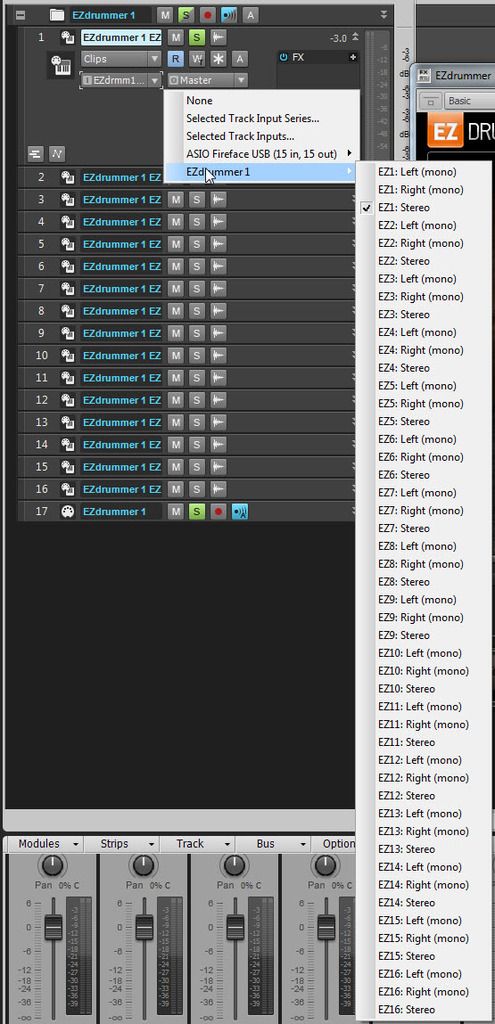
|
bapu
Max Output Level: 0 dBFS
- Total Posts : 86000
- Joined: 2006/11/25 21:23:28
- Location: Thousand Oaks, CA
- Status: offline
Re: Assigning drum parts to tracks
2015/05/08 19:53:28
(permalink)
That image starts with the I EZDrummer drop down list on the track.
|
greg54
Max Output Level: -79 dBFS
- Total Posts : 551
- Joined: 2011/01/27 18:13:52
- Status: offline
Re: Assigning drum parts to tracks
2015/05/08 20:02:46
(permalink)
They are all assigned to EZDrummer 2 Stereo.
Thanks!
Greg
Intel Core i7 4770 quad core 16 GB DDR3, 1600 MHz SDRAM 1T SSD; 2T 7200 GB HD'sWindows 10 Professional 64 bit Solid State Logic SSL2 interface Sonar Platinum
|
bapu
Max Output Level: 0 dBFS
- Total Posts : 86000
- Joined: 2006/11/25 21:23:28
- Location: Thousand Oaks, CA
- Status: offline
Re: Assigning drum parts to tracks
2015/05/08 20:06:15
(permalink)
greg54
They are all assigned to EZDrummer 2 Stereo.
Thanks!
Greg
Yup change them to match what you set in EZDrummer mixer. 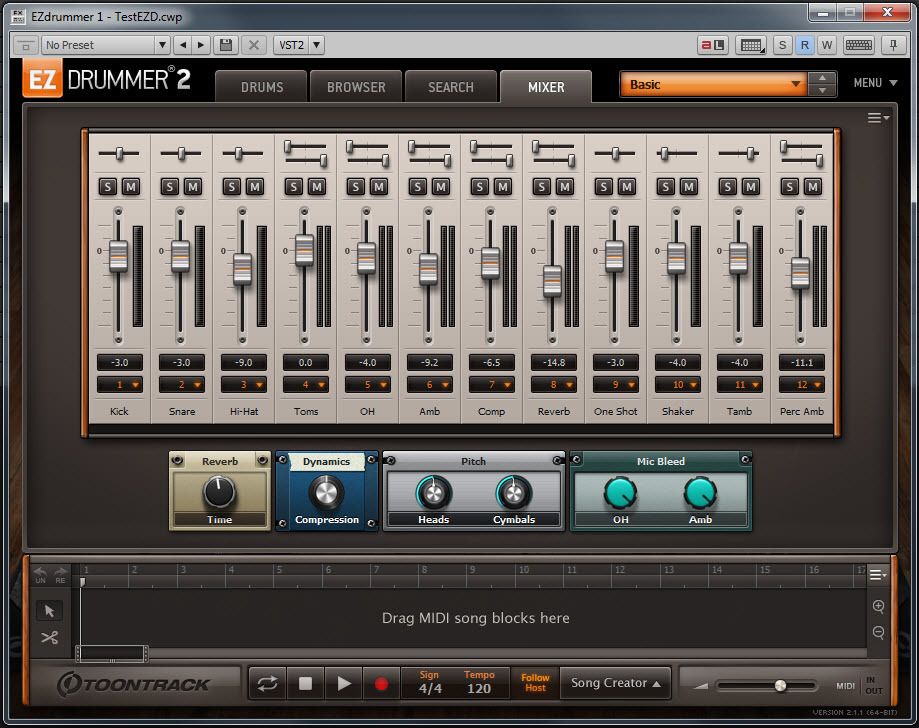
|
greg54
Max Output Level: -79 dBFS
- Total Posts : 551
- Joined: 2011/01/27 18:13:52
- Status: offline
Re: Assigning drum parts to tracks
2015/05/09 10:46:16
(permalink)
So I keep everything set to EZDrummer 2 Stereo, correct? If that's true, then the kick should be singled out on the first track . . and it's not. So I don't get what's causing all of the drums to come through the kick track. Thanks! Greg
post edited by greg54 - 2015/05/09 11:43:03
Intel Core i7 4770 quad core 16 GB DDR3, 1600 MHz SDRAM 1T SSD; 2T 7200 GB HD'sWindows 10 Professional 64 bit Solid State Logic SSL2 interface Sonar Platinum
|
bapu
Max Output Level: 0 dBFS
- Total Posts : 86000
- Joined: 2006/11/25 21:23:28
- Location: Thousand Oaks, CA
- Status: offline
Re: Assigning drum parts to tracks
2015/05/09 11:54:10
(permalink)
Your mixer can be different based on the kit you choose. Some have multiple outs for kick and snare. Some have compression some not.
Use my mixer as a "guide". If you have three kicks in EZD2 then set all 3 to out 1, Two snares? Set both to out 2.
|
greg54
Max Output Level: -79 dBFS
- Total Posts : 551
- Joined: 2011/01/27 18:13:52
- Status: offline
Re: Assigning drum parts to tracks
2015/05/09 13:40:53
(permalink)
bapu
Use my mixer as a "guide". If you have three kicks in EZD2 then set all 3 to out 1, Two snares? Set both to out 2.
Yeah, I've done that. I put all three kicks on Output 1, both snares on output 2, etc. But that still doesn't change the fact that the track in Sonar with the kick has all the drums parts coming through it. That's what I'm trying to figure out now - why it's doing that. Thanks! Greg
Intel Core i7 4770 quad core 16 GB DDR3, 1600 MHz SDRAM 1T SSD; 2T 7200 GB HD'sWindows 10 Professional 64 bit Solid State Logic SSL2 interface Sonar Platinum
|
konradh
Max Output Level: -42 dBFS
- Total Posts : 3325
- Joined: 2006/01/16 16:07:06
- Status: offline
Re: Assigning drum parts to tracks
2015/05/09 19:19:33
(permalink)
This is the problem I had recently. Kick, snare, and toms all came out on the snare track. The other tracks were fine. I actually think this is a bug.
I never had this issue in EZ Drummer 1.
Konrad Current album and more: http://www.themightykonrad.com/ Sonar X1d Producer. V-Studio 700. PC: Intel i7 CPU 3.07GHz, 12 GB RAM. Win 7 64-bit. RealGuitar, RealStrat, RealLPC, Ivory II, Vienna Symphonic, Hollywood Strings, Electr6ity, Acoustic Legends, FabFour, Scarbee Rick/J-Bass/P-Bass, Kontakt 5. NI Session Guitar. Boldersounds, Noisefirm. EZ Drummer 2. EZ Mix. Melodyne Assist. Guitar Rig 4. Tyros 2, JV-1080, Kurzweil PC2R, TC Helicon VoiceWorks+. Rode NT2a, EV RE20. Presonus Eureka. Rokit 6s.
|
greg54
Max Output Level: -79 dBFS
- Total Posts : 551
- Joined: 2011/01/27 18:13:52
- Status: offline
Re: Assigning drum parts to tracks
2015/05/09 21:58:36
(permalink)
konradh
I actually think this is a bug.
I think you may be right. Thanks! Greg
Intel Core i7 4770 quad core 16 GB DDR3, 1600 MHz SDRAM 1T SSD; 2T 7200 GB HD'sWindows 10 Professional 64 bit Solid State Logic SSL2 interface Sonar Platinum
|
greg54
Max Output Level: -79 dBFS
- Total Posts : 551
- Joined: 2011/01/27 18:13:52
- Status: offline
Re: Assigning drum parts to tracks
2015/05/21 15:30:37
(permalink)
konradh: I found the solution. Even though this video is old, it still applies to EZD2. Fast forward to about 1:13. You have to click on "Multichannel." Once I did that, everything was fine. https://www.youtube.com/watch?v=ttAPxp7Jv3g Greg
post edited by greg54 - 2015/05/21 15:37:02
Intel Core i7 4770 quad core 16 GB DDR3, 1600 MHz SDRAM 1T SSD; 2T 7200 GB HD'sWindows 10 Professional 64 bit Solid State Logic SSL2 interface Sonar Platinum
|