olemon
Max Output Level: -75 dBFS

- Total Posts : 768
- Joined: 2011/10/27 05:35:19
- Status: offline
Automation Oddities
Anyone else experience this? Is it normal? 1. A track with automation lane removed still shows ghosted nodes and the automation icon on the track strip. Notice 'Read' is off. If not, the volume fader will be automated. Isn't the '-' for Automation Lanes supposed to delete the lane, as it does for a Take Lane? 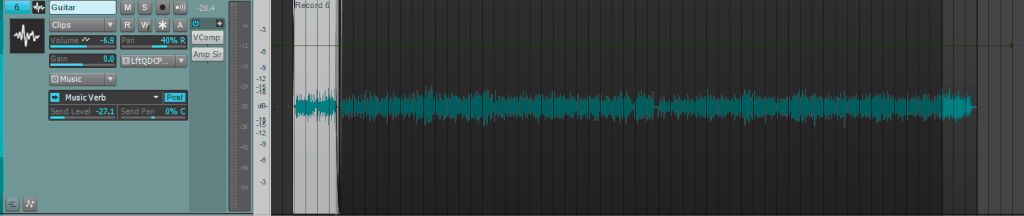 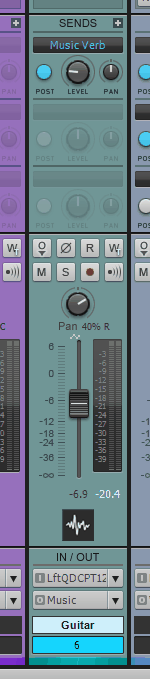 2. After creating envelopes/saving/closing, I can open that same project at some future point and find something like this. Sometimes the original automation works, but sometimes not. That extra node may be one I forgot to delete, but I've seen extra nodes in the envelopes on tracks where this has happened. 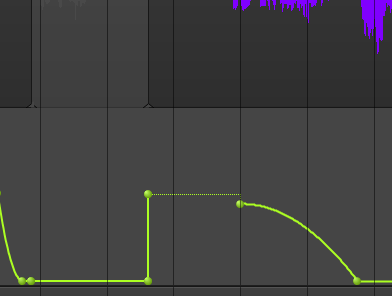
https://www.reverbnation.com/scottholson Platinum, Studio One 3 Pro, Win 10 (x64), AMD FX-8350, ASUS M5A97 R2.0, 16GB, RME UCX, Digimax DP88, Faderport 8, Revive Audio Mod Studio Channel, Vintage Audio M72, Summit Audio TLA-50, KRK Rokit 5 G2 Monitors, Guitars "If you wait till the last minute, it only takes a minute."
|
scook
Forum Host

- Total Posts : 24146
- Joined: 2005/07/27 13:43:57
- Location: TX
- Status: offline

Re: Automation Oddities
2015/05/18 14:50:12
(permalink)
Deleting an automation lane does not delete the envelop. To delete the envelop right-click the envelop and select "Delete Envelop."
|
olemon
Max Output Level: -75 dBFS
- Total Posts : 768
- Joined: 2011/10/27 05:35:19
- Status: offline
Re: Automation Oddities
2015/05/18 15:05:03
(permalink)
You have to delete every node and then delete the lane itself? I don't think the nodes actually exist in that lane anymore. I think I deleted them. Have to check.... Yeah, there are no nodes there except for the two created by default. When I add an automation lane, two nodes are created, on at each end of the...lane. I can't delete those nodes, and deleting the lane does not remove them either. It's as if once automation has been used on a track it can't be removed, I have to disable the Read button.
post edited by olemon - 2015/05/18 15:16:12
https://www.reverbnation.com/scottholson Platinum, Studio One 3 Pro, Win 10 (x64), AMD FX-8350, ASUS M5A97 R2.0, 16GB, RME UCX, Digimax DP88, Faderport 8, Revive Audio Mod Studio Channel, Vintage Audio M72, Summit Audio TLA-50, KRK Rokit 5 G2 Monitors, Guitars "If you wait till the last minute, it only takes a minute."
|
scook
Forum Host
- Total Posts : 24146
- Joined: 2005/07/27 13:43:57
- Location: TX
- Status: offline
Re: Automation Oddities
2015/05/18 15:16:52
(permalink)
☄ Helpfulby olemon 2015/05/18 15:34:04
olemon
You have to delete every node and then delete the lane itself?
No, right-click on the envelop and select "Delete Envelop."  or right-click a node and select "Delete Envelop." 
post edited by scook - 2015/05/18 15:30:13
|
olemon
Max Output Level: -75 dBFS
- Total Posts : 768
- Joined: 2011/10/27 05:35:19
- Status: offline
Re: Automation Oddities
2015/05/18 15:29:29
(permalink)
...and deleting the last envelope removes the Automation Lane. Okay. Thanks, Scook.
Any thoughts on that second issue?
https://www.reverbnation.com/scottholson Platinum, Studio One 3 Pro, Win 10 (x64), AMD FX-8350, ASUS M5A97 R2.0, 16GB, RME UCX, Digimax DP88, Faderport 8, Revive Audio Mod Studio Channel, Vintage Audio M72, Summit Audio TLA-50, KRK Rokit 5 G2 Monitors, Guitars "If you wait till the last minute, it only takes a minute."
|
scook
Forum Host
- Total Posts : 24146
- Joined: 2005/07/27 13:43:57
- Location: TX
- Status: offline
Re: Automation Oddities
2015/05/18 15:34:22
(permalink)
No, other than verify the envelop is read enabled and assigned correctly.
post edited by scook - 2015/05/18 15:40:25
|
olemon
Max Output Level: -75 dBFS
- Total Posts : 768
- Joined: 2011/10/27 05:35:19
- Status: offline
Re: Automation Oddities
2015/05/18 15:41:03
(permalink)
scook
No, other than verify the envelop is read enabled.
You mean whether Read is On or Off? It's On. There's Volume automation throughout that track that displays properly.
https://www.reverbnation.com/scottholson Platinum, Studio One 3 Pro, Win 10 (x64), AMD FX-8350, ASUS M5A97 R2.0, 16GB, RME UCX, Digimax DP88, Faderport 8, Revive Audio Mod Studio Channel, Vintage Audio M72, Summit Audio TLA-50, KRK Rokit 5 G2 Monitors, Guitars "If you wait till the last minute, it only takes a minute."
|