Markubl2
Max Output Level: -85 dBFS

- Total Posts : 299
- Joined: 2016/05/11 16:50:57
- Status: offline

Beginner Questions
Greetings,
I am very new to all of this, and just purchased Sonar as my first DAW last month. I have been doing a ton of reading, and recently purchased some of the Groove 3 videos on Sonar and Midi. I do have a few extreme basic and random questions I hope will answer for me.
1). I see there is a lot of freeware out there for grooves, samples, other snippets. For example, I just bought a Computer Music magazine for the DVD to learn about these these. Most seem to be in .sfz or .wav files (I know what .wav is, but now idea about .sfz). Now, I understand that I can manually drag one of these files into a track, but is there a place where one can put all of these where Sonar will read it "natively" (eg. browse to them within the program itself)? How does one normally use these things?
2) I have a Roland FA08 which is my primary instrument (I am a very ungifted musician, but I like playing around). I "think" I have a decent understanding of virtual instruments, and have even purchased a few (I've made the mistake of browsing the deals forum and discovering pluginboutique.com). I can get them installed and working well, but whenever I attempt to control them with my FA-08, I always hear both the VSTi and the sound of the keyboard together. I am sure I don't have something configured correctly.
3) I understand the "effects" (eq, compression, etc.) can be placed on tracks. Can these effects be place on only parts of the tracks?
4) I understand in concept the difference between mixing and mastering. I've read where some people are of the opinion that Sonar is not a good environment for mastering. I see that there are groups of "mastering plugins" (like Izotop Ozone) - are these plugins that are inported into a DAW to make it a better mastering suite? Are these plugins substantially different than what is built into Sonar?
5) Finally, are there groups of plugins that seem to be "must have"? This is way down the road for me (I've spent enough on SPLAT, keyboard, VST, Notion and Groove 3) but I'm curious to see what other people think are the "must haves." I know that NI seems to be popular, as well as some Waves bundles.
Thank you for your patience with a true beginner.
|
Bristol_Jonesey
Max Output Level: 0 dBFS

- Total Posts : 16775
- Joined: 2007/10/08 15:41:17
- Location: Bristol, UK
- Status: offline
Re: Beginner Questions
2016/08/11 09:37:06
(permalink)
The only "must haves" (for me) which are not included in Sonar are BFD, T-Racks & EWQLSO
post edited by Bristol_Jonesey - 2016/08/11 10:31:06
CbB, Platinum, 64 bit throughoutCustom built i7 3930, 32Gb RAM, 2 x 1Tb Internal HDD, 1 x 1TB system SSD (Win 7), 1 x 500Gb system SSD (Win 10), 2 x 1Tb External HDD's, Dual boot Win 7 & Win 10 64 Bit, Saffire Pro 26, ISA One, Adam P11A,
|
John
Forum Host

- Total Posts : 30467
- Joined: 2003/11/06 11:53:17
- Status: offline
Re: Beginner Questions
2016/08/11 09:44:08
(permalink)
1 Loops and other content can be put in the Cakewalk Content folder . It has subfolders that you can put various content in under to right category. Use the Browser in Sonar to access this folders.
2 Make sure local control is off on the FA.
3 Yes On every clip is an FX bin just for that.
4 I totally reject the notion that Sonar is not a good mastering environment. It certainly can be used to master a song. I use Ozone but you can do many of the things it can do with what Sonar is bundled with. However it is meant for this and ultimately easier to use.
5 You may get different answers from different people but no there no "must have" plugins.
|
AT
Max Output Level: 0 dBFS
- Total Posts : 10654
- Joined: 2004/01/09 10:42:46
- Location: TeXaS
- Status: offline
Re: Beginner Questions
2016/08/11 10:19:34
(permalink)
The usual suspects have covered most everything. My advice is just to take some time and experiment before you rush into recording and having it sound "professional." If you play an instrument, you didn't pick it up (or sit down to it if you are a piano player) and sound like Jerry Lee Lewis - or Chopin. Recording is the same way and there is a whole list of things that need to be mastered - tracking w/ mic, tracking with soft synths, editing, mixing, etc. et al. Hang on and try to have some fun before you start writing the great American novel - it ain't going to sound like Huckleberry Finn right out the gates.
There should be some good material in the Cakewalk Contents to start with. Use your browser to preview and then load those clips. There is audio and midi, of which the later you can use w/ a softsynth.
Mixing is, basically, adjusting the different volume levels of your tracks so they blend together naturally. There are a lot of other tricks, too, like reverb, comps and EQ Again, etc. et al.
Mastering is taking that MIX of a song and making it sound natural in comparison with the other songs on the collection. In the vinyl days you had to restrict the loudness and bandwidth of frequencies of taped music before you could cut albums. The mastering engineers learned tricks to make the sound and as loud and even as possible. Today, that is one of the main functions of mastering. SONAR is fine mastering jobs, but many of us use a stereo program to master, which has some ease of use advantages. But, of course, Sound Forge and the like don't handle many DAW functions. You don't need SF or other such programs to master.
Hope that helps and keep asking questions. There are stupid questions, but you won't know them until you ask. That's how I learned.
@
https://soundcloud.com/a-pleasure-dome
http://www.bnoir-film.com/ there came forth little children out of the city, and mocked him, and said unto him, Go up, thou bald head; go up, thou bald head. 24 And he turned back, and looked on them, and cursed them in the name of the Lord. And there came forth two she bears out of the wood, and tare forty and two children of them.
|
John
Forum Host
- Total Posts : 30467
- Joined: 2003/11/06 11:53:17
- Status: offline
Re: Beginner Questions
2016/08/11 10:33:28
(permalink)
When did we become criminals? "The usual suspects", indeed. 
|
bvideo
Max Output Level: -58 dBFS

- Total Posts : 1707
- Joined: 2006/09/02 22:20:02
- Status: offline
Re: Beginner Questions
2016/08/11 10:39:21
(permalink)
Expanding on what John said: 1. putting loops into the content folder makes them easily findable by Sonar's built-in browser. You can further organize them into subfolders for your own convenience. 2. There is a setting in Sonar that should automatically set your keyboard into "local control off" (see below). Your FA08 will send and respond to Sonar, but will not sound the notes you are performing your keyboard. When you do want to hear your playing on then keyboard, you set up a track with "echo" on so that Sonar sends incoming MIDI back to the keyboard. 3. If your tracks are made with separate clips, then the clip FX bin will work. Otherwise, look into automation. That will allow you to vary any parameters of effects and other parameters of a track. 4. & 5. ... fully agree Local Control (from "help")
To automatically disable all local control whenever you launch SONAR
1. In the directory where SONAR is installed, double-click on the TTSseq.ini file to open it.
2. In the [Options] section, add the line:
SendLocalOff=1
3. Save the file and close it.
4. When you launch SONAR, it automatically sends a Local Off message to your keyboard.
Note: Not all keyboards respond to Local Off messages.
W10 pro, Sonar Platinum, Alesis Multimix 16 FW, MOTU Express 128, Gigabyte Z370 HD3P, i7 8700K, 16 Gigs, ssd + 2 X 2T disks, D50-MEX, JV80, A90EX, M1REX
|
bitflipper
01100010 01101001 01110100 01100110 01101100 01101
- Total Posts : 26036
- Joined: 2006/09/17 11:23:23
- Location: Everett, WA USA
- Status: offline
Re: Beginner Questions
2016/08/11 11:30:58
(permalink)
Good answers so far, so I'll just try to fill in a few blanks...
1. sfz files contain one or more wave files plus metadata that describes them. Think of them as "smart" wave files. To use them properly you need an sfz player. Fortunately, SONAR comes with more than one. Dimension Pro is a particularly sophisticated sfz player.
2. A keyboard instrument such as the FA08 has two sections, a MIDI controller and a tone generator. Normally, when you play the instrument you're connecting the MIDI controller (keyboard) internally to the tone generator. However, it is possible to disconnect them from one another and use them independently. The MIDI output can drive another keyboard or a virtual instrument in your DAW. The DAW can also control the tone generator separately, independent of the keyboard.
The easiest way to use the Roland as just a MIDI controller and not hear its internal sounds is to simply turn the master volume down on the FA08. All you need for the virtual instrument is the MIDI output, not the audio.
If you want to use the FAO8's sounds in addition to your computer-based virtual instruments, then you'll want to assign different MIDI channels to each. Internal sounds are typically assigned to channel 1, and the keyboard normally sends MIDI data over channel 1. However, by assigning your virtual instrument to, say, channel 2 and instructing the FA08 to send MIDI data on channel 2, now the MIDI data from the keyboard is ignored by the internal tone generator and only the virtual instrument will respond to what you're playing on the keyboard.
3. Yes, effects can be applied to parts of a track or to the whole track. There are two ways to do this: clip effects and automation.
A track consists of one or more audio clips, and each one of those clips can have its own effects bin. This method works well when one clip needs special processing the other clips do not need. More common, and more convenient, is effect automation. With automation, you can create a graph that controls any parameter you like (e.g. wet/dry mix). It's a very, very powerful mix tool.
4. SONAR provides everything you need for mastering. However, many users prefer third-party tools, with Ozone being perhaps the most popular among them. My advice would be to learn the built-in tools first and then decide whether or not you need to invest in Ozone.
5. "Must-have" is an entirely personal opinion, and depends on your needs. Many of us consider Kontakt a must-have, while others could not care less about it. I'd really hate to lose Ozone, but is it a "must-have"? Not really. In truth, I cannot think of anything that's a literal prerequisite to making records beyond what SONAR gives you.
 All else is in doubt, so this is the truth I cling to. My Stuff
|
jude77
Max Output Level: -68 dBFS

- Total Posts : 1146
- Joined: 2013/08/27 21:31:34
- Location: South Saturn Delta
- Status: offline
Re: Beginner Questions
2016/08/11 11:36:51
(permalink)
First, welcome to SONAR and the forum. You'll find that the guys here can answer almost any question you have.
The only thing I could add to the posts above would be to describe how I add FX to only part of a track (keeping in mind there are going to be better ways to do it, but I don't know them).
First, I split the track at the places I want the effect to start and end (use the edit tool which is up on the left part of your screen and looks like a wrench. Click on it then press F8 until the scissors appear, then click the scissors on the left and right part of the section of the track that you want to add the effect to). Then right click the spilt section and you will see a drop down menu that includes "add audio effect". Add the ones you want and there you go!
As for what plugins are indispensable? The only one I use constantly is Kontakt, though I guess it's more of a sampler/vsti rather than a plugin per se.
Best of luck with your music!!
You haven't lived until you've taken the Rorschach. Windows 10 Home Edition 64-bit /6th Generation Intel(R) Core(TM) i7-6700 Processor (8M Cache, up to 4.0 GHz)/16GB (1x16GB) DDR4 2133MHz SDRAM Memory/ NVIDIA(R) GeForce(R) GT 730 with 2GB DDR3 Graphics Memory/ Dell KB216 Wired Multi-Media Keyboard English Black/ 802.11ac + Bluetooth 4.0/Integrated 7.1 with WAVE MAXXAudio Pro/Wireless 3165 driver
|
Markubl2
Max Output Level: -85 dBFS
- Total Posts : 299
- Joined: 2016/05/11 16:50:57
- Status: offline
Re: Beginner Questions
2016/08/14 13:53:49
(permalink)
Thank you all for the help. I have one follow up question - I don't believe the Sonar has a built in Midi Monitor (something where you can see the rolling text of midi messages). Can someone recommend a good freeware alternative?
|
jude77
Max Output Level: -68 dBFS
- Total Posts : 1146
- Joined: 2013/08/27 21:31:34
- Location: South Saturn Delta
- Status: offline
Re: Beginner Questions
2016/08/14 14:59:06
(permalink)
The "Event List" in SONAR might do what you're looking for. To access it go to "views" then "event list" or "Alt+8".
You haven't lived until you've taken the Rorschach. Windows 10 Home Edition 64-bit /6th Generation Intel(R) Core(TM) i7-6700 Processor (8M Cache, up to 4.0 GHz)/16GB (1x16GB) DDR4 2133MHz SDRAM Memory/ NVIDIA(R) GeForce(R) GT 730 with 2GB DDR3 Graphics Memory/ Dell KB216 Wired Multi-Media Keyboard English Black/ 802.11ac + Bluetooth 4.0/Integrated 7.1 with WAVE MAXXAudio Pro/Wireless 3165 driver
|
Marshall
Max Output Level: -78 dBFS

- Total Posts : 602
- Joined: 2007/06/14 04:28:16
- Location: Alicante, Spain
- Status: offline
Re: Beginner Questions
2016/08/14 16:32:53
(permalink)
If you want to add convincing keyboard parts but are more of a guitarist at heart, then EZKeys is a good addition. But really, Sonar has so many great toys to learn before you buy additional stuff.
|
Markubl2
Max Output Level: -85 dBFS
- Total Posts : 299
- Joined: 2016/05/11 16:50:57
- Status: offline
Re: Beginner Questions
2016/08/14 18:20:48
(permalink)
jude77
The "Event List" in SONAR might do what you're looking for. To access it go to "views" then "event list" or "Alt+8".
That looks like it might be it, but it does not show any midi data when I play a Vsti.
|
chuckebaby
Max Output Level: 0 dBFS
- Total Posts : 13146
- Joined: 2011/01/04 14:55:28
- Status: offline
Re: Beginner Questions
2016/08/14 19:44:49
(permalink)
are you by any chance maybe thinking of the Piano Roll View ? 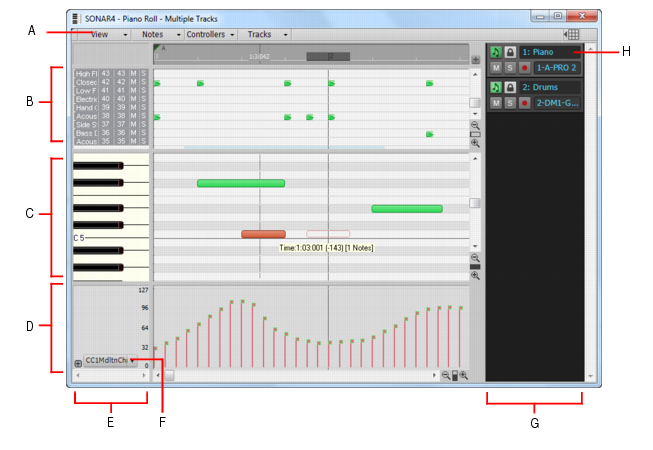
Windows 8.1 X64 Sonar Platinum x64 Custom built: Asrock z97 1150 - Intel I7 4790k - 16GB corsair DDR3 1600 - PNY SSD 220GBFocusrite Saffire 18I8 - Mackie Control
|
Markubl2
Max Output Level: -85 dBFS
- Total Posts : 299
- Joined: 2016/05/11 16:50:57
- Status: offline
Re: Beginner Questions
2016/08/14 21:38:08
(permalink)
|
Bristol_Jonesey
Max Output Level: 0 dBFS
- Total Posts : 16775
- Joined: 2007/10/08 15:41:17
- Location: Bristol, UK
- Status: offline
Re: Beginner Questions
2016/08/15 04:46:04
(permalink)
husker
jude77
The "Event List" in SONAR might do what you're looking for. To access it go to "views" then "event list" or "Alt+8".
That looks like it might be it, but it does not show any midi data when I play a Vsti.
It will show any events you have already recorded on a track. Be sure you have the correct track selected in the Event View
CbB, Platinum, 64 bit throughoutCustom built i7 3930, 32Gb RAM, 2 x 1Tb Internal HDD, 1 x 1TB system SSD (Win 7), 1 x 500Gb system SSD (Win 10), 2 x 1Tb External HDD's, Dual boot Win 7 & Win 10 64 Bit, Saffire Pro 26, ISA One, Adam P11A,
|
tlw
Max Output Level: -49.5 dBFS

- Total Posts : 2567
- Joined: 2008/10/11 22:06:32
- Location: West Midlands, UK
- Status: offline
Re: Beginner Questions
2016/08/15 07:31:33
(permalink)
Sonar Platinum 64bit, Windows 8.1 Pro 64bit, I7 3770K Ivybridge, 16GB Ram, Gigabyte Z77-D3H m/board, ATI 7750 graphics+ 1GB RAM, 2xIntel 520 series 220GB SSDs, 1 TB Samsung F3 + 1 TB WD HDDs, Seasonic fanless 460W psu, RME Fireface UFX, Focusrite Octopre. Assorted real synths, guitars, mandolins, diatonic accordions, percussion, fx and other stuff.
|
bitflipper
01100010 01101001 01110100 01100110 01101100 01101
- Total Posts : 26036
- Joined: 2006/09/17 11:23:23
- Location: Everett, WA USA
- Status: offline
Re: Beginner Questions
2016/08/15 11:49:46
(permalink)
All else is in doubt, so this is the truth I cling to. My Stuff
|
konradh
Max Output Level: -42 dBFS

- Total Posts : 3325
- Joined: 2006/01/16 16:07:06
- Status: offline
Re: Beginner Questions
2016/08/15 14:33:30
(permalink)
Are you sure you want local control off? If you do that, the keyboard will not do anything and you won't be able to send MIDI to Sonar.
I think you just want to (1) turn the volume down or off on the Roland or (2) mute the track that is receiving the audio from the Roland. (Of course, you don't have to have a track for the Roland audio if you only want to use the virtual instrument.)
I use external keyboards a lot. I used to use a synth to play the notes I wanted, but lately, I use a controller keyboard that doesn't make any sound, if which case LOCAL OFF is fine for the synth.
You can add an effect to just a clip within a track, but I find it easier just to turn the effect off and on using automation. Turn WRITE ON for the track, play the track, and then click the power button on the effect off and on as desired in the effects bin (or in the Pro Channel). You can see these ONs and OFFs and automation events and move them around later if you want. That takes more explanation so I will wait to see if you need help with that.
For MUST HAVES, I can't live without RealGuitar, Ivory Grands, and my Vienna Orchestra--but it all depends on what kind of music you do and how much you want to spend. If you don't really know how to arrange for orchestras, Vienna would cost more than you'd want to spend. ***The full version of Kontack will pay you back what you spend 100 times because 1-you will get most virtual instruments you will need bundled with it (except for something like RealGuitar) and 2-with the full player, you will find a whole world of free or very inexpensive VIs.***
For effects plug-ins, I am usually happy with what came with Sonar although I do use GuitarRig a lot, and I really like Abbey Road's ADT (Automatic Double Track). Guitar Rig gets a lot of use. ADT is super cool, but more for special situations. I just used it to create an awesome fake double-tracked 60s-sounding flute solo in a rock song. The solo on my record was a complex, but I had fun playing Swinging Safari on the ADT flute because of the retro sound. I could almost see Marcia Brady coming up the walk.
Konrad Current album and more: http://www.themightykonrad.com/ Sonar X1d Producer. V-Studio 700. PC: Intel i7 CPU 3.07GHz, 12 GB RAM. Win 7 64-bit. RealGuitar, RealStrat, RealLPC, Ivory II, Vienna Symphonic, Hollywood Strings, Electr6ity, Acoustic Legends, FabFour, Scarbee Rick/J-Bass/P-Bass, Kontakt 5. NI Session Guitar. Boldersounds, Noisefirm. EZ Drummer 2. EZ Mix. Melodyne Assist. Guitar Rig 4. Tyros 2, JV-1080, Kurzweil PC2R, TC Helicon VoiceWorks+. Rode NT2a, EV RE20. Presonus Eureka. Rokit 6s.
|
tlw
Max Output Level: -49.5 dBFS
- Total Posts : 2567
- Joined: 2008/10/11 22:06:32
- Location: West Midlands, UK
- Status: offline
Re: Beginner Questions
2016/08/15 19:22:41
(permalink)
konradh
Are you sure you want local control off? If you do that, the keyboard will not do anything and you won't be able to send MIDI to Sonar. I've several MIDI-equipped keyboard synths and when using them with a DAW I always set them to local off. The keyboards still produce MIDI output and the synth side still responds to MIDI. I set up a MIDI track with the synth as input and output and enable echo on the track. The DAW then receives the MIDI, records it and spits it back out to the synth. Which means I can then edit the MIDI if required or mix "live" playing with sequenced stuff. If left set to local on then if the MIDI is being recorded in the DAW the synth triggers the note twice. Once when it receives the MIDI from the keyboard and again a few milliseconds later when it receives the MIDI being echoed from the DAW. While turning off MIDI echo while recording can prevent this happening it's just simpler to set the synth to local off. One exception in my setup is the Dark Time sequencer which responds to incoming MIDI in a way that makes letting it's output be echoed backmto it is a non-starter - it changes the sequence pitch when it receives incoming MIDI notes which is great when you want that to happen, but it happening every sixteenth note or whatever the clock speed is set to is generally less than musical. Which means, as a plus point, the synth's keyboard and wheels can also be used as a controller keyboard for other hardware and software synths. Usefull if you've a mix of hardware, maybe including rack or tabletop modules without dedicated keyboards, and software sound generators.
Sonar Platinum 64bit, Windows 8.1 Pro 64bit, I7 3770K Ivybridge, 16GB Ram, Gigabyte Z77-D3H m/board, ATI 7750 graphics+ 1GB RAM, 2xIntel 520 series 220GB SSDs, 1 TB Samsung F3 + 1 TB WD HDDs, Seasonic fanless 460W psu, RME Fireface UFX, Focusrite Octopre. Assorted real synths, guitars, mandolins, diatonic accordions, percussion, fx and other stuff.
|
Markubl2
Max Output Level: -85 dBFS
- Total Posts : 299
- Joined: 2016/05/11 16:50:57
- Status: offline
Re: Beginner Questions
2016/08/15 19:47:49
(permalink)
Thank you all for the replies.
Midi OX was exactly what I was looking for, thank you. I have been going through the Groove 3 Midi videos, and it is interesting for me to follow along in my own environment.
Setting local off did the trick, turning the keyboard volume down just muted everything for me. I'm sure it is just the way I have everything hooked up right now. I don't know much about Sonar, the tracks, or inputs yet. I am brand new to all of this, once I finish with the Midi videos, I'm going to delve into Sonar. I'll be much better versed in asking questions when I learn a bit more about DAWs.
Problem is (for me) that I just love to play around too much.
Thank you all for your replies.
|
mrpippy2
Max Output Level: -86 dBFS

- Total Posts : 222
- Joined: 2008/10/03 20:54:06
- Status: offline
Re: Beginner Questions
2016/08/16 11:08:22
(permalink)
Seen a mention or 2 about Kontakt in this thread. FWIW, I just saw that Komplete 10, which includes Kontakt and MUCH more, is now selling for $199 since Native Instruments just announced the upcoming release of Komplete 11. Unfortunately, I just paid $399 since I bought it 4 days before the announcement and subsequent price drop. Bummer. :(
Having just promoted Komplete, I'd also suggest not becoming a "collector" of plugins. In other words, really learn and master a few of them, then decide if you need others that do something that the ones you've mastered can't do. I know I have redundant plugins that I didn't need to acquire, as something I already had could have done the same thing had I just taken the time to really learn that plugin. Easier said than done, obviously.
Sweetwater Creation Station 250, QuadCore, i5 3.4 Ghz, 2x1TB HD, 16GB RAM, Windows 10 64 bit, Sonar Platinum 64 bit, Focusrite 2i2
|