kmcintyre
Max Output Level: -88 dBFS

- Total Posts : 118
- Joined: 2004/01/24 03:53:08
- Status: offline
Best way to mix with Kontact?
So I'm using an instance of Kontact with 6 midi tracks feeding 6 instruments in a multi. Seemed like a right move, except now when I go to mix my song, the midi tracks can't really be mixed with the Sonar volume faders because they only trim midi note velocity.
I can Midi Learn the Kontact instrument volume controls to sliders on my MPK88 controller, but that doesn't really help me mix using the Sonar console.
What I'd like to do is map the Sonar midi track volume slider(s) to the associated Kontack instrument's volume slider. So I can adjust volume all in the Sonar console view. But I don't know how to do that...
What's the best way to deal with this?
Thanks!
|
AT
Max Output Level: 0 dBFS

- Total Posts : 10654
- Joined: 2004/01/09 10:42:46
- Location: TeXaS
- Status: offline

Re: Best way to mix with Kontact?
2016/06/30 01:22:42
(permalink)
change the tracks to audio (freeze) and fader away.
https://soundcloud.com/a-pleasure-dome
http://www.bnoir-film.com/ there came forth little children out of the city, and mocked him, and said unto him, Go up, thou bald head; go up, thou bald head. 24 And he turned back, and looked on them, and cursed them in the name of the Lord. And there came forth two she bears out of the wood, and tare forty and two children of them.
|
kmcintyre
Max Output Level: -88 dBFS
- Total Posts : 118
- Joined: 2004/01/24 03:53:08
- Status: offline
Re: Best way to mix with Kontact?
2016/06/30 13:48:22
(permalink)
Thanks for the response! So I clicked the freeze button and waited for Sonar to render the clip. But the track still shows MIDI notes, and the volume slider still doesn't adjust the volume. (In fact, the volume slider does nothing since the clip is frozen.)
I could bounce to track and create a new audio track for each Kontact instrument. (That might be my best path...)
I could create separate instances of Kontact and convert the midi tracks to instrument tracks. (If I had a lot of editing left to do on the midi I'd probably pick this route...)
My lesson learned is to use instrument tracks from the start and eat the cpu/mem costs of the separate Kontact instances. I think the biggest hit is sample data, and I take that hit regardless of have 1 or 6 instances of Kontact.
Please correct me if I'm missing something.
Thanks!
|
robert_e_bone
Moderator

- Total Posts : 8968
- Joined: 2007/12/26 22:09:28
- Location: Palatine, IL
- Status: offline
Re: Best way to mix with Kontact?
2016/06/30 14:46:29
(permalink)
☄ Helpfulby Thedoccal 2016/07/04 09:01:17
Sorry - I am a bit confused. It sounds like you are trying to mix the midi levels using the midi faders instead of the audio track faders.
1. Do you have each instrument in the Kontakt instance routed to its own Kontakt audio output channels?
2. Do you then have separate audio tracks inserted into your Sonar project and routed to pick up the separated output from each corresponding instrument's audio output from the Kontakt instance? (so that rather than all the instruments in the Kontakt instance using ST1 for audio output, there is one stereo output in the Kontakt instance for each instrument in the instance - ST1 ST2 ST3, etc., and separate audio tracks in the project assigned to each of the separate outputs for each instrument from the Kontakt instance?)
3. OR, are all your instruments in the Kontakt instance sharing a single ST1 audio output, and then you are attempting to control volume using the midi track faders for each of the instruments?
For MY projects, I load up 5-6 instruments into a single Kontakt instance, then I:
1. Go into the Instrument settings for each instrument in the instance (using the wrench icon for each of the instruments and then clicking on Instrument to get to those settings), and once there I make sure that there I remove the check for the parameter that is labelled something like Accept Standard CC 7 and CC 11 volume.... (or something like that I don't have Kontakt open at the moment).
2. Make sure the Output Section is open (there is a button at the top of the Kontakt instance for this), which opens up Kontakt's audio output channels, then click on the Batch Functions and click on the one that says something like 'Delete all output assignments and create one output channel for each loaded instrument'. Doing this gives each loaded instrument a separate stereo output channel from the Kontakt instance. (I also then rename each of the outputs to something shorter than what Kontakt names them - it tries to mash the preset name to be that output channel's name, and I prefer shorter names, like Piano, Organ, Violin, etc)
3. Insert a midi track for each loaded instrument (sounds like you have this done already), and set the output to go to the proper Kontakt instance. (I may havee 3-4 or more instances). I also then set the Midi output channel for each midi track to the correct midi channel assigned to each instrument in the instance. The midi output channel is set in each midi track, just below the FX Bin.
4. Insert a single stereo audio track or a left and right mono track, for each of the loaded instruments from the instance, and set the input for each track to the appropriate audio output from the instrument's output channel from the Kontakt instance. Because I renamed my output channels in the Kontakt instance, these are much easier to read in the drop-down presentation of outputs to pick from when assigning the audio track inputs.
5. Now, I control all volumes for all of the instruments from the Kontakt instance through a combination of the instrument's output from the Kontakt instance, the Gain knob for the audio track(s) for that instrument, and I generally set everything initially so that all instruments run at around -18 dB, and I leave the audio track faders at unity.
6. Once I begin mixing, I only have to adjust the faders for each track - or possibly also the Gain, but I NEVER have to mess with the midi faders whatsoever.
So - please run through how you are set up and how you are attempting to control things - THANKS. :)
Bob Bone
Wisdom is a giant accumulation of "DOH!" Sonar: Platinum (x64), X3 (x64) Audio Interfaces: AudioBox 1818VSL, Steinberg UR-22 Computers: 1) i7-2600 k, 32 GB RAM, Windows 8.1 Pro x64 & 2) AMD A-10 7850 32 GB RAM Windows 10 Pro x64 Soft Synths: NI Komplete 8 Ultimate, Arturia V Collection, many others MIDI Controllers: M-Audio Axiom Pro 61, Keystation 88es Settings: 24-Bit, Sample Rate 48k, ASIO Buffer Size 128, Total Round Trip Latency 9.7 ms
|
kmcintyre
Max Output Level: -88 dBFS
- Total Posts : 118
- Joined: 2004/01/24 03:53:08
- Status: offline
Re: Best way to mix with Kontact?
2016/07/02 12:00:10
(permalink)
Bob,
Thanks for that great tutorial!
I was using one st1.1 output from Kontakt for all instruments. The way I got around it (not recommending this) was to mute all but one instrument, freeze that instrument, create an audio track named for that instrument, ctrl+shift drag the generated audio from Kontakt to the audio track, then repeating for all instruments. Then I mixed the resultant audio tracks. Of course I can't change the MIDI without repeating the mute/freeze/copy process...
Next time I think I'll just use 6 instances of Kontakt on 6 instrument tracks. Once I figure out the shortfalls of that approach I'll probably end following your tutorial... (Cuz I'm a slow learner! lol)
Cheers!
|
John
Forum Host

- Total Posts : 30467
- Joined: 2003/11/06 11:53:17
- Status: offline
Re: Best way to mix with Kontact?
2016/07/02 12:57:56
(permalink)
☄ Helpfulby chuckebaby 2016/07/02 13:57:58
You do know that Kontakt can send audio to separate audio outs, an out for each instrument, right?
|
robert_e_bone
Moderator
- Total Posts : 8968
- Joined: 2007/12/26 22:09:28
- Location: Palatine, IL
- Status: offline
Re: Best way to mix with Kontact?
2016/07/02 22:07:04
(permalink)
☄ Helpfulby 200bpm 2016/07/04 10:20:05
I recommend you do NOT use 1 separate instance of Kontakt for each instrument you plan to use in the project that uses Kontakt, but that instead, you take a closer look at my earlier post.
I ROUTINELY use one or more instance of Kontakt in my projects, BUT, each Kontakt instance will contain up to 5-6 loaded instruments, EACH instrument being set to have its own separate stereo output channel in Kontakt (again, look at my post again - slowly, and ask questions if you need to), AND I COMPLETELY control volume and added effects and panning and everything for EACH of those instruments with separate Sonar audio tracks and a separate Sonar midi track for each of the instruments from that single instance of Kontakt.
Again, PLEASE PLEASE PLEASE take another really good look at what I posted, and please please please post as many questions as you need to about how to actually do what I do, until you too are able to control the audio and midi of 5-6 instruments for a single Kontakt instance.
I PROMISE you, I will stay up late and get up early to try to help you to understand how to do this, and once you get it, you will be VERY much more happier than you could possibly be with all the work you are going through to try to get to the same place that I get to in just a couple of minutes per instance.
OK? So, IF you go back and read my post again, and try it out for yourself, AND post back as many times as you need to, with as many questions as you need to ask, even if they are repeats of questions already asked, I will then PROMISE to take whatever time that is needed to respond to each of your questions, and will work with you for as long as it takes you to 'get' doing this.
Deal? :)
Bob Bone
Wisdom is a giant accumulation of "DOH!" Sonar: Platinum (x64), X3 (x64) Audio Interfaces: AudioBox 1818VSL, Steinberg UR-22 Computers: 1) i7-2600 k, 32 GB RAM, Windows 8.1 Pro x64 & 2) AMD A-10 7850 32 GB RAM Windows 10 Pro x64 Soft Synths: NI Komplete 8 Ultimate, Arturia V Collection, many others MIDI Controllers: M-Audio Axiom Pro 61, Keystation 88es Settings: 24-Bit, Sample Rate 48k, ASIO Buffer Size 128, Total Round Trip Latency 9.7 ms
|
tenfoot
Max Output Level: -53.5 dBFS

- Total Posts : 2186
- Joined: 2015/01/22 18:12:07
- Location: Qld, Australia
- Status: offline
Re: Best way to mix with Kontact?
2016/07/03 02:40:22
(permalink)
FWIW I haven't found any disadvantage in running a separate instance of Kontakt for each instrument. I have found little to no performance difference and am able to have a separate track template for each of my goto sounds.
Bruce. Sonar Platinum 2017-09, Studio One 3.5.3, Win 10 x64, Quad core i7, RME Fireface, Behringer X32 Producer, Behringer X32 Rack, Presonus Faderport, Lemure Software Controller (Android), Enttec DMXIS VST lighting controller, Xtempo POK.
|
Sanderxpander
Max Output Level: -36.5 dBFS

- Total Posts : 3873
- Joined: 2013/09/30 10:08:24
- Status: offline
Re: Best way to mix with Kontact?
2016/07/03 03:24:43
(permalink)
Same here, I find it way easier to deal with, even though one multi out instance is the "correct" way to go.
|
robert_e_bone
Moderator
- Total Posts : 8968
- Joined: 2007/12/26 22:09:28
- Location: Palatine, IL
- Status: offline
Re: Best way to mix with Kontact?
2016/07/03 22:42:29
(permalink)
Certainly loading up a bunch of single instrument instances of Kontakt is pretty simple, but the OP had specifically indicated the following (copy/paste from initial post of this thread):
"What I'd like to do is map the Sonar midi track volume slider(s) to the associated Kontack instrument's volume slider. So I can adjust volume all in the Sonar console view. But I don't know how to do that...
What's the best way to deal with this?"
Sooo, that is why I offered the explanation, as well as the offer to work with him to show him how to set up a single Kontakt instance with multiple loaded instruments, with each instrument having its own separate audio channel output from that Kontakt instance, and then get the Sonar audio and midi tracks created and configured properly to pick up the audio output and get it sent to the appropriate audio tracks, as well as get the midi tracks setup and configured to send data on the correct midi channel for each of the loaded instruments, thus giving him what he had asked for in the initial post.
My offer remains, for the original poster, or for anyone else trying to figure out how to do the above successfully.
Bob Bone
Wisdom is a giant accumulation of "DOH!" Sonar: Platinum (x64), X3 (x64) Audio Interfaces: AudioBox 1818VSL, Steinberg UR-22 Computers: 1) i7-2600 k, 32 GB RAM, Windows 8.1 Pro x64 & 2) AMD A-10 7850 32 GB RAM Windows 10 Pro x64 Soft Synths: NI Komplete 8 Ultimate, Arturia V Collection, many others MIDI Controllers: M-Audio Axiom Pro 61, Keystation 88es Settings: 24-Bit, Sample Rate 48k, ASIO Buffer Size 128, Total Round Trip Latency 9.7 ms
|
sonarman1
Max Output Level: -85 dBFS

- Total Posts : 255
- Joined: 2016/02/22 11:26:16
- Status: offline
Re: Best way to mix with Kontact?
2016/07/04 02:23:31
(permalink)
☄ Helpfulby robert_e_bone 2016/07/04 10:14:55
Ha its all might look a lot complicated to route and get it right. Specially with kontact than anyother multitimbral vst's. Once you do it its fairly simple . I will tell you what  . I have a track template perfectly routed with 8midi tracks and 8 audio tracks. All put together in a folder. I just load it and load any instruments inside kontact and set the output of each instrument. Its all done in a min. If I need only 4 instruments then I just hve to delete OR archieve and hide the other 4 audio and midi tracks  I can send you the synth template. But not sure if it will work just like that.
post edited by sonarman1 - 2016/07/04 02:44:51
|
Sanderxpander
Max Output Level: -36.5 dBFS
- Total Posts : 3873
- Joined: 2013/09/30 10:08:24
- Status: offline
Re: Best way to mix with Kontact?
2016/07/04 04:00:38
(permalink)
☄ Helpfulby robert_e_bone 2016/07/04 12:10:47
I think using one instance per instrument is just a simpler way to achieve what I think the OP really wants - individual volume sliders in Sonar. I realize this isn't EXACTLY what he stated but often enough people will get stuck on thinking they need a certain solution when thinking about the problem another way is all that's needed. Happens to me all the time, at least.
|
Thedoccal
Max Output Level: -85 dBFS
- Total Posts : 290
- Joined: 2014/10/12 16:43:08
- Location: Joshua Tree, CA
- Status: offline
Re: Best way to mix with Kontact?
2016/07/04 08:35:09
(permalink)
Bob I'm going to try your method next time I open and use Kontakt. I get what you are saying and think you are onto something there. Multis can contain many layers, and I thought I had to mix them all in Kontakt, but each multi layer can be routed to Sonar in it's own track. Brilliant.
http://www.catastrophelounge.comThe NeckDive Strap - NEW^^Sonar: Platinum Lifetime/Computer: i7-870, 16GB RAM, AMD R9 380 graphics, Windows 10 (Pro x64)/500gb SSD C:, Barracuda sample(3T) and projects(1T) drives/3 Display Monitors (2&3 split)/Audio Interface: Behringer UFX1604 USB/Firewire/USB Stick/MIDI: Roland A-800Pro, Keystation Pro 88, Roland UM-3G:/Hardware Synths: Korg M3, Yamaha MOX6, Roland TD-8
|
robert_e_bone
Moderator
- Total Posts : 8968
- Joined: 2007/12/26 22:09:28
- Location: Palatine, IL
- Status: offline
Re: Best way to mix with Kontact?
2016/07/04 10:25:09
(permalink)
☄ Helpfulby Thedoccal 2016/07/04 11:01:43
There are indeed usually multiple ways to accomplish things in Sonar, and life in general, so my vote is to do what works for the person at the controls.
I too sometimes will reuse a Kontakt multi-instrument instance, and just swap out the instruments, but really I most of the time just create a new instance with exactly what I am looking to use, each time.
Setting one of these up is really harder to type up in a post than it is to actually build, particularly once you have done it a handful of times. In steps, you are essentially only doing the following:
1. Insert an instance of Kontakt (I usually pick the dll with the 16 outputs)
2. Load up the desired instruments for that instance
3. Click on the Batch Function in the Output Section that clears out the audio channels and creates a new audio output channel for each loaded instrument. (It does it all for you)
The 3 simple steps above are all you need to do to set up the Kontakt instance. I happen to also take a minute to rename each output channel to something shorter like: Piano, Bass, Violin, Piano. THAT is not required - I just like it for readability.
Once the Kontakt instance is loaded, I do the following handful of steps to get the audio tracks and the midi tracks inserted and configured:
1) Insert 1 stereo or 2 mono audio tracks for each instrument in the Kontakt instance. I usually use a mono Left and Right track for keyboard instruments, as I will usually also have one of the 2 tracks slightly delayed.
2) Set each audio track's Input to the corresponding Output Channel from the loaded instrument from the Kontakt instance.
3) IF using a left and right mono track for a given instrument, set initial panning for left and right.
4) IF any audio track(s) is going to go to a bus other than the master bus, set the Output for the track(s) to whatever bus you want it to go to.
The above are the simple steps for the audio tracks to go to each loaded instrument in the Kontakt instance.
For the midi tracks:
1) Insert a midi track for each loaded instrument in the Kontakt instance.
2) Set Output for each midi track to the corresponding instrument in the Kontakt instance.
3) Set the Midi Output Channel for each midi track to the appropriate midi channel Kontakt automatically assigned when each instrument was loaded into the instance. (Midi Output Channel is found in each midi track, right under the FX Bin.
The steps above are all that are needed to get the midi tracks connected to the loaded instruments in the given Kontakt instance.
Doing the above steps takes VERY little time.
While the above gets the instance created, and all the tracks inserted and routed as needed, I ALSO then will set each instrument's gain to an initial value of around -18 dB. I do this with a combination of playing a few notes for each instrument (the default velocity is 100), and then setting the Gain knob for each audio track. IF needed, I will also go into the Instrument settings (the wrench in the Kontakt instance for each instrument, then the Instrument tab), and remove the check for the box that is labelled something to the effect of Accept Standard CC 7 and CC 11 Volume changes.
Anyway, the above is really not complicated, and once you do it a couple of times you will be a pro at setting a multi-instrument Kontakt instance up, along with the audio and midi track assignments.
Bob Bone
Wisdom is a giant accumulation of "DOH!" Sonar: Platinum (x64), X3 (x64) Audio Interfaces: AudioBox 1818VSL, Steinberg UR-22 Computers: 1) i7-2600 k, 32 GB RAM, Windows 8.1 Pro x64 & 2) AMD A-10 7850 32 GB RAM Windows 10 Pro x64 Soft Synths: NI Komplete 8 Ultimate, Arturia V Collection, many others MIDI Controllers: M-Audio Axiom Pro 61, Keystation 88es Settings: 24-Bit, Sample Rate 48k, ASIO Buffer Size 128, Total Round Trip Latency 9.7 ms
|
thedukewestern
Max Output Level: -83 dBFS

- Total Posts : 387
- Joined: 2008/04/14 12:06:59
- Location: NY
- Status: offline
Re: Best way to mix with Kontact?
2016/07/04 11:18:34
(permalink)
Be the first one who thinks that you can Sonar Platinum, Windows 7 64 bit - clean install January 2016, Focusrite Pro 40, Outboard Pres, Native Instruments Komplete, Izotope, PSP, Melodyne, Vegetarian
|
200bpm
Max Output Level: -84 dBFS

- Total Posts : 337
- Joined: 2014/06/25 15:01:55
- Status: offline
Re: Best way to mix with Kontact?
2016/07/04 12:11:41
(permalink)
This is Komplikated!
This thread is forcing me to confront my Kontakt demons. I will probably have more questions than the OP.
i7 4790K @ 4.8/1.325v Gigabyte Z97X-ud3h, 16GB DDR3 2300, RME UFX, Sonar 3Xe
|
robert_e_bone
Moderator
- Total Posts : 8968
- Joined: 2007/12/26 22:09:28
- Location: Palatine, IL
- Status: offline
Re: Best way to mix with Kontact?
2016/07/04 12:18:57
(permalink)
Sanderxpander
I think using one instance per instrument is just a simpler way to achieve what I think the OP really wants - individual volume sliders in Sonar. I realize this isn't EXACTLY what he stated but often enough people will get stuck on thinking they need a certain solution when thinking about the problem another way is all that's needed. Happens to me all the time, at least.
This method is also PERFECTLY reasonable, as well. Particularly with Sonar and other recording software, there are often multiple ways of doing things, and whatever works for anyone is fine. :) There was a performance discussion a year or so back, about folks who use a single ginormous Kontakt instance with kajillions of loaded instruments, versus using smaller but more numerous instances each with somewhere between 4-8 instruments, and Noel from Cakewalk weighed in on things. IF I recall correctly, there is some benefit to getting the load shared between CPU cores by using a few instances rather than a giant single instance, but the example was dealing with someone who was loading something like 75-90 instruments into their composer templates for film. I think that performance wise, there isn't much of a hit or a benefit either way, of having a few Kontakt instances with 4-6 instruments versus 10-15 instances of Kontakt each having a single instrument. There is likely a way to measure some general difference estimate, but I am not about to go through that exercise of figuring out the performance differences in either of the approaches. As long as it works and doesn't cripple performance, go with whatever method makes sense to each person. Bob Bone
Wisdom is a giant accumulation of "DOH!" Sonar: Platinum (x64), X3 (x64) Audio Interfaces: AudioBox 1818VSL, Steinberg UR-22 Computers: 1) i7-2600 k, 32 GB RAM, Windows 8.1 Pro x64 & 2) AMD A-10 7850 32 GB RAM Windows 10 Pro x64 Soft Synths: NI Komplete 8 Ultimate, Arturia V Collection, many others MIDI Controllers: M-Audio Axiom Pro 61, Keystation 88es Settings: 24-Bit, Sample Rate 48k, ASIO Buffer Size 128, Total Round Trip Latency 9.7 ms
|
subtlearts
Max Output Level: -53.5 dBFS
- Total Posts : 2200
- Joined: 2006/01/10 05:59:21
- Location: Berlin
- Status: offline
Re: Best way to mix with Kontact?
2016/07/04 13:29:24
(permalink)
Between Kontakt and Sonar, two mindblowingly deep, flexible pieces of software, you can a) do just about anything anyone could reasonably ever want to do, and b) do it in about as many different ways as there are people using that combination of software.
I sometimes work in a hurry, if I know I'm not going to be going heavy with instrument load and arrangement complexity, using a separate instance of Kontakt (or whatever) per instrument I want in the arrangement - much of my music involves a small number of highly complex textures interacting, rather than giant orchestrations. However, if I'm doing something closer to that, I'm more likely to go with a small number of Kontakt instances - say, one for strings, one for brass and/or choir, one for percussion, which helps keep it a *little* bit organized - and multiple MIDI channels / outputs. Sometimes I don't bother with the multiple outputs and just submix all strings, or whatever, in Kontakt's mixer, and then mix the stems in Sonar. As often as not that's all I need.
It really depends on how fast I am building things up and how much control I feel I need to get the results I want. If I need to work fast and all the strings are going to have the same reverb and compression anyway, then it's overkill to deal with more channels in Sonar. On the other hand if you tend to do things much the same way a lot of the time then the fastest most efficient thing is to set up templates, and then you can just load them up and be in the middle of a familiar environment. I tend to be more a shoot-from-the-hip guy, I never know what I'm going to need until I'm at that moment in the process where it's like, I suddenly need realize I need Taiko drums, muted french horns and a Mellotron - so since I don't have those prepared in a template I'll take the quickest route to getting those things set up.
Luckily, it's also pretty easy to change on the fly - if I suddenly need to do something to the tubas that I don't want on the trombones, I can give them their own output without too much trouble - it's a matter of familiarity with the tools, and to that end I would recommend the OP, and anyone else who's a bit mystified about routing between Kontakt and Sonar, read through Bob's tutorial above - since he was nice enough to lay it all out so clearly!
|
200bpm
Max Output Level: -84 dBFS
- Total Posts : 337
- Joined: 2014/06/25 15:01:55
- Status: offline
Re: Best way to mix with Kontact?
2016/07/04 16:46:35
(permalink)
thedukewestern
https://www.youtube.com/watch?v=1kGH2A9xKfw Heres a video I made regarding this. Hope it helps!
Thanks for this video. I'm duplicating your tutorial but something doesnt work. I have everything routed as you advise, but when I play midi into Kontakt, the plug in is receiving midi from the midi track, but there is no output from kontakt, even though I have everything routed as you advise. I have a screenshot that shows everything, but forum won't allow attachment! Pulling hair out. (I was frustrated enough by the issue, then confronted by stupid forum that doesnt allow attachments, now im agitated...) I've encounterd this before. Its 2016.. the forum needs to accept gddm attachments. Having to host a pic just for information exchange is soooo 2004.
i7 4790K @ 4.8/1.325v Gigabyte Z97X-ud3h, 16GB DDR3 2300, RME UFX, Sonar 3Xe
|
200bpm
Max Output Level: -84 dBFS
- Total Posts : 337
- Joined: 2014/06/25 15:01:55
- Status: offline
Re: Best way to mix with Kontact?
2016/07/04 16:59:32
(permalink)
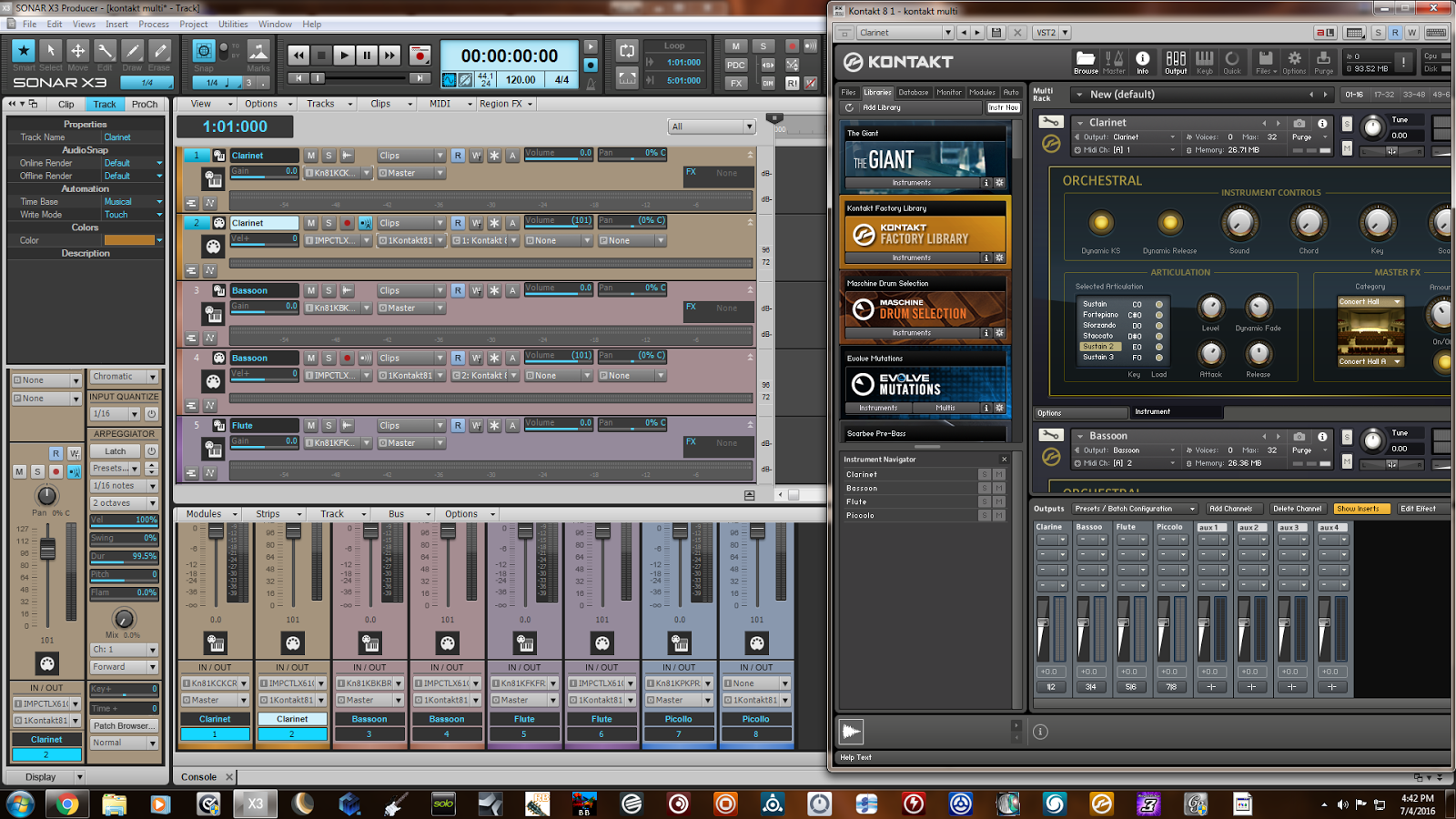 Forum wont allow pic to show at original size.. must click through. LAF forum. http://sonorblog.blogspot.com/ Again, when I play midi part, it is routed through to kontakt from the midi track, I can see midi signal coming in, but thats where it stops. The output of kontakt is set as input to the synth track but it gets lost somewhere. Any help appreciated.
post edited by 200bpm - 2016/07/04 17:21:14
i7 4790K @ 4.8/1.325v Gigabyte Z97X-ud3h, 16GB DDR3 2300, RME UFX, Sonar 3Xe
|
200bpm
Max Output Level: -84 dBFS
- Total Posts : 337
- Joined: 2014/06/25 15:01:55
- Status: offline
Re: Best way to mix with Kontact?
2016/07/04 18:29:15
(permalink)
I started a new project, loaded different K instruments and its working. Looking at both projects I cant see any differences... maybe its a bug.
i7 4790K @ 4.8/1.325v Gigabyte Z97X-ud3h, 16GB DDR3 2300, RME UFX, Sonar 3Xe
|
sonarman1
Max Output Level: -85 dBFS
- Total Posts : 255
- Joined: 2016/02/22 11:26:16
- Status: offline
Re: Best way to mix with Kontact?
2016/07/05 05:56:04
(permalink)
☄ Helpfulby subtlearts 2016/07/05 06:19:21
Alright guys. Hope this helps. Please try my presets. Hope it works in your setup. 1.Download and Unrar this rar file. http://jmp.sh/M5BQBpE
(If chrome blocks this website use the next link) https://www.mediafire.com/?dgm8bngos4w4bc4
You should get 3 files. 2. Move "16 channel Output.cfg" to C:\Users\Jasper Roy\AppData\Local\Native Instruments\Kontakt 5\default\Output Section Presets 3. The other 2 files are Sonar synth track template I have created with 8 & 16 audio and midi tracks. All set up and routed properly.
4. Move the 2 files to where Sonar stores them and load any one of them. OR Just drag them Inside sonar track view from anywhere.(Dont drag both at the same time) 5. The template will get loaded and now you should be able to open Kontakt from the loaded template tracks. Open Kontakt. 6. In Kontakt's output window(mixer) Select "16 channel Output" (the output preset you moved in step 2) from the preset/ configuration drop down list. Set it as default(if req) Done. now everytime you need to use kontakt just load the track template. Within few sec you are ready to go on and load upto 16instruments in 1 instance of kontakt. There wont be anything to worry abt. If you have 16 fav instuments in kontakt you use often, Just load them all and select all the tracks and save it as your favorite track template, You could just load this in your next project and ready to record everything in mins. You can later delete the ununsed tracks anytime.  Its easy to delete.
post edited by sonarman1 - 2016/07/05 07:48:06
|
subtlearts
Max Output Level: -53.5 dBFS
- Total Posts : 2200
- Joined: 2006/01/10 05:59:21
- Location: Berlin
- Status: offline
Re: Best way to mix with Kontact?
2016/07/05 06:01:13
(permalink)
|
sonarman1
Max Output Level: -85 dBFS
- Total Posts : 255
- Joined: 2016/02/22 11:26:16
- Status: offline
Re: Best way to mix with Kontact?
2016/07/05 07:24:47
(permalink)
Well its the awesomeness of Track templates. Cant live without it once get to know how powerful it is. Have to do one more step though, after loading the instruments set which channel the instruments outputs to. Like this.  Do let me know it if all loads like this in your pc. subtlearts were you able to load the templates
|
thedukewestern
Max Output Level: -83 dBFS
- Total Posts : 387
- Joined: 2008/04/14 12:06:59
- Location: NY
- Status: offline
Re: Best way to mix with Kontact?
2016/07/05 09:20:42
(permalink)
Hey 200bpm - Im sorry you had trouble - but happy it worked for you! - I have noticed upon the rare occasion where a sample based instruments sort of "Lose Their Grip" in sonar and I don't have output. While rare - on my system, I just reboot sonar. On very few occasions I have just created a new session as you did. I think - less than 5 in my whole decade of sonar.
Be the first one who thinks that you can Sonar Platinum, Windows 7 64 bit - clean install January 2016, Focusrite Pro 40, Outboard Pres, Native Instruments Komplete, Izotope, PSP, Melodyne, Vegetarian
|