amiller
Max Output Level: -73 dBFS

- Total Posts : 876
- Joined: 2006/01/28 19:54:49
- Status: offline
Bit Depth Settings
OK, I saw something about this topic a few weeks ago but I'm not sure if it answers my question ... and I couldn't find the thread.
I see that the DAW has the project set for a bit depth of 16 in the control bar, however, when I look at the driver settings it's set for 24 AND it's greyed out...can't access.
Questions:
Why is it set to 16?
How do I change it?
Should I change it?
Why is it greyed out in driver settings?
I also found this SONAR note on the subject:
Note: If you are planning to move your project to a Digital Audio Tape (DAT) or to some other
media via a digital transfer, set your sampling rate and bit depth to match the target unit. For
example, use 44,100Hz/16-bit for a project that will be mastered to a CD, so that no sample rate
conversion is required.
RAWK!!! . SONAR Platinum: 2017.10
System specs: Purrrfect Audio: http://www.studiocat.com/open_cart/ • Case Silent Mid Tower • Power-Supply 600w quiet • Haswell CPU 4790k @ 4.4GHz • RAM 32GB DDR3/1600 • OS drive 1TB HD • Audio drive 2TB HD • Samples drive 1 3TB HD • Burner 24x DVD/RW • Video HD4600 • Add TI chipset Firewire For all others • Operating System Windows 10 x64 Home Edition . MOTU 828 mkII . Lucid 9624 A/D . Millennia HV-3b pre . Dual 24" Widescreen Monitors
|
scook
Forum Host

- Total Posts : 24146
- Joined: 2005/07/27 13:43:57
- Location: TX
- Status: offline

Re: Bit Depth Settings
2016/08/29 15:57:11
(permalink)
|
amiller
Max Output Level: -73 dBFS
- Total Posts : 876
- Joined: 2006/01/28 19:54:49
- Status: offline
Re: Bit Depth Settings
2016/08/29 16:02:54
(permalink)
RAWK!!! . SONAR Platinum: 2017.10
System specs: Purrrfect Audio: http://www.studiocat.com/open_cart/ • Case Silent Mid Tower • Power-Supply 600w quiet • Haswell CPU 4790k @ 4.4GHz • RAM 32GB DDR3/1600 • OS drive 1TB HD • Audio drive 2TB HD • Samples drive 1 3TB HD • Burner 24x DVD/RW • Video HD4600 • Add TI chipset Firewire For all others • Operating System Windows 10 x64 Home Edition . MOTU 828 mkII . Lucid 9624 A/D . Millennia HV-3b pre . Dual 24" Widescreen Monitors
|
Rob[at]Sound-Rehab
Max Output Level: -47 dBFS

- Total Posts : 2819
- Joined: 2011/02/03 04:31:35
- Location: Sound-Rehab, Austria
- Status: offline
Re: Bit Depth Settings
2016/08/30 07:56:15
(permalink)
amiller
scook
The transport module shows the Record Bit Depth. Info about the setting here http://www.cakewalk.com/Documentation?product=SONAR&language=3&help=Dialogs2.063.html
The driver bit depth in Preferences is greyed out because the value is hard coded in the driver.
OK, I get that it's hard coded in the driver but the driver is set to 24 and the transport module has it at 16?
Hi. you need to take another look at the link scook provided. the transport says 16 because it is the record bit depth which you defined (or left at 16 in case you never changed that). you should set that to whatever your audio interface uses (usually 24). no need/benefit from setting it any higher, but if you keep it at 16 you compromise audio quality of your recordings
GOOD TUNES LAST FOREVER +++ Visit the Rehab +++ DAW: Platinum/X3e, win10 64 bit, i7-3930K (6x3.2GHz), Asus Sabertooth X79, 32 GB DDR3 1600MHz, ATI HD 5450, 120 GB SSD OCZ Agility3, 2x 1TB WD HDD SATA 600 Audio-Interface: 2x MOTU 1248 AVB, Focusrite OctoPre, (Roland Octa-Capture) Control-Surface: VS-700C VSTi: WAVES, NI K10u, FabFilter, IK, ... (too many really)
|
amiller
Max Output Level: -73 dBFS
- Total Posts : 876
- Joined: 2006/01/28 19:54:49
- Status: offline
Re: Bit Depth Settings
2016/08/30 08:05:48
(permalink)
Rob[atSound-Rehab]
amiller
scook
The transport module shows the Record Bit Depth. Info about the setting here http://www.cakewalk.com/Documentation?product=SONAR&language=3&help=Dialogs2.063.html
The driver bit depth in Preferences is greyed out because the value is hard coded in the driver.
OK, I get that it's hard coded in the driver but the driver is set to 24 and the transport module has it at 16?
Hi. you need to take another look at the link scook provided. the transport says 16 because it is the record bit depth which you defined (or left at 16 in case you never changed that). you should set that to whatever your audio interface uses (usually 24). no need/benefit from setting it any higher, but if you keep it at 16 you compromise audio quality of your recordings
OK...got that. But if I'm going to burn my songs to CD (16 bit) does it make any difference to record stuff at 24 bit?
RAWK!!! . SONAR Platinum: 2017.10
System specs: Purrrfect Audio: http://www.studiocat.com/open_cart/ • Case Silent Mid Tower • Power-Supply 600w quiet • Haswell CPU 4790k @ 4.4GHz • RAM 32GB DDR3/1600 • OS drive 1TB HD • Audio drive 2TB HD • Samples drive 1 3TB HD • Burner 24x DVD/RW • Video HD4600 • Add TI chipset Firewire For all others • Operating System Windows 10 x64 Home Edition . MOTU 828 mkII . Lucid 9624 A/D . Millennia HV-3b pre . Dual 24" Widescreen Monitors
|
DeeringAmps
Max Output Level: -49 dBFS

- Total Posts : 2614
- Joined: 2005/10/03 10:29:25
- Location: Seattle area
- Status: offline
Re: Bit Depth Settings
2016/08/30 08:31:14
(permalink)
☄ Helpfulby glennstanton 2016/08/30 11:28:19
Simple answer; YES. This has been discussed for years. Set Sonar to 24 and don't fret over it. Like this 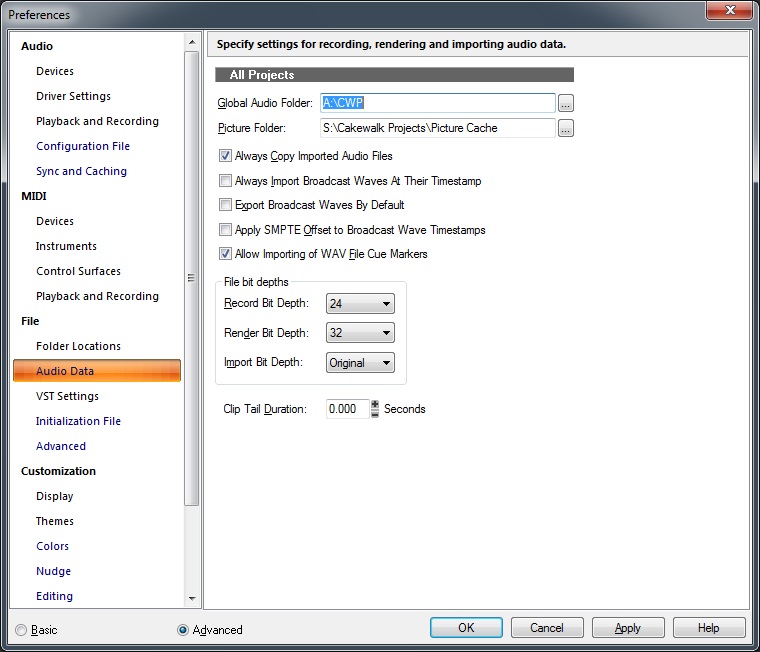 Record at 44.1 or 48 or higher if you like. Export at 44.1k, 16 bit (dither, doesn't matter which dither you use) the CD master. That's all we need to know for now, smarter guys than me (us) have explained it time and time again... T
post edited by DeeringAmps - 2016/08/30 08:59:51
Tom Deering Tascam FW-1884 User Resources Page Firewire "Legacy" Tutorial, Service Manual, Schematic, and Service Bulletins Win10x64 StudioCat Pro Studio Coffee Lake 8086k 32gb RAM  RME UFX (Audio) Tascam FW-1884 (Control) in Win 10x64 Pro
|
chuckebaby
Max Output Level: 0 dBFS

- Total Posts : 13146
- Joined: 2011/01/04 14:55:28
- Status: offline
Re: Bit Depth Settings
2016/08/30 08:36:53
(permalink)
Windows 8.1 X64 Sonar Platinum x64 Custom built: Asrock z97 1150 - Intel I7 4790k - 16GB corsair DDR3 1600 - PNY SSD 220GBFocusrite Saffire 18I8 - Mackie Control
|
Rob[at]Sound-Rehab
Max Output Level: -47 dBFS
- Total Posts : 2819
- Joined: 2011/02/03 04:31:35
- Location: Sound-Rehab, Austria
- Status: offline
Re: Bit Depth Settings
2016/08/30 10:24:05
(permalink)
amiller
OK...got that. But if I'm going to burn my songs to CD (16 bit) does it make any difference to record stuff at 24 bit?
DeeringAmps
Simple answer; YES.
This has been discussed for years.
Set Sonar to 24 and don't fret over it.
Record at 44.1 or 48 or higher if you like.
Export at 44.1k, 16 bit (dither, doesn't matter which dither you use) the CD master.
That's all we need to know for now, smarter guys than me (us) have explained it time and time again...
T
there are entire books written on the subject. while the simple practical approach is given above, it's still good to know more about the subject ... but that either means going through endless forum threads or buying one of the books from the pros like Bob Katz & Co
GOOD TUNES LAST FOREVER +++ Visit the Rehab +++ DAW: Platinum/X3e, win10 64 bit, i7-3930K (6x3.2GHz), Asus Sabertooth X79, 32 GB DDR3 1600MHz, ATI HD 5450, 120 GB SSD OCZ Agility3, 2x 1TB WD HDD SATA 600 Audio-Interface: 2x MOTU 1248 AVB, Focusrite OctoPre, (Roland Octa-Capture) Control-Surface: VS-700C VSTi: WAVES, NI K10u, FabFilter, IK, ... (too many really)
|
DeeringAmps
Max Output Level: -49 dBFS
- Total Posts : 2614
- Joined: 2005/10/03 10:29:25
- Location: Seattle area
- Status: offline
Re: Bit Depth Settings
2016/08/30 12:06:12
(permalink)
It makes my brain hurt, I'm just happy to know what to do.
Kinda like the intro to all books on valves, bunch of theory you don't need to make them (the valves) work.
Had the same problem as an Anthro major in college. I didn't "need" to know geology, I just need a Geologist to tell me the age of the strata we were working; simples!
T
Tom Deering Tascam FW-1884 User Resources Page Firewire "Legacy" Tutorial, Service Manual, Schematic, and Service Bulletins Win10x64 StudioCat Pro Studio Coffee Lake 8086k 32gb RAM RME UFX (Audio) Tascam FW-1884 (Control) in Win 10x64 Pro
|