|
|
SvenArne
Max Output Level: -48 dBFS

- Total Posts : 2719
- Joined: 2007/01/31 12:51:29
- Location: Trondheim, Norway
- Status: offline

Re:Cakewalk Blog: QuadCurve EQ Demystified
2012/03/11 07:10:31
(permalink)
Modern = "Musical and warm" Vintage = "Clinical and harsh" Time to fill in a bug report  Seriously though, thanks for the cool info, I like the blog!
|
Re:Cakewalk Blog: QuadCurve EQ Demystified
2012/03/11 07:15:03
(permalink)
SvenArne
Modern = "Musical and warm"
Vintage = "Clinical and harsh"
Time to fill in a bug report
Seriously though, thanks for the cool info, I like the blog!
Nope, no bug report required. The E-Series EQ came out first, which is why we called it Vintage in the original Gloss EQ. Many of the original console engineers who adopted the E Series consoles early on complained to its maker that it sounded too harsh and clinical, so the console maker introduced the G-Series EQ afterwards (even retrofitting earlier consoles with the newer, 'Modern' EQ). FWIW, the latest generations of these British series, starting with the K series, offer an EQ with switchable curves (just like the Gloss and QuadCurve EQs). SP
|
SvenArne
Max Output Level: -48 dBFS
- Total Posts : 2719
- Joined: 2007/01/31 12:51:29
- Location: Trondheim, Norway
- Status: offline
Re:Cakewalk Blog: QuadCurve EQ Demystified
2012/03/11 07:35:26
(permalink)
Interesting, thanks! I think it's wise that you renamed the models, since people looking for "warm and musical" would probably reach for the "vintage" model first without exploring what it really means.
|
Rain
Max Output Level: 0 dBFS

- Total Posts : 9736
- Joined: 2003/11/07 05:10:12
- Location: Las Vegas
- Status: offline
Re:Cakewalk Blog: QuadCurve EQ Demystified
2012/03/11 08:56:39
(permalink)
TCB - Tea, Cats, Books...
|
The Maillard Reaction
Max Output Level: 0 dBFS
- Total Posts : 31918
- Joined: 2004/07/09 20:02:20
- Status: offline
Re:Cakewalk Blog: QuadCurve EQ Demystified
2012/03/11 09:48:37
(permalink)
In physics and engineering Q factor means a very specific thing: Q is the bandwidth of a resonant circuit and it is measured at 3dB from Peak.
In other words the Q parameter is not a number value that can mean many things... In engineering it means one thing, a specific bandwidth measured at a specific place.
Why does ProChannel offer three different actual bandwidths for the very same Q parameter value?
The way ProChannel EQ uses the Q parameter value seems like a perpetuation of a labeling mistake made when someone was building some old analog gear.
Wouldn't it be more accurate to have the actual numeric Q parameter value switch in the text box to an accurate representation of the the actual Q value that we hear when we switch between Pro, Vintage, Modern, Hybrid?
I don't understand why we are encountering a labeling mistake in 2012 when the actual underlying *digital* math is so accurate that a mistake like this has to be forced upon the transfer function in the form of some correction factor that forces Q to not mean what Q actually means.
Surely, if the Q we are hearing is wider, or less wide, than the Q factor value shown in the ProChannel Gui then there must be some mathematics under the hood that represents what the actual Q we are hearing really is.
Why can't we see the actual Q we are hearing, rather than have to view some arbitrarily assigned value?
I suspect that if one really understands the idea that the Q in ProChannel is just some reference number, a number that is only accurate representation of Q for some of the EQ modes, that one will conclude that switching between the EQ types is a quick way to switch Q values.
The next thought that may occur is that any of us ought to be able to adjust the Q by ear so that any EQ can sound Pure, Vintage, Or Modern. If you are seeking a good understanding of EQ it can be helpful to know what the actual real life Q value you are listening to is.
Is there a real benefit to hiding the actual Q factor by leaving it at a fixed value as you actually switch through various widths?
One benefit is that you can present a regular old EQ transfer function and pretend like it's actually 3 different EQs... which I guess makes it seem like more EQ.
One downside is that the end user will have inconsistent experiences when listening and trying to relate what they hear to a Q factor, The lack of consistency, and inaccurate display of the parameter value as you switch through the various mis labeled Q factors will make it difficult to keep track of which Q actually is and which Q isn't really.
So, it seems to that it would be great if the real Q factor was displayed as the parameter value. For example; If you switch modes and the Q gets wider or thinner then the Q number could reflect the change rather than the way the current display perpetuates, and even celebrates an inability of old analog circuits to be as accurate as digital circuits.
In other words if the Q is 1.0 and I switch modes and now the Q is actually 1.5... I think the parameter value should switch out and read 1.5 rather than suggest that Q = 1.0 can mean different things.
It's 2012 and control panel labeling mistakes and analog circuit compromises can be easily understood, accurately described, and easily represented using digital processes.
It is 2012, and the easiest way to demystify some of this stuff would be too provide accurate labeling rather than indulge in the anachronistic practice of emulating mistakes made in the past.
Simple?
best regards,
mike
|
Re:Cakewalk Blog: QuadCurve EQ Demystified
2012/03/11 09:54:20
(permalink)
Q is subjective. A Q of '1' on one EQ can be different from another, which is evident in the QuadCurve EQ and the hardware that it was modeled after. There is no labeling mistake as each of the modes has a different Q to Gain dependancy, hence the different curves at the same Q value.
SP
|
The Maillard Reaction
Max Output Level: 0 dBFS
- Total Posts : 31918
- Joined: 2004/07/09 20:02:20
- Status: offline
Re:Cakewalk Blog: QuadCurve EQ Demystified
2012/03/11 10:04:09
(permalink)
Q is decidedly NOT subjective.
Engineers (real ones) and Mathematicians have a specific defintion that has been shared and agreed upon for 100+/- years.
It's easy to learn about.
best regards,
mike
|
John T
Max Output Level: -7.5 dBFS

- Total Posts : 6783
- Joined: 2006/06/12 10:24:39
- Status: offline
Re:Cakewalk Blog: QuadCurve EQ Demystified
2012/03/11 10:09:48
(permalink)
This is just pedantry. Clearly he means that the value range under control of the Q knob varies from circuit to circuit (emulated circuits in this application).
http://johntatlockaudio.com/Self-build PC // 16GB RAM // i7 3770k @ 3.5 Ghz // Nofan 0dB cooler // ASUS P8-Z77 V Pro motherboard // Intel x-25m SSD System Drive // Seagate RAID Array Audio Drive // Windows 10 64 bit // Sonar Platinum (64 bit) // Sonar VS-700 // M-Audio Keystation Pro 88 // KRK RP-6 Monitors // and a bunch of other stuff
|
John T
Max Output Level: -7.5 dBFS
- Total Posts : 6783
- Joined: 2006/06/12 10:24:39
- Status: offline
Re:Cakewalk Blog: QuadCurve EQ Demystified
2012/03/11 10:15:18
(permalink)
And oh dear, caught out again. Looked good for a bit, almost like you actually knew what you were talking about for once, but that idea of changing the labels to the "real" Q number shows you don't.
http://johntatlockaudio.com/Self-build PC // 16GB RAM // i7 3770k @ 3.5 Ghz // Nofan 0dB cooler // ASUS P8-Z77 V Pro motherboard // Intel x-25m SSD System Drive // Seagate RAID Array Audio Drive // Windows 10 64 bit // Sonar Platinum (64 bit) // Sonar VS-700 // M-Audio Keystation Pro 88 // KRK RP-6 Monitors // and a bunch of other stuff
|
Re:Cakewalk Blog: QuadCurve EQ Demystified
2012/03/11 10:16:48
(permalink)
John T
This is just pedantry. Clearly he means that the value range under control of the Q knob varies from circuit to circuit (emulated circuits in this application).
Exactly. That's why you see different EQs having different curves while at the same Q. It boils down to the dependency between the Q and the Gain, and that varies in different EQs. SP
|
Re:Cakewalk Blog: QuadCurve EQ Demystified
2012/03/11 10:18:45
(permalink)
mike_mccue
Q is decidedly NOT subjective.
Engineers (real ones) and Mathematicians have a specific defintion that has been shared and agreed upon for 100+/- years.
It's easy to learn about.
best regards,
mike
It is subjective because it is relative to its dependency on Gain (see above post). That's why you see different curves on different EQs with the same gain and Q settings. SP
|
The Maillard Reaction
Max Output Level: 0 dBFS
- Total Posts : 31918
- Joined: 2004/07/09 20:02:20
- Status: offline
Re:Cakewalk Blog: QuadCurve EQ Demystified
2012/03/11 10:28:19
(permalink)
"you see different EQs having different curves while at the same Q."...
Because back in the old days, and this is common knowledge, the Q label on the panel was no where near accurate. It was sorta close, but as Seth suggests... there are lots of of examples of deviation from the label. It has been considered a long standing circumstance, and anyone interested in audio electronics knows this.
I'm simply asking that we move beyond celebrating inaccuracy and misunderstanding and make use of the accuracy that is inherently available in dsp.
In other words, if the Q is actually 1.5... why not just say the Q is 1.5.
What is the benefit of insisting on using a number that doesn't actually represent the Q we are hearing?
A mislabeled Q still sounds like what it actually is... why not swap out the text box with the actual value?
all the best,
mike
|
John T
Max Output Level: -7.5 dBFS
- Total Posts : 6783
- Joined: 2006/06/12 10:24:39
- Status: offline
Re:Cakewalk Blog: QuadCurve EQ Demystified
2012/03/11 10:29:42
(permalink)
Sigh. Q can't "actually" be anything in this context.
http://johntatlockaudio.com/Self-build PC // 16GB RAM // i7 3770k @ 3.5 Ghz // Nofan 0dB cooler // ASUS P8-Z77 V Pro motherboard // Intel x-25m SSD System Drive // Seagate RAID Array Audio Drive // Windows 10 64 bit // Sonar Platinum (64 bit) // Sonar VS-700 // M-Audio Keystation Pro 88 // KRK RP-6 Monitors // and a bunch of other stuff
|
Re:Cakewalk Blog: QuadCurve EQ Demystified
2012/03/11 10:33:20
(permalink)
mike_mccue
"you see different EQs having different curves while at the same Q."...
Because back in the old days, and this is common knowledge, the Q label on the panel was no where near accurate. It was sorta close, but as Seth suggests... there are lots of of examples of deviation from the label. It has been considered a long standing circumstance, and anyone interested in audio electronics knows this.
I'm simply asking that we move beyond celebrating inaccuracy and misunderstanding and make use of the accuracy that is inherently available in dsp.
In other words, if the Q is actually 1.5... why not just say the Q is 1.5.
What is the benefit of insisting on using a number that doesn't actually represent the Q we are hearing?
A mislabeled Q still sounds like what it actually is... why not swap out the text box with the actual value?
all the best,
mike
It's not mislabeled. The dsp of the different modes is actually different. Furthermore, the EQ modes in the QuadCurve EQ were modeled after specific hardware EQs. If the EQs did have some sort of, 'Q/ Gain offset mode', then that wouldn't be a faithful model of the original. The whole point of the blog post was to give you guys a better understanding of how and why the four modes behave the way they do. I feel confident that I illustrated that rather effectively. Thanks, SP
|
The Maillard Reaction
Max Output Level: 0 dBFS
- Total Posts : 31918
- Joined: 2004/07/09 20:02:20
- Status: offline
Re:Cakewalk Blog: QuadCurve EQ Demystified
2012/03/11 10:37:53
(permalink)
Seth Perlstein [Cakewalk
]
mike_mccue
Q is decidedly NOT subjective.
Engineers (real ones) and Mathematicians have a specific defintion that has been shared and agreed upon for 100+/- years.
It's easy to learn about.
best regards,
mike
It is subjective because it is relative to its dependency on Gain (see above post). That's why you see different curves on different EQs with the same gain and Q settings.
SP
I can suggest that the curves shown on the graph do represent the actual Q accurately (to the degree to which the graph is accurately drawn) while the numeric value in the text box is the value that deviates from the Q you are hearing. If the Q value drawn on the graph can change to reflect what we are hearing why can't the Q value written in the text box accurately reflect what we are hearing? The only reason that I can think of is that this is some sort of anachronistic celebration of the limitations of analog circuits and their inaccurate, yet permanent, silk screen or engraved labels. It's 2012... we can have EQs that actually do what the parameter values say they are doing. best regards, mike
|
Re:Cakewalk Blog: QuadCurve EQ Demystified
2012/03/11 10:45:25
(permalink)
mike_mccue
Seth Perlstein [Cakewalk
]
mike_mccue
Q is decidedly NOT subjective.
Engineers (real ones) and Mathematicians have a specific defintion that has been shared and agreed upon for 100+/- years.
It's easy to learn about.
best regards,
mike
It is subjective because it is relative to its dependency on Gain (see above post). That's why you see different curves on different EQs with the same gain and Q settings.
SP
I can suggest that the curves shown on the graph do represent the actual Q accurately (to the degree to which the graph is accurately drawn) while the numeric value in the text box is the value that deviates from the Q you are hearing.
If the Q value drawn on the graph can change to reflect what we are hearing why can't the Q value written in the text box accurately reflect what we are hearing?
The only reason that I can think of is that this is some sort of anachronistic celebration of the limitations of analog circuits and their inaccurate, yet permanent, silk screen or engraved labels.
It's 2012... we can have EQs that actually do what the parameter values say they are doing.
best regards,
mike
Again, the QuadCurve EQ modes were modeled after specific hardware. Your concept of, 'Q @ 1 always equals x value', doesn't apply to the QuadCurve EQ modes because that's not how the hardware they were modeled after works. If you want to use an EQ where a Q of 1 always equates to a specific curve in the graph, well, I suggest you find another EQ to use, because that's not how the QuadCurve EQ works. Again, the blog post was written to explain how the QuadCurve EQ modes work and where they came from. Thanks for reading. SP
|
John T
Max Output Level: -7.5 dBFS
- Total Posts : 6783
- Joined: 2006/06/12 10:24:39
- Status: offline
Re:Cakewalk Blog: QuadCurve EQ Demystified
2012/03/11 10:45:32
(permalink)
There's no such thing as an "actual" Q value. Can anybody hear me? Am I a ghost?
http://johntatlockaudio.com/Self-build PC // 16GB RAM // i7 3770k @ 3.5 Ghz // Nofan 0dB cooler // ASUS P8-Z77 V Pro motherboard // Intel x-25m SSD System Drive // Seagate RAID Array Audio Drive // Windows 10 64 bit // Sonar Platinum (64 bit) // Sonar VS-700 // M-Audio Keystation Pro 88 // KRK RP-6 Monitors // and a bunch of other stuff
|
Re:Cakewalk Blog: QuadCurve EQ Demystified
2012/03/11 10:47:56
(permalink)
John T
There's no such thing as an "actual" Q value. Can anybody hear me? Am I a ghost?
Exactly, Q is relative to the Q/ Gain dependency of the EQ, as described in the blog post. SP
|
The Maillard Reaction
Max Output Level: 0 dBFS
- Total Posts : 31918
- Joined: 2004/07/09 20:02:20
- Status: offline
Re:Cakewalk Blog: QuadCurve EQ Demystified
2012/03/11 11:17:43
(permalink)
"Your concept of, 'Q @ 1 always equals x value',"
It's not my concept. It's a engineering concept that is shared all over the world in the universal language of mathematics.
"If you want to use an EQ where a Q of 1 always equates to a specific curve in the graph, well, I suggest you find another EQ to use, because that's not how the QuadCurve EQ works."
But it can work that way.... doesn't one of the 4 choices work that way?
I think it's what Cakewalk calls the "E".
It's the other 3 that seem "mystifying" because they arbitrarily alter the Q value without displaying the alteration.
best regards,
mike
|
Re:Cakewalk Blog: QuadCurve EQ Demystified
2012/03/11 11:32:21
(permalink)
Mike, I think you're missing the variable of the Q/ Gain dependency. E-Type has has minimal Q/ Gain dependency and the width of its curve at 0db drastically changes the more you boost or cut.
Pure, on the other hand, has a high Q/ Gain Dependency as the width of its curve at 0db stays the same no matter how much you boost or cut.
Look at the widths at 0db of the different curves at each of their gain settings. The reason they are different is their Q/ Gain dependencies are different, so each modes curve will look and sound different even when their Gain and Q settings are identical.
This is how the hardware we modeled the modes after behaved, and is why different EQs have different 'sounds'.
EDIT: BTW, the modes are not behaving in an arbitrary manner at all. They are modeled to behave after specific classic hardware EQs. One EQs Q value of 1 will always sound different than another's if it has a different Q/ Gain dependency.
SP
|
John T
Max Output Level: -7.5 dBFS
- Total Posts : 6783
- Joined: 2006/06/12 10:24:39
- Status: offline
Re:Cakewalk Blog: QuadCurve EQ Demystified
2012/03/11 11:32:51
(permalink)
Oh my. No. Q is a relative value. It has no absolute meaning.
http://johntatlockaudio.com/Self-build PC // 16GB RAM // i7 3770k @ 3.5 Ghz // Nofan 0dB cooler // ASUS P8-Z77 V Pro motherboard // Intel x-25m SSD System Drive // Seagate RAID Array Audio Drive // Windows 10 64 bit // Sonar Platinum (64 bit) // Sonar VS-700 // M-Audio Keystation Pro 88 // KRK RP-6 Monitors // and a bunch of other stuff
|
John T
Max Output Level: -7.5 dBFS
- Total Posts : 6783
- Joined: 2006/06/12 10:24:39
- Status: offline
Re:Cakewalk Blog: QuadCurve EQ Demystified
2012/03/11 11:34:11
(permalink)
Indeed, it has no absolute meaning all over the world.
http://johntatlockaudio.com/Self-build PC // 16GB RAM // i7 3770k @ 3.5 Ghz // Nofan 0dB cooler // ASUS P8-Z77 V Pro motherboard // Intel x-25m SSD System Drive // Seagate RAID Array Audio Drive // Windows 10 64 bit // Sonar Platinum (64 bit) // Sonar VS-700 // M-Audio Keystation Pro 88 // KRK RP-6 Monitors // and a bunch of other stuff
|
GIM Productions
Max Output Level: -73 dBFS

- Total Posts : 860
- Joined: 2005/12/14 05:07:56
- Status: offline

Re:Cakewalk Blog: QuadCurve EQ Demystified
2012/03/11 11:47:13
(permalink)
Hi Mike,no offence sincerely,but you should be a politician.....You can not always be right!Best.Roby
Intel i7 3600,Asus Z170P,16 GIG Corsair ram,Focusrite Saffire Pro 26 i\o,Nektar Impact LX 49,Focusrite Liquid Mix,Monitors ADAM-K&H,Sonar Platinum Windows 10 SP1 Producer....more stuff in SStudio, Rome ,Italy.
|
The Maillard Reaction
Max Output Level: 0 dBFS
- Total Posts : 31918
- Joined: 2004/07/09 20:02:20
- Status: offline
Re:Cakewalk Blog: QuadCurve EQ Demystified
2012/03/11 11:53:58
(permalink)
Hi Seth,
I've been aware of gain dependent Q factors since George Massenburg wrote about it in the early 1970's.
Those early articles are one of the sources where you learn about the limitations of permanent, non-dynamic labeling on the face of an appliance panel.
Some of us have been anticipating improvement in the labeling of these circuits for quite some time.
The results of gain dependence can be displayed in the Q value dynamically as the actual value changes. The actual value may be displayed just as the actual Q is displayed in the graphical curve drawing.
The sound we are hearing represents an actual Q factor, and that is universally defined as the bandwidth -3dB from the peak (pretty darn close to the RMS value) in a mathematical transfer function. The same value used to define the sound and draw the graphics may be displayed in a text parameter box.
In other words, one can mimic the anomalies of a reactive or inductive circuit from times past while displaying the actual values at the very same time. It doesn't hurt the sound to use accurate labeling.
best regards,
mike
|
trimph1
Max Output Level: -12 dBFS

- Total Posts : 6348
- Joined: 2010/09/07 19:20:06
- Location: London ON
- Status: offline
Re:Cakewalk Blog: QuadCurve EQ Demystified
2012/03/11 11:55:07
(permalink)
In mah house voltage does not always equal 120 volts..it is either 105V or 135V.... This almost reads like one of those discussions wherein one has the idea that it is the circuit itself that makes for a good amplifier or the parts used. To me Q is an arbitrary construct anyways... 
The space you have will always be exceeded in direct proportion to the amount of stuff you have...Thornton's Postulate. Bushpianos
|
listen
Max Output Level: -79 dBFS

- Total Posts : 593
- Joined: 2008/09/12 06:07:55
- Status: offline
Re:Cakewalk Blog: QuadCurve EQ Demystified
2012/03/11 12:06:15
(permalink)
Does a Q have a relative value??? Lol "just joking"
- Listen - FOH Mixer & Recording Studio Manager Nothing but the grace of God - mggtg. VS 700C - R / CONSOLE 1 / NEVE PORTICO 5017 / TASCAM UH-7000 / SONAR PLATINUM / REASON RECORD 9 / VMP 2 / UREI 7110's / UA LA-610 MkII / AUDIENT ASP 880 / CREATION STATION 450 V 5 WINDOWS 10 / HOME 64 - BIT / SKYLAKE CORE i7 (i7 - 6700, 4 CORES/8 THREADS)
|
The Maillard Reaction
Max Output Level: 0 dBFS
- Total Posts : 31918
- Joined: 2004/07/09 20:02:20
- Status: offline
Re:Cakewalk Blog: QuadCurve EQ Demystified
2012/03/11 12:24:58
(permalink)
"Look at the widths at 0db of the different curves at each of their gain settings. The reason they are different is their Q/ Gain dependencies are different, so each modes curve will look and sound different even when their Gain and Q settings are identical." Hi Seth, Here's an illustration that shows where Q is measured. The width at the 0dB line is just the result of some particular Q at some particular gain level. 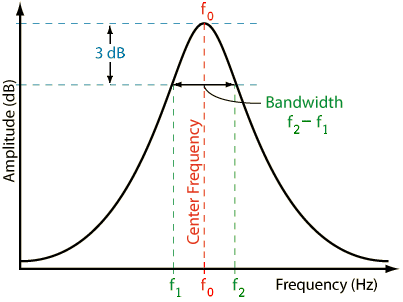 Which is why I equate the E which is described as " minimal Q/ Gain Dependency" to what an engineer calls *Constant Q* or in this case maybe *near Constant Q* The Q, measured at -3dB from peak stays [nearly] constant (because it is effected by gain "minimally") and so we can observe that while the width at 0dB expands and contracts the Q is effected minimally with gain. So, in the case of "E" a Q label may actually be what it says it is... or at least onl minimally different. In the other examples gain dependency can occur and the bandwidth at -3dB from peak will reflect that relationship. The bandwidth at 0dB is merely the result of the Q at some particular gain level. Q is measured at -3dB from the peak. If the value of Q is dynamically linked or dependent on gain level then the Q is still measured at -3dB of peak regardless of what is happening at 0dB. The bandwidth at 0dB is only a result of the current Q factor and the current gain level. If the graph in ProChannel was sized larger, the drawing would be easier to view at -3dB from the peak and we could see that on the whole your explanation of the effects of gain dependency seem accurate. I imagine that it seems easier to illustrate the effect at 0dB simply because it is easier to view in the drawing. Unfortunately, that is not where Q is measured so the observation at 0dB is purely incidental. It would be more accurate to speak about Q where Q is actually measured. This practice may highlight the fact that Q actually has a well defined meaning in engineering and mathematics. all the best, mike
|
John T
Max Output Level: -7.5 dBFS
- Total Posts : 6783
- Joined: 2006/06/12 10:24:39
- Status: offline
Re:Cakewalk Blog: QuadCurve EQ Demystified
2012/03/11 12:28:24
(permalink)
Q does indeed have an accurately defined meaning. It's just not this one.
http://johntatlockaudio.com/Self-build PC // 16GB RAM // i7 3770k @ 3.5 Ghz // Nofan 0dB cooler // ASUS P8-Z77 V Pro motherboard // Intel x-25m SSD System Drive // Seagate RAID Array Audio Drive // Windows 10 64 bit // Sonar Platinum (64 bit) // Sonar VS-700 // M-Audio Keystation Pro 88 // KRK RP-6 Monitors // and a bunch of other stuff
|
Re:Cakewalk Blog: QuadCurve EQ Demystified
2012/03/11 12:29:22
(permalink)
mike_mccue
"Look at the widths at 0db of the different curves at each of their gain settings. The reason they are different is their Q/ Gain dependencies are different, so each modes curve will look and sound different even when their Gain and Q settings are identical."
Hi Seth,
Here's an illustration that shows where Q is measured. The width at the 0dB line is just the result of some particular Q at some particular gain level.
Which is why I equate the E which is described as "Q/ Gain Dependency" to what an engineer calls *Constant Q* or in this case maybe *near Constant Q*
The Q, measured at -3dB from peak stays [nearly] constant (because it is effected by gain "minimally") and so we can observe that while the width at 0dB expands and contracts the Q is effected minimally with gain.
So, in the case of "E" a Q label may actually be what it says it is.
In the other examples gain dependency can occur and the bandwidth at -3dB from peak will reflect that relationship.
The bandwidth at 0dB is merely the result of the Q at some particular gain level. Q is measured at -3dB from the peak.
If the value of Q is dynamically linked or dependent on gain level then the Q is still measured at -3dB of peak regardless of what is happening at 0dB.
The bandwidth at 0dB is only a result of the current Q factor and the current gain level.
If the graph in ProChannel was sized larger, the drawing would be easier to view at -3dB from the peak and we could see that on the whole your explanation of the effects of gain dependency seem accurate.
I imagine that it seems easier to illustrate the effect at 0dB simply because it is easier to view in the drawing. Unfortunately, that is not where Q is measured so the observation at 0dB is purely incidental.
It would be more accurate to speak about Q where Q is actually measured. This practice may highlight the fact that Q actually has a well defined meaning in engineering and mathematics.
all the best,
mike
That's nice that you went to the trouble to research and post what you posted, but the blog post was not meant to be a white paper. It was meant to explain the different modes in the QuadCurve EQ. The blog post is probably not for you since you are familiar with Q/ Gain dependency and all that. If you wish to use an EQ that displays its Q setting how you describe, I would suggest you look for another EQ. However, if you want an EQ that faithfully represents some of the most sought after console EQs of the past half century, then use the QuadCurve EQ. SP
|