PJH
Max Output Level: -79 dBFS

- Total Posts : 599
- Joined: 2007/01/23 15:25:59
- Location: South Africa
- Status: offline
Can anyone confirm whether this is a bug in X3c?
I'm editing a drum track and am having to timestretch certain clips. If I set my "snap" settings to "clips" only so that I can join the clips together accurately the snap works perfectly. The problem comes when I have to scroll further down the page to reach the rest of the drum tracks.
As soon as I scroll down, the snap doesn't work anymore. It seems to lose it's snap setting.
If I try to fill my screen with all of the drum tracks then the snap works perfectly. It seems to stop working as soon as I have to scroll.
If anyone else can try this it would be appreciated.
Cheers,
Peter.
|
neirbod
Max Output Level: -84 dBFS

- Total Posts : 343
- Joined: 2005/05/09 12:27:26
- Status: offline

Re: Can anyone confirm whether this is a bug in X3c?
2013/11/19 09:04:32
(permalink)
I can't speak to the exact situation, but I have had intermittent trouble in X3c with snapping to clips. I will try the workflow you describe and see if I can recreate the problem.
|
PJH
Max Output Level: -79 dBFS
- Total Posts : 599
- Joined: 2007/01/23 15:25:59
- Location: South Africa
- Status: offline
Re: Can anyone confirm whether this is a bug in X3c?
2013/11/19 09:26:58
(permalink)
neirbod
I can't speak to the exact situation, but I have had intermittent trouble in X3c with snapping to clips. I will try the workflow you describe and see if I can recreate the problem.
Thanks Neirbod, It would be appreciated. Cheers, Peter.
|
Re: Can anyone confirm whether this is a bug in X3c?
2013/11/19 09:48:38
(permalink)
By scrolling do you mean using your mouse wheel to zoom in? I'm not sure I understand the recipe to try and reproduce.
|
gswitz
Max Output Level: -18.5 dBFS

- Total Posts : 5694
- Joined: 2007/06/16 07:17:14
- Location: Richmond Virginia USA
- Status: offline
Re: Can anyone confirm whether this is a bug in X3c?
2013/11/19 10:08:54
(permalink)
The smart tool changes snap based on what has the focus.
You can easily set focus using the mouse by holding shift and clicking on things... like envelopes or the clip itself.
This matters for snapping and for hover tools like slip editing clips or changing clip fades. You can't see the hover tools for the clip if the volume envelope has the focus, but if you shift click on the clip, setting focus on the clip, it will then work.
Does this help?
StudioCat > I use Windows 10 and Sonar Platinum. I have a touch screen. I make some videos. This one shows how to do a physical loopback on the RME UCX to get many more equalizer nodes.
|
PJH
Max Output Level: -79 dBFS
- Total Posts : 599
- Joined: 2007/01/23 15:25:59
- Location: South Africa
- Status: offline
Re: Can anyone confirm whether this is a bug in X3c?
2013/11/19 10:55:35
(permalink)
OK, I'll try to be more specific.
I do a lot of drum track editing. Sometimes up to 12 tracks of drums. There are many occasions where I have to cut up tracks and move drum hits into time and then time stretch the "gaps" to close the "holes" in the track. I then have to do the same to all of the tracks.
These 12 tracks are not always visible on my screen as I'm slightly zoomed in. I'll set my snap to "snap to clips" and start time stretching one drum track at a time. eq Kick, Snare, Hi Hat, Tom1. Now in order for me to stretch the rest of the tracks (Tom 2, Tom 3, Tom 4 etc) I have to scroll down so that the rest of these drum tracks are visible.
As soon as I do that (scroll down so that I can see the rest of my tracks), the snap function no longer works.
I then have to undo the stretched clips, zoom out completely so that all the drum tracks are visible on the screen and redo all the time stretching again. As long as I don't scroll the snap works.
I really hope I'm making sense here.
If not I'll make a few pics to try and make it clearer.
Thanks guys,
Peter.
|
brundlefly
Max Output Level: 0 dBFS

- Total Posts : 14250
- Joined: 2007/09/14 14:57:59
- Location: Manitou Spgs, Colorado
- Status: offline
Re: Can anyone confirm whether this is a bug in X3c?
2013/11/19 11:18:29
(permalink)
I think the issue is that you can't snap to landmarks of objects that are not currently visible (because they've been hidden or scrolled out of view), and I would guess that's working as designed because it could be potentially confusing and/or problematic if the objects snapped to landmarks that a user was not aware of because they're not visible. But I can also see where that functionality might be needed in a big project.
Found it; page 371 of the Ref. Guide:
"SONAR will snap to landmarks on tracks/lanes that are currently visible in the Clips pane."
SONAR Platinum x64, 2x MOTU 2408/PCIe-424 (24-bit, 48kHz) Win10, I7-6700K @ 4.0GHz, 24GB DDR4, 2TB HDD, 32GB SSD Cache, GeForce GTX 750Ti, 2x 24" 16:10 IPS Monitors
|
PJH
Max Output Level: -79 dBFS
- Total Posts : 599
- Joined: 2007/01/23 15:25:59
- Location: South Africa
- Status: offline
Re: Can anyone confirm whether this is a bug in X3c?
2013/11/19 11:38:42
(permalink)
Hi guys, I've made a few pics to try and demonstrate what my problem is. In Pic 1 the "snap" function works perfectly. 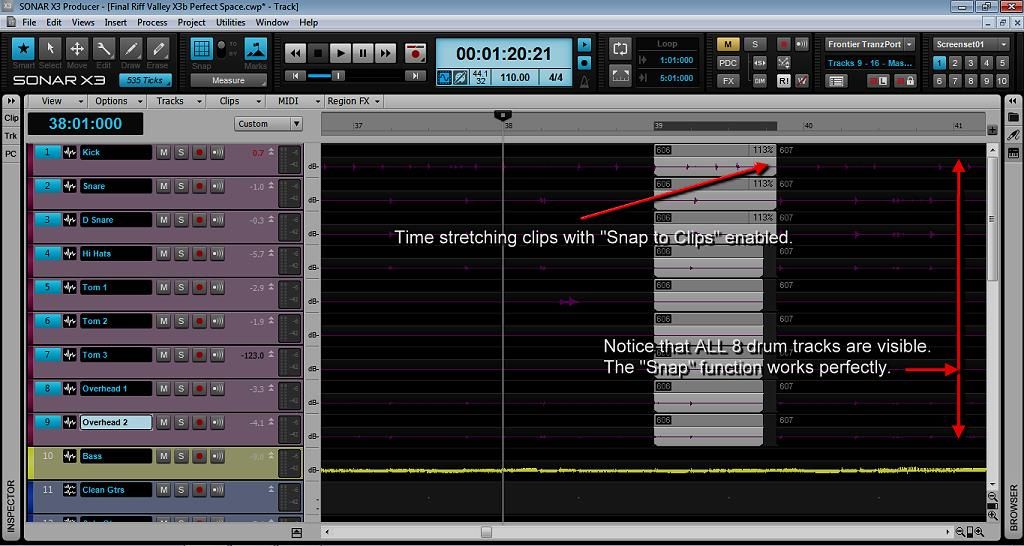 In Pic 2 after moving the screen down to reveal the remaining clips the snap function stops working. 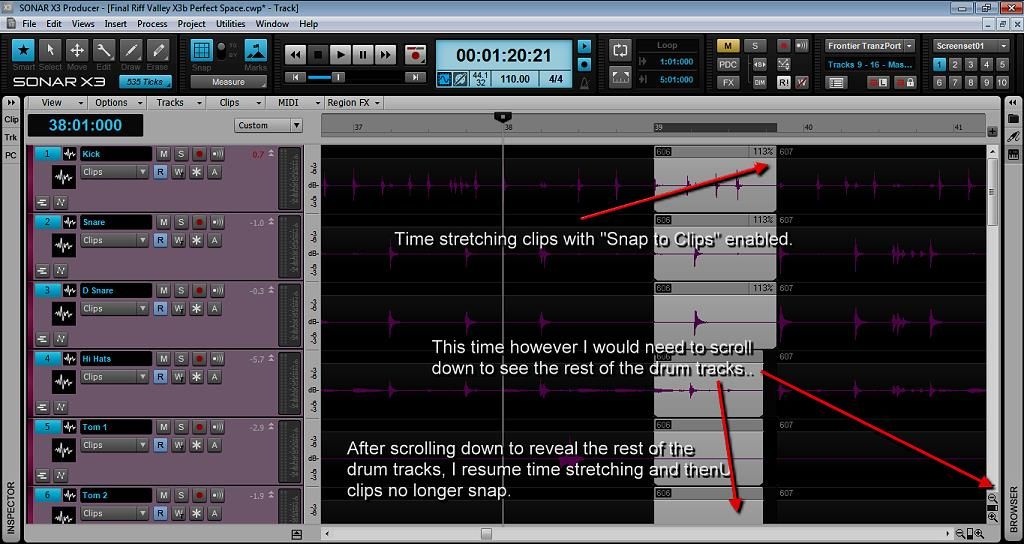 I'd like to add that this function has worked for me in 8.5, X1 and X2. I hope this make things a bit clearer. Cheers, Peter.
|
Bristol_Jonesey
Max Output Level: 0 dBFS
- Total Posts : 16775
- Joined: 2007/10/08 15:41:17
- Location: Bristol, UK
- Status: offline
Re: Can anyone confirm whether this is a bug in X3c?
2013/11/19 11:39:02
(permalink)
There are many occasions where I have to cut up tracks and move drum hits into time and then time stretch the "gaps" to close the "holes" in the track Are you completely sure this is absolutely necessary? Can you not simply move the individual drum hits to where they should" be and just move on to the next phrase? I assume you're talking about audio tracks here, not Midi yes?
CbB, Platinum, 64 bit throughoutCustom built i7 3930, 32Gb RAM, 2 x 1Tb Internal HDD, 1 x 1TB system SSD (Win 7), 1 x 500Gb system SSD (Win 10), 2 x 1Tb External HDD's, Dual boot Win 7 & Win 10 64 Bit, Saffire Pro 26, ISA One, Adam P11A,
|
PJH
Max Output Level: -79 dBFS
- Total Posts : 599
- Joined: 2007/01/23 15:25:59
- Location: South Africa
- Status: offline
Re: Can anyone confirm whether this is a bug in X3c?
2013/11/19 11:50:38
(permalink)
Bristol_Jonesey
There are many occasions where I have to cut up tracks and move drum hits into time and then time stretch the "gaps" to close the "holes" in the track
Are you completely sure this is absolutely necessary?
Can you not simply move the individual drum hits to where they should" be and just move on to the next phrase?
I assume you're talking about audio tracks here, not Midi yes?
Yes, It's audio. If you cut a clip and move a drum hit it will leave a "hole" in the audio and you will have a gap where there will be no audio. If you have a cymbal crash thats decaying over the hole you will have a gap in the audio. Thats why you have to time stretch the audio to close the gap and not have any breaks in the audio tracks.
|
brundlefly
Max Output Level: 0 dBFS
- Total Posts : 14250
- Joined: 2007/09/14 14:57:59
- Location: Manitou Spgs, Colorado
- Status: offline
Re: Can anyone confirm whether this is a bug in X3c?
2013/11/19 12:27:12
(permalink)
So what I wrote in post #7 isn't the issue?
Incidentally, moving drum hits within a clip using Audiosnap automatically takes care of the stretching for you. I understand if you've chosen splitting over Audiosnap for other reasons, but thought I'd mention it in case you're not aware of this feature.
SONAR Platinum x64, 2x MOTU 2408/PCIe-424 (24-bit, 48kHz) Win10, I7-6700K @ 4.0GHz, 24GB DDR4, 2TB HDD, 32GB SSD Cache, GeForce GTX 750Ti, 2x 24" 16:10 IPS Monitors
|
stevec
Max Output Level: 0 dBFS
- Total Posts : 11546
- Joined: 2003/11/04 15:05:54
- Location: Parkesburg, PA
- Status: offline
Re: Can anyone confirm whether this is a bug in X3c?
2013/11/19 14:42:17
(permalink)
brundlefly
So what I wrote in post #7 isn't the issue?
Incidentally, moving drum hits within a clip using Audiosnap automatically takes care of the stretching for you. I understand if you've chosen splitting over Audiosnap for other reasons, but thought I'd mention it in case you're not aware of this feature.
And FWIW, the OP does have the Landmarks icon enabled.
SteveC https://soundcloud.com/steve-cocchi http://www.soundclick.com/bands/pagemusic.cfm?bandID=39163 SONAR Platinum x64, Intel Q9300 (2.5Ghz), Asus P5N-D, Win7 x64 SP1, 8GB RAM, 1TB internal + ESATA + USB Backup HDDs, ATI Radeon HD5450 1GB RAM + dual ViewSonic VA2431wm Monitors; Focusrite 18i6 (ASIO); Komplete 9, Melodyne Studio 4, Ozone 7 Advanced, Rapture Pro, GPO5, Valhalla Plate, MJUC comp, MDynamic EQ, lots of other freebie VST plugins, synths and Kontakt libraries
|
PJH
Max Output Level: -79 dBFS
- Total Posts : 599
- Joined: 2007/01/23 15:25:59
- Location: South Africa
- Status: offline
Re: Can anyone confirm whether this is a bug in X3c?
2013/11/19 15:10:24
(permalink)
brundlefly
So what I wrote in post #7 isn't the issue?
Incidentally, moving drum hits within a clip using Audiosnap automatically takes care of the stretching for you. I understand if you've chosen splitting over Audiosnap for other reasons, but thought I'd mention it in case you're not aware of this feature.
I do have the landmarks icon enabled.
I have tried Audiosnap and find it notoriously unreliable. It seems to work fairly well on a single drum track but to try and get a decent result with 8 or 10 tracks of live drums is so hit and miss it's a complete waste of time.
Has anyone else tried what I'm attempting? I'd just like to know if they have the same result as I do. I'm convinced it's a bug. I cannot believe that "snap" stops working when you merely use your mouse to adjust the level of your screen.
Cheers,
Peter.
|
brundlefly
Max Output Level: 0 dBFS
- Total Posts : 14250
- Joined: 2007/09/14 14:57:59
- Location: Manitou Spgs, Colorado
- Status: offline
Re: Can anyone confirm whether this is a bug in X3c?
2013/11/19 16:56:34
(permalink)
PJH
Has anyone else tried what I'm attempting? I'd just like to know if they have the same result as I do. I'm convinced it's a bug. I cannot believe that "snap" stops working when you merely use your mouse to adjust the level of your screen.
Okay. After some experimenting, I am able to replicate this. Snap to clip landmarks just quits working when the track view is scrolled to certain positions, especially down where only the last few tracks are in view. Looks like a bug to me. You'll want to take a minute to report it here: http://www.cakewalk.com/support/contact/problemreport.aspx I'll do the same.
SONAR Platinum x64, 2x MOTU 2408/PCIe-424 (24-bit, 48kHz) Win10, I7-6700K @ 4.0GHz, 24GB DDR4, 2TB HDD, 32GB SSD Cache, GeForce GTX 750Ti, 2x 24" 16:10 IPS Monitors
|
PJH
Max Output Level: -79 dBFS
- Total Posts : 599
- Joined: 2007/01/23 15:25:59
- Location: South Africa
- Status: offline
Re: Can anyone confirm whether this is a bug in X3c?
2013/11/20 01:35:58
(permalink)
brundlefly
PJH
Has anyone else tried what I'm attempting? I'd just like to know if they have the same result as I do. I'm convinced it's a bug. I cannot believe that "snap" stops working when you merely use your mouse to adjust the level of your screen.
Okay. After some experimenting, I am able to replicate this. Snap to clip landmarks just quits working when the track view is scrolled to certain positions, especially down where only the last few tracks are in view.
Looks like a bug to me. You'll want to take a minute to report it here:
http://www.cakewalk.com/support/contact/problemreport.aspx
I'll do the same.
Thanks, brundlefly. I did fill in a problem report but it was the usual story. "The problem you are experiencing is most likely a system specific problem or a configuration issue that we believe can be resolved with assistance from Cakewalk Technical Support. Unfortunately, as explained in the Problem Report Form, this form does not put you in direct contact with our support staff." This is NOT a system specific problem. It's a bug. Lets see what Support says. Cheers, Peter.
|
neirbod
Max Output Level: -84 dBFS
- Total Posts : 343
- Joined: 2005/05/09 12:27:26
- Status: offline
Re: Can anyone confirm whether this is a bug in X3c?
2013/11/20 08:09:30
(permalink)
Confirmed here as well. I am not sure exactly what triggered the change. I have two tracks far enough apart that I need to scroll to see them, both split. At first I can move the edges of the clips around and then snap back to each other at the break. I tried scrolling (both with mouse wheel and arrow keys on the track view) and everything still snapped correctly. I then tried vertical zooming and it still worked. I then tried a few random moves of scrolling and zooming and suddenly the snap stopped working, despite the markers button still showing that snap is on.
Glad you picked this up as I had intermittent problems with this that I never dug into. I will file a bug report as well and link to this thread. Having a few of us point out the issue should make Cakewalk look into it and not blame a specific system.
|
neirbod
Max Output Level: -84 dBFS
- Total Posts : 343
- Joined: 2005/05/09 12:27:26
- Status: offline
Re: Can anyone confirm whether this is a bug in X3c?
2013/11/20 08:32:08
(permalink)
More details - The failure to snap on my system seems to only affect the lower tracks as the OP observed. Snapping works consistently on the upper track. I think this has something to do with only snapping to what is visible, and a bug in how Sonar determines what is visible. I my example above I found that if I reduced the size (vertical) of all my tracks I can actually see all of them without scrolling. In this case snap works fine for all tracks. When I expand a little so that the lower tracks are offscreen, snapping works for the upper tracks. When I scroll down to see the lower tracks, snapping does not work. It seems like Sonar is interpreting "snap to what is visible" as "snap to what is visible when you are scrolled all the way up." UPDATE - I tried this in X2a and found the same bug. Surprised it has taken so long to get noticed.
post edited by neirbod - 2013/11/20 08:51:57
|
PJH
Max Output Level: -79 dBFS
- Total Posts : 599
- Joined: 2007/01/23 15:25:59
- Location: South Africa
- Status: offline
Re: Can anyone confirm whether this is a bug in X3c?
2013/11/20 09:15:46
(permalink)
neirbod
More details - The failure to snap on my system seems to only affect the lower tracks as the OP observed. Snapping works consistently on the upper track. I think this has something to do with only snapping to what is visible, and a bug in how Sonar determines what is visible. I my example above I found that if I reduced the size (vertical) of all my tracks I can actually see all of them without scrolling. In this case snap works fine for all tracks. When I expand a little so that the lower tracks are offscreen, snapping works for the upper tracks. When I scroll down to see the lower tracks, snapping does not work. It seems like Sonar is interpreting "snap to what is visible" as "snap to what is visible when you are scrolled all the way up."
UPDATE - I tried this in X2a and found the same bug. Surprised it has taken so long to get noticed.
Thanks neirbod, Hopefully if more users file reports, it will get looked at. Cheers, Peter.
|
neirbod
Max Output Level: -84 dBFS
- Total Posts : 343
- Joined: 2005/05/09 12:27:26
- Status: offline
Re: Can anyone confirm whether this is a bug in X3c?
2013/11/20 10:49:06
(permalink)
I got the same message:
The problem you are experiencing is most likely a system specific problem or a configuration issue that we believe can be resolved with assistance from Cakewalk Technical Support. Unfortunately, as explained in the Problem Report Form, this form does not put you in direct contact with our support staff.
I will try calling tech support, but given three of us have the same problem this almost certainly a bug. I linked to this thread in my report and mentioned several of us are experiencing it, so I am surprised they don't see it as a bug.
Dan, are you still following this? I'd be curious to see if this sound system-specific to you.
|
brundlefly
Max Output Level: 0 dBFS
- Total Posts : 14250
- Joined: 2007/09/14 14:57:59
- Location: Manitou Spgs, Colorado
- Status: offline
Re: Can anyone confirm whether this is a bug in X3c?
2013/11/20 11:23:33
(permalink)
neirbod
More details - The failure to snap on my system seems to only affect the lower tracks as the OP observed. Snapping works consistently on the upper track. I think this has something to do with only snapping to what is visible, and a bug in how Sonar determines what is visible. I my example above I found that if I reduced the size (vertical) of all my tracks I can actually see all of them without scrolling. In this case snap works fine for all tracks. When I expand a little so that the lower tracks are offscreen, snapping works for the upper tracks. When I scroll down to see the lower tracks, snapping does not work. It seems like Sonar is interpreting "snap to what is visible" as "snap to what is visible when you are scrolled all the way up."
UPDATE - I tried this in X2a and found the same bug. Surprised it has taken so long to get noticed.
This analysis sounds about right to me, given how little we have to go on. This kind of failure to snap in creatin situations has been reported before, but I'm not sure anyone ever made the connection with scroll position; a search might run up something. I don't often have a need to snap to clips or other landmarks, myself, so never ran into it.
SONAR Platinum x64, 2x MOTU 2408/PCIe-424 (24-bit, 48kHz) Win10, I7-6700K @ 4.0GHz, 24GB DDR4, 2TB HDD, 32GB SSD Cache, GeForce GTX 750Ti, 2x 24" 16:10 IPS Monitors
|
stevec
Max Output Level: 0 dBFS
- Total Posts : 11546
- Joined: 2003/11/04 15:05:54
- Location: Parkesburg, PA
- Status: offline
Re: Can anyone confirm whether this is a bug in X3c?
2013/11/20 11:39:58
(permalink)
Just curious... does this still happen if Landmarks are disabled?
SteveC https://soundcloud.com/steve-cocchi http://www.soundclick.com/bands/pagemusic.cfm?bandID=39163 SONAR Platinum x64, Intel Q9300 (2.5Ghz), Asus P5N-D, Win7 x64 SP1, 8GB RAM, 1TB internal + ESATA + USB Backup HDDs, ATI Radeon HD5450 1GB RAM + dual ViewSonic VA2431wm Monitors; Focusrite 18i6 (ASIO); Komplete 9, Melodyne Studio 4, Ozone 7 Advanced, Rapture Pro, GPO5, Valhalla Plate, MJUC comp, MDynamic EQ, lots of other freebie VST plugins, synths and Kontakt libraries
|
brundlefly
Max Output Level: 0 dBFS
- Total Posts : 14250
- Joined: 2007/09/14 14:57:59
- Location: Manitou Spgs, Colorado
- Status: offline
Re: Can anyone confirm whether this is a bug in X3c?
2013/11/20 12:20:08
(permalink)
If you mean does snap to grid stop working, the answer is no; it's only snap to Clips and MIDI landmarks that's failing; snap to Now and Markers also continues to work. I now have a demo project in which scrolling way from the the fully scrolled up position by even the tiniest possible amount breaks snap to Clips/MIDI landmarks.
SONAR Platinum x64, 2x MOTU 2408/PCIe-424 (24-bit, 48kHz) Win10, I7-6700K @ 4.0GHz, 24GB DDR4, 2TB HDD, 32GB SSD Cache, GeForce GTX 750Ti, 2x 24" 16:10 IPS Monitors
|
stevec
Max Output Level: 0 dBFS
- Total Posts : 11546
- Joined: 2003/11/04 15:05:54
- Location: Parkesburg, PA
- Status: offline
Re: Can anyone confirm whether this is a bug in X3c?
2013/11/20 13:36:54
(permalink)
Huh... weird. Well, at least it's logged with CW!
SteveC https://soundcloud.com/steve-cocchi http://www.soundclick.com/bands/pagemusic.cfm?bandID=39163 SONAR Platinum x64, Intel Q9300 (2.5Ghz), Asus P5N-D, Win7 x64 SP1, 8GB RAM, 1TB internal + ESATA + USB Backup HDDs, ATI Radeon HD5450 1GB RAM + dual ViewSonic VA2431wm Monitors; Focusrite 18i6 (ASIO); Komplete 9, Melodyne Studio 4, Ozone 7 Advanced, Rapture Pro, GPO5, Valhalla Plate, MJUC comp, MDynamic EQ, lots of other freebie VST plugins, synths and Kontakt libraries
|
PJH
Max Output Level: -79 dBFS
- Total Posts : 599
- Joined: 2007/01/23 15:25:59
- Location: South Africa
- Status: offline
Re: Can anyone confirm whether this is a bug in X3c?
2013/11/21 02:48:01
(permalink)
brundlefly
neirbod
More details - The failure to snap on my system seems to only affect the lower tracks as the OP observed. Snapping works consistently on the upper track. I think this has something to do with only snapping to what is visible, and a bug in how Sonar determines what is visible. I my example above I found that if I reduced the size (vertical) of all my tracks I can actually see all of them without scrolling. In this case snap works fine for all tracks. When I expand a little so that the lower tracks are offscreen, snapping works for the upper tracks. When I scroll down to see the lower tracks, snapping does not work. It seems like Sonar is interpreting "snap to what is visible" as "snap to what is visible when you are scrolled all the way up."
UPDATE - I tried this in X2a and found the same bug. Surprised it has taken so long to get noticed.
This analysis sounds about right to me, given how little we have to go on. This kind of failure to snap in creatin situations has been reported before, but I'm not sure anyone ever made the connection with scroll position; a search might run up something. I don't often have a need to snap to clips or other landmarks, myself, so never ran into it.
I think the snap to landmarks is vital when editing live drums. Hopefully one day when "Audiosnap" becomes more reliable it won't be so important but as of now I can't work without it.
|
neirbod
Max Output Level: -84 dBFS
- Total Posts : 343
- Joined: 2005/05/09 12:27:26
- Status: offline
Re: Can anyone confirm whether this is a bug in X3c?
2013/11/21 11:19:13
(permalink)
PJH
This is NOT a system specific problem. It's a bug.
Lets see what Support says.
Did you contact support, Peter? I am interested in hearing what they say about this. I tried calling yesterday but they were closed. Won't have a chance to do so today. Any updates are appreciated. Dave
|
PJH
Max Output Level: -79 dBFS
- Total Posts : 599
- Joined: 2007/01/23 15:25:59
- Location: South Africa
- Status: offline
Re: Can anyone confirm whether this is a bug in X3c?
2013/11/23 03:07:11
(permalink)
neirbod
PJH
This is NOT a system specific problem. It's a bug.
Lets see what Support says.
Did you contact support, Peter? I am interested in hearing what they say about this. I tried calling yesterday but they were closed. Won't have a chance to do so today. Any updates are appreciated.
Dave
Hi Dave, I did contact support via email. This was on Wednesday 20th Nov. The only thing I've heard is from their automated response. I'll report back as soon as I hear anything. Cheers, Peter.
|
neirbod
Max Output Level: -84 dBFS
- Total Posts : 343
- Joined: 2005/05/09 12:27:26
- Status: offline
Re: Can anyone confirm whether this is a bug in X3c?
2014/01/09 19:20:42
(permalink)
Someone else wrote that this issue seems to have been fixed in X3d, but for me it is still broken as before. Can anyone else check?
----------------- Windows 7 64Sonar PlatinumIntel i7 3.4 GHzGigabyte GA-H67A-UD3H-B3 moboRME UFX and UCX
|
PJH
Max Output Level: -79 dBFS
- Total Posts : 599
- Joined: 2007/01/23 15:25:59
- Location: South Africa
- Status: offline
Re: Can anyone confirm whether this is a bug in X3c?
2014/01/10 02:25:03
(permalink)
neirbod
Someone else wrote that this issue seems to have been fixed in X3d, but for me it is still broken as before. Can anyone else check?
I checked my system when I installed the patch and mine seems to be working properly now. Cheers.
|
neirbod
Max Output Level: -84 dBFS
- Total Posts : 343
- Joined: 2005/05/09 12:27:26
- Status: offline
Re: Can anyone confirm whether this is a bug in X3c?
2014/01/10 08:20:09
(permalink)
Well this is odd. I tried again and now it seems to work. But I swear it was still acting buggy last night (or maybe it was the wine). I guess I will put this in the "probably fixed but I am still keeping an eye on it" file.
----------------- Windows 7 64Sonar PlatinumIntel i7 3.4 GHzGigabyte GA-H67A-UD3H-B3 moboRME UFX and UCX
|
Splat 
Max Output Level: 0 dBFS
- Total Posts : 8672
- Joined: 2010/12/29 15:28:29
- Location: Mars.
- Status: offline
Re: Can anyone confirm whether this is a bug in X3c?
2014/01/10 08:21:51
(permalink)
People always forget about the glass of wine step and it should be used more often!
Sell by date at 9000 posts. Do not feed. @48/24 & 128 buffers latency is 367 with offset of 38. Sonar Platinum(64 bit),Win 8.1(64 bit),Saffire Pro 40(Firewire),Mix Control = 3.4,Firewire=VIA,Dell Studio XPS 8100(Intel Core i7 CPU 2.93 Ghz/16 Gb),4 x Seagate ST31500341AS (mirrored),GeForce GTX 460,Yamaha DGX-505 keyboard,Roland A-300PRO,Roland SPD-30 V2,FD-8,Triggera Krigg,Shure SM7B,Yamaha HS5.Maschine Studio+Komplete 9 Ultimate+Kontrol Z1.Addictive Keys,Izotope Nectar elements,Overloud Bundle,Geist.Acronis True Image 2014.
|