muzeek
Max Output Level: -90 dBFS

- Total Posts : 16
- Joined: 2011/02/03 19:24:13
- Status: offline
Can't get "pan" feature to work
I have Sonar X1 Studio and I’m trying to use the “pan” feature (recording newbie). I am on one recorded track of a song, and when I move the pan knob left or right, all it does is decrease the volume of both speakers equally. I have max volume with zero panning. Moving the knob does not change any left/right volume. Any help is appreciated!! Thank you.
|
Wookiee
Rrrrugh arah-ah-woof?

- Total Posts : 13306
- Joined: 2007/01/16 06:19:43
- Location: Akahaocwora - Village Yoh Kay
- Status: offline

Re:Can't get "pan" feature to work
2012/11/10 21:27:10
(permalink)
Some idea of what soundcard you are using would help.
Life is not about waiting for the storm to pass, it's about learning to dance in the rain.
Karma has a way of finding its own way home.
Primary, i7 8700K 16Gigs Ram, 3x500gb SSD's 2TB Backup HHD Saffire Pro 40. Win 10 64Bit Secondary i7 4790K, 32GB Ram, 500Gb SSD OS/Prog's, 1TB Audio, 1TB Samples HHD AudioBox USB, Win 10 64Bit CbB, Adam's A7x's - Event 20/20's, Arturia V6, Korg Digital Legacy, Softube Modular, Arturia Keylab-88, USB-MidiSport 8x8
|
muzeek
Max Output Level: -90 dBFS
- Total Posts : 16
- Joined: 2011/02/03 19:24:13
- Status: offline
Re:Can't get "pan" feature to work
2012/11/10 21:51:33
(permalink)
Wookiee
Some idea of what soundcard you are using would help.
Sound card is in the interface? I am using a Focusrite Saffire Pro40 interface and a Dell laptop.
|
swamptooth
Max Output Level: -53 dBFS

- Total Posts : 2229
- Joined: 2012/04/16 15:44:21
- Status: offline
Re:Can't get "pan" feature to work
2012/11/11 00:26:08
(permalink)
in preferences/audio/driver settings try setting your pan law to 0db center, balance control and see if that helps. is it a midi track, a stereo audio track or a mono audio track???
post edited by swamptooth - 2012/11/11 00:40:44
Arvid H. PetersonSonar X3E Prod / X2A / X1PE | Cubase 9.5.1 | Reason 9.5 | Sibelius7 | Pure DataNative-Instruments Komplete 10 Ultimate and a smattering of other pluginsHome-brewed VSTs Toshiba Satellite S855-S5378 (16GB RAM, modified with 2x 750GB HDDs, Windows 8.1 x64) Samson Graphite 49, M-Audio Oxygen 49, Korg nanoPAD2, Webcam motion tracking programs M-Audio Fast Track UltraMember, ASCAP
|
Wookiee
Rrrrugh arah-ah-woof?
- Total Posts : 13306
- Joined: 2007/01/16 06:19:43
- Location: Akahaocwora - Village Yoh Kay
- Status: offline
Re:Can't get "pan" feature to work
2012/11/11 06:06:47
(permalink)
muzeek
Wookiee
Some idea of what soundcard you are using would help.
Sound card is in the interface? I am using a Focusrite Saffire Pro40 interface and a Dell laptop.
Check that in the sound card control software that your output busses are hard panned left and right. The default PAN law in SONAR causes a -3db drop when panning left or right. If your cards outputs are not panned left and right what you will hear is a 3db drop across the board. Hope that helps. PS I use a Focusrite Saffire Pro 26/ i/o
Life is not about waiting for the storm to pass, it's about learning to dance in the rain.
Karma has a way of finding its own way home.
Primary, i7 8700K 16Gigs Ram, 3x500gb SSD's 2TB Backup HHD Saffire Pro 40. Win 10 64Bit Secondary i7 4790K, 32GB Ram, 500Gb SSD OS/Prog's, 1TB Audio, 1TB Samples HHD AudioBox USB, Win 10 64Bit CbB, Adam's A7x's - Event 20/20's, Arturia V6, Korg Digital Legacy, Softube Modular, Arturia Keylab-88, USB-MidiSport 8x8
|
cclarry
Max Output Level: 0 dBFS

- Total Posts : 20964
- Joined: 2012/02/07 09:42:07
- Status: offline
Re:Can't get "pan" feature to work
2012/11/11 07:39:58
(permalink)
Most likely cause is that the "Interleave" button on the track is set to MONO...
it looks like a bunch of vertical lines that gets smaller in the center ...on the
track you are trying to pan.
That should solve your problem.
Cheers!
|
CJaysMusic
Max Output Level: 0 dBFS
- Total Posts : 30423
- Joined: 2006/10/28 01:51:41
- Location: Miami - Fort Lauderdale - Davie
- Status: offline
Re:Can't get "pan" feature to work
2012/11/11 09:13:07
(permalink)
I bet you recorded a MONO Signal onto a STEREO Track. This is the most popular rookie mistakes in recording. You need to record a mono signal in a mono track not a stereo track muzeek.
Go to the drop down arrow box for the input section in sonar's track section on select a mono input. Then your problems will be solved
CJ
|
petec
Max Output Level: -90 dBFS
- Total Posts : 43
- Joined: 2007/01/27 05:05:53
- Location: UK
- Status: offline
Re:Can't get "pan" feature to work
2012/11/11 09:40:33
(permalink)
Another place to look is to check your Saffire 'Mix Control' software is set up for stereo output.
|
muzeek
Max Output Level: -90 dBFS
- Total Posts : 16
- Joined: 2011/02/03 19:24:13
- Status: offline
Re:Can't get "pan" feature to work
2012/11/11 20:46:53
(permalink)
I really appreciate the above ideas (comments to follow). I know some of them have to be on the right track. So far I have not had any luck, but it is more my lack of knowledge than anything else. Here is what I have done or found out:
Swamptooth – I found driver settings and made the change – same result. This is not midi, but I’m not sure about the track being mono or stereo. Is it just a matter of the Interleave button?
Wookie – All I know about that Focusright interface is that my setting are all “Mix1 (L)” or “Mix1 (R)” and not “Mix9 (mono)” for example.
Cclarry – I didn’t get any difference trying to pan with Interleave on or off.
CJ – I think I am doing mono to mono. My inputs are “1/2 Left” etc. (not stereo).
Petec – I think I am doing stereo output; not mono (see wookie above).
I will keep trying. Maybe they have a tech line I can call while I am in my system.
|
daveny5
Max Output Level: 0 dBFS
- Total Posts : 16934
- Joined: 2003/11/06 09:54:36
- Location: North Carolina
- Status: offline
Re:Can't get "pan" feature to work
2012/11/12 08:49:38
(permalink)
How are your speakers connected? Did you try it with headphones connected to the audio interface?
Dave Computer: Intel i7, ASROCK H170M, 16GB/5TB+, Windows 10 Pro 64-bit, Sonar Platinum, TASCAM US-16x08, Cakewalk UM-3G MIDI I/F Instruments: SL-880 Keyboard controller, Korg 05R/W, Korg N1R, KORG Wavestation EX Axes: Fender Stratocaster, Line6 Variax 300, Ovation Acoustic, Takamine Nylon Acoustic, Behringer GX212 amp, Shure SM-58 mic, Rode NT1 condenser mic. Outboard: Mackie 1402-VLZ mixer, TC Helicon VoiceLive 2, Digitech Vocalist WS EX, PODXTLive, various stompboxes and stuff. Controllers: Korg nanoKONTROL, Wacom Bamboo Touchpad
|
muzeek
Max Output Level: -90 dBFS
- Total Posts : 16
- Joined: 2011/02/03 19:24:13
- Status: offline
Re:Can't get "pan" feature to work
2012/11/12 09:12:59
(permalink)
daveny5
How are your speakers connected? Did you try it with headphones connected to the audio interface?
Yes, I get the same result with the monitors or headphones (no L/R difference). Thank you for responding.
|
Bristol_Jonesey
Max Output Level: 0 dBFS
- Total Posts : 16775
- Joined: 2007/10/08 15:41:17
- Location: Bristol, UK
- Status: offline
Re:Can't get "pan" feature to work
2012/11/12 09:45:22
(permalink)
but I’m not sure about the track being mono or stereo. Is it just a matter of the Interleave button? Can you do a screen shot of the track you've recorded and post it up for us to view please, along with the Inspector & Track Header
CbB, Platinum, 64 bit throughoutCustom built i7 3930, 32Gb RAM, 2 x 1Tb Internal HDD, 1 x 1TB system SSD (Win 7), 1 x 500Gb system SSD (Win 10), 2 x 1Tb External HDD's, Dual boot Win 7 & Win 10 64 Bit, Saffire Pro 26, ISA One, Adam P11A,
|
CJaysMusic
Max Output Level: 0 dBFS
- Total Posts : 30423
- Joined: 2006/10/28 01:51:41
- Location: Miami - Fort Lauderdale - Davie
- Status: offline
Re:Can't get "pan" feature to work
2012/11/12 10:54:11
(permalink)
Yes, I get the same result with the monitors or headphones (no L/R difference). Thank you for responding. It happening because of what i said in my post above
|
Wookiee
Rrrrugh arah-ah-woof?
- Total Posts : 13306
- Joined: 2007/01/16 06:19:43
- Location: Akahaocwora - Village Yoh Kay
- Status: offline
Re:Can't get "pan" feature to work
2012/11/12 14:22:43
(permalink)
Wookiee – All I know about that Focusrite interface is that my setting are all “Mix1 (L)” or “Mix1 (R)” and not “Mix9 (mono)” for example Have you opened the Saffire mix control software? Have a look at it look at how each channel is panned centre across the stereo bus of the interface! Go to http://uk.focusrite.com/firewire-audio-interfaces/saffire-pro-40 watch the videos about how to use mix control  Interesting stuff, yes there is a lot of additional stuff and the interface is not a pro 40 but all current Firewire and USB I/F's from Focusrite use it. It could prove very educational
Life is not about waiting for the storm to pass, it's about learning to dance in the rain.
Karma has a way of finding its own way home.
Primary, i7 8700K 16Gigs Ram, 3x500gb SSD's 2TB Backup HHD Saffire Pro 40. Win 10 64Bit Secondary i7 4790K, 32GB Ram, 500Gb SSD OS/Prog's, 1TB Audio, 1TB Samples HHD AudioBox USB, Win 10 64Bit CbB, Adam's A7x's - Event 20/20's, Arturia V6, Korg Digital Legacy, Softube Modular, Arturia Keylab-88, USB-MidiSport 8x8
|
muzeek
Max Output Level: -90 dBFS
- Total Posts : 16
- Joined: 2011/02/03 19:24:13
- Status: offline
Re:Can't get "pan" feature to work
2012/11/12 14:27:37
(permalink)
CJaysMusic
Yes, I get the same result with the monitors or headphones (no L/R difference). Thank you for responding.
It happening because of what i said in my post above
CJ - I think I am doing this (per my reply to you above in #9), but maybe I am not grasping everything. Is a "stereo track" determined by something other than the position of the Interleave button? I am a real rookie, so a lot of this is easily over my head. Does this condition mean I have to re-record to get it right, or can it be fixed after the fact? Thanks for your comments.
|
Bristol_Jonesey
Max Output Level: 0 dBFS
- Total Posts : 16775
- Joined: 2007/10/08 15:41:17
- Location: Bristol, UK
- Status: offline
Re:Can't get "pan" feature to work
2012/11/12 15:00:15
(permalink)
It can be fixed after the fact, but if you do as I suggested and post a screen shot we'll know exactly what the problem is. Hopefully 
CbB, Platinum, 64 bit throughoutCustom built i7 3930, 32Gb RAM, 2 x 1Tb Internal HDD, 1 x 1TB system SSD (Win 7), 1 x 500Gb system SSD (Win 10), 2 x 1Tb External HDD's, Dual boot Win 7 & Win 10 64 Bit, Saffire Pro 26, ISA One, Adam P11A,
|
Kalle Rantaaho
Max Output Level: -5 dBFS

- Total Posts : 7005
- Joined: 2006/01/09 13:07:59
- Location: Finland
- Status: offline
Re:Can't get "pan" feature to work
2012/11/12 15:09:37
(permalink)
If your input is like "1/left", the track interleave is set to "mono" and what you get recorded is one mono track (not a "two lane" stereo track with signal on only one side) that you hear in the center (when pan is centered) you are recording mono correctly.
In that case the reason you're not being able to pan is something a little special.
The fact that you hear both loudspeakers go silent when panning means you are not recording mono on a stereo track (as suggested by some), because in such a case you would only hear sound on one side. But it means both your speakers/headphone cans are receiving the same signal (=mono). With my brains it means your signal gets turned into mono after it leaves SONAR (??).
My best bet is there's something strange in your audio interface routing or monitor cabling. So, to me this sounds like this far you have had all your projects in mono only, right?
Are all your tracks going through Master Bus in SONAR? Is there an Interleave-switch in the Master Bus (I'm not at my DAW now)?
SONAR PE 8.5.3, Asus P5B, 2,4 Ghz Dual Core, 4 Gb RAM, GF 7300, EMU 1820, Bluetube Pre - Kontakt4, Ozone, Addictive Drums, PSP Mixpack2, Melda Creative Pack, Melodyne Plugin etc. The benefit of being a middle aged amateur is the low number of years of frustration ahead of you.
|
muzeek
Max Output Level: -90 dBFS
- Total Posts : 16
- Joined: 2011/02/03 19:24:13
- Status: offline
Re:Can't get "pan" feature to work
2012/11/12 19:58:19
(permalink)
Wookiee
Wookiee – All I know about that Focusrite interface is that my setting are all “Mix1 (L)” or “Mix1 (R)” and not “Mix9 (mono)” for example
Have you opened the Saffire mix control software?
Have a look at it look at how each channel is panned centre across the stereo bus of the interface!
Go to http://uk.focusrite.com/firewire-audio-interfaces/saffire-pro-40 watch the videos about how to use mix control
Interesting stuff, yes there is a lot of additional stuff and the interface is not a pro 40 but all current Firewire and USB I/F's from Focusrite use it.
It could prove very educational
Thank you for the link – I will take a look. Hope you are not frustrated with my lack of knowledge cuz I don’t know how to do this: Have a look at it look at how each channel is panned centre across the stereo bus of the interface! Let me explain. I never ever recorded before. Then I bought the stuff to do it, and I find the info you get is kinda geared toward those who already know how to do it. In fact, when calling the companies to get questions answered, they told me that the owner’s manual for your car doesn’t tell you how to drive it. Very true, so you gotta learn somehow. I guess it’s amazing I have recorded anything at all. I am trying to learn and will follow any leads I get. Thanks again.
|
muzeek
Max Output Level: -90 dBFS
- Total Posts : 16
- Joined: 2011/02/03 19:24:13
- Status: offline
Re:Can't get "pan" feature to work
2012/11/12 21:03:08
(permalink)
Bristol_Jonesey
It can be fixed after the fact, but if you do as I suggested and post a screen shot we'll know exactly what the problem is.
Hopefully
Well.........I have screen shots of the interface and Sonar but can't seem to copy them here!!
|
Wookiee
Rrrrugh arah-ah-woof?
- Total Posts : 13306
- Joined: 2007/01/16 06:19:43
- Location: Akahaocwora - Village Yoh Kay
- Status: offline
Re:Can't get "pan" feature to work
2012/11/12 21:20:21
(permalink)
muzeek
Wookiee
Wookiee – All I know about that Focusrite interface is that my setting are all “Mix1 (L)” or “Mix1 (R)” and not “Mix9 (mono)” for example
Have you opened the Saffire mix control software?
Have a look at it look at how each channel is panned centre across the stereo bus of the interface!
Go to http://uk.focusrite.com/firewire-audio-interfaces/saffire-pro-40 watch the videos about how to use mix control
Interesting stuff, yes there is a lot of additional stuff and the interface is not a pro 40 but all current Firewire and USB I/F's from Focusrite use it.
It could prove very educational
Thank you for the link – I will take a look. Hope you are not frustrated with my lack of knowledge cuz I don’t know how to do this:
Have a look at it look at how each channel is panned centre across the stereo bus of the interface!
Let me explain. I never ever recorded before. Then I bought the stuff to do it, and I find the info you get is kinda geared toward those who already know how to do it. In fact, when calling the companies to get questions answered, they told me that the owner’s manual for your car doesn’t tell you how to drive it. Very true, so you gotta learn somehow. I guess it’s amazing I have recorded anything at all. I am trying to learn and will follow any leads I get. Thanks again.
No problem please accept my furry apologies if my reply seemed slightly sarcastic or acerbic it is a Wookiee trait.  My questions were genuine as I suspected that you had not fully investigated what you had installed in your DAW PC. I also had a good guessed at what was the problem as I recently upgraded my own DAW. In doing so I had forgotten to reconfigure my own Saffire pro 26. When I played back a panning track it did not pan as expected but got exactly what you described as a lowering volume.
Life is not about waiting for the storm to pass, it's about learning to dance in the rain.
Karma has a way of finding its own way home.
Primary, i7 8700K 16Gigs Ram, 3x500gb SSD's 2TB Backup HHD Saffire Pro 40. Win 10 64Bit Secondary i7 4790K, 32GB Ram, 500Gb SSD OS/Prog's, 1TB Audio, 1TB Samples HHD AudioBox USB, Win 10 64Bit CbB, Adam's A7x's - Event 20/20's, Arturia V6, Korg Digital Legacy, Softube Modular, Arturia Keylab-88, USB-MidiSport 8x8
|
swamptooth
Max Output Level: -53 dBFS
- Total Posts : 2229
- Joined: 2012/04/16 15:44:21
- Status: offline
Re:Can't get "pan" feature to work
2012/11/12 21:34:26
(permalink)
+1 wookie. very classy. :)
Arvid H. PetersonSonar X3E Prod / X2A / X1PE | Cubase 9.5.1 | Reason 9.5 | Sibelius7 | Pure DataNative-Instruments Komplete 10 Ultimate and a smattering of other pluginsHome-brewed VSTs Toshiba Satellite S855-S5378 (16GB RAM, modified with 2x 750GB HDDs, Windows 8.1 x64) Samson Graphite 49, M-Audio Oxygen 49, Korg nanoPAD2, Webcam motion tracking programs M-Audio Fast Track UltraMember, ASCAP
|
swamptooth
Max Output Level: -53 dBFS
- Total Posts : 2229
- Joined: 2012/04/16 15:44:21
- Status: offline
Re:Can't get "pan" feature to work
2012/11/12 21:36:59
(permalink)
@ muzeek... post them to picasa or another pic site then add the link via the insert pic button. :)
Arvid H. PetersonSonar X3E Prod / X2A / X1PE | Cubase 9.5.1 | Reason 9.5 | Sibelius7 | Pure DataNative-Instruments Komplete 10 Ultimate and a smattering of other pluginsHome-brewed VSTs Toshiba Satellite S855-S5378 (16GB RAM, modified with 2x 750GB HDDs, Windows 8.1 x64) Samson Graphite 49, M-Audio Oxygen 49, Korg nanoPAD2, Webcam motion tracking programs M-Audio Fast Track UltraMember, ASCAP
|
CJaysMusic
Max Output Level: 0 dBFS
- Total Posts : 30423
- Joined: 2006/10/28 01:51:41
- Location: Miami - Fort Lauderdale - Davie
- Status: offline
Re:Can't get "pan" feature to work
2012/11/13 10:52:30
(permalink)
Is a "stereo track" determined by something other than the position of the Interleave button? Yes, BUT you do have have a TRUE STEREO track. You have a mono track inside a stereo track. Thats why you Cant Pan You need to select a MONO Input in SONAR for a MONO track when recording from the start!!! you shoudl not be sleecting a stereo input when recording a mono instrument. This is what you are doing. CJ
|
muzeek
Max Output Level: -90 dBFS
- Total Posts : 16
- Joined: 2011/02/03 19:24:13
- Status: offline
Re:Can't get "pan" feature to work
2012/11/13 19:18:47
(permalink)
To all: It sucks to be a rookie! I am looking at all of your suggestions and I thank you. I am also working to post screenshots.
|
daveny5
Max Output Level: 0 dBFS
- Total Posts : 16934
- Joined: 2003/11/06 09:54:36
- Location: North Carolina
- Status: offline
Re:Can't get "pan" feature to work
2012/11/14 09:18:57
(permalink)
Here's an example of a Mono input recorded on a stereo track. See, it only recorded on the left side (the top half of the track). The right side (bottom half of the track) is silent. If your track looks like this, then that's the problem. Just Bounce it to a Mono track and you're done. EDIT: Image removed by author.
post edited by daveny5 - 2012/11/15 23:03:25
Dave Computer: Intel i7, ASROCK H170M, 16GB/5TB+, Windows 10 Pro 64-bit, Sonar Platinum, TASCAM US-16x08, Cakewalk UM-3G MIDI I/F Instruments: SL-880 Keyboard controller, Korg 05R/W, Korg N1R, KORG Wavestation EX Axes: Fender Stratocaster, Line6 Variax 300, Ovation Acoustic, Takamine Nylon Acoustic, Behringer GX212 amp, Shure SM-58 mic, Rode NT1 condenser mic. Outboard: Mackie 1402-VLZ mixer, TC Helicon VoiceLive 2, Digitech Vocalist WS EX, PODXTLive, various stompboxes and stuff. Controllers: Korg nanoKONTROL, Wacom Bamboo Touchpad
|
CJaysMusic
Max Output Level: 0 dBFS
- Total Posts : 30423
- Joined: 2006/10/28 01:51:41
- Location: Miami - Fort Lauderdale - Davie
- Status: offline
Re:Can't get "pan" feature to work
2012/11/14 09:47:42
(permalink)
I am also working to post screenshots.
I would not even waste the time doing that!. You recorded a one sided stereo track because you selected a stereo input when recording a mono track. That's all you did. Next time, Select a mono input for the mono track. That's all you need to do. Your making it more complicated than it really is. Mono instrument means you need to select a mono input in the drop down menu for that track. Stereo instrument, means you need to select a stereo input for that track. That's all you need to do to fix your issue. We don't need screenshots posted by you. i and some others already know what your doing wrong and we have been posting what you need to do, to fix it. Cj
|
ProjectM
Max Output Level: -36 dBFS

- Total Posts : 3941
- Joined: 2004/02/10 09:32:12
- Location: Norway
- Status: offline
Re:Can't get "pan" feature to work
2012/11/14 10:19:07
(permalink)
That's not entirely correct CJ If you record through "In1 Left" to a stereo track you'll get a recording on the left side of the audio track and will not hear anything on the right side. If you pan to the right, it will be silent and if you pan to the left, you won't experience any difference. If for some reason, the same signal is recorded to both the left and right channel so you have sound in both speakers, which was absolutely possible with eg. the soundblaster, then you can still pan the track like you can pan any stereo track. Also, when selecting a mono input on a track, Sonar automaticly set the channel to MONO. This can of course be overrided if you use a stereo VST insert at some point. So to me, this sounds like either the Master bus or some other bus he's routed the signal to is set to MONO. Then you'll have that effect, that when you pan, you only reduce the volume of the recorded signal in both speakers. I don't know much about the audio interface in question so perhaps Wookie is actually the one with the correct answers here. But my cent is on the Stero button. If I recall correctly, the interleave button (marked with something that looks like Ø) is called the interleave button in the tool tip when hoovering over it with the mouse. changing the state of this will off course not remedy this at all. What you should look for is one of the buttons next to the interleave button on the Master bus or a bus you are sending your signal to that says Stereo/Mono (or something like that - not at my DAW atm) when hoovering your mouse over it and make sure it is blue. Then you can try to pan your track. My point is, a track can be paned no matter what format it is and you should hear it. At some point the output is summed in MONO and this is your problem, whether it is inside Sonar or in the setup of the audio interface. This is what I would investigate.
(Sonar Platinum - Win10 x64) - iMac and 13" MacBook - Logic Pro X ++ - UA Apollo Twin DUO - NI Maschine MKII - NI Komplete Kontrol S61 - Novation Nocturne - KRK Rokit 6 SoundcloudNegative Vibe Records
|
ProjectM
Max Output Level: -36 dBFS
- Total Posts : 3941
- Joined: 2004/02/10 09:32:12
- Location: Norway
- Status: offline
Re:Can't get "pan" feature to work
2012/11/14 10:30:15
(permalink)
BTW - this is the Stereo/Mono button found on all tracks. Make sure that any output you send your track to is set to stereo - the button will light up in blue. 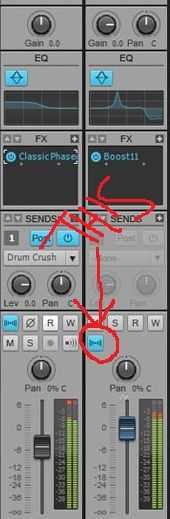
(Sonar Platinum - Win10 x64) - iMac and 13" MacBook - Logic Pro X ++ - UA Apollo Twin DUO - NI Maschine MKII - NI Komplete Kontrol S61 - Novation Nocturne - KRK Rokit 6 SoundcloudNegative Vibe Records
|
CJaysMusic
Max Output Level: 0 dBFS
- Total Posts : 30423
- Joined: 2006/10/28 01:51:41
- Location: Miami - Fort Lauderdale - Davie
- Status: offline
Re:Can't get "pan" feature to work
2012/11/14 10:53:15
(permalink)
So to me, this sounds like either the Master bus or some other bus he's routed the signal to is set to MONO. Then you'll have that effect, that when you pan, you only reduce the volume of the recorded signal in both speakers. I've seen hundreds of newbies post this same exact thing and it was always them not selecting a mono input for the track when recording. I'm going with the law of averages. Wanna make a friendly bet :) ill bet you a $500 gift card if you want. That's how sure i am
|
ProjectM
Max Output Level: -36 dBFS
- Total Posts : 3941
- Joined: 2004/02/10 09:32:12
- Location: Norway
- Status: offline
Re:Can't get "pan" feature to work
2012/11/14 11:19:01
(permalink)
LOL - I can see that well, I'm not a gambling man but if you're correct on this I'll buy you a virtual beer Let's hope at least one of these suggestions can help him fix the problem
(Sonar Platinum - Win10 x64) - iMac and 13" MacBook - Logic Pro X ++ - UA Apollo Twin DUO - NI Maschine MKII - NI Komplete Kontrol S61 - Novation Nocturne - KRK Rokit 6 SoundcloudNegative Vibe Records
|