Phonic
Max Output Level: -85 dBFS

- Total Posts : 291
- Joined: 2011/04/04 13:13:38
- Status: offline
Cannot Write Disk May Be Full Error, then Reset Computer, then Same Error!
What is going on? I have plenty of disk space and all of a sudden in the middle of editing my project I get the "Cannot Write Disk May Be Full Error" so I reset the whole computer and load up the project (losing all my changes). Then I proceed to continue to work when the metronome stops working and shortly thereafter I get the "Cannot Write Disk May Be Full Error" AGAIN!
I am getting very sick of constant errors with Sonar and I can't nail it down to one particular thing. If this was consistent I think I would stand a chance of figuring out the problem but it isn't.
Any help is appreciated. I think shortly I will have to talk to tech support.
i7 4770k @ 3.5 Ghz 24 GB DDR 3 Windows 7 64 bit Sonar Platinum Foxboro 64 bit MOTU 828 MK3 UAD-2 Quad
|
cliffr
Max Output Level: -80 dBFS

- Total Posts : 539
- Joined: 2010/02/19 21:44:43
- Location: Wellington, New Zealand
- Status: offline

Re:Cannot Write Disk May Be Full Error, then Reset Computer, then Same Error!
2012/06/12 00:35:48
(permalink)
Sounds like it's likely your "Picture Cache" folder is filled.
Not at my DAW, but it should be easy enough for you to find.
You can either increase the size of the picture cache folder (default is 500 MB), or delete the current contents.
I think I set mine to 1500 MB, and not a squeak since.
Cheers - Cliff
i7-950 24 GB, GTX 580, W7/64 Ultimate, Sonar Platinum, Alesis MasterControl, KRK Rokit RP8g2s Some Real piano, basses, and guitars, Komplete 8Ultimate, Ibanez guitars, MusicLab RG/Strat/LPC, Trilian, Omnisphere, RMX, EWQL SO Platinum, Pianos, Choirs, VOP, Gypsy, Goliath, SD2, MOR, Ra, HS, HB, too many plugs, Midi controllers, and all kinds of weird gadgets My Soundclick Page
|
Phonic
Max Output Level: -85 dBFS
- Total Posts : 291
- Joined: 2011/04/04 13:13:38
- Status: offline
Re:Cannot Write Disk May Be Full Error, then Reset Computer, then Same Error!
2012/06/12 01:02:23
(permalink)
Thank you, I have emptied the Picture Cache folder and am hoping that solves my problem.
i7 4770k @ 3.5 Ghz 24 GB DDR 3 Windows 7 64 bit Sonar Platinum Foxboro 64 bit MOTU 828 MK3 UAD-2 Quad
|
larrymcg
Max Output Level: -64 dBFS

- Total Posts : 1310
- Joined: 2003/11/05 17:00:22
- Location: Redding (Northern California)
- Status: offline
Re:Cannot Write Disk May Be Full Error, then Reset Computer, then Same Error!
2012/06/12 15:44:49
(permalink)
Phonic,
Let us know how this turns out. Actually I'd be surprised if it fixed anything for you. If the product acts as advertised (yes, I know that is a long shot...) it should automatically delete the older files in the Picture Cache to make room for new ones.
Intel Core i7-4790 @3.6GHz; 8GB; Win10 Pro 64bit; 1TB disk + 3TB ext disk; Midiman Fineline mixer; MidiSport 4x4 midi I/F; Roland JV-30 kbd/synth; Yamaha TG55 synth; Rx with 3 piece Home audio speakers; Sonar X3e Studio
|
Freddie H
Max Output Level: -39 dBFS

- Total Posts : 3617
- Joined: 2007/09/21 06:07:40
- Status: offline
Re:Cannot Write Disk May Be Full Error, then Reset Computer, then Same Error!
2012/06/12 16:18:38
(permalink)
Phonic
What is going on? I have plenty of disk space and all of a sudden in the middle of editing my project I get the "Cannot Write Disk May Be Full Error" so I reset the whole computer and load up the project (losing all my changes). Then I proceed to continue to work when the metronome stops working and shortly thereafter I get the "Cannot Write Disk May Be Full Error" AGAIN!
I am getting very sick of constant errors with Sonar and I can't nail it down to one particular thing. If this was consistent I think I would stand a chance of figuring out the problem but it isn't.
Any help is appreciated. I think shortly I will have to talk to tech support.
I have had the same problem! http://forum.cakewalk.com/tm.aspx?m=2571474&high= Is all about that you have converted “Synth Track” + “Midi Track” to “VST-Instrument tracks” by the Menu…  that causing this error. It’s simple as DON*T uses any “VST-Instrument tracks” because if the project contains any “Instrument tracks” this bug happens. If you remove all your “VST-Instrument tracks” and use and have VST-I old way, “Synth Tracks” + “Midi track” it all will work fine.
-Highly developed spirits often encounter resistance from mediocre minds. -It really matters!
|
konradh
Max Output Level: -42 dBFS

- Total Posts : 3325
- Joined: 2006/01/16 16:07:06
- Status: offline
Re:Cannot Write Disk May Be Full Error, then Reset Computer, then Same Error!
2012/06/13 10:21:51
(permalink)
I have had this error and it can be deadly and make you lose a file. This error is the cheif reason I save multiple versions of every project on both internal and external drives.
I don't believe I have ever done the conversion Freddie mentions—unless I don't know what he means—so perhaps there is more than one thing that triggers this.
It is an ugly problem.
|
Phonic
Max Output Level: -85 dBFS
- Total Posts : 291
- Joined: 2011/04/04 13:13:38
- Status: offline
Re:Cannot Write Disk May Be Full Error, then Reset Computer, then Same Error!
2012/06/16 16:52:58
(permalink)
Freddie can you please be more specific as to what to do? This issue keeps happening now to my project and I am getting ready to trash Sonar.
i7 4770k @ 3.5 Ghz 24 GB DDR 3 Windows 7 64 bit Sonar Platinum Foxboro 64 bit MOTU 828 MK3 UAD-2 Quad
|
Freddie H
Max Output Level: -39 dBFS
- Total Posts : 3617
- Joined: 2007/09/21 06:07:40
- Status: offline
Re:Cannot Write Disk May Be Full Error, then Reset Computer, then Same Error!
2012/06/19 17:16:43
(permalink)
Phonic
Freddie can you please be more specific as to what to do? This issue keeps happening now to my project and I am getting ready to trash Sonar.
Hi Phonic! You use one or many VST "Instrument tracks ", also know as (Simpel Intrument Track) in that project, right? Delete all VST "Instrument tracks" in that project and re open one by one, as you did before VST "Instrument tracks" was invented "VST old way,". -----> You get an ("VST-AUDIO-Track" + a Midi Track) = VST-I.... *Check Picture Below DONT USE ANY VST "Instrument tracks" also know as (Simpel Intrument Track) 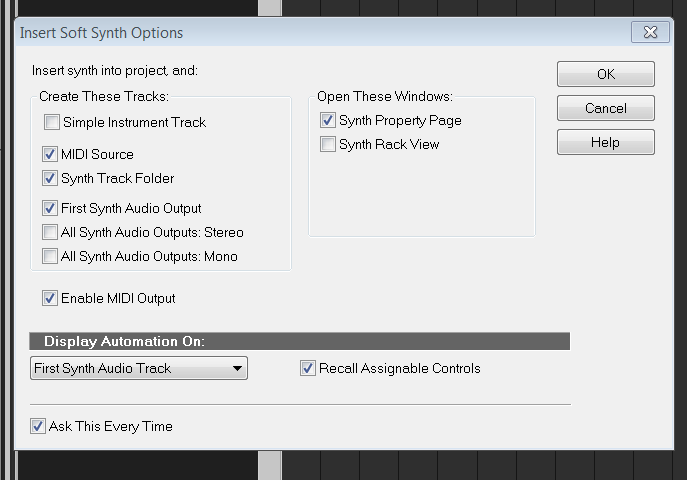
-Highly developed spirits often encounter resistance from mediocre minds. -It really matters!
|
jimkleban
Max Output Level: -64 dBFS
- Total Posts : 1319
- Joined: 2008/11/09 09:42:45
- Status: offline
Re:Cannot Write Disk May Be Full Error, then Reset Computer, then Same Error!
2012/06/19 18:14:26
(permalink)
I have had this happen a few times as well.... seems to me that there are some hidden bugs in our program that takes specific hardware/actions to activate.
I will say that X1 now is much more stable than days 1 - 100.
Jim
The Lamb Laid Down on MIDI www.lldom.com Studio Cat Custom i7 with Thunderbolt (wonderful system built and configured by our own Jim R) Apollo Duo (via TB) UAD Quad UAD Duo WIN 8.1 x64 with 32 GB Ram 4 SSD for programs and sample libraries Splat (latest version)
|
Phonic
Max Output Level: -85 dBFS
- Total Posts : 291
- Joined: 2011/04/04 13:13:38
- Status: offline
Re:Cannot Write Disk May Be Full Error, then Reset Computer, then Same Error!
2012/06/19 19:25:43
(permalink)
Hello Freddie - Thanks, I have changed all the simple instrument tracks to synth + MIDI and it appears the error has subsided.
i7 4770k @ 3.5 Ghz 24 GB DDR 3 Windows 7 64 bit Sonar Platinum Foxboro 64 bit MOTU 828 MK3 UAD-2 Quad
|
Bristol_Jonesey
Max Output Level: 0 dBFS

- Total Posts : 16775
- Joined: 2007/10/08 15:41:17
- Location: Bristol, UK
- Status: offline
Re:Cannot Write Disk May Be Full Error, then Reset Computer, then Same Error!
2012/06/20 03:26:23
(permalink)
Freddie H
Phonic
Freddie can you please be more specific as to what to do? This issue keeps happening now to my project and I am getting ready to trash Sonar.
Hi Phonic!
You use one or many VST "Instrument tracks", also know as (Simpel Intrument Track) in that project, right?
Delete all VST "Instrument tracks" in that project and re open one by one, as you did before VST "Instrument tracks" was invented "VST old way,". -----> You get an ("VST-AUDIO-Track" + a Midi Track) = VST-I....
*Check Picture Below
DONT USE ANY VST "Instrument tracks" also know as (Simpel Intrument Track)
Freddie, if this is indeed the cause of these error messages, can't you just open the project normally and for each Vsti loaded as a simple instrument track, select the option "Revert to Midi & Audio"? (I think that's the correct terminology - if it isn't, it's close!)
CbB, Platinum, 64 bit throughoutCustom built i7 3930, 32Gb RAM, 2 x 1Tb Internal HDD, 1 x 1TB system SSD (Win 7), 1 x 500Gb system SSD (Win 10), 2 x 1Tb External HDD's, Dual boot Win 7 & Win 10 64 Bit, Saffire Pro 26, ISA One, Adam P11A,
|