Sara95
Max Output Level: -90 dBFS

- Total Posts : 23
- Joined: 2013/01/04 07:02:50
- Status: offline

Can't bounce MIDI into audio, using soft synths only flat audio lines appear
I'm using sonar 8.5 LE and have a question: I have a midi track and a soft synth (sound center) the output of the midi track is sound center and when I play back I hear the midi track played by the soft synth. But when I select the midi track and sound center and hit edit--> bounce to tracks only a flat audio line appear. When play back this audio track you hear nothing. The MIDI parts works, but when I want to bounce it in to audio it doesn't work:( This is strange because when using ezdrummer (instead of soundcenter) it works very well, i get an audio track with the drum beat.. Could someone pleaaaase help me? I've searched the forum multiple times and tried alot (for example: be sure that everthing is selected so I just press ctrl A, and make sure the output for the midi track is the soft synth etc etc i tried it all.) I would reaaaaallllyyy appreciate someone to help me, I must record a song for school but i only have a drum track so far, no piano strings etc.. please help me!
|
57Gregy
Max Output Level: 0 dBFS

- Total Posts : 14404
- Joined: 2004/05/31 17:04:17
- Location: Raleigh, North Carolina
- Status: offline
Re:Can't bounce MIDI into audio, using soft synths only flat audio lines appear
2013/01/04 17:52:05
(permalink)
Welcome to the forum. What are the Bounce options? Is the output set to a bus, Master, for instance, when the song isn't being played through the Master bus?
Attached Image(s)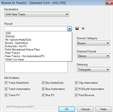
|
Sara95
Max Output Level: -90 dBFS
- Total Posts : 23
- Joined: 2013/01/04 07:02:50
- Status: offline

Re:Can't bounce MIDI into audio, using soft synths only flat audio lines appear
2013/01/05 07:21:07
(permalink)
Thankyou very much:) I've made a screenshot of my bounce options which is in the attachement. I'm not sure which output you mean, the output of the MIDI track = soft synth output of the soft synth = master. When play backing the midi file trough the soft synth you here the piano perfectly, but when bounced to a track, no audio.
Attached Image(s)
|
RobertB
Max Output Level: 0 dBFS
- Total Posts : 11256
- Joined: 2005/11/19 23:40:50
- Location: Fort Worth, Texas
- Status: offline
Re:Can't bounce MIDI into audio, using soft synths only flat audio lines appear
2013/01/05 10:31:28
(permalink)
Your bounce options look fine, and your routing appears to be correct.
Are you holding the [ctrl] key down when you make your track selections?
Both tracks must be highlighted, or you will get a silent bounce.
My Soundclick Page SONAR Professional, X3eStudio,W7 64bit, AMD Athlon IIx4 2.8Ghz, 4GB RAM, 64bit, AKAI EIE Pro, Nektar Impact LX61,Alesis DM6,Alesis ControlPad,Yamaha MG10/2,Alesis M1Mk2 monitors,Samson Servo300,assorted guitars,Lava Lamp Shimozu-Kushiari or Bob
|
Sara95
Max Output Level: -90 dBFS
- Total Posts : 23
- Joined: 2013/01/04 07:02:50
- Status: offline
Re:Can't bounce MIDI into audio, using soft synths only flat audio lines appear
2013/01/05 16:34:08
(permalink)
Yes, I also tried selecting everything by pressing ctrl - A and mute the tracks I dont want to bounce to audio
|
57Gregy
Max Output Level: 0 dBFS
- Total Posts : 14404
- Joined: 2004/05/31 17:04:17
- Location: Raleigh, North Carolina
- Status: offline
Re:Can't bounce MIDI into audio, using soft synths only flat audio lines appear
2013/01/06 11:10:25
(permalink)
Have you tried exporting the track(s)?
Create a new folder on your desktop called Audio Files. Select the MIDI and soft synth track like you would if you were bouncing them, then go to File>Export Audio. Use the Audio Files folder as the destination and 44,100 Hz sampling rate and 16-bit.
See what happens...
|
Sara95
Max Output Level: -90 dBFS
- Total Posts : 23
- Joined: 2013/01/04 07:02:50
- Status: offline
Re:Can't bounce MIDI into audio, using soft synths only flat audio lines appear
2013/01/06 11:25:23
(permalink)
Yes i tried a wave file is created, can be played by wmp but no audio is heard:( i really dont understand what i'm doing wrong... Thankyou for all your comments so far, and i'm sorry for my bad English..
|
Sara95
Max Output Level: -90 dBFS
- Total Posts : 23
- Joined: 2013/01/04 07:02:50
- Status: offline
Re:Can't bounce MIDI into audio, using soft synths only flat audio lines appear
2013/01/06 11:26:51
(permalink)
By the way i have read peoples comments in other posts that you have to create a new audio track and make the input the soft synth, but when I do this the R ecord button disappear.. Still can't find the solution, does anyone have anymore sggestions or solutions?? any help is very appreciated
|
Bristol_Jonesey
Max Output Level: 0 dBFS
- Total Posts : 16775
- Joined: 2007/10/08 15:41:17
- Location: Bristol, UK
- Status: offline
Re:Can't bounce MIDI into audio, using soft synths only flat audio lines appear
2013/01/07 04:57:12
(permalink)
Have you tried freezing the synth? This is an alternative to bouncing and works really well.
Just click the snowflake icon, either in the Synth Rack or in the Midi track
CbB, Platinum, 64 bit throughoutCustom built i7 3930, 32Gb RAM, 2 x 1Tb Internal HDD, 1 x 1TB system SSD (Win 7), 1 x 500Gb system SSD (Win 10), 2 x 1Tb External HDD's, Dual boot Win 7 & Win 10 64 Bit, Saffire Pro 26, ISA One, Adam P11A,
|
Kalle Rantaaho
Max Output Level: -5 dBFS

- Total Posts : 7005
- Joined: 2006/01/09 13:07:59
- Location: Finland
- Status: offline
Re:Can't bounce MIDI into audio, using soft synths only flat audio lines appear
2013/01/07 08:30:48
(permalink)
Sara95
By the way i have read peoples comments in other posts that you have to create a new audio track and make the input the soft synth, but when I do this the R ecord button disappear.. Still can't find the solution, does anyone have anymore sggestions or solutions?? any help is very appreciated
But the Record button disappears from the audio track, right? It's MIDI you are recording on the MIDI track when you use Sound Center . When you use the "Insert Soft Synth" dropdown box or Synth Rack all these tracks and routing are created automatically. You don't need to mess with them at all. I recommend not using the "Simple Instrument Track" option, untill you're familiar with whole procedure. Also, select the "First Audio Output" -option, as long as your not totally "in" yet. I don't have Sound Center, so this may be stupid, but I write it down anyway: In the screen capture you attached your export source is Tracks/"Sound Center1 Primary Output Stereo". Is that really the name of the audio track that is playing the soft synth? In my export settings there is normally the number of the audio track or the name I have given to the track, like " Kontakt Bass". In my system, that "Primary Output:Stereo" would be the input of the audio track that is assigned to the soft synth, not the export source.
SONAR PE 8.5.3, Asus P5B, 2,4 Ghz Dual Core, 4 Gb RAM, GF 7300, EMU 1820, Bluetube Pre - Kontakt4, Ozone, Addictive Drums, PSP Mixpack2, Melda Creative Pack, Melodyne Plugin etc. The benefit of being a middle aged amateur is the low number of years of frustration ahead of you.
|
Sara95
Max Output Level: -90 dBFS
- Total Posts : 23
- Joined: 2013/01/04 07:02:50
- Status: offline
Re:Can't bounce MIDI into audio, using soft synths only flat audio lines appear
2013/01/07 10:54:29
(permalink)
Hi Kalle, thanks for your answer! But i'm not understanding it completely.. i'm sorry Yes the record button disappears from the audio track. By audio track i mean an empty (not containing any data) just inserted audio track. OK thanks for the tips about the settings in my screen capture i have chosen "tracks" under "source catagory". By this the "export source" changes automatically to Tracks/"Sound Center1 Primary Output Stereo" when I chose "Buses" or "main outputs" or "entire mix" under "source catagory" the "export source" changes also. but I tried em all. I tried: "source catagory" : "buses" which mean that export source change to "Master" and "source catagory": "Main outputs" than "export source" changes to: OUT-UA25EX (this is my interface which play back the audio) So i tried different options for export source and they all did not work. Do you have another idea of something i do wrong? thankyou
|
Sara95
Max Output Level: -90 dBFS
- Total Posts : 23
- Joined: 2013/01/04 07:02:50
- Status: offline
Re:Can't bounce MIDI into audio, using soft synths only flat audio lines appear
2013/01/07 10:55:58
(permalink)
☄ Helpful
Hello Bristol_Jonesey, thanks for your answer:) Yes i tried but there is no freeze button in my sonar. I think that is not available on the LE version:(
|
Kalle Rantaaho
Max Output Level: -5 dBFS
- Total Posts : 7005
- Joined: 2006/01/09 13:07:59
- Location: Finland
- Status: offline
Re:Can't bounce MIDI into audio, using soft synths only flat audio lines appear
2013/01/07 12:12:18
(permalink)
Ooops! Sorry, Sara! I must take my words back a little. I just checked, I do get track names like "Kontakt1, Primary Output: Stereo". I remembered wrong! My baaad :o/
SONAR PE 8.5.3, Asus P5B, 2,4 Ghz Dual Core, 4 Gb RAM, GF 7300, EMU 1820, Bluetube Pre - Kontakt4, Ozone, Addictive Drums, PSP Mixpack2, Melda Creative Pack, Melodyne Plugin etc. The benefit of being a middle aged amateur is the low number of years of frustration ahead of you.
|
Sara95
Max Output Level: -90 dBFS
- Total Posts : 23
- Joined: 2013/01/04 07:02:50
- Status: offline
Re:Can't bounce MIDI into audio, using soft synths only flat audio lines appear
2013/01/07 14:07:56
(permalink)
Hi Kalle, haha no problem! it is nice that you think about my problem en want to help me! I bet you can bounce your MIDI into audio can't you? Maybe another idea what i'm doing wrong?? thankyou
|
Kalle Rantaaho
Max Output Level: -5 dBFS
- Total Posts : 7005
- Joined: 2006/01/09 13:07:59
- Location: Finland
- Status: offline
Re:Can't bounce MIDI into audio, using soft synths only flat audio lines appear
2013/01/07 14:29:13
(permalink)
It is strange:
If you do EVERYTHING exactly the same way with EZDrummer and Sound Center, but you only get audio bounced with EZD, I can't understand it.
On the other hand, you have not given a full, clear description of how you have Sound Center inserted.
In your post #8 you write:
By the way i have read peoples comments in other posts that you have to create a new audio track and make the input the soft synth...
It bothers me somehow that you mention the audio track as something new you haven't tried yet, when it is an elementary part of setting up a soft synth. If you have not had this audio output track, then how have you used Sound Center? Does LE have Simple Instrument Tracks?
SONAR PE 8.5.3, Asus P5B, 2,4 Ghz Dual Core, 4 Gb RAM, GF 7300, EMU 1820, Bluetube Pre - Kontakt4, Ozone, Addictive Drums, PSP Mixpack2, Melda Creative Pack, Melodyne Plugin etc. The benefit of being a middle aged amateur is the low number of years of frustration ahead of you.
|
Sara95
Max Output Level: -90 dBFS
- Total Posts : 23
- Joined: 2013/01/04 07:02:50
- Status: offline
Re:Can't bounce MIDI into audio, using soft synths only flat audio lines appear
2013/01/07 15:17:37
(permalink)
I insert Sound center like this: I just hit insert--> soft synths --> ezdrummer/sound center etc. Than a list of options pop up (in the attachment) and I click OK a soft synth is created.
Attached Image(s)
|
Sara95
Max Output Level: -90 dBFS
- Total Posts : 23
- Joined: 2013/01/04 07:02:50
- Status: offline
Re:Can't bounce MIDI into audio, using soft synths only flat audio lines appear
2013/01/07 15:23:29
(permalink)
oh and with your advise it would be this (see attachement)
Attached Image(s)
|
Kalle Rantaaho
Max Output Level: -5 dBFS
- Total Posts : 7005
- Joined: 2006/01/09 13:07:59
- Location: Finland
- Status: offline
Re:Can't bounce MIDI into audio, using soft synths only flat audio lines appear
2013/01/07 15:38:40
(permalink)
Everything seems to be right, so I'm stumped.
And you record MIDI on the MIDI track with....what? And you see there are MIDI notes in the Piano Roll View?
SONAR PE 8.5.3, Asus P5B, 2,4 Ghz Dual Core, 4 Gb RAM, GF 7300, EMU 1820, Bluetube Pre - Kontakt4, Ozone, Addictive Drums, PSP Mixpack2, Melda Creative Pack, Melodyne Plugin etc. The benefit of being a middle aged amateur is the low number of years of frustration ahead of you.
|
Sara95
Max Output Level: -90 dBFS
- Total Posts : 23
- Joined: 2013/01/04 07:02:50
- Status: offline
Re:Can't bounce MIDI into audio, using soft synths only flat audio lines appear
2013/01/07 15:48:44
(permalink)
Just opened a midi file, so not recorded by my self but there are MIDI notes in the PRV
|
Kalle Rantaaho
Max Output Level: -5 dBFS
- Total Posts : 7005
- Joined: 2006/01/09 13:07:59
- Location: Finland
- Status: offline
Re:Can't bounce MIDI into audio, using soft synths only flat audio lines appear
2013/01/07 15:58:23
(permalink)
And when you press "play" the MIDI is played by Sound Center with the sounds of your choice,
but when you select both of the tracks (Tracks, not clips), MIDI and audio, and bounce or export, you only get a silent flat line? Or, if you select nothing, it's the same as selecting all (if there only is this one soft synth track.)
And the output of the MIDI track is Sound Center, and the input of the audio track is Sound Center?
Or, if you use simple instrument track, you click on the track number to select both MIDI and audio, and get a flat line all the same?
SONAR PE 8.5.3, Asus P5B, 2,4 Ghz Dual Core, 4 Gb RAM, GF 7300, EMU 1820, Bluetube Pre - Kontakt4, Ozone, Addictive Drums, PSP Mixpack2, Melda Creative Pack, Melodyne Plugin etc. The benefit of being a middle aged amateur is the low number of years of frustration ahead of you.
|
Sara95
Max Output Level: -90 dBFS
- Total Posts : 23
- Joined: 2013/01/04 07:02:50
- Status: offline
Re:Can't bounce MIDI into audio, using soft synths only flat audio lines appear
2013/01/07 16:32:26
(permalink)
And when you press "play" the MIDI is played by Sound Center with the sounds of your choice --> Yes I can choose piano/synth/clarinet etc but when you select both of the tracks (Tracks, not clips), MIDI and audio, and bounce or export, you only get a silent flat line? --> correct Or, if you select nothing, it's the same as selecting all (if there only is this one soft synth track.) --> correct And the output of the MIDI track is Sound Center, and the input of the audio track is Sound Center? --> i select the MIDI track and the sound center track and press bounce to tracks, then in a new track (destination track)a audio clip is created but it has only flat audio lines.. SO in the end I have 3 tracks MIDI soft synth and the new audio track (which contains no data)
|
Kalle Rantaaho
Max Output Level: -5 dBFS
- Total Posts : 7005
- Joined: 2006/01/09 13:07:59
- Location: Finland
- Status: offline
Re:Can't bounce MIDI into audio, using soft synths only flat audio lines appear
2013/01/07 16:38:51
(permalink)
SO in the end I have 3 tracks MIDI soft synth and the new audio track (which contains no data)
How come you have three MIDI tracks...a typo? There should be the original MIDI track which includes the MIDI notes you see in PRV and the audio track that plays back the MIDI via Sound Center, and the destination audio track containing the bounced audio. What are the 3 MIDI tracks you mention?
SONAR PE 8.5.3, Asus P5B, 2,4 Ghz Dual Core, 4 Gb RAM, GF 7300, EMU 1820, Bluetube Pre - Kontakt4, Ozone, Addictive Drums, PSP Mixpack2, Melda Creative Pack, Melodyne Plugin etc. The benefit of being a middle aged amateur is the low number of years of frustration ahead of you.
|
Sara95
Max Output Level: -90 dBFS
- Total Posts : 23
- Joined: 2013/01/04 07:02:50
- Status: offline
Re:Can't bounce MIDI into audio, using soft synths only flat audio lines appear
2013/01/08 00:49:37
(permalink)
Im very sorry did not mean to say that. I meant: i have 3 tracks : one M
|
Sara95
Max Output Level: -90 dBFS
- Total Posts : 23
- Joined: 2013/01/04 07:02:50
- Status: offline
Re:Can't bounce MIDI into audio, using soft synths only flat audio lines appear
2013/01/08 00:57:37
(permalink)
OK amswering with my iPhone is not a very good idea.. Im very sorry but i meant to say: i have 3 tracks: one MIDI track, one Soft synth track and one new audio track. There is missing something like a , or a : in my previous message. But i have just what you said..three tracks
|
57Gregy
Max Output Level: 0 dBFS
- Total Posts : 14404
- Joined: 2004/05/31 17:04:17
- Location: Raleigh, North Carolina
- Status: offline
Re:Can't bounce MIDI into audio, using soft synths only flat audio lines appear
2013/01/08 12:08:41
(permalink)
Do you record your MIDI, whether by keyboard or mousing the notes in the PRV or staff, before you insert the synth, or do you insert the synth and then do the recording?
If the latter, you should have the 'Create MIDI Source Track' box checked. This will insert a new MIDI track with the output already set to the synth, and the synth audio track. Record your MIDI in the new track.
What is the output of the synth track? If it's the UA, change it to a bus; name the bus Master if there isn't a Master already. Make sure the bus is ouput to the UA.
Then in the export menu, select Tracks/Buses as the source.
You might try increasing the width of the Track Pane by grabbing the right side and dragging it to the right. See if that exposes the Freeze button.
|
Sara95
Max Output Level: -90 dBFS
- Total Posts : 23
- Joined: 2013/01/04 07:02:50
- Status: offline
Re:Can't bounce MIDI into audio, using soft synths only flat audio lines appear
2013/01/08 13:41:11
(permalink)
I import a midi file (it opens several MIDI tracks) I deleted them all exept one. So I have a MIDI track with MIDI in it (you can see the notes in PRV) The out put of the synth track is master No I can't find a freeze button I have a printscreen of the alt-0 (overall screen) of my sonar with the song in the attachement.. In this picture i have selected the two tracks i want to bounce to tracks thanks for all the suggestions :) I hope my problem will be solved soon, that will only happen if you keep thinking and name things thankyou!
Attached Image(s)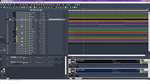
|
Kalle Rantaaho
Max Output Level: -5 dBFS
- Total Posts : 7005
- Joined: 2006/01/09 13:07:59
- Location: Finland
- Status: offline
Re:Can't bounce MIDI into audio, using soft synths only flat audio lines appear
2013/01/08 13:57:24
(permalink)
Greg, we've been going through this step by step, and I can't figure it out.
And note: She can use/bounce/export EZDrummer without problems.
I don't have Sound Center. Maybe you can spot something. I'm out of ideas. Could the solution be in the type or something in the MIDI tracks themselves. I've never used ready made MIDI.
SONAR PE 8.5.3, Asus P5B, 2,4 Ghz Dual Core, 4 Gb RAM, GF 7300, EMU 1820, Bluetube Pre - Kontakt4, Ozone, Addictive Drums, PSP Mixpack2, Melda Creative Pack, Melodyne Plugin etc. The benefit of being a middle aged amateur is the low number of years of frustration ahead of you.
|
RobertB
Max Output Level: 0 dBFS
- Total Posts : 11256
- Joined: 2005/11/19 23:40:50
- Location: Fort Worth, Texas
- Status: offline
Re:Can't bounce MIDI into audio, using soft synths only flat audio lines appear
2013/01/08 14:19:15
(permalink)
I think I see something. In your selected MIDI track, there is a bank and patch selection showing(in the track inspector). These are not available if the MIDI track output is set to Sound Center, but they are available if the output is going to the MS Wavetable Synth. So the sound you are hearing is not really coming from Sound Center. Sound Center is not receiving any input, and is not producing sound, so you get a bounced track with only silence. Expand your MIDI track so you can see the output selection. If the MIDI track is properly associated with the Sound Center audio track, you should see something like this: 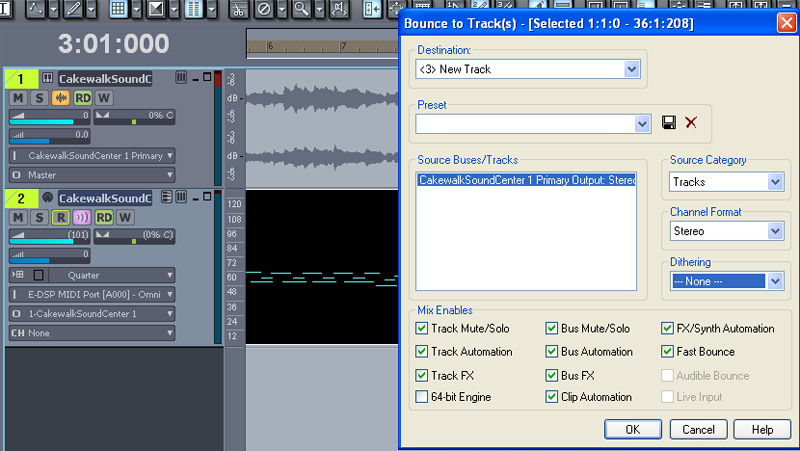 You won't see the waveform in your synth audio track. The waveform preview is not available in LE. This screen shot is from 8.3 Studio. Also, the freeze button would appear in the blank space next to the Solo button in the Synth Rack if it were available. It appears that LE does not have that option.
post edited by RobertB - 2013/01/08 14:32:10
My Soundclick Page SONAR Professional, X3eStudio,W7 64bit, AMD Athlon IIx4 2.8Ghz, 4GB RAM, 64bit, AKAI EIE Pro, Nektar Impact LX61,Alesis DM6,Alesis ControlPad,Yamaha MG10/2,Alesis M1Mk2 monitors,Samson Servo300,assorted guitars,Lava Lamp Shimozu-Kushiari or Bob
|
Kalle Rantaaho
Max Output Level: -5 dBFS
- Total Posts : 7005
- Joined: 2006/01/09 13:07:59
- Location: Finland
- Status: offline
Re:Can't bounce MIDI into audio, using soft synths only flat audio lines appear
2013/01/08 15:22:41
(permalink)
I really hope you spotted it ! If that's it, this is again a good example of how rational and accurate one must be in describing the problem workflow. Then again, how could she select/change instruments in Sound Center (as I understand she's done) and hear the changes, if it's actually Wavetable synth she's using. My posts #20 and Saras answer # 21 gave me the impression that routing is correct. But, to be very precise,, Sara did not write "yes, MIDI tracks output is Sound Center." But I really hope the quest is over! The OP has been very, very patient. No ranting, no frustrated rage. Admirable, actually!
post edited by Kalle Rantaaho - 2013/01/08 16:30:56
SONAR PE 8.5.3, Asus P5B, 2,4 Ghz Dual Core, 4 Gb RAM, GF 7300, EMU 1820, Bluetube Pre - Kontakt4, Ozone, Addictive Drums, PSP Mixpack2, Melda Creative Pack, Melodyne Plugin etc. The benefit of being a middle aged amateur is the low number of years of frustration ahead of you.
|
Kalle Rantaaho
Max Output Level: -5 dBFS
- Total Posts : 7005
- Joined: 2006/01/09 13:07:59
- Location: Finland
- Status: offline
Re:Can't bounce MIDI into audio, using soft synths only flat audio lines appear
2013/01/08 16:28:24
(permalink)
Sorry, double
post edited by Kalle Rantaaho - 2013/01/08 16:29:30
SONAR PE 8.5.3, Asus P5B, 2,4 Ghz Dual Core, 4 Gb RAM, GF 7300, EMU 1820, Bluetube Pre - Kontakt4, Ozone, Addictive Drums, PSP Mixpack2, Melda Creative Pack, Melodyne Plugin etc. The benefit of being a middle aged amateur is the low number of years of frustration ahead of you.
|