TremoJem
Max Output Level: -81 dBFS

- Total Posts : 479
- Joined: 2008/04/10 09:42:25
- Location: NY
- Status: offline
Clean Install of Win10 & Sonar
Quick Question.
I have been with Sonar since 7PE, back when it was on media.
I then upgraded to X3PE and then to SPlat.
After I clean install Win10, where do I have to start with Sonar.
Do I have to first install X3?
Or, do I just install CCC and go from there?
Purrrfect Audio LLC Pro Studio, Sonar X3e PE X64, Win7 Pro 64Bit - Dell Inspiron 1760, Sonar 7 PE X64, Win7 Pro 64Bit - iZotope Ozone 5 & Alloy 2 - MOTU Audio Express & 2 MOTU 8Pre - Glyph & Lacie External HDs - Roland A-800Pro - Mackie MR5mkIII - Shure - AKG - Sennheiser Most importantly...not enough time. www.studiocat.com jim@studiocat.com
|
Doktor Avalanche 
Max Output Level: -32.5 dBFS

- Total Posts : 4294
- Joined: 2015/03/26 18:02:02
- Status: offline

Re: Clean Install of Win10 & Sonar
2015/09/17 07:19:05
(permalink)
I assume you booted off Win10 install media and formatted the disk when installing Windows 10, custom install, after you did an upgrade (that's a full clean install)... Platinum does not contain some plugins supplied in older versions. If you really need them suggest you get that out the way first. Look at the Platinum specs to see what you are missing. You can do custom installs of each version of Sonar to individually install ancient plugins. I strongly urge you go 64 bit only though at this stage, and consider less might be more. Anyway whatever your requirement. There is a thread somewhere that lists plugins with all Sonar versions, can't find it though, somebody might post a link. If you really need to install old versions of Sonar first (you shouldn't need to do so) do it in sequential order, oldest first. CCC will only install Platinum BTW. Make sure your audio interface is on the latest firmware and drivers. Consider updating your BIOS, and visiting the intel driver update site. Otherwise just charge into CCC. Make sure the settings within CCC are correctly configured before you begin install. And don't forget to backup with something like Acronis once you've finally got everything running. Cheers..
post edited by Doktor Avalanche - 2015/09/17 07:34:18
Sonar Platinum(64 bit),Win 8.1(64 bit),Saffire Pro 40(Firewire),Mix Control = 3.6,Firewire=VIA,Dell Studio XPS 8100(Intel Core i7 CPU 2.93 Ghz/16 Gb),2 x 1TB SSD (Samsung EVO 850),GeForce GTX 460,Yamaha DGX-505 keyboard,Roland A-300PRO,Roland SPD-30 V2,FD-8,Triggera Krigg,Shure SM7B,Yamaha HS5. Rap Pro,Maschine Studio+Komplete 9 Ultimate+Kontrol Z1,Addictive Keys,Waves Silver,Izotope Nectar elements,Overloud Bundle,Geist,Acronis True Image 2015.
|
Zargg
Max Output Level: 0 dBFS

- Total Posts : 10666
- Joined: 2014/09/28 04:20:14
- Location: Norway
- Status: offline
Re: Clean Install of Win10 & Sonar
2015/09/17 07:56:24
(permalink)
Ken Nilsen ZarggBBZWin 10 Pro X64, Cakewalk by Bandlab, SPlat X64, AMD AM3+ fx-8320, 16Gb RAM, RME Ucx (+ ARC), Tascam FW 1884, M-Audio Keystation 61es, *AKAI MPK Pro 25, *Softube Console1, Alesis DM6 USB, Maschine MkII Laptop setup: Win 10 X64, i5 2.4ghz, 8gb RAM, 320gb 7200 RPM HD, Focusrite Solo, + *
|
TremoJem
Max Output Level: -81 dBFS
- Total Posts : 479
- Joined: 2008/04/10 09:42:25
- Location: NY
- Status: offline
Re: Clean Install of Win10 & Sonar
2015/09/17 12:19:24
(permalink)
Purrrfect Audio LLC Pro Studio, Sonar X3e PE X64, Win7 Pro 64Bit - Dell Inspiron 1760, Sonar 7 PE X64, Win7 Pro 64Bit - iZotope Ozone 5 & Alloy 2 - MOTU Audio Express & 2 MOTU 8Pre - Glyph & Lacie External HDs - Roland A-800Pro - Mackie MR5mkIII - Shure - AKG - Sennheiser Most importantly...not enough time. www.studiocat.com jim@studiocat.com
|
stickman393
Max Output Level: -60 dBFS

- Total Posts : 1528
- Joined: 2003/11/07 18:35:26
- Status: offline
Re: Clean Install of Win10 & Sonar
2015/09/17 14:29:17
(permalink)
When I went through this last weekend, i installed 8.5; X2; X3; and Platinum. I skipped X1 because there were no plugins or optional bits that weren't provided by the others.
|
Doktor Avalanche
Max Output Level: -32.5 dBFS
- Total Posts : 4294
- Joined: 2015/03/26 18:02:02
- Status: offline
Re: Clean Install of Win10 & Sonar
2015/09/17 14:32:19
(permalink)
Well FYI again, you don't need to install the main Sonar app to install the plugins. Unless you want to for some reason. And remember kids.. Less is more ;) Cheers..
post edited by Doktor Avalanche - 2015/09/17 14:41:04
Sonar Platinum(64 bit),Win 8.1(64 bit),Saffire Pro 40(Firewire),Mix Control = 3.6,Firewire=VIA,Dell Studio XPS 8100(Intel Core i7 CPU 2.93 Ghz/16 Gb),2 x 1TB SSD (Samsung EVO 850),GeForce GTX 460,Yamaha DGX-505 keyboard,Roland A-300PRO,Roland SPD-30 V2,FD-8,Triggera Krigg,Shure SM7B,Yamaha HS5. Rap Pro,Maschine Studio+Komplete 9 Ultimate+Kontrol Z1,Addictive Keys,Waves Silver,Izotope Nectar elements,Overloud Bundle,Geist,Acronis True Image 2015.
|
stickman393
Max Output Level: -60 dBFS
- Total Posts : 1528
- Joined: 2003/11/07 18:35:26
- Status: offline
Re: Clean Install of Win10 & Sonar
2015/09/17 14:54:03
(permalink)
>> you don't need to install the main Sonar app to install the plugins
Except for V-Vocal.
|
Doktor Avalanche
Max Output Level: -32.5 dBFS
- Total Posts : 4294
- Joined: 2015/03/26 18:02:02
- Status: offline
Re: Clean Install of Win10 & Sonar
2015/09/17 17:47:02
(permalink)
Vvocal? Nope never heard of it ;)
Sonar Platinum(64 bit),Win 8.1(64 bit),Saffire Pro 40(Firewire),Mix Control = 3.6,Firewire=VIA,Dell Studio XPS 8100(Intel Core i7 CPU 2.93 Ghz/16 Gb),2 x 1TB SSD (Samsung EVO 850),GeForce GTX 460,Yamaha DGX-505 keyboard,Roland A-300PRO,Roland SPD-30 V2,FD-8,Triggera Krigg,Shure SM7B,Yamaha HS5. Rap Pro,Maschine Studio+Komplete 9 Ultimate+Kontrol Z1,Addictive Keys,Waves Silver,Izotope Nectar elements,Overloud Bundle,Geist,Acronis True Image 2015.
|
bluviaggiatore
Max Output Level: -90 dBFS

- Total Posts : 10
- Joined: 2015/09/19 03:37:59
- Status: offline
Re: Clean Install of Win10 & Sonar
2015/09/19 03:50:05
(permalink)
still waiting for Win10 update . :(
|
Doktor Avalanche
Max Output Level: -32.5 dBFS
- Total Posts : 4294
- Joined: 2015/03/26 18:02:02
- Status: offline
Re: Clean Install of Win10 & Sonar
2015/09/19 05:22:34
(permalink)
Sonar Platinum(64 bit),Win 8.1(64 bit),Saffire Pro 40(Firewire),Mix Control = 3.6,Firewire=VIA,Dell Studio XPS 8100(Intel Core i7 CPU 2.93 Ghz/16 Gb),2 x 1TB SSD (Samsung EVO 850),GeForce GTX 460,Yamaha DGX-505 keyboard,Roland A-300PRO,Roland SPD-30 V2,FD-8,Triggera Krigg,Shure SM7B,Yamaha HS5. Rap Pro,Maschine Studio+Komplete 9 Ultimate+Kontrol Z1,Addictive Keys,Waves Silver,Izotope Nectar elements,Overloud Bundle,Geist,Acronis True Image 2015.
|
TremoJem
Max Output Level: -81 dBFS
- Total Posts : 479
- Joined: 2008/04/10 09:42:25
- Location: NY
- Status: offline
Re: Clean Install of Win10 & Sonar
2015/09/21 17:49:47
(permalink)
I logged in/out.
I selected "Check Now".
Still no success...I am at Gloucester currently and CCC does not see any new updates.
Hmmm...that sucks.
Help please and thank you.
Purrrfect Audio LLC Pro Studio, Sonar X3e PE X64, Win7 Pro 64Bit - Dell Inspiron 1760, Sonar 7 PE X64, Win7 Pro 64Bit - iZotope Ozone 5 & Alloy 2 - MOTU Audio Express & 2 MOTU 8Pre - Glyph & Lacie External HDs - Roland A-800Pro - Mackie MR5mkIII - Shure - AKG - Sennheiser Most importantly...not enough time. www.studiocat.com jim@studiocat.com
|
scook
Forum Host

- Total Posts : 24146
- Joined: 2005/07/27 13:43:57
- Location: TX
- Status: offline
Re: Clean Install of Win10 & Sonar
2015/09/21 17:53:45
(permalink)
|
TremoJem
Max Output Level: -81 dBFS
- Total Posts : 479
- Joined: 2008/04/10 09:42:25
- Location: NY
- Status: offline
Re: Clean Install of Win10 & Sonar
2015/09/21 18:19:24
(permalink)
O.K. so before I posted I had to download the new version of CCC.
It told me that I had two files to update..."Documentation".
So I said..."what the heck"...did it.
Came back 22 minutes later and now I am at Ipswich 21.8.0.2.
Makes no sense to me.
What did it download?
Oh, by the way, "SONAR Local Documentation" is still yellow.
I am confused...oh well.
Thanks
Purrrfect Audio LLC Pro Studio, Sonar X3e PE X64, Win7 Pro 64Bit - Dell Inspiron 1760, Sonar 7 PE X64, Win7 Pro 64Bit - iZotope Ozone 5 & Alloy 2 - MOTU Audio Express & 2 MOTU 8Pre - Glyph & Lacie External HDs - Roland A-800Pro - Mackie MR5mkIII - Shure - AKG - Sennheiser Most importantly...not enough time. www.studiocat.com jim@studiocat.com
|
scook
Forum Host
- Total Posts : 24146
- Joined: 2005/07/27 13:43:57
- Location: TX
- Status: offline
Re: Clean Install of Win10 & Sonar
2015/09/21 18:22:02
(permalink)
It sounds like you downloaded and updated the SONAR program (which is currently delivered in two files) and still have a pending SONAR documentation update. Usually when the program is updated, there is a change to the help files.
|
TremoJem
Max Output Level: -81 dBFS
- Total Posts : 479
- Joined: 2008/04/10 09:42:25
- Location: NY
- Status: offline
Re: Clean Install of Win10 & Sonar
2015/09/21 18:54:20
(permalink)
Oh, thank you...very cool.
I will update the docs.
Purrrfect Audio LLC Pro Studio, Sonar X3e PE X64, Win7 Pro 64Bit - Dell Inspiron 1760, Sonar 7 PE X64, Win7 Pro 64Bit - iZotope Ozone 5 & Alloy 2 - MOTU Audio Express & 2 MOTU 8Pre - Glyph & Lacie External HDs - Roland A-800Pro - Mackie MR5mkIII - Shure - AKG - Sennheiser Most importantly...not enough time. www.studiocat.com jim@studiocat.com
|
Jesse G
Max Output Level: -32.5 dBFS
- Total Posts : 4282
- Joined: 2004/04/14 01:43:43
- Status: offline
Re: Clean Install of Win10 & Sonar
2015/09/21 23:05:32
(permalink)
Keep in mind that you don't have to install the full versions of Sonar X1, or X2 or eve X3, just install the plugins you want from them. There will be no need to install any previous version of Sonar as you already have the latest version you want installed. Start the installation of the previous versions and select advanced installationSelect only the items you want installed and deselect everything else especially older version of Sonar itself. Now you will only have the plugins you want from the earlier Sonar versions and not the previous versions of Sonar itself. 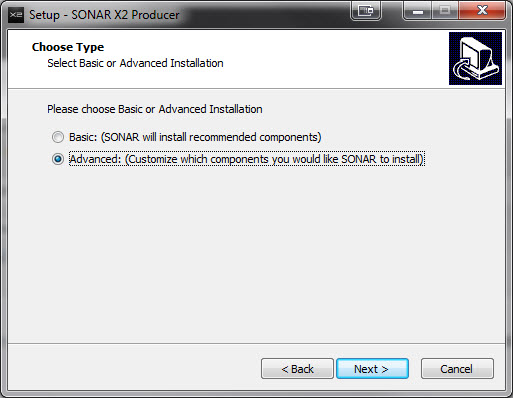 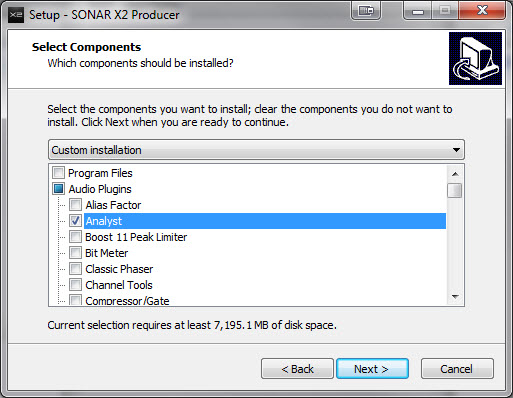 I hope this helps
Peace,Jesse G.  A fisher of men <>< ==============================Cakewalk and I are going places together! A fisher of men <>< ==============================Cakewalk and I are going places together!
Cakewalk By Bandlab, Windows 10 Pro- 64 bit, Gigabyte GA-Z97X-SLI, Intel Core i5-4460 Haswell Processor, Crucial Ballistix 32 GB Ram, PNY GeForce GTX 750, Roland Octa-Capture, Mackie Big Knob, Mackie Universal Controller (MCU), KRK V4's, KRK Rockit 6, Korg TR-61 Workstation, M-Audio Code 49 MIDI keyboard controller.[/
|