Johnbee58
Max Output Level: -72 dBFS

- Total Posts : 946
- Joined: 2014/06/21 10:45:53
- Location: Reading PA
- Status: offline
Comping Questions
Hello!
Yesterday, I tried using the Comping feature in Sonar X3 Studio for the first time and I guess I'm missing a point because when I record a new track it overwrites the previous take. I checked and I have Comping selected and not overwite. What I should be getting is a new take written over the old, but without erasing the old, correct? Then, when I hit the icon I should see all the takes, right? I really would like to use this feature but I got tired of trying to figure it out and just did the old fashioned Punch in/out thing I did on previous DAWs I used. Can somebody tell me what I might be doing wrong?
Thanks
John B.
Lenovo Core i5 4460 Desktop PC (Windows 8 64 bit), Focusrite Scarlett 6i6, Nektar LX61 Keyboard MIDI Controller, Avantone Pro CV-12 tube condenser microphone, JBL LSR308 8" active monitor speakers. Cakewalk by Bandlab, Reason 7, NI Session Strings Pro, NI Strummed Acoustic Guitar, Miroslav Philharmonic, Auturia DX7 V, Garritan JABB 3, EZ Keys, EZ Drummer. "I will create music the way I want to whether a million people are listening or no one is listening." Dan Fogelberg, Singer/Songwriter-1951-2007
|
CJaysMusic
Max Output Level: 0 dBFS

- Total Posts : 30423
- Joined: 2006/10/28 01:51:41
- Location: Miami - Fort Lauderdale - Davie
- Status: offline

Re: Comping Questions
2014/11/11 11:06:19
(permalink)
You need to select 'sound On sound' in the preference menu in sonar. You probably have 'replace old with new' selected..
CJ
|
FastBikerBoy
Forum Host

- Total Posts : 11326
- Joined: 2008/01/25 16:15:36
- Location: Watton, Norfolk, UK
- Status: offline
Re: Comping Questions
2014/11/11 13:41:53
(permalink)
When you select "Comping" as the record mode, existing takes are kept in the track but are auto-muted by the fresh take. You should be able to see the previous takes by opening lanes.
The comping feature itself is the ease with which these takes can be comped together. Either by speed comping or manual comping. To speed comp, split the clips into manageable sizes to audition them, all takes will split at the same point. Press Shift+space bar to start playback and the use the keyboard arrow keys to navigate the clips.
Manual comping is slightly different but just as quick. Start playback normally and split the clips as the transport is running. Click in the lower half of a clip and the now time jumps back to the start of that clip. Split and click as required.
At any time in either method the split points can be click dragged left/right to move them as well as up/down to adjust the crossfades.
|
Johnbee58
Max Output Level: -72 dBFS
- Total Posts : 946
- Joined: 2014/06/21 10:45:53
- Location: Reading PA
- Status: offline
Re: Comping Questions
2014/11/14 09:48:30
(permalink)
I'm sorry, but I'm still not clear on some of this process. I did manage to do a test recording creating 4 takes. Now I need to know what to do next. I make sure I select the Smart tool and when I run the Smart tool over a take it turns into the isolate icon. But when I left click over a region I want to promote and click on it, the entire track turns white as if to highlight the entire track. What am I doing wrong?
Thanks
John B.
Lenovo Core i5 4460 Desktop PC (Windows 8 64 bit), Focusrite Scarlett 6i6, Nektar LX61 Keyboard MIDI Controller, Avantone Pro CV-12 tube condenser microphone, JBL LSR308 8" active monitor speakers. Cakewalk by Bandlab, Reason 7, NI Session Strings Pro, NI Strummed Acoustic Guitar, Miroslav Philharmonic, Auturia DX7 V, Garritan JABB 3, EZ Keys, EZ Drummer. "I will create music the way I want to whether a million people are listening or no one is listening." Dan Fogelberg, Singer/Songwriter-1951-2007
|
scook
Forum Host
- Total Posts : 24146
- Joined: 2005/07/27 13:43:57
- Location: TX
- Status: offline
Re: Comping Questions
2014/11/14 10:19:05
(permalink)
|
Johnbee58
Max Output Level: -72 dBFS
- Total Posts : 946
- Joined: 2014/06/21 10:45:53
- Location: Reading PA
- Status: offline
Re: Comping Questions
2014/11/14 10:43:11
(permalink)
No. I'm sorry, but that video is absolutely useless! I've looked it over several times and it is so vague. It tells you what the feature can do, but not how to do it.
At this point I'd like to say that I'm totally disgusted by Cakewalk Sonar an wish I'd never bought it! So far I've had issues with Comping, Backing Up projects and other issues and have not been helped much. I know people here have tried to help as I have tried, and I appreciate the effort but I'm getting nowhere with any of the issues I've asked about.
Maybe it's me. It's just not a very user friendly program and the documentation is terrible!
John B.
Lenovo Core i5 4460 Desktop PC (Windows 8 64 bit), Focusrite Scarlett 6i6, Nektar LX61 Keyboard MIDI Controller, Avantone Pro CV-12 tube condenser microphone, JBL LSR308 8" active monitor speakers. Cakewalk by Bandlab, Reason 7, NI Session Strings Pro, NI Strummed Acoustic Guitar, Miroslav Philharmonic, Auturia DX7 V, Garritan JABB 3, EZ Keys, EZ Drummer. "I will create music the way I want to whether a million people are listening or no one is listening." Dan Fogelberg, Singer/Songwriter-1951-2007
|
Johnbee58
Max Output Level: -72 dBFS
- Total Posts : 946
- Joined: 2014/06/21 10:45:53
- Location: Reading PA
- Status: offline
Re: Comping Questions
2014/11/14 11:06:01
(permalink)
I really don't want to come off sounding like I have an attitude or don't appreciate the help people here have tried to give me, but I really can't get any of these issues resolved. I've watched the comping video you mentioned several times very carefully and I just can't get past the recording of the takes.
Somebody has to put out a book called "Sonar X3 For Dummies".
John B.
Lenovo Core i5 4460 Desktop PC (Windows 8 64 bit), Focusrite Scarlett 6i6, Nektar LX61 Keyboard MIDI Controller, Avantone Pro CV-12 tube condenser microphone, JBL LSR308 8" active monitor speakers. Cakewalk by Bandlab, Reason 7, NI Session Strings Pro, NI Strummed Acoustic Guitar, Miroslav Philharmonic, Auturia DX7 V, Garritan JABB 3, EZ Keys, EZ Drummer. "I will create music the way I want to whether a million people are listening or no one is listening." Dan Fogelberg, Singer/Songwriter-1951-2007
|
FCCfirstclass
Max Output Level: -71 dBFS

- Total Posts : 969
- Joined: 2003/11/15 15:02:42
- Location: Las Vegas, Nevada
- Status: offline
Re: Comping Questions
2014/11/14 11:10:30
(permalink)
Win 10 Pro x64, 32Gb DDR3 ram, Sonar Platinum, Cubase 9.5, Mackie MCU Pro, Cakewalk VS 100, Roland Octa-Capture, A 800 Pro, Carver M-1.5t amp & C4000 pre amp, various mics, drums and brass instruments. And away we go!
|
FCCfirstclass
Max Output Level: -71 dBFS
- Total Posts : 969
- Joined: 2003/11/15 15:02:42
- Location: Las Vegas, Nevada
- Status: offline
Re: Comping Questions
2014/11/14 11:13:44
(permalink)
Sonar X3 Power! by Scott Garrigus is considered the standard for books. Scott does a superb job of explaining Sonar. http://www.digifreq.com/digifreq/ That is Scott's website for his books as well as other goodies.
Win 10 Pro x64, 32Gb DDR3 ram, Sonar Platinum, Cubase 9.5, Mackie MCU Pro, Cakewalk VS 100, Roland Octa-Capture, A 800 Pro, Carver M-1.5t amp & C4000 pre amp, various mics, drums and brass instruments. And away we go!
|
stickman393
Max Output Level: -60 dBFS

- Total Posts : 1528
- Joined: 2003/11/07 18:35:26
- Status: offline
Re: Comping Questions
2014/11/14 11:34:30
(permalink)
Try this: New project - set record mode to Comping
- add track
- expand take lanes
- record three takes
You should see something similar to: 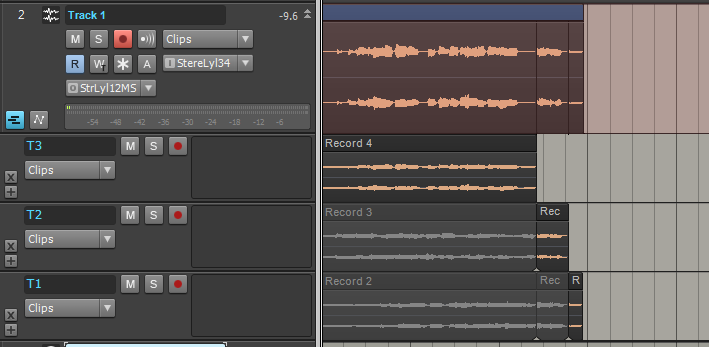 Observe: - The take lanes are added at the top of the stack (i.e. most recent at top)
- The previous takes are muted - where they overlap the most recent take
- SONAR automatically breaks up the clips on take bounderies
I'm not saying I totally approve of this behavior (I don't use Comping mode myself) but this is what is happening. If you can get to this point, come back and let us know and we can answer questions or talk about how to use the Smart Tool to pick the best take.
|
Johnbee58
Max Output Level: -72 dBFS
- Total Posts : 946
- Joined: 2014/06/21 10:45:53
- Location: Reading PA
- Status: offline
Re: Comping Questions
2014/11/14 11:53:36
(permalink)
FCC & Stickman-Thanks so much for these suggestions. I will give them a try!
John B.
Lenovo Core i5 4460 Desktop PC (Windows 8 64 bit), Focusrite Scarlett 6i6, Nektar LX61 Keyboard MIDI Controller, Avantone Pro CV-12 tube condenser microphone, JBL LSR308 8" active monitor speakers. Cakewalk by Bandlab, Reason 7, NI Session Strings Pro, NI Strummed Acoustic Guitar, Miroslav Philharmonic, Auturia DX7 V, Garritan JABB 3, EZ Keys, EZ Drummer. "I will create music the way I want to whether a million people are listening or no one is listening." Dan Fogelberg, Singer/Songwriter-1951-2007
|
Johnbee58
Max Output Level: -72 dBFS
- Total Posts : 946
- Joined: 2014/06/21 10:45:53
- Location: Reading PA
- Status: offline
Re: Comping Questions
2014/11/14 11:56:55
(permalink)
Stickman-I can get to the point already that you have outlined above. I need to know how to use the Smart tool to pick the best take. That's exactly where I need to go next! Thank you so much!
John B.
Lenovo Core i5 4460 Desktop PC (Windows 8 64 bit), Focusrite Scarlett 6i6, Nektar LX61 Keyboard MIDI Controller, Avantone Pro CV-12 tube condenser microphone, JBL LSR308 8" active monitor speakers. Cakewalk by Bandlab, Reason 7, NI Session Strings Pro, NI Strummed Acoustic Guitar, Miroslav Philharmonic, Auturia DX7 V, Garritan JABB 3, EZ Keys, EZ Drummer. "I will create music the way I want to whether a million people are listening or no one is listening." Dan Fogelberg, Singer/Songwriter-1951-2007
|
stickman393
Max Output Level: -60 dBFS
- Total Posts : 1528
- Joined: 2003/11/07 18:35:26
- Status: offline
Re: Comping Questions
2014/11/14 12:46:14
(permalink)
John, I don't think I can explain it better than this video does, at 1:12 - 2:30: X3 Comping Watch that segment a couple of times, then come back here with questions. The rest of the video is pretty clear, actually, but it took me a couple of practice sessions before I understood what I was supposed to do to use the feature the way it was designed.
|
Johnbee58
Max Output Level: -72 dBFS
- Total Posts : 946
- Joined: 2014/06/21 10:45:53
- Location: Reading PA
- Status: offline
Re: Comping Questions
2014/11/14 14:02:24
(permalink)
OK. How do I get the Smart tool to become the comping tool? I have the Smart tool highlighted on the tools menu, but when I run the tool across the take it stays an I bar and does not become the Comping tool as indicated on the video. I'm obviously missing a step. What is it!? This is getting frustrating!! Please note that I have "Comping selected in the record menu at the Record button. I have everything there selected as in the video.
John B.
Lenovo Core i5 4460 Desktop PC (Windows 8 64 bit), Focusrite Scarlett 6i6, Nektar LX61 Keyboard MIDI Controller, Avantone Pro CV-12 tube condenser microphone, JBL LSR308 8" active monitor speakers. Cakewalk by Bandlab, Reason 7, NI Session Strings Pro, NI Strummed Acoustic Guitar, Miroslav Philharmonic, Auturia DX7 V, Garritan JABB 3, EZ Keys, EZ Drummer. "I will create music the way I want to whether a million people are listening or no one is listening." Dan Fogelberg, Singer/Songwriter-1951-2007
|
stickman393
Max Output Level: -60 dBFS
- Total Posts : 1528
- Joined: 2003/11/07 18:35:26
- Status: offline
Re: Comping Questions
2014/11/14 14:17:47
(permalink)
Hmm. It shouldn't be that tricky. In my test, I made sure that the smart "Star" tool was selected, and when I expand the take lanes, and moved the cursor over the clips, it changes to the I-bar + stacked clip icon.
I'm not sure what else to try... when all else fails, save and close the project, close and re-open SONAR, and open the project again ... and see if it works.
Are these audio or MIDI clips? I'm testing with audio. I don't know why that would make a difference...
|
Johnbee58
Max Output Level: -72 dBFS
- Total Posts : 946
- Joined: 2014/06/21 10:45:53
- Location: Reading PA
- Status: offline
Re: Comping Questions
2014/11/14 15:15:22
(permalink)
Something may have gotten corrupted there. These are audio clips. I just did 4 takes with just my voice saying "This is comping test. Take one. Comping test" with a few seconds in between to simulate a line per line vocal take in a song. I'm going to do what you suggested and just start a fresh project doing the same thing and see if that works. Maybe I screwed something up there and didn't realize it. Thanks. I'll let you know how I make out.
John B.
Lenovo Core i5 4460 Desktop PC (Windows 8 64 bit), Focusrite Scarlett 6i6, Nektar LX61 Keyboard MIDI Controller, Avantone Pro CV-12 tube condenser microphone, JBL LSR308 8" active monitor speakers. Cakewalk by Bandlab, Reason 7, NI Session Strings Pro, NI Strummed Acoustic Guitar, Miroslav Philharmonic, Auturia DX7 V, Garritan JABB 3, EZ Keys, EZ Drummer. "I will create music the way I want to whether a million people are listening or no one is listening." Dan Fogelberg, Singer/Songwriter-1951-2007
|
raweber
Max Output Level: -87 dBFS

- Total Posts : 178
- Joined: 2008/01/23 14:03:14
- Location: Hampton Roads, VA
- Status: offline
Re: Comping Questions
2014/11/14 21:26:26
(permalink)
You have to have the cursor hovering over the lower part of the clip to get the comping option. When you are in the top half of the clip you get the option to move the clip left or right on the timeline. The comping cursor looks like the normal I-beam insert cursor with three little stacked rectangles to the lower right of it. I woukld post a screenshot but they don't show the cursor.
Don't get frustrated - if I figured this out then you can to. I used the video on youtube that stickman linked to earlier to learn.
|
FastBikerBoy
Forum Host
- Total Posts : 11326
- Joined: 2008/01/25 16:15:36
- Location: Watton, Norfolk, UK
- Status: offline
Re: Comping Questions
2014/11/15 02:22:12
(permalink)
Johnbee58
I'm sorry, but I'm still not clear on some of this process. I did manage to do a test recording creating 4 takes. Now I need to know what to do next. I make sure I select the Smart tool and when I run the Smart tool over a take it turns into the isolate icon. But when I left click over a region I want to promote and click on it, the entire track turns white as if to highlight the entire track. What am I doing wrong?
Thanks
John B.
In this particular case it sounds like the entire clip is being promoted. Have you already split the clips? If not try click dragging in the lower half of the clip to highlight the region you want to promote. That will auto split the clip for you an promote it.
|
Johnbee58
Max Output Level: -72 dBFS
- Total Posts : 946
- Joined: 2014/06/21 10:45:53
- Location: Reading PA
- Status: offline
Re: Comping Questions
2014/11/15 09:13:26
(permalink)
Thanks so much, all. raweber, you were RIGHT!! The mystery is finally solved for me. I did what you said and hovered the mouse over the lower part of the clip and it works! I'm getting the comping tool and the crossfade tool. Thanks again!!
John B.
Lenovo Core i5 4460 Desktop PC (Windows 8 64 bit), Focusrite Scarlett 6i6, Nektar LX61 Keyboard MIDI Controller, Avantone Pro CV-12 tube condenser microphone, JBL LSR308 8" active monitor speakers. Cakewalk by Bandlab, Reason 7, NI Session Strings Pro, NI Strummed Acoustic Guitar, Miroslav Philharmonic, Auturia DX7 V, Garritan JABB 3, EZ Keys, EZ Drummer. "I will create music the way I want to whether a million people are listening or no one is listening." Dan Fogelberg, Singer/Songwriter-1951-2007
|
stevec
Max Output Level: 0 dBFS
- Total Posts : 11546
- Joined: 2003/11/04 15:05:54
- Location: Parkesburg, PA
- Status: offline
Re: Comping Questions
2014/11/16 11:01:29
(permalink)
SteveC https://soundcloud.com/steve-cocchi http://www.soundclick.com/bands/pagemusic.cfm?bandID=39163 SONAR Platinum x64, Intel Q9300 (2.5Ghz), Asus P5N-D, Win7 x64 SP1, 8GB RAM, 1TB internal + ESATA + USB Backup HDDs, ATI Radeon HD5450 1GB RAM + dual ViewSonic VA2431wm Monitors; Focusrite 18i6 (ASIO); Komplete 9, Melodyne Studio 4, Ozone 7 Advanced, Rapture Pro, GPO5, Valhalla Plate, MJUC comp, MDynamic EQ, lots of other freebie VST plugins, synths and Kontakt libraries
|