sharke
Max Output Level: 0 dBFS

- Total Posts : 13933
- Joined: 2012/08/03 00:13:00
- Location: NYC
- Status: offline
Controlling Sonar from 2nd laptop?
Is this possible? I have a touchscreen Windows 8 laptop that folds backwards into a tent shape and it would be ideal as a control surface. I've never looked into using touchscreen surfaces but I've heard of people using phones and tablets to this end - is there any use for my laptop?
JamesWindows 10, Sonar SPlat (64-bit), Intel i7-4930K, 32GB RAM, RME Babyface, AKAI MPK Mini, Roland A-800 Pro, Focusrite VRM Box, Komplete 10 Ultimate, 2012 American Telecaster!
|
Ruben
Max Output Level: -81 dBFS

- Total Posts : 472
- Joined: 2003/11/06 08:12:42
- Location: Where they play the West Coast sound
- Status: offline

Re: Controlling Sonar from 2nd laptop?
2014/03/07 12:50:48
(permalink)
Since Win8 supports apps, you might search the Windows app store for TouchDAW or something like it.
|
Sanderxpander
Max Output Level: -36.5 dBFS

- Total Posts : 3873
- Joined: 2013/09/30 10:08:24
- Status: offline
Re: Controlling Sonar from 2nd laptop?
2014/03/07 13:04:01
(permalink)
It wouldn't work if you need immediate tactile response, but if you need a "remote control" you could just remote desktop in?
|
joeb1cannoli
Max Output Level: -87 dBFS

- Total Posts : 199
- Joined: 2012/09/22 20:07:26
- Status: offline
Re: Controlling Sonar from 2nd laptop?
2014/03/07 14:04:21
(permalink)
http://soundcloud.com/joe-b-10 Windows 10 Pro x64, 6 core, Core i7 , 16GB ram Sonar Platinum , Komplete 8, Ozone 8 Presonus Studio 192 and DP88 ,uad-2 solo
|
sharke
Max Output Level: 0 dBFS
- Total Posts : 13933
- Joined: 2012/08/03 00:13:00
- Location: NYC
- Status: offline
Re: Controlling Sonar from 2nd laptop?
2014/03/07 17:40:05
(permalink)
That looks perfect, I would like to try a demo though. I wonder if there's any reviews of it.
JamesWindows 10, Sonar SPlat (64-bit), Intel i7-4930K, 32GB RAM, RME Babyface, AKAI MPK Mini, Roland A-800 Pro, Focusrite VRM Box, Komplete 10 Ultimate, 2012 American Telecaster!
|
sharke
Max Output Level: 0 dBFS
- Total Posts : 13933
- Joined: 2012/08/03 00:13:00
- Location: NYC
- Status: offline
Re: Controlling Sonar from 2nd laptop?
2014/03/07 17:42:39
(permalink)
TouchDAW appears to be Android only unfortunately.
JamesWindows 10, Sonar SPlat (64-bit), Intel i7-4930K, 32GB RAM, RME Babyface, AKAI MPK Mini, Roland A-800 Pro, Focusrite VRM Box, Komplete 10 Ultimate, 2012 American Telecaster!
|
cliffr
Max Output Level: -80 dBFS

- Total Posts : 539
- Joined: 2010/02/19 21:44:43
- Location: Wellington, New Zealand
- Status: offline
Re: Controlling Sonar from 2nd laptop?
2014/03/07 17:49:56
(permalink)
sharke
That looks perfect, I would like to try a demo though. I wonder if there's any reviews of it.
Scroll down to the "Installation" - says to download the demo version. It's not expensive either, price shows as $24.95 NZD. May be time for me to spring for a new laptop :-) If you get it, please let us know how it works out, I'm VERY Interested in this. Cheers - Cliff
i7-950 24 GB, GTX 580, W7/64 Ultimate, Sonar Platinum, Alesis MasterControl, KRK Rokit RP8g2s Some Real piano, basses, and guitars, Komplete 8Ultimate, Ibanez guitars, MusicLab RG/Strat/LPC, Trilian, Omnisphere, RMX, EWQL SO Platinum, Pianos, Choirs, VOP, Gypsy, Goliath, SD2, MOR, Ra, HS, HB, too many plugs, Midi controllers, and all kinds of weird gadgets My Soundclick Page
|
riojazz
Max Output Level: -64 dBFS

- Total Posts : 1337
- Joined: 2004/02/26 13:23:02
- Location: Mid-Hudson Valley, NY
- Status: offline
Re: Controlling Sonar from 2nd laptop?
2014/03/07 18:13:27
(permalink)
I have used a remote-control generic program to control the whole screen, but I don't use it anymore since I got V-Control Pro for my iPad. That has a dedicated SONAR driver and works very well.
Software: Cakewalk by Bandlab; Adobe Audition; Band-in-A-Box audiophile; Izotope Ozone; Encore; Melodyne; Win 10 Pro, 64-bit. Hardware: Focusrite Scarlett 18i20 2nd; Roland Integra-7; TCE Finalizer; Presonus Central Station, Behringer X-Touch. Home built i7 with 16 GB RAM, SSDs.
|
Ruben
Max Output Level: -81 dBFS
- Total Posts : 472
- Joined: 2003/11/06 08:12:42
- Location: Where they play the West Coast sound
- Status: offline
Re: Controlling Sonar from 2nd laptop?
2014/03/07 20:44:07
(permalink)
joeb1cannoli
I wonder if this would work
http://sites.fastspring.com/avatron/product/airdisplayforwindows
There's a free trial.
I tried out the free trial. My DAW is Windows 8.1 with X2, my remote computer is a Win7 laptop - wireless G. The installation is a bit confusing, partly because of the terms they use in the instructions, partly because the instructions are not completely clear, and also because some of the instructions are Mac-centric. I finally got it working and was disappointed by the performance - it works and the display looks pretty good, but way too much screen lag. Maybe it works better with wireless N, or Ethernet (which would defeat the convenience of the remote). VNC works better than this app - using VNC there is less screen lag and VNC is easier to set up. Maybe it works better with a Mac - I can test that later, but as far as Windows, no thanks.
post edited by Ruben - 2014/03/07 20:50:44
|
jimkleban
Max Output Level: -64 dBFS
- Total Posts : 1319
- Joined: 2008/11/09 09:42:45
- Status: offline
Re: Controlling Sonar from 2nd laptop?
2014/03/08 08:25:21
(permalink)
I have GREAT success using WIN8's built in Remote Desktop. If you have a reasonably fast WIFI connection in your work area, using TOUCH on the remote laptop for the transport controllers respond immediately.
I use this for tracking sessions where I need to be both the musician and the engineer. Touch the record button and off we go... bad take, no problem, CNTL Z, hit record again... all from the comfort of my guitar playing bar stool in another room from my DAW.
The remote screen looks just like your DAWs screens and enables touch if your laptop is touch enabled. So, no setup time or compromise on features since you are controller and seeing your DAWs screen(s) on the remote laptop.
Jim
PS - oh, and did I tell you, this feature and software is FREE and built right into WIN 8.
The Lamb Laid Down on MIDI www.lldom.com Studio Cat Custom i7 with Thunderbolt (wonderful system built and configured by our own Jim R) Apollo Duo (via TB) UAD Quad UAD Duo WIN 8.1 x64 with 32 GB Ram 4 SSD for programs and sample libraries Splat (latest version)
|
gustabo
Max Output Level: -49.5 dBFS

- Total Posts : 2591
- Joined: 2009/01/05 17:32:38
- Status: offline
Re: Controlling Sonar from 2nd laptop?
2014/03/08 09:27:20
(permalink)
Unfortunately Remote Desktop (the server portion) doesn't come with any Win 7 or 8 Home edition, only pro or beyond. $100 upgrade to a pro version of Win is ridiculous is all you're after is remote capabilities so I purchased RAdmin for my purposes and it which works flawlessly. There is a 30 day free trial available.
Cakewalk by Bandlab - Win10 Pro x64 - StudioCat Platinum Studio DAW - 32 GB Ram - MOTU UltraLite-mk3
M-Audio Keystation 88ES - Akai MPD26 (hot-rodded) - Alesis DM10 - a few guitars, a few amps
Novation Launch Control - Korg nanoKONTROL2 - PreSonus FaderPort - DAW Remote HD on iPad
Adam A7X - Behritone C50A
PreSonus Monitor Station v2 (controlling the mons)
https://www.facebook.com/groups/sonarusergroup/
|
Ruben
Max Output Level: -81 dBFS
- Total Posts : 472
- Joined: 2003/11/06 08:12:42
- Location: Where they play the West Coast sound
- Status: offline
Re: Controlling Sonar from 2nd laptop?
2014/03/08 15:26:42
(permalink)
I have a project that I need to overdub with acoustic guitar, which requires me to be musician and engineer. But I need to record the guitar in another room and I've been investigating remote access options, so this thread comes at an opportune time for me. First, I set up TouchDAW for my Droid Incredible. Simple start/stop/record functions work very well with fast response. Plus faders for 8 tracks. I had to install rtpMIDI on my DAW but once I got it configured it worked very well. If all you need is remote access to the transport functions TouchDAW works very nicely. However, like the OP, I decided that it would be better if I could see my DAW screen (to adjust levels) so I tested three options to use my laptop as a remote - AirDisplay, VNC and Windows Remote Desktop (RDP). First I installed the demo version of AirDisplay, and as I noted in my post above, lots of screen lag - in fact, really annoying screen lag. Once you have the connection, you will need to have the laptop at your DAW so you can adjust the desired application windows on the second screen (laptop). Screen drawing is poor - take a close look at the AirDisplay image below and check out the text - lots of broken text which could make smaller text difficult to read. But the deal breaker for me was the screen lag - sometimes when trying to move the mouse arrow, it would just disappear and I'd have to wait for it to appear again. Or I'd click "play" and it wouldn't start, so I would click "play" again, but then it would start from the first click then pause because of the second click. If this was the only option available you could at least get it to remotely start and stop your DAW, but with better options there is no need to use AirDisplay, even less because it costs $20. Use your $20 to buy Nectar and use VNC or RDP for remote access. VNC means "virtual network computing" and it is a way to remotely access any other computer that supports VNC. So you could use your Mac or Linux laptop to control your Windows DAW, or vice versa. There are several free VNC programs (search the interwebs) and I used TightVNC on both my Windows 8.1 DAW and my Win7 laptop. VNC gives you full control of the remote desktop and the screen lag is much lower than with AirDisplay - in fact for me it was almost imperceptible. And the advantage over TouchDAW is that you can see meters (to adjust levels, which I'll need for overdubbing guitar). VNC is a good working, free option. Next I tried Window Remote Desktop (RDP). RDP is very handy when working on a Windows network with multiple servers and workstations and is free in some versions of Windows - I thought it was included in all versions of Windows, but apparently that's not true. Third-party implementations of RDP servers and clients are available for Mac OS and Linux, many of them free. If you have it, you will need to allow Remote Desktop connections on your DAW to make the connection. It connects easily and has almost no screen lag. Buttons clicked work immediately, windows dragged move cleanly. It gives the user a full view of the remote desktop. Out of the three options tested, RDP works the best. RDP is also the least resource-intensive of these three programs. In the photos below are views of the task manager using each program. In each set, the task manager image on the left is my DAW without any remote connections, with Sonar X2 open. The task manager image on the right is the view with each particular remote app connected. So in the first photo, the task manager on the left is with no remote access, and the view on the right is my DAW connected to AirDisplay. The second photo is no remote access (left) and connected with TightVNC (right). The third photo is no remote access (left) and connected with RDP (right). As you can see, AirDisplay uses the most CPU resources, with the VNC connection using just a bit lower, and lastly the RDP connection using noticeably fewer resources still. Windows 8 DAW Task Manager without/with AirDisplay 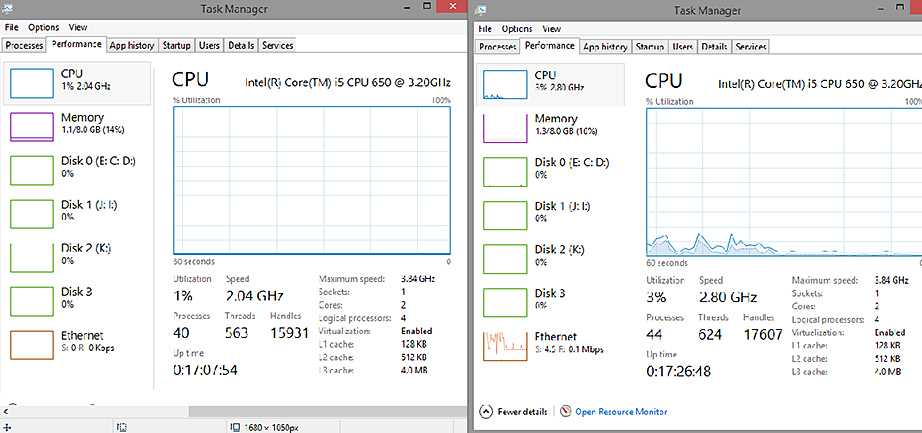 Windows 8 DAW Task Manager without/with VNC connection 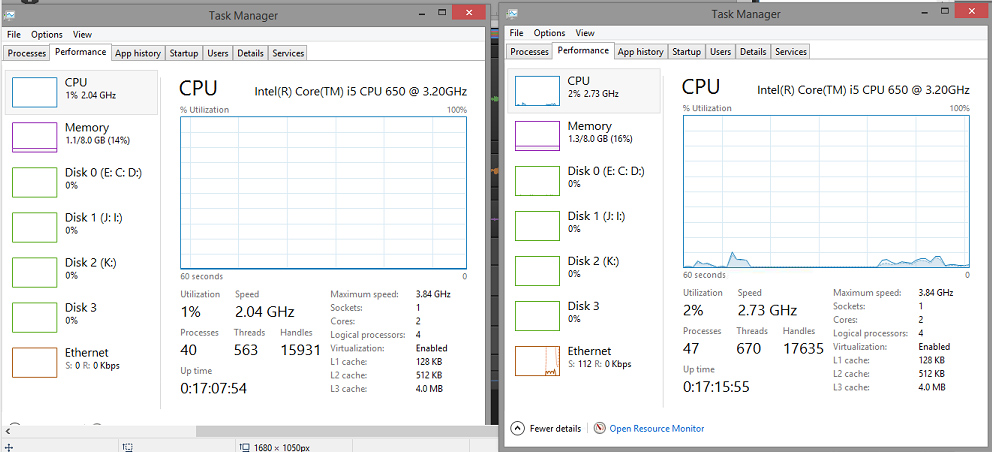 Windows 8 DAW Task Manager without/with RDP 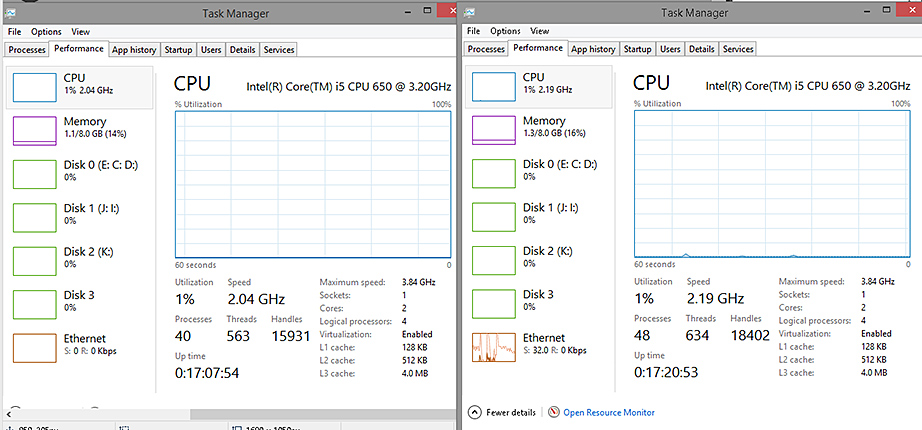 So according to these results, using RDP would result in the best quality with the lowest resource impact, followed by VNC, with AirDisplay being the lowest quality connection and using the most resources of the three. FYI, TouchDAW used about the same CPU resources as RDP, so if I just simply and quickly need to access my DAW's transport, I'll probably use TouchDAW - nice access, small remote unit (Driod phone). But if I need to set levels or otherwise see the DAW screen I'll be using RDP for remote access. HTH.
post edited by Ruben - 2014/03/09 11:49:23
|
sharke
Max Output Level: 0 dBFS
- Total Posts : 13933
- Joined: 2012/08/03 00:13:00
- Location: NYC
- Status: offline
Re: Controlling Sonar from 2nd laptop?
2014/03/08 17:21:02
(permalink)
Great info, thanks! I have a new rig on order from Jim Roseberry and once it's set up I will be delving into all of this. My goal is to have the console on the touchscreen and keep my two monitors for tracking/arrangement and plugin windows.
JamesWindows 10, Sonar SPlat (64-bit), Intel i7-4930K, 32GB RAM, RME Babyface, AKAI MPK Mini, Roland A-800 Pro, Focusrite VRM Box, Komplete 10 Ultimate, 2012 American Telecaster!
|
Sanderxpander
Max Output Level: -36.5 dBFS
- Total Posts : 3873
- Joined: 2013/09/30 10:08:24
- Status: offline
Re: Controlling Sonar from 2nd laptop?
2014/03/08 18:14:34
(permalink)
Huh, to be honest, although I recommended it I'm surprised to hear such good results using Windows RDP. It is obviously the simplest option, with the most complete control (vs TouchDAW and the like) but in the past when I've used it it has always been just slightly laggy, so I thought it may not work if you need the control to be very immediate (where eg TouchDAW would excel). Glad to hear it's working so well.
Come to think of it, when I used it it was to admin an old ass Celeron based home server so perhaps that's why it is laggy. I hadn't considered it's not available in Home editions, I've always used Pro or Ultimate for this and other networking bits and bobs included. May give this another go!
|
Ruben
Max Output Level: -81 dBFS
- Total Posts : 472
- Joined: 2003/11/06 08:12:42
- Location: Where they play the West Coast sound
- Status: offline
Re: Controlling Sonar from 2nd laptop?
2014/03/09 11:56:03
(permalink)
Sanderxpander
Huh, to be honest, although I recommended it I'm surprised to hear such good results using Windows RDP.
Honestly, before I started the comparisons, I felt the same way. I assumed that RDP would have a lot of overhead and that VNC would be the most efficient, so I was surprised with the results. I'm glad I did the tests, though, because I would have just gone with VNC and not even considered RDP.
|
bapu
Max Output Level: 0 dBFS

- Total Posts : 86000
- Joined: 2006/11/25 21:23:28
- Location: Thousand Oaks, CA
- Status: offline
Re: Controlling Sonar from 2nd laptop?
2014/03/09 14:23:39
(permalink)
jkleban
I use this for tracking sessions where I need to be both the musician and the engineer. Touch the record button and off we go... bad take, no problem, CNTL Z, hit record again... all from the comfort of my guitar playing bar stool in another room from my DAW.
Ok, so you move into another room (away from the noise of your DAW, presumably) to have a (noise generating) computer sitting near you while recording? Then again, maybe there is another reason?
|
thebiglongy
Max Output Level: -80 dBFS
- Total Posts : 502
- Joined: 2006/01/29 19:20:31
- Status: offline
Re: Controlling Sonar from 2nd laptop?
2014/03/09 17:18:01
(permalink)
Use Teamviewer :) Simple and easy to set up. Gives you control over your pc and you can see and in most cases even hear what is being played.
Sonar x2a Win 7 x64 // i7 930 @ stock speed // Gigabyte x58a-ud3r (rev 1) // 6gb corsair 1600mhz triple channel // ATI HD5450 Samsung EVO 128gb SSD // 2 x WD Black 1tb. M-Audio Fast Track Ultra 8R
|
jimkleban
Max Output Level: -64 dBFS
- Total Posts : 1319
- Joined: 2008/11/09 09:42:45
- Status: offline
Re: Controlling Sonar from 2nd laptop?
2014/03/09 20:06:59
(permalink)
sharke
Great info, thanks! I have a new rig on order from Jim Roseberry and once it's set up I will be delving into all of this. My goal is to have the console on the touchscreen and keep my two monitors for tracking/arrangement and plugin windows.
Exactly my setup rig... two touchscreen monitors at the mixing desk and my SURFACE RT in the tracking room. Works great. I know I have WIN 8 but didn't think I had an advanced edition, but the RDT was already available. Also, it was already an APP installed on my Surface RT.
The Lamb Laid Down on MIDI www.lldom.com Studio Cat Custom i7 with Thunderbolt (wonderful system built and configured by our own Jim R) Apollo Duo (via TB) UAD Quad UAD Duo WIN 8.1 x64 with 32 GB Ram 4 SSD for programs and sample libraries Splat (latest version)
|
Ruben
Max Output Level: -81 dBFS
- Total Posts : 472
- Joined: 2003/11/06 08:12:42
- Location: Where they play the West Coast sound
- Status: offline
Re: Controlling Sonar from 2nd laptop?
2014/03/09 20:20:52
(permalink)
thebiglongy
Use Teamviewer :)
TeamViewer is a bit different, much more of a feature set actually, than simple remote desktop - its features are like a combination of VNC and RDP. With TeamViewer, in addition to remote desktop control, you can set up Internet-based meetings, transfer files, and even play sounds from the host computer on the remote computer. It also has other features that require add-on modules. TeamViewer is promoted as an alternative to remote assistance apps like LogMeIn. It is available for both Windows and Mac, so you could control your Windows DAW from your Mac laptop (there are also versions for the iPad). It is offered free for private use. TeamViewer has a very quick screen response, as good as VNC IMO, and the screen looks sharp (unlike AirDisplay) so it's good those regards. But there are a couple of downsides to TeamViewer - 1) it uses more resources than RDP (although not as much as VNC). It installs modules for its features, and the more features, the more modules (and the more services running in the background). CPU Usage - base 2.30: RDP: increase to 2.38 TeamViewer: increase to 2.57 VNC: increase to 2.73 But the second issue with TeamViewer is that it requires an Internet connection. Not just a local network connection - TeamViewer phones home, so it needs an Internet connection and will not connect to remote desktops without it. Aside from many users who don't allow their DAW's on the Internet, this also raises the issue is privacy - what is being reported back to TeamViewer and are they tracking your usage. For me, I'm going to stick with RDP.
|
Rob from Sydney
Max Output Level: -90 dBFS

- Total Posts : 29
- Joined: 2013/08/07 05:58:27
- Location: Sydney, Australia
- Status: offline
Re: Controlling Sonar from 2nd laptop?
2014/03/10 05:06:29
(permalink)
I had a go at this a while ago (and didn't get far at the time); I've got a windows 7 desktop machine with a windows 7 slate tablet that's a bit underpowered now but would be a great control surface, nice big screen. While I could get an android tablet and put TouchDAW on it, it seems annoying to have to buy an extra device...
I had tried VNC at the time, lag was horrible and not worth bothering. I think a different implementation of VNC (real vs tight, etc) was suggested, but I didn't get back to trying this. And it was a bit painful trying to get the right window, or portion of, displayed on the VNC screen. I usually run the Console (and/or whole multidock) on a second monitor.
I suspect RDP will be better performance (as tested above by Ruben) - it's certainly my past experience of it vs VNC. But again I'm not sure if it will be a bit tricky to set it up to share the console window off to the side.
Meanwhile, I thought I'd try and see what was around equivalent to TouchDAW that could work on Windows (7 in my case - so not Windows 8 RT for anyone following along with an RT tablet). First thought was the BlueCat Remote Control, tried to demo it on the local computer but realised it would be ok to setup for a few MIDI-learn type functions but not a control surface, or at least I couldn't figure out how to. So the current plan is to build something with CTRLR (I can't post links yet, but ctrlr.org is the one) to mimic the console view, and map its MIDI messages to a "Generic" Control Surface. If you get that far, the Motu Mixer7s panel on that site is the kind of thing I've got in mind. This can then run on the tablet, with rtpMidi to send it across to the main PC, again basically like TouchDAW.
Right now I've started mapping the MIDI messages to an AKAI MPK49 - first in the preset list from the generic surface and looks easy enough to clone. Volume and pan for the first two channels work ok, so I think this will work alright at least for a one-way link; would like to make the mute, solo buttons work next. I guess an Edirol PCR is another obvious choice to emulate.
Thinking that if it could be remapped to Mackie or VS700 messages, then it might allow two-way messages and move the faders on screen? This might be easier now with the source code to work out which message is hooked up to what controls... But I'll leave this for a later exercise once it all works, and not familiar enough with Mackie to know how its protocol works.
Won't get near this again for 2-3 weeks but will try and spend a day to see if it gets off the ground and works well enough ... i'll let you know if so! And meanwhile I'll try give RDP another go and see if it have more success there.
Rob | Sydney NSW Australia Sonar Platinum (x64) | Win 10 ProCore 2 Duo E8400 | 4GB RAMEdirol UA-25 | Edirol PCR-M30 | Nord Stage EX Compact
|
Psalmist35
Max Output Level: -61 dBFS

- Total Posts : 1471
- Joined: 2005/12/31 11:11:33
- Location: North Carolina
- Status: offline
Re: Controlling Sonar from 2nd laptop?
2014/03/10 13:03:24
(permalink)
George Foreman Grill; Ginsu knifes; Clapper; Home Grown Intel i7 -6700K 16G Ram; Sonar Platinum; MOTU 896HD; Tascam US2400;
My Music
|
jeebustrain
Max Output Level: -88 dBFS

- Total Posts : 139
- Joined: 2005/03/09 12:23:44
- Location: St Louis
- Status: offline
Re: Controlling Sonar from 2nd laptop?
2014/03/10 17:44:35
(permalink)
Sonar Platinum (lifetime sub) :: Windows 8.1 Pro :: AMD FX-8350 CPU, 16GB ram :: 120GB SSD (boot), 1TB 7200rpm HDD (data/projects) :: (dual) Focusrite Saffire Pro40 (TI chipset on FW card) :: lots of plugins :: lots of various midi controllers and hardware synths :: Pearl Drums/Paiste Cymbals/Roland & Alesis Electronic pads.
My Music
|
pghboemike
Max Output Level: -88 dBFS
- Total Posts : 107
- Joined: 2009/09/26 19:45:03
- Status: offline
Re: Controlling Sonar from 2nd laptop?
2014/03/10 18:21:59
(permalink)
Splashtop http://www.splashtop.com/personal scroll to bottom GETTING STARTED: Step 1 Get the App Download App for your mobile service or computer Splashtop Personal Icon Green iPad iPhone/iPod Mac Windows Win 8/RT WinPhone Google Android Devices
asus laptop Intel(R) Core(TM) i5-3230M CPU @ 2.60GHz 8 GB RAM 64 bit Windows 8 home Premium casio wk7500 roland quadCapture audio\midi usb interface sonar producer 64 bit X3e
|
Ruben
Max Output Level: -81 dBFS
- Total Posts : 472
- Joined: 2003/11/06 08:12:42
- Location: Where they play the West Coast sound
- Status: offline
Re: Controlling Sonar from 2nd laptop?
2014/03/11 19:53:37
(permalink)
Psalmist35
Splashtop2 (free) remote desktop for both the Droid and Apple
https://play.google.com/store/search?q=splashtop%202
Splashtop sets up almost effortlessly, incredibly easy, and seems to work well, but it appears to to made for tablets - since it captures the full screen of your DAW, the image is too small to be useful on an average-sized phone (I couldn't get the screen to resize on my phone) so for example, it's almost useless on my iPhone 4s. I addition to the screen size, this is another app that requires an Internet connection and doesn't work unless it is allowed to contact it's home base, so again there is the question of privacy/security.
|