Vokalzz
Max Output Level: -89 dBFS

- Total Posts : 87
- Joined: 2013/07/27 18:29:40
- Status: offline
Converting Midi data to audio
Hello all,
This is a two part question. Forgive me in advance. I recorded a soft synth track. However, I only get sound when I start at the beginning of the midi track. When I start the (now time) in the middle of the midi track all I get is silence. Can someone explain? Is there a way to fix that?
Second question:
Since I only get sound from playing the midi track from the beginning and no where else, I thought I could bounce the midi to an audio track and overcome it that way. However, how do you do that? Is there an easy way to do so?
Ive tried freezing the track because Ive read its like doing the same thing as bouncing to audio, but when I Freeze the track and press play, all I get is crackle and no sound.
Thank you all again for your help!
|
Bristol_Jonesey
Max Output Level: 0 dBFS

- Total Posts : 16775
- Joined: 2007/10/08 15:41:17
- Location: Bristol, UK
- Status: offline

Re: Converting Midi data to audio
2013/08/23 06:27:48
(permalink)
☄ Helpfulby Seth Kellogg [Cakewalk] 2013/08/23 19:28:04
Are you starting playback in the middle of a long, held Midi note? If so, Sonar won't pick this up. If you're starting playback slightly before the beginning of a note then they should all play. Things to check for the notes that aren't playing: - Midi channel (they should all be the same as the notes that play correctly)
- Velocity (lower velocities might not get heard)
- Range (is it outside of the note range for the synth you're using)
- Can you see Midi activity on the meter when it's attempting to play the silent notes?
- Do you have any automation that is lowering the track fader to -INF during play
Which soft synth are you using, just for sake of curiosity How did you insert it? Is it a simple instrument tracks or split Midi/Audio Can you hear the notes sounding out if you click on them individually in the Piano Roll View? What's your system specs (yeah I'm incurring the wrath of at least one member here, but the answer you provide could be vital). Please list everything you can think of - CPU, RAM, HDD's, Interface, Driver version etc.
CbB, Platinum, 64 bit throughoutCustom built i7 3930, 32Gb RAM, 2 x 1Tb Internal HDD, 1 x 1TB system SSD (Win 7), 1 x 500Gb system SSD (Win 10), 2 x 1Tb External HDD's, Dual boot Win 7 & Win 10 64 Bit, Saffire Pro 26, ISA One, Adam P11A,
|
Guitarhacker
Max Output Level: 0 dBFS
- Total Posts : 24398
- Joined: 2007/12/07 12:51:18
- Location: NC
- Status: offline
Re: Converting Midi data to audio
2013/08/23 08:05:27
(permalink)
for a temporary "bounce" simply select and click the synth track and choose FREEZE SYNTH from the options. It bounces right to the track and a simple click unfreezes it. Of course Bounce to track is always an option that creates a new bounced track.
My website & music: www.herbhartley.com MC4/5/6/X1e.c, on a Custom DAW Focusrite Firewire Saffire Interface BMI/NSAI "Just as the blade chooses the warrior, so too, the song chooses the writer "
|
Re: Converting Midi data to audio
2013/08/23 15:02:27
(permalink)
I recorded a soft synth track. However, I only get sound when I start at the beginning of the midi track. When I start the (now time) in the middle of the midi track all I get is silence. Can someone explain? Is there a way to fix that?
I'm gonna have to agree with Bristol_Jonesey on this one. How long is this MIDI track that you recorded? It's possible that SONAR is just not catching the "Note On" message in that MIDI tack. This may explain why it plays from the beginning and not when you start in the middle of the recorded data.
Since I only get sound from playing the midi track from the beginning and no where else, I thought I could bounce the midi to an audio track and overcome it that way. However, how do you do that? Is there an easy way to do so?
The crackling part of this query is off-putting. Does this repeat the same process when you right-click on the FREEZE button, select "Freeze Options", and uncheck "Fast Bounce". Same crackling sound?
|
Vokalzz
Max Output Level: -89 dBFS
- Total Posts : 87
- Joined: 2013/07/27 18:29:40
- Status: offline
Re: Converting Midi data to audio
2013/08/23 18:49:56
(permalink)
Thank you all for your responses.
Bristol, I think you are right. I was using cakewalk sound center and did in fact hold out a long note. I did not know that cakewalk wouldnt allow you to hear these long notes started half way through a track. hmm. This creates a problem because the long held out note is the meat and potatoes of my song, which means that when I record vocals I will in fact have to start at different places withing the song to record vocals.
Would it be easier to just bounce to an audio clip?
If so, What is the easiest way to do so?
Or just freeze the track?
Like I said before, when I freeze a track it converts it to audio, but when I hit playback it crackles, pops and I hear no sound.
I did insert sound center as a simple instrument track.
In response to DAN. I have not yet right clicked on freeze and unchecked fast bounce. What is the difference? I will try it out shortly and give you my feedback.
Computer specs:
1 tb HDD
8 gb ram
600 watt supply
intel i-5 4670K processor
|
Bristol_Jonesey
Max Output Level: 0 dBFS
- Total Posts : 16775
- Joined: 2007/10/08 15:41:17
- Location: Bristol, UK
- Status: offline
Re: Converting Midi data to audio
2013/08/24 03:45:50
(permalink)
Matthew, a couple of things. Firstly, convert your Simple instrument to a split Midi/Audio track. Do this by right clicking in the track header and choose "Split Instrument Track": 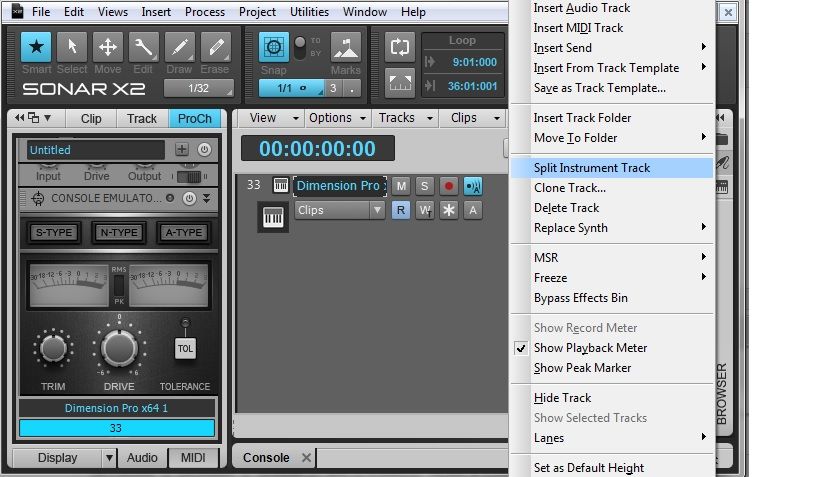 This will give you much better control of your midi activity, and SIT's have been known to casue 1 or 2 problems in the past. Now, on the Midi track, click the "Freeze Synth" icon. 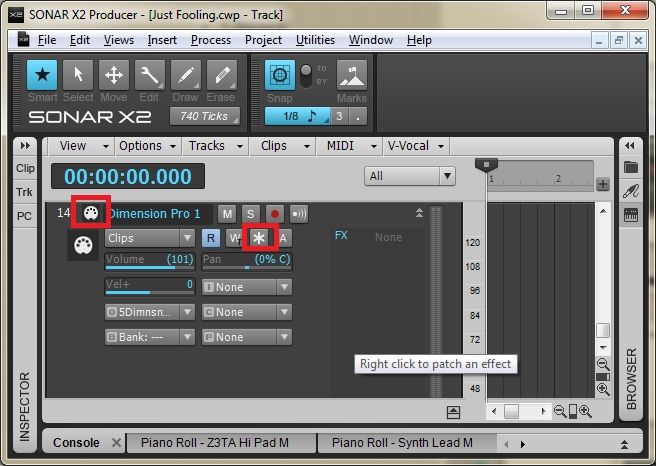 This will render your Midi to Audio Now play it back and if all is well you can proceed with overdubbing your vocals. if not, please report back so we can investigate further
CbB, Platinum, 64 bit throughoutCustom built i7 3930, 32Gb RAM, 2 x 1Tb Internal HDD, 1 x 1TB system SSD (Win 7), 1 x 500Gb system SSD (Win 10), 2 x 1Tb External HDD's, Dual boot Win 7 & Win 10 64 Bit, Saffire Pro 26, ISA One, Adam P11A,
|
Vokalzz
Max Output Level: -89 dBFS
- Total Posts : 87
- Joined: 2013/07/27 18:29:40
- Status: offline
Re: Converting Midi data to audio
2013/08/26 02:17:07
(permalink)
Bristol, Thank you for the help. Unfortunately your method did not work. I did everything you stated and I still get the crackling and no playback. This one stumps me. Any advice?
|
Kalle Rantaaho
Max Output Level: -5 dBFS

- Total Posts : 7005
- Joined: 2006/01/09 13:07:59
- Location: Finland
- Status: offline
Re: Converting Midi data to audio
2013/08/26 07:30:58
(permalink)
And all other audio is playing back normally in the project, only the frozen one crackles?
Some more info on details might be useful. What audio interface are you using? What driver mode? What buffer size/latency setting?
SONAR PE 8.5.3, Asus P5B, 2,4 Ghz Dual Core, 4 Gb RAM, GF 7300, EMU 1820, Bluetube Pre - Kontakt4, Ozone, Addictive Drums, PSP Mixpack2, Melda Creative Pack, Melodyne Plugin etc. The benefit of being a middle aged amateur is the low number of years of frustration ahead of you.
|
Guitarhacker
Max Output Level: 0 dBFS
- Total Posts : 24398
- Joined: 2007/12/07 12:51:18
- Location: NC
- Status: offline
Re: Converting Midi data to audio
2013/08/26 08:13:40
(permalink)
Something to note: regarding the NOTE ON/NOTE OFF in midi.
If you edit a part and for example a note in the passage is slightly off time from being played live and the player hesitated a bit when playing that note..... and there is a note that preceded it that was the same musical pitch.....
Now you decide to fix that hesitated note and of course the easiest thing to do is to go in and simply move that note forward in time the necessary distance to put it where it should have been.... easy enough to do in the midi edit mode.
Now you play it back and it's not there. It's on the screen but doesn't play.
This is another case of the on/off midi signal playing havoc in the time line. The note that preceded the edited note is the issue. When you moved the "late note" up, it's on time was placed before the first note's off time..... so the original ON1/OFF1 ...ON2/OFF2 of the original midi became ON1..ON2 Off1...OFF2 and the second note effectively was shut off.
Make sense? This used to really throw me off until I figured out what was causing it.... so now, I know to edit the duration of the first note to shorten it sufficiently so that it shuts off before the edited note's starting "on" point occurs.
My website & music: www.herbhartley.com MC4/5/6/X1e.c, on a Custom DAW Focusrite Firewire Saffire Interface BMI/NSAI "Just as the blade chooses the warrior, so too, the song chooses the writer "
|
BobbyT
Max Output Level: -88 dBFS

- Total Posts : 107
- Joined: 2011/03/29 21:35:46
- Location: Texas
- Status: offline
Re: Converting Midi data to audio
2013/08/27 00:36:04
(permalink)
i ran into a similar problem with midi and instrument tracks due to the fact that my computer is not the fastest in the world,so after freezing my synth's,i go to track menu then bounce to tracks and send all the tracks i need to audio tracks,put them in a track folder and play the audio tracks when you want to lay down other parts of your song,no more cracks and pops that way and it always played no matter where in the time line..
|
Vokalzz
Max Output Level: -89 dBFS
- Total Posts : 87
- Joined: 2013/07/27 18:29:40
- Status: offline
Re: Converting Midi data to audio
2013/08/29 00:26:29
(permalink)
Hello all, Sorry for the late response and thank you for all your help.
All tracks are playing but when I freeze ANY track that is when it crackles and pops.
I dont think the crackling has anything to do with on/off midi notes as you explained because all the midi data is actually playing fine.
My interface is a Line six ux2, WDM/KS is my driver mode, and my buffer is set in the middle.
|