Paul G
Max Output Level: -52 dBFS

- Total Posts : 2334
- Joined: 2004/03/17 21:38:03
- Location: Florida
- Status: offline
Dealing with computer fan noise
I'm sure this has been discussed but I couldn't find the right search terms. Anyway, you folks that have a 'one room' setup, how do you deal with the noise of the computer while recording? My 'so-called' studio is just swapping out a drive in my home office computer. I generally only track vocals and I do that at the other end of the house. It works but it's a pain. An open mic in the office picks up way too much computer noise. I've tried covering the computer with absorbent materials etc but it doesn't really work. I'd really like to get set up so I could track here in the office. Anyone in this situation, how do you do it? What's your setup? Any and all suggestions are welcome. Thanks. Paul 
|
Wookiee
Rrrrugh arah-ah-woof?

- Total Posts : 13306
- Joined: 2007/01/16 06:19:43
- Location: Akahaocwora - Village Yoh Kay
- Status: offline

Re: Dealing with computer fan noise
2014/06/20 13:04:16
(permalink)
There are many factors that make for a noisy PC such as Fan's, CPU cooler, even case vibration. Check out this place http://www.quietpc.com/casefans that might give you a start. Another solution is to build a box to place your PC in this will require ventilation though otherwise your beloved PC will just so much recyclable electronics.
Life is not about waiting for the storm to pass, it's about learning to dance in the rain.
Karma has a way of finding its own way home.
Primary, i7 8700K 16Gigs Ram, 3x500gb SSD's 2TB Backup HHD Saffire Pro 40. Win 10 64Bit Secondary i7 4790K, 32GB Ram, 500Gb SSD OS/Prog's, 1TB Audio, 1TB Samples HHD AudioBox USB, Win 10 64Bit CbB, Adam's A7x's - Event 20/20's, Arturia V6, Korg Digital Legacy, Softube Modular, Arturia Keylab-88, USB-MidiSport 8x8
|
dlion16
Max Output Level: -83 dBFS

- Total Posts : 391
- Joined: 2007/03/08 15:21:55
- Location: East Quogue, NY
- Status: offline
Re: Dealing with computer fan noise
2014/06/20 14:47:21
(permalink)
my pc is a video box too, so it is somewhat noisy, but under a table, and the difference between under and above is significant. i still hear it, but i'm able to get a decent track. or i'll set up the mic in the room next door (10' away) and use my wireless keyboard to record & stop. i also have a gizmo called the kaotica eyeball. $199. http://kaoticaeyeball.com/ it won't filter out hammering or anything like that (lots of construction where i am) but it gives a really clean track.
SONAR Platinum Lifetime 64-bit; Focusrite Scarlett 6i6 2nd Gen.; KRK Rokit 5; ASUS P9X79; INTEL I7-3820 3.6 GHZ;850 WATT POWER SUPPLY; EVGA NVIDIA GTX560 TI 1GB;Windows 10 Home 64-bit; 32GB RAM;2 Internal SSD Drives, 3 External USB drives.
|
...wicked
Max Output Level: -1.5 dBFS

- Total Posts : 7360
- Joined: 2003/12/18 01:00:56
- Location: Seattle
- Status: offline
Re: Dealing with computer fan noise
2014/06/20 15:05:14
(permalink)
You can pick up a very decent case that will cut down on noise majorly for about $60. Then you just have to transfer all your computer parts into and it's like a brand new machine! Throw in a quieter fan for another $15 and you'll have solved a tremendous amount of the noise.
=========== The Fog People =========== Intel i7-4790 16GB RAM ASUS Z97 Roland OctaCapture Win10/64 SONAR Platinum 64-bit billions VSTs, some of which work
|
Paul G
Max Output Level: -52 dBFS
- Total Posts : 2334
- Joined: 2004/03/17 21:38:03
- Location: Florida
- Status: offline
Re: Dealing with computer fan noise
2014/06/20 17:48:05
(permalink)
Thanks for the suggestions guys. I have a large and very expensive case I got for my last build although it's not necessarily designed for sound dampening. I needed it to house the AM cooler I put in. There's supposed to by dampening material you can add to your case but I don't remember being impressed with the reviews. The box surround might be a possibility although that would take up more space that I presently have. I built a gobo to record behind, (in the office), but was surprised to find that it didn't really stop any of the computer noise from finding it's way into the mic. So back to the closet at the other end of the house. Thanks.
|
tlw
Max Output Level: -49.5 dBFS

- Total Posts : 2567
- Joined: 2008/10/11 22:06:32
- Location: West Midlands, UK
- Status: offline
Re: Dealing with computer fan noise
2014/06/20 19:43:57
(permalink)
Damping material on the case doesn't cut down on sound escaping through the holes in the case but it helps stop the case vibrating. I've been building my own very quiet PCs for many years now. It requires careful selection of components, always with a view to fitting big, effective heatsinks and as few, quiet fans as possible operating on the lowest voltage possible. My current PC is no louder than background measured in a typical quiet room - around 26-30dBA at 1 metre. For recording purposes any PC noise that finds its way into a sensibly positioned mic is lost in the general background. This inevitably costs more than an off-the-shelf PC from HP, Dell etc. and means getting familiar with PC internals, their noise levels and their power consumption. Once built a quiet PC absolutely has to be stress-tested using software to send the cpu and graphics card to 100% and holding them there for several minutes while monitoring internal temperatures to check the cooling system can cope. The PC in my sig has only three 140mm fans running slowly at 5 volts. One intake, one output and one in the cpu cooler, no fan on the graphics card or psu. It can hold 100% of cpu pretty much indefinitely so long as I clear the vents and coolers with air duster once in a while. The loudest components are the HDDs. Just because a manufacturer claims their cooler/fan is super-quiet doesn't mean it actually is, at least not by audio standards. I suggest www.silentpcreview.com is a good place to start research. Many if the articles are old, but the forums are very useful.
Sonar Platinum 64bit, Windows 8.1 Pro 64bit, I7 3770K Ivybridge, 16GB Ram, Gigabyte Z77-D3H m/board, ATI 7750 graphics+ 1GB RAM, 2xIntel 520 series 220GB SSDs, 1 TB Samsung F3 + 1 TB WD HDDs, Seasonic fanless 460W psu, RME Fireface UFX, Focusrite Octopre. Assorted real synths, guitars, mandolins, diatonic accordions, percussion, fx and other stuff.
|
John T
Max Output Level: -7.5 dBFS

- Total Posts : 6783
- Joined: 2006/06/12 10:24:39
- Status: offline
Re: Dealing with computer fan noise
2014/06/20 22:32:47
(permalink)
It's not cheap to do this, and it takes a lot of research and careful testing, but a fanless PC can be powerful and not cost the entire earth. The only moving parts in my PC are the hard drives, which will be getting swapped out for SSD's hopefully this year. For CPU cooling, I highly reccomend a company called NoFan. You need a big case to fit their heatsink thingy in, but it works astonishingly well.
http://johntatlockaudio.com/Self-build PC // 16GB RAM // i7 3770k @ 3.5 Ghz // Nofan 0dB cooler // ASUS P8-Z77 V Pro motherboard // Intel x-25m SSD System Drive // Seagate RAID Array Audio Drive // Windows 10 64 bit // Sonar Platinum (64 bit) // Sonar VS-700 // M-Audio Keystation Pro 88 // KRK RP-6 Monitors // and a bunch of other stuff
|
mettelus
Max Output Level: -22 dBFS

- Total Posts : 5321
- Joined: 2005/08/05 03:19:25
- Location: Maryland, USA
- Status: offline
Re: Dealing with computer fan noise
2014/06/21 06:16:45
(permalink)
My "solution" to this is over-simplified in a way, but effective. All audio takes I will leave a few seconds of "dead space" both before and after. For consistent background noise, a destructive noise reduction edit (I use Audition personally for this) is all that is necessary. Directional mics are highly beneficial as well.
ASUS ROG Maximus X Hero (Wi-Fi AC), i7-8700k, 16GB RAM, GTX-1070Ti, Win 10 Pro, Saffire PRO 24 DSP, A-300 PRO, plus numerous gadgets and gizmos that make or manipulate sound in some way.
|
markyzno
Max Output Level: -66 dBFS

- Total Posts : 1216
- Joined: 2011/02/08 06:40:20
- Location: UK
- Status: offline
Re: Dealing with computer fan noise
2014/06/21 07:07:53
(permalink)
Sonar Platinum 64 bit > Pro tools 10.3.2 >Intel i7 3770K > 16Gb Ram > Gigabyte Z77-D3H Motherboard> NVIDIA GeForce GTX 660 2 GB > ATi RADEON HD5700 > 240GB OCZ Agility 3 SSD> Win 10 home 64 bit> Delta 1010 > MOTU Audio Express > MA-15D's > NI Ultimate 9 > NI Kontrol S61 1.1 > NI MAschine Studio 2.3 / KORG MS-20 Mini - Arturia MicroBrute > KORG SQ1 - KORG Kaoss Pad KP3 > iPad and IO Dock 2 running various bits > Bunch of guitars >Sound Design on IMDB --
|
tlw
Max Output Level: -49.5 dBFS
- Total Posts : 2567
- Joined: 2008/10/11 22:06:32
- Location: West Midlands, UK
- Status: offline
Re: Dealing with computer fan noise
2014/06/21 09:02:38
(permalink)
Cleaning fans won't cut the noide down much. It's the fan motors that make the noise.
Sonar Platinum 64bit, Windows 8.1 Pro 64bit, I7 3770K Ivybridge, 16GB Ram, Gigabyte Z77-D3H m/board, ATI 7750 graphics+ 1GB RAM, 2xIntel 520 series 220GB SSDs, 1 TB Samsung F3 + 1 TB WD HDDs, Seasonic fanless 460W psu, RME Fireface UFX, Focusrite Octopre. Assorted real synths, guitars, mandolins, diatonic accordions, percussion, fx and other stuff.
|
DRanck
Max Output Level: -78 dBFS

- Total Posts : 608
- Joined: 2013/05/31 18:35:32
- Location: Sarasota, FL USA
- Status: offline
Re: Dealing with computer fan noise
2014/06/21 09:37:53
(permalink)
Another thing to look for depending on your motherboard is a way to set the fan speed. If the mobo has presets for a Performance mode, that may be forcing the fans to run at a higher speed. You may be able to set the fans to automatically adjust their speed.
My Sound CloudWebsiteYoutube ChannelThe way that I've always gone about making music, the rule of thumb, has just been to make what I love. Amy Lee Sonar Pro 64 (Newburyport), Akai Pro MPK 88, i7-4770K, ASUS Z87-PRO V, 32GB SDRAM 1866, SAMSUNG 840 EVO 500GB SSD, 2 - WD BLACK 2TB, Samsung USB 3.0 SSD, Win 10 Pro 64, Radeon R9 270 Video 2GB, Dell P2314T 23" Touchscreen, Gateway 23" monitor, Presonus USB Audio Interface, Surface Pro 2 w/ Xotopad as a control surface
|
rsinger
Max Output Level: -83 dBFS
- Total Posts : 387
- Joined: 2007/08/25 14:34:57
- Status: offline
Re: Dealing with computer fan noise
2014/06/21 13:43:30
(permalink)
Paul G
I'm sure this has been discussed but I couldn't find the right search terms. Anyway, you folks that have a 'one room' setup, how do you deal with the noise of the computer while recording?
Anyone in this situation, how do you do it? What's your setup? Any and all suggestions are welcome. Thanks.
Paul
Use a dedicated DAW designed for the situation. I'm using an Antec Sonata IV case and that has worked out well. It has one case fan and I don't have a separate graphics card. The case has a speed switch for the fan so I'm running it at the lowest level "quiet". The cpu is only lightly overclocked since I want to minimize fan noise - it runs between 3.2 & 4.2 GHz.
Sonar Platinum, 64 bit, win 7 pro - 64 bit
Core i7 3770k 3.5 Ghz, 16 Gb Ram, 480Gb + 256Gb SSDs, 1 Tb Velociraptor, Echo AudioFire4
|
drewfx1
Max Output Level: -9.5 dBFS

- Total Posts : 6585
- Joined: 2008/08/04 16:19:11
- Status: offline
Re: Dealing with computer fan noise
2014/06/21 14:45:46
(permalink)
One fan running at high speed makes much more noise than 2 (or more) running at low speed.
 In order, then, to discover the limit of deepest tones, it is necessary not only to produce very violent agitations in the air but to give these the form of simple pendular vibrations. - Hermann von Helmholtz, predicting the role of the electric bassist in 1877.
|
John
Forum Host
- Total Posts : 30467
- Joined: 2003/11/06 11:53:17
- Status: offline
Re: Dealing with computer fan noise
2014/06/21 14:56:48
(permalink)
drewfx1
One fan running at high speed makes much more noise than 2 (or more) running at low speed.
I have 8, yes 8 fans in my case. However they are large very slow running and do not make any noise. But what little noise they do make is damped by the case I have. A Cooler Master Cosmos 1000 and it does have damping on the interior sides. And it is dead quiet. 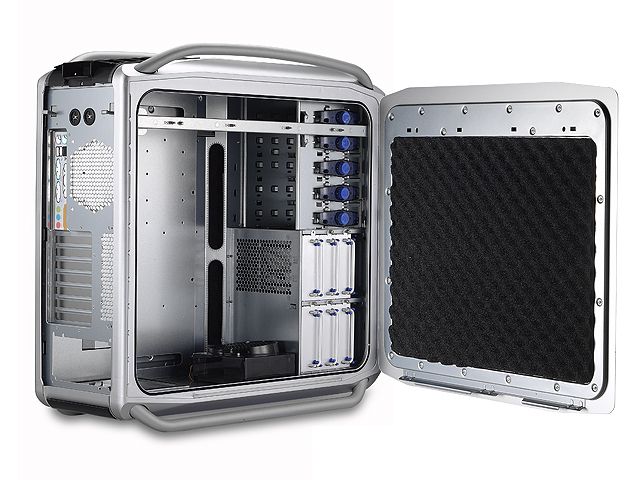
post edited by John - 2014/06/22 12:32:30
|
markyzno
Max Output Level: -66 dBFS
- Total Posts : 1216
- Joined: 2011/02/08 06:40:20
- Location: UK
- Status: offline
Re: Dealing with computer fan noise
2014/06/22 12:02:16
(permalink)
tlw
Cleaning fans won't cut the noide down much. It's the fan motors that make the noise.
Not true, if the fan is clogged up with crud then the fan motor goes into overdrive.. I had this on my graphics card, had tried stupidly to adjust voltage, CPU temp, GPU temp controls and missed the most basic of checks. Dust.
Sonar Platinum 64 bit > Pro tools 10.3.2 >Intel i7 3770K > 16Gb Ram > Gigabyte Z77-D3H Motherboard> NVIDIA GeForce GTX 660 2 GB > ATi RADEON HD5700 > 240GB OCZ Agility 3 SSD> Win 10 home 64 bit> Delta 1010 > MOTU Audio Express > MA-15D's > NI Ultimate 9 > NI Kontrol S61 1.1 > NI MAschine Studio 2.3 / KORG MS-20 Mini - Arturia MicroBrute > KORG SQ1 - KORG Kaoss Pad KP3 > iPad and IO Dock 2 running various bits > Bunch of guitars >Sound Design on IMDB --
|
tlw
Max Output Level: -49.5 dBFS
- Total Posts : 2567
- Joined: 2008/10/11 22:06:32
- Location: West Midlands, UK
- Status: offline
Re: Dealing with computer fan noise
2014/06/22 13:17:28
(permalink)
Depends on the fan and how it is powered. Drawing fan power from motherboard/card headers which alter fan speed according to temperature generally results in a noisy PC as the fan speeds are poorly callibrated and the board designers play very safe because they assume, sensibly, that e.g. the cpu cooler will be a standard Intel one with a small fan that requires high speed to push much air and won't reliably start at low voltage.
Switch the cooler for e.g. a huge Noctua heatpipe one and the fan for a much more efficient model that will start at low voltage and the motherboard design assumptions no longer apply.
Stock fans are nearly always noisy to start with. If power for the fan is drawn from the GPU card and changed according to temperature automatically then what you describe might happen. However, the noise is still mostly coming from the motor.
Cleaning the fan won't help if the motor is too noisy to start with or if the blades create noisy turbulence.
Quite a few GPU BIOS can be edited to make the fan much quieter. One I had started with the fan running at a minimum of 70% then ramped it to 100% by the time temperatures reached 45C, less than half the rated temp. for the card. It sounded like a vacuum cleaner. After some tweaking I reduced the fan speed to a maximum of 40% and the card ran quite happily for the 3-4 year lifespan of that PC. Sure, the card ran hotter, but still well within spec.
And if the fans are drawing power from a fan control unit rather than motherboard headers that provide varying voltage then cleaning the blades will help cooling efficiency but not reduce noise because the fan won't have ramped up in the first place.
Anyway, we're probably well off topic for the SonarX forum by now...
Sonar Platinum 64bit, Windows 8.1 Pro 64bit, I7 3770K Ivybridge, 16GB Ram, Gigabyte Z77-D3H m/board, ATI 7750 graphics+ 1GB RAM, 2xIntel 520 series 220GB SSDs, 1 TB Samsung F3 + 1 TB WD HDDs, Seasonic fanless 460W psu, RME Fireface UFX, Focusrite Octopre. Assorted real synths, guitars, mandolins, diatonic accordions, percussion, fx and other stuff.
|
John
Forum Host
- Total Posts : 30467
- Joined: 2003/11/06 11:53:17
- Status: offline
Re: Dealing with computer fan noise
2014/06/22 15:29:40
(permalink)
I clean fans for the reason that sometimes they can become unbalanced do to dirt build up. This can cause vibrations that are annoying. Plus it can lead to excessive ware on the bearings. If done carefully it wont hurt and it may save your system.
|
Paul G
Max Output Level: -52 dBFS
- Total Posts : 2334
- Joined: 2004/03/17 21:38:03
- Location: Florida
- Status: offline
Re: Dealing with computer fan noise
2014/06/22 15:58:10
(permalink)
tlw
Damping material on the case doesn't cut down on sound escaping through the holes in the case but it helps stop the case vibrating. Thanks. That makes sense and most of the noise from my system IS moving air and not fan motor or HDD noise, (although I do have five HDD's in this case so I supposes there is some drive noise). My case is a Antec P-183 mid tower. There are four AM Scythe 120mm fans, one 120mm fan on the AM cooler and of course the fan on the 750 watt PS, so that's six fans! My graphics card is fanless. I guess I should edit the thread title to "moving air noise". I won't be building a new system anytime soon so I was hoping for an inexpensive solution. Paul
|
Paul G
Max Output Level: -52 dBFS
- Total Posts : 2334
- Joined: 2004/03/17 21:38:03
- Location: Florida
- Status: offline
Re: Dealing with computer fan noise
2014/06/22 15:59:39
(permalink)
John T
It's not cheap to do this, and it takes a lot of research and careful testing, but a fanless PC can be powerful and not cost the entire earth. The only moving parts in my PC are the hard drives, which will be getting swapped out for SSD's hopefully this year. For CPU cooling, I highly reccomend a company called NoFan. You need a big case to fit their heatsink thingy in, but it works astonishingly well.
Interesting, thanks.
|
Paul G
Max Output Level: -52 dBFS
- Total Posts : 2334
- Joined: 2004/03/17 21:38:03
- Location: Florida
- Status: offline
Re: Dealing with computer fan noise
2014/06/22 16:05:41
(permalink)
mettelus
My "solution" to this is over-simplified in a way, but effective. All audio takes I will leave a few seconds of "dead space" both before and after. For consistent background noise, a destructive noise reduction edit (I use Audition personally for this) is all that is necessary. Directional mics are highly beneficial as well.
Thanks. I do have a version of Audition around here somewhere. I should take a look. Izotope RX3 would be my ideal choice for noise removal but it's a bit out of my budget at the moment. Still, this is not a solution but a fix I'd rather not have to use.
|
Paul G
Max Output Level: -52 dBFS
- Total Posts : 2334
- Joined: 2004/03/17 21:38:03
- Location: Florida
- Status: offline
Re: Dealing with computer fan noise
2014/06/22 16:08:18
(permalink)
markyzno
Clean your fans.
I clean the filter screens regularly and blow out the entire case at least once a year. The fan blades don't get very dirty in this case because of the filter screens. It's a feature I really like. Thanks. Paul
|
Paul G
Max Output Level: -52 dBFS
- Total Posts : 2334
- Joined: 2004/03/17 21:38:03
- Location: Florida
- Status: offline
Re: Dealing with computer fan noise
2014/06/22 16:09:48
(permalink)
tlw
Cleaning fans won't cut the noide down much. It's the fan motors that make the noise.
I agree and the fan motors really aren't making any noise. It's all that moving air. Thanks.
|
Paul G
Max Output Level: -52 dBFS
- Total Posts : 2334
- Joined: 2004/03/17 21:38:03
- Location: Florida
- Status: offline
Re: Dealing with computer fan noise
2014/06/22 16:18:44
(permalink)
DRanck
Another thing to look for depending on your motherboard is a way to set the fan speed. If the mobo has presets for a Performance mode, that may be forcing the fans to run at a higher speed. You may be able to set the fans to automatically adjust their speed.
Thanks for bringing this up. I know I looked at this during the build but I don't remember how I set it up. I'll have to go back and take a look. The rear case fan has a selection switch to set the speed. I also have a little program installed that monitors the core temps. I try to keep the temp at 45C to 48C. If I turn the fan speed down the temp goes up and with this CPU being OC'd I worry about letting the temps get too high. Paul
|
Paul G
Max Output Level: -52 dBFS
- Total Posts : 2334
- Joined: 2004/03/17 21:38:03
- Location: Florida
- Status: offline
Re: Dealing with computer fan noise
2014/06/22 16:21:56
(permalink)
rsinger
Use a dedicated DAW designed for the situation. I'm using an Antec Sonata IV case and that has worked out well. It has one case fan and I don't have a separate graphics card. The case has a speed switch for the fan so I'm running it at the lowest level "quiet". The cpu is only lightly overclocked since I want to minimize fan noise - it runs between 3.2 & 4.2 GHz. I looked at the Sonata case prior to this build but it was not big enough to house the AM cooler I had selected so I went with the P-183. As I said in the previous post, I'm going to go back and revisit the fan speed thing. Thanks.
|
Paul G
Max Output Level: -52 dBFS
- Total Posts : 2334
- Joined: 2004/03/17 21:38:03
- Location: Florida
- Status: offline
Re: Dealing with computer fan noise
2014/06/22 16:30:41
(permalink)
drewfx1
One fan running at high speed makes much more noise than 2 (or more) running at low speed.
True!
|
Paul G
Max Output Level: -52 dBFS
- Total Posts : 2334
- Joined: 2004/03/17 21:38:03
- Location: Florida
- Status: offline
Re: Dealing with computer fan noise
2014/06/22 16:35:15
(permalink)
John
I have 8, yes 8 fans in my case. However they are large very slow running and do not make any noise. But what little noise they do make is damped by the case I have. A Cooler Master Cosmos 1000 and it does have damping on the interior sides. And it is dead quiet. Thanks John. I don't remember if I looked at this case or not. My brother is a big fan of Cooler Master. One thing about these more stylish cases is that you can't really put stuff on top of them. In my office, computer top storage space is a must! LOL Paul
|
Paul G
Max Output Level: -52 dBFS
- Total Posts : 2334
- Joined: 2004/03/17 21:38:03
- Location: Florida
- Status: offline
Re: Dealing with computer fan noise
2014/06/22 16:36:47
(permalink)
markyzno
tlw
Cleaning fans won't cut the noide down much. It's the fan motors that make the noise.
Not true, if the fan is clogged up with crud then the fan motor goes into overdrive..
I had this on my graphics card, had tried stupidly to adjust voltage, CPU temp, GPU temp controls and missed the most basic of checks.
Dust.
Have I started the "Fan Wars"!?? 
|
Paul G
Max Output Level: -52 dBFS
- Total Posts : 2334
- Joined: 2004/03/17 21:38:03
- Location: Florida
- Status: offline
Re: Dealing with computer fan noise
2014/06/22 16:41:10
(permalink)
tlw
Depends on the fan and how it is powered. Drawing fan power from motherboard/card headers which alter fan speed according to temperature generally results in a noisy PC as the fan speeds are poorly callibrated and the board designers play very safe because they assume, sensibly, that e.g. the cpu cooler will be a standard Intel one with a small fan that requires high speed to push much air and won't reliably start at low voltage.
Switch the cooler for e.g. a huge Noctua heatpipe one and the fan for a much more efficient model that will start at low voltage and the motherboard design assumptions no longer apply.
Stock fans are nearly always noisy to start with. If power for the fan is drawn from the GPU card and changed according to temperature automatically then what you describe might happen. However, the noise is still mostly coming from the motor.
Cleaning the fan won't help if the motor is too noisy to start with or if the blades create noisy turbulence.
Quite a few GPU BIOS can be edited to make the fan much quieter. One I had started with the fan running at a minimum of 70% then ramped it to 100% by the time temperatures reached 45C, less than half the rated temp. for the card. It sounded like a vacuum cleaner. After some tweaking I reduced the fan speed to a maximum of 40% and the card ran quite happily for the 3-4 year lifespan of that PC. Sure, the card ran hotter, but still well within spec.
And if the fans are drawing power from a fan control unit rather than motherboard headers that provide varying voltage then cleaning the blades will help cooling efficiency but not reduce noise because the fan won't have ramped up in the first place.
Anyway, we're probably well off topic for the SonarX forum by now...
Off topic or not, thanks to everyone for this discussion. I am certainly going to revisit the BIOS settings and see what happens.
|
mettelus
Max Output Level: -22 dBFS
- Total Posts : 5321
- Joined: 2005/08/05 03:19:25
- Location: Maryland, USA
- Status: offline
Re: Dealing with computer fan noise
2014/06/22 23:50:21
(permalink)
Paul G
mettelus
My "solution" to this is over-simplified in a way, but effective. All audio takes I will leave a few seconds of "dead space" both before and after. For consistent background noise, a destructive noise reduction edit (I use Audition personally for this) is all that is necessary. Directional mics are highly beneficial as well.
Thanks. I do have a version of Audition around here somewhere. I should take a look. Izotope RX3 would be my ideal choice for noise removal but it's a bit out of my budget at the moment. Still, this is not a solution but a fix I'd rather not have to use.
If you have a version of Audition lying around, definitely check it out... any "consistent" background noise can be removed by it effectively with the "default" settings alone, which is why I do the "environmental sample" before/after each take. I have Audition 4 (that came with CS 5.5), and it has been effective enough that I have not looked into another solution. Consistent noise of sufficient sample size it all it needs (I have never modified the default settings myself, but have run it twice in a row to clean off recordings of analog tape, which was rather impressive as to what it is capable of).
ASUS ROG Maximus X Hero (Wi-Fi AC), i7-8700k, 16GB RAM, GTX-1070Ti, Win 10 Pro, Saffire PRO 24 DSP, A-300 PRO, plus numerous gadgets and gizmos that make or manipulate sound in some way.
|
markyzno
Max Output Level: -66 dBFS
- Total Posts : 1216
- Joined: 2011/02/08 06:40:20
- Location: UK
- Status: offline
Re: Dealing with computer fan noise
2014/06/23 10:39:46
(permalink)
Sonar Platinum 64 bit > Pro tools 10.3.2 >Intel i7 3770K > 16Gb Ram > Gigabyte Z77-D3H Motherboard> NVIDIA GeForce GTX 660 2 GB > ATi RADEON HD5700 > 240GB OCZ Agility 3 SSD> Win 10 home 64 bit> Delta 1010 > MOTU Audio Express > MA-15D's > NI Ultimate 9 > NI Kontrol S61 1.1 > NI MAschine Studio 2.3 / KORG MS-20 Mini - Arturia MicroBrute > KORG SQ1 - KORG Kaoss Pad KP3 > iPad and IO Dock 2 running various bits > Bunch of guitars >Sound Design on IMDB --
|