SteveStrummerUK
Max Output Level: 0 dBFS

- Total Posts : 31112
- Joined: 2006/10/28 10:53:48
- Location: Worcester, England.
- Status: offline
Dimension Pro - 'Error' Message: "Multisample Not Found"
Hi guys I'm using Dimension Pro x64 v1.5 inside SONAR X1 Expanded 64bit on i7 Windows 7 64bit When I try to open any of the programs from the following categories:  I get the message Multisample Not Found, for example:  All the categories who's programs won't open appear in my Program Data folder alongside all the categories that do:  I've even checked inside each folder to make certain the program patches are there:  So basically, my question is: Does anyone know the correct procedure to get Dim Pro to be able to open these programs? Many thanks in advance.
|
myconsumerclub
Max Output Level: -82 dBFS

- Total Posts : 410
- Joined: 2007/07/09 23:39:46
- Status: offline

Re:Dimension Pro - 'Error' Message: "Multisample Not Found"
2012/09/15 12:26:38
(permalink)
same problem in rapture le with some of the patches I downloaded from patch arena. I had to also reinstall DP after reinstalling sonar which meant reinstalling expansion packs etc.. and I found a file on my C drive called multisamples which has duplicates of some of the dim pro multisample files and it even had DSF examples of rapture stuff which I moved to the Multisample file in rapture to get a lot of patches to work in rapture. Amazing a good article on this is not found in the knowledge base. There needs to be more info on how to use samples ie waves and SFZ files from one synth in each others files without duplicating the files in each others directory. Someone had a post here the other day about the old p5 wiki that had all kinds of helpful DP info up and another poster on here had created some rapture how to stuff as well. you think Cake would offer them a place to archive this info in their knowledge base somewhere.
Samsung I7 8 mb ram windows 8 64 bit on everything x2 & X1 producer line 6 podfarm gold interface event monitors Ibanez rg 350 guitar and GA6CE classical edirol pcr 500 keystation 88 plugins out the wazoo
|
daveny5
Max Output Level: 0 dBFS
- Total Posts : 16934
- Joined: 2003/11/06 09:54:36
- Location: North Carolina
- Status: offline
Re:Dimension Pro - 'Error' Message: "Multisample Not Found"
2012/09/15 13:27:37
(permalink)
Dave Computer: Intel i7, ASROCK H170M, 16GB/5TB+, Windows 10 Pro 64-bit, Sonar Platinum, TASCAM US-16x08, Cakewalk UM-3G MIDI I/F Instruments: SL-880 Keyboard controller, Korg 05R/W, Korg N1R, KORG Wavestation EX Axes: Fender Stratocaster, Line6 Variax 300, Ovation Acoustic, Takamine Nylon Acoustic, Behringer GX212 amp, Shure SM-58 mic, Rode NT1 condenser mic. Outboard: Mackie 1402-VLZ mixer, TC Helicon VoiceLive 2, Digitech Vocalist WS EX, PODXTLive, various stompboxes and stuff. Controllers: Korg nanoKONTROL, Wacom Bamboo Touchpad
|
JClosed
Max Output Level: -77 dBFS

- Total Posts : 690
- Joined: 2009/12/19 11:50:26
- Status: offline
Re:Dimension Pro - 'Error' Message: "Multisample Not Found"
2012/09/15 13:52:12
(permalink)
Well - I do not have these packages, but I seem to remember from the free add-ons for Rapture I had to copy the multisamples in C:\Program Files\Cakewalk\Rapture\Multisamples AND ALSO in C:\Program Files (x86)\Cakewalk\Rapture\Multisamples. Otherwise I get the same error as you describe. I also seem to remember I had to do the same thing for Dimension Pro. I guess it has something to do with internally wrong pointers to the sample directory in Dim Pro 32- and 64 bit. I do not guarantee this will solve your problem tough..
|
bvideo
Max Output Level: -58 dBFS

- Total Posts : 1707
- Joined: 2006/09/02 22:20:02
- Status: offline
Re:Dimension Pro - 'Error' Message: "Multisample Not Found"
2012/09/15 13:57:07
(permalink)
During your very first install of Dim Pro, you can elect an alternate folder location for multisamples. Subsequent expansion packs should see this alternate choice in the registry and install multisamples in the same folder. For some reason, yours did not. Perhaps installation order was different? If you can find the multisamples folder currently used by dim pro, you can move the multisamples of those expansion packages to that folder. Edit: the multisamples are in a different place from the programs.
|
techead
Max Output Level: -31.5 dBFS

- Total Posts : 4353
- Joined: 2004/01/24 08:40:20
- Location: Macomb, IL, USA
- Status: offline
Re:Dimension Pro - 'Error' Message: "Multisample Not Found"
2012/09/15 14:00:38
(permalink)
The program list that you have (that is the list of programs displayed in Dimension Pro's program browser window) is generated from a directory located by default at "C:\ProgramData\Cakewalk\Dimension Pro\Programs". What is likely happening is that there are DimPro programs (.prog files) in that folder which reference .sfz/.wav/.flac multisample files which are not available in your main Multisamples folder. It is possible that your system might have two different multisample folders with mostly duplicate content with Dimension Pro trying to use the multisample folder that is missing the extra packs.
Try searching your various computer hard drives to see if there is a second location for multisamples for Dimension Pro. If you find there are two you may need to make some adjustments to the registry entries used by DimPro.
Check to see where Dimension Pro is looking for its multisamples. Do this by opening the Windows registry editor and then drill down to "HKEY_LOCAL_MACHINE\Software\Cakewalk Music Software\dp" in the left-side tree navigation window pane. In the right pane, find the entry named "Multisamples Folder" and check its value. The value should be the fully qualified path name to the parent folder containing your Multisamples folder. I have a Windows 7 Pro x64 CORE i7 system similar to yours and I used the default options when installing Dimension Pro 1.5 which resulted in this path for that registry value: "C:\Program Files\Cakewalk\Dimension Pro". Dimension Pro's actual mutlisamples are found within the folder hierarchy "C:\Program Files\Cakewalk\Dimension Pro\Multisamples". If you end up editing this registry value, make sure not to include the actual "Multisamples" folder in the path--it must be the parent folder containing the "Multisamples" folder.
|
SteveStrummerUK
Max Output Level: 0 dBFS
- Total Posts : 31112
- Joined: 2006/10/28 10:53:48
- Location: Worcester, England.
- Status: offline
Re:Dimension Pro - 'Error' Message: "Multisample Not Found"
2012/09/15 14:35:54
(permalink)
Many thanks to all for chipping in so far  techead
Check to see where Dimension Pro is looking for its multisamples. Do this by opening the Windows registry editor and then drill down to "HKEY_LOCAL_MACHINE\Software\Cakewalk Music Software\dp" in the left-side tree navigation window pane. In the right pane, find the entry named "Multisamples Folder" and check its value. The value should be the fully qualified path name to the parent folder containing your Multisamples folder. I have a Windows 7 Pro x64 CORE i7 system similar to yours and I used the default options when installing Dimension Pro 1.5 which resulted in this path for that registry value: "C:\Program Files\Cakewalk\Dimension Pro". Dimension Pro's actual mutlisamples are found within the folder hierarchy "C:\Program Files\Cakewalk\Dimension Pro\Multisamples". If you end up editing this registry value, make sure not to include the actual "Multisamples" folder in the path--it must be the parent folder containing the "Multisamples" folder.
Bob, thanks for the instructions, I think this situation may have come about when I originally installed both the 32bit and the 64bit versions of Dim Pro. I checked out the Registry value you suggested and this is what's there:  When I look inside that folder, those Digital Sound Factory folders are all in there. However, they only contain .prog files, not .sfz files, like all the other folders do. I really have got myself in a bit of a pickle here 
|
techead
Max Output Level: -31.5 dBFS
- Total Posts : 4353
- Joined: 2004/01/24 08:40:20
- Location: Macomb, IL, USA
- Status: offline
Re:Dimension Pro - 'Error' Message: "Multisample Not Found"
2012/09/15 15:43:25
(permalink)
Steve,
On 64-bit Windows you can definitely have both 32-bit and 64-bit application software (like Dim Pro) installed at the same time. Both versions think they are reading from the registry at "HKEY_LOCAL_MACHINE\Software\Cakewalk Music Software\dp", but 64-bit Windows actually has two different registry paths (one for 64 bit apps and another for 32 bit apps) and transparently redirects 32-bit applications to a slightly different path (but the 32-bit application doesn't know this).
So, if you have/had both 32-bit Dim Pro and 64-bit Dim Pro installed then there will actually be two sets of registry values as follows:
64-bit Dim Pro: HKEY_LOCAL_MACHINE\Software\Cakewalk Music Software\dp
32-bit Dim Pro: HKEY_LOCAL_MACHINE\Software\Wow6432Node\Cakewalk Music Software\dp
|
daveny5
Max Output Level: 0 dBFS
- Total Posts : 16934
- Joined: 2003/11/06 09:54:36
- Location: North Carolina
- Status: offline
Re:Dimension Pro - 'Error' Message: "Multisample Not Found"
2012/09/15 15:44:24
(permalink)
Did you press F5 like I suggested? That reloads all the patches.
Dave Computer: Intel i7, ASROCK H170M, 16GB/5TB+, Windows 10 Pro 64-bit, Sonar Platinum, TASCAM US-16x08, Cakewalk UM-3G MIDI I/F Instruments: SL-880 Keyboard controller, Korg 05R/W, Korg N1R, KORG Wavestation EX Axes: Fender Stratocaster, Line6 Variax 300, Ovation Acoustic, Takamine Nylon Acoustic, Behringer GX212 amp, Shure SM-58 mic, Rode NT1 condenser mic. Outboard: Mackie 1402-VLZ mixer, TC Helicon VoiceLive 2, Digitech Vocalist WS EX, PODXTLive, various stompboxes and stuff. Controllers: Korg nanoKONTROL, Wacom Bamboo Touchpad
|
SteveStrummerUK
Max Output Level: 0 dBFS
- Total Posts : 31112
- Joined: 2006/10/28 10:53:48
- Location: Worcester, England.
- Status: offline
Re:Dimension Pro - 'Error' Message: "Multisample Not Found"
2012/09/15 16:32:26
(permalink)
@ Bob - I looked in there and the same folder is listed: C:\Program Files (x86)\Cakewalk\Dimension Pro
@ Dave - Thanks, I tried that, but to no effect I'm afraid.
|
scook
Forum Host

- Total Posts : 24146
- Joined: 2005/07/27 13:43:57
- Location: TX
- Status: offline
Re:Dimension Pro - 'Error' Message: "Multisample Not Found"
2012/09/15 17:19:56
(permalink)
Your multisamples folder should not contain .prog files. It should only contain .sfz and .wav files. Uninstall all the DSF packages, make sure that the multisamples DSF directories containing .prog files are removed then reinstall the DSF libraries.
|
SteveStrummerUK
Max Output Level: 0 dBFS
- Total Posts : 31112
- Joined: 2006/10/28 10:53:48
- Location: Worcester, England.
- Status: offline
Re:Dimension Pro - 'Error' Message: "Multisample Not Found"
2012/09/15 17:23:40
(permalink)
Thanks Steve.
It's been so long (and I'm getting on a bit) I can't remember where I got those DSF packs from. Are they on the disc or do I download them?
|
scook
Forum Host
- Total Posts : 24146
- Joined: 2005/07/27 13:43:57
- Location: TX
- Status: offline
Re:Dimension Pro - 'Error' Message: "Multisample Not Found"
2012/09/15 17:31:35
(permalink)
I do not have them.
You might want to check your store account.
I just realized that you are missing some Vintage Sound library multisamples.
Those should have been installed with DimPro 1.5. At least they are in mine, I just checked.
Did you search you C: drive for Pulse_fixedvel.sfz?
I recall there were some issues with multisamples being installed in the wrong place. It may not be related to your problem though.
If you can't find the Vintage Sound Library stuff, you might just want to reinstall all of DimPro.
|
scook
Forum Host
- Total Posts : 24146
- Joined: 2005/07/27 13:43:57
- Location: TX
- Status: offline
Re:Dimension Pro - 'Error' Message: "Multisample Not Found"
2012/09/15 17:39:33
(permalink)
I think the DSF Symphonic Strings HD is the X2 promo download.
|
SteveStrummerUK
Max Output Level: 0 dBFS
- Total Posts : 31112
- Joined: 2006/10/28 10:53:48
- Location: Worcester, England.
- Status: offline
Re:Dimension Pro - 'Error' Message: "Multisample Not Found"
2012/09/15 17:42:04
(permalink)
scook
I think the DSF Symphonic Strings HD is the X2 promo download.
Yes mate, I already have that and it's working perfectly. Edit - sorry Steve, I see what you were getting at mate. It's all the other DSF stuff that can't be found.
|
SteveStrummerUK
Max Output Level: 0 dBFS
- Total Posts : 31112
- Joined: 2006/10/28 10:53:48
- Location: Worcester, England.
- Status: offline
Re:Dimension Pro - 'Error' Message: "Multisample Not Found"
2012/09/16 14:05:51
(permalink)
Can anyone remember where we originally got these particular DSF samples from?
Were they available to download, and does anyone know if they are still available?
Or were they on an installation disc perhaps?
|
bapu
Max Output Level: 0 dBFS

- Total Posts : 86000
- Joined: 2006/11/25 21:23:28
- Location: Thousand Oaks, CA
- Status: offline
Re:Dimension Pro - 'Error' Message: "Multisample Not Found"
2012/09/16 14:13:36
(permalink)
SteveStrummerUK
Can anyone remember where we originally got these particular DSF samples from?
Were they available to download, and does anyone know if they are still available?
Or were they on an installation disc perhaps?
I'm gonna go out a limb here and say that what you are looking for is not an install external to SONAR. The reason I say this is I can load your missing samples on both of my DAWs (main and lappy). Both these installs were SONAR X1 only. The lappy install was done by ADK Pro Audio and the main DAW was done by me. IIRC no other installs on the main DAW were needed as this was a fully new build done by me starting with X1 and Dim Pro media supplied by Cakewalk. I'm sorry this is not direct help. I hope you are not chasing a dead end though. BTW, on the Dim Pro re-install did you completely remove the previous install (to insure all registry entries were removed)?
|
SteveStrummerUK
Max Output Level: 0 dBFS
- Total Posts : 31112
- Joined: 2006/10/28 10:53:48
- Location: Worcester, England.
- Status: offline
Re:Dimension Pro - 'Error' Message: "Multisample Not Found"
2012/09/16 14:17:03
(permalink)
No mate, I just installed over the top of it. To be honest, as you know, I'm not good with this sort of stuff Will I need to remove the X2 freebie Strings stuff and reinstall them too?
|
bapu
Max Output Level: 0 dBFS
- Total Posts : 86000
- Joined: 2006/11/25 21:23:28
- Location: Thousand Oaks, CA
- Status: offline
Re:Dimension Pro - 'Error' Message: "Multisample Not Found"
2012/09/16 14:19:07
(permalink)
SteveStrummerUK
No mate, I just installed over the top of it.
To be honest, as you know, I'm not good with this sort of stuff
Will I need to remove the X2 freebie Strings stuff and reinstall them too?
Given the nature of the problem I would uninstall all Dim Pro stuff, shut down/reboot and install all Dim Pro stuff again. BTW, were you ever able to load these before?
|
AT
Max Output Level: 0 dBFS
- Total Posts : 10654
- Joined: 2004/01/09 10:42:46
- Location: TeXaS
- Status: offline
Re:Dimension Pro - 'Error' Message: "Multisample Not Found"
2012/09/16 14:30:09
(permalink)
Try manually loading in the sfz/wav files (tho this can be a pain in time if you have a lot) and then resaving the prog. It should point to the right place. I had to do this with some prog files that used some 3rd party wav/sfz files.
@
https://soundcloud.com/a-pleasure-dome
http://www.bnoir-film.com/ there came forth little children out of the city, and mocked him, and said unto him, Go up, thou bald head; go up, thou bald head. 24 And he turned back, and looked on them, and cursed them in the name of the Lord. And there came forth two she bears out of the wood, and tare forty and two children of them.
|
bapu
Max Output Level: 0 dBFS
- Total Posts : 86000
- Joined: 2006/11/25 21:23:28
- Location: Thousand Oaks, CA
- Status: offline
Re:Dimension Pro - 'Error' Message: "Multisample Not Found"
2012/09/16 14:34:28
(permalink)
|
bapu
Max Output Level: 0 dBFS
- Total Posts : 86000
- Joined: 2006/11/25 21:23:28
- Location: Thousand Oaks, CA
- Status: offline
Re:Dimension Pro - 'Error' Message: "Multisample Not Found"
2012/09/16 14:40:42
(permalink)
Do you have this directory? 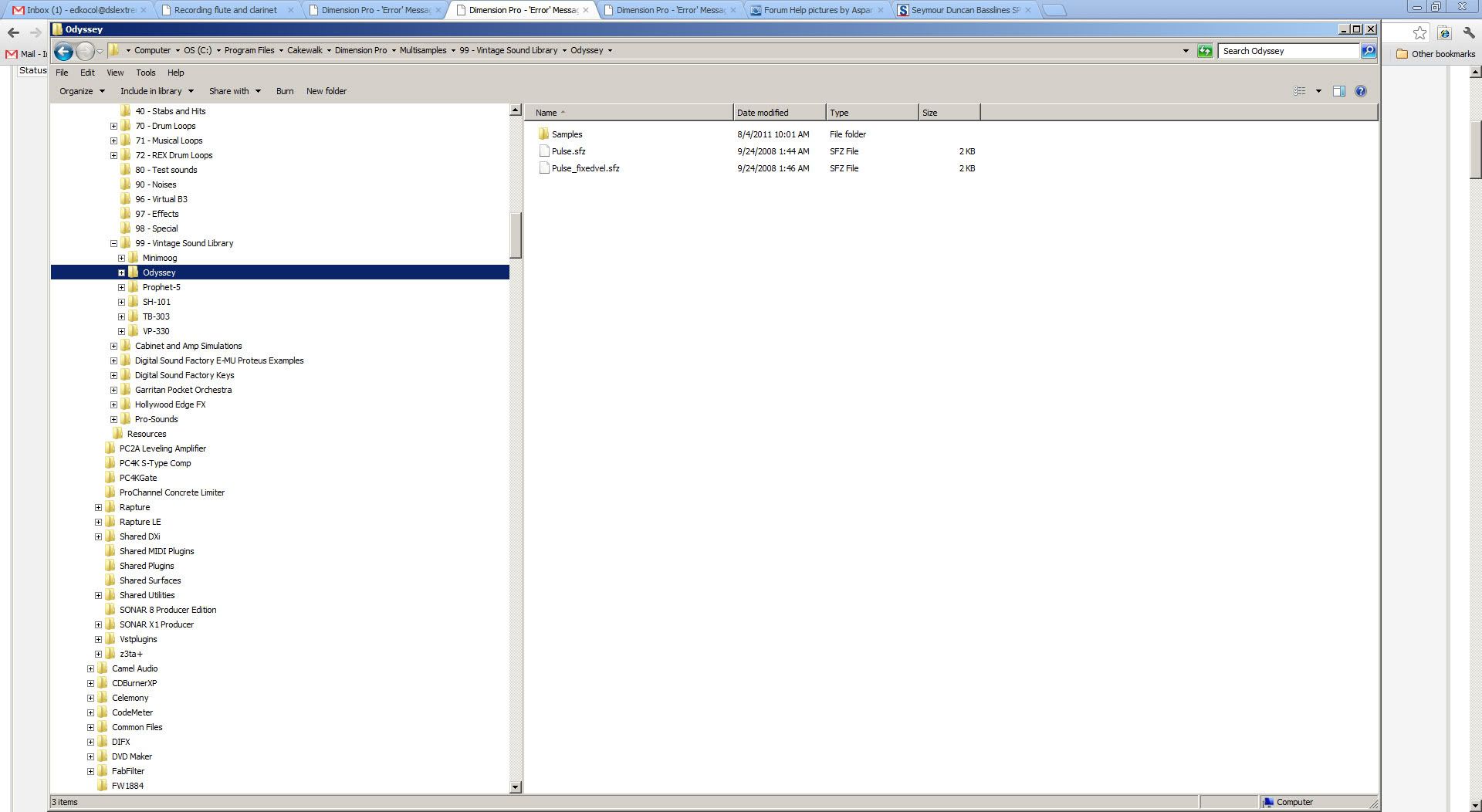
|
SteveStrummerUK
Max Output Level: 0 dBFS
- Total Posts : 31112
- Joined: 2006/10/28 10:53:48
- Location: Worcester, England.
- Status: offline
Re:Dimension Pro - 'Error' Message: "Multisample Not Found"
2012/09/16 14:41:50
(permalink)
Here's what I see in that folder Ed: 
|
bapu
Max Output Level: 0 dBFS
- Total Posts : 86000
- Joined: 2006/11/25 21:23:28
- Location: Thousand Oaks, CA
- Status: offline
Re:Dimension Pro - 'Error' Message: "Multisample Not Found"
2012/09/16 14:43:40
(permalink)
Aha, Your entire 99 directory is missing.
|
SteveStrummerUK
Max Output Level: 0 dBFS
- Total Posts : 31112
- Joined: 2006/10/28 10:53:48
- Location: Worcester, England.
- Status: offline
Re:Dimension Pro - 'Error' Message: "Multisample Not Found"
2012/09/16 14:48:50
(permalink)
And all the DSF folders (except the new Symphonic Strings HD) only contain .prog files - i.e. no .wav or .sfz files.
|
scook
Forum Host
- Total Posts : 24146
- Joined: 2005/07/27 13:43:57
- Location: TX
- Status: offline
Re:Dimension Pro - 'Error' Message: "Multisample Not Found"
2012/09/16 14:55:51
(permalink)
Also missing Hollywood Edge FX which came with 8 Producer. Didn't Vintage Sound Library also come with 8? It may be that the newer versions don't include them. I can't say. When I installed on my new machine, I merged old stuff with new install. The DSF stuff is different though. Not only, not part of a regular DimPro install but the multisample directories do not contain sample info, they contain programs. The last three entries, the ones that end .001, .002, .003 look like part of an interrupted install.
post edited by scook - 2012/09/16 15:19:00
|
SteveStrummerUK
Max Output Level: 0 dBFS
- Total Posts : 31112
- Joined: 2006/10/28 10:53:48
- Location: Worcester, England.
- Status: offline
Re:Dimension Pro - 'Error' Message: "Multisample Not Found"
2012/09/16 14:59:30
(permalink)
I only have the installation discs for SONAR 8 and X1 Steve.
|
scook
Forum Host
- Total Posts : 24146
- Joined: 2005/07/27 13:43:57
- Location: TX
- Status: offline
Re:Dimension Pro - 'Error' Message: "Multisample Not Found"
2012/09/16 15:03:56
(permalink)
Your store account shows 8 Producer and Studio. Are you saying you only have the Studio disks? The producer would have a separate disk with DimPro on it.
|
bvideo
Max Output Level: -58 dBFS
- Total Posts : 1707
- Joined: 2006/09/02 22:20:02
- Status: offline
Re:Dimension Pro - 'Error' Message: "Multisample Not Found"
2012/09/16 15:24:45
(permalink)
Six of those DSF's are the EMU proteus pack sold by CW at a discount at one time. They could be had on CD/DVD. Download maybe, I don't know. Plus you have symphonic strings HD, the recent freebee. Looks like some of those sfz's and their wavs got installed somewhere else. Is there a conflict between the folder you show in post #23, C:\Program files\..., and the multisample folder registry entry you showed in post #7, C:\Program files (x86)\... ? Possibly you have a bunch of your samples loaded twice (both of those folders). Did you upgrade from a 32-bit windows to W7 64?
|
SteveStrummerUK
Max Output Level: 0 dBFS
- Total Posts : 31112
- Joined: 2006/10/28 10:53:48
- Location: Worcester, England.
- Status: offline
Re:Dimension Pro - 'Error' Message: "Multisample Not Found"
2012/09/16 15:35:28
(permalink)
@ Steve - I have both SONAR 8 Studio and Producer discs. I'm off to find them all in the attic now.
@ Bill - I've always had Win7 64 on this PC, but I have in the past installed both the 32 bit and the 64 bit versions of Dim Pro - would that explain why I have a Dim Pro folder in Programs and in Programs x86?
|