ttaggart4
Max Output Level: -90 dBFS

- Total Posts : 13
- Joined: 2014/12/20 13:05:55
- Status: offline
Double-clicking the track icon when using a drum map does not open soft synth properties!
I used to be able to consistently open soft synth properties by clicking the track icon (A). This no longer works, it usually just maximizes the height of the track. I have had this issue for a while, in multiple versions of Sonar. Currently using version 21.13.00 Build 32 Newburyport x64. Any ideas? 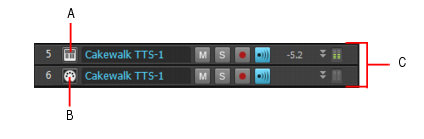
post edited by ttaggart4 - 2016/03/06 13:52:40
|
Anderton
Max Output Level: 0 dBFS

- Total Posts : 14070
- Joined: 2003/11/06 14:02:03
- Status: offline

Re: Double-clicking the track icon does not open soft synth properties!
2016/03/06 09:54:11
(permalink)
Make sure you click on the right icon: 
|
notscruffy2
Max Output Level: -89 dBFS

- Total Posts : 67
- Joined: 2015/02/28 07:25:41
- Status: offline
Re: Double-clicking the track icon does not open soft synth properties!
2016/03/06 10:34:24
(permalink)
I think you have "auto track zoom"engaged
|
ttaggart4
Max Output Level: -90 dBFS
- Total Posts : 13
- Joined: 2014/12/20 13:05:55
- Status: offline
Re: Double-clicking the track icon does not open soft synth properties!
2016/03/06 12:55:32
(permalink)
Thank you for your responses!
I am clicking the correct button. I am a long time Sonar user, and I have used this feature consistently in the past.
Auto track zoom is not engaged.
Additionally, this behavior only appears to affect certain soft synths. For example, in my current project Dimension Pro and TruePianos properties load fine when double-clicking the icon. However, Addictive Drums 2 does not. So my concern is that it is not consistent!
Any additional thoughts are appreciated.
|
mettelus
Max Output Level: -22 dBFS

- Total Posts : 5321
- Joined: 2005/08/05 03:19:25
- Location: Maryland, USA
- Status: offline
Re: Double-clicking the track icon does not open soft synth properties!
2016/03/06 13:06:55
(permalink)
Given AD2 as a culprit, I just added that to a project to check and am getting the correct behavior in the M1 build (not Newburyport). I do notice that the "maximize track height" changes the cursor to an "up/down arrow" when enabled... if you get that cursor, and then slide up over the "open synth properties" it seems to get to within only a few pixels before the cursor reverts back (Smart tool enabled).
Are you seeing the cursor as an up/down arrow over top of the "open synth properties" button?
ASUS ROG Maximus X Hero (Wi-Fi AC), i7-8700k, 16GB RAM, GTX-1070Ti, Win 10 Pro, Saffire PRO 24 DSP, A-300 PRO, plus numerous gadgets and gizmos that make or manipulate sound in some way.
|
ttaggart4
Max Output Level: -90 dBFS
- Total Posts : 13
- Joined: 2014/12/20 13:05:55
- Status: offline
Re: Double-clicking the track icon does not open soft synth properties!
2016/03/06 13:14:09
(permalink)
Mettelus:
I have a normal cursor over the entire track icon.
I have noticed this behavior over the last several releases of Sonar (I would say at least a year). I just figured they would get it fixed since it seems a commonly used feature!
Is there possibly a setting in the AD2 VST that affects this?
Thanks!
|
ttaggart4
Max Output Level: -90 dBFS
- Total Posts : 13
- Joined: 2014/12/20 13:05:55
- Status: offline
Re: Double-clicking the track icon does not open soft synth properties!
2016/03/06 13:18:57
(permalink)
☄ Helpfulby mettelus 2016/03/06 18:22:55
Okay, I just tried this: I am using a drum map with AD2. I changed the midi output directly to the AD2 plugin, and the track icon double-click works. So apparently, the use of a drum map disables the button functionality.
Is this by design? If so please consider changing it!
Thanks.
|
mettelus
Max Output Level: -22 dBFS
- Total Posts : 5321
- Joined: 2005/08/05 03:19:25
- Location: Maryland, USA
- Status: offline
Re: Double-clicking the track icon does not open soft synth properties!
2016/03/06 13:23:57
(permalink)
I cannot think of one, but is certainly possible. I am not as synth heavy as some others here, but if AD2 is a consistent offender, you might want to try editing the original post and adding AD2 to that title so it stands out better.
ASUS ROG Maximus X Hero (Wi-Fi AC), i7-8700k, 16GB RAM, GTX-1070Ti, Win 10 Pro, Saffire PRO 24 DSP, A-300 PRO, plus numerous gadgets and gizmos that make or manipulate sound in some way.
|
ttaggart4
Max Output Level: -90 dBFS
- Total Posts : 13
- Joined: 2014/12/20 13:05:55
- Status: offline
Re: Double-clicking the track icon does not open soft synth properties!
2016/03/06 13:39:54
(permalink)
See my last post . . . it would appear that the culprit is the use of a drum map.
post edited by ttaggart4 - 2016/03/06 14:04:46
|
chuckebaby
Max Output Level: 0 dBFS
- Total Posts : 13146
- Joined: 2011/01/04 14:55:28
- Status: offline
Re: Double-clicking the track icon does not open soft synth properties!
2016/03/06 13:54:48
(permalink)
ttaggart4
See my last post . . . it would appear that the culprit is the use of a drum map.
I believe you may be correct, I have found the same behavior myself after creating a custom drum map. for now use the browser soft synth rack to open AD 2. that's the work around I just found.
Windows 8.1 X64 Sonar Platinum x64 Custom built: Asrock z97 1150 - Intel I7 4790k - 16GB corsair DDR3 1600 - PNY SSD 220GBFocusrite Saffire 18I8 - Mackie Control
|
ttaggart4
Max Output Level: -90 dBFS
- Total Posts : 13
- Joined: 2014/12/20 13:05:55
- Status: offline
Re: Double-clicking the track icon does not open soft synth properties!
2016/03/06 14:00:29
(permalink)
That's what I found as well. Hopefully it is something that will be fixed. Thanks!
|
scook
Forum Host

- Total Posts : 24146
- Joined: 2005/07/27 13:43:57
- Location: TX
- Status: offline
Re: Double-clicking the track icon does not open soft synth properties!
2016/03/06 14:11:40
(permalink)
AFAIK it has always worked this way. While I suppose SONAR could read the drum map and open all the plug-ins referenced or it could open the map or drum map manager, it would be a feature request.
|
Bristol_Jonesey
Max Output Level: 0 dBFS
- Total Posts : 16775
- Joined: 2007/10/08 15:41:17
- Location: Bristol, UK
- Status: offline
Re: Double-clicking the track icon does not open soft synth properties!
2016/03/06 15:23:32
(permalink)
Exactly Steve.
Remember ttaggart4, you can load multiple VST's into a drum map, you are not limited to a single synth so the behaviour is "as expected"
CbB, Platinum, 64 bit throughoutCustom built i7 3930, 32Gb RAM, 2 x 1Tb Internal HDD, 1 x 1TB system SSD (Win 7), 1 x 500Gb system SSD (Win 10), 2 x 1Tb External HDD's, Dual boot Win 7 & Win 10 64 Bit, Saffire Pro 26, ISA One, Adam P11A,
|
ttaggart4
Max Output Level: -90 dBFS
- Total Posts : 13
- Joined: 2014/12/20 13:05:55
- Status: offline
Re: Double-clicking the track icon does not open soft synth properties!
2016/03/06 15:40:35
(permalink)
Bristol_Jonesey
Exactly Steve.
Remember ttaggart4, you can load multiple VST's into a drum map, you are not limited to a single synth so the behaviour is "as expected"
True, but it should be simple enough for the designers to distinguish between single and multiple VST drum maps! Don't let them off that easily.
|
Bristol_Jonesey
Max Output Level: 0 dBFS
- Total Posts : 16775
- Joined: 2007/10/08 15:41:17
- Location: Bristol, UK
- Status: offline
Re: Double-clicking the track icon does not open soft synth properties!
2016/03/06 16:36:23
(permalink)
Drum map stability is fragile at best, I certainly would not want their integrity compromised by tinkering with the code, I use at least 2/3 in every project.
If it were a simple enough task I'm sure they would have done it. Have you submitted a feature request?
CbB, Platinum, 64 bit throughoutCustom built i7 3930, 32Gb RAM, 2 x 1Tb Internal HDD, 1 x 1TB system SSD (Win 7), 1 x 500Gb system SSD (Win 10), 2 x 1Tb External HDD's, Dual boot Win 7 & Win 10 64 Bit, Saffire Pro 26, ISA One, Adam P11A,
|