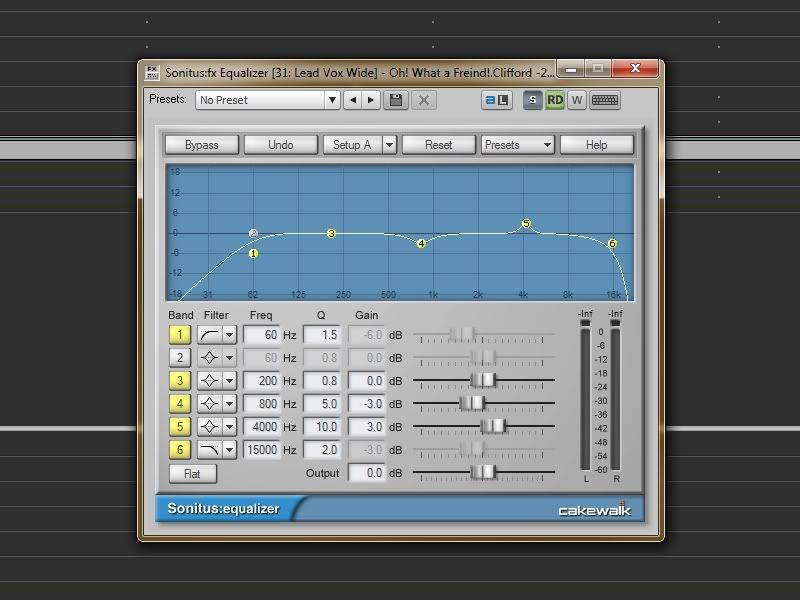
that advice goes for Sonitus or any EQ. in your example, if you are hearing a "bassy" sound then you definitely want to cut / attenuate the low end frequencies and not boost anything else.
removing bass / low end is different than carving out frequencies to dip/peak (cut or boost). on low end you want to use either a shelf or a highpass filter. for clearing up the low end I prefer to start with a high pass filter.
if you're using sonitus, on BAND 1, choose FILTER type as HIGHPASS. then set your FREQ to around 40 to 75 depending on how much you want to get rid of. you probably don't want to go too high if you are EQ'ing an electric or acoustic Bass track, but you don't want to go too low or you won't cut out any of the "boominess" of the bass. most of the time you want to cut around 60 to 75 in order to get rid of the boominess of a track or bus.
next is the Q - "Q" is a factor of the slope of the curve. you don't have to know the technical details behind it but basically it changes how steep the curve is made for the filter. play with it some and see what it does. if you're not wanting to boost any frequencies, then you don't want a Q higher than about 1.5 here. if you'll notice on the highpass filter for sonitus, a Q of more than 1.5 will BOOST frequencies right before it drops off. (but it also gives you a steeper dropoff after it starts down).
this is not what you want to do, however for cutting/boosting other frequencies. if, for example, you have an acoustic guitar track and it doesn't quite "shine" in the mix. you can add 2 or 3 dB at somewhere around 3k to 5k to give it some "punch"
to do that, you would choose, for example on the same sonitus EQ, BAND 5. change the FILTER type to PEAK/DIP then change the frequency to about 4000 to start with. now adjust the GAIN to about +3dB. Notice at the default settings the Q is 0.6 and the change it made on the graph is very wide, covering lots of frequencies. this is not really what you want just to boost some punch for the acoustic. you want to narrow the bandwidth to something close around 4k. Let's give the Q a value of 10. that will make it a pretty narrow bandwidth centered around 4k. now play your acoustic track (solo'd). hear the difference? you might need to adjust the center frequency and the GAIN up or down some to make it sound better to your liking.
you can also use the same EQ on the same track to reduce "muddiness" of the recorded acoustic. suppose you didn't get the mic close enough to the guitar and you get a lot of "room sound" in the recording. that adds "muddiness" to the recording. so let's go back to the EQ and cut some more out of the signal at around 600Hz. choose BAND 4, the FILTER type is already at peak/dip, and that's what you want. now change the frequency to 600, the gain to -3. this time we want a little wider band to cover more frequencies than before since "muddiness" covers more fundamental area. so let's set the Q at about 5. see how the curves react to the changes?
now play the acoustic track. still sometime missing? too much piercing? high end too high? let's use a low pass filter on it now.
choose BAND 6. change the FILTER type to LOWPASS. change the FREQ to around 15k, and the Q to 2.
we never actually used BAND 2, but it is ON by default in Sonitus, so let's turn it off by clicking on the yellow number 2. that way the default settings for band 2 don't affect our EQ settings for the other bands.
there's also what's called a shelf EQ. you can play with the shelf EQ on the low end. you could change BAND 1 to SHELVING LOW, change the GAIN to -6 and see what that does to the graph.
I also have helpful guides on my website. click on the RECORDING HELP, then on RECORDING TIPS.