guitardad
Max Output Level: -89 dBFS

- Total Posts : 94
- Joined: 2006/03/16 05:04:11
- Status: offline
Editing audio wave files in Sonar X1 PE
made some recordings and bassist hit some notes that created spikes that sound like crackle. when you view zoomed in track you can see the sine wave with 3-4 vertical spikes ( def samples) in the regions. audibly makes a hf clicking noise. I can export that track, go into wavelab, zoom in, and use the draw tools to fix these problems. rather than dumping a great track. I haven't figured out if X1 has the "redraw" capability. If it doesn't have this feature , it sure could use it. If it does have this feature, let me know what it is or how to access it. saves me time from having to export file, save and reboot system to use wavelab on the other hdd and xp. thanks
post edited by guitardad - 2011/11/08 22:59:35
Sonar X2 w packs/ S8.53PE Win 7 64b Quad Core cpu 2.6ghz 8GB ram Intel mobo Focusrite LS56
|
brundlefly
Max Output Level: 0 dBFS

- Total Posts : 14250
- Joined: 2007/09/14 14:57:59
- Location: Manitou Spgs, Colorado
- Status: offline

Re:Editing audio wave files in Sonar X1 PE
2011/11/09 02:47:24
(permalink)
SONAR does not have that kind of wave editing built in. It's possible to change the amplitude of individual samples by zooming in selecting one sample, and using Process > Gain, but that's pretty awkward.
I'm not sure why you can't run Wavelab under Win7, but If you have an audio editor installed in the same environment as SONAR, you can integrate it so you can open clips for editing directly from SONAR.
SONAR Platinum x64, 2x MOTU 2408/PCIe-424 (24-bit, 48kHz) Win10, I7-6700K @ 4.0GHz, 24GB DDR4, 2TB HDD, 32GB SSD Cache, GeForce GTX 750Ti, 2x 24" 16:10 IPS Monitors
|
joakes
Max Output Level: -72 dBFS

- Total Posts : 905
- Joined: 2006/12/05 15:51:24
- Location: 465 Km South West of Paris
- Status: offline
Re:Editing audio wave files in Sonar X1 PE
2011/11/09 03:09:33
(permalink)
FYI, you can use Wavelab 6.1 and upwards with W7 no problem.
Cheers,
Jerry
Built by yours truely : I7-2600@3.4GHz, Asus P67Z68, W10x64 Creator Edition, 32GB RAM, 3 HD's, nVidia 760 GT, Focusrite 18i20 2,d Gen + Ti FW, Oxygen 61 iv Gen, and Edirol SD-20 (yes it works), CbB, Teles, Strats, LP's, Epi Riviera, etc
|
Bristol_Jonesey
Max Output Level: 0 dBFS
- Total Posts : 16775
- Joined: 2007/10/08 15:41:17
- Location: Bristol, UK
- Status: offline
Re:Editing audio wave files in Sonar X1 PE
2011/11/09 04:10:38
(permalink)
You might get lucky and find a place in the song where the bassist hits a note with identical pitch/length which doesn't clip, and copy/paste it over the offending notes. Use the split function to isolate the bad notes and delete them.
Work on a copy of the track!
CbB, Platinum, 64 bit throughoutCustom built i7 3930, 32Gb RAM, 2 x 1Tb Internal HDD, 1 x 1TB system SSD (Win 7), 1 x 500Gb system SSD (Win 10), 2 x 1Tb External HDD's, Dual boot Win 7 & Win 10 64 Bit, Saffire Pro 26, ISA One, Adam P11A,
|
guitardad
Max Output Level: -89 dBFS
- Total Posts : 94
- Joined: 2006/03/16 05:04:11
- Status: offline
Re:Editing audio wave files in Sonar X1 PE
2011/11/10 01:20:29
(permalink)
Thanks much, Guess I have to uninstall WL from my other system. I only get these from time to time but it would be convenient to have. I bet it wouldn't take much at all to add the funtionality either. Already have the other options, why not make the draw tool available for those edits? Just kind of weird to attempt the same edit using automation env for clicks or pops which are mostly very very small blurbs of bogus sample. Easier to just grab the tool and draw a line, small curve and make it disappear. I just figured with all the right tools for writing automation, damn, why not at least have some editing capabilities in the programs. I've requested this for years. Cubase, PT and other daw's do this all the time. IIRC audacity has that option too. LOL.. lame Concerns for destructive editing is kind of meh. Copy and paste new track, destroy the old one all you want. If you fix it replace the original. What's so hard or bad about destructive edits? It'd just be nice to wipe out those clicks by zooming in and using a pen tool. Cakewalk... seriously if you are listening, Add this feature and catch up to other daw makers. Request submitted (for this iteration of daw too)
post edited by guitardad - 2011/11/10 01:26:39
Sonar X2 w packs/ S8.53PE Win 7 64b Quad Core cpu 2.6ghz 8GB ram Intel mobo Focusrite LS56
|
brundlefly
Max Output Level: 0 dBFS
- Total Posts : 14250
- Joined: 2007/09/14 14:57:59
- Location: Manitou Spgs, Colorado
- Status: offline
Re:Editing audio wave files in Sonar X1 PE
2011/11/10 14:38:05
(permalink)
My take on this is that it is really quite easy and effective to integrate a 3rd-party audio editor into SONAR (see screenshot), and then you get the benefit of the years of development and advanced editing features available in those applications, leaving the Bakers to focus on adding/improving the bread and butter features of SONAR. Even just providing the basic functionality of dragging sample amplitudes in SONAR would be a pretty major development undertaking, I think, and not worth the effort at this point as far as I'm concerned. 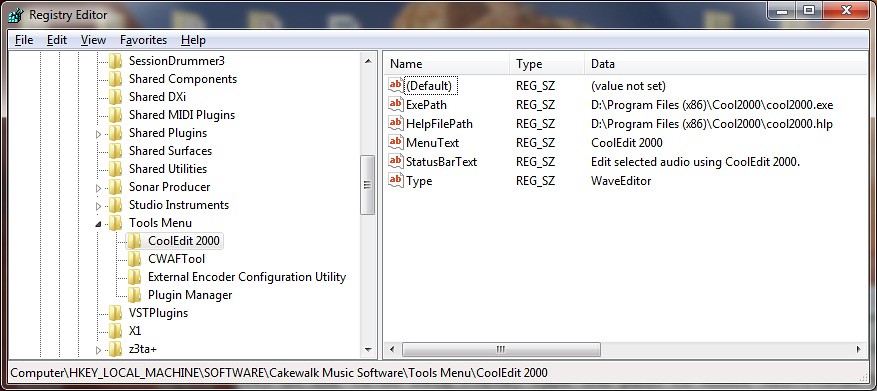
SONAR Platinum x64, 2x MOTU 2408/PCIe-424 (24-bit, 48kHz) Win10, I7-6700K @ 4.0GHz, 24GB DDR4, 2TB HDD, 32GB SSD Cache, GeForce GTX 750Ti, 2x 24" 16:10 IPS Monitors
|
CJaysMusic
Max Output Level: 0 dBFS
- Total Posts : 30423
- Joined: 2006/10/28 01:51:41
- Location: Miami - Fort Lauderdale - Davie
- Status: offline
Re:Editing audio wave files in Sonar X1 PE
2011/11/10 14:44:38
(permalink)
bassist hit some notes that created spikes that sound like crackle. It sound slike digital clipping and if it it is, then its hard to get rid of 100%. Yuor better of re-recording the bass track. FYI: there is no reason for anyone to be clipping now days. you do not need to record how in 24bit recording. Let your peak be between -20dB to -8dB and youll be just fine and youll avoid the issue your having now. You may also want to think about using an outboard compressor or limiter when re-recording or recording the bass guitar track in the future. Avoid digital clipping..
|
Guitarhacker
Max Output Level: 0 dBFS
- Total Posts : 24398
- Joined: 2007/12/07 12:51:18
- Location: NC
- Status: offline
Re:Editing audio wave files in Sonar X1 PE
2011/11/10 14:54:34
(permalink)
I will use the following method for issues like that. As Bristol Jonesy said above.
First, clone the track. Work on the cloned track and mute the original. Find the same note elsewhere in the track and split it out, then delete the "bad note" and copy and paste the new one in. Zoom in as needed and you can very often make a totally seamless edit.
Depending too on what else is going on in the other tracks, minor imperfections in the edit will be totally hidden if it's not a perfect match/edit.
I removed some pretty loud string squeaks from my most current project in several places. I zoomed in and used envelopes to kill the squeaks. The tracks solo show evidence that there was an envelope edit right on the squeak. The squeak is gone, and soloed, you can hear the split second hole. However, in the mix with the other tracks, you can not hear it.
My website & music: www.herbhartley.com MC4/5/6/X1e.c, on a Custom DAW Focusrite Firewire Saffire Interface BMI/NSAI "Just as the blade chooses the warrior, so too, the song chooses the writer "
|
brundlefly
Max Output Level: 0 dBFS
- Total Posts : 14250
- Joined: 2007/09/14 14:57:59
- Location: Manitou Spgs, Colorado
- Status: offline
Re:Editing audio wave files in Sonar X1 PE
2011/11/10 15:08:04
(permalink)
It just so happens I had a recording of a Session Drummer rendering anomaly from another thread. Here's before and after editing with CoolEdit launched from within SONAR after selecting the problematic region. Took way longer to screenshot and post than to fix:  
SONAR Platinum x64, 2x MOTU 2408/PCIe-424 (24-bit, 48kHz) Win10, I7-6700K @ 4.0GHz, 24GB DDR4, 2TB HDD, 32GB SSD Cache, GeForce GTX 750Ti, 2x 24" 16:10 IPS Monitors
|
guitardad
Max Output Level: -89 dBFS
- Total Posts : 94
- Joined: 2006/03/16 05:04:11
- Status: offline
Re:Editing audio wave files in Sonar X1 PE
2011/11/11 00:53:40
(permalink)
Thanks. yeah I've done these many times. It's a great reason to have WaveLab. This particular track was a compilation of songs or medley they were doing. Out of 15 minutes it had a few ticks. Irritating, but I zoomed in and could see (knew) what it was. All the levels and inputs were fine, plus we used an Avalon 737 compressor and another type of hw limiter/gate. I can't recall what it was. I didn' track the bass. Anyway we use a Focusrite LM56 interface w extra I/O expander. The gear is fine. Sometimes digital just does this to be a "butt". My bud gets these on his i7 Mac and Apogee rack interface too. Nature of the beast. Ticked (pun intended) him off his hardware did that, but such is life in digital world. Oddly enough, never experienced a sample hiccup (what I call them) on my VS2480. Not once in as many years and recording a ton of live bands, and using every track. That machine isn't even close in processing power to most home pc's. Computer Daw's.. I'm used to sample hiccups, and that's why I have WaveLab... for that, and mic/hp bleed that you can't fix with gating/expanders.. export> Soundbooth or WaveLab. Select, Insert silence.. done. Easier and not as taxing on the system since you remedy the actual file. I just heard another tell me the newer X1 had the waveform redraw feature. I knew 853 didn't, but I didn't sweat it. X1 Exp is still pretty cool. FWIW I only edit these in standalone, same with Melodyne if I fix a note or two. Things are more stable this way. It just throws me Sonar still does not have this simple redraw option. Other daws have had it for years. I've been using Sonar since V4, and I just scratch my head they'd rather user crossfades and volume envelopes. Makes no sense to have the same tools for envelope edits but not an available audio edit mode. How hard could it be? really. Just aggravates me to have to export tracks to fix simple audio wav. One of the things that turned me onto X1 was the "browser" lol. Now its a little less navigation at least to insert those files I do fix in WL/SB etc..
post edited by guitardad - 2011/11/11 01:15:22
Sonar X2 w packs/ S8.53PE Win 7 64b Quad Core cpu 2.6ghz 8GB ram Intel mobo Focusrite LS56
|
Lanceindastudio
Max Output Level: -29 dBFS

- Total Posts : 4604
- Joined: 2004/01/22 02:28:30
- Status: offline
Re:Editing audio wave files in Sonar X1 PE
2011/11/11 01:51:18
(permalink)
I second the notion of replacing the note with another one that is quite close to the same - I have done this especially on bass with very good results, but integrating a third party wave editing program with sonar is a great idea.
It is good to have that option to edit bad data within sonar through an integration instead of exporting and importing again.
Asus P8Z77-V LE PLUS Motherboard i7 3770k CPU 32 gigs RAM Presonus AudioBox iTwo Windows 10 64 bit, SONAR PLATINUM 64 bit Lots of plugins and softsynths and one shot samples, loops Gauge ECM-87, MCA SP-1, Alesis AM51 Presonus Eureka Mackie HR824's and matching subwoofer
|
guitardad
Max Output Level: -89 dBFS
- Total Posts : 94
- Joined: 2006/03/16 05:04:11
- Status: offline
Re:Editing audio wave files in Sonar X1 PE
2011/11/11 02:16:25
(permalink)
I think its overdue Sonar adds an audio wav editing "pen" tool. No third party anything required.
Copying and pasting, finding a note and blending it in is an option, but it would be 1000x easier with simple audio edit feature.
We can edit midi, and draw envelops all day. Sampling Ticks are part of digital equipment, daws and have been. So should a pen tool to fix those things. I get not everyone can draw with a mouse, but what we're talking here is so miniscule, and such an easy correction with the provided tool function should not damage the original track even if you were less experienced and decided not to copy the bad track to make edits..
Maybe in the next round.
Sonar X2 w packs/ S8.53PE Win 7 64b Quad Core cpu 2.6ghz 8GB ram Intel mobo Focusrite LS56
|