ThemBonez
Max Output Level: -90 dBFS

- Total Posts : 43
- Joined: 2008/05/07 21:12:58
- Status: offline
Exported Mix sounds terrible
Maybe someone can help.
I have a 28 track mix that sounds incredible when I play it direct from Sonar X3.
As soon as I export to a wav....it sounds terrible. Nothing like "what I hear".
So to narrow down the problem I exported only a Synth Drum track and the Bass track.
Again, in the program sounds awesome.
When I export there are 2 problems I can hear. One, is its very quiet....and when I raise the volume to hear it, the Bass overpowers the drums.
If there was a way to attach the mp3 for you to hear, I would.
Any suggestions would be helpful
|
djoni
Max Output Level: -55.5 dBFS

- Total Posts : 1974
- Joined: 2003/12/17 11:10:44
- Location: Mozambique
- Status: offline

Re: Exported Mix sounds terrible
2014/02/15 07:48:39
(permalink)
make sure there are no sends to other outputs on your sound card. They will all be added to your mix.
also, check the faders of your cards outputs and make sure they and on zero.
that is all I can say now based on the details you posted.
Ekaya Productions
Sonar Platinum, Intel - 6 Core i7 overclocked 4.5GHz with HT 12meg cache w/ 32GB RAM, UAD-2 QUAD & OCTO, Tascam DM-4800, 1xMackie CU & 2xExtenders...
|
Guitarhacker
Max Output Level: 0 dBFS

- Total Posts : 24398
- Joined: 2007/12/07 12:51:18
- Location: NC
- Status: offline
Re: Exported Mix sounds terrible
2014/02/15 08:32:04
(permalink)
You can upload the MP3 to soundclick or soundcloud and post the link here. We can then hear it.
Hearing it is the best way to determine what you may be doing wrong.
First though, check all your routing assignments. The mix should sound exactly like what you hear. The low volume is a minor issue but the sound is what you need to work on and solve first.
My website & music: www.herbhartley.com MC4/5/6/X1e.c, on a Custom DAW Focusrite Firewire Saffire Interface BMI/NSAI "Just as the blade chooses the warrior, so too, the song chooses the writer "
|
djoni
Max Output Level: -55.5 dBFS
- Total Posts : 1974
- Joined: 2003/12/17 11:10:44
- Location: Mozambique
- Status: offline
Re: Exported Mix sounds terrible
2014/02/15 08:40:57
(permalink)
Not really, if you hear your main outs 1-2 and you're sending 3-4 for your talent, when you export, sonar will add the 1-2 and 3-4 to your exported file. Guitarhacker
The mix should sound exactly like what you hear.
Ekaya Productions
Sonar Platinum, Intel - 6 Core i7 overclocked 4.5GHz with HT 12meg cache w/ 32GB RAM, UAD-2 QUAD & OCTO, Tascam DM-4800, 1xMackie CU & 2xExtenders...
|
ThemBonez
Max Output Level: -90 dBFS
- Total Posts : 43
- Joined: 2008/05/07 21:12:58
- Status: offline
Re: Exported Mix sounds terrible
2014/02/15 08:41:20
(permalink)
I am using a laptop with an internal soundcard and a Roland Quadcapture interface with everything on the default settings.
|
ThemBonez
Max Output Level: -90 dBFS
- Total Posts : 43
- Joined: 2008/05/07 21:12:58
- Status: offline
Re: Exported Mix sounds terrible
2014/02/15 08:43:15
(permalink)
Everything is being sent to 1-2. Nothing to 3-4
|
djoni
Max Output Level: -55.5 dBFS
- Total Posts : 1974
- Joined: 2003/12/17 11:10:44
- Location: Mozambique
- Status: offline
Re: Exported Mix sounds terrible
2014/02/15 08:44:28
(permalink)
check the console if your sound cards output meters are at zero…(after the bus meters)
Ekaya Productions
Sonar Platinum, Intel - 6 Core i7 overclocked 4.5GHz with HT 12meg cache w/ 32GB RAM, UAD-2 QUAD & OCTO, Tascam DM-4800, 1xMackie CU & 2xExtenders...
|
ThemBonez
Max Output Level: -90 dBFS
- Total Posts : 43
- Joined: 2008/05/07 21:12:58
- Status: offline
Re: Exported Mix sounds terrible
2014/02/15 09:01:00
(permalink)
|
ThemBonez
Max Output Level: -90 dBFS
- Total Posts : 43
- Joined: 2008/05/07 21:12:58
- Status: offline
Re: Exported Mix sounds terrible
2014/02/15 09:47:27
(permalink)
|
ThemBonez
Max Output Level: -90 dBFS
- Total Posts : 43
- Joined: 2008/05/07 21:12:58
- Status: offline
Re: Exported Mix sounds terrible
2014/02/15 09:51:07
(permalink)
I also need to clarify, when I listen on my computer its mostly the overall volume issue. The overpowering bass occurs when I move to a cd and listen on my home or car stereo, as well as the volume issue.
|
Blogman
Max Output Level: -81 dBFS

- Total Posts : 481
- Joined: 2011/02/08 02:32:48
- Status: offline
Re: Exported Mix sounds terrible
2014/02/15 10:09:14
(permalink)
You might want to check your mix in mono and set the bass level while listening in mono. (master fader interleave or from your audio card control panel so as not to change within sonar. My focusrite has a mono button for checking in mono.) I switch to mono to check volumes of vox, bass, things predominately mono. See if that helps.
|
ThemBonez
Max Output Level: -90 dBFS
- Total Posts : 43
- Joined: 2008/05/07 21:12:58
- Status: offline
Re: Exported Mix sounds terrible
2014/02/15 10:30:52
(permalink)
Ok...Ill try that....what about the overall level. It gets so quiet when I export I have to turn my computer to full volume just to begin to hear it
|
Anderton
Max Output Level: 0 dBFS
- Total Posts : 14070
- Joined: 2003/11/06 14:02:03
- Status: offline
Re: Exported Mix sounds terrible
2014/02/15 11:36:27
(permalink)
Try this: Select all your tracks and "Bounce to Track." This will create a new track in your project that represents your mix.
Solo it and listen to what it sounds like. It should sound like your mix, but lower in volume because your master fader will probably be down somewhat to accommodate the levels of all the tracks. If you turn the master up, the sound should be the same.
If the mixed sound is NOT the same, then there is something set wrong in the export dialog. If the sound IS the same, drag the clip with the mix to your desktop and play it back through something else (burn a CD or whatever) and report back on what happens.
|
stevec
Max Output Level: 0 dBFS
- Total Posts : 11546
- Joined: 2003/11/04 15:05:54
- Location: Parkesburg, PA
- Status: offline
Re: Exported Mix sounds terrible
2014/02/15 13:07:16
(permalink)
SteveC https://soundcloud.com/steve-cocchi http://www.soundclick.com/bands/pagemusic.cfm?bandID=39163 SONAR Platinum x64, Intel Q9300 (2.5Ghz), Asus P5N-D, Win7 x64 SP1, 8GB RAM, 1TB internal + ESATA + USB Backup HDDs, ATI Radeon HD5450 1GB RAM + dual ViewSonic VA2431wm Monitors; Focusrite 18i6 (ASIO); Komplete 9, Melodyne Studio 4, Ozone 7 Advanced, Rapture Pro, GPO5, Valhalla Plate, MJUC comp, MDynamic EQ, lots of other freebie VST plugins, synths and Kontakt libraries
|
brundlefly
Max Output Level: 0 dBFS
- Total Posts : 14250
- Joined: 2007/09/14 14:57:59
- Location: Manitou Spgs, Colorado
- Status: offline
Re: Exported Mix sounds terrible
2014/02/15 13:19:29
(permalink)
To save everyone some reading in the above link:
"The problem was Windows Media Player all along. It had the "SRS WOW Effects" settings on. The track sounded exactly as intended when I took that setting off."
I second Craig's proposal to bounce everything to a track in SONAR, but choose Buses as the source, and select only the Master. Then set the output of that "Master Bounce" track direct to Main Outs, and A/B the live and bounced mix. You can also invert the phase of the Master Bounce track and it should null with the live mix, though unfrozen plugins that have random elements built-in can prevent perfect cancellation.
SONAR Platinum x64, 2x MOTU 2408/PCIe-424 (24-bit, 48kHz) Win10, I7-6700K @ 4.0GHz, 24GB DDR4, 2TB HDD, 32GB SSD Cache, GeForce GTX 750Ti, 2x 24" 16:10 IPS Monitors
|
Myriad_Rocker
Max Output Level: -83 dBFS

- Total Posts : 357
- Joined: 2005/03/01 14:06:53
- Status: offline
Re: Exported Mix sounds terrible
2014/02/15 20:05:41
(permalink)
ThemBonez
I also need to clarify, when I listen on my computer its mostly the overall volume issue. The overpowering bass occurs when I move to a cd and listen on my home or car stereo, as well as the volume issue.
The overpowering bass on other systems is a product of your mixing environment, not your equipment. Well, minus your monitors, anyway. As for the volume issue, I think there's something going on with your faders. I'd do what others are suggesting.
|
ThemBonez
Max Output Level: -90 dBFS
- Total Posts : 43
- Joined: 2008/05/07 21:12:58
- Status: offline
Re: Exported Mix sounds terrible
2014/02/18 10:44:26
(permalink)
I believe I have the bass thing handled, but still have issue with overall volume. I did everything suggested and getting same result. I import the exported wave so I can measure the db's. When playing direct from the tracks the db floats between -3 and -6 db. When I play the imported wave, it floats between -18 and -12. All my faders are on 0.
|
ThemBonez
Max Output Level: -90 dBFS
- Total Posts : 43
- Joined: 2008/05/07 21:12:58
- Status: offline
Re: Exported Mix sounds terrible
2014/02/18 11:19:51
(permalink)
Also, when I bounce the drum and bass tracks to a track, that tracks is also playing around -18 to -12 db. While the original tracks are playing at around -3 to -6 db. Here lies the problem.
|
Bristol_Jonesey
Max Output Level: 0 dBFS
- Total Posts : 16775
- Joined: 2007/10/08 15:41:17
- Location: Bristol, UK
- Status: offline
Re: Exported Mix sounds terrible
2014/02/19 09:54:07
(permalink)
This must be a routing problem, it's the only logical explanation.
Please list what tracks & busses you have in your project, how it's routed and also what sends you are using.
CbB, Platinum, 64 bit throughoutCustom built i7 3930, 32Gb RAM, 2 x 1Tb Internal HDD, 1 x 1TB system SSD (Win 7), 1 x 500Gb system SSD (Win 10), 2 x 1Tb External HDD's, Dual boot Win 7 & Win 10 64 Bit, Saffire Pro 26, ISA One, Adam P11A,
|
ThemBonez
Max Output Level: -90 dBFS
- Total Posts : 43
- Joined: 2008/05/07 21:12:58
- Status: offline
Re: Exported Mix sounds terrible
2014/02/19 10:43:38
(permalink)
I had the drums routed to a drum bus and the bass routed to a music bus, but I changed it to be directly to the master and my quadcapture12 interface. There are no sends. I minimized everything so that I can isolate this issue. No effects, no sends, no buses. When I export to wave, like I said, its about 6-12db lower. When I bounce the tracks to another track....even that bounced track is about 6-12db lower.
|
Cactus Music
Max Output Level: 0 dBFS
- Total Posts : 8424
- Joined: 2004/02/09 21:34:04
- Status: offline
Re: Exported Mix sounds terrible
2014/02/19 11:40:53
(permalink)
The Quad Capture uses a GUI mixer. I suspect if you turn down a fader here, or add compression or ?? it might result in a change to your bounces. Worth a shot I say. 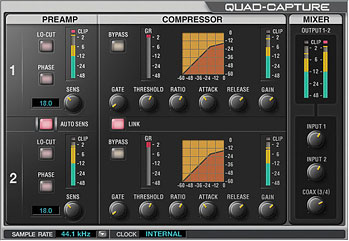
|
ThemBonez
Max Output Level: -90 dBFS
- Total Posts : 43
- Joined: 2008/05/07 21:12:58
- Status: offline
Re: Exported Mix sounds terrible
2014/02/19 12:05:52
(permalink)
If I am bouncing from track to track, would the interface even affect it?
|
brundlefly
Max Output Level: 0 dBFS
- Total Posts : 14250
- Joined: 2007/09/14 14:57:59
- Location: Manitou Spgs, Colorado
- Status: offline
Re: Exported Mix sounds terrible
2014/02/19 12:40:07
(permalink)
No, you're right, interface mixer settings shouldn't matter to levels inside the project.
But we still don't know what your Source selection is for bouncing/exporting, which is a major factor in the result you get. If you bounce a single track to another with Source = Tracks, I wager it will bounce at the expected level. If not, somethings's going on with gains, offset mode, mono/stereo interleave, mono/stereo track format, pan law or... something.
Assuming a single track bounces at the correct level with Source = Tracks, then you need to look at the bus I/O levels (both software and hardware) that get involved when you use Buses, Main Outs or Entire Mix as the source.
Another possibility if it's only synth tracks that are changing level is that the rendering process is producing a different level than the live output. Try freezing synth tracks first, and make sure the levels are not changing at that point.
SONAR Platinum x64, 2x MOTU 2408/PCIe-424 (24-bit, 48kHz) Win10, I7-6700K @ 4.0GHz, 24GB DDR4, 2TB HDD, 32GB SSD Cache, GeForce GTX 750Ti, 2x 24" 16:10 IPS Monitors
|
Bristol_Jonesey
Max Output Level: 0 dBFS
- Total Posts : 16775
- Joined: 2007/10/08 15:41:17
- Location: Bristol, UK
- Status: offline
Re: Exported Mix sounds terrible
2014/02/19 15:51:39
(permalink)
It's certainly worth double checking all of the above, especially the gains at the top of the tracks AND busses, including the master bus.
CbB, Platinum, 64 bit throughoutCustom built i7 3930, 32Gb RAM, 2 x 1Tb Internal HDD, 1 x 1TB system SSD (Win 7), 1 x 500Gb system SSD (Win 10), 2 x 1Tb External HDD's, Dual boot Win 7 & Win 10 64 Bit, Saffire Pro 26, ISA One, Adam P11A,
|
stevec
Max Output Level: 0 dBFS
- Total Posts : 11546
- Joined: 2003/11/04 15:05:54
- Location: Parkesburg, PA
- Status: offline
Re: Exported Mix sounds terrible
2014/02/20 08:03:59
(permalink)
What happens if you freeze both tracks, copy the results into two new audio tracks routed to Mains, then solo these two new tracks?
SteveC https://soundcloud.com/steve-cocchi http://www.soundclick.com/bands/pagemusic.cfm?bandID=39163 SONAR Platinum x64, Intel Q9300 (2.5Ghz), Asus P5N-D, Win7 x64 SP1, 8GB RAM, 1TB internal + ESATA + USB Backup HDDs, ATI Radeon HD5450 1GB RAM + dual ViewSonic VA2431wm Monitors; Focusrite 18i6 (ASIO); Komplete 9, Melodyne Studio 4, Ozone 7 Advanced, Rapture Pro, GPO5, Valhalla Plate, MJUC comp, MDynamic EQ, lots of other freebie VST plugins, synths and Kontakt libraries
|
goodseed
Max Output Level: -90 dBFS
- Total Posts : 22
- Joined: 2013/10/07 11:53:50
- Location: London
- Status: offline
Re: Exported Mix sounds terrible
2014/02/20 15:26:41
(permalink)
Have you checked your fader levels vs monitor volume knob? The file will export according to the settings on Sonar. If your Master fader is set to -6db, for example, but you have a nice volume level because of your hardware, you may find that this is a cause?
And, not wishing to teach you to suck eggs, but you have exported "Entire Mix" and made sure all the little boxes have been checked?
|