mse21tx
Max Output Level: -90 dBFS

- Total Posts : 22
- Joined: 2015/07/17 15:55:40
- Status: offline
FX Bypass
Maybe I've missed something, but when opening a plugin's properties window I see solo, read/write and other functions in the top strip as part of the Sonar interface, but I don't see a bypass switch. I know some plugins have a bypass switch built into their interface, but if they don't, is there any other way to bypass a plugin other than in the track strip in console or track view? To me, it's more convenient to have a bypass switch right there in the same place when I'm tweaking the plugin parameters rather than having to jump over to the track strip and hunt for the bypass button. I know it's a pretty minor thing but this seems to be a fairly standard feature in many other DAWs. I'm sure this has been discussed before, but I couldn't find a previous thread on it. Thanks!
Mike
Sonar Platinum, Windows 7, I7 3.4ghz, 16gb RAM, 500 gb SSD, 500gb HDD
|
Wood67
Max Output Level: -64 dBFS

- Total Posts : 1348
- Joined: 2008/10/27 08:57:36
- Location: Brighton, UK
- Status: offline

Re: FX Bypass
2016/03/22 13:07:43
(permalink)
I don't think it's mandatory, but agree a useful feature. PC has the ability to enable or disable each individually, but outside of that YMMV. Some have a bypass, others a wet/dry, others nothing at all.
Also One of the things I find most irritating in SPLAT is that the new style of inserts (in the FX rack) make it almost impossible to tell whether the FX is activated or not. There's a weird mix of gray/blue/green which seems to change depending on whether it's in focus or not. Wish is was either faint gray for 'off', and something bright/solid for 'on'.
Wood Studio One 3 Pro, (Sonar Platinum), Intel i7, Win10 Pro, 32Gb ram, RME Babyface Pro, Behringer X-Touch, Presonus Faderport, Akai MPK49, Arturia KeyLab25, KRK Rokit 5 monitors, and other sonic surprises.
|
dwardzala
Max Output Level: -61 dBFS

- Total Posts : 1470
- Joined: 2008/05/26 19:18:33
- Status: offline
Re: FX Bypass
2016/03/22 13:08:03
(permalink)
Which plug in specifically are you talking about?
DaveMain Studio- Core i5 @2.67GHz, 16Gb Ram, (2) 500Gb HDs, (1) 360 Gb HD MotU Ultralite AVB, Axiom 49 Midi Controller, Akai MPD18 Midi Controller Win10 x64 Home Sonar 2017.06 Platinum (and X3e, X2c, X1d) Mobile Studio - Sager NP8677 (i7-6700HQ @2.67MHz, 16G Ram, 250G SSD, 1T HD) M-Box Mini v. 2 Win 10 x64 Home Sonar 2016.10 Platinum Check out my original music: https://soundcloud.com/d-wardzala/sets/d-wardzala-original-music
|
Sylvan
Max Output Level: -75 dBFS

- Total Posts : 793
- Joined: 2005/04/14 14:51:02
- Location: San Diego, CA-USA
- Status: offline
Re: FX Bypass
2016/03/22 13:24:27
(permalink)
☄ Helpfulby jonboper 2016/03/22 14:25:41
You can right-click in the effects bin to bypass all plug-ins there, or click on the little "button" icon just to the left of the plug-in name to bypass just that one.
SONAR Platinum RME Fireface UFX Tascam US 20X20 Tascam US 16X08 Intel i7-5830K LGA2011V3 (6 CORE) Asus X99-AII Corsair Vengeance DDR4 32GB Geeforce GTX 970 4GB
|
John
Forum Host

- Total Posts : 30467
- Joined: 2003/11/06 11:53:17
- Status: offline
Re: FX Bypass
2016/03/22 13:31:44
(permalink)
☄ Helpfulby jonboper 2016/03/22 14:25:36
You can bypass a plugin in the FX bin by clicking on the on / off button. Its the You can bypass all FX in the Mix Module of the control bar. In this Picture you will see a hi-lighted FX in the FX Bin. When you mouse over it a on/off button appears. 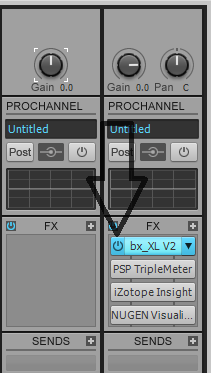
|
Sanderxpander
Max Output Level: -36.5 dBFS

- Total Posts : 3873
- Joined: 2013/09/30 10:08:24
- Status: offline
Re: FX Bypass
2016/03/22 13:36:36
(permalink)
Don't all plugins have a bypass button in the top left corner too? I usually use the fx bin buttons though.
|
Zargg
Max Output Level: 0 dBFS

- Total Posts : 10666
- Joined: 2014/09/28 04:20:14
- Location: Norway
- Status: offline
Re: FX Bypass
2016/03/22 15:30:57
(permalink)
Hi. I thought as Sander did that all (of my) plugins has a on / off button, but checking on my laptop now, it seems to be ProChannel only. Hmm? Do I remember wrong, or did this happen recently?
All the best.
Ken Nilsen ZarggBBZWin 10 Pro X64, Cakewalk by Bandlab, SPlat X64, AMD AM3+ fx-8320, 16Gb RAM, RME Ucx (+ ARC), Tascam FW 1884, M-Audio Keystation 61es, *AKAI MPK Pro 25, *Softube Console1, Alesis DM6 USB, Maschine MkII Laptop setup: Win 10 X64, i5 2.4ghz, 8gb RAM, 320gb 7200 RPM HD, Focusrite Solo, + *
|
Sanderxpander
Max Output Level: -36.5 dBFS
- Total Posts : 3873
- Joined: 2013/09/30 10:08:24
- Status: offline
Re: FX Bypass
2016/03/22 15:37:22
(permalink)
Oh I see now that VST2 plugs (or at least mine) do have that button on the plugin window but it's greyed out. Still, the button in the bin works.
|
scook
Forum Host
- Total Posts : 24146
- Joined: 2005/07/27 13:43:57
- Location: TX
- Status: offline
Re: FX Bypass
2016/03/22 15:40:48
(permalink)
☄ Helpfulby Zargg71 2016/03/22 17:02:03
The bypass button in the standard header was added for VST3 plugins. IIRC, bypass is part of the VST3 spec but not VST2.
|
Zargg
Max Output Level: 0 dBFS
- Total Posts : 10666
- Joined: 2014/09/28 04:20:14
- Location: Norway
- Status: offline
Re: FX Bypass
2016/03/22 16:49:53
(permalink)
Thanks for clearing that up, Steve  Thought I had seen it before, but lesser minds and all that 
Ken Nilsen ZarggBBZWin 10 Pro X64, Cakewalk by Bandlab, SPlat X64, AMD AM3+ fx-8320, 16Gb RAM, RME Ucx (+ ARC), Tascam FW 1884, M-Audio Keystation 61es, *AKAI MPK Pro 25, *Softube Console1, Alesis DM6 USB, Maschine MkII Laptop setup: Win 10 X64, i5 2.4ghz, 8gb RAM, 320gb 7200 RPM HD, Focusrite Solo, + *
|
John
Forum Host
- Total Posts : 30467
- Joined: 2003/11/06 11:53:17
- Status: offline
Re: FX Bypass
2016/03/22 17:04:46
(permalink)
scook
The bypass button in the standard header was added for VST3 plugins. IIRC, bypass is part of the VST3 spec but not VST2.
I'm seeing it on all FX that I put in the FX bin. VST2.4 and VST3. You have to mouse over the FX in the bin to see the on/off button. Heck it works for DX plugins too.
|
mse21tx
Max Output Level: -90 dBFS
- Total Posts : 22
- Joined: 2015/07/17 15:55:40
- Status: offline
Re: FX Bypass
2016/03/22 17:13:50
(permalink)
Thanks for all the replies. Yes, there is a bypass button in the top left corner of each plugin window, but as scook pointed out, this only works for VST3, it is grayed-out for VST2 plugins. Unfortunately not all of my favorite VST2 plugins have been updated to VST3.
It would be nice to have that option for all plugins, not just the VST3s. As I said in my first post, while it's not a major inconvenience, it does tend to disrupt the flow a bit when you are tweaking your plugin settings and must jump out of the plugin window, hunt for the track strip, then make sure you are choosing the right plugin every time you need to check it bypassed. Why not be able to just reach up and click that button in the top left corner of the plugin window?
Thanks again folks!
Sonar Platinum, Windows 7, I7 3.4ghz, 16gb RAM, 500 gb SSD, 500gb HDD
|
scook
Forum Host
- Total Posts : 24146
- Joined: 2005/07/27 13:43:57
- Location: TX
- Status: offline
Re: FX Bypass
2016/03/22 17:18:14
(permalink)
John
scook
The bypass button in the standard header was added for VST3 plugins. IIRC, bypass is part of the VST3 spec but not VST2.
I'm seeing it on all FX that I put in the FX bin. VST2.4 and VST3. You have to mouse over the FX in the bin to see the on/off button. Heck it works for DX plugins too.
The on/off button in the FX rack and PC is a different function than the FX bypass provided in the standard header for VST3 plug-ins.
|
John
Forum Host
- Total Posts : 30467
- Joined: 2003/11/06 11:53:17
- Status: offline
Re: FX Bypass
2016/03/22 17:21:49
(permalink)
Yep it works here for all plugins. So I'm not seeing what you are seeing. Hold on a moment. Look at that picture it is all about the track FX bin I have not used the PC for any of this. Its from my understanding came with FX Stacking. I tested it too and it does what it is supposed to do.
|
John
Forum Host
- Total Posts : 30467
- Joined: 2003/11/06 11:53:17
- Status: offline
Re: FX Bypass
2016/03/22 17:33:55
(permalink)
BTW just to be clear I am on Sonar Platinum 64 bit Newburyport under Windows 10 Pro 64 bit.
|
Sanderxpander
Max Output Level: -36.5 dBFS
- Total Posts : 3873
- Joined: 2013/09/30 10:08:24
- Status: offline
Re: FX Bypass
2016/03/22 17:42:47
(permalink)
John
Yep it works here for all plugins. So I'm not seeing what you are seeing. Hold on a moment. Look at that picture it is all about the track FX bin I have not used the PC for any of this. Its from my understanding came with FX Stacking. I tested it too and it does what it is supposed to do.
We're not talking about the button on the fx in the bin. Double click a plugin to open its interface. On the left top of the interface header is a bypass button. That one only works on VST3.
|
scook
Forum Host
- Total Posts : 24146
- Joined: 2005/07/27 13:43:57
- Location: TX
- Status: offline
Re: FX Bypass
2016/03/22 17:48:13
(permalink)
Yes, it is not the same. The host bypass was introduced in the VST standard header starting with X3 and looks like this when enabled in a VST3 instance of FabFilter Pro-C 
|
John
Forum Host
- Total Posts : 30467
- Joined: 2003/11/06 11:53:17
- Status: offline
Re: FX Bypass
2016/03/22 18:00:34
(permalink)
Sanderxpander
John
Yep it works here for all plugins. So I'm not seeing what you are seeing. Hold on a moment. Look at that picture it is all about the track FX bin I have not used the PC for any of this. Its from my understanding came with FX Stacking. I tested it too and it does what it is supposed to do.
We're not talking about the button on the fx in the bin. Double click a plugin to open its interface. On the left top of the interface header is a bypass button. That one only works on VST3.
You may not be, I am. It was very confusing that you were quoting me and disputing my post. It is a new feature in Sonar with FX stacking that allows independent bypass on all FX in a bin. Its an alternative to not having this built into the plugin itself. It also works with any plugin. That was why I posted that picture. Again it allows the bypassing of a plugin independent of the status of any other plugin. It is not VST 3 or any other VST type dependent. Now the question as I recall was how to bypass a plugin if there is no bypass on the GUI of the plugin. I gave the answer I did to answer that question.
|
dwardzala
Max Output Level: -61 dBFS
- Total Posts : 1470
- Joined: 2008/05/26 19:18:33
- Status: offline
Re: FX Bypass
2016/03/22 18:17:59
(permalink)
mse21tx
Maybe I've missed something, but when opening a plugin's properties window I see solo, read/write and other functions in the top strip as part of the Sonar interface, but I don't see a bypass switch. I know some plugins have a bypass switch built into their interface, but if they don't, is there any other way to bypass a plugin other than in the track strip in console or track view? To me, it's more convenient to have a bypass switch right there in the same place when I'm tweaking the plugin parameters rather than having to jump over to the track strip and hunt for the bypass button. I know it's a pretty minor thing but this seems to be a fairly standard feature in many other DAWs. I'm sure this has been discussed before, but I couldn't find a previous thread on it. Thanks!
Mike
I think the OP was looking for solutions where he didn't have to go to the track or console views.
DaveMain Studio- Core i5 @2.67GHz, 16Gb Ram, (2) 500Gb HDs, (1) 360 Gb HD MotU Ultralite AVB, Axiom 49 Midi Controller, Akai MPD18 Midi Controller Win10 x64 Home Sonar 2017.06 Platinum (and X3e, X2c, X1d) Mobile Studio - Sager NP8677 (i7-6700HQ @2.67MHz, 16G Ram, 250G SSD, 1T HD) M-Box Mini v. 2 Win 10 x64 Home Sonar 2016.10 Platinum Check out my original music: https://soundcloud.com/d-wardzala/sets/d-wardzala-original-music
|
John
Forum Host
- Total Posts : 30467
- Joined: 2003/11/06 11:53:17
- Status: offline
Re: FX Bypass
2016/03/22 18:37:45
(permalink)
Well you are right but then there is no other way, Dave.
|
icontakt
Max Output Level: -32.5 dBFS

- Total Posts : 4266
- Joined: 2012/03/04 08:18:02
- Location: Tokyo
- Status: offline
Re: FX Bypass
2016/03/23 03:23:39
(permalink)
Tak T. Primary Laptop: Core i7-4710MQ CPU, 16GB RAM, 7200RPM HDD, Windows 7 Home Premium OS (Japanese) x64 SP1Secondary Laptop: Core2 Duo CPU, 8GB RAM, 7200RPM HDD, Windows 7 Professional OS (Japanese) x64 SP1Audio Interface: iD14 (ASIO)Keyboard Controller/MIDI Interface: A-800PRODAW: SONAR Platinum x64 (latest update installed)
|
Sanderxpander
Max Output Level: -36.5 dBFS
- Total Posts : 3873
- Joined: 2013/09/30 10:08:24
- Status: offline
Re: FX Bypass
2016/03/23 03:43:47
(permalink)
John
Sanderxpander
John
Yep it works here for all plugins. So I'm not seeing what you are seeing. Hold on a moment. Look at that picture it is all about the track FX bin I have not used the PC for any of this. Its from my understanding came with FX Stacking. I tested it too and it does what it is supposed to do.
We're not talking about the button on the fx in the bin. Double click a plugin to open its interface. On the left top of the interface header is a bypass button. That one only works on VST3.
You may not be, I am. It was very confusing that you were quoting me and disputing my post. It is a new feature in Sonar with FX stacking that allows independent bypass on all FX in a bin. Its an alternative to not having this built into the plugin itself. It also works with any plugin. That was why I posted that picture. Again it allows the bypassing of a plugin independent of the status of any other plugin. It is not VST 3 or any other VST type dependent.
Now the question as I recall was how to bypass a plugin if there is no bypass on the GUI of the plugin. I gave the answer I did to answer that question.
Sorry for the confusion, I think we misinterpreted each other. I don't really know what FX stacking is but bypassing FX in the bin has always worked for me with their individual bypass buttons. My first Sonar was Sonar 6 and I'm pretty sure it worked that way too. Are we talking about something else again?
|
John
Forum Host
- Total Posts : 30467
- Joined: 2003/11/06 11:53:17
- Status: offline
Re: FX Bypass
2016/03/23 10:52:20
(permalink)
|
Sanderxpander
Max Output Level: -36.5 dBFS
- Total Posts : 3873
- Joined: 2013/09/30 10:08:24
- Status: offline
Re: FX Bypass
2016/03/23 13:21:25
(permalink)
I don't get what is new about this feature. As far as I can remember I've always been able to bypass individual plugins in the bin. It seems a really basic feature too, I don't know of any DAW that doesn't. The oldest version of Sonar I currently have on my system is X2 and it works the same way there. I'm pretty confident it worked the same way on Sonar 6 which was when I started using Cakewalk software, but that's so long ago I can't say for sure.
|
mse21tx
Max Output Level: -90 dBFS
- Total Posts : 22
- Joined: 2015/07/17 15:55:40
- Status: offline
Re: FX Bypass
2016/03/23 13:25:36
(permalink)
Thanks, yes I am aware that any plugin can be bypassed from the fx bin. My post relates to bypassing the plugin directly in it's properties window rather than having to jump out of the plugin window and look for that particular plugin's bypass button in the track's fx bin. As pointed out, there is a bypass button for vst3 plugins, but it is grayed out for vst2s. I have submitted a feature request for this.
Sonar Platinum, Windows 7, I7 3.4ghz, 16gb RAM, 500 gb SSD, 500gb HDD
|
John
Forum Host
- Total Posts : 30467
- Joined: 2003/11/06 11:53:17
- Status: offline
Re: FX Bypass
2016/03/23 13:48:19
(permalink)
Right I don't see this being a big priority considering it is accomplished via the FX bin and VST 2 is on its way out.
|
Sanderxpander
Max Output Level: -36.5 dBFS
- Total Posts : 3873
- Joined: 2013/09/30 10:08:24
- Status: offline
Re: FX Bypass
2016/03/23 14:24:12
(permalink)
I'm seconding the feature request, it seems incongruous as is.
|
dwardzala
Max Output Level: -61 dBFS
- Total Posts : 1470
- Joined: 2008/05/26 19:18:33
- Status: offline
Re: FX Bypass
2016/03/23 15:58:59
(permalink)
I think the problem is that feature is included as part of the plug-in not Sonar.
DaveMain Studio- Core i5 @2.67GHz, 16Gb Ram, (2) 500Gb HDs, (1) 360 Gb HD MotU Ultralite AVB, Axiom 49 Midi Controller, Akai MPD18 Midi Controller Win10 x64 Home Sonar 2017.06 Platinum (and X3e, X2c, X1d) Mobile Studio - Sager NP8677 (i7-6700HQ @2.67MHz, 16G Ram, 250G SSD, 1T HD) M-Box Mini v. 2 Win 10 x64 Home Sonar 2016.10 Platinum Check out my original music: https://soundcloud.com/d-wardzala/sets/d-wardzala-original-music
|