Musikman
Max Output Level: -86 dBFS

- Total Posts : 220
- Joined: 2008/08/26 11:21:27
- Location: NorthEast, USA
- Status: offline

Fade Envelope Backwards
Hi,
Strange problem here. I recently re-installed Sonar 8.5 Producer onto a new hard drive, new OS Win7, (used to have XP). Sonar working fine for the most part. However, my fade envelope(s) working backwards. To fade the end of a track/song, I used to just highlight the last measure or two of a clip/track by dragging in the timeline to highlight it, then I'd go to Process/Audio/Fade-Envelopes, and then select one..ie..Exponential Fade Out ...or Linear Fade Out...
Now since installing Sonar onto Win7, when I follow the same procedure as described above, it fades backwards. Hard to explain, but for example, recently I had a drum track consisting of several clips, the last clip being about 4 measures. I dragged in the timeline to highlite the last two measures of that clip (which was the last two measures of the track), then went to Process/Audio/Fade-Envelope and selected Exponential Fade Out. When I processed it, the FIRST two measures of that clip got the fade, even though I had highlited the last two measures. The last two measures remained at full volume, unaffected by the process. Why is this happening? Anyone have any ideas?? Same with any Fade Out I use, Linear did the same thing.
(For now I am able to right click the clip and use a gain envelope, that is working, however if I have a full song all as one big clip that I want to fade out, I don't want to use a clip or track gain envelope, which will run across the whole song/track)
Any help appreciated!
Thanks
MM
Sonar Platinum, Win10 Pro 64bit, AMD FX 6300 6 Core, 8GB RAM, AMD Radeon R9-380
|
Cactus Music
Max Output Level: 0 dBFS

- Total Posts : 8424
- Joined: 2004/02/09 21:34:04
- Status: offline
Re: Fade Envelope Backwards
2014/05/26 14:52:16
(permalink)
I always fade the Master bus at end of song, but not ever using that feature your describing not sure, there should be absolutly no differance from the old system. Unless a Keyboard short cut is toggled . Are you saying it is fading in or just fading out at the begining.
|
57Gregy
Max Output Level: 0 dBFS
- Total Posts : 14404
- Joined: 2004/05/31 17:04:17
- Location: Raleigh, North Carolina
- Status: offline
Re: Fade Envelope Backwards
2014/05/27 08:49:29
(permalink)
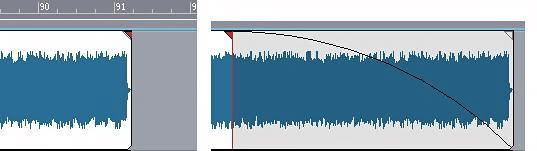 Did you know that you can create a fade by hovering the cursor over the end of a clip until a triangle appears, then grabbing and dragging the triangle? That would be easier than your procedure, I think.
|
bitflipper
01100010 01101001 01110100 01100110 01101100 01101

- Total Posts : 26036
- Joined: 2006/09/17 11:23:23
- Location: Everett, WA USA
- Status: offline
Re: Fade Envelope Backwards
2014/05/27 09:40:22
(permalink)
Greg's got it right - except I'd recommend the reverse exponential slope ("fast") for fades. The advantage of fading with a volume envelope is you can tweak it later if you want to.
 All else is in doubt, so this is the truth I cling to. My Stuff
|
Musikman
Max Output Level: -86 dBFS
- Total Posts : 220
- Joined: 2008/08/26 11:21:27
- Location: NorthEast, USA
- Status: offline
Re: Fade Envelope Backwards
2014/05/28 09:32:11
(permalink)
Hi guys, sorry for the late reply. For some reason the HTML was messed up on the forum the other day, so I couldn't get in to post a reply.
Cactus! Long time, how you been? The only way I can describe what's happening is to take Greg's jpeg and just reverse it. So the music playing in the previous clip (the one just before the clip with the applied fade) is at normal volume, then when playback reaches the beginning of the faded clip, the volume drops to zero and gradually fades up to normal by the end of the clip. Strange, never saw that happen in 20 years using CW.
Greg I didn't know I could do that! Thanks for the tip, I'll try that. That would also save me from having to split the track at the end of a song, something I especially don't want to do if it's a final mix.
Bitflipper, I haven't tried Greg's suggestion yet, but what you said brings a question...am I able to choose what kind of fade to use with Greg's method, and is it a pop up box, or a project/global setting?
Thanks, much appreciate the help.
MM
Sonar Platinum, Win10 Pro 64bit, AMD FX 6300 6 Core, 8GB RAM, AMD Radeon R9-380
|
scook
Forum Host
- Total Posts : 24146
- Joined: 2005/07/27 13:43:57
- Location: TX
- Status: offline
Re: Fade Envelope Backwards
2014/05/28 10:44:12
(permalink)
The slope of the fade is set similar to automation. Right-click on the hot-spot that creates the fade to select the slope. It is adjusted per-clip. I can't recall of 8.5 allows quick groups like the current version does. With quick groups, you can select all the clips and affect them at once by holding the CTRL key.
|
seed
Max Output Level: -88 dBFS

- Total Posts : 102
- Joined: 2013/11/26 13:20:45
- Status: offline
Re: Fade Envelope Backwards
2014/05/28 12:25:30
(permalink)
|
Musikman
Max Output Level: -86 dBFS
- Total Posts : 220
- Joined: 2008/08/26 11:21:27
- Location: NorthEast, USA
- Status: offline
Re: Fade Envelope Backwards
2014/05/28 12:42:19
(permalink)
If what you mean by quick groups is dragging the mouse to "lasso" around several clips, then yes it is available in 8.5. It is only one track that I am working with here though, so I'm wondering if my highliting the end of the track/clip by first making sure the track I want is selected, then dragging the mouse over the timeline is maybe causing some issue. Never did before, but I'll try it both ways and see what happens.
Sonar Platinum, Win10 Pro 64bit, AMD FX 6300 6 Core, 8GB RAM, AMD Radeon R9-380
|
scook
Forum Host
- Total Posts : 24146
- Joined: 2005/07/27 13:43:57
- Location: TX
- Status: offline
Re: Fade Envelope Backwards
2014/05/28 13:00:37
(permalink)
If it is just one clip there is no need to select or highlight anything. There is a hot spot at the end of the clip to create the fade. Refer to page 350 in the user guide pdf for instructions with illustrations.
|
Musikman
Max Output Level: -86 dBFS
- Total Posts : 220
- Joined: 2008/08/26 11:21:27
- Location: NorthEast, USA
- Status: offline
Re: Fade Envelope Backwards
2014/05/28 13:02:52
(permalink)
This may help, screengrabs of when I did it the way I've been used to, by using the process menu/audio/fade. You see the original clip (left) full volume all the way across. Then dragged in the timeline to highlight the end of the clip, but when I applied an exponential fade out, the beginning of the clip got it instead of the end that I highlighted. (Btw, I did try applying the fade the way Greg suggested and it works fine.) Just curious why this method (shown in the pics) is applying the fade to the opposite piece of the clip instead of the piece I highlighted.  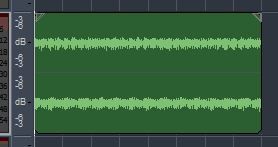 " /> 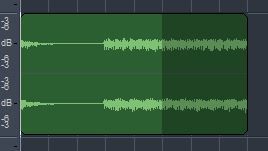 " /> Scook, I don't have that pdf user manual, and I don't think I can get it on the support site. All the links that I saw in old threads about the 8.5 pdf manual and reference guides just take me to the support home page. Search turns up nothing. I have the hard copy books that came with the discs, but only 195pgs for the user guide. Checked the Sonar 8 "Add'l content" dvd, (I assumed it's on that dvd from reading the old threads) not on there, haven't checked the 8.5 dvd yet.
post edited by Musikman - 2014/05/30 01:21:53
Sonar Platinum, Win10 Pro 64bit, AMD FX 6300 6 Core, 8GB RAM, AMD Radeon R9-380
|
Cactus Music
Max Output Level: 0 dBFS
- Total Posts : 8424
- Joined: 2004/02/09 21:34:04
- Status: offline
Re: Fade Envelope Backwards
2014/05/30 11:39:16
(permalink)
Hi, thanks for the PM, Personally I stopped using the Process functions because of weird behavior issues as your describing. One thing I hated was a volume ( gain) would change a mono track to stereo? I gave up and found other ways to work once I decided Sonar does not work like Cubase for wave editing. There is lots of other options and you just have to use those. There's no reason to highlight the timeline to apply the fade out option, just drag the triangle back.
post edited by Cactus Music - 2014/05/30 21:58:15
|
Musikman
Max Output Level: -86 dBFS
- Total Posts : 220
- Joined: 2008/08/26 11:21:27
- Location: NorthEast, USA
- Status: offline
Re: Fade Envelope Backwards
2014/05/30 18:17:53
(permalink)
Yep, that's just what I'm going to do from now on, use the triangle, easier access and faster too. So you've had issues with the process menu as well, I'm not surprised. I never had it change a mono track to stereo, but if it's behaving that strangely, I'm surprised they haven't addressed the issues and patched them by now. I don't have X3 yet, or any X for that matter, so I don't even know if they continued the process menu in the X versions. Thanks again Cactus.
Sonar Platinum, Win10 Pro 64bit, AMD FX 6300 6 Core, 8GB RAM, AMD Radeon R9-380
|
Kev999
Max Output Level: -36 dBFS

- Total Posts : 3922
- Joined: 2007/05/01 14:22:54
- Location: Victoria, Australia
- Status: offline
Re: Fade Envelope Backwards
2014/05/30 20:11:51
(permalink)
Musikman
...I don't have that pdf user manual...haven't checked the 8.5 dvd yet.
That's where you will find it.
SonarPlatinum∞(22.11.0.111)|Mixbus32C(4.3.19)|DigitalPerformer(9.5.1)|Reaper(5.77)FractalDesign:DefineR5|i7-6850k@4.1GHz|16GB@2666MHz-DDR4|MSI:GamingProCarbonX99a|Matrox:M9148(x2)|UAD2solo(6.5.2)|W7Ult-x64-SP1
Audient:iD22+ASP800|KRK:VXT6|+various-outboard-gear|+guitars&basses, etc.
Having fun at work lately
|