benduncan
Max Output Level: -90 dBFS

- Total Posts : 7
- Joined: 2013/11/21 11:15:51
- Status: offline
Faderport not working with X1, Cannot complete regvrs32
I'm trying to get my Presonus FaderPort to work with Sonar x1 LE. I have found a couple great threads on here about this, but When I try to CMD regsvr32 "c:\Program Files (x86)\Cakewalk\Shared Surfaces\FaderPort.dll" I get this error 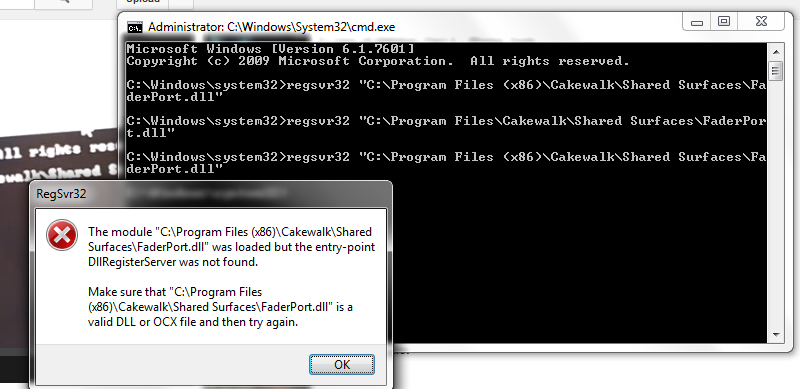 I tried updating the firmware, didn't help. Does anyone know how to fix this? I'm running Windows 7 64bit service pack 1, thanks
post edited by benduncan - 2013/11/21 13:59:48
|
bedstrom
Max Output Level: -89 dBFS

- Total Posts : 65
- Joined: 2003/11/06 12:34:12
- Location: Wisconsin
- Status: offline

Re: Faderport not working with X1, Cannot complete regvrs32
2013/11/21 14:39:29
(permalink)
Hi, It might be that you aren't running Cmd as administrator. Hold down Ctrl+Shift while hitting Enter to running Cmd as admin. This linked video is from my new book " The Power in Cakewalk SONAR." Maybe it will help! I walk through Faderport setup step by step: Video 12: Setting up a Faderport The video was recorded with X2 and Windows 8 64-bit, but I think the procedure is the identical for Windows 7. If you don't see the video right away, give it a few minutes. I just put it into Dropbox and it was still syncing when I posted this. Bill
|
Anderton
Max Output Level: 0 dBFS

- Total Posts : 14070
- Joined: 2003/11/06 14:02:03
- Status: offline
Re: Faderport not working with X1, Cannot complete regvrs32
2013/11/21 21:05:59
(permalink)
IIRC (not at my main computer, on the road) a lot of people get tripped up because something has to be enabled in MIDI...I'm pretty sure it's aftertouch.
|
Leadfoot
Max Output Level: -47 dBFS

- Total Posts : 2817
- Joined: 2011/04/26 11:08:38
- Location: Indiana
- Status: offline
Re: Faderport not working with X1, Cannot complete regvrs32
2013/11/21 21:40:40
(permalink)
You are correct Craig, it's channel aftertouch. But he seems to be having trouble when he's using the CMD trick to get it running in Windows 7 64bit.
|
benduncan
Max Output Level: -90 dBFS
- Total Posts : 7
- Joined: 2013/11/21 11:15:51
- Status: offline
Re: Faderport not working with X1, Cannot complete regvrs32
2013/11/21 22:02:30
(permalink)
I am opening the command window as an administrator. thanks for the video, it will be very helpful when I get past the regsvr32 part, lol. I tried doing the command a little differently(if you can tell by the text) and got a slightly different error message. It has less words, is that progress? lol 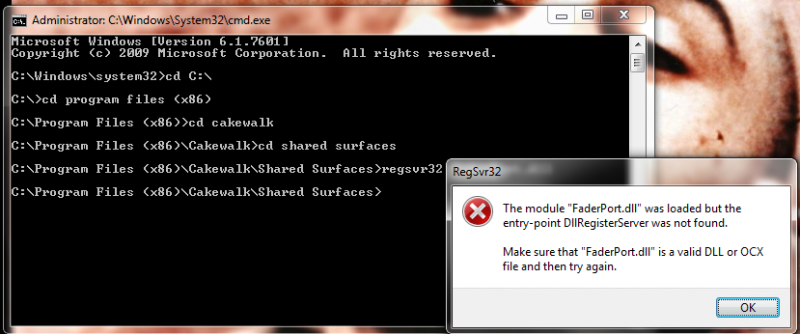
|
benduncan
Max Output Level: -90 dBFS
- Total Posts : 7
- Joined: 2013/11/21 11:15:51
- Status: offline
Re: Faderport not working with X1, Cannot complete regvrs32
2013/11/22 01:42:39
(permalink)
ok, so I looked at some different versions of the dll downloads and found the update with the 64bit version. The dll file successfully registered!!! but its still not working. Now, when I'm on the "Control Surfaces" page in preferences, under "Controller/Surface" it says "(Presonus FaderPort - 1)" but I can't assign anything to in port or out port. I can select the faderport in the drop down menu, but after I hit reply it disappears and its blank under in port and out port.
I have it selected under in devices, under inputs and outputs. I also checked Key Aftertouch and Channel Aftertouch. I wish I could get this working!
|
benduncan
Max Output Level: -90 dBFS
- Total Posts : 7
- Joined: 2013/11/21 11:15:51
- Status: offline
Re: Faderport not working with X1, Cannot complete regvrs32
2013/11/22 01:43:02
(permalink)
damn double post
post edited by benduncan - 2013/11/22 01:54:11
|
Leadfoot
Max Output Level: -47 dBFS
- Total Posts : 2817
- Joined: 2011/04/26 11:08:38
- Location: Indiana
- Status: offline
Re: Faderport not working with X1, Cannot complete regvrs32
2013/11/22 08:15:10
(permalink)
I've had that happen. Try reinstalling the Faderport software. That usually does the trick for me.
|
codamedia
Max Output Level: -67 dBFS

- Total Posts : 1185
- Joined: 2005/01/24 09:58:10
- Location: Winnipeg Canada
- Status: offline
Re: Faderport not working with X1, Cannot complete regvrs32
2013/11/22 10:00:04
(permalink)
benduncan
ok, so I looked at some different versions of the dll downloads and found the update with the 64bit version. The dll file successfully registered!!! but its still not working. Now, when I'm on the "Control Surfaces" page in preferences, under "Controller/Surface" it says "(Presonus FaderPort - 1)" but I can't assign anything to in port or out port. I can select the faderport in the drop down menu, but after I hit reply it disappears and its blank under in port and out port.
I have it selected under in devices, under inputs and outputs. I also checked Key Aftertouch and Channel Aftertouch. I wish I could get this working!
When I got my faderport, this was where I got stumped. As Craig says earlier, the secret is checking the Key Aftertouch and Channel Aftertouch. I can see that you said you have done this - but did you restart Sonar after doing that? Failing that I would try Leadfoot's suggestion of re-installing the FaderPort drivers. Make sure you have the latest ones, which may be different than on the disk.
Don't fix it in the mix ... Fix it in the take!
Desktop: Win 7 Pro 64 Bit , ASUS MB w/Intel Chipset, INTEL Q9300 Quad Core, 2.5 GHz, 8 GB RAM, ATI 5450 Video Laptop: Windows 7 Pro, i5, 8 Gig Ram Hardware: Presonus FP10 (Firepod), FaderPort, M-Audio Axiom 49, Mackie 1202 VLZ, POD X3 Live, Variax 600, etc... etc...
|
benduncan
Max Output Level: -90 dBFS
- Total Posts : 7
- Joined: 2013/11/21 11:15:51
- Status: offline
Re: Faderport not working with X1, Cannot complete regvrs32
2013/11/22 10:20:58
(permalink)
Thanks. Good idea but it didn't work, the in port/out port still goes blank after I hit apply. I assume that has something to do with why it isn't working.
|
bitflipper
01100010 01101001 01110100 01100110 01101100 01101

- Total Posts : 26036
- Joined: 2006/09/17 11:23:23
- Location: Everett, WA USA
- Status: offline
Re: Faderport not working with X1, Cannot complete regvrs32
2013/11/22 10:55:50
(permalink)
The "entry point DLLRegisterServer not found" message is telling you that faderport.dll is a static DLL that does not need to be registered.
 All else is in doubt, so this is the truth I cling to. My Stuff
|
benduncan
Max Output Level: -90 dBFS
- Total Posts : 7
- Joined: 2013/11/21 11:15:51
- Status: offline
Re: Faderport not working with X1, Cannot complete regvrs32
2013/11/22 11:15:44
(permalink)
codamedia
When I got my faderport, this was where I got stumped. As Craig says earlier, the secret is checking the Key Aftertouch and Channel Aftertouch. I can see that you said you have done this - but did you restart Sonar after doing that?
Failing that I would try Leadfoot's suggestion of re-installing the FaderPort drivers. Make sure you have the latest ones, which may be different than on the disk.
Your post went up while i was replying to leadfoot. I've opened and closed Sonar around 20 times in the last couple days, I've also reinstalled(and installed different versions) the drivers like 8 times. Yes I am stumped, lol
|
benduncan
Max Output Level: -90 dBFS
- Total Posts : 7
- Joined: 2013/11/21 11:15:51
- Status: offline
Re: Faderport not working with X1, Cannot complete regvrs32
2013/11/22 11:48:20
(permalink)
Success! I called Presonus and they sent me a new dll file(my 4th faderport.dll file). It worked! Finally, lol.
Thanks for the replies everyone!
|