HunaMan
Max Output Level: -90 dBFS

- Total Posts : 32
- Joined: 2011/01/20 05:58:09
- Status: offline

File->Export->Audio file doesn't sound same as when playing the music using the Play butto
Hi Guys,
I'm trying to do an export to a WAV file from Sonar X1, using Dimension Pro virtual synths, being driven by 5 or 6 Midi tracks.
So I solo all the Midi tracks I want, mute a few others I don't want, select the Midi clips I want to be included, and then do a File->Export->Audio.
This does create a .wav file, BUT the mix doesn't sound the same as the sound I get when just playing the music directly in X1. The balance is different. It's as though the balance of the mix created in the WAV file is not being affected by the clip automation, or by the faders on the mixing strips. I'm routing all the strips for the midi tracks into one single master stereo channel, which is about as simple as possible to be.
I'm using simple parameters - 44100 sample rate, 16 bit. I seem to get the same problem whether I choose Source Category of Entire Mix, or Main Outputs. I check all the relevant Mix Enable boxes (I think), so Clip automation ought to be respected.
Anyone got any thoughts about what I might be doing wrong? This is really frustrating - the mix is great when I'm playing directly in X1, but the WAV file sounds really different.
Help! [...please!]
HunaMan
|
brundlefly
Max Output Level: 0 dBFS

- Total Posts : 14250
- Joined: 2007/09/14 14:57:59
- Location: Manitou Spgs, Colorado
- Status: offline
Re:File->Export->Audio file doesn't sound same as when playing the music using the Play bu
2011/05/19 11:10:13
(permalink)
the mix doesn't sound the same as the sound I get when just playing the music directly in X1. First step is to re-import the mix to a track of the same project in X1, set its output direct to Main Outs, invert the phase in the Track Inspector, and see if it will null with the live mix going through the Master bus. This way you know it's not just an issue with whatever player/monitoring system you're using to play back the export. EDIT: Incidentally, you might want to freeze all the synth tracks before exporting to eliminate any randomness in the patch programming that causes each playback/rendering to be different, but this isn't usually a problem with Dimension Pro.
post edited by brundlefly - 2011/05/19 11:15:41
|
daveny5
Max Output Level: 0 dBFS
- Total Posts : 16934
- Joined: 2003/11/06 09:54:36
- Location: North Carolina
- Status: offline
Re:File->Export->Audio file doesn't sound same as when playing the music using the Play bu
2011/05/19 11:10:26
(permalink)
You don't need to solo any tracks. Just mute the ones you don't want in the final mix and press CTRL-A to select all tracks and then File-Export audio. What soundcard are you using?
post edited by daveny5 - 2011/05/19 11:12:08
Dave Computer: Intel i7, ASROCK H170M, 16GB/5TB+, Windows 10 Pro 64-bit, Sonar Platinum, TASCAM US-16x08, Cakewalk UM-3G MIDI I/F Instruments: SL-880 Keyboard controller, Korg 05R/W, Korg N1R, KORG Wavestation EX Axes: Fender Stratocaster, Line6 Variax 300, Ovation Acoustic, Takamine Nylon Acoustic, Behringer GX212 amp, Shure SM-58 mic, Rode NT1 condenser mic. Outboard: Mackie 1402-VLZ mixer, TC Helicon VoiceLive 2, Digitech Vocalist WS EX, PODXTLive, various stompboxes and stuff. Controllers: Korg nanoKONTROL, Wacom Bamboo Touchpad
|
bitflipper
01100010 01101001 01110100 01100110 01101100 01101

- Total Posts : 26036
- Joined: 2006/09/17 11:23:23
- Location: Everett, WA USA
- Status: offline
Re:File->Export->Audio file doesn't sound same as when playing the music using the Play bu
2011/05/19 15:50:29
(permalink)
Every time this problem has come up it's turned out to be a routing problem.
Make sure no tracks or busses are routed directly to the main output (except the master bus, of course). You can test this easily by muting the master bus and verifying that everything silences. Anything still playing is bypassing the master bus.
 All else is in doubt, so this is the truth I cling to. My Stuff
|
Metaphasic
Max Output Level: -85 dBFS

- Total Posts : 262
- Joined: 2010/09/28 16:36:37
- Status: offline
Re:File->Export->Audio file doesn't sound same as when playing the music using the Play bu
2011/05/19 16:22:06
(permalink)
Usually, once I get basic midi tracks done (drums, bass and pad), I save the file to a backup, then use the "Bounce to Track" feature on each, deleting the midi as I go (they're backed up remember). This way, I can also remove the SoftSynth as well as boost CPU performance.
The trick here is knowing when to use the "Track" or "Busses" option in the Bounce dialog. If you want dry sound, use Track, otherwise Bus.
There is no need to export / import anything at all until final mix.
|
brundlefly
Max Output Level: 0 dBFS
- Total Posts : 14250
- Joined: 2007/09/14 14:57:59
- Location: Manitou Spgs, Colorado
- Status: offline
Re:File->Export->Audio file doesn't sound same as when playing the music using the Play bu
2011/05/19 16:32:36
(permalink)
Freezing gets you the same benefit without messing around with multiple project versions. Plus you can immediately unfreeze if you decide something needs changing.
The only way you could export a full mix by using Tracks as a source is if you've already bounced the mix down to one track. Otherwise you get one file for every track.
|
HunaMan
Max Output Level: -90 dBFS
- Total Posts : 32
- Joined: 2011/01/20 05:58:09
- Status: offline
Re:File->Export->Audio file doesn't sound same as when playing the music using the Play bu
2011/05/20 07:32:00
(permalink)
Thanks guys.
@Brundlefly:
1) It doesn't seem to be any kind of phasing issue.
2) Don't see why different renderings would make such a big difference to the final mix. Especially if, as you say DimPro doesn't usually cause this kind of problem.
---
@Daveny5
"You don't need to solo any tracks. Just mute the ones you don't want in the final mix and press CTRL-A to select all tracks and then File-Export audio. "
I wondered, after your comment, whether having the (S) button set was interfering with the mix, for some reason. I've tried not having the to-be-recorded tracks set to 'Solo'. Not sure whether this makes a difference.
"What soundcard are you using? "
The device manager says it's an: "IDT high definition audio codec"
---
@BitFlipper:
"Every time this problem has come up it's turned out to be a routing problem.
Make sure no tracks or busses are routed directly to the main output (except the master bus, of course). You can test this easily by muting the master bus and verifying that everything silences. Anything still playing is bypassing the master bus."
I THINK THIS IS THE KEY. PLEASE SEE BELOW!
---
@Serenarules
Thanks for your comments, but I'm still wrestling with the 'wrong mix' problem... Bounce to track options etc seem to be a bit further down the line...
---
@Brundlefly
Thanks for your comments, but I'd like to deal with the 'wrong mix' issue first...
=======
Above, BitFlipper said:
"Every time this problem has come up it's turned out to be a routing problem.
Make sure no tracks or busses are routed directly to the main output (except the master bus, of course). You can test this easily by muting the master bus and verifying that everything silences. Anything still playing is bypassing the master bus."
I'm sure you're onto something here.
One thing I've noticed - the output saved in the WAV file seems to have a smaller stereo spread than the original, when played from inside X1, as well as having a slighly different mix. I'm monitoring through headphones and the effect is noticeable. But the automation is working - tracks fade up when they should, for example. So it's not that the automation is being completely bypassed - it's liked it's being partially bypassed. But if I click the mute button on the Master fader (the fader labelled 'Master' with the grey fader control), it's complete silence - there's nothing leaking 'past' it.
BUT there might be a problem here somewhere - I'm a pre-novice with regards to buses and mains etc. I've not set up anything sophisticated, in fact I've relied on defaults completey - prossibly too much reliance! All I did was set up some midi tracks which seem by default to go into a mixer track labelled 'Master', with grey slider controls. I've pretty much ignored the faders, also labelled 'MASTER' with the red fader controls. I'm attaching a screen image showing as much as I can (sorry - couldn't seem to do this). I can't even remember exactly how I created the DimPro-based midi tracks in the first place, but you can see the tracks in the image. I'm beginning to feel that it's a bit of a mess.
Also, I did load an Aria player, but haven't used it - could that be interfering in some way?
But any comments you can make about routing, bearing in mind I'm a novice, would be appreciated.
HunaMan
|
Zuma
Max Output Level: -80 dBFS

- Total Posts : 525
- Joined: 2006/01/13 17:56:03
- Location: SoCal...High and dry in LA
- Status: offline
Re:File->Export->Audio file doesn't sound same as when playing the music using the Play bu
2011/05/20 09:18:51
(permalink)
To take/post a screenshot: on your computer keyboard hit control/printscreen. This will save your image to the windows clipboard. Then go to start/programs/accessories/paint. Open paint and in the edit menu select paste. There you'll see the screenshot. Make any edits you want and then save the file to your computer. After that you'll need a site such as Photobucket to host the image. Once you have the image up on the host site you can copy the link and post it here.
|
HunaMan
Max Output Level: -90 dBFS
- Total Posts : 32
- Joined: 2011/01/20 05:58:09
- Status: offline
Re:File->Export->Audio file doesn't sound same as when playing the music using the Play bu
2011/05/20 10:15:17
(permalink)
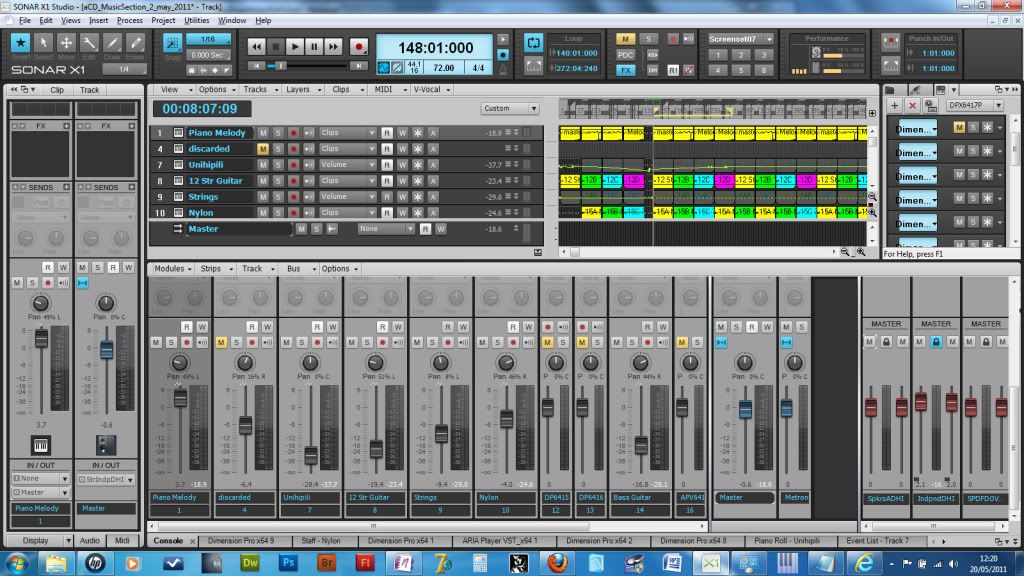 Thanks Zuma. So here's a screen dump of X1, the way I've set this piece up. I hope it provides some clues! HunaMan
|
brundlefly
Max Output Level: 0 dBFS
- Total Posts : 14250
- Joined: 2007/09/14 14:57:59
- Location: Manitou Spgs, Colorado
- Status: offline
Re:File->Export->Audio file doesn't sound same as when playing the music using the Play bu
2011/05/20 15:35:21
(permalink)
@Brundlefly Thanks for your comments, but I'd like to deal with the 'wrong mix' issue first... The procedure I suggested is intended to verify that what you're hearing is actually "wrong" (i.e. different from the Master bus output), and not just a side-effect of playing back and/or monitoring using different software/hardware. I may have missed it, but it's not clear how you're listening back to the exported file, assuming you're not bring it back into the same project, and soloing it. This variable needs to be eliminated first. The console strips with the red faders represent actual hardware outputs on your interface(s). It appears you have at least three, and one of them is not at 0dB, so depending on which Main Outs you selected when exporting, you might get a different result in terms of basic sound level. Therefore, I suggest you try selecting Buses as your source, select only the Master, and export that. You have the I/O module of the console disabled, so it's difficult to confirm that all tracks are going to the Master bus, but if muting that Master stops all sound, that pretty much confirms that they are.
|
HunaMan
Max Output Level: -90 dBFS
- Total Posts : 32
- Joined: 2011/01/20 05:58:09
- Status: offline
Re:File->Export->Audio file doesn't sound same as when playing the music using the Play bu
2011/05/21 11:16:54
(permalink)
Hi Brundlefly,
I'm listening to the exported WAV file by importing it into Adobe Audition, and playing it through that. In that way, I can easily switch between applications and do a pretty good A-B comparison between the version actually being played by Sonar, and the WAv file exported from it. It's not just a mater of levels, or phase; as I say, the mix seems pretty different. I can't see that the difference could be caused just from playing it back from inside Audition.
Are there any howlingly obvious mistakes shown by the screen dump I linked to? I think perhaps I should wait untill Scott Garrigus's book arrives, and then study all it contains about buses and mixing...
|
brundlefly
Max Output Level: 0 dBFS
- Total Posts : 14250
- Joined: 2007/09/14 14:57:59
- Location: Manitou Spgs, Colorado
- Status: offline
Re:File->Export->Audio file doesn't sound same as when playing the music using the Play bu
2011/05/21 13:59:32
(permalink)
It's not just a mater of levels, or phase; as I say, the mix seems pretty different. I can't see that the difference could be caused just from playing it back from inside Audition.
If you do what I suggested, you will be able to hear exactly what the difference is. I suggested inverting the phase, not because there might be phase issues, but because playing back the inverted import going direct to Main Outs against the live mix on the Master bus will reveal the difference (if any) between the two mixes. Just make sure to export from time 00:00:00:00 (if you're not already) so the export will be perfectly in sync when you import it to that time. If you're not familiar with this procedure, it's called a null test because the two opposite-polarity signals should completely cancel each other, producing silence (i.e. null signal) at your monitors. The change in bit-depth and sample rate with dithering will result in a tiny difference signal, but you shouldn't hear that at normal monitoring levels. Anything you do hear is the difference between the two mixes.
post edited by brundlefly - 2011/05/21 14:00:41
SONAR Platinum x64, 2x MOTU 2408/PCIe-424 (24-bit, 48kHz) Win10, I7-6700K @ 4.0GHz, 24GB DDR4, 2TB HDD, 32GB SSD Cache, GeForce GTX 750Ti, 2x 24" 16:10 IPS Monitors
|
rbowser
Max Output Level: -10 dBFS

- Total Posts : 6518
- Joined: 2005/07/31 14:32:34
- Status: offline
Re:File->Export->Audio file doesn't sound same as when playing the music using the Play bu
2011/05/21 14:10:03
(permalink)
Serenarules
Usually, once I get basic midi tracks done (drums, bass and pad), I save the file to a backup, then use the "Bounce to Track" feature on each, deleting the midi as I go (they're backed up remember). This way, I can also remove the SoftSynth as well as boost CPU performance.
The trick here is knowing when to use the "Track" or "Busses" option in the Bounce dialog. If you want dry sound, use Track, otherwise Bus.
There is no need to export / import anything at all until final mix.
Side note to Serenarules - I can save you some steps, as per Brundlefly's reply to you. Once you have your MIDI tracks in shape, after bouncing to audio (a good practice always, IMHO, to make sure you're getting what you really intend), just mute and archive your MIDI tracks and associated Audio tracks, turn the synth off, and then with the Track Manager, hide all those tracks. You've freed up your CPU without having to make multiple versions of the project. It's very handy to re-open a single version of the project with everything involved in the project still available in that one folder. Randy B.
Sonar X3e Studio Roland A-800 MIDI keyboard controller Alesis i|O2 interface Gigabyte Technology-AMD Phenom II @ 3 GHz 8 Gb RAM 6 Core Windows 7 Home Premium x64 with dual monitors
|
HunaMan
Max Output Level: -90 dBFS
- Total Posts : 32
- Joined: 2011/01/20 05:58:09
- Status: offline
Re:File->Export->Audio file doesn't sound same as when playing the music using the Play bu
2011/05/21 16:53:41
(permalink)
Hi Brundlefly,
I've done what you suggest. I have to adjust the level of the imported WAV file, and there is a point where pretty good cancellation occurs when I play that, inverted, against the X1 tracks. I can still hear a trace of a a glockenspiel sound, for some reason [is there some actual randomness introduced into this when DimPro plays it?] but most of the sound is nulled into inaudibility. Which is surprising, to me at least, because the thing I was finding most different between the X1 playback and the exported WAV file seemed to be the string sound, which seemed very different when I llistened to the WAV file, but clearly isn't 'really' different at all. And, of course, when I listen to just the WAV file from inside X1, it sounds pretty good. So I'm forced to conclude that listening to it play back in Audition changes the sound a lot. Don't know why that should be, but there it is.
I must say, I'm a bit stunned at this. I had no idea they could be so different. I'm going to put an MP3 version onto my iPod, which is where I really want to play it from, and see how that goes.
Thanks for your help and your patience. Especially when I couldn't see the point of what you were suggesting. Big D'oh!
HunaMan
|
rbowser
Max Output Level: -10 dBFS
- Total Posts : 6518
- Joined: 2005/07/31 14:32:34
- Status: offline
Re:File->Export->Audio file doesn't sound same as when playing the music using the Play bu
2011/05/21 17:02:49
(permalink)
HunaMan
...
I must say, I'm a bit stunned at this. I had no idea they could be so different. I'm going to put an MP3 version onto my iPod, which is where I really want to play it from, and see how that goes.
...
Well, HunaMan - there shouldn't be any difference. You're saying the results are so drastically different that it makes one suspect that a different sound source is being recorded when you do the export, like maybe the dreaded Microsoft sounds on your built in sound card. I highly recommend that you bounce your tracks to audio first, or freeze them, before doing what's supposed to a final mix export. When you're dealing just with audio in your project as you work on the mix, there's no possibility of unpleasant surprises when you do your final export. I feel you're missing several steps in putting your projects together. Randy B.
Sonar X3e Studio Roland A-800 MIDI keyboard controller Alesis i|O2 interface Gigabyte Technology-AMD Phenom II @ 3 GHz 8 Gb RAM 6 Core Windows 7 Home Premium x64 with dual monitors
|
brundlefly
Max Output Level: 0 dBFS
- Total Posts : 14250
- Joined: 2007/09/14 14:57:59
- Location: Manitou Spgs, Colorado
- Status: offline
Re:File->Export->Audio file doesn't sound same as when playing the music using the Play bu
2011/05/22 02:16:55
(permalink)
I have to adjust the level of the imported WAV file, and there is a point where pretty good cancellation occurs when I play that, inverted, against the X1 tracks. I can still hear a trace of a a glockenspiel sound, for some reason [is there some actual randomness introduced into this when DimPro plays it?] but most of the sound is nulled into inaudibility. Try it again with the Glockenspiel frozen before export. It may well be that there's some randomness in the patch or in Dim Pro's timing. It shouldn't be necessary to adjust the level of the imported mix unless there's something going on with that Main Out that did not have faders at 0dB. How many dB did it take to get the best cancellation, and did you have to increase decrease the imported mix level?
SONAR Platinum x64, 2x MOTU 2408/PCIe-424 (24-bit, 48kHz) Win10, I7-6700K @ 4.0GHz, 24GB DDR4, 2TB HDD, 32GB SSD Cache, GeForce GTX 750Ti, 2x 24" 16:10 IPS Monitors
|
moving air
Max Output Level: -90 dBFS
- Total Posts : 20
- Joined: 2010/02/26 15:05:35
- Status: offline
Re:File->Export->Audio file doesn't sound same as when playing the music using the Play bu
2012/06/04 14:18:19
(permalink)
Hey everyone. I am having the exact same problem with my Sonar X1 with the 1c update (didn't like how the 1d update crashed when you tried to add/change track icons, so I reinstalled up to x1c). My mixes in playback sound notably different than the playback when it's set to audibly bounce down. I have many of my tracks frozen and everything is routed track>busses>master>audio out (soundcard is E-MU1212, by the way). It will sound just fine in the mixing portion, but when I do an audible bounce, I can already hear the levels have shifted. My sessions are about 95% audio tracks, a small handful of midi tracks (frozen), being mixed on a custom-built tower with an i7 processor and 16 gigs of RAM, so it's not on an under-powered computer by any means. I don't know if it's the busses themselves that are going up (it's usually something gets louder), or individual tracks. But it's making mixing REALLY challenging. Any thoughts?
|
lorneyb2
Max Output Level: -58.5 dBFS

- Total Posts : 1667
- Joined: 2007/04/26 04:02:10
- Location: Saskatchewan, Canada
- Status: offline
Re:File->Export->Audio file doesn't sound same as when playing the music using the Play bu
2012/06/04 20:49:18
(permalink)
To HunaMan: Another possibility to consider with difference in sound between Audition and what you are hearing in Sonar could be a difference due to panning rules between the 2. Sonar now defaults to "0db centre" on a new project. Audition may default to "-3db centre". This could dramatically change how the mix sounds if you had done some fairly extensive panning.
Check what you project is set at under Preferences - Audio - Driver settings - Stereo panning law. Then check what the settings are in Audition. I do not have Audition so I can not tell you how to check that.
Sonar Platinum 64bit, Win 8.1 Pro 64bit, Quad Core 3.2GHz, 16G ram, Edirol FA 101, Nvidia EW (Platinum Orchestra, Hollywood Strings, Pianos, Gypsy, Fab 4, Ministry of Rock,Choirs, etc)
|
Cactus Music
Max Output Level: 0 dBFS
- Total Posts : 8424
- Joined: 2004/02/09 21:34:04
- Status: offline
Re:File->Export->Audio file doesn't sound same as when playing the music using the Play bu
2012/06/04 22:48:06
(permalink)
Human was a year ago,,,, He never solved his problem? Anyways , he was using on board sound card ,, nuff said. I think Randy was right, He was hearing Soft synths in Sonar but his export used the MS wavetable. makes perfect sense to me.
|