Chino
Max Output Level: -88 dBFS

- Total Posts : 126
- Joined: 2006/06/07 23:58:22
- Location: Buenos Aires, Argentina
- Status: offline
Clip and bus automation envelopes on SONAR X1
Hi everybody! A long time since my last post...
Well, I'm using this new version of SONAR that, though I believe is a big and great change, it has some awkward spots.
This post is specifically to ask about automation envelopes, by the moment.
- Am I crazy or there's a bug in clip automation? When I have several clips within a track (multiple track clips) and I try to automate, let's say, pan, it only allows me to control the inferior clip or the superior, depending on which I touch at first. Is there any way to avoid that?
- How do I get to control bus envelopes? First you cannot create them manually, you have to write them. And second, you are not able to edit them!!! How's that?
I hope someone has the answer, or the confirmation of bugs.
Thanks in advance!!
Chino
|
garrigus
Max Output Level: 0 dBFS

- Total Posts : 8599
- Joined: 2003/11/05 17:23:21
- Location: www.garrigus.com
- Status: offline

Re:Clip and bus automation envelopes on SONAR X1
2011/02/17 12:23:46
(permalink)
Each track provides an Edit Filter control... you'll probably see it labeled Clips. Click that to select the type of data you would like to edit. When you choose Automation, SONAR will automatically create the type of envelope you choose. Scott -- Scott R. Garrigus - Author of the Cakewalk Sonar and Sony Sound Forge Power book series. Get Sonar X1 Power - Today! Go to: http://www.garrigus.com/ Publisher of DigiFreq - free music technology newsletter. Win a free SoundTech Vocal Trainer Package, go to: http://www.digifreq.com/digifreq/ Publisher of NewTechReview - free consumer technology newsletter. Win a free i2i Stream Wireless Music Pack, go to: http://www.newtechreview.com/newtechreview/
|
Chino
Max Output Level: -88 dBFS
- Total Posts : 126
- Joined: 2006/06/07 23:58:22
- Location: Buenos Aires, Argentina
- Status: offline
Re:Clip and bus automation envelopes on SONAR X1
2011/02/18 10:14:31
(permalink)
Hey, Scott!
You're talking about the new tool, the "T" key, isn't it? Well, I'm using it. But there's that problem? that when I try to assign multiple pans to multiple clips in a same track, I can't control them all but one...
And I can't control bus envelopes either...
I don't know if I'm explainig well myself. Please, let me know!
Thanks!!
Chino
|
garrigus
Max Output Level: 0 dBFS
- Total Posts : 8599
- Joined: 2003/11/05 17:23:21
- Location: www.garrigus.com
- Status: offline
Re:Clip and bus automation envelopes on SONAR X1
2011/02/18 11:03:51
(permalink)
Hi Chino, Yep, you can access the Edit Filter from the Tools HUD (T key), but it's also available over to the side in the track parameters. Either way, when you choose any of the automation options from the Edit Filter, it will automatically create the envelope, which you can then edit with the Smart tool. For buses, the Tools HUD doesn't work there. Instead, you need to access the Edit Filter for the bus over to the left in the bus parameters. Scott -- Scott R. Garrigus - Author of the Cakewalk Sonar and Sony Sound Forge Power book series. Get Sonar X1 Power - Today! Go to: http://www.garrigus.com/ Publisher of DigiFreq - free music technology newsletter. Win a free SoundTech Vocal Trainer Package, go to: http://www.digifreq.com/digifreq/ Publisher of NewTechReview - free consumer technology newsletter. Win a free i2i Stream Wireless Music Pack, go to: http://www.newtechreview.com/newtechreview/
|
Grem
Max Output Level: -19.5 dBFS

- Total Posts : 5562
- Joined: 2005/06/28 09:26:32
- Location: Baton Rouge Area
- Status: offline
Re:Clip and bus automation envelopes on SONAR X1
2011/02/18 11:22:03
(permalink)
Yes like Scott says. For a bus it's over the the side with the Track names and other settings. It is usually right under the Track Name. It may say "None" Or "Clips." When you click on it you will see several options with "Clip Automation" being one of them. That's what you want.
Need anymore help just ask.
[edit] Spelling
Grem
Michael Music PC i7 2600K; 64gb Ram; 3 256gb SSD, System, Samples, Audio; 1TB & 2TB Project Storage; 2TB system BkUp; RME FireFace 400; Win 10 Pro 64; CWbBL 64, Home PCAMD FX 6300; 8gb Ram; 256 SSD sys; 2TB audio/samples; Realtek WASAPI; Win 10 Home 64; CWbBL 64 Surface Pro 3Win 10 i7 8gb RAM; CWbBL 64
|
Frick
Max Output Level: -90 dBFS

- Total Posts : 13
- Joined: 2011/08/27 22:47:39
- Location: New Hampshire
- Status: offline
Re:Clip and bus automation envelopes on SONAR X1
2011/08/27 23:42:50
(permalink)
Hi All,
I'm having a serious issue with automation in my projects... I have listed all below. if anyone can assist I would greatly appreciate it. ...Or to be a bit more subtle... HhEEeeeeEEeeLLLLLPPppPPPP!!!!
Here's the stuff...
#1. No Slider movement during automation read while track is in Read Automation
Environment:
Sonar X1C build 319, x64 (Installed patch from X1b to X1c 5 days ago)
OS - Windows 7 Professional x64
Hardware:
- 3.2GHz Quad-Core XEON processor(s)
- 6GB DDR3 ECC SDRAM Memory @ 1333MHz
- 7200 RPM - 1TB HD
- Dual 256MB PCIe x16 NVIDIA NVS295 Quad Monitor Video Card
- MOTU 24 IO w/PCIe24 Interface w/CueMix
Scenario:
1. In any audio Track... Click "W" press spacebar to play track.
2. Adjust slider level... Automation data gets written to track.
3. Stop track... playback again while in Automation Write ("W") and Automation Read ("R"). Slider animates correctly, showing automation.
4. Deselect "W"... only "R" on track is selected. Slider does not move!
Level indication text below slider shows level being changed during automation read. But slider does not move.
Expected Result:
Slider animates correctly reflecting automation read for the track.
(Note: been using SONAR since V6)
Actual Result:
No Automation of slider reflected in Console View... level indication is changing below slider during automation read.
Notes:
Thoughout the process of getting automation to work for the a track, I had lost the audio on the track. NOT SURE HOW OR WHY.
Automation spline was correct and the slider in console view was about -5db, but not moving during playback. Meter for compressor was moving and Audio data was locked and intact... Still no audio. I disabled the "W" button on the track, Still... NO AUDIO.
So I right clicked on the automation spline in the track and selected "Clear ALL". Nodes in the spline were cleared, Automation spline indicated -5db and slider was positioned @ -5 db as well. Still... no audio!!
Finally, I decided to disable the Automation read on the track... and I got audio back for the track. WIERD! but need this to work... kinda critical.
Add'l Note: This is NOT the case on my Live Rig (Laptop running Windows Vista 64). Slide automation works as expected on this machine. Same version and Build.
|
emallove
Max Output Level: -90 dBFS
- Total Posts : 8
- Joined: 2007/07/01 14:17:47
- Location: Boston, MA
- Status: offline
Re:Clip and bus automation envelopes on SONAR X1
2013/09/09 22:21:18
(permalink)
(I just ran into this issue and didn't see the following solution mentioned.) Ensure that the Move tool (  ) is selected, and not the Select tool (  ), e.g., 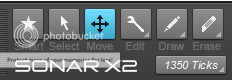
|