Teksonik
Max Output Level: -80 dBFS

- Total Posts : 521
- Joined: 2006/10/18 12:59:42
- Location: Las Vegas
- Status: offline
Qwerty Keyboard Focus to Plugin
There was a button on the synth toolbar in version 8.5 that would allow you to give the qwerty keyboard focus to the plugin. I've searched the Sonar X-1 manual but I don't see that function any more. What I'm trying to do is name a preset created in a vsti plugin but every time I hit a key to type in the name it activates that key's shortcut. In other words as soon as I try to type Teksonik and hit the "T" key it brings up the Tools Box. I'm sure it's just something obvious and simple I'm missing. Anyone know how to give a plugin qwerty keyboard focus in X1? Thanks!
|
Teksonik
Max Output Level: -80 dBFS
- Total Posts : 521
- Joined: 2006/10/18 12:59:42
- Location: Las Vegas
- Status: offline

Re:Qwerty Keyboard Focus to Plugin
2012/03/31 07:16:11
(permalink)
|
pwal
Max Output Level: -46 dBFS

- Total Posts : 2909
- Joined: 2004/08/24 07:15:57
- Status: offline
Re:Qwerty Keyboard Focus to Plugin
2012/03/31 07:52:33
(permalink)
the button's there - top-right of the vst gui window, but it doesn't work (tested win7.32, x1d, new empty project, u-he tyrell n6v2)
|
pwal
Max Output Level: -46 dBFS
- Total Posts : 2909
- Joined: 2004/08/24 07:15:57
- Status: offline
Re:Qwerty Keyboard Focus to Plugin
2012/03/31 07:54:39
(permalink)
ok, a workaround is using a text editor, copy, then right-click paste... 8-S
|
Jind
Max Output Level: -73 dBFS

- Total Posts : 878
- Joined: 2007/09/08 16:14:48
- Status: offline
Re:Qwerty Keyboard Focus to Plugin
2012/03/31 08:31:02
(permalink)
The button you are looking for is in the upper right hand corner of every x64 plugin. If you launch a 32 bit plugin via BitBridge, you need to add it to your FX Bin, close the plugin window and reopen by holding SHIFT + Double clicking on the plugin in the FX bin. It will reopen the plugin and a separate window with the button you are looking for in the upper right hand corner - this other window also has the preset management stuff and automation buttons for 32 bit bridged plugins. You may need to move the plugin window to the side the first time as the secondary window pops up behind it. It may also need to be expanded the secondary window as it defaults to the width of the plugin if I recall.
hope this is your issue and hope it helps.
Jind Sonar X2 PE, Cakewalk V Studio 100; Intel i7 w/ 16 GB Ram, MS Windows 8.1
|
Jind
Max Output Level: -73 dBFS
- Total Posts : 878
- Joined: 2007/09/08 16:14:48
- Status: offline
Re:Qwerty Keyboard Focus to Plugin
2012/03/31 09:48:02
(permalink)
I noticed after the fact you mentioned the use of U-He plugins. There is an issue with U-He plugins and the "Give All Keystrokes to Plug-in" button. If you are in the preset window in Uhbik (and other U-He plugins I think), and use the "Give All..." button, it will not work. As soon as you enter a letter mapped to a Sonar command it will jump out of the preset window and perform the command in Sonar. This happens at least in some U-He plugins - definitely in Uhbik. there is a thread about it here somewhere.
Jind Sonar X2 PE, Cakewalk V Studio 100; Intel i7 w/ 16 GB Ram, MS Windows 8.1
|
pwal
Max Output Level: -46 dBFS
- Total Posts : 2909
- Joined: 2004/08/24 07:15:57
- Status: offline
Re:Qwerty Keyboard Focus to Plugin
2012/03/31 11:19:49
(permalink)
it was me not the op that mentioned u-he ;-)
|
Teksonik
Max Output Level: -80 dBFS
- Total Posts : 521
- Joined: 2006/10/18 12:59:42
- Location: Las Vegas
- Status: offline
Re:Qwerty Keyboard Focus to Plugin
2012/03/31 18:44:06
(permalink)
You were right PWAL it was TyrellN6 
post edited by Teksonik - 2012/03/31 19:15:52
|
Teksonik
Max Output Level: -80 dBFS
- Total Posts : 521
- Joined: 2006/10/18 12:59:42
- Location: Las Vegas
- Status: offline
Re:Qwerty Keyboard Focus to Plugin
2012/03/31 18:51:02
(permalink)
Well Jind you hit the nail on the head...It's U-he's Tyrell N6. Urs has said this is a problem with Sonar not his plugins so it's Developer Tennis at this point (it's your fault......no it's your fault 15 all next serve.)  I'll copy and paste the response from here at Urs' forum at KVR. By the way I'm using 32 bit plugins in 32 bit Sonar so no bridge issues. I still don't get the keystroke pass thru button on the toolbar but I guess it wouldn't matter anyway...... Thanks for the replies everyone.
|
Teksonik
Max Output Level: -80 dBFS
- Total Posts : 521
- Joined: 2006/10/18 12:59:42
- Location: Las Vegas
- Status: offline
Re:Qwerty Keyboard Focus to Plugin
2012/03/31 19:05:19
(permalink)
Here's a screenshot of Pentagon 1 in Sonar. No keyboard pass thru button as you can see.......maybe it's something I'm doing wrong or something in my setup 
|
Jind
Max Output Level: -73 dBFS
- Total Posts : 878
- Joined: 2007/09/08 16:14:48
- Status: offline
Re:Qwerty Keyboard Focus to Plugin
2012/03/31 19:42:34
(permalink)
Teksonik
Here's a screenshot of Pentagon 1 in Sonar. No keyboard pass thru button as you can see.......maybe it's something I'm doing wrong or something in my setup
That is indeed strange as I do have the key you are looking for: 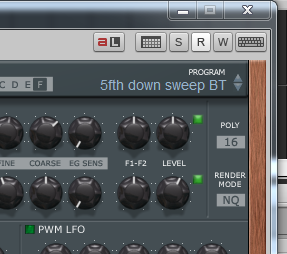
Jind Sonar X2 PE, Cakewalk V Studio 100; Intel i7 w/ 16 GB Ram, MS Windows 8.1
|
Jind
Max Output Level: -73 dBFS
- Total Posts : 878
- Joined: 2007/09/08 16:14:48
- Status: offline
Re:Qwerty Keyboard Focus to Plugin
2012/03/31 19:43:53
(permalink)
Mine is Pentagon I but appears different than yours as far as skin goes.
Jind Sonar X2 PE, Cakewalk V Studio 100; Intel i7 w/ 16 GB Ram, MS Windows 8.1
|
pwal
Max Output Level: -46 dBFS
- Total Posts : 2909
- Joined: 2004/08/24 07:15:57
- Status: offline
Re:Qwerty Keyboard Focus to Plugin
2012/04/01 04:39:23
(permalink)
my pentagon 1 looks like jind's, including the qwerty button/icon - but p1 is a dx synth? does this affect more than the u-he plugs?
|
Teksonik
Max Output Level: -80 dBFS
- Total Posts : 521
- Joined: 2006/10/18 12:59:42
- Location: Las Vegas
- Status: offline
Re:Qwerty Keyboard Focus to Plugin
2012/04/01 07:22:44
(permalink)
Well that's weird. Yes the button is missing on any plugin I've tried so far from Albino to Z3TA+2. (I'm using the VSTi version of Pentagon 1 with a modified nBeat skin). I've looked at every preference and view option I can think of to get the button to show. But I guess the button wouldn't work with Tyrell anyway. Using Note Pad works and I've got other hosts I can use when programming patches on Tyrell or Zebra. I copied the post from here and pasted it at the Uhe forum. We'll see what Urs has to say. By the way I'm using X1 Expanded Producer Build 425 in case that matters.
|
pwal
Max Output Level: -46 dBFS
- Total Posts : 2909
- Joined: 2004/08/24 07:15:57
- Status: offline
Re:Qwerty Keyboard Focus to Plugin
2012/04/01 07:26:43
(permalink)
|
Teksonik
Max Output Level: -80 dBFS
- Total Posts : 521
- Joined: 2006/10/18 12:59:42
- Location: Las Vegas
- Status: offline
Re:Qwerty Keyboard Focus to Plugin
2012/04/01 18:19:47
(permalink)
Yes I know. That's the thread I posted in...... I meant see what he says after seeing the response from here that I copied and pasted. It's the last post in that thread (at this time).
|
Teksonik
Max Output Level: -80 dBFS
- Total Posts : 521
- Joined: 2006/10/18 12:59:42
- Location: Las Vegas
- Status: offline
Re:Qwerty Keyboard Focus to Plugin
2012/04/01 18:33:36
(permalink)
For the record there is no problem naming patches with TyrellN6 in Reaper, Orion, or FL Studio. Only in Sonar X1 is there a problem. That's what I mean by Developer Tennis. They will volley the Bug Ball back and forth with the plugin blaming the host and the host blaming the plugin. I've seen it many times over the years and unfortunately it usually means nothing gets fixed. But in this case it's not a huge deal. Either use Note Pad in Sonar or use Reaper to program patches with TyrellN6. Still I'd like to know why the keystroke pass thru button does not show on my toolbar.....
|
paulhcp
Max Output Level: -86 dBFS

- Total Posts : 250
- Joined: 2007/10/06 14:48:59
- Status: offline
Re:Qwerty Keyboard Focus to Plugin
2012/04/01 19:05:20
(permalink)
If this was a U-HE problem then why would it not be a issue with Sonar 8.5?
I have mentioned this since the release of X1 but it appears that very few on this fourm have used these great plugins and therefor very few replies about it... or none at all.
SONAR X3C PE , Windows Pro 8.1 64 BIT I7 2600k, Gigabyte Z68MA MB, 8 gigs Ram Corsair SSD 240, WD ,HD 150GB VelociRaptor, Roland Quad capture, Mackie 824 M2 Yamaha S90 keyboard, Omnisphere, Trillian, kontakt 5., Zebra HZ Diva, Addictive keys.
|
Teksonik
Max Output Level: -80 dBFS
- Total Posts : 521
- Joined: 2006/10/18 12:59:42
- Location: Las Vegas
- Status: offline
Re:Qwerty Keyboard Focus to Plugin
2012/04/02 07:11:51
(permalink)
Very good point. Why was it not an issue in 8.5 and why is it not an issue with any of the other DAWS I've tested?
|