rnelson
Max Output Level: -90 dBFS

- Total Posts : 16
- Joined: 2010/08/03 09:27:45
- Status: offline
EQ while recording, MIDI playback
Newbie with a couple of questions here...... Can you use EQ by channel while recording or is it just available on playback? Trying to determine if I need a mixer or not. If I just want to sit at my controller keyboard (CME UF7) and play something thru a soft synth and hear it on my monitors, how would I do that? Thanks alot!
|
larrymcg
Max Output Level: -64 dBFS

- Total Posts : 1310
- Joined: 2003/11/05 17:00:22
- Location: Redding (Northern California)
- Status: offline

Re:EQ while recording, MIDI playback
2012/04/03 13:56:39
(permalink)
The output of your controller keyboard is midi data, not sound, so you can't apply EQ to the midi being recorded.
To do what you want you set up a Sonar (or whatever you are using) project and insert a midi track and a software synth you want to listen to. Set the midi track input to be your keyboard. Set the midi track output to be the software synth. You can add audio effects (EQ, Reverb, etc) to the track with the software synth.
I think that's an easy way to do it but others might have an easier way.
--Larry
Intel Core i7-4790 @3.6GHz; 8GB; Win10 Pro 64bit; 1TB disk + 3TB ext disk; Midiman Fineline mixer; MidiSport 4x4 midi I/F; Roland JV-30 kbd/synth; Yamaha TG55 synth; Rx with 3 piece Home audio speakers; Sonar X3e Studio
|
rnelson
Max Output Level: -90 dBFS
- Total Posts : 16
- Joined: 2010/08/03 09:27:45
- Status: offline
Re:EQ while recording, MIDI playback
2012/04/03 14:33:19
(permalink)
Larry, Thanks for the reply....I think I didn't do a good job of phrasing my question....I know that MIDI can't be EQ'd when recording, I was talking about audio such as vocals, guitar, etc. Going into Sonar, can it be EQ'd or is it just on playback......
|
Kalle Rantaaho
Max Output Level: -5 dBFS

- Total Posts : 7005
- Joined: 2006/01/09 13:07:59
- Location: Finland
- Status: offline
Re:EQ while recording, MIDI playback
2012/04/03 17:00:10
(permalink)
SONAR always records the dry signal. If you want to record the FX you need to use some special routing. IIRC it's possible, but now I don't remember how it's done.
I'm not sure I understand the second part of your question. Are you not familiar with soft synths? How have you used your UF7 this far? Insert any of the ones in SONAR using the synth rack and play to your hearts content. There's a tutorial in the help files.
SONAR PE 8.5.3, Asus P5B, 2,4 Ghz Dual Core, 4 Gb RAM, GF 7300, EMU 1820, Bluetube Pre - Kontakt4, Ozone, Addictive Drums, PSP Mixpack2, Melda Creative Pack, Melodyne Plugin etc. The benefit of being a middle aged amateur is the low number of years of frustration ahead of you.
|
rnelson
Max Output Level: -90 dBFS
- Total Posts : 16
- Joined: 2010/08/03 09:27:45
- Status: offline
Re:EQ while recording, MIDI playback
2012/04/03 17:04:41
(permalink)
No, not too familiar with soft synths.....bought the UF7 several years ago and haven't really used it much, so all this is a learning experience for me.
|
57Gregy
Max Output Level: 0 dBFS

- Total Posts : 14404
- Joined: 2004/05/31 17:04:17
- Location: Raleigh, North Carolina
- Status: offline
Re:EQ while recording, MIDI playback
2012/04/03 21:01:54
(permalink)
Larry has it pretty much dead on.
Set the MIDI track's input to the keyboard and it's output to the soft synth of choice. When you play the keyboard, you should hear the synth sound.
Of course, how the sound card handles it is another question. If you're using the stock computer sound card there will almost certainly be a delay (latency) from the time you hit the key until you hear it from the speakers. What is your sound card or audio interface?
As far as EQ, or any audio effect, they are only applied to the output. You can permanently apply the effect to a track by bouncing the track or using the Process>Audio>Apply Audio Effect function at the top. That cannot be undone once the track is saved and closed, though.
|
rnelson
Max Output Level: -90 dBFS
- Total Posts : 16
- Joined: 2010/08/03 09:27:45
- Status: offline
Re:EQ while recording, MIDI playback
2012/04/03 22:05:18
(permalink)
My audio interface is an Echo Audiofire8. I was just playing around with it before I read this post. If I have the output as a softsynth, how do I then also route to the Audiofire8 output channel 1 so I can hear it in headphones or monitors? In regards to audio, say you have a thin sounding voice and want to beef it up a little when recording.....a hardware mixer inline would be the best solution? Sorry for these newbie questions.....
|
57Gregy
Max Output Level: 0 dBFS
- Total Posts : 14404
- Joined: 2004/05/31 17:04:17
- Location: Raleigh, North Carolina
- Status: offline
Re:EQ while recording, MIDI playback
2012/04/03 22:45:44
(permalink)
It looks like the Echo has ASIO drivers. Change the Driver Mode in SONAR to ASIO and that should make the Echo the default device since with SONAR in ASIO, only 1 device can be used.
How you do that depends on which version of SONAR you have. Putting that info as well as your audio interface and computer operating system in your profile signature can keep us from having to ask what you're using each time you have a question.
In older SONAR products, go to Options>Audio, find the Driver Mode and change it to ASIO.
In X1 and Music Creator 6, press the P button on the computer keyboard to bring up the Preferences screen to change driver modes, or Edit>Preferences at the top.
|
rnelson
Max Output Level: -90 dBFS
- Total Posts : 16
- Joined: 2010/08/03 09:27:45
- Status: offline
Re:EQ while recording, MIDI playback
2012/04/03 22:51:21
(permalink)
Yes, it uses ASIO. I will make the changes in my profile sig, good idea.....running Sonar X1 Producer, Win7 64-bit. When I play the keys, I can hear the output in Output1 of the Echo......but it doesn't sound like the softsynth I selected, and when I change something on the softsynth itself, the sound does not change......
post edited by rnelson - 2012/04/03 22:54:23
Windows 7 64-bit, Echo AudioFire8, Sonar X1 Producer
|
57Gregy
Max Output Level: 0 dBFS
- Total Posts : 14404
- Joined: 2004/05/31 17:04:17
- Location: Raleigh, North Carolina
- Status: offline
Re:EQ while recording, MIDI playback
2012/04/03 23:11:16
(permalink)
In many (most?) soft synths, you change the patch in the MIDI track, not the synth GUI. Try that.
|
spacealf
Max Output Level: -54 dBFS

- Total Posts : 2133
- Joined: 2010/11/18 17:44:34
- Status: offline
Re:EQ while recording, MIDI playback
2012/04/03 23:32:13
(permalink)
You may need a microphone pre-amp or a studio channel (which can be used for most instruments - well a synth, guitar, or voice) and has EQ on it which can change the sound of the mic going into the recording. http://www.sweetwater.com...dio/signal-processing/
|
spacealf
Max Output Level: -54 dBFS
- Total Posts : 2133
- Joined: 2010/11/18 17:44:34
- Status: offline
Re:EQ while recording, MIDI playback
2012/04/03 23:39:49
(permalink)
Ah, MIDI has 16 channels to transmit on. Usually synths are set to Channel 1 unless changed. If you record a midi track on channel 1 then the next one has to be (without interfering with the first one) set to channel 2 and on like that. Then you have to check in Sonar to make sure you are playing back the midi channel that was recorded on that track. You probably could use just channel 1 for a few tracks but I would not want to actually do that with midi because everything for those few tracks would be on channel 1 no matter what soft synth or patch you have set. Not really done that way. (studio channel is also called a channel strip).
|
rnelson
Max Output Level: -90 dBFS
- Total Posts : 16
- Joined: 2010/08/03 09:27:45
- Status: offline
Re:EQ while recording, MIDI playback
2012/04/04 00:11:14
(permalink)
Here's what goes on: Plug headphones into Echo Output1. Start Sonar/New. MIDI track shows on far left In=MIDI Omni Out=MS GS Wavetable Synth (also has Audiofirea MIDI in list). Play UF7, plays tinny piano. Click MIDI track, Insert from menu, Soft Synth (Roland in this example). Brings up Roland on screen, MIDI track shows In=Omni, Out has MS GS, Echo, and Roland. The only one that has any sound is MS GS Wavetable Synth. If you select either Echo or Roland, there is no sound. If you click Roland track, you do not get any sounds
post edited by rnelson - 2012/04/04 00:13:58
Windows 7 64-bit, Echo AudioFire8, Sonar X1 Producer
|
spacealf
Max Output Level: -54 dBFS
- Total Posts : 2133
- Joined: 2010/11/18 17:44:34
- Status: offline
Re:EQ while recording, MIDI playback
2012/04/04 00:37:22
(permalink)
I do not use soft synths so I really can not help. But in Sonar if it is like mine (Sonar 7) on the Options menu - Midi devices, do you have the one you want to use - checked there. Since I have the RME Babyface, I have midi in - Babyface Midi In and output is Babyface Midi Out checked. The Microsoft built in midi soft synth is there but not checked or at the top of the list - the device being checked should be at the top of the list both Midi In and Midi Out. Otherwise, someone else will have to chime in on using soft synths from Sonar. I don't use midi anymore.
|
spacealf
Max Output Level: -54 dBFS
- Total Posts : 2133
- Joined: 2010/11/18 17:44:34
- Status: offline
Re:EQ while recording, MIDI playback
2012/04/04 00:51:47
(permalink)
Use Help in Sonar!
Look up "soft synths" in the Help of Sonar!
|
rnelson
Max Output Level: -90 dBFS
- Total Posts : 16
- Joined: 2010/08/03 09:27:45
- Status: offline
Re:EQ while recording, MIDI playback
2012/04/04 01:33:04
(permalink)
Got it working!!! Really cool stuff!
Windows 7 64-bit, Echo AudioFire8, Sonar X1 Producer
|
57Gregy
Max Output Level: 0 dBFS
- Total Posts : 14404
- Joined: 2004/05/31 17:04:17
- Location: Raleigh, North Carolina
- Status: offline
Re:EQ while recording, MIDI playback
2012/04/04 12:50:05
(permalink)
Cool. So what was the solution? In case someone with a similar problem finds this thread.
Were the outputs set incorrectly?
|
rnelson
Max Output Level: -90 dBFS
- Total Posts : 16
- Joined: 2010/08/03 09:27:45
- Status: offline
Re:EQ while recording, MIDI playback
2012/04/04 19:37:44
(permalink)
Not completely sure about the solution....I went into Windows Control Panel and made my regular speakers the default.....I guess I was not doing something right on the outputs.....
Windows 7 64-bit, Echo AudioFire8, Sonar X1 Producer
|
57Gregy
Max Output Level: 0 dBFS
- Total Posts : 14404
- Joined: 2004/05/31 17:04:17
- Location: Raleigh, North Carolina
- Status: offline
Re:EQ while recording, MIDI playback
2012/04/04 21:47:29
(permalink)
Just want to make sure you're set up for best audio performance. You wrote that you're using ASIO driver mode, but you also wrote that the MIDI was output to the Microsoft GS Wavetable synth. That can't happen in ASIO. The driver mode must be MME to use the MS Wavetable synth and if it was in any other driver mode you would get this message: 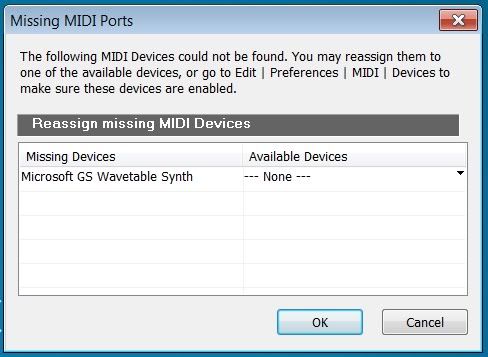 Plus, you would not be able to select your computer sound card's output to the speakers in ASIO, as it will only allow 1 audio device to be used at a time. It's not a good idea to use 2 sound cards anyway, synchonization problems will occur.
|
RobertB
Max Output Level: 0 dBFS
- Total Posts : 11256
- Joined: 2005/11/19 23:40:50
- Location: Fort Worth, Texas
- Status: offline
Re:EQ while recording, MIDI playback
2012/04/04 23:51:44
(permalink)
"Not completely sure about the solution....I went into Windows Control Panel and made my regular speakers the default.....I guess I was not doing something right on the outputs....." Your instinct to question this is correct. Here's the problem: "MIDI track shows on far left In=MIDI Omni Out=MS GS Wavetable Synth" While Greg is correct, generally speaking, there are exceptions, and some sound cards can indeed see the MS Wavetable Synth using ASIO. My E-MU0404 can, and it appears thet your Echo can as well. First step, uncheck the MS Wavetable Synth in the Preferences manu. You don't want to use it. Ever. Even though it is technically a soft synth, sonar sees it as an external hardware device. It operates outside the Sonar environment. The reason you can hear it through your normal computer speakers is because the sound is being handled by Windows and the built-in sound card, not by Sonar and the Echo. The Echo option you see as a MIDI output would be for an external device connected to the Echo MIDI OUt port. The port itself cannot produce sound. it is merely a connection point. You hear no sound from the Roland soft synth you have inserted because there is no MIDI data being fed to it. Insert a soft synth (TTS-1 is a good one to start with). Select: MIDI Source Track First Synth Audio Out Synth Properties Page(the GUI) This will create a MIDI track and audio track properly connected to each other. Assuming you have everything else properly connected, this should give you sound through your monitors connected to the Echo output. Take some time to digest that. This is a basic signal path, and works with all soft synths in Sonar. it's confusing at first, but once you wrap your head around that, the world of soft syths is yours. Your EQ question is a completely different animal. Lets take them on one at a time.
post edited by RobertB - 2012/04/04 23:56:35
My Soundclick Page SONAR Professional, X3eStudio,W7 64bit, AMD Athlon IIx4 2.8Ghz, 4GB RAM, 64bit, AKAI EIE Pro, Nektar Impact LX61,Alesis DM6,Alesis ControlPad,Yamaha MG10/2,Alesis M1Mk2 monitors,Samson Servo300,assorted guitars,Lava Lamp Shimozu-Kushiari or Bob
|
rnelson
Max Output Level: -90 dBFS
- Total Posts : 16
- Joined: 2010/08/03 09:27:45
- Status: offline
Re:EQ while recording, MIDI playback
2012/04/05 01:07:54
(permalink)
With all due respect, I am set to ASIO and the MS Wavetable Synth does appear....guess I am one of those exceptions also. I unchecked MS Wavetable Synth in Preferences. Works MUCH better now. Thanks to you both.
Windows 7 64-bit, Echo AudioFire8, Sonar X1 Producer
|
57Gregy
Max Output Level: 0 dBFS
- Total Posts : 14404
- Joined: 2004/05/31 17:04:17
- Location: Raleigh, North Carolina
- Status: offline
Re:EQ while recording, MIDI playback
2012/04/05 09:28:55
(permalink)
there are exceptions, and some sound cards can indeed see the MS Wavetable Synth using ASIO. My E-MU0404 can, and it appears thet your Echo can as well. Even after 10 years, I still learn something new. I did not know that. I thought it was a universal restriction. Thanks, Bob. So, rnelson, is the sound coming out of your Echo or out of the computer speakers now?
|
rnelson
Max Output Level: -90 dBFS
- Total Posts : 16
- Joined: 2010/08/03 09:27:45
- Status: offline
Re:EQ while recording, MIDI playback
2012/04/05 10:39:13
(permalink)
Greg, It is now coming out of the Echo, just as it should....I took out the MS Wavetable Synth as an option and everything is working fine.....thanks for your help.
Windows 7 64-bit, Echo AudioFire8, Sonar X1 Producer
|