Skyline_UK
Max Output Level: -54 dBFS

- Total Posts : 2133
- Joined: 2004/04/15 17:55:09
- Location: Midlands, UK
- Status: offline
Fadeouts at the end of a track - how do you do them?
I find that when I use either the in-track fade line at the end of a track or Process/Audio/Fadeouts, etc. the result is unsatisfactory, i.e. a can't seem to get a nice smooth fade right to zero; there's always a point where I can hear the audio actually stop abruptly. I've tried using the different types of fade, e.g. fast and exponential but I still can't get a nice clean fade down to nothing. What technique(s) do you use?
My stuff Intel Sandy Bridge i7 2600 @ 3.4GHz, 4 cores, 8 threads, 16GB RAM.OS & Programs drive: 240GB SSD
Data drives: 1 x 1TB drive RAID mirrored, plus extra 1TB data drive
Windows 10 Home 64 bit
Cakewalk by BandLab 64 bit, Studio One 3, Band In A Box 2016, Ozone 8+ too many other pluginsBandLab page
|
Saintom
Max Output Level: -58 dBFS

- Total Posts : 1749
- Joined: 2005/12/17 14:09:34
- Location: Portland Oregon
- Status: offline

Re:Fadeouts at the end of a track - how do you do them?
2012/04/13 03:57:09
(permalink)
Sometimes we see the light, Sometimes we stare at the light, and wonder why it is so bright...
|
Skyline_UK
Max Output Level: -54 dBFS
- Total Posts : 2133
- Joined: 2004/04/15 17:55:09
- Location: Midlands, UK
- Status: offline
Re:Fadeouts at the end of a track - how do you do them?
2012/04/13 04:18:43
(permalink)
Actually, I arrived at that last night after another hour of frustration!
I was just wondering if I was doing something wrong with the intended processes; if not then Sonar's fade tools are not fit for purpose, which is a bit odd.
My stuff Intel Sandy Bridge i7 2600 @ 3.4GHz, 4 cores, 8 threads, 16GB RAM.OS & Programs drive: 240GB SSD
Data drives: 1 x 1TB drive RAID mirrored, plus extra 1TB data drive
Windows 10 Home 64 bit
Cakewalk by BandLab 64 bit, Studio One 3, Band In A Box 2016, Ozone 8+ too many other pluginsBandLab page
|
Saintom
Max Output Level: -58 dBFS
- Total Posts : 1749
- Joined: 2005/12/17 14:09:34
- Location: Portland Oregon
- Status: offline
Re:Fadeouts at the end of a track - how do you do them?
2012/04/13 04:34:09
(permalink)
if not then Sonar's fade tools are not fit for purpose, which is a bit odd. The 2 fade tools you mention, I use them for quick fade ins/outs for edited clips, not for end of song fades, in which I leave for the mastering stage. and even then I would use automation. Tom
Sometimes we see the light, Sometimes we stare at the light, and wonder why it is so bright...
|
perfectprint
Max Output Level: -73 dBFS

- Total Posts : 862
- Joined: 2010/01/02 02:21:12
- Status: offline
Re:Fadeouts at the end of a track - how do you do them?
2012/04/13 04:49:12
(permalink)
volume automation on the master bus.
|
twisted6s
Max Output Level: -55 dBFS

- Total Posts : 2001
- Joined: 2007/08/21 21:10:33
- Location: New York
- Status: offline
Re:Fadeouts at the end of a track - how do you do them?
2012/04/13 04:52:07
(permalink)
I fade the final stereo mix in Sound Forge
|
Bristol_Jonesey
Max Output Level: 0 dBFS

- Total Posts : 16775
- Joined: 2007/10/08 15:41:17
- Location: Bristol, UK
- Status: offline
Re:Fadeouts at the end of a track - how do you do them?
2012/04/13 05:05:20
(permalink)
I like an 'S' curve on my fadeouts.
CbB, Platinum, 64 bit throughoutCustom built i7 3930, 32Gb RAM, 2 x 1Tb Internal HDD, 1 x 1TB system SSD (Win 7), 1 x 500Gb system SSD (Win 10), 2 x 1Tb External HDD's, Dual boot Win 7 & Win 10 64 Bit, Saffire Pro 26, ISA One, Adam P11A,
|
Guitarhacker
Max Output Level: 0 dBFS
- Total Posts : 24398
- Joined: 2007/12/07 12:51:18
- Location: NC
- Status: offline
Re:Fadeouts at the end of a track - how do you do them?
2012/04/13 08:46:19
(permalink)
I like to fade the tracks so I have precise control of what instruments fade, when, and how fast. I do not necessarily want everything fading together,,,,, see the image below and note that some fade fast while others fade a bit slower. I also use the time line "NOW" marker as a reference point for the fades. Automation in the tracks will allow volume control of the instruments in the project as well as the fade at the end. 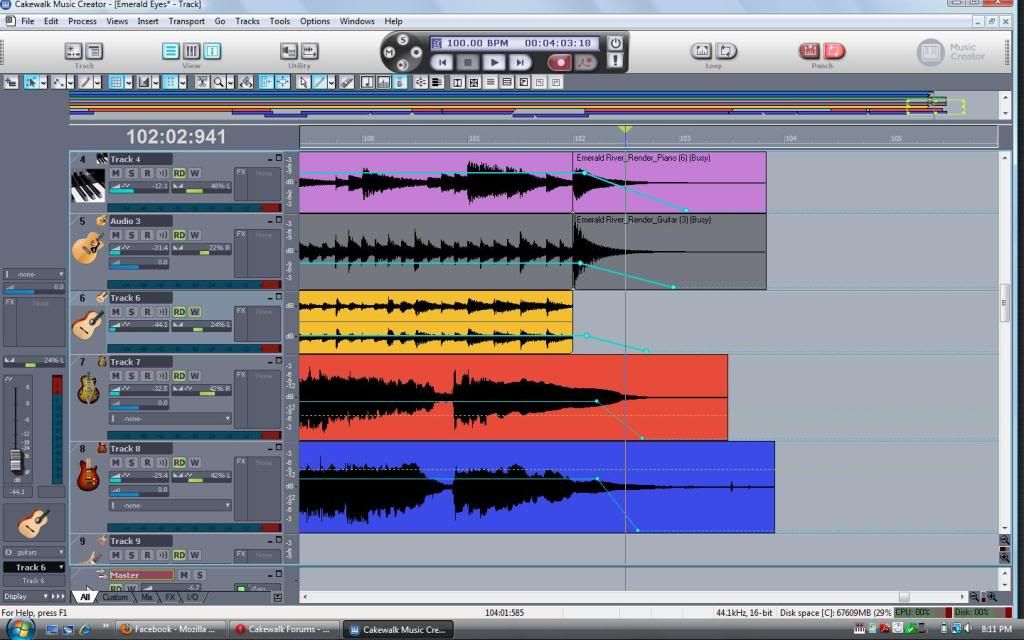
My website & music: www.herbhartley.com MC4/5/6/X1e.c, on a Custom DAW Focusrite Firewire Saffire Interface BMI/NSAI "Just as the blade chooses the warrior, so too, the song chooses the writer "
|
DW_Mike
Max Output Level: -6 dBFS

- Total Posts : 6907
- Joined: 2006/11/29 18:06:40
- Location: The arm-pit of the good 'ol US...New Jersey
- Status: offline
Re:Fadeouts at the end of a track - how do you do them?
2012/04/13 09:36:01
(permalink)
perfectprint
volume automation on the master bus.
Yeah me too. You also have to be sure that your final node is placed before the end of the song. I usually end the fade 1/2 a measure to a full measure before the end of the song or else there's a chance of hearing the stop. Mike
Sonar X3 ~ Scarlett 18i6 ~ Home Build DAW
GA-Z77X-UD5H
Intel i7 3770k 4.2GHz
32GB RAM Crucial Ballistix Elite (4x8)
2x Samsung 250GB SSD
1TB WD Black HDD @ 7200RPM 6Gb/s 64MB
Corsair H80i Liquid cooler
Noctua Silent Fans ~ 3x120mm ~ 1x140mm
Seasonic Platinum 760w PSU
Windows 7 Pro 64Bit.
|
tvolhein
Max Output Level: -82 dBFS

- Total Posts : 413
- Joined: 2006/12/15 09:41:14
- Status: offline
Re:Fadeouts at the end of a track - how do you do them?
2012/04/13 10:00:25
(permalink)
twisted6s
I fade the final stereo mix in Sound Forge +1
Tom Volhein tvolhein@gmail.com http://www.tomvolhein.com H55 motherboard, Intel i7 870, SATA-II, TI Firewire, USB-3, 4 GB DDR3, 3-1TB HDs (130MB/Sec), Dual head video (1GB), 22x DVD/RW w/lightscribe, Windows 7 x64, Sonar Platinum, latest build x64, Fireface 800
|
Teds_Studio
Max Output Level: -75 dBFS

- Total Posts : 761
- Joined: 2011/12/21 01:00:42
- Location: AR
- Status: offline
Re:Fadeouts at the end of a track - how do you do them?
2012/04/13 10:28:45
(permalink)
Although we live in a mostly digital world these days....there is just no substitute for good quality analog faders for doing a nice smooth fade to inf...JMHO. I've noticed the "cutoff" on digital fades too...especially when listening on headphones.
ASRock X99 Extreme4 MB....Gigabyte GeForce GTX 960 4 GB DDR 5.....Intel i7 5820k 3.3 Ghz....Corsair RM850i power supply....3 Seagate 1TB SATA III drives....32 Gig G.Skill Ripjaws DDR4 3000.....Win 10 Pro.....Sonar X1 Producer Exp & X2, X3...Platinum....Superior Drummer 2 & 3 w/ N.Y. Vol 2 SDX.....Sony VEGAS Pro 11.0 32 & 64 bit Pro 12.....Sony VX2100.....Sony HVR-Z7U....Sony HDR-CX130....Alesis HD24....Behringer X32 console....Focusrite 18i20....JBL LSR2328P studio monitors with LSR2310P sub.
|
timidi
Max Output Level: -21 dBFS

- Total Posts : 5449
- Joined: 2006/04/11 12:55:15
- Location: SE Florida
- Status: offline
Re:Fadeouts at the end of a track - how do you do them?
2012/04/13 10:29:32
(permalink)
If you fade on the master buss, and you have compressors/limiter there, the fade will constantly be fighting the limiting. Not a big deal but, Probably best to fade apres print.
|
daryl1968
Max Output Level: 0 dBFS
- Total Posts : 10984
- Joined: 2010/06/01 22:51:43
- Location: Englishman in deepest, darkest Wales
- Status: offline
Re:Fadeouts at the end of a track - how do you do them?
2012/04/13 10:33:48
(permalink)
Don't be so lazy - write proper endings for your songs ;)
|
konradh
Max Output Level: -42 dBFS

- Total Posts : 3325
- Joined: 2006/01/16 16:07:06
- Status: offline
Re:Fadeouts at the end of a track - how do you do them?
2012/04/13 11:18:24
(permalink)
I turn on write automation and move the fader.
Daryl, I use automation to fade individual tracks at the end of phrases sometimes to make them sound more natural (e.g., strings swelling in and out). I never write face out endings for songs, but still use Master to fade out the sustains at the end of a song to make it smoother. Otherwise, I get some instruments fading at different times, some chopping off, etc. For me, only one out of a dozen songs works with a natural decay. Bass, acoustic guitar, piano, etc. fading at different times may sound real, but it often sounds sloppy.
PS. I hate fade-out endings but understand them. I think they were designed 1-to make it easier for old radio jocks to talk over them, and 2-to leave people mentally finishing the phrases and thus remembering the songs. Now they are useful for dance DJs to mix and cross-fade.
|
ProMusic27
Max Output Level: -84 dBFS

- Total Posts : 341
- Joined: 2009/11/27 06:05:55
- Location: Granja Viana - Carapicuíba - SP - Brasil
- Status: offline
Re:Fadeouts at the end of a track - how do you do them?
2012/04/13 11:33:16
(permalink)
The clip fade in/out in Sonar is a very poor feature. It could give the user the possibility to define the fade as automation does. Then, we would have two levels of automation, one for individual clips and another for the entire track...
Other DAWs have it... Even Brandon Ryan states that havin this feature in Sonar could be very nice.
Peace.
Mauricio Monteiro - BrazilIntel I7 2.8Ghz 16Gb ram | Win 7 64 | Sonar Platinum 64 | UAD-2 Octo | UAD-2 Quad | VS-700 rack | VS-100 | FaderPort | JBL 4326 monitors | A-88 | Integra 7 | iRig keys 37 PRO | Akai MPD 226 | Full AIRA system | XPS-10 | JP-8000 | Super JV-1080 | R-8 | R-44 field recorder.
|
moffdnb
Max Output Level: -64 dBFS

- Total Posts : 1332
- Joined: 2004/04/27 16:42:30
- Status: offline
Re:Fadeouts at the end of a track - how do you do them?
2012/04/13 11:42:41
(permalink)
I'd like to see "S" curves brought in to SONARs Autofade options. I requested it a few times: http://www.cakewalk.com/support/contact/featurerequest.aspx But Sometimes I do struggle with smooth fade outs even with automation. May sound like a simple job but the audio doesn't seem to correlate with the automation as you might expect visually. If you fade from vol100 to vol000 then I notice that somewhere in the middle of the linear line (call it the bulk) there is slightly more actual attenuation going on. You need more sophisticated edits (like an "s" curve) to actually get a hi rez pro fade. Can be tricky if your not paying much attention to what might seem an easy task. Anyone else find this?
|
js516
Max Output Level: -84 dBFS
- Total Posts : 347
- Joined: 2006/05/17 15:14:53
- Status: offline
Re:Fadeouts at the end of a track - how do you do them?
2012/04/13 12:00:44
(permalink)
I remove silence from the end of clips (eitehr by using the tool or manually adjusting the end of the clip) that are in the fade out zone. I then use a volume automation in my master bus using 3 nodes to make a slow fade segment followed by a fast fade segment which creates an S-curve on the master buss. 0 point is 50-100 milliseconds from the end of the longest clip or the clip that I want audible through the fade. You need to end the fade before the end of the clip you want audible to prevent cut-off.
post edited by js516 - 2012/04/13 12:13:01
|
Skyline_UK
Max Output Level: -54 dBFS
- Total Posts : 2133
- Joined: 2004/04/15 17:55:09
- Location: Midlands, UK
- Status: offline
Re:Fadeouts at the end of a track - how do you do them?
2012/04/13 12:09:23
(permalink)
Thanks guys, I'm on wavelength now. I'd been labouring under the misapprehension that I should be using the fade tools and that I just wasn't using them right!
Automation is obviously the answer. Thanks again for all the tips.
My stuff Intel Sandy Bridge i7 2600 @ 3.4GHz, 4 cores, 8 threads, 16GB RAM.OS & Programs drive: 240GB SSD
Data drives: 1 x 1TB drive RAID mirrored, plus extra 1TB data drive
Windows 10 Home 64 bit
Cakewalk by BandLab 64 bit, Studio One 3, Band In A Box 2016, Ozone 8+ too many other pluginsBandLab page
|
John
Forum Host

- Total Posts : 30467
- Joined: 2003/11/06 11:53:17
- Status: offline
Re:Fadeouts at the end of a track - how do you do them?
2012/04/13 12:29:47
(permalink)
In the track view use the fade handle at the beginning top to fade in and the end top to fade out. You do not need to use volume automation to do this.
Also in X1 now the drawn audio will change according to the fade.
|
DW_Mike
Max Output Level: -6 dBFS
- Total Posts : 6907
- Joined: 2006/11/29 18:06:40
- Location: The arm-pit of the good 'ol US...New Jersey
- Status: offline
Re:Fadeouts at the end of a track - how do you do them?
2012/04/13 13:19:44
(permalink)
I'd like to see "S" curves brought in to SONARs Autofade options. Hi Steven. What exactly is an 'S' curve? This is the first I've heard of it. Could you perhaps provide an example. Thanks for the further education. Mike
Sonar X3 ~ Scarlett 18i6 ~ Home Build DAW
GA-Z77X-UD5H
Intel i7 3770k 4.2GHz
32GB RAM Crucial Ballistix Elite (4x8)
2x Samsung 250GB SSD
1TB WD Black HDD @ 7200RPM 6Gb/s 64MB
Corsair H80i Liquid cooler
Noctua Silent Fans ~ 3x120mm ~ 1x140mm
Seasonic Platinum 760w PSU
Windows 7 Pro 64Bit.
|
konradh
Max Output Level: -42 dBFS
- Total Posts : 3325
- Joined: 2006/01/16 16:07:06
- Status: offline
Re:Fadeouts at the end of a track - how do you do them?
2012/04/13 13:24:14
(permalink)
Mathematically, an S curve represents the sum of the areas under a normal distribution (bell curve). When it moves left to right (high at the right), it is a good picture of project work (slow at first, sloping up in the middle, flattening at the end). Turned the other way, it would represent a natural-sounding fade since our hearing is not linear. (Pulling a fader down smoothly produces a non-linear reduction since dB is not a linear scale.) http://en.wikipedia.org/wiki/Logistic_function
|
Bristol_Jonesey
Max Output Level: 0 dBFS
- Total Posts : 16775
- Joined: 2007/10/08 15:41:17
- Location: Bristol, UK
- Status: offline
Re:Fadeouts at the end of a track - how do you do them?
2012/04/13 13:50:41
(permalink)
You can do this by adding three nodes to your otherwise flat envelope
Node 1 = earliest, node 3 = latest, node 2 in between.
Between nodes 1 & 2 you want a slow curve and between nodes 2 & 3 you want a fast curve (which brings the overall level down to 0)
CbB, Platinum, 64 bit throughoutCustom built i7 3930, 32Gb RAM, 2 x 1Tb Internal HDD, 1 x 1TB system SSD (Win 7), 1 x 500Gb system SSD (Win 10), 2 x 1Tb External HDD's, Dual boot Win 7 & Win 10 64 Bit, Saffire Pro 26, ISA One, Adam P11A,
|
Jind
Max Output Level: -73 dBFS
- Total Posts : 878
- Joined: 2007/09/08 16:14:48
- Status: offline
Re:Fadeouts at the end of a track - how do you do them?
2012/04/13 13:51:11
(permalink)
Guitarhacker
I like to fade the tracks so I have precise control of what instruments fade, when, and how fast.
I do not necessarily want everything fading together,,,,, see the image below and note that some fade fast while others fade a bit slower.
I also use the time line "NOW" marker as a reference point for the fades.
Automation in the tracks will allow volume control of the instruments in the project as well as the fade at the end.
On the rare occasion when I do fade outs on my own songs, this is how I go about it. I prefer control over each instrument/vocal track independent from each other this way I can emphasize something I may want stronger or weaker in the ending. But as I noted, I've very rarely used a fade out as the end of any song I've written and since I only mix my music, it's not something I'm worrying about for anyone but myself.
Jind Sonar X2 PE, Cakewalk V Studio 100; Intel i7 w/ 16 GB Ram, MS Windows 8.1
|
don4777
Max Output Level: -85 dBFS

- Total Posts : 264
- Joined: 2004/06/06 17:21:38
- Status: offline
Re:Fadeouts at the end of a track - how do you do them?
2012/04/13 15:31:26
(permalink)
ProMusic27
The clip fade in/out in Sonar is a very poor feature. It could give the user the possibility to define the fade as automation does. Then, we would have two levels of automation, one for individual clips and another for the entire track...
Other DAWs have it... Even Brandon Ryan states that havin this feature in Sonar could be very nice.
Peace.
Hi Mauricio, Can you clarify? I thought we already have Automation of level at the clip and track level. I use both automation envelopes. What function am I missing? Don
|