TraceyStudios
Max Output Level: -78 dBFS

- Total Posts : 603
- Joined: 2005/10/13 12:40:33
- Location: Chandler, AZ
- Status: offline
SAVE Icon request!!!
Would love to have a save button some where on the screen as in past versions!!! Would like to not have to go file/save every time. Perhaps this is doable now, if so, I can't figure out how to create it. I did see a post about adding "add-ons" however, not interested in that (just an oppertunity for additional issues with 3rd party addons).
AMD FX-6100 six-core processor 3.3GHz 8 Gig RAM SONAR X3 Producer Tascam FW1884 Mackie Blackbird Presonus Digimax Avalon U5 BFD2 SL Trigger Alesis DM8 Pro drums KRK Rokit 8s KRK 10s ARC2 Folgers Dark Roast, a bit of crazy :) & lots of help from the forums! http://www.reverbnation.com/blakkmire
|
Bristol_Jonesey
Max Output Level: 0 dBFS

- Total Posts : 16775
- Joined: 2007/10/08 15:41:17
- Location: Bristol, UK
- Status: offline

Re:SAVE Icon request!!!
2012/04/18 14:32:00
(permalink)
There's always ctrl + s 
CbB, Platinum, 64 bit throughoutCustom built i7 3930, 32Gb RAM, 2 x 1Tb Internal HDD, 1 x 1TB system SSD (Win 7), 1 x 500Gb system SSD (Win 10), 2 x 1Tb External HDD's, Dual boot Win 7 & Win 10 64 Bit, Saffire Pro 26, ISA One, Adam P11A,
|
Jind
Max Output Level: -73 dBFS

- Total Posts : 878
- Joined: 2007/09/08 16:14:48
- Status: offline
Re:SAVE Icon request!!!
2012/04/18 14:33:32
(permalink)
While I have no issues with adding the Save button back, CTRL+S serves the same purpose and just seems easier to me than mousing to a button. Just an option ultimately.
Jind Sonar X2 PE, Cakewalk V Studio 100; Intel i7 w/ 16 GB Ram, MS Windows 8.1
|
bapu
Max Output Level: 0 dBFS

- Total Posts : 86000
- Joined: 2006/11/25 21:23:28
- Location: Thousand Oaks, CA
- Status: offline

Re:SAVE Icon request!!!
2012/04/18 14:36:07
(permalink)
Bristol_Jonesey
There's always ctrl + s
Seems to work for me. Thanks for that tip. Now I can go on the the next project.
|
John T
Max Output Level: -7.5 dBFS

- Total Posts : 6783
- Joined: 2006/06/12 10:24:39
- Status: offline
Re:SAVE Icon request!!!
2012/04/18 14:41:15
(permalink)
I'm not especially bothered about this myself, but I am surprised it's not made it's way into Sonar yet, given that they've already made it for Music Creator, which clearly comes from the same code-base: 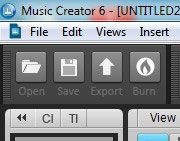
http://johntatlockaudio.com/Self-build PC // 16GB RAM // i7 3770k @ 3.5 Ghz // Nofan 0dB cooler // ASUS P8-Z77 V Pro motherboard // Intel x-25m SSD System Drive // Seagate RAID Array Audio Drive // Windows 10 64 bit // Sonar Platinum (64 bit) // Sonar VS-700 // M-Audio Keystation Pro 88 // KRK RP-6 Monitors // and a bunch of other stuff
|
TraceyStudios
Max Output Level: -78 dBFS
- Total Posts : 603
- Joined: 2005/10/13 12:40:33
- Location: Chandler, AZ
- Status: offline
Re:SAVE Icon request!!!
2012/04/18 14:50:50
(permalink)
Previous Sonar versions had it. Didn't know about ctl +s.
that was simple!
THANKS!!!
AMD FX-6100 six-core processor 3.3GHz 8 Gig RAM SONAR X3 Producer Tascam FW1884 Mackie Blackbird Presonus Digimax Avalon U5 BFD2 SL Trigger Alesis DM8 Pro drums KRK Rokit 8s KRK 10s ARC2 Folgers Dark Roast, a bit of crazy :) & lots of help from the forums! http://www.reverbnation.com/blakkmire
|
Dave Modisette
Max Output Level: 0 dBFS
- Total Posts : 11050
- Joined: 2003/11/13 22:12:55
- Location: Brandon, Florida
- Status: offline
Re:SAVE Icon request!!!
2012/04/18 15:42:26
(permalink)
bapu
Bristol_Jonesey
There's always ctrl + s
Seems to work for me. Thanks for that tip. Now I can go on the the next project.
<snicker>
|
Bristol_Jonesey
Max Output Level: 0 dBFS
- Total Posts : 16775
- Joined: 2007/10/08 15:41:17
- Location: Bristol, UK
- Status: offline
Re:SAVE Icon request!!!
2012/04/19 03:36:28
(permalink)
Mod Bod
bapu
Bristol_Jonesey
There's always ctrl + s
Seems to work for me. Thanks for that tip. Now I can go on the the next project.
<snicker> <marathon>
Fixed!
CbB, Platinum, 64 bit throughoutCustom built i7 3930, 32Gb RAM, 2 x 1Tb Internal HDD, 1 x 1TB system SSD (Win 7), 1 x 500Gb system SSD (Win 10), 2 x 1Tb External HDD's, Dual boot Win 7 & Win 10 64 Bit, Saffire Pro 26, ISA One, Adam P11A,
|
Bristol_Jonesey
Max Output Level: 0 dBFS
- Total Posts : 16775
- Joined: 2007/10/08 15:41:17
- Location: Bristol, UK
- Status: offline
Re:SAVE Icon request!!!
2012/04/19 03:38:14
(permalink)
My only real issue with ctrl + s is to do with "sausage finger syndrome" The 's' is too damned close to the 'z' so instead of saving I undo my last action (which is usually a good thing  )
CbB, Platinum, 64 bit throughoutCustom built i7 3930, 32Gb RAM, 2 x 1Tb Internal HDD, 1 x 1TB system SSD (Win 7), 1 x 500Gb system SSD (Win 10), 2 x 1Tb External HDD's, Dual boot Win 7 & Win 10 64 Bit, Saffire Pro 26, ISA One, Adam P11A,
|
wruess
Max Output Level: -89 dBFS

- Total Posts : 83
- Joined: 2009/11/16 10:01:10
- Status: offline
Re:SAVE Icon request!!!
2012/04/21 01:53:23
(permalink)
I would love to have the 'Save' button back again. Suppose it's peculiar to the the way I work with Sonar most of the time. My right hand is usually on the mouse. My left hand is often NOT on the (computer) keyboard. So it takes an extra click OR I have to move my L hand over for Ctl-S. It just seems odd to me that they removed this option in X1. (And that it would be really easy to add it back with some update in the future).
|
mudgel
Max Output Level: 0 dBFS
- Total Posts : 12010
- Joined: 2004/08/13 00:56:05
- Location: Linton Victoria (Near Ballarat)
- Status: offline
Re:SAVE Icon request!!!
2012/04/21 04:46:58
(permalink)
why not install Benstat's SONAR Plus add-on and only select it to show the save button.
It's hardly a corrupting 3rd party addon.
Mike V. (MUDGEL) STUDIO: Win 10 Pro x64, SPlat & CbB x64, PC: ASUS Z370-A, INTEL i7 8700k, 32GIG DDR4 2400, OC 4.7Ghz. Storage: 7 TB SATA III, 750GiG SSD & Samsung 500 Gig 960 EVO NVMe M.2. Monitors: Adam A7X, JBL 10” Sub. Audio I/O & DSP Server: DIGIGRID IOS & IOX. Screen: Raven MTi + 43" HD 4K TV Monitor. Keyboard Controller: Native Instruments Komplete Kontrol S88.
|
Kalle Rantaaho
Max Output Level: -5 dBFS

- Total Posts : 7005
- Joined: 2006/01/09 13:07:59
- Location: Finland
- Status: offline
Re:SAVE Icon request!!!
2012/04/21 05:06:23
(permalink)
Bristol_Jonesey
My only real issue with ctrl + s is to do with "sausage finger syndrome"
The 's' is too damned close to the 'z' so instead of saving I undo my last action (which is usually a good thing )
A very good point. I've not realized the size of the risk.
SONAR PE 8.5.3, Asus P5B, 2,4 Ghz Dual Core, 4 Gb RAM, GF 7300, EMU 1820, Bluetube Pre - Kontakt4, Ozone, Addictive Drums, PSP Mixpack2, Melda Creative Pack, Melodyne Plugin etc. The benefit of being a middle aged amateur is the low number of years of frustration ahead of you.
|
jbraner
Max Output Level: -57 dBFS

- Total Posts : 1830
- Joined: 2003/11/06 14:38:35
- Location: Edinburgh, Scotland
- Status: offline
Re:SAVE Icon request!!!
2012/04/23 06:08:02
(permalink)
why not install Benstat's SONAR Plus add-on That's what I do - but this can't automatically load up X1 expanded (or indeed X1e). So you have to : - load SONAR - load SONAR Plus - click the button to unload the default (blank) song then you're ready to go. It's areal trade off between bothering with this - or just using ctrl-S to save
|
John
Forum Host

- Total Posts : 30467
- Joined: 2003/11/06 11:53:17
- Status: offline
Re:SAVE Icon request!!!
2012/04/23 06:19:34
(permalink)
jbraner
why not install Benstat's SONAR Plus add-on
That's what I do - but this can't automatically load up X1 expanded (or indeed X1e).
So you have to :
- load SONAR
- load SONAR Plus
- click the button to unload the default (blank) song
then you're ready to go.
It's areal trade off between bothering with this - or just using ctrl-S to save
Not true. Panup has updated it for X1 Expanded D. Goto Sonar Mods. Here
|
jbraner
Max Output Level: -57 dBFS
- Total Posts : 1830
- Joined: 2003/11/06 14:38:35
- Location: Edinburgh, Scotland
- Status: offline
Re:SAVE Icon request!!!
2012/04/23 06:27:06
(permalink)
Thanks for that John.
I liked SONAR Plus because it's just an addon - but I've been staying away from Panup's mods, as I just can't be bothered remembering to replace the exe file every time a patch comes along.
I'm sure it's just a simple fix for SONAR plus (it's just checking the SONAR version when it starts up) but I guess Ben doesn't have time for this anymore... ;-)
|
John
Forum Host
- Total Posts : 30467
- Joined: 2003/11/06 11:53:17
- Status: offline
Re:SAVE Icon request!!!
2012/04/23 06:44:23
(permalink)
Right John, great name BTW, Panup has kept Sonar Plus going. We owe a lot to Panup.
I know what you mean about the mods. I stopped using them myself awhile ago. I still like them very much but when CW keeps updating and offering new modules for PC it just became too much hassle. Now I kind of like the look of X1 as it is anyway.
|
jbraner
Max Output Level: -57 dBFS
- Total Posts : 1830
- Joined: 2003/11/06 14:38:35
- Location: Edinburgh, Scotland
- Status: offline
Re:SAVE Icon request!!!
2012/04/23 14:25:42
(permalink)
Panup has kept Sonar Plus going I didn't realise this! I found the 1.0.3 patcher and it works fine. Thanks for the heads up John! And thanks Panup!!!
|
BluerecordingStudios
Max Output Level: -72 dBFS

- Total Posts : 916
- Joined: 2005/05/22 07:19:10
- Location: Nitra, SLOVAKIA
- Status: offline
Re:SAVE Icon request!!!
2012/04/24 09:18:39
(permalink)
Ctrl+S is one of the most important shortcuts not only in Sonar...
|