paulo
Max Output Level: -13 dBFS

- Total Posts : 6218
- Joined: 2007/01/30 05:06:57
- Status: offline
MIDI device selection - aaaaarrrrgh !!
Having no luck upstairs, so thought I'd try here...
This is a new installation of 8.53 PE on a new PC. When I go into the menu to select midi in/out devices, my choices are there with the tick boxes next to them, so I select the one I want, press OK and immediately get a pop up window saying .......no midi devices have been selected do you want to select them now or carry on without them, so I choose select now, tick the boxes again - same result. If I close the window and go back again none of the boxes are ticked.
Am I doing something wrong here ? I'm sure this is how I did it last time.
Any audio tracks play just fine. On synths that have an onscreen keyboard I can play them with the mouse ok.
|
Wookiee
Rrrrugh arah-ah-woof?

- Total Posts : 13306
- Joined: 2007/01/16 06:19:43
- Location: Akahaocwora - Village Yoh Kay
- Status: offline

Re:MIDI device selection - aaaaarrrrgh !!
2012/08/11 14:19:30
(permalink)
Are you running windows 7, if so you may have to "Run as Administrator" to get it stick. Just guessing!!!
Life is not about waiting for the storm to pass, it's about learning to dance in the rain.
Karma has a way of finding its own way home.
Primary, i7 8700K 16Gigs Ram, 3x500gb SSD's 2TB Backup HHD Saffire Pro 40. Win 10 64Bit Secondary i7 4790K, 32GB Ram, 500Gb SSD OS/Prog's, 1TB Audio, 1TB Samples HHD AudioBox USB, Win 10 64Bit CbB, Adam's A7x's - Event 20/20's, Arturia V6, Korg Digital Legacy, Softube Modular, Arturia Keylab-88, USB-MidiSport 8x8
|
paulo
Max Output Level: -13 dBFS
- Total Posts : 6218
- Joined: 2007/01/30 05:06:57
- Status: offline
Re:MIDI device selection - aaaaarrrrgh !!
2012/08/11 14:51:45
(permalink)
No, XP Wookie. Good thought though. Keep em comin...
|
Beagle
Max Output Level: 0 dBFS

- Total Posts : 50621
- Joined: 2006/03/29 11:03:12
- Location: Fort Worth, TX
- Status: offline
Re:MIDI device selection - aaaaarrrrgh !!
2012/08/11 15:21:37
(permalink)
what exactly is the MIDI device you're selecting?
|
paulo
Max Output Level: -13 dBFS
- Total Posts : 6218
- Joined: 2007/01/30 05:06:57
- Status: offline
Re:MIDI device selection - aaaaarrrrgh !!
2012/08/11 15:46:11
(permalink)
Beagle
what exactly is the MIDI device you're selecting?
Its a yamaha keyboard. The Driver for it is called Yamaha CBX- it's there and I can tick the box, but it won't accept it when I press OK 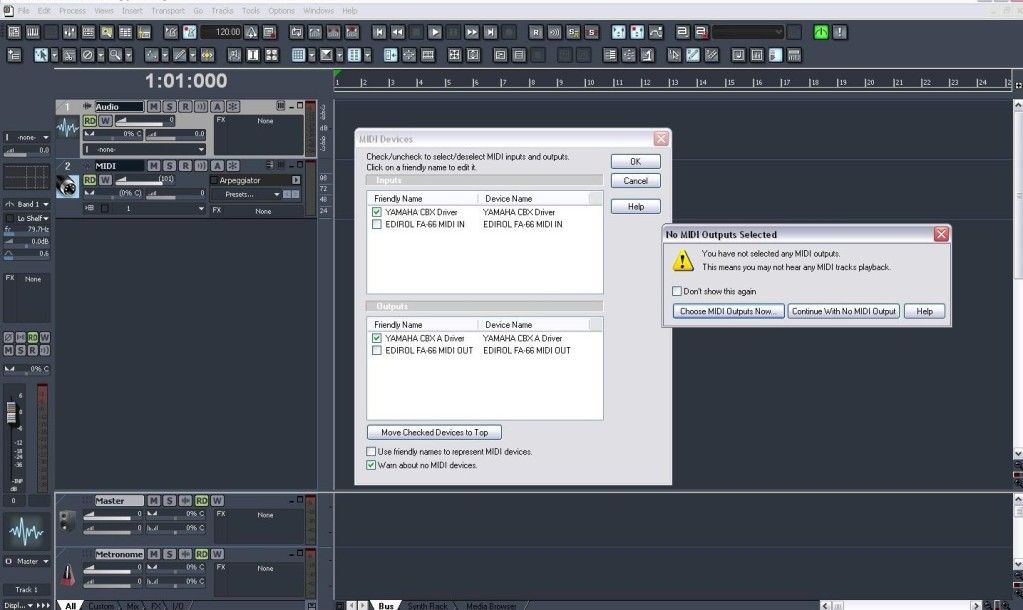
post edited by paulo - 2012/08/11 15:52:04
|
Beagle
Max Output Level: 0 dBFS
- Total Posts : 50621
- Joined: 2006/03/29 11:03:12
- Location: Fort Worth, TX
- Status: offline
Re:MIDI device selection - aaaaarrrrgh !!
2012/08/11 16:46:38
(permalink)
have you tried running sonar in Admin mode? (right click on sonar exe and choose RUN AS ADMIN)
|
paulo
Max Output Level: -13 dBFS
- Total Posts : 6218
- Joined: 2007/01/30 05:06:57
- Status: offline
Re:MIDI device selection - aaaaarrrrgh !!
2012/08/11 17:13:06
(permalink)
Beagle
have you tried running sonar in Admin mode? (right click on sonar exe and choose RUN AS ADMIN)
OS is xp - doesn't have that option, but I am the only user account and therefore the admin. I've managed to get it working via fa66 midi ports now, so at least that's something. My next problem is that the audio is in 16bit mode even though I have selected 24bit in the audio options. I'm guessing this is something to do with the onboard soundcard interfering somehow, but after 11hrs of installing software and messing with it I've had enough for one day, so that will have to be tomorrow's little challenge !
|
Beagle
Max Output Level: 0 dBFS
- Total Posts : 50621
- Joined: 2006/03/29 11:03:12
- Location: Fort Worth, TX
- Status: offline
Re:MIDI device selection - aaaaarrrrgh !!
2012/08/11 18:43:20
(permalink)
Sorry , I didn't remember XP didn't have that option.
some soundcards will not work in 24bit depending on the sampling rate. if you are using anything other than 44.1 or 48, try one of those instead and see if that allows you to change your bit rate to 24.
|
bapu
Max Output Level: 0 dBFS

- Total Posts : 86000
- Joined: 2006/11/25 21:23:28
- Location: Thousand Oaks, CA
- Status: offline
Re:MIDI device selection - aaaaarrrrgh !!
2012/08/11 19:22:41
(permalink)
paulo
Is that X2? It looks so retro. How long did it take you to learn that interface?
|
paulo
Max Output Level: -13 dBFS
- Total Posts : 6218
- Joined: 2007/01/30 05:06:57
- Status: offline
Re:MIDI device selection - aaaaarrrrgh !!
2012/08/11 19:37:44
(permalink)
bapu
paulo
Is that X2?
It looks so retro.
How long did it take you to learn that interface?
It's actually X3 with the 8.5 looky-like feature activated. Don't tell no-one, it's a secret.
|
Wookiee
Rrrrugh arah-ah-woof?
- Total Posts : 13306
- Joined: 2007/01/16 06:19:43
- Location: Akahaocwora - Village Yoh Kay
- Status: offline
Re:MIDI device selection - aaaaarrrrgh !!
2012/08/11 20:36:30
(permalink)
May be a daft question but is the keyboard on before you start Sonar. I noticed a couple of time in 8.3 that if I had left an I/F off because I did not need it the driver would still appear. Not every time just sometimes when it felt like making your brain explode.
Life is not about waiting for the storm to pass, it's about learning to dance in the rain.
Karma has a way of finding its own way home.
Primary, i7 8700K 16Gigs Ram, 3x500gb SSD's 2TB Backup HHD Saffire Pro 40. Win 10 64Bit Secondary i7 4790K, 32GB Ram, 500Gb SSD OS/Prog's, 1TB Audio, 1TB Samples HHD AudioBox USB, Win 10 64Bit CbB, Adam's A7x's - Event 20/20's, Arturia V6, Korg Digital Legacy, Softube Modular, Arturia Keylab-88, USB-MidiSport 8x8
|
57Gregy
Max Output Level: 0 dBFS
- Total Posts : 14404
- Joined: 2004/05/31 17:04:17
- Location: Raleigh, North Carolina
- Status: offline
Re:MIDI device selection - aaaaarrrrgh !!
2012/08/12 01:03:37
(permalink)
Were there any Yamaha driver updates you failed to get?
|
paulo
Max Output Level: -13 dBFS
- Total Posts : 6218
- Joined: 2007/01/30 05:06:57
- Status: offline
Re:MIDI device selection - aaaaarrrrgh !!
2012/08/12 10:11:54
(permalink)
Wookiee
May be a daft question but is the keyboard on before you start Sonar. I noticed a couple of time in 8.3 that if I had left an I/F off because I did not need it the driver would still appear. Not every time just sometimes when it felt like making your brain explode.
Tried it all ways wookie, don't you just love computers sometimes ! 
|
paulo
Max Output Level: -13 dBFS
- Total Posts : 6218
- Joined: 2007/01/30 05:06:57
- Status: offline
Re:MIDI device selection - aaaaarrrrgh !!
2012/08/12 10:13:16
(permalink)
57Gregy
Were there any Yamaha driver updates you failed to get?
There is only the one for this OS - used to work fine, so not sure why it wouldn't now.
|
spacey
Max Output Level: 0 dBFS
- Total Posts : 8769
- Joined: 2004/05/03 18:53:44
- Status: offline
Re:MIDI device selection - aaaaarrrrgh !!
2012/08/12 10:27:48
(permalink)
Paulo it's been awhile since I've used 8.5 but it seems there was a setting in Options>Global or Project>MIDI - that
needs to be set.
|
Janet
Max Output Level: 0 dBFS
- Total Posts : 8094
- Joined: 2010/01/02 19:04:11
- Location: Missouri
- Status: offline
Re:MIDI device selection - aaaaarrrrgh !!
2012/08/12 14:15:25
(permalink)
If it's any help (and I already know it's not)...this happens to me now and then. Don't know why and I can't remember when. Oh yeah, most of the time I just have to push the midi cords in better.
And ALL of the time it makes me growl.
|
Moshkiae
Max Output Level: -14 dBFS

- Total Posts : 6111
- Joined: 2009/04/27 10:26:25
- Status: offline
Re:MIDI device selection - aaaaarrrrgh !!
2012/08/12 15:48:43
(permalink)
57Gregy
Were there any Yamaha driver updates you failed to get?
I'm taking a shot that the driver is not compatible with XP at all ... after all, that thing is now 14 years old or so ... however, I still use the XP-Pro version of XP on 3 of my machines, and have to tell you that the biggest problem? ... you got it ... the motherboard drivers for the audio are the stink, stunk, stank, stonk and stenk kind and in most cases if you take a look at them? ... they are the same and have never been updated or cleaned up, which is a serious issue for a lot of the more modern software that is more advanced than the old drivers and designs for these motherboards. Note: Microsoft no longer supports any of the XP's, except the Professional versions ... because there are way too many of their network clients that still use XP-Pro. I'm upgrading one computer to W7 and putting my big sound card on that new machine so I can get better results ... had an issue with the old drivers for a GTX motherboard not having enough capabilities and flexibilities to handle even such easy things as Audacity! You can get about it, eventually, but it is a total pain. I might not be totally correct here, but I have given up doing some things until such a time as I have W7-Pro 64-bit on the machine ... tired of dealing with the driver issues and have to reboot every few minutes!
post edited by Moshkiae - 2012/08/12 16:04:28
As a wise Guy once stated from his holy chapala ... none of the hits, none of the time ... prevents you from becoming just another turkey in the middle of all the other turkeys!
|
paulo
Max Output Level: -13 dBFS
- Total Posts : 6218
- Joined: 2007/01/30 05:06:57
- Status: offline
Re:MIDI device selection - aaaaarrrrgh !!
2012/08/12 17:06:15
(permalink)
spacey
Paulo it's been awhile since I've used 8.5 but it seems there was a setting in Options>Global or Project>MIDI - that
needs to be set.
Ok - I'll take a look at that - thanks
|
paulo
Max Output Level: -13 dBFS
- Total Posts : 6218
- Joined: 2007/01/30 05:06:57
- Status: offline
Re:MIDI device selection - aaaaarrrrgh !!
2012/08/12 17:07:49
(permalink)
Janet
If it's any help (and I already know it's not)...this happens to me now and then. Don't know why and I can't remember when. Oh yeah, most of the time I just have to push the midi cords in better.
And ALL of the time it makes me growl.
Not midi cords in this case - serial port (screwed in) so shouldn't be loose.
|
paulo
Max Output Level: -13 dBFS
- Total Posts : 6218
- Joined: 2007/01/30 05:06:57
- Status: offline
Re:MIDI device selection - aaaaarrrrgh !!
2012/08/12 17:11:46
(permalink)
Moshkiae
57Gregy
Were there any Yamaha driver updates you failed to get?
I'm taking a shot that the driver is not compatible with XP at all ... after all, that thing is now 14 years old or so ... however, I still use the XP-Pro version of XP on 3 of my machines, and have to tell you that the biggest problem? ... you got it ... the motherboard drivers for the audio are the stink, stunk, stank, stonk and stenk kind and in most cases if you take a look at them? ... they are the same and have never been updated or cleaned up, which is a serious issue for a lot of the more modern software that is more advanced than the old drivers and designs for these motherboards.
Note: Microsoft no longer supports any of the XP's, except the Professional versions ... because there are way too many of their network clients that still use XP-Pro.
I'm upgrading one computer to W7 and putting my big sound card on that new machine so I can get better results ... had an issue with the old drivers for a GTX motherboard not having enough capabilities and flexibilities to handle even such easy things as Audacity! You can get about it, eventually, but it is a total pain.
I might not be totally correct here, but I have given up doing some things until such a time as I have W7-Pro 64-bit on the machine ... tired of dealing with the driver issues and have to reboot every few minutes!
Same driver and same OS that was working just fine last week and has been rock solid for many years. Only the physical machine is different.
|
Moshkiae
Max Output Level: -14 dBFS
- Total Posts : 6111
- Joined: 2009/04/27 10:26:25
- Status: offline
Re:MIDI device selection - aaaaarrrrgh !!
2012/08/12 18:54:20
(permalink)
paulo
Same driver and same OS that was working just fine last week and has been rock solid for many years. Only the physical machine is different. Yeah ... if that is a new hard drive and it has different drivers between the XP (the OS) and the hard drive (hardware) ... these parameters could easily cause issues between the software and hardware. Not sure I'm helping a lot here ... so you are welcome to ignore the comments ... but this has beenmy experience. I'm done doing music in XP ... today's software does NOT like the stuff that is 14 years old now ... and we need to come up to snuff a bit better ... yeah, I know this is hard but if you got a new hard drive, it's probably a good time to up the ante ... to something that is more dependable than XP is nowadays for these things. Remember that XP came from NT, and was designed to be network software and was not ready for graphics and sound a whole lot ... but Microsoft did not want to lose that battle and slowly but surely got it to work better and better ... but it still has horrible issues with video drivers ... don't try using 2Gig video cards with it, for example!
post edited by Moshkiae - 2012/08/12 19:13:36
As a wise Guy once stated from his holy chapala ... none of the hits, none of the time ... prevents you from becoming just another turkey in the middle of all the other turkeys!
|
paulo
Max Output Level: -13 dBFS
- Total Posts : 6218
- Joined: 2007/01/30 05:06:57
- Status: offline
Re:MIDI device selection - aaaaarrrrgh !!
2012/08/12 19:13:07
(permalink)
Moshkiae
paulo
Same driver and same OS that was working just fine last week and has been rock solid for many years. Only the physical machine is different.
Yeah ... if that is a new hard drive and it has different drivers between the XP and the software ... these parameters could easily cause issues between the software and hardware.
You may be right - I don't have a clue about that side of things.
|
Crg
Max Output Level: 0 dBFS
- Total Posts : 7719
- Joined: 2007/11/15 07:59:17
- Status: offline
Re:MIDI device selection - aaaaarrrrgh !!
2012/08/12 19:35:34
(permalink)
Stupid questions here. You do have the Midi devices turned on when you select them? Are they run USB or through a Midi Router?
|
paulo
Max Output Level: -13 dBFS
- Total Posts : 6218
- Joined: 2007/01/30 05:06:57
- Status: offline
Re:MIDI device selection - aaaaarrrrgh !!
2012/08/13 05:18:37
(permalink)
Crg
Stupid questions here. You do have the Midi devices turned on when you select them? Are they run USB or through a Midi Router?
Not a stupid question - sometimes we all overlook the obvious, but I've tried it all ways. In this case (Yamaha CBX driver) the connection is via serial port. As you can see from the pic, the option is there for me, I can tick the box, but pressing OK brings up the no devices selected window. It's not the end of the world as I have got it working via the FA66 midi ports now, but it would be nice to have it working again as it frees up the midi ports for another keyboard, which was what I had planned to do.
|
Beagle
Max Output Level: 0 dBFS
- Total Posts : 50621
- Joined: 2006/03/29 11:03:12
- Location: Fort Worth, TX
- Status: offline
Re:MIDI device selection - aaaaarrrrgh !!
2012/08/13 07:58:50
(permalink)
paulo
Crg
Stupid questions here. You do have the Midi devices turned on when you select them? Are they run USB or through a Midi Router?
Not a stupid question - sometimes we all overlook the obvious, but I've tried it all ways. In this case (Yamaha CBX driver) the connection is via serial port. As you can see from the pic, the option is there for me, I can tick the box, but pressing OK brings up the no devices selected window.
It's not the end of the world as I have got it working via the FA66 midi ports now, but it would be nice to have it working again as it frees up the midi ports for another keyboard, which was what I had planned to do.
not what you want, but if it works, then that's the important thing. but when you want to add another keyboard you can always add it thru USB. if the keyboard itself doesn't have a USB port (most of them do these days, mostly only the older used ones do not) then you can always get a MIDI/USB cable to hook it up with.
|
paulo
Max Output Level: -13 dBFS
- Total Posts : 6218
- Joined: 2007/01/30 05:06:57
- Status: offline
Re:MIDI device selection - aaaaarrrrgh !!
2012/08/13 16:12:32
(permalink)
Beagle
not what you want, but if it works, then that's the important thing. but when you want to add another keyboard you can always add it thru USB. if the keyboard itself doesn't have a USB port (most of them do these days, mostly only the older used ones do not) then you can always get a MIDI/USB cable to hook it up with.
Thanks Beagle, no USB on the keyboard, but I didn't even know there was such a thing as a midi/USB cable - so that would be a good way round it. Is that just a plug in and play type deal ?
|
Beagle
Max Output Level: 0 dBFS
- Total Posts : 50621
- Joined: 2006/03/29 11:03:12
- Location: Fort Worth, TX
- Status: offline
Re:MIDI device selection - aaaaarrrrgh !!
2012/08/13 16:18:21
(permalink)
there are drivers associated with it, but they work well.
the one I have is an M-audio UNO. you plug the keyboard MIDI I/O into the cable, plug the USB into the computer and it shows up in sonar as a USB MIDI devcie.
|
Crg
Max Output Level: 0 dBFS
- Total Posts : 7719
- Joined: 2007/11/15 07:59:17
- Status: offline
Re:MIDI device selection - aaaaarrrrgh !!
2012/08/13 18:22:49
(permalink)
In this case (Yamaha CBX driver) the connection is via serial port. And how do you have that serial port set up? That's your problem right there. That's an old way of hooking things up that might not be supported anymore. Midi has changed since then. The Midi to USB cable and driver is a good suggestion. If I were you I'd get Midi router with a USB to computer connection and run your stuff through that.
|
paulo
Max Output Level: -13 dBFS
- Total Posts : 6218
- Joined: 2007/01/30 05:06:57
- Status: offline
Re:MIDI device selection - aaaaarrrrgh !!
2012/08/13 18:35:12
(permalink)
Crg
In this case (Yamaha CBX driver) the connection is via serial port.
And how do you have that serial port set up? That's your problem right there. That's an old way of hooking things up that might not be supported anymore. Midi has changed since then. The Midi to USB cable and driver is a good suggestion. If I were you I'd get Midi router with a USB to computer connection and run your stuff through that.
I have no idea how it is set up - it was supposed to be the same as in my previous pc so that it would work. I wWould have to ask the guy who built it that question. The USB/Midi thing is my get out of jail card though - didn't know you could do that until today. so I'll get round it one way or another. thanks for your help. :)
|