bobernaut
Max Output Level: -88 dBFS

- Total Posts : 106
- Joined: 2010/06/18 14:56:24
- Status: offline
Mastering question for you all, help please
Hello everyone, thanks for reading my question here. I'll get right to the point.
I am trying to place an entire album (11 songs), back-to-back in Sonar 6 so that I can create 1 file. I currently have all 11 songs completed and waved, but I want to make sure that there is a sameness to the album, song after song. I want to master the whole album in the same way, that is, EQ, limiting and compression. I understand that there is a way to bring the songs back into Sonar 6 so that I can accomplish what I am trying to do.
I can't quite figure out how to do this. I'm hoping someone here has experience with this and will share their knowledge.
This is the last thing for me before I can put out about 5 years of work. I want to give it a well-rounded sound from song to song so that it is all the same volume and sound (EQ).
Any help is welcomed!
thanks a ton
|
malcolmb
Max Output Level: -76 dBFS

- Total Posts : 713
- Joined: 2008/06/11 14:43:05
- Location: Isle of Wight - England
- Status: offline

Re:Mastering question for you all, help please
2012/08/27 04:31:19
(permalink)
Hi Bobernaut - What I would do is to start a new blank project, add 11 Audio tracks and then import one .wav file to each of the Audio tracks. Position each .wav file in the Track View so that they follow one after the other in the order of the planned CD. Then select all the Audio Tracks and then "Bounce to Track" (Edit / Bounce to Track). That will create a single track containing all the .wav files. Then just select the composite track and Export. Then set up another blank project with one Audio track. Import the composite .wav to that track and then master it. Then Bounce to Track the mastered .wav and export the resulting Track. You will then of course need to slice the mastered exported .wav back into individual tracks.
|
bobernaut
Max Output Level: -88 dBFS
- Total Posts : 106
- Joined: 2010/06/18 14:56:24
- Status: offline
Re:Mastering question for you all, help please
2012/08/28 03:40:47
(permalink)
Hi Bobernaut - What I would do is to start a new blank project, add 11 Audio tracks and then import one .wav file to each of the Audio tracks. Position each .wav file in the Track View so that they follow one after the other in the order of the planned CD. Then select all the Audio Tracks and then "Bounce to Track" (Edit / Bounce to Track). That will create a single track containing all the .wav files. Then just select the composite track and Export. Then set up another blank project with one Audio track. Import the composite .wav to that track and then master it. Then Bounce to Track the mastered .wav and export the resulting Track. You will then of course need to slice the mastered exported .wav back into individual tracks. Hi malcolmb, thank you for your reply in such a short time. I appreciate how you layed this answer out-pretty much exactly the way I would need it without too much guess work. I will try this very soon and come back here to say whether it worked or if I was too dense to follow you. This is the first time on this particular thing for me, I hope it goes smoothly. Again, thank you. bob
|
Sidroe
Max Output Level: -55.5 dBFS

- Total Posts : 1954
- Joined: 2010/11/10 18:59:43
- Location: Macon,Georgia
- Status: offline
Re:Mastering question for you all, help please
2012/08/28 08:18:37
(permalink)
If this is your first time mastering, a bit of advice. Stick with it! Mastering is probably the biggest ordeal of the recording process. Don't get frustrated because many of us even on a pro level, have had to really work hard to get the finished result. Patience is the key. And you will find plenty of info about how to do this final step right here in these forums. If you have not already, I would search through the forums for any posts on mastering. I use X1 myself so I am noit to familiar with Syudio and what you tools you have in Studio as far as mastering qaulity. Some people prefer to master outside of Sonar. Just a word of encouragement. One more thing, it doesn't hurt to have another fresh pair of ears critique your progress from time to time. Just make sure it is someone who you trust that will give you an honest opinion. And beware of listening fatique! Mix and Master for a while, if you still don't have what you want, walk away for a while. On average, I go by what a hearing specialist told me. I try to master for about 3-4 hours. After that point the ears are fatiqued and you are not hearing what you think you are. Many of us have spent several hours mixing that one song that just is not coming together. We finally feel we have it, only to come back the next day, play the track, and say to ourselves,"What was I thinking. This sounds terrible!"
I wish you luck, HANG IN THERE! STAY POSITIVE!
Sonar Platinum, Sonar X3e, Sonar X2a , Sonar X1 Expanded and 8.5.3 (32 and 64 bit), Windows 10 on a Toshiba P75-A7200 Laptop with i7 @ 2.4 quad and 8 gigs of RAM and secondary WD 1 Tb drive, Windows 10 desktop, Asus i5 @ 3.2 quad, 12 gigs RAM, 1 Tb drive, 1 500 gig drive, MOTU 24io, 2 Roland Studio Captures, Saffire 6 USB for laptop, Soundtracs Topaz Project 8 mixer, Alesis Monitor 2s, Event BAS 20/20s, Roland Micro-Monitor BA-8s, and 45 years worth of collecting FX, Mics, Amps, Guitars, and Keyboards!
|
bobernaut
Max Output Level: -88 dBFS
- Total Posts : 106
- Joined: 2010/06/18 14:56:24
- Status: offline
Re:Mastering question for you all, help please
2012/09/30 03:30:06
(permalink)
Thanks for the encouragement Sidroe, I'm sorry it took so long for me to get back to the forum, but everything non-music related piled up on me this last month.
Malcolmb, I hope you are still out there because I have a follow-up question for you.
The only way I have found so far to put all the songs on 1 track is to do as you prescribed about the tracks but then click and drag each song and place it behind the one before it, so that it is one continuous line of songs ( 11 to be exact ). When I tried it the way you suggested, all the tracks played at the same time-and I don't want to have to tell you how bad that sounded.
Not being overly bright about this, I could easily have made an error or not understood you properly. If you could try to explain this once again, I would be frorever grateful to you.
To summerize:
I tried what I thought you were saying to do. Everything was fine until I got to the "bounce to track " part. When I did this, all the songs were playing at the same time.
I played around with it and experimented with dragging each song into one continous line on track 12 (which I just added). This seemed to work although I did not go all the way through the process but heard enough to know that the songs were all on 1 track as I wanted. Is this what you meant by saying to position each wav. file so that they follow one after another?
Am I on the right track here or way off?
I think I will be okay once I figure this part out Sidroe, but I will take it all into consideration for sure.
Anyway, thanks for reading, and I hope someone can help me iron out this process. Please respond if you can and again, sorry it took a month to get back.
thank,
Bob
|
malcolmb
Max Output Level: -76 dBFS
- Total Posts : 713
- Joined: 2008/06/11 14:43:05
- Location: Isle of Wight - England
- Status: offline
Re:Mastering question for you all, help please
2012/09/30 05:45:13
(permalink)
Hi Bob I suspect you created the 11 Audio Tracks and then imported each song to each track but put them to all start at bar 1. What I was suggesting was to do as you did on the single track - place each song to start one after the other. In other words, import the first song to Audio Track 1 to start at bar 1. Let us assume that this song finishes at bar 98. So, select the second Audio track, position the cursor (ie. the 'play' line that runs down the screen from the top to the bottom) at bar 99 and then import the second track. So, you now have Song one starting on Audio Track 1 at bar 1 and the second Song on Audio Track 2 starting at bar 99. You then have one track following on from the other. (You could of course import each song to each Audio Track at bar 1 and then simply drag each song to its correct position - the result is the same!). Now, a quick trick! BEFORE you import any tracks, position the cursor at bar 1. Then go to Insert / Meter-KeyChange. Set the Beats per Measure to 1 and the Beat Value to 32. What a lot of bars you now have! Why do this? As you said when you were using just one track for all the songs, you dragged each song to their position. With a time signature of 1/32 you can move the songs very precisely to where you want them. So, why use 11 Audio tracks when you can, as you found, put them all on one? Try it my way and then listen to each track, one after the other. I bet you will find that several tracks are mixed totally differently to the others and sound out of place. This is particularly true of volume level. One of the first steps in Mastering is to get all the tracks to the same volume level. So having used 11 Audio tracks, it is simple to go to the mixer and make the adjustment now BEFORE you combine the songs into a single track. And of course you can also add compression, limiters and so forth at this stage, before making the final adjustments after you have brought all the tracks together (ie. Select all and then Edit / Bounce to Track). I hope this is clear. I had a bit of trouble trying to post a picture but have now worked it out! Please see next post. If you are still unsure what I mean, please email me: malcolm_brown@msn.com (there is an underscore character between 'malcolm' and 'brown') Best Wishes Malcolm
post edited by malcolmb - 2012/09/30 07:29:03
|
malcolmb
Max Output Level: -76 dBFS
- Total Posts : 713
- Joined: 2008/06/11 14:43:05
- Location: Isle of Wight - England
- Status: offline
Re:Mastering question for you all, help please
2012/09/30 07:21:56
(permalink)
I hope this will work! Looks like it has! OK, here we have three Audio Tracks. I have imported a .wav to each track, each in its right position. I have then selected all the Audio tracks and then 'Edit / Bounce to Track' to a new track. Easy! Hope this helps. 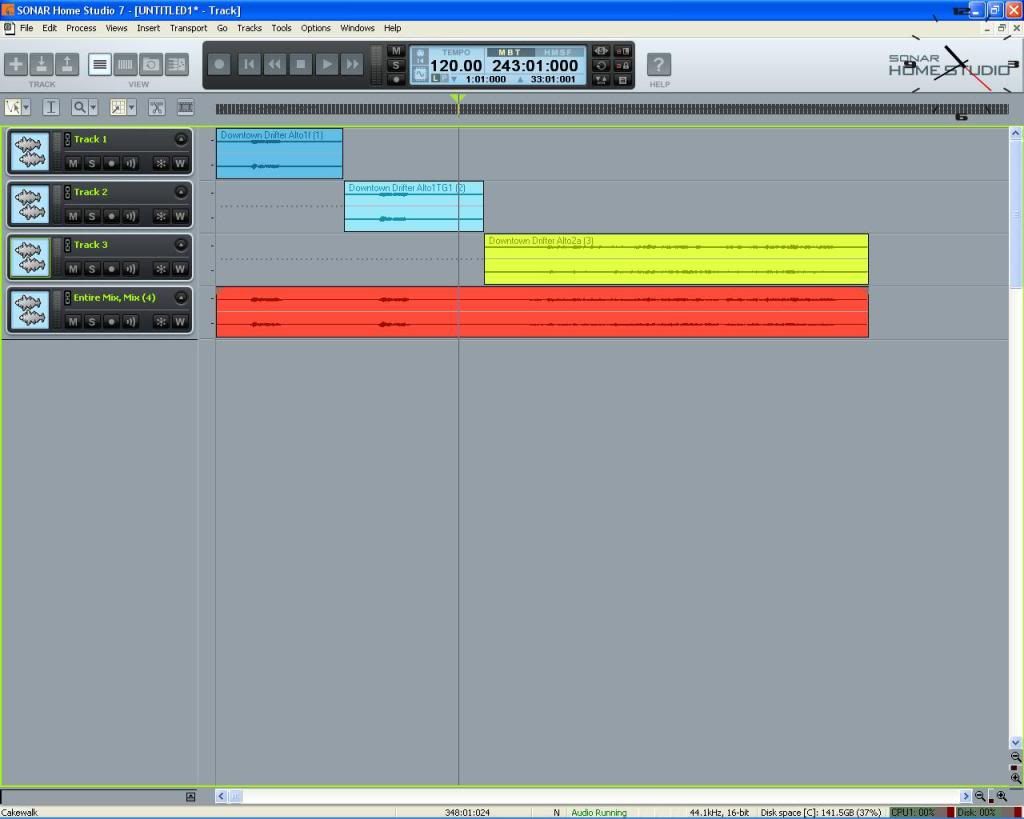
post edited by malcolmb - 2012/09/30 07:24:32
|
bobernaut
Max Output Level: -88 dBFS
- Total Posts : 106
- Joined: 2010/06/18 14:56:24
- Status: offline
Re:Mastering question for you all, help please
2012/10/01 04:00:49
(permalink)
Wow, I don't know where to start Malcolb-to thank you that is! You are on my credits page for the album for sure-that's a done deal. If I can somehow assist you sometime (doubt it though, unless you need a shredder (guitar)), please let me know.
Anyway, thank you for still being out there and answering questions for me.
You are correct in your assumption that I imported that way. This is one of those things that a person just wants done, but, it must be done correctly, at least in my book. With what you have told me, including the free quick trick-which I will certainly attempt to do, I will now be able to get this thing done (hope and pray).
I really can't thank your efforts enough in creating the picture for dummies like me. I know that takes alot of extra effort that most people just won't do for free. Maybe, just maybe, with the picture and advice, I will pull this off.
It will take a day or two for me to try this and then I'll get back with you, I hope, might try your email if that's alright. I know I will have at least one more question pertaining to the "splicing" that you mentioned in your first answer.
Nothing more I can say for now, except, once again, thank you so much!
bob
|
malcolmb
Max Output Level: -76 dBFS
- Total Posts : 713
- Joined: 2008/06/11 14:43:05
- Location: Isle of Wight - England
- Status: offline
Re:Mastering question for you all, help please
2012/10/01 04:14:54
(permalink)
Hi Bob - My pleasure. Please go ahead and email me with further questions. Best Wishes, Malcolm.
|
bobernaut
Max Output Level: -88 dBFS
- Total Posts : 106
- Joined: 2010/06/18 14:56:24
- Status: offline
Re:Mastering question for you all, help please
2012/10/05 15:08:45
(permalink)
That I am certain to do. Again, many thanks!
|
daveny5
Max Output Level: 0 dBFS

- Total Posts : 16934
- Joined: 2003/11/06 09:54:36
- Location: North Carolina
- Status: offline
Re:Mastering question for you all, help please
2012/10/05 18:03:02
(permalink)
You don't want them all in one file. A CD has to be indexed so it needs to be made of separate files that can be played sequentially or randomly. Sonar is not the best tool for this. Get Cakewalk pyro Audio Creator or Sony CD Architect to create your master.
Dave Computer: Intel i7, ASROCK H170M, 16GB/5TB+, Windows 10 Pro 64-bit, Sonar Platinum, TASCAM US-16x08, Cakewalk UM-3G MIDI I/F Instruments: SL-880 Keyboard controller, Korg 05R/W, Korg N1R, KORG Wavestation EX Axes: Fender Stratocaster, Line6 Variax 300, Ovation Acoustic, Takamine Nylon Acoustic, Behringer GX212 amp, Shure SM-58 mic, Rode NT1 condenser mic. Outboard: Mackie 1402-VLZ mixer, TC Helicon VoiceLive 2, Digitech Vocalist WS EX, PODXTLive, various stompboxes and stuff. Controllers: Korg nanoKONTROL, Wacom Bamboo Touchpad
|
CJaysMusic
Max Output Level: 0 dBFS
- Total Posts : 30423
- Joined: 2006/10/28 01:51:41
- Location: Miami - Fort Lauderdale - Davie
- Status: offline
Re:Mastering question for you all, help please
2012/10/05 23:18:22
(permalink)
whole album in the same way, that is, EQ, limiting and compression Each song will need different Eq, compression and limiting settings to it. There are no one settings for all in mastering. Your ears will tell you what to use and what settings to set them to Cj
|
malcolmb
Max Output Level: -76 dBFS
- Total Posts : 713
- Joined: 2008/06/11 14:43:05
- Location: Isle of Wight - England
- Status: offline
Re:Mastering question for you all, help please
2012/10/06 04:24:48
(permalink)
Very much agree with Dave and Cj and this was why I recommended using 11 Audio tracks rather than one. Each track can then have EQ, Compression and limiting applied individually while being able to compare tracks one against the other. Once Bob is ready for the next stage of exporting and CD creation, my advice was then going to be to export each track individually rather than create a composite track (and thereby avoid the need to 'slice'). Also agree with Dave about Pyro and Architect. I use Architect and it is excellent - but of course it costs money and I actually find it easier and more effective to do much of my mastering within Home Studio. I then use Architect to apply the 'gloss'. As they say, "each to their own"!
|