Chris Grant
Max Output Level: -90 dBFS

- Total Posts : 18
- Joined: 2012/06/20 22:59:18
- Status: offline
Vocal Effects and general questions about Sonar LE
Hi everyone, I've been searching around on the net, youtube ect but there isn't a whole lot of info around about how to apply vocal effects, guitar effects ect for sonar LE. So I thought I may as well ask around here. So my first question is what are some nice vocal effects to use that come standard on Sonar LE? (keep in mind I only know how to select an effect but I don't really know how to manipulate it i.e. change it or how to use it) How do you apply a distortion, sort of like an electric guitar effect? I tried to use a compressor/gate for my voice but I didn't really sound much different when I applied (mainly due to me not knowing what I'm doing). Here is sample song of what I'm actually singing/playing guitar : http://soundcloud.com/chr...he-pie-man-chris-grant (also if you think of anything my voice/guitar effects wise please let me know) Cheers, Chris.
|
57Gregy
Max Output Level: 0 dBFS

- Total Posts : 14404
- Joined: 2004/05/31 17:04:17
- Location: Raleigh, North Carolina
- Status: offline

Re:Vocal Effects and general questions about Sonar LE
2012/09/18 01:20:44
(permalink)
When you right-click in an audio track's effects (FX) bin, what effects are listed?
|
Chris Grant
Max Output Level: -90 dBFS
- Total Posts : 18
- Joined: 2012/06/20 22:59:18
- Status: offline
Re:Vocal Effects and general questions about Sonar LE
2012/09/18 01:57:58
(permalink)
57Gregy
When you right-click in an audio track's effects (FX) bin, what effects are listed?
Here is an image of my FX: 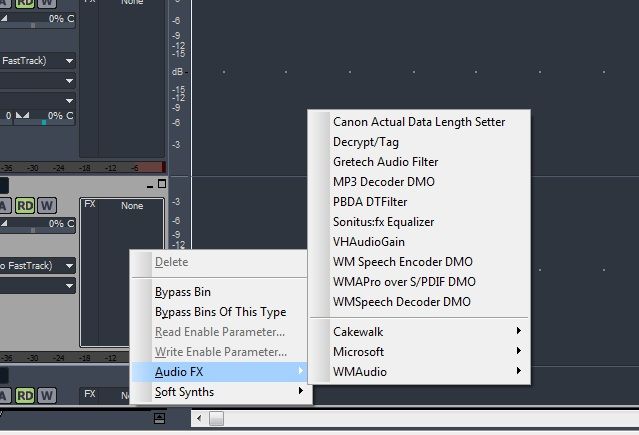 EDIT: I'm also having trouble when recording guitar, it has a little bit of delay (enough to warrant it being very annoying) I use the M-Audio Fast Track USB interface.
post edited by Chris Grant - 2012/09/18 04:52:32
|
Akito
Max Output Level: -90 dBFS
- Total Posts : 27
- Joined: 2012/09/12 10:29:29
- Status: offline
Re:Vocal Effects and general questions about Sonar LE
2012/09/18 11:17:48
(permalink)
Click on the "Cakewalk" tab and you'll find a vast number of useful effects for vocals, guitar, and more. Just click on the effect's name and adjust it to your liking. In addition, you can find a lot of useful VST effects on the internet.
|
57Gregy
Max Output Level: 0 dBFS
- Total Posts : 14404
- Joined: 2004/05/31 17:04:17
- Location: Raleigh, North Carolina
- Status: offline
Re:Vocal Effects and general questions about Sonar LE
2012/09/18 11:21:18
(permalink)
That list at the top are effects that were already on the computer and probably don't do anything, except the Sonitusfx Equalizer. That came with SONAR LE. You can probably remove the rest from the Cakewalk Plug-in Manager. The ones you'll use are in the Cakewalk folder. What's in there? Here is a very, very basic explanation of audio effects and what they do, but the best way to learn about them is to try them out. And check out the Cakewalk Techniques forum, too. http://en.wikipedia.org/wiki/Audio_effects
|
Chris Grant
Max Output Level: -90 dBFS
- Total Posts : 18
- Joined: 2012/06/20 22:59:18
- Status: offline
Re:Vocal Effects and general questions about Sonar LE
2012/09/18 11:25:09
(permalink)
Would anyone know why I have delay when recording using Sonar LE. I use an M-Audio I'll record a basic guitar track, then I'll record on another track trying to play in time with the first guitar, it sounds fine while recording but when I finished recording it's off. I've tried increasing the buffer size to faster but it didn't seem to improve it by much. Also I'm fairly certain this is sonar issue as I don't have this problem using Mixcraft 6.0. Chris.
|
Chris Grant
Max Output Level: -90 dBFS
- Total Posts : 18
- Joined: 2012/06/20 22:59:18
- Status: offline
Re:Vocal Effects and general questions about Sonar LE
2012/09/18 11:31:53
(permalink)
57Gregy
That list at the top are effects that were already on the computer and probably don't do anything, except the Sonitusfx Equalizer. That came with SONAR LE. You can probably remove the rest from the Cakewalk Plug-in Manager.
The ones you'll use are in the Cakewalk folder. What's in there?
Here is a very, very basic explanation of audio effects and what they do, but the best way to learn about them is to try them out. And check out the Cakewalk Techniques forum, too.
http://en.wikipedia.org/wiki/Audio_effects
Thanks for the help greg, all of this is stuff I didn't know so it's all very usefull, I'll have a look at that wiki. I'm on my macbook atm but I'll post back tomorrow with what FX I have in cakewalk. I find the interface very confusing though compared to using Garageband. I've also had far more problems with Sonar than GB but that could be due to the fact that I'm fairly amateur with sonar LE. Is it worth sticking it out with Sonar LE? Or do you think I should give something else a crack. I downloaded the trial for Mixcracft 6.0 today and it seemed to work a treat so I'll be seeing how it performed in comparison to Sonar LE 8.5
|
57Gregy
Max Output Level: 0 dBFS
- Total Posts : 14404
- Joined: 2004/05/31 17:04:17
- Location: Raleigh, North Carolina
- Status: offline
Re:Vocal Effects and general questions about Sonar LE
2012/09/18 11:33:08
(permalink)
The sampling rate and bit depth in SONAR and the M-Audio have to match. I believe SONAR defaults to 44,100 Hz @ 16-bit. Check the M-Audio's settings and make sure they are the same as SONAR. Or change SONAR's settings to match the Fast Track's.
Make sure you have the latest drivers for the Fast Track for your operating system. You can find those at the M-Audio web site.
Use the ASIO driver mode, too.
|
Chris Grant
Max Output Level: -90 dBFS
- Total Posts : 18
- Joined: 2012/06/20 22:59:18
- Status: offline
Re:Vocal Effects and general questions about Sonar LE
2012/09/18 11:42:28
(permalink)
Ok I"ll look into that,
I know ASIO Driver mode doesn't work for me as I already tried it.
It's currently on MME (32 bit I think).
I was starting to think I had to buy a new soundcard for my pc, but that was half the reason I bought the M-Audio fast track interface because I thought it didn't run off the soundcard?
Any way I'll try and match the settings if I find them.
Chris.
|
57Gregy
Max Output Level: 0 dBFS
- Total Posts : 14404
- Joined: 2004/05/31 17:04:17
- Location: Raleigh, North Carolina
- Status: offline
Re:Vocal Effects and general questions about Sonar LE
2012/09/18 12:10:43
(permalink)
In SONAR LE before X1 LE, you'll find the audio settings under Options>Audio.
In X1 LE, you'll find the same settings by clicking P (preferences) on the computer keyboard.
ASIO may not work now if you didn't download and install the latest driver updates. M-Audio's drivers are usually pretty good.
If you've ever used the generic ASIO4All driver, you need to remove that from the computer before installing M-Audio's ASIO driver.
MME is the oldest, slowest, least-efficient driver there is. You were using that when you had the USB mic? Sorry if I'm confusing you with someone else.
By the way, what's your operating system and is it a 32-bit or 64-bit OS?
I've never used anything but Cakewalk software, so I can't say whether something else is better or on par with SONAR. It works for me.
My music computer is running Windows XP SP 3 32-bit.
I've read here that SONAR is a little more complex to set up than other DAWs (Digital Audio Workstation) by others who have tried them.
You don't need another sound card; the Fast Track will be your new sound card once everything is sorted out.
|
Chris Grant
Max Output Level: -90 dBFS
- Total Posts : 18
- Joined: 2012/06/20 22:59:18
- Status: offline
Re:Vocal Effects and general questions about Sonar LE
2012/09/18 22:45:50
(permalink)
Will the mixing latency have an effect on how delayed my guitar recording will be? I downloaded the latest drivers from m-audio but the ASIO driver mode still didn't work. M-Audio reccommended I work in 44.1KHZ and 24bit. I applied these settings but I still notice a delay. What settings should my mixing latency be on? Whats should my settins be for the amount of buffers in playback que, and what buffer size? Cheers, Chris. EDIT: Got ASIO working! I just hadn't selected the right drivers after selecting ASIO mode. I'm using Windows 7 64bit to answer your last question.
post edited by Chris Grant - 2012/09/18 22:48:26
|
Chris Grant
Max Output Level: -90 dBFS
- Total Posts : 18
- Joined: 2012/06/20 22:59:18
- Status: offline
Re:Vocal Effects and general questions about Sonar LE
2012/09/19 05:33:12
(permalink)
I'm having problems with when using ASIO the driver again.
Is the fast track meant ot be able to use the ASIO drivers?
Evertime I use it it will not play sound or record properly it seems to work ok using the MME driver mode but I still notice delay.
I have the most updated drivers for the M-Audio Fast track interface I'm using.
Anyone have any ideas?
I'm using my the interface as the system default for all sound for playback ect.
Chris.
|
57Gregy
Max Output Level: 0 dBFS
- Total Posts : 14404
- Joined: 2004/05/31 17:04:17
- Location: Raleigh, North Carolina
- Status: offline
Re:Vocal Effects and general questions about Sonar LE
2012/09/19 10:26:51
(permalink)
Yes, it's supposed to work with ASIO.
Can you post screen shots of your Options>Audio dialog boxes? I'd like to see what everything is set to.
|
Kalle Rantaaho
Max Output Level: -5 dBFS

- Total Posts : 7005
- Joined: 2006/01/09 13:07:59
- Location: Finland
- Status: offline
Re:Vocal Effects and general questions about Sonar LE
2012/09/19 10:44:01
(permalink)
Chris Grant:
EDIT: Got ASIO working! I just hadn't selected the right drivers after selecting ASIO mode.
I'm using Windows 7 64bit to answer your last question.
ASIO is the driver, so what drivers had you not selected? Oh, you must mean the in/out drivers box? You have Fast Track as the system default (that means in Windows?), but is it also selected as the record and playback timing master in SONAR?
The fact that it's working in MME makes me suspect another soundcard (the integrated one?) is active, because ASIO only suppports one soundcard at a time.
SONAR PE 8.5.3, Asus P5B, 2,4 Ghz Dual Core, 4 Gb RAM, GF 7300, EMU 1820, Bluetube Pre - Kontakt4, Ozone, Addictive Drums, PSP Mixpack2, Melda Creative Pack, Melodyne Plugin etc. The benefit of being a middle aged amateur is the low number of years of frustration ahead of you.
|
Chris Grant
Max Output Level: -90 dBFS
- Total Posts : 18
- Joined: 2012/06/20 22:59:18
- Status: offline
Re:Vocal Effects and general questions about Sonar LE
2012/09/19 21:30:41
(permalink)
Greg here is two screen shots of my driver mode and my drivers. 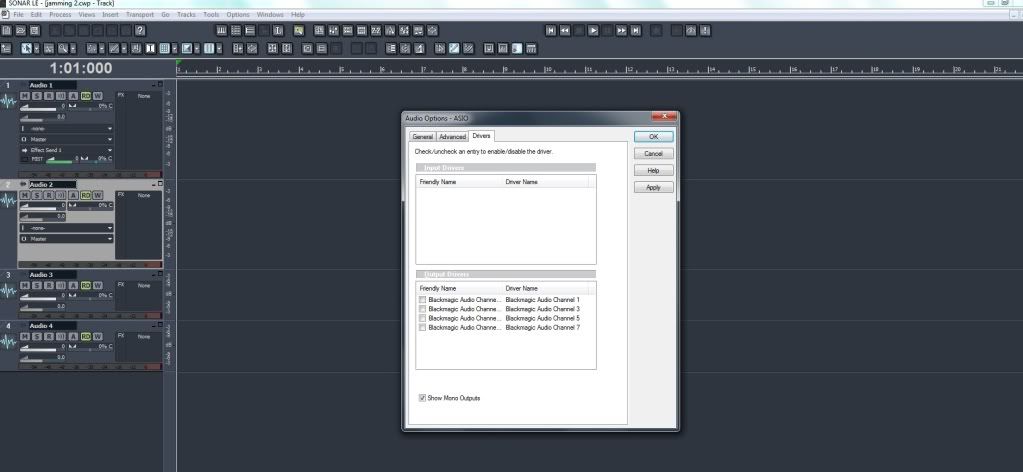 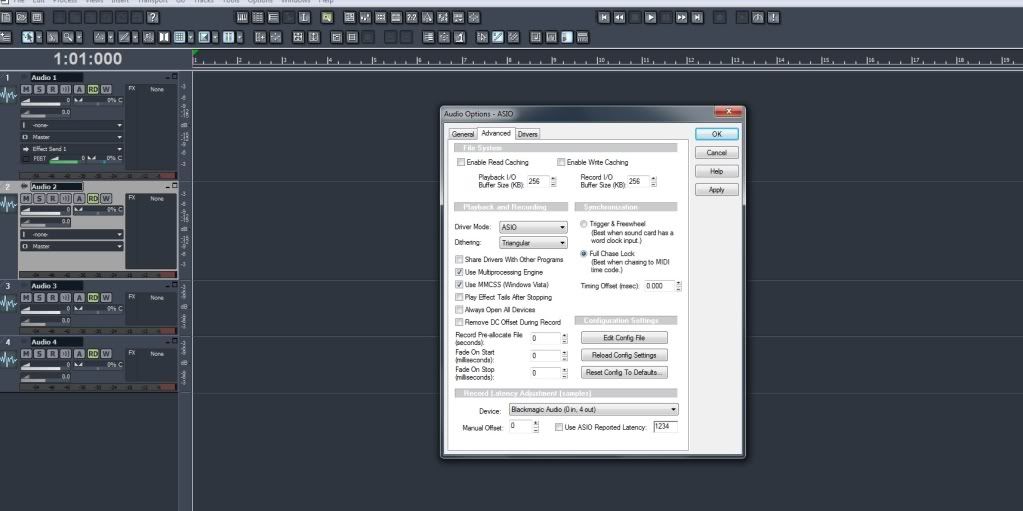 Asio will work ok for a little bit but then after I close LE and open it back up again it says the sample rate is not supported my usb interface. But I can't change it as you can see here. 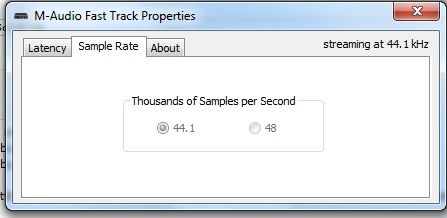 I also can't change it in Sonar LE either. It says this in Sonar LE when on Asio mode. 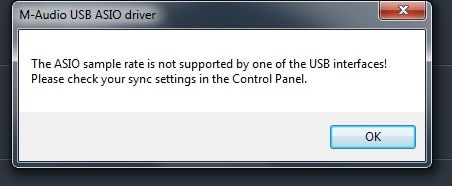
post edited by Chris Grant - 2012/09/19 21:35:38
|
Chris Grant
Max Output Level: -90 dBFS
- Total Posts : 18
- Joined: 2012/06/20 22:59:18
- Status: offline
Re:Vocal Effects and general questions about Sonar LE
2012/09/19 21:54:58
(permalink)
After a restart of my comp the asio driver is working at the moment. But it's most likely going to stop working again. One thing to note is when I change the volume in the main volume slider on windows 7 it doesn't change the volume of the playback in Sonar LE when on ASIO driver mode even though my M-audio is set to default playback device. But in MME when I change the volume in windows 7 it effects the volume in sonar LE. Will MME be ok to use? Asio doesn't seem to be working very well for a long period of time. EDIT: Apparantly you have to use your soundcard (on the pc) as the default playback device otherwise ASIO will stop working in the recording program. http://forums.m-audio.com/showthread.php?21810-ASIO-Drivers-for-Fast-Track-Pro That makes sense as I have my default playback device as m-audio fast track. I guess it means I can't use the internet or other applications to play along to and record though which sucks.
post edited by Chris Grant - 2012/09/19 22:11:03
|
57Gregy
Max Output Level: 0 dBFS
- Total Posts : 14404
- Joined: 2004/05/31 17:04:17
- Location: Raleigh, North Carolina
- Status: offline
Re:Vocal Effects and general questions about Sonar LE
2012/09/19 22:15:48
(permalink)
What is "Blackmagic Audio"? MME works fine, as long as you don't mind the huge delay while recording. And don't have a lot of tracks playing. Or have several soft synths and/or audio effects running at once. 
|
Chris Grant
Max Output Level: -90 dBFS
- Total Posts : 18
- Joined: 2012/06/20 22:59:18
- Status: offline
Re:Vocal Effects and general questions about Sonar LE
2012/09/19 22:23:04
(permalink)
57Gregy
What is "Blackmagic Audio"?
MME works fine, as long as you don't mind the huge delay while recording. And don't have a lot of tracks playing. Or have several soft synths and/or audio effects running at once.
Blackmagic audio is a capture card I don't use that. Yeah I really hate the delay on MME haha. I have the ASIO working but it is a tad annoying how I can't use other applications at the same time itunes ect to play and record at the same time.
|
57Gregy
Max Output Level: 0 dBFS
- Total Posts : 14404
- Joined: 2004/05/31 17:04:17
- Location: Raleigh, North Carolina
- Status: offline
Re:Vocal Effects and general questions about Sonar LE
2012/09/19 22:31:17
(permalink)
Chris Grant
57Gregy
What is "Blackmagic Audio"?
MME works fine, as long as you don't mind the huge delay while recording. And don't have a lot of tracks playing. Or have several soft synths and/or audio effects running at once.
Blackmagic audio is a capture card I don't use that.
Yeah I really hate the delay on MME haha.
I have the ASIO working but it is a tad annoying how I can't use other applications at the same time itunes ect to play and record at the same time.
Well, since it's showing up in your Driver Output list, you are using that. Apparently it uses ASIO drivers, too, and is messing up your system. Have you ever run the Wave Profiler? It should have run the first time you opened SONAR. If everything is connected and on, it should have picked up the Fast Track. I don't even see it on the list, and there are no input drivers at all. In Options>Audio, what is listed and selected for Recording Timing Master and Playback Timing Master?
|
Chris Grant
Max Output Level: -90 dBFS
- Total Posts : 18
- Joined: 2012/06/20 22:59:18
- Status: offline
Re:Vocal Effects and general questions about Sonar LE
2012/09/19 22:45:17
(permalink)
57Gregy
Chris Grant
57Gregy
What is "Blackmagic Audio"?
MME works fine, as long as you don't mind the huge delay while recording. And don't have a lot of tracks playing. Or have several soft synths and/or audio effects running at once.
Blackmagic audio is a capture card I don't use that.
Yeah I really hate the delay on MME haha.
I have the ASIO working but it is a tad annoying how I can't use other applications at the same time itunes ect to play and record at the same time.
Well, since it's showing up in your Driver Output list, you are using that. Apparently it uses ASIO drivers, too, and is messing up your system.
Have you ever run the Wave Profiler? It should have run the first time you opened SONAR. If everything is connected and on, it should have picked up the Fast Track. I don't even see it on the list, and there are no input drivers at all.
In Options>Audio, what is listed and selected for Recording Timing Master and Playback Timing Master?
Yeah I've run the wave profiler before it's not showing it on the list because I had the m-audio set to default playback device on w7 which messed up all the settings after a restart and assigning my comp sound card as default playback device the drivers in sonar are showing up agian. See here 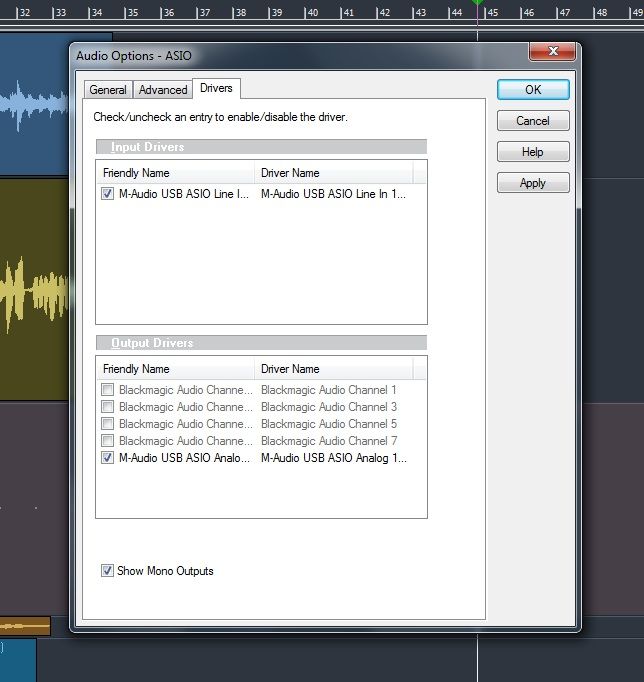 Is this latency time good? 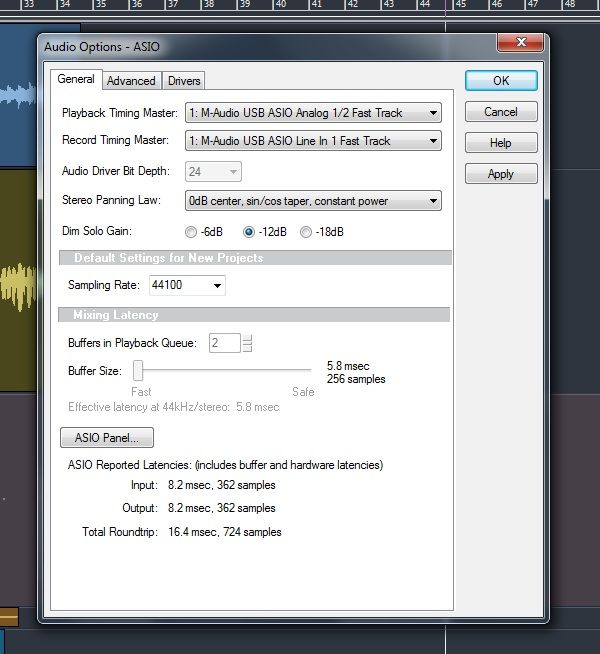
|
57Gregy
Max Output Level: 0 dBFS
- Total Posts : 14404
- Joined: 2004/05/31 17:04:17
- Location: Raleigh, North Carolina
- Status: offline
Re:Vocal Effects and general questions about Sonar LE
2012/09/19 23:18:37
(permalink)
Roundtrip latency of 16.4 ms is okay. You probably won't hear any delay. I'm pretty sure I couldn't hear it.
You may be able to use WDM or WASAPI Driver Mode and get acceptable performance, if they're available. You'll be able to use 2 devices in WDM... not sure about WASAPI.
|