funnyjim
Max Output Level: -90 dBFS

- Total Posts : 27
- Joined: 2005/09/26 12:00:56
- Status: offline
Alesis Nanopiano
Dear everyone,
I'd appreciate tips on how to access my Alesis Nanopiano sounds in Sonar Cakewalk Home Studio 4 XL. I currently have one midi lead connected from my Alesis module to my Behringer soundcard, which enables my master piano keyboard in the DAW, but I don't know how to call up the Alesis to use its superior sounds (should I refer to it as a soft synth, or maybe a plugin?)
Any help appreciated,
Jim
funnyjim Dell 2.10 Ghz 1 Gb RAM XP Home Edition Sonar HS4XL Behringer B-Control Audio BCA2000 Cheetah Masterseries 7P Alesis NanoPiano
|
57Gregy
Max Output Level: 0 dBFS

- Total Posts : 14404
- Joined: 2004/05/31 17:04:17
- Location: Raleigh, North Carolina
- Status: offline

Re:Alesis Nanopiano
2012/09/26 11:03:42
(permalink)
You'll have to plug the Alesis's audio outputs into your sound card's audio inputs and record the sounds that way.
You MIDI track will play through the Alesis with whatever patch you select on the Alesis, and that sound will then be recorded into SONAR on an audio track.
If SHS 4 supports Instrument Definitions and if you can find an ID for the Nanopiano and load it into SONAR, you will then be able to select the patches in SONAR.
|
funnyjim
Max Output Level: -90 dBFS
- Total Posts : 27
- Joined: 2005/09/26 12:00:56
- Status: offline
Re:Alesis Nanopiano
2012/09/26 12:11:20
(permalink)
Hi Greg,
Thanks for your advice. I'm not sure if you statement 'Alesis's audio outputs into your sound card's audio inputs' refers to the jack/mic inputs and outputs; this suggests a live recording of the Alesis sounds. Or am I talking out of my end?
I'll attempt to find an ID for the Nanopiano online as suggested. I'll let you kow how it goes.
Cheers
Jim
funnyjim Dell 2.10 Ghz 1 Gb RAM XP Home Edition Sonar HS4XL Behringer B-Control Audio BCA2000 Cheetah Masterseries 7P Alesis NanoPiano
|
funnyjim
Max Output Level: -90 dBFS
- Total Posts : 27
- Joined: 2005/09/26 12:00:56
- Status: offline
Re:Alesis Nanopiano
2012/09/26 16:34:09
(permalink)
Hi,
I've managed to download an Instrument Definition and assign it to an output, designate a track but now I can't hear anything in that track (previously an Edirol piano recording). I'm assuming I can use it like a DXi, but I'm not sure what combination of channel and midi options I should take. I've tried lots to no avail. Any further help here would be much appreciated.
Jim
funnyjim Dell 2.10 Ghz 1 Gb RAM XP Home Edition Sonar HS4XL Behringer B-Control Audio BCA2000 Cheetah Masterseries 7P Alesis NanoPiano
|
57Gregy
Max Output Level: 0 dBFS
- Total Posts : 14404
- Joined: 2004/05/31 17:04:17
- Location: Raleigh, North Carolina
- Status: offline
Re:Alesis Nanopiano
2012/09/26 21:29:30
(permalink)
funnyjim
Hi Greg,
Thanks for your advice. I'm not sure if you statement 'Alesis's audio outputs into your sound card's audio inputs' refers to the jack/mic inputs and outputs; this suggests a live recording of the Alesis sounds. Or am I talking out of my end?
I'll attempt to find an ID for the Nanopiano online as suggested. I'll let you kow how it goes.
Cheers
Jim
No, you're not talking out of your end  . If you want to use the nanopiano's sounds, they'll have to be recorded live while the MIDI plays through it. Hopefully, your SHS 4 isn't too different from my SHS 6. Let me take a look at how to get an ID entered. It's been a long time since I've done it...
|
57Gregy
Max Output Level: 0 dBFS
- Total Posts : 14404
- Joined: 2004/05/31 17:04:17
- Location: Raleigh, North Carolina
- Status: offline
Re:Alesis Nanopiano
2012/09/26 22:44:22
(permalink)
Okay. Open SONAR.
Click Options>Instruments.
Click the Define button.
Click the Import button.
Navigate to the location of the Alesis ID on the hard drive and double-click it.
You'll then get a window to select the ID from a list.
Once that's done, select the channel(s) you want to associate the ID to in Options>Instruments.
Hope that works.
|
RobertB
Max Output Level: 0 dBFS
- Total Posts : 11256
- Joined: 2005/11/19 23:40:50
- Location: Fort Worth, Texas
- Status: offline
Re:Alesis Nanopiano
2012/09/26 23:58:57
(permalink)
It looks like Greg made some headway on the ID side of things.
Let's look at your signal routing.
I have found precious little information on the Cheetah, but I assume it has a standard MIDI DIN output.
You will need two MIDI cables.
The first will go from the MIDI OUT of the Cheetah to the MIDI IN of the B-Control.
The second will go from MIDI OUT A of the B-Control to the MIDI IN of the Nanopiano.
In SHS4, go to Options>MIDI Devices, and make sure all of the B-Control MIDI I/O ports are selected.
Also in Options>Audio select the B-Control Line In as an Input.
I'm not entirely sure how these will appear in the menu, but they should be fairly obvious.
You will also need two 1/4" T/S cables(ie. instrument cables).
Connect the Left/Right Outputs of the Nano to the Line In L/R of the B-Control.
In SHS4, insert an Audio track, and a MIDI track.
In the MIDI track:
Set the Input to the B-Control MIDI IN port.
Select OMNI or the channel the Cheetah is transmitting on.
Set the Output to MIDI OUT A.
Match the output channel to the channel the Nanopiano is set to receive on.
In the Audio track:
Set the Input to the B-Control Line In
Set the Output to your soundcard, or preferably your Master Bus.
To hear what you are playing, turn on Input Echo.
To record the nanopiano audio output, arm the track, and hit Record.
Here's the good part.
You record your actual performance to the MIDI track, just as you would with a soft synth.
You can edit this track at will.
Once you are satisfied with it, you can record the nanopiano output to audio.
Softsynths do exactly the same thing, but because the connections are virtual, and inside the program, they may be less apparent.
I hope that all makes sense.
It's really just a matter of completing the signal path.
My Soundclick Page SONAR Professional, X3eStudio,W7 64bit, AMD Athlon IIx4 2.8Ghz, 4GB RAM, 64bit, AKAI EIE Pro, Nektar Impact LX61,Alesis DM6,Alesis ControlPad,Yamaha MG10/2,Alesis M1Mk2 monitors,Samson Servo300,assorted guitars,Lava Lamp Shimozu-Kushiari or Bob
|
funnyjim
Max Output Level: -90 dBFS
- Total Posts : 27
- Joined: 2005/09/26 12:00:56
- Status: offline
Re:Alesis Nanopiano
2012/09/29 07:49:03
(permalink)
Hi RobertB and Greg,
Thanks so much for your help with this. I've entered the ID and worked through the routing, and I believe I've assigned input and output correctly. I can hear the nanopiano sounds when I assign them to a previously recorded midi track - Hurrah! - but I can also hear piano simultaneously under the sounds I've chosen, i.e. strings or organ for example. Boo! The same problem occurs when I record a new midi performance track and then record the nanopiano output to audio.
I also have a return of latency problems. I overcame this in the past by routing my master keyboard audio output (jack leads) into an amp and simply turning it up sufficient to drown out the latent midi reproduction of my performance; I can't do this now as I've used all the audio outputs in connecting the nanopiano to the B-control. One solution would be to return all cabling to my original set up, record the track and then re route them again to access the nanopiano, but this seems very manual.
Any further help with these issues would be most excellent.
Regards,
Jim
funnyjim Dell 2.10 Ghz 1 Gb RAM XP Home Edition Sonar HS4XL Behringer B-Control Audio BCA2000 Cheetah Masterseries 7P Alesis NanoPiano
|
57Gregy
Max Output Level: 0 dBFS
- Total Posts : 14404
- Joined: 2004/05/31 17:04:17
- Location: Raleigh, North Carolina
- Status: offline
Re:Alesis Nanopiano
2012/09/29 10:08:54
(permalink)
I can also hear piano simultaneously under the sounds I've chosen, Make sure each track that's playing through the NP are using different channels. Piano is the default patch. Also, you may have the 'Always Echo Current MIDI Track' box checked under Options>Global. I usually don't have the piano plugged into the interface. I have a small mixer it's connected to, the interface outputs too, so I can hear the MIDI and everything else while recording. If I decide to use my keyboard's sounds instead of a soft synth, I'll plug it into the interface to record it's audio. Check your Behringer's control panel/preferences to see if you can lower the latency.
|
funnyjim
Max Output Level: -90 dBFS
- Total Posts : 27
- Joined: 2005/09/26 12:00:56
- Status: offline
Re:Alesis Nanopiano
2012/10/02 05:18:43
(permalink)
Hi Greg and Robert
Please forgive my ignorance and palpably low IQ. I’m having difficulty matching your terminology with what I see in the dialogue boxes in Sonar HS4. Here’s what I’ve done so far
Re MIDI
‘OUTPUT to MIDI OUT A’ – I’ve assumed that this refers to B- Control 1 (I’m given two options, B- Control 1 and B- Control 2)
‘Match the output channel to the channel the Nanopiano is set to receive on’ - I don’t understand this. Is the ‘output channel’ simply the MIDI Channel, i.e. termed ‘1: nanopiano’ in Sonar HS4?
I assume that now I assign preferences for Bank (i.e. Bank 1: sounds 0-127 in the Nanopiano and Bank 2: sounds 128 - 256 in the Nanopiano) and Patch (the specific sound within these Banks).
Re AUDIO
‘Set the Input to the B-Control Line In’ – I’m offered one option: B - Control ASIO (4in, 4out) and I opt for stereo B-Control 1.
‘Set the Output to your soundcard, or preferably your Master Bus.’ – I’ve opted for Master.
‘turn on Input Echo. To record the Nanopiano audio output, arm the track, and hit Record.’ – I’ve done this.
OPTIONS
‘In SHS4, go to Options>MIDI Devices and make sure all of the B-Control MIDI I/O ports are selected’ – in INPUTS I have one B-Control device selected, in OUTPUTS, two B-Control devices (1 and 2)
‘Also in Options>Audio select the B-Control Line In as an Input.’ In AUDIO OPTIONS – ASIO > DRIVERS I have selected all available B-Control INPUT and OUTPUT drivers (4 in each).
OPTIONS > ASSIGN INSTRUMENTS
OUTPUT/CHANNEL
‘Make sure each track that's playing through the NP are using different channels’ - In this category I’m offered ‘OUTPUT 1:B-Control/ Ch 1 to Ch 16’ and ‘OUTPUT 2:B-Control Ch 1 to Ch16’. - Should I hightlight ‘OUTPUT 1:B-Control/ Ch 1 or more or all 16 channels?
‘USES INSTRUMENT’
I’m offered a selection, including NanoPiano. I obviously choose NanoPiano.
GENERAL
‘you may have the 'Always Echo Current MIDI Track' box checked under Options>Global.’ – I have unchecked this box.
I hope this isn’t too longwinded and annoying. I’d be grateful if you guys could possibly tell me where I’m going wrong.
Regards,
Jim
funnyjim Dell 2.10 Ghz 1 Gb RAM XP Home Edition Sonar HS4XL Behringer B-Control Audio BCA2000 Cheetah Masterseries 7P Alesis NanoPiano
|
57Gregy
Max Output Level: 0 dBFS
- Total Posts : 14404
- Joined: 2004/05/31 17:04:17
- Location: Raleigh, North Carolina
- Status: offline
Re:Alesis Nanopiano
2012/10/04 14:37:05
(permalink)
Re MIDI ‘OUTPUT to MIDI OUT A’ – I’ve assumed that this refers to B- Control 1 (I’m given two options, B- Control 1 and B- Control 2) I'm assuming that the B-Control has more than one set of MIDI in/outs. Mine only has one. Select the one that your Nanopiano is connected to. 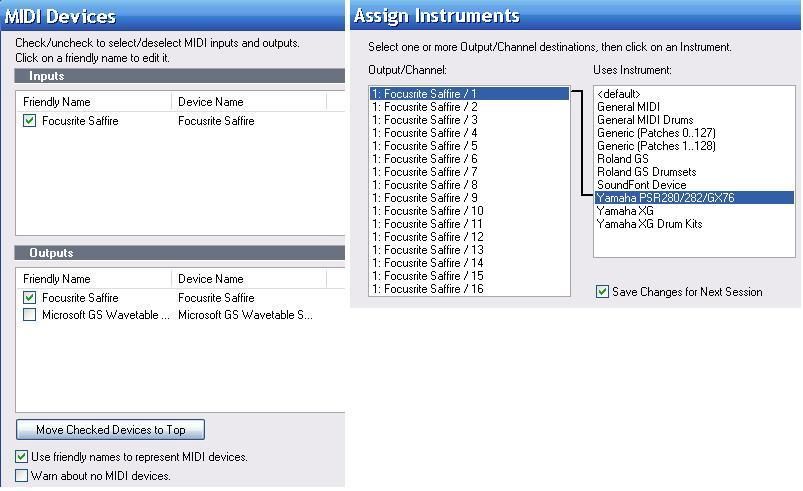 Match the output channel to the channel the Nanopiano is set to receive on - I don’t understand this. Match the output channel to the channel the Nanopiano is set to receive on - I don’t understand this.
Is the ‘output channel’ simply the MIDI Channel, i.e. termed ‘1: nanopiano’ in Sonar HS4?
I assume that now I assign preferences for Bank (i.e. Bank 1: sounds 0-127 in the Nanopiano and Bank 2:
sounds 128 - 256 in the Nanopiano) and Patch (the specific sound within these Banks).
I don't know about the 'matching the output channel to the channel the piano is set to recieve on' part. It may recieve on all channels; my Yamaha does. The output is what you send the MIDI to, of course. The channel selection is just below the output box. If you don't select different channels for each MIDI track going to the same output, the MIDI tracks will all play the same patch, regardless of what patch you choose. Most Instrument Definitions will have multiple banks containing multiple patches, while General MIDI (GM) has just one bank with 128 patches. #2 shows the input, my Saffire and MIDI Omni, which recieves from all channels. #3 shows my output, also the Saffire which is connected to my Yamaha keyboard, on channel 1 and the ID for the Yamaha, #5 and #6 the banks and patches for that bank. 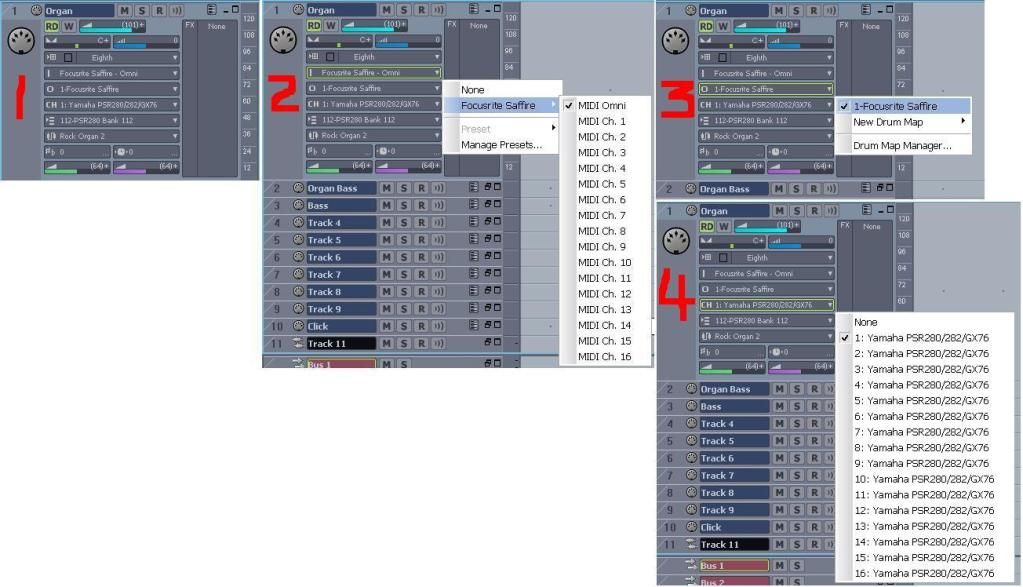 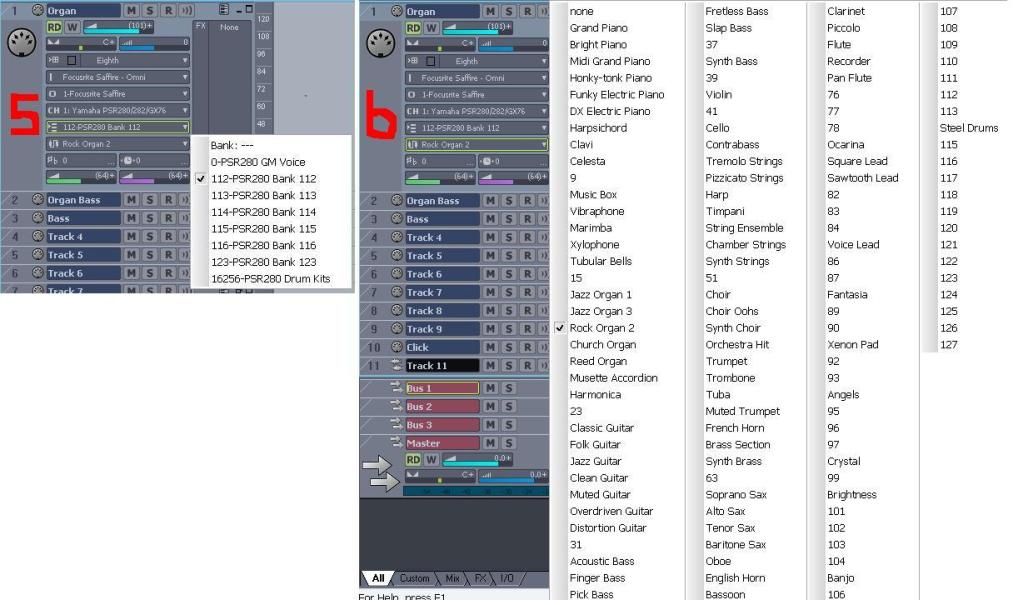 Re AUDIO Re AUDIO
Set the Input to the B-Control Line In – I’m offered one option: B - Control ASIO (4in, 4out) and I
opt for stereo B-Control 1.
That should work. Just make sure you plug the audio cables into that input on the B-Control.
Set the Output to your soundcard, or preferably your Master Bus. – I’ve opted for Master.
Yes, and make sure the Master's output is to a valid B-Control output. As you can see in the Drivers image below, I have 10 outputs available with the Saffire, but I only have 1 selected. Each of the 5 outputs is a stereo out, so 1 is 1 and 2, 3 is 3 and 4, etc. The last one, 9, is the S/PDIF digital output. I could potentially create a 7.1 surround sound mix.
OPTIONS
‘In SHS4, go to Options>MIDI Devices and make sure all of the B-Control MIDI I/O ports are selected’ –
in INPUTS I have one B-Control device selected, in OUTPUTS, two B-Control devices (1 and 2)
That should work. Hopefully, your Options menus will look something like these from SONAR Home Studio 6. I have all my MIDI channels assigned to the Yamaha ID.
Also in Options>Audio select the B-Control Line In as an Input.’ In AUDIO OPTIONS – ASIO > DRIVERS I
have selected all available B-Control INPUT and OUTPUT drivers (4 in each).
While it doesn't hurt to select ins and outs you may never use, it can add another level of selection you don't have to go through when recording or playing back the project. If some of your ins and outs are digital S/PDIF (for instance) and you don't have anything connected to your digital ports, having them on the list of possible choices could be confusing. I just select the ones that I use so the list isn't too long and to lessen the chance of misselecting an in or out, resulting in me thinking the program or audio interface broke and spending hours troubleshooting and cursing because nothing I do will fix it then posting a plea for help in the forums only to have someone write "check your in/out settings". 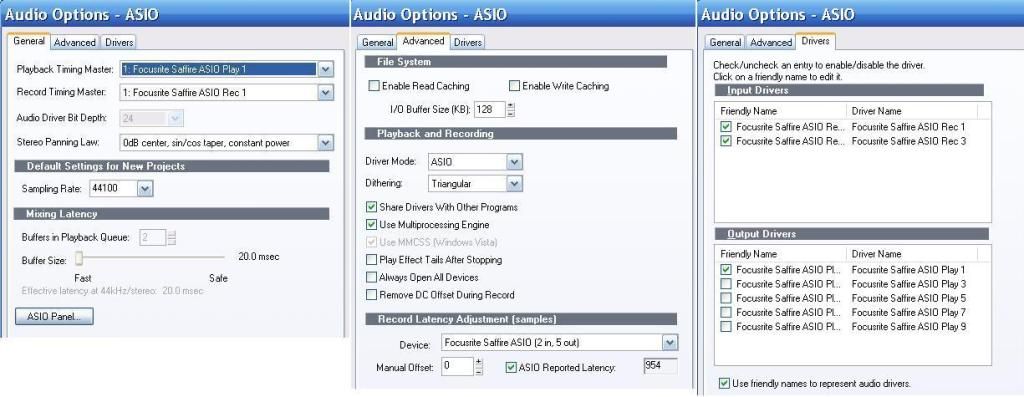
OPTIONS > ASSIGN INSTRUMENTS
OUTPUT/CHANNEL
Make sure each track that's playing through the NP are using different channels - In this category
I’m offered ‘OUTPUT 1:B-Control/ Ch 1 to Ch 16’ and ‘OUTPUT 2:B-Control Ch 1 to Ch16’. - Should I
hightlight ‘OUTPUT 1:B-Control/ Ch 1 or more or all 16 channels?
If you want to use the Instrument Definition on all channels, select them all. I would (did). If the B-Control Output 2 is another MIDI port and you later connect another MIDI keyboard/sound module, you can add that ID and select output 2 to use MIDI channels 1-16 for that keyboard. See the first image.
USES INSTRUMENT
I’m offered a selection, including NanoPiano. I obviously choose NanoPiano. Good. What other choices do you have? Microsoft GS Wavetable Synth and a bunch of devices you don't have? The MS GS synth is okay to learn MIDI on, but it doesn't sound too good. Your Nanopiano and most software synthesizers will sound much better.
|
funnyjim
Max Output Level: -90 dBFS
- Total Posts : 27
- Joined: 2005/09/26 12:00:56
- Status: offline
Re:Alesis Nanopiano
2012/10/05 02:18:48
(permalink)
Wow, thanks for this Greg. You've clearly put some time in to this. I'll work through it carefully and post results.
Cheers,
Jim
funnyjim Dell 2.10 Ghz 1 Gb RAM XP Home Edition Sonar HS4XL Behringer B-Control Audio BCA2000 Cheetah Masterseries 7P Alesis NanoPiano
|
RobertB
Max Output Level: 0 dBFS
- Total Posts : 11256
- Joined: 2005/11/19 23:40:50
- Location: Fort Worth, Texas
- Status: offline
Re:Alesis Nanopiano
2012/10/06 00:47:37
(permalink)
Nicely done, Greg.
Jim, keep us posted.
My Soundclick Page SONAR Professional, X3eStudio,W7 64bit, AMD Athlon IIx4 2.8Ghz, 4GB RAM, 64bit, AKAI EIE Pro, Nektar Impact LX61,Alesis DM6,Alesis ControlPad,Yamaha MG10/2,Alesis M1Mk2 monitors,Samson Servo300,assorted guitars,Lava Lamp Shimozu-Kushiari or Bob
|
funnyjim
Max Output Level: -90 dBFS
- Total Posts : 27
- Joined: 2005/09/26 12:00:56
- Status: offline
Re:Alesis Nanopiano
2012/10/09 07:35:37
(permalink)
Hi Greg.
I've following your instructions closely and set up as instructed, but still have peculiar issues. Re selecting different channels for each MIDI track going to the same output, I can only select and record one channel via SHS4XL commands. When I attempt further selections via SHS4XL commands on following tracks it simply records the first channel selection. I've managed to select two different channels for different sounds going to the same output successfully only by manually changing channels on the Alesis hardware. When I manually select the channel on the Alesis hardware I can execute two but when I try to add a third it's not happening; the third channel controls the second, so they play the same sound irrespective of my selection. Also, when a third channel is selected and a sound recorded, the solo buttons will only work on channel 2 when channel 3's solo controls are also selected, thus negating the solo capacity (i.e. it's a duo!)
I must be doing something right as I'm managing to record one track using the Alesis with the via SHS4XL, and two manually, but I'm clearly doing a lot wrong.
I wonder if my Cheetah 7P keyboard needs to be configured differently.? I currently have it set on 'Patch' and then key in patches 0 - 127. I have never managed to access 128 - 256 via the keyboard as the manual made my eyes bleed; I simply manually access those sounds via the Alesis hardware (making patch selection during gigs a bit of a nightmare).
Re your other queries:
The Master Output is to a valid B-Control output.
Other 'uses instrument' options are: default, General MIDI, General MIDI Drums, Generic Patches 0.. 127, Generic Patches 1.. 128' Roland GS, Roland GS Drumsets, SoundFont Device, Yamaha XG, Yamaha XG Drum Kits.
I'd appreciate any further help with this.
Regards,
Jim
funnyjim Dell 2.10 Ghz 1 Gb RAM XP Home Edition Sonar HS4XL Behringer B-Control Audio BCA2000 Cheetah Masterseries 7P Alesis NanoPiano
|
57Gregy
Max Output Level: 0 dBFS
- Total Posts : 14404
- Joined: 2004/05/31 17:04:17
- Location: Raleigh, North Carolina
- Status: offline
Re:Alesis Nanopiano
2012/10/09 14:02:31
(permalink)
As Bob wrote, finding info on the Cheetah isn't easy; most of the search results I get are for sale ads. Since you have the manual, I think you should keep applying cold compresses to the bleeding eyes and find out how to set it up. Not being a smart a...leck, but it looks like it's a problem with the keyboard's settings, and I can't find the manual. Have you tried using software synthesizers to see if the keyboard operates differently through those synths? Click Insert>Soft Synths at the top. If you have Edirol VSC, try that. It can recieve input from up to 16 MIDI channels. What other soft synths are available on the list? Anyway, insert a soft synth, set a MIDI track to record from the keyboard with it's output set to the synth, channels and patches set, the try to record multiple channels and see how they play back through the soft synth.
|
funnyjim
Max Output Level: -90 dBFS
- Total Posts : 27
- Joined: 2005/09/26 12:00:56
- Status: offline
Re:Alesis Nanopiano
2012/10/09 15:25:31
(permalink)
Hi Greg,
No, no, not the manual! It is written in evil computer code and it hurts. You'll find a copy in the Tower of London, next to The Rack. I will gird my loins and persist. Re other synths, I've used lots - Edirol, Dreamstation, RPX, Dyad and some others I can't spell, all with no issues.
I'll let you know what occurs. Thanks again for your help.
Regards,
Jim
funnyjim Dell 2.10 Ghz 1 Gb RAM XP Home Edition Sonar HS4XL Behringer B-Control Audio BCA2000 Cheetah Masterseries 7P Alesis NanoPiano
|
funnyjim
Max Output Level: -90 dBFS
- Total Posts : 27
- Joined: 2005/09/26 12:00:56
- Status: offline
Re:Alesis Nanopiano
2012/10/12 10:27:12
(permalink)
Hi Greg, Robert and all,
I've read the appropriate section of the Cheetah manual and followed commands to select channels and ports with no joy, probably due to the fact that I don't know what I'm doing.
I have, however, managed to record multiple sounds in SHS4 by hitting Record and then manually selecting the desired Patch on the Alesis hardware; I'm not switching the channel, but simply selecting a new Bank and Patch. I still have the MIDI piano sounds playing underneath but muting the MIDI track solves this problem. I am content to continue in this ham-fisted way as I've come to a dead end trying to perform this via the DAW, but if the above suggests an obvious mistake stopping the execution within SHS4 I would welcome further enlightenment. It's dark in here.
Meanwhile, thanks very much for your interest and help. Long live altruism!
Regards,
Jim
funnyjim Dell 2.10 Ghz 1 Gb RAM XP Home Edition Sonar HS4XL Behringer B-Control Audio BCA2000 Cheetah Masterseries 7P Alesis NanoPiano
|