John6528
Max Output Level: -82 dBFS

- Total Posts : 409
- Joined: 2008/01/19 10:45:28
- Status: offline
How load channel tools?
I have totally forgotten how to load a new plugin. I see it there and can drag it but then what> It asks all sorts of questions.
John
Sonar 8.5 64, Win 7 64 Asrock X58 Extreme3, I7-950, 12G ram OCZ Vertx3 120, Vertex2 90, WDM 1T Focusrite Saffire Yamaha P-70 Keyboard M-Audio Midisport Uno Miroslav Philharmonik , Nanosynth
|
digi2ns
Max Output Level: -48.5 dBFS

- Total Posts : 2694
- Joined: 2010/11/24 14:27:12
- Location: MICHIGAN
- Status: offline

Re:How load channel tools?
2012/10/16 22:17:05
(permalink)
So you right click in the FX bin, locate "Channel Tools" and select it and it asks you questions?
MIKE --Dell Studio XPS I7/870 2.93 Ghz, 8GB Mem, 2-2TB Barracuda HDs, 500 GB Ext.HDD, Win7/64 --X1 64 Pro Expanded, Dual 21" Monitors --PCR500 --MAUDIO FastTrack Ultra --Mackie 1604 VLZ PRO --Line6 X3 Live --Gibson, Fender, Takamine, Schecter, Washburn http://pogopoppa.wix.com/5thgear# http://soundcloud.com/digi2ns
|
John6528
Max Output Level: -82 dBFS
- Total Posts : 409
- Joined: 2008/01/19 10:45:28
- Status: offline
Re:How load channel tools?
2012/10/16 23:28:14
(permalink)
digi2ns
So you right click in the FX bin, locate "Channel Tools" and select it and it asks you questions?
I went to plug-in manager, found Channel Tools under VST Audio Effects and then am stuck. I Double clicked it and I think something happened but I don't know what. It is under registered plugins but where is it in the menus? I can get it's properties. If I click "add plugin" it moves it to a large open space. If I try to close then it asks to Save changes to current menu layout, "<Unnamed Layout>" It looks like I'm supposed to enter a menu layout? I don't know. So I quit.
John
Sonar 8.5 64, Win 7 64 Asrock X58 Extreme3, I7-950, 12G ram OCZ Vertx3 120, Vertex2 90, WDM 1T Focusrite Saffire Yamaha P-70 Keyboard M-Audio Midisport Uno Miroslav Philharmonik , Nanosynth
|
Kalle Rantaaho
Max Output Level: -5 dBFS

- Total Posts : 7005
- Joined: 2006/01/09 13:07:59
- Location: Finland
- Status: offline
Re:How load channel tools?
2012/10/17 04:26:27
(permalink)
You don't go to Plugin Manager in order to load a plugin, only to manage them. Loading is done the way Digi2ns describes: Right click in the FX bin.
SONAR PE 8.5.3, Asus P5B, 2,4 Ghz Dual Core, 4 Gb RAM, GF 7300, EMU 1820, Bluetube Pre - Kontakt4, Ozone, Addictive Drums, PSP Mixpack2, Melda Creative Pack, Melodyne Plugin etc. The benefit of being a middle aged amateur is the low number of years of frustration ahead of you.
|
Bristol_Jonesey
Max Output Level: 0 dBFS

- Total Posts : 16775
- Joined: 2007/10/08 15:41:17
- Location: Bristol, UK
- Status: offline
Re:How load channel tools?
2012/10/17 04:43:49
(permalink)
I'm confused.
You talk about loading a "new" plugin but your thread title refers to Channel Tools which isn't new.
Please clarify.
CbB, Platinum, 64 bit throughoutCustom built i7 3930, 32Gb RAM, 2 x 1Tb Internal HDD, 1 x 1TB system SSD (Win 7), 1 x 500Gb system SSD (Win 10), 2 x 1Tb External HDD's, Dual boot Win 7 & Win 10 64 Bit, Saffire Pro 26, ISA One, Adam P11A,
|
John6528
Max Output Level: -82 dBFS
- Total Posts : 409
- Joined: 2008/01/19 10:45:28
- Status: offline
Re:How load channel tools?
2012/10/17 13:16:34
(permalink)
I now realize I have never loaded a plugin. I have only inserted vsts's. Where is the Fx Bin?
John
Sonar 8.5 64, Win 7 64 Asrock X58 Extreme3, I7-950, 12G ram OCZ Vertx3 120, Vertex2 90, WDM 1T Focusrite Saffire Yamaha P-70 Keyboard M-Audio Midisport Uno Miroslav Philharmonik , Nanosynth
|
Kalle Rantaaho
Max Output Level: -5 dBFS
- Total Posts : 7005
- Joined: 2006/01/09 13:07:59
- Location: Finland
- Status: offline
Re:How load channel tools?
2012/10/17 14:49:50
(permalink)
John6528
I now realize I have never loaded a plugin. I have only inserted vsts's. Where is the Fx Bin?
John
Now you really confuse us! What's the difference between loading a plugin or inserting a VST? Or in other words, what does loading a plugin mean to you? Do you mean installing one, like installing any new software? Where's the FX bin??? If you don't know where it is, how and where have you inserted the VSTs? Or, by VSTs, do you mean soft synths and other instruments, VSTi's, that are inserted using the synth rack? We're really speaking different languages now.
SONAR PE 8.5.3, Asus P5B, 2,4 Ghz Dual Core, 4 Gb RAM, GF 7300, EMU 1820, Bluetube Pre - Kontakt4, Ozone, Addictive Drums, PSP Mixpack2, Melda Creative Pack, Melodyne Plugin etc. The benefit of being a middle aged amateur is the low number of years of frustration ahead of you.
|
Kev999
Max Output Level: -36 dBFS

- Total Posts : 3922
- Joined: 2007/05/01 14:22:54
- Location: Victoria, Australia
- Status: offline
Re:How load channel tools?
2012/10/17 15:24:36
(permalink)
SonarPlatinum∞(22.11.0.111)|Mixbus32C(4.3.19)|DigitalPerformer(9.5.1)|Reaper(5.77)FractalDesign:DefineR5|i7-6850k@4.1GHz|16GB@2666MHz-DDR4|MSI:GamingProCarbonX99a|Matrox:M9148(x2)|UAD2solo(6.5.2)|W7Ult-x64-SP1
Audient:iD22+ASP800|KRK:VXT6|+various-outboard-gear|+guitars&basses, etc.
Having fun at work lately
|
digi2ns
Max Output Level: -48.5 dBFS
- Total Posts : 2694
- Joined: 2010/11/24 14:27:12
- Location: MICHIGAN
- Status: offline
Re:How load channel tools?
2012/10/17 17:54:51
(permalink)
Heres a screen shot of Console View, (IGNORE the Red circled one-this was for a different posting) Just above the FADER module you see the darker grey box with the blue lettering in it? On top of this box it is labeled FX-This is the bin. If it is not visible on your console, Go to the upper tab marked "Modules", make sure everything you want to see has a check mark next to it. You can also do this from Track View Right click in the FX box, select the Audio and navigate to your Effect of choice and select it. It should drop it in the bin so you can do what you want with it 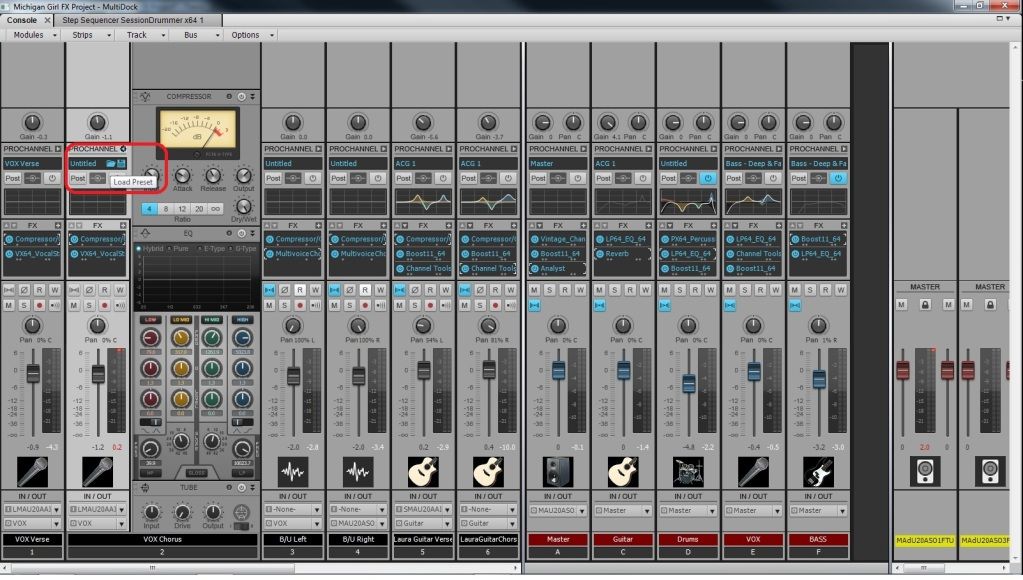
post edited by digi2ns - 2012/10/17 17:56:12
MIKE --Dell Studio XPS I7/870 2.93 Ghz, 8GB Mem, 2-2TB Barracuda HDs, 500 GB Ext.HDD, Win7/64 --X1 64 Pro Expanded, Dual 21" Monitors --PCR500 --MAUDIO FastTrack Ultra --Mackie 1604 VLZ PRO --Line6 X3 Live --Gibson, Fender, Takamine, Schecter, Washburn http://pogopoppa.wix.com/5thgear# http://soundcloud.com/digi2ns
|
John6528
Max Output Level: -82 dBFS
- Total Posts : 409
- Joined: 2008/01/19 10:45:28
- Status: offline
Re:How load channel tools?
2012/10/17 19:37:47
(permalink)
Up till now all I have ever done is use insert vst.
I have found the bin and popped up channel tools. Now I have no idea how to use it.
I want to insert pans in an audio track.
JOhn
Sonar 8.5 64, Win 7 64 Asrock X58 Extreme3, I7-950, 12G ram OCZ Vertx3 120, Vertex2 90, WDM 1T Focusrite Saffire Yamaha P-70 Keyboard M-Audio Midisport Uno Miroslav Philharmonik , Nanosynth
|
digi2ns
Max Output Level: -48.5 dBFS
- Total Posts : 2694
- Joined: 2010/11/24 14:27:12
- Location: MICHIGAN
- Status: offline
Re:How load channel tools?
2012/10/17 20:20:59
(permalink)
Channel tools is more of an enhancer.
You can have it raise and lower volumes of say the higher sides of the cymbols freqs to the sides or bring more of it to the middle.
Im not sure on what you are doing on this project.
How is it broke down into tracks (ie drums, guitars, vox, etc...) Why can you pan from each track or buss on each?
MIKE --Dell Studio XPS I7/870 2.93 Ghz, 8GB Mem, 2-2TB Barracuda HDs, 500 GB Ext.HDD, Win7/64 --X1 64 Pro Expanded, Dual 21" Monitors --PCR500 --MAUDIO FastTrack Ultra --Mackie 1604 VLZ PRO --Line6 X3 Live --Gibson, Fender, Takamine, Schecter, Washburn http://pogopoppa.wix.com/5thgear# http://soundcloud.com/digi2ns
|
Cactus Music
Max Output Level: 0 dBFS
- Total Posts : 8424
- Joined: 2004/02/09 21:34:04
- Status: offline
Re:How load channel tools?
2012/10/18 11:11:53
(permalink)
I agree with Mike, Channel tools is like it's name, some tools your can use, it's sort of like having a hot rod channel strip on a mixer. I found no use for it myself so far. I guess if you have only been using MIDI tracks and VST you would have never used the EFX bins which are for audio tracks. Best to add the EFX to the Bin of a buss.
|
John6528
Max Output Level: -82 dBFS
- Total Posts : 409
- Joined: 2008/01/19 10:45:28
- Status: offline
Re:How load channel tools?
2012/10/18 14:34:55
(permalink)
It is a stereo audio clip... a mellow pad sound. It is over a soft vocal choir... it is a meditation kind of piece. I want to give the pad sound more depth and presence by panning it back and forth. Right now I use Clip Envelope Pan. Seems to work ok but read in here somewhere that Channel Tools is better for stereo.
Also, I probably should learn how to use plugins some time.
JOhn
Sonar 8.5 64, Win 7 64 Asrock X58 Extreme3, I7-950, 12G ram OCZ Vertx3 120, Vertex2 90, WDM 1T Focusrite Saffire Yamaha P-70 Keyboard M-Audio Midisport Uno Miroslav Philharmonik , Nanosynth
|
Bristol_Jonesey
Max Output Level: 0 dBFS
- Total Posts : 16775
- Joined: 2007/10/08 15:41:17
- Location: Bristol, UK
- Status: offline
Re:How load channel tools?
2012/10/18 16:00:29
(permalink)
Qiote honestly, for that type of sound, I don't think panning it back & forth will give it the depth & presence you're looking for - now panning a sweeping filter might give you something to work with, and channel tools will work in this context but will have to be automated.
CbB, Platinum, 64 bit throughoutCustom built i7 3930, 32Gb RAM, 2 x 1Tb Internal HDD, 1 x 1TB system SSD (Win 7), 1 x 500Gb system SSD (Win 10), 2 x 1Tb External HDD's, Dual boot Win 7 & Win 10 64 Bit, Saffire Pro 26, ISA One, Adam P11A,
|
scook
Forum Host

- Total Posts : 24146
- Joined: 2005/07/27 13:43:57
- Location: TX
- Status: offline
Re:How load channel tools?
2012/10/18 16:06:14
(permalink)
Sounds like a job for the Sonitus Surround plugin
|