jld2112
Max Output Level: -90 dBFS

- Total Posts : 4
- Joined: 2012/10/20 17:43:01
- Status: offline
Something so simple
All my midi devices are showing up on the same input in sonar .... This is something that I have to change on each device or in sonar
|
John
Forum Host

- Total Posts : 30467
- Joined: 2003/11/06 11:53:17
- Status: offline

Re:Something so simple
2012/10/20 18:02:24
(permalink)
Could you explain this a bit more?
|
jld2112
Max Output Level: -90 dBFS
- Total Posts : 4
- Joined: 2012/10/20 17:43:01
- Status: offline
Re:Something so simple
2012/10/20 18:07:30
(permalink)
brand new setup here and really new to sonar ... got 3 midi (usb) devices ... Casio KB, Digitech rp150, and alesis DM8 ...
When I add a new track ... hope I'm using the correct term here ... I can hear/see all the devices on the same input. ... ie play KB and drums ... same input
Add a new midi track ... all on same input
|
Teds_Studio
Max Output Level: -75 dBFS

- Total Posts : 761
- Joined: 2011/12/21 01:00:42
- Location: AR
- Status: offline
Re:Something so simple
2012/10/20 18:11:58
(permalink)
You probably need to edit your Master INS file....you do this by editing your instrument definition in the MIDI section of Sonar preferences.
It sounds like Sonar is seeing all your instruments on the same midi channel.
ASRock X99 Extreme4 MB....Gigabyte GeForce GTX 960 4 GB DDR 5.....Intel i7 5820k 3.3 Ghz....Corsair RM850i power supply....3 Seagate 1TB SATA III drives....32 Gig G.Skill Ripjaws DDR4 3000.....Win 10 Pro.....Sonar X1 Producer Exp & X2, X3...Platinum....Superior Drummer 2 & 3 w/ N.Y. Vol 2 SDX.....Sony VEGAS Pro 11.0 32 & 64 bit Pro 12.....Sony VX2100.....Sony HVR-Z7U....Sony HDR-CX130....Alesis HD24....Behringer X32 console....Focusrite 18i20....JBL LSR2328P studio monitors with LSR2310P sub.
|
John
Forum Host
- Total Posts : 30467
- Joined: 2003/11/06 11:53:17
- Status: offline
Re:Something so simple
2012/10/20 18:13:55
(permalink)
You could have the MIDI track set to omni mode which will allow all input devices to go to that track.
Select the device for the input you wish. That is done on a track by track basis.
|
jld2112
Max Output Level: -90 dBFS
- Total Posts : 4
- Joined: 2012/10/20 17:43:01
- Status: offline
Re:Something so simple
2012/10/20 18:18:42
(permalink)
Where do I do that (I aploigze for asking some many questions ;) ... ) ... but the last time I recorded was on a tascam 4-track cassette player in the mid-80's
|
robert_e_bone
Moderator

- Total Posts : 8968
- Joined: 2007/12/26 22:09:28
- Location: Palatine, IL
- Status: offline
Re:Something so simple
2012/10/20 18:22:34
(permalink)
It could also be that he has the echo on for all three tracks.
Can you please tell me if the button to the right of the track name (echo on) is lit for all three tracks, or just one? (blue)
If you have that button lit for all the tracks, then you are telling Sonar you want to monitor the input - since in that case all 3 would be set and also presumably be set to midi omni, all three would play.
Normally, X2 would change the echo on to be on only for the selected midi track - the one in focus. Changing focus from one to the next midi track would change focus and then automatically de-select the echo on for the track you are leaving and set it on for the track who will now be coming into focus.
So, please review the above and advise,
Bob Bone
Wisdom is a giant accumulation of "DOH!" Sonar: Platinum (x64), X3 (x64) Audio Interfaces: AudioBox 1818VSL, Steinberg UR-22 Computers: 1) i7-2600 k, 32 GB RAM, Windows 8.1 Pro x64 & 2) AMD A-10 7850 32 GB RAM Windows 10 Pro x64 Soft Synths: NI Komplete 8 Ultimate, Arturia V Collection, many others MIDI Controllers: M-Audio Axiom Pro 61, Keystation 88es Settings: 24-Bit, Sample Rate 48k, ASIO Buffer Size 128, Total Round Trip Latency 9.7 ms
|
John
Forum Host
- Total Posts : 30467
- Joined: 2003/11/06 11:53:17
- Status: offline
Re:Something so simple
2012/10/20 18:28:05
(permalink)
Each track whether MIDI or audio has an input. If you have the track inspector open that is the channel strip to the left of the tracks pane you will see a widget drop down for input. That is where you set the input for each track. 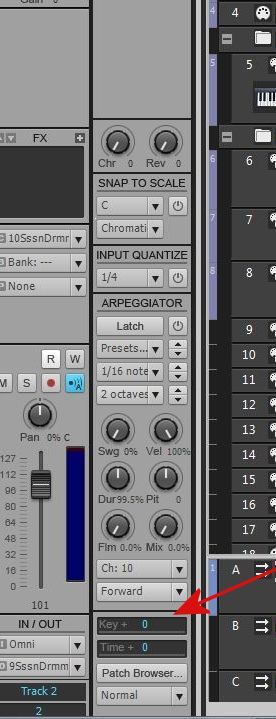 This is a picture of the track inspector from another post I did. Look to the left of the red arrow and there is the in and outs.
|
robert_e_bone
Moderator
- Total Posts : 8968
- Joined: 2007/12/26 22:09:28
- Location: Palatine, IL
- Status: offline
Re:Something so simple
2012/10/20 18:29:39
(permalink)
Jid2112, welcome to X2, and to this community.
Lots of us in the forum post our system specs at the bottom of our posts, so that others can see at a glance what our computer hardware and software environments are - it helps us to help each other when we know that. So, when you get a chance, edit your forum profile and add the system specs to your 'signature', and they will appear at the bottom of future posts from you. Thanks.
With regard to your situation, your post is a bit unclear. This is what you wrote: "All my midi devices are showing up on the same input in sonar .... This is something that I have to change on each device or in sonar"
Can you please list each type of track, and what the inputs and outputs are for each of those tracks? Also, tell me which Echo On buttons are lit (blue).
Thanks,
Bob Bone
Wisdom is a giant accumulation of "DOH!" Sonar: Platinum (x64), X3 (x64) Audio Interfaces: AudioBox 1818VSL, Steinberg UR-22 Computers: 1) i7-2600 k, 32 GB RAM, Windows 8.1 Pro x64 & 2) AMD A-10 7850 32 GB RAM Windows 10 Pro x64 Soft Synths: NI Komplete 8 Ultimate, Arturia V Collection, many others MIDI Controllers: M-Audio Axiom Pro 61, Keystation 88es Settings: 24-Bit, Sample Rate 48k, ASIO Buffer Size 128, Total Round Trip Latency 9.7 ms
|
jld2112
Max Output Level: -90 dBFS
- Total Posts : 4
- Joined: 2012/10/20 17:43:01
- Status: offline
Re:Something so simple
2012/10/20 18:29:40
(permalink)
Thanks guys !!!... I'll go in there and look at that
|
daveny5
Max Output Level: 0 dBFS

- Total Posts : 16934
- Joined: 2003/11/06 09:54:36
- Location: North Carolina
- Status: offline
Re:Something so simple
2012/10/21 13:40:25
(permalink)
Look at Preferences-MIDI Devices. You should see all three devices listed separately in the input and output columns (except perhaps the Digitech which is probably output only. EDIT: Actually the RP150 does not have MIDI. The USB is for the Editor/Librarian and for streaming audio (not sure how that will work with Sonar. Check your manual).
post edited by daveny5 - 2012/10/21 13:51:45
Dave Computer: Intel i7, ASROCK H170M, 16GB/5TB+, Windows 10 Pro 64-bit, Sonar Platinum, TASCAM US-16x08, Cakewalk UM-3G MIDI I/F Instruments: SL-880 Keyboard controller, Korg 05R/W, Korg N1R, KORG Wavestation EX Axes: Fender Stratocaster, Line6 Variax 300, Ovation Acoustic, Takamine Nylon Acoustic, Behringer GX212 amp, Shure SM-58 mic, Rode NT1 condenser mic. Outboard: Mackie 1402-VLZ mixer, TC Helicon VoiceLive 2, Digitech Vocalist WS EX, PODXTLive, various stompboxes and stuff. Controllers: Korg nanoKONTROL, Wacom Bamboo Touchpad
|