ChuckC
Max Output Level: -61 dBFS

- Total Posts : 1488
- Joined: 2010/02/13 01:22:55
- Location: Port Charlotte, Fl
- Status: offline

A couple things I NEED to figure out how to put back on my screen!!??
I do my recording (audio such as guitars, bass, vocals, etc) in track view. I hadn't noticed this before as last night was one of my 1st full sessions recording in X2 but.... Where are the controls for volume, input, panning in track view? I don't have them on my screen and it drives me crazy. I was double tracking guitars and looking to pan what I had recorded already to one side so I could hear any inconsistencies of the rhythm between the 2 takes, So I had to switch views to do it. what's up with that?
This takes me to my 2nd question:
My other guitarist was laying down leads (several takes) and I was naming them in the take lanes thinking this is great!! Now I can add names that help me remember why we kept each take such as-
Great intro
messed up ending
he like this one
smooth middle
Then, as I stated above I went to pan somethings around (having to switch to console view) and I come back to track view and all my track names are gone? Over and over again. I can enter them but they don't stay there. Is this a bug? Or is it just a feature that seems like a good idea but is not really executed right?
ADK Built DAW, W7, Sonar Platinum, Studio One Pro,Yamaha HS8's & HS8S Presonus Studio/Live 24.4.2, A few decent mic pre's, lots of mics, 57's,58 betas, Sm7b, LD Condensors, Small condensors, Senn 421's, DI's, Sans Amp, A few guitar amps etc. Guitars : Gib. LP, Epi. Lp, Dillion Tele, Ibanez beater, Ibanez Ergodyne 4 String bass, Mapex Mars series 6 pc. studio kit, cymbals and other sh*t. http://www.everythingiam.net/ http://www.stormroomstudios.com Some of my productions: http://soundcloud.com/stormroomstudios
|
Mystic38
Max Output Level: -59 dBFS

- Total Posts : 1622
- Joined: 2010/08/30 17:40:34
- Location: Mystic, CT
- Status: offline
Re:A couple things I NEED to figure out how to put back on my screen!!??
2012/10/24 08:10:45
(permalink)
in the track view control manager pull down menu (to the left of the ruler) select mix or all
post edited by Mystic38 - 2012/10/24 09:51:16
HPE-580T with i7-950, 8G, 1.5T, ATI6850, Win7/64, Motu 828 III Hybrid, Motu Midi Express, Sonar Platinum, Komplete 9, Ableton Live 9 & Push 2, Melodyne Editor and other stuff, KRK VXT8 Monitors Virus Ti2 Polar, Fantom G6, Yamaha S70XS, Novation Nova, Novation Nova II, Korg MS2000, Waldorf Micro Q, NI Maschine Studio, TC-VoiceLive Rack, 2012 Gibson Les Paul Standard, 2001 Gibson Les Paul DC, 1999 Fender Am Hardtail Strat, Fender Blues Jr, Orange TH30/PPC212, Tak EF360GF, one mic, no talent.
|
Bristol_Jonesey
Max Output Level: 0 dBFS

- Total Posts : 16775
- Joined: 2007/10/08 15:41:17
- Location: Bristol, UK
- Status: offline
Re:A couple things I NEED to figure out how to put back on my screen!!??
2012/10/24 08:14:20
(permalink)
All these controls are accessed either via the Track Header or the Inspector You might want to switch the Widget Manager control to "All " in order to see them all, and press "I" to access the Inspector 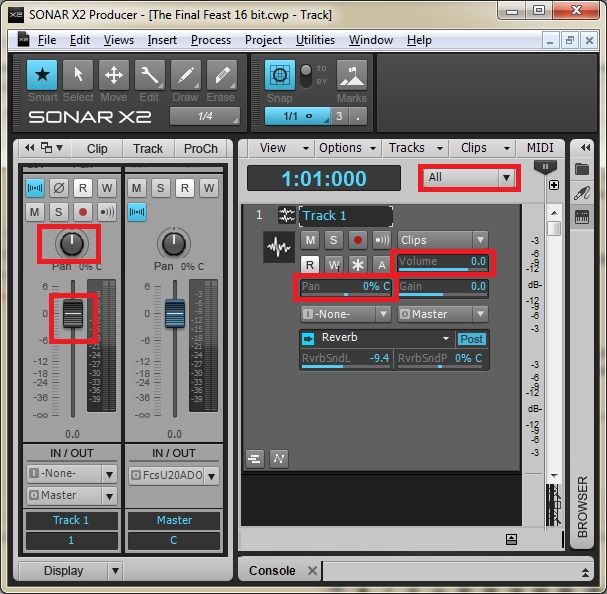
CbB, Platinum, 64 bit throughoutCustom built i7 3930, 32Gb RAM, 2 x 1Tb Internal HDD, 1 x 1TB system SSD (Win 7), 1 x 500Gb system SSD (Win 10), 2 x 1Tb External HDD's, Dual boot Win 7 & Win 10 64 Bit, Saffire Pro 26, ISA One, Adam P11A,
|
FastBikerBoy
Forum Host

- Total Posts : 11326
- Joined: 2008/01/25 16:15:36
- Location: Watton, Norfolk, UK
- Status: offline
Re:A couple things I NEED to figure out how to put back on my screen!!??
2012/10/24 08:18:58
(permalink)
Not sure what's going on with #2 but take lane names work here as expected. Given your strange experience with VST GUIs as well I just wonder whether you have a screwy installation.
|
daveny5
Max Output Level: 0 dBFS
- Total Posts : 16934
- Joined: 2003/11/06 09:54:36
- Location: North Carolina
- Status: offline
Re:A couple things I NEED to figure out how to put back on my screen!!??
2012/10/24 09:04:29
(permalink)
Where are the controls for volume, input, panning in track view? I don't have them on my screen and it drives me crazy.
At the top of the track view, to the right of the time display, is a button that let's you select what's shown on each track and also access the track control manager. Click it and change it to All.
Dave Computer: Intel i7, ASROCK H170M, 16GB/5TB+, Windows 10 Pro 64-bit, Sonar Platinum, TASCAM US-16x08, Cakewalk UM-3G MIDI I/F Instruments: SL-880 Keyboard controller, Korg 05R/W, Korg N1R, KORG Wavestation EX Axes: Fender Stratocaster, Line6 Variax 300, Ovation Acoustic, Takamine Nylon Acoustic, Behringer GX212 amp, Shure SM-58 mic, Rode NT1 condenser mic. Outboard: Mackie 1402-VLZ mixer, TC Helicon VoiceLive 2, Digitech Vocalist WS EX, PODXTLive, various stompboxes and stuff. Controllers: Korg nanoKONTROL, Wacom Bamboo Touchpad
|
ChuckC
Max Output Level: -61 dBFS
- Total Posts : 1488
- Joined: 2010/02/13 01:22:55
- Location: Port Charlotte, Fl
- Status: offline
Re:A couple things I NEED to figure out how to put back on my screen!!??
2012/10/24 18:29:11
(permalink)
Thanks everyone for the help with issue #1 That is awesome to hear that it is an easy fix!
As far as my 2nd issue. I am guessing that I am doing something wrong... Do you have to click something to save the names or something? I hope it's not an install issue because other than this little hiccup, since the 308 patch this is the most stable sonar has ever been for me!
Hopefully one of the Bakers will chime in to lend some expertise.
ADK Built DAW, W7, Sonar Platinum, Studio One Pro,Yamaha HS8's & HS8S Presonus Studio/Live 24.4.2, A few decent mic pre's, lots of mics, 57's,58 betas, Sm7b, LD Condensors, Small condensors, Senn 421's, DI's, Sans Amp, A few guitar amps etc. Guitars : Gib. LP, Epi. Lp, Dillion Tele, Ibanez beater, Ibanez Ergodyne 4 String bass, Mapex Mars series 6 pc. studio kit, cymbals and other sh*t. http://www.everythingiam.net/ http://www.stormroomstudios.com Some of my productions: http://soundcloud.com/stormroomstudios
|
John
Forum Host
- Total Posts : 30467
- Joined: 2003/11/06 11:53:17
- Status: offline
Re:A couple things I NEED to figure out how to put back on my screen!!??
2012/10/24 18:52:25
(permalink)
Bristol_Jonesey
All these controls are accessed either via the Track Header or the Inspector
You might want to switch the Widget Manager control to "All " in order to see them all, and press "I" to access the Inspector
That is the neatest tiny screenset I have ever seen. Very cool indeed!
|
Bristol_Jonesey
Max Output Level: 0 dBFS
- Total Posts : 16775
- Joined: 2007/10/08 15:41:17
- Location: Bristol, UK
- Status: offline
Re:A couple things I NEED to figure out how to put back on my screen!!??
2012/10/25 03:50:43
(permalink)
Thanks John.
I'm actually building up quite a substantial library of these suckers!
CbB, Platinum, 64 bit throughoutCustom built i7 3930, 32Gb RAM, 2 x 1Tb Internal HDD, 1 x 1TB system SSD (Win 7), 1 x 500Gb system SSD (Win 10), 2 x 1Tb External HDD's, Dual boot Win 7 & Win 10 64 Bit, Saffire Pro 26, ISA One, Adam P11A,
|
olemon
Max Output Level: -75 dBFS

- Total Posts : 768
- Joined: 2011/10/27 05:35:19
- Status: offline
Re:A couple things I NEED to figure out how to put back on my screen!!??
2012/10/25 06:13:31
(permalink)
A related issue....sorry if bending rules
In Bristol_J's screen shot, you can see that the Inspector cuts off the channel strip controls toward the top and there is no slider to let you scroll to the top, like there is in Track View. The Console does the same thing. Even maximized on a second monitor, the Console cuts off channel controls on top. But, as you uncheck the controls to display, the channel strip then fills with space.
Even selecting ProChannel in the Inspector doesn't display the top of that module. I have to hide the Control Bar, then the Inspector increases in size automatically, and the top of the Pro Channel module is visible.
Am I confused? (Wait, don't answer that.) Is there some display setting for this? I didn't see one in Preferences.
Thanks.
https://www.reverbnation.com/scottholson Platinum, Studio One 3 Pro, Win 10 (x64), AMD FX-8350, ASUS M5A97 R2.0, 16GB, RME UCX, Digimax DP88, Faderport 8, Revive Audio Mod Studio Channel, Vintage Audio M72, Summit Audio TLA-50, KRK Rokit 5 G2 Monitors, Guitars "If you wait till the last minute, it only takes a minute."
|
ProjectM
Max Output Level: -36 dBFS

- Total Posts : 3941
- Joined: 2004/02/10 09:32:12
- Location: Norway
- Status: offline
Re:A couple things I NEED to figure out how to put back on my screen!!??
2012/10/25 06:21:51
(permalink)
Quick tip #765:
Shift + left/right arrow moves between the different widget setups in the Widget Manager
(Sonar Platinum - Win10 x64) - iMac and 13" MacBook - Logic Pro X ++ - UA Apollo Twin DUO - NI Maschine MKII - NI Komplete Kontrol S61 - Novation Nocturne - KRK Rokit 6 SoundcloudNegative Vibe Records
|
FastBikerBoy
Forum Host
- Total Posts : 11326
- Joined: 2008/01/25 16:15:36
- Location: Watton, Norfolk, UK
- Status: offline
Re:A couple things I NEED to figure out how to put back on my screen!!??
2012/10/25 06:53:51
(permalink)
olemon
A related issue....sorry if bending rules
In Bristol_J's screen shot, you can see that the Inspector cuts off the channel strip controls toward the top and there is no slider to let you scroll to the top, like there is in Track View. The Console does the same thing. Even maximized on a second monitor, the Console cuts off channel controls on top. But, as you uncheck the controls to display, the channel strip then fills with space.
Even selecting ProChannel in the Inspector doesn't display the top of that module. I have to hide the Control Bar, then the Inspector increases in size automatically, and the top of the Pro Channel module is visible.
Am I confused? (Wait, don't answer that.) Is there some display setting for this? I didn't see one in Preferences.
Thanks.
Scroll the prochannel using the middle mouse button or page up/down (to scroll) or home/end (to jump) keypress. Doesn't work on the channel strip though.
|