Rob[at]Sound-Rehab
Max Output Level: -47 dBFS

- Total Posts : 2819
- Joined: 2011/02/03 04:31:35
- Location: Sound-Rehab, Austria
- Status: offline

Re:NVIDIA driving me nuts! Help needed
2012/11/22 13:25:38
(permalink)
Things are getting even weirder. Now that I disabled more services that are not needed and fiddled with the nVidia settings (and then set it back to what it was before) I get audible USB noise in my OctaCapture direct monitoring i.e. I have some sort of a constant high freq hum and when I move windows around it changes and gets louder ... I'm sure that wasn't there 2 days ago  ...
GOOD TUNES LAST FOREVER +++ Visit the Rehab +++ DAW: Platinum/X3e, win10 64 bit, i7-3930K (6x3.2GHz), Asus Sabertooth X79, 32 GB DDR3 1600MHz, ATI HD 5450, 120 GB SSD OCZ Agility3, 2x 1TB WD HDD SATA 600 Audio-Interface: 2x MOTU 1248 AVB, Focusrite OctoPre, (Roland Octa-Capture) Control-Surface: VS-700C VSTi: WAVES, NI K10u, FabFilter, IK, ... (too many really)
|
Rob[at]Sound-Rehab
Max Output Level: -47 dBFS
- Total Posts : 2819
- Joined: 2011/02/03 04:31:35
- Location: Sound-Rehab, Austria
- Status: offline
Re:NVIDIA driving me nuts! Help needed
2012/11/23 06:24:13
(permalink)
OK, the weird thing is solved. That humming came from having cables plugged into the audio interface with a DI box at the other end, which was switched off since it was not in use. With the DI on, the USB noisy interference when moving windows is gone ... strange, and beyond my current understanding of the world, but true ... What still puzzles me is if this would also be the case if the USB cables are pluuged into a separate USB PCI interface and not the motherboard??? Any suggestions??? As regards the original NVIDIA problem: Despite trying all of most welcome suggestions, it's still the same. So I ordered an 5450 card which I will give a try in a few days.
post edited by FreeFlyBertl - 2012/11/23 06:33:09
GOOD TUNES LAST FOREVER +++ Visit the Rehab +++ DAW: Platinum/X3e, win10 64 bit, i7-3930K (6x3.2GHz), Asus Sabertooth X79, 32 GB DDR3 1600MHz, ATI HD 5450, 120 GB SSD OCZ Agility3, 2x 1TB WD HDD SATA 600 Audio-Interface: 2x MOTU 1248 AVB, Focusrite OctoPre, (Roland Octa-Capture) Control-Surface: VS-700C VSTi: WAVES, NI K10u, FabFilter, IK, ... (too many really)
|
gswitz
Max Output Level: -18.5 dBFS

- Total Posts : 5694
- Joined: 2007/06/16 07:17:14
- Location: Richmond Virginia USA
- Status: offline
Re:NVIDIA driving me nuts! Help needed
2012/11/23 07:03:13
(permalink)
FreeFlyBertl > the hum sounds like an oldschool ground loop, no?
StudioCat > I use Windows 10 and Sonar Platinum. I have a touch screen. I make some videos. This one shows how to do a physical loopback on the RME UCX to get many more equalizer nodes.
|
Rob[at]Sound-Rehab
Max Output Level: -47 dBFS
- Total Posts : 2819
- Joined: 2011/02/03 04:31:35
- Location: Sound-Rehab, Austria
- Status: offline
Re:NVIDIA driving me nuts! Help needed
2012/11/26 15:31:26
(permalink)
FYI, the problem is solved!
ATI 5450 did the job. 32 EUR fix from amazon. installed w/ latest drivers, no fiddling about but all latency problems related to the graphic card driver interferring are gone (graphics stay way down in the latency ranking).
I wish I could mark this thread as solved, but can't find the knobs (using IE 9 64 bit).
I'm still a little disappointed that I can't go below ASIO setting 4 (96 samples ~ 12ms latency), but I reckon that Roland interfaces aren't stable enough at low buffers for extended periods (works for 2 mins, but eventually stops). Anyway, with all those routing options for direct monitoring on the Octa-Capture I don't really have to go that low ...
GOOD TUNES LAST FOREVER +++ Visit the Rehab +++ DAW: Platinum/X3e, win10 64 bit, i7-3930K (6x3.2GHz), Asus Sabertooth X79, 32 GB DDR3 1600MHz, ATI HD 5450, 120 GB SSD OCZ Agility3, 2x 1TB WD HDD SATA 600 Audio-Interface: 2x MOTU 1248 AVB, Focusrite OctoPre, (Roland Octa-Capture) Control-Surface: VS-700C VSTi: WAVES, NI K10u, FabFilter, IK, ... (too many really)
|
moffdnb
Max Output Level: -64 dBFS

- Total Posts : 1332
- Joined: 2004/04/27 16:42:30
- Status: offline
Re:NVIDIA driving me nuts! Help needed
2012/11/26 15:53:17
(permalink)
Just an hour ago I changed from my NVIDIA Geforce 7300 to a ATI 5450 and resolved another issue with WAVES Plugin GUIs (jerky parameter controls).
It seems ATI is the way to go for DAWS according to SOS. Cool ;>
|
gustabo
Max Output Level: -49.5 dBFS

- Total Posts : 2591
- Joined: 2009/01/05 17:32:38
- Status: offline
Re:NVIDIA driving me nuts! Help needed
2012/11/26 16:21:52
(permalink)
Cakewalk by Bandlab - Win10 Pro x64 - StudioCat Platinum Studio DAW - 32 GB Ram - MOTU UltraLite-mk3
M-Audio Keystation 88ES - Akai MPD26 (hot-rodded) - Alesis DM10 - a few guitars, a few amps
Novation Launch Control - Korg nanoKONTROL2 - PreSonus FaderPort - DAW Remote HD on iPad
Adam A7X - Behritone C50A
PreSonus Monitor Station v2 (controlling the mons)
https://www.facebook.com/groups/sonarusergroup/
|
Rob[at]Sound-Rehab
Max Output Level: -47 dBFS
- Total Posts : 2819
- Joined: 2011/02/03 04:31:35
- Location: Sound-Rehab, Austria
- Status: offline
Re:NVIDIA driving me nuts! Help needed
2012/11/27 11:06:06
(permalink)
FreeFlyBertl
I'm still a little disappointed that I can't go below ASIO setting 4 (96 samples ~ 12ms latency), but I reckon that Roland interfaces aren't stable enough at low buffers for extended periods (works for 2 mins, but eventually stops). Anyway, with all those routing options for direct monitoring on the Octa-Capture I don't really have to go that low ...
I have to apologize and get something straight here: I forgot to change one important settings! I'm using a VS-700 and a Octa-Capture synced via VS EXPAND; since it worked quite nicely with the Octa-Capture 1.51 drivers and my new DAW provides a lot of CPU power, it did work OK despite my inability to set the synchronisation in the VS-700 to DIGITAL 1 (which it has to be according to the manual). Now that I'm using the correct sync mode these interfaces really ROCK!!! I can record at ASIO buffer sizes of 48 samples without drop outs or glitches for 10+ minutes!! 
GOOD TUNES LAST FOREVER +++ Visit the Rehab +++ DAW: Platinum/X3e, win10 64 bit, i7-3930K (6x3.2GHz), Asus Sabertooth X79, 32 GB DDR3 1600MHz, ATI HD 5450, 120 GB SSD OCZ Agility3, 2x 1TB WD HDD SATA 600 Audio-Interface: 2x MOTU 1248 AVB, Focusrite OctoPre, (Roland Octa-Capture) Control-Surface: VS-700C VSTi: WAVES, NI K10u, FabFilter, IK, ... (too many really)
|
Splat 
Max Output Level: 0 dBFS

- Total Posts : 8672
- Joined: 2010/12/29 15:28:29
- Location: Mars.
- Status: offline
Re:NVIDIA driving me nuts! Help needed
2012/11/27 15:03:09
(permalink)
With the nVidea did you? a) Uninstall the drivers. b) Reboot c) Install the latest driver, ONLY install the driver, nothing else - no auto update or phyx/3D/HDMI drivers etc. Guess the point is moot now... Cheers... Alex
Sell by date at 9000 posts. Do not feed. @48/24 & 128 buffers latency is 367 with offset of 38. Sonar Platinum(64 bit),Win 8.1(64 bit),Saffire Pro 40(Firewire),Mix Control = 3.4,Firewire=VIA,Dell Studio XPS 8100(Intel Core i7 CPU 2.93 Ghz/16 Gb),4 x Seagate ST31500341AS (mirrored),GeForce GTX 460,Yamaha DGX-505 keyboard,Roland A-300PRO,Roland SPD-30 V2,FD-8,Triggera Krigg,Shure SM7B,Yamaha HS5.Maschine Studio+Komplete 9 Ultimate+Kontrol Z1.Addictive Keys,Izotope Nectar elements,Overloud Bundle,Geist.Acronis True Image 2014.
|
moffdnb
Max Output Level: -64 dBFS
- Total Posts : 1332
- Joined: 2004/04/27 16:42:30
- Status: offline
Re:NVIDIA driving me nuts! Help needed
2012/11/27 15:18:41
(permalink)
Tried loads of driver versions. Uninstalled etc.
|
thearclight
Max Output Level: -90 dBFS

- Total Posts : 42
- Joined: 2009/01/08 11:53:33
- Location: Hamburg / Germany
- Status: offline

Re:NVIDIA driving me nuts! Help needed
2012/11/27 16:22:29
(permalink)
It´s maybe just another funny option. All the nVidia Problems shown by latMon (or other tools) are mostly based on OEM (build) cards like the 630 series (330,430,540, etc.). These cards are just labeled to the 600 series. It´s not the GPU which is working on the upper 600er series cards. (or the OEM cards are build with defect GPU which are running while they just disable a core or whatever.) A friend of Me got the same problem...Beast of an machine, but a cheap graphic card build in... cubase 6.5 crackles. A few years ago...we´d got an southbridge and northbridge chipset which managed a lot of things...now it´s all on the CPU. ...Every PCgamer forum is "preaching" never build a machine where the graphic card is a bottleneck and can slowing the whole configuration. Just try to invest in an better one...nVidia or ATI...but I think it´s logic: Building an "hell of a machine" by saving a few Euros/Dollars for the graphic card could´nt be the best option...
post edited by thearclight - 2012/11/27 16:30:33
- Sonar X2 PE 64bit - projectstudio: core i7 2600K @ 3.7GHz - Win7 64bit - ESI Maya44 XTe - 16GB RAM - 2 x SSD 256GB OCZ - 2 x 1TB HDD Seagate Baracuda -
|
Rob[at]Sound-Rehab
Max Output Level: -47 dBFS
- Total Posts : 2819
- Joined: 2011/02/03 04:31:35
- Location: Sound-Rehab, Austria
- Status: offline
Re:NVIDIA driving me nuts! Help needed
2012/11/27 16:45:47
(permalink)
It wasn't really saving a few dollars that caused it ... I had just thought that for a DAW you don't need fancy gamer-style 3D graphics, so why put a high end card in? just to generate heat? i reckon my logic wasn't spot on ... but with every PC based DAW being unique, it is hard to know upfront if everything will work fine or not ...
Anyway, as recommended by gustabo, the 5450 was a 30 EUR fix to the problem ...
GOOD TUNES LAST FOREVER +++ Visit the Rehab +++ DAW: Platinum/X3e, win10 64 bit, i7-3930K (6x3.2GHz), Asus Sabertooth X79, 32 GB DDR3 1600MHz, ATI HD 5450, 120 GB SSD OCZ Agility3, 2x 1TB WD HDD SATA 600 Audio-Interface: 2x MOTU 1248 AVB, Focusrite OctoPre, (Roland Octa-Capture) Control-Surface: VS-700C VSTi: WAVES, NI K10u, FabFilter, IK, ... (too many really)
|
gustabo
Max Output Level: -49.5 dBFS
- Total Posts : 2591
- Joined: 2009/01/05 17:32:38
- Status: offline
Re:NVIDIA driving me nuts! Help needed
2012/11/27 18:35:32
(permalink)
FreeFlyBertl
Anyway, as recommended by gustabo, the 5450 was a 30 EUR fix to the problem ...
I'd like to give credit where credit is due. Thank Scott at ADK and Jim at Studiocat, they're the ones who recommended the 5450 to me. I was merely passing on their wisdom.
Cakewalk by Bandlab - Win10 Pro x64 - StudioCat Platinum Studio DAW - 32 GB Ram - MOTU UltraLite-mk3
M-Audio Keystation 88ES - Akai MPD26 (hot-rodded) - Alesis DM10 - a few guitars, a few amps
Novation Launch Control - Korg nanoKONTROL2 - PreSonus FaderPort - DAW Remote HD on iPad
Adam A7X - Behritone C50A
PreSonus Monitor Station v2 (controlling the mons)
https://www.facebook.com/groups/sonarusergroup/
|
bobguitkillerleft
Max Output Level: -72 dBFS

- Total Posts : 944
- Joined: 2011/05/17 17:28:58
- Location: Adelaide Australia
- Status: offline
Re:NVIDIA driving me nuts! Help needed
2012/11/27 19:07:01
(permalink)
Hi,on my laptop-dell xps L502x,everytime I start the computer,I MUST right click on the desktop to get to Nvidea Control Panel,and revert the options to factory install or some such gibberish or I get insane DPC spikes,like 87,000 or something,but once I do that,I get 140,168,never over 200.
If I disable wiFi and the USB 3.0 controller,I get it as low as 20us!,but since I need the USB 3.0 for my external USB3.0 WD HDD,and underside fan,thats a bit impractical,but yeah EVERYTIME I start up I must reinitialize the Nvidea stock settings[even though I have NOT changed,or modified anything!] or spikes to the moon.
This is why I use an ATI card for my desktop,but every interaction is different so,you can't just blanket bag[diss] one brand over another,but the card on my dell[gt540m]certainly has a bag of tricks that plays havoc here!
Good Luck!
Bob
https://soundcloud.com/rks26https://en.wikipedia.org/wiki/The_Hitmen Lenovo W540 Factoryrefurb SONAR PLATINUM,Ozone 7 N.I. KA6 Komplete 9 SSD4 Platinum Epi L/H LP Custom Headstock broken twice and fixed.Gibson L/H Les Paul 2010 Wine Red Studio stupid Right Hand Vol.Tone for Left Hand?LH84Ibanez RS135 gen.FloydRose JB Marshall 100w 2203 4x25w Celestion Green backs "You are what you is"-Frank Zappa "But I'm gonna wave my freak flag high"-Jimi Hendrix
|
Teds_Studio
Max Output Level: -75 dBFS

- Total Posts : 761
- Joined: 2011/12/21 01:00:42
- Location: AR
- Status: offline
Re:NVIDIA driving me nuts! Help needed
2012/11/28 01:04:56
(permalink)
Just curious if any of you guys using the ATI HD 5450 card are using duel monitors. It shows to have one DVI and one HDMI. Does this card support two monitors?
You can get this card at NewEgg for $20 after a $15 rebate.
My problem is...I rely on my high dollar Nvidia card for video editing since I do video edit on the same machine as my DAW.
ASRock X99 Extreme4 MB....Gigabyte GeForce GTX 960 4 GB DDR 5.....Intel i7 5820k 3.3 Ghz....Corsair RM850i power supply....3 Seagate 1TB SATA III drives....32 Gig G.Skill Ripjaws DDR4 3000.....Win 10 Pro.....Sonar X1 Producer Exp & X2, X3...Platinum....Superior Drummer 2 & 3 w/ N.Y. Vol 2 SDX.....Sony VEGAS Pro 11.0 32 & 64 bit Pro 12.....Sony VX2100.....Sony HVR-Z7U....Sony HDR-CX130....Alesis HD24....Behringer X32 console....Focusrite 18i20....JBL LSR2328P studio monitors with LSR2310P sub.
|
moffdnb
Max Output Level: -64 dBFS
- Total Posts : 1332
- Joined: 2004/04/27 16:42:30
- Status: offline
Re:NVIDIA driving me nuts! Help needed
2012/11/28 05:35:10
(permalink)
@ Ted. Yes I use Dual Monitors on HD5450. It has 3 outputs. VGA, DVI, HDMI on the card itself. No probs at all.
|
FastBikerBoy
Forum Host

- Total Posts : 11326
- Joined: 2008/01/25 16:15:36
- Location: Watton, Norfolk, UK
- Status: offline
Re:NVIDIA driving me nuts! Help needed
2012/11/28 05:42:16
(permalink)
Another HD5450user here. I have a pair of them on a Windows 7 x64 machine. One running two monitors the other a single one.
I've also fallen foul of the Nvidia PowerMizer thing on my laptop. Disabling it has stopped dpc spikes here. Still can't run my ZED-R16 at all though, but I suspect that is the firewire port.
|
gustabo
Max Output Level: -49.5 dBFS
- Total Posts : 2591
- Joined: 2009/01/05 17:32:38
- Status: offline
Re:NVIDIA driving me nuts! Help needed
2012/11/28 06:22:42
(permalink)
Also running dual monitors on the AT HD series. Mine is pre-5450, 4xxxx but no problems at all!
Cakewalk by Bandlab - Win10 Pro x64 - StudioCat Platinum Studio DAW - 32 GB Ram - MOTU UltraLite-mk3
M-Audio Keystation 88ES - Akai MPD26 (hot-rodded) - Alesis DM10 - a few guitars, a few amps
Novation Launch Control - Korg nanoKONTROL2 - PreSonus FaderPort - DAW Remote HD on iPad
Adam A7X - Behritone C50A
PreSonus Monitor Station v2 (controlling the mons)
https://www.facebook.com/groups/sonarusergroup/
|
moffdnb
Max Output Level: -64 dBFS
- Total Posts : 1332
- Joined: 2004/04/27 16:42:30
- Status: offline
Re:NVIDIA driving me nuts! Help needed
2012/11/28 09:49:37
(permalink)
@FastBiker: How do 2 Graphics cards work in windows?
Curious how you have them setup and how you select which displays what. Especially in SONAR.
|
FastBikerBoy
Forum Host
- Total Posts : 11326
- Joined: 2008/01/25 16:15:36
- Location: Watton, Norfolk, UK
- Status: offline
Re:NVIDIA driving me nuts! Help needed
2012/11/28 11:04:12
(permalink)
moffdnb
@FastBiker: How do 2 Graphics cards work in windows?
Curious how you have them setup and how you select which displays what. Especially in SONAR.
Long story short........ I had two different make cards working in XP, couldn't get them to work together in Windows 7 so I bought the two cards when I upgraded my system. They just work, once "extend desktop to this monitor" has been selected. As for monitors, I have two 22" widescreens side by side and another 'regular' 22" above my keyboards. Like this.... 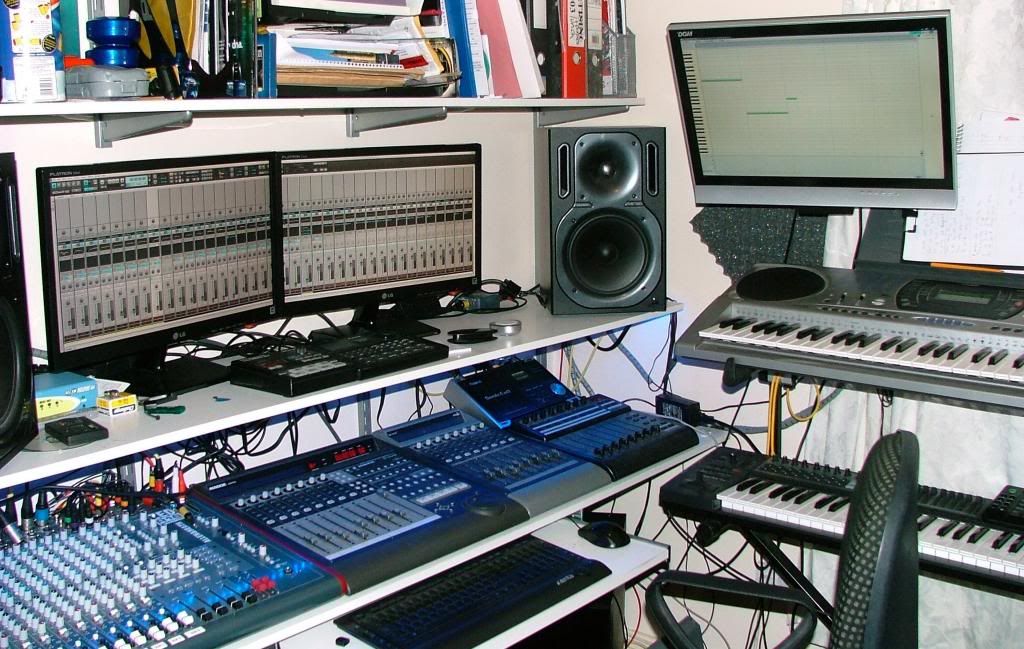 It's probably possible to set up just about any view you want using the views either stretched across or floated on to the monitors. In the pic above I have the CV in the multidock stretched across the main two and the PRV floated on the monitor above my keyboards. The great thing about set up with X2 is as well as screensets, is that full screen mode is remembered on a per screenset basis. So not only can you set up any view you want but youcan set up ten views that you want and then switch instantly between them as required. I honestly think screensets are the greatest feature introduced so far.......... Anyway I digress, the CV/Track view in the pic above looks like this when screen captured. It shows over 35 full width console strips as well as the full control bar if that is important. 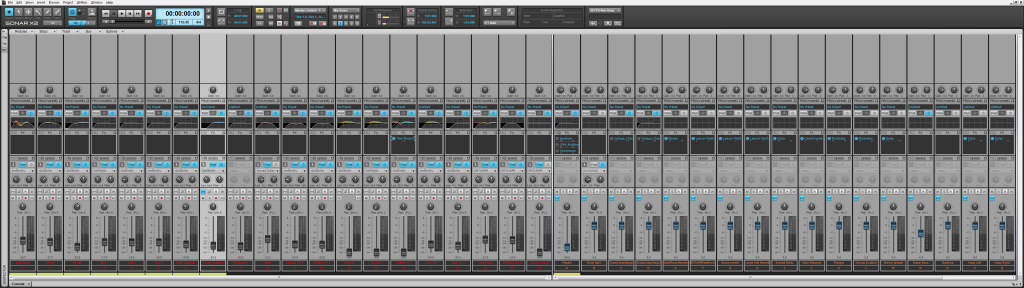 Finally I also use third party software DisplayFusionPro for even greater control. There's a free/trial version and the full version is cheap and well worth the money. It allows quick window movement and also window/monitor mirroring allowing a duplicate of a window to be placed on another monitor. Very helpful in the above scenario where I sometimes want to work using the keyboard monitor. Although X1/X2 make multi monitors less of a necessity and more of a luxury they can still be used to great effect. HTH
|
moffdnb
Max Output Level: -64 dBFS
- Total Posts : 1332
- Joined: 2004/04/27 16:42:30
- Status: offline
Re:NVIDIA driving me nuts! Help needed
2012/11/28 11:16:44
(permalink)
Very nice indeed mate. Hmmm some pondering to do. Thanks ;>
p.s. Wouldn't it be cool if CW brought back colours (& in CV too). Make life much easier.
|
FastBikerBoy
Forum Host
- Total Posts : 11326
- Joined: 2008/01/25 16:15:36
- Location: Watton, Norfolk, UK
- Status: offline
Re:NVIDIA driving me nuts! Help needed
2012/11/28 11:42:43
(permalink)
Yeah customisation would be nice, although it's not something I do much myself, I can see why it's frustrating for those that do.
|