djoni
Max Output Level: -55.5 dBFS

- Total Posts : 1974
- Joined: 2003/12/17 11:10:44
- Location: Mozambique
- Status: offline
How to bring ALL faders down
I can't move all faders either up or down.
Is there a way to select all tracks and bring all faders down at the same time? (I need to bring all of them down about 5db)
Thanks
kind regards
joni
ps- I had this issue with previous versions of Sonar but back then we could click the little triangle on the track view and by selecting all tracks we could move them up or down.
Ekaya Productions
Sonar Platinum, Intel - 6 Core i7 overclocked 4.5GHz with HT 12meg cache w/ 32GB RAM, UAD-2 QUAD & OCTO, Tascam DM-4800, 1xMackie CU & 2xExtenders...
|
jerrypettit
Max Output Level: -78 dBFS

- Total Posts : 625
- Joined: 2003/11/06 15:54:52
- Location: Omaha, NE
- Status: offline

Re:How to bring ALL faders down
2012/12/03 10:28:24
(permalink)
Select all tracks (Ctrl-A), right-click on one to group them all. Bring down the faders. Right-click again to ungroup.
I just figured this out a week or two ago myself--takes just a few seconds now.
|
John
Forum Host

- Total Posts : 30467
- Joined: 2003/11/06 11:53:17
- Status: offline
Re:How to bring ALL faders down
2012/12/03 10:32:43
(permalink)
Or get a CS. 
|
garrigus
Max Output Level: 0 dBFS

- Total Posts : 8599
- Joined: 2003/11/05 17:23:21
- Location: www.garrigus.com
- Status: offline
Re:How to bring ALL faders down
2012/12/03 10:35:31
(permalink)
You don't need to group the faders unless you want them to be grouped for future use, but you can just use the Quick Group feature. Select all tracks and then hold down Ctrl on your PC keyboard. Now adjust one of the Volume parameters on one of the tracks. This will adjust the same parameter on all selected tracks. This works with other parameters as well. Scott -- Scott R. Garrigus - http://garrigus.com * Author of the Cakewalk Sonar and Sony Sound Forge Power book series: http://garrigus.com/?PowerBooks * Author of the Cakewalk Sonar ProAudioTutor video tutorial series: http://garrigus.com/?ProAudioTutor * Publisher of the DigiFreq free music technology newsletter: http://digifreq.com/?DigiFreq * Publisher of the NewTechReview free consumer technology newsletter: http://newtechreview.com/?NewTechReview
|
Funkybot
Max Output Level: -75 dBFS

- Total Posts : 796
- Joined: 2003/11/06 16:32:13
- Status: offline
Re:How to bring ALL faders down
2012/12/03 10:37:31
(permalink)
Scott, beat me to it. Select All+Ctrl is the fastest way to do this. One of my favorite new(-ish) Sonar features. Great for gain-staging any of those errant peaks on the master channel out of existence.
Intel i7 4790k, ASUS Z97-A mobo, 16GB Kingston DDR3 RAM, Windows 10 x64, UAD2 Duo, RME Fireface 800, Sonar X1/X2 Producer
|
djoni
Max Output Level: -55.5 dBFS
- Total Posts : 1974
- Joined: 2003/12/17 11:10:44
- Location: Mozambique
- Status: offline
Re:How to bring ALL faders down
2012/12/03 10:42:52
(permalink)
Thanks jerry. That works, but when you do that (when ungrouping) you loose all previous groups you had before.
any other way?
Ekaya Productions
Sonar Platinum, Intel - 6 Core i7 overclocked 4.5GHz with HT 12meg cache w/ 32GB RAM, UAD-2 QUAD & OCTO, Tascam DM-4800, 1xMackie CU & 2xExtenders...
|
Lynn
Max Output Level: -14 dBFS

- Total Posts : 6117
- Joined: 2003/11/12 18:36:16
- Location: Kansas City, MO
- Status: offline
Re:How to bring ALL faders down
2012/12/03 10:51:53
(permalink)
You can go control +A to select all, and then right click on a volume parameter and choose group-new, and group by color and they will stay grouped until you deselect them.
|
djoni
Max Output Level: -55.5 dBFS
- Total Posts : 1974
- Joined: 2003/12/17 11:10:44
- Location: Mozambique
- Status: offline
Re:How to bring ALL faders down
2012/12/03 14:22:29
(permalink)
Thanks Scott, that is exactly what I needed...it makes all the sense to be able to do that. regards, joni
garrigus
You don't need to group the faders unless you want them to be grouped for future use, but you can just use the Quick Group feature.
Select all tracks and then hold down Ctrl on your PC keyboard. Now adjust one of the Volume parameters on one of the tracks. This will adjust the same parameter on all selected tracks.
This works with other parameters as well.
Scott
--
Scott R. Garrigus - http://garrigus.com
* Author of the Cakewalk Sonar and Sony Sound Forge Power book series: http://garrigus.com/?PowerBooks
* Author of the Cakewalk Sonar ProAudioTutor video tutorial series: http://garrigus.com/?ProAudioTutor
* Publisher of the DigiFreq free music technology newsletter: http://digifreq.com/?DigiFreq
* Publisher of the NewTechReview free consumer technology newsletter: http://newtechreview.com/?NewTechReview
Ekaya Productions
Sonar Platinum, Intel - 6 Core i7 overclocked 4.5GHz with HT 12meg cache w/ 32GB RAM, UAD-2 QUAD & OCTO, Tascam DM-4800, 1xMackie CU & 2xExtenders...
|
TS
Max Output Level: -88 dBFS

- Total Posts : 146
- Joined: 2012/01/02 16:30:09
- Location: Nice, France
- Status: offline
Re:How to bring ALL faders down
2012/12/03 16:31:55
(permalink)
It works also when there are no tracks selected.
You just hold on Ctrl key while adjusting the parameter of one track, a little red square will appear in the corner of the button, and the same parameter of all the tracks will be adjusted.
Laptop HP DV7 (i7 720 QM, Win 7/64, 4 Go Ram), UA-101 (2), Focal Solo6 Be, Sennh HD 600, set micros (MD441, M88, M160, MD431, Mk-012, K2, etc)
|
djoni
Max Output Level: -55.5 dBFS
- Total Posts : 1974
- Joined: 2003/12/17 11:10:44
- Location: Mozambique
- Status: offline
Re:How to bring ALL faders down
2012/12/03 17:37:05
(permalink)
Ekaya Productions
Sonar Platinum, Intel - 6 Core i7 overclocked 4.5GHz with HT 12meg cache w/ 32GB RAM, UAD-2 QUAD & OCTO, Tascam DM-4800, 1xMackie CU & 2xExtenders...
|
Guitarhacker
Max Output Level: 0 dBFS
- Total Posts : 24398
- Joined: 2007/12/07 12:51:18
- Location: NC
- Status: offline
Re:How to bring ALL faders down
2012/12/03 19:04:16
(permalink)
I'm just old school.... Since I normally have volume envelopes in every track anyway...... I just use the existing envelopes to shut down the tracks at the end as needed. By using this method.... sure it takes a few minutes to set it up and work the ending...BUT.. the payoff is I can precisely control how long something rings at the end... if I want the acoustics to fade out completely but let the piano ring a half second longer.... it's easy to do. In this example below, the bass gets shut down before it plays the last note....and the guitars all ring and fade at the same time to nothing. 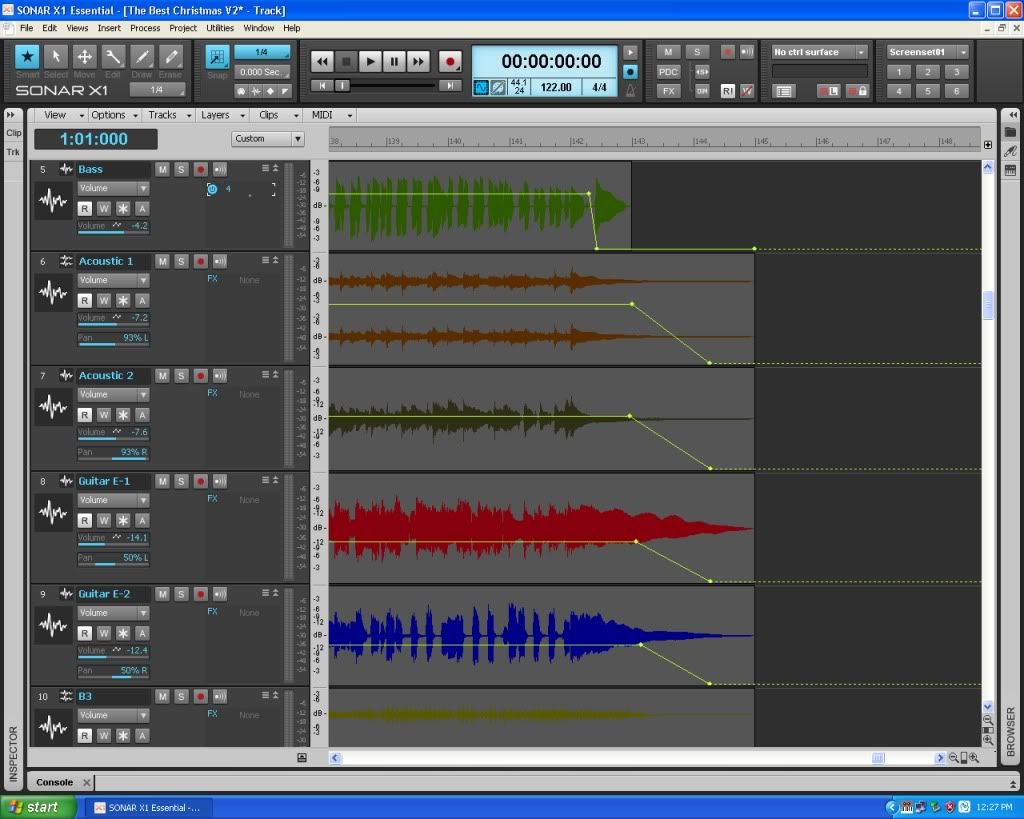
My website & music: www.herbhartley.com MC4/5/6/X1e.c, on a Custom DAW Focusrite Firewire Saffire Interface BMI/NSAI "Just as the blade chooses the warrior, so too, the song chooses the writer "
|
jerrypettit
Max Output Level: -78 dBFS
- Total Posts : 625
- Joined: 2003/11/06 15:54:52
- Location: Omaha, NE
- Status: offline
Re:How to bring ALL faders down
2012/12/03 19:16:18
(permalink)
Ah, thanks Scott, etc.
That IS an improvement over what I've been doing.
|
garrigus
Max Output Level: 0 dBFS
- Total Posts : 8599
- Joined: 2003/11/05 17:23:21
- Location: www.garrigus.com
- Status: offline
Re:How to bring ALL faders down
2012/12/03 19:25:42
(permalink)
|
SuperG
Max Output Level: -63 dBFS

- Total Posts : 1371
- Joined: 2012/10/19 16:09:18
- Location: Edgewood, NM
- Status: offline
Re:How to bring ALL faders down
2012/12/03 20:57:39
(permalink)
I'm partial to busing instrument sections. If I need to knock a group of faders down and they're all feeding the same bus: I just fade the bus. This is just one of those things where there are five million ways to skin the cat... 
|