focus1
Max Output Level: -90 dBFS

- Total Posts : 17
- Joined: 2012/12/19 11:23:09
- Status: offline

Live Recording Sonar 8.5SE
Hi everybody, I just received my Scarlett 18i6 and I am planing to use it record my band next week. So far I ran a few tests on my desktop PC and I am really satisfied with it. Unfortunately I cant bring my desktop with me but I am going to have my old lap top. It s really old but it runs fine. Here are some specs: Toshiba Satellite M55-S331 Notebook with 14-inch TruBrite display 1.73 GHz Intel Pentium M (Centrino) 740 processor, 2 MB L2 cache 250 GB hard drive, + Glyph 1T external HD via FW 1.5 GB of RAM, 4 X USB 2.0, one FireWire (TI), Dual Boot Windows XP Home edition, SP3/Windows 7 Home Installed and been using for years with no problems, is Sonar 6 SE, Sonar 8.5 SE, Pro Tools 7.3 + MBOX2 I have recorded stereo with the MBOX2 for years with no problems but now I need to record 8 tracks simultaneously for hours. - Do you think my lap top is going to be able to do it? The XP boot is optimized for studio work only (mostly tracking and basic editing) - Does the old processor play a major role for recording 8 tracks? or the low memory? - Should I better use Sonar 6 instead of 8.5? (may be less resources?) - Should I use Windows 7 instead of XP? Thank you all in advance
post edited by focus1 - 2012/12/19 12:58:30
|
focus1
Max Output Level: -90 dBFS
- Total Posts : 17
- Joined: 2012/12/19 11:23:09
- Status: offline
Re:Live Recording Sonar 8.5SE
2012/12/19 11:46:59
(permalink)
deleted
post edited by focus1 - 2012/12/19 12:59:02
|
daveny5
Max Output Level: 0 dBFS

- Total Posts : 16934
- Joined: 2003/11/06 09:54:36
- Location: North Carolina
- Status: offline
Re:Live Recording Sonar 8.5SE
2012/12/19 11:52:07
(permalink)
You should have someone hit CTRL-S during the recording or have autosave turned on otherwise if it crashes during the recording, you may have trouble recovering it. You should test it with the laptop that you're going to use. Test it just like you plan to use it and record 8 tracks of something for 2-3 hours and see how it holds up. I'd be a little concerned with just 1.5 GB of memory and only 250GB hard drive. 8 tracks x 10MB per minute x 60 minutes = that's about 5GB per hour plus paging space and temporary files. I'm not sure if the 2GB file limit applies to XP, but if it does, you could be in trouble. You really need to run some tests.
post edited by daveny5 - 2012/12/19 11:56:20
Dave Computer: Intel i7, ASROCK H170M, 16GB/5TB+, Windows 10 Pro 64-bit, Sonar Platinum, TASCAM US-16x08, Cakewalk UM-3G MIDI I/F Instruments: SL-880 Keyboard controller, Korg 05R/W, Korg N1R, KORG Wavestation EX Axes: Fender Stratocaster, Line6 Variax 300, Ovation Acoustic, Takamine Nylon Acoustic, Behringer GX212 amp, Shure SM-58 mic, Rode NT1 condenser mic. Outboard: Mackie 1402-VLZ mixer, TC Helicon VoiceLive 2, Digitech Vocalist WS EX, PODXTLive, various stompboxes and stuff. Controllers: Korg nanoKONTROL, Wacom Bamboo Touchpad
|
focus1
Max Output Level: -90 dBFS
- Total Posts : 17
- Joined: 2012/12/19 11:23:09
- Status: offline
Re:Live Recording Sonar 8.5SE
2012/12/19 12:02:34
(permalink)
First of all thank you for your response! Saving during recording, do you mean literally during recording? No pops no clicks? Because I dont have 8 signal sources at the moment, I recorded just silence from the 8 inputs for about 30 minutes and it seems fine. I am going to use the Glyph (1TB) for "Audio Drive So memory is the major problem? Thanks again!
post edited by focus1 - 2012/12/19 13:00:02
|
Kalle Rantaaho
Max Output Level: -5 dBFS

- Total Posts : 7005
- Joined: 2006/01/09 13:07:59
- Location: Finland
- Status: offline
Re:Live Recording Sonar 8.5SE
2012/12/19 12:54:30
(permalink)
Firefox is the cause of missing paragraphs. Anything newer than vs. 3 doesn't work well with the forum software. Chrome, IE and others are ok.
SONAR PE 8.5.3, Asus P5B, 2,4 Ghz Dual Core, 4 Gb RAM, GF 7300, EMU 1820, Bluetube Pre - Kontakt4, Ozone, Addictive Drums, PSP Mixpack2, Melda Creative Pack, Melodyne Plugin etc. The benefit of being a middle aged amateur is the low number of years of frustration ahead of you.
|
focus1
Max Output Level: -90 dBFS
- Total Posts : 17
- Joined: 2012/12/19 11:23:09
- Status: offline
Re:Live Recording Sonar 8.5SE
2012/12/19 13:00:50
(permalink)
Kalle Rantaaho
Firefox is the cause of missing paragraphs. Anything newer than vs. 3 doesn't work well with the forum software. Chrome, IE and others are ok.
Thank you!! Havent used IE in years! lol
|
Cactus Music
Max Output Level: 0 dBFS
- Total Posts : 8424
- Joined: 2004/02/09 21:34:04
- Status: offline
Re:Live Recording Sonar 8.5SE
2012/12/19 13:38:10
(permalink)
I have a Toshiba Satilite A40 P4 2.4Mz with 1.5 gig RAM,, I did upgrade the Hard drive to a 7200 RPM 100 Gig which is the most critical component when streaming audio. CPU and RAM have very little effect if under powered. The audio is written directly to your hard drive, so you can see why that's the most important item to optimize. Anyhow you will be just fine, I've recorded 12 tracks and CPU never leaves the basement. I have been doing this for 10 years on this computer and before that an even worse Acer 1.5Mz. Centron. Some tips. Run DPCLAT meter.. This will tell you if all is good. Any yellow of red spikes need to be dealt with or you could have a dropout. Kill these in Device Manager: Wireless adapter Battery management On board Sound card Use 44.1/ 24 bit. 48/24 might work too. but don't try any higher. I also keep the hard drive under 40% used and will defrag before the session. Just get rid of all your crap to a external drive. For the session make a template with the amount of tracks you need and name them. Set all the inputs etc. DON"T add efxs at this point. or Bypass the bins. Then for each song your going to record perform a "save as" of the template , rename, and put each song in it's own folder. These folders should be in an Album folder too. This will make it simple to drag and drop this folder to transfer to your desktop DAW later. I always include the date in the title of album folder. Make a few extras just in case your band writes a new song that night! Seriously! The night of the session you can open all those projects and minimize to tray. I had 14 projects open the other night and my RAM never choked. This makes it easy on you as the night progresses you can quickly be ready for the next song. Once a good take has been made SAVE it right away. If you decide to make a second take, just record over the other one and do a "save as" take 2 when done. DO not use auto save. it's too scary for me.
post edited by Cactus Music - 2012/12/19 13:47:35
|
Cactus Music
Max Output Level: 0 dBFS
- Total Posts : 8424
- Joined: 2004/02/09 21:34:04
- Status: offline
Re:Live Recording Sonar 8.5SE
2012/12/19 13:57:02
(permalink)
Use the OS that has the best drivers for your audio interface.
The version of Sonar makes no difference. I've used from 6 to 8.5. They all record audio the same as always. I'd stick with 8.5 if that's what your editing and mixing will be on later. It's when you add VST and efxs that things need more CPU power and RAM. Straight audio needs very little resources. If your hard drive is only 5400 RPM I'd stick a 7200 in there for sure.
And as long as your only recording one song at a time and then save it you'll never go past 500MB. It's only an issue if you recorded a 1 hour show without saving.
|
daveny5
Max Output Level: 0 dBFS
- Total Posts : 16934
- Joined: 2003/11/06 09:54:36
- Location: North Carolina
- Status: offline
Re:Live Recording Sonar 8.5SE
2012/12/19 14:03:08
(permalink)
Because I dont have 8 signal sources at the moment, I recorded just silence from the 8 inputs for about 30 minutes and it seems fine. I don't think that's a very good test. Why not record 8 tracks from the same input for the sake of testing? Edit: I'm running a similar test now and my disk is at 50% and the CPU is at 52%. I'm using X2 Producer on a QuadCore with 8GB of memory and a 7200 1TB drive. Edit: Well I turned the input all the way down so that it recorded silence and that didn't lower the CPU or Disk % used so maybe your test was ok. What were your CPU and disk #s?
post edited by daveny5 - 2012/12/19 14:27:14
Dave Computer: Intel i7, ASROCK H170M, 16GB/5TB+, Windows 10 Pro 64-bit, Sonar Platinum, TASCAM US-16x08, Cakewalk UM-3G MIDI I/F Instruments: SL-880 Keyboard controller, Korg 05R/W, Korg N1R, KORG Wavestation EX Axes: Fender Stratocaster, Line6 Variax 300, Ovation Acoustic, Takamine Nylon Acoustic, Behringer GX212 amp, Shure SM-58 mic, Rode NT1 condenser mic. Outboard: Mackie 1402-VLZ mixer, TC Helicon VoiceLive 2, Digitech Vocalist WS EX, PODXTLive, various stompboxes and stuff. Controllers: Korg nanoKONTROL, Wacom Bamboo Touchpad
|
focus1
Max Output Level: -90 dBFS
- Total Posts : 17
- Joined: 2012/12/19 11:23:09
- Status: offline
Re:Live Recording Sonar 8.5SE
2012/12/19 14:48:59
(permalink)
Thank you guys!! I knew I could count on you!! Thank you very very much!
@ daveny5, thanks for the tip I will give it a try once I get home
@Cactus, I dont know how to thank you for your tips.
First of all, my OS drive is 5400, unfortunately I wont be able to replace it for the time being with a faster one... I will have to bite the bullet. My audio drive is 7200 RPM 16MB cache. Not an ideal situation but that s what I have to deal with right now.
I will run the DPCLAT utility as soon as I get home tonight.
How long should I let it run if it doesnt find any glitches the first few minutes?
The session is going to be a live show recording. I wont be able to fiddle much with the lap top since I ll be playing too.
16 bit 44.1 KHz will be my choice.
No EFX or Soft Synths or anything other than direct audio to disk.
There is a very good possibility where I wont be able to touch the lap top for over an hour or so, may be 2 hours. So those files will be huge.
I am not fan of the autosave function but I may look into it a little more.
I will go with 8.5 version then.
I am not sure which drivers are better for the 18i6. The unit is fairly new to me so I havent had time to compare. If anyone has any experience I would love an input here.
Thanks again and I will report probably tomorrow my test results
|
Cactus Music
Max Output Level: 0 dBFS
- Total Posts : 8424
- Joined: 2004/02/09 21:34:04
- Status: offline
Re:Live Recording Sonar 8.5SE
2012/12/19 16:09:21
(permalink)
The DPCLAT will show issues pretty much right away, What you can do is let it run for 5-15 minutes. Any processes that were lurking will show up by then.
Hmm an hour , that's a different kettle of fish. As Daveny is warning you'll hit the file size limitation.
I would see if there was any point in the show that you could spare 30 seconds it would take to hit save. The fastest way would be to close the project window via the red X. It will ask you if you want to save. Then start a new recording with one of the already open files like I mentioned. You could have multiple projects open and layered over top one another.
If Sonar crashes you'll loss everything so you have to figure a way to do a few saves or the whole thing is gone. Tell the band to have a smoke after the 5th song. Sets of 4 to 6 songs would be ideal.
Just remember, the longer the song , the longer it will take to save, This is where a faster CPU would help.
You'll find that when you hit the space bar to stop that the waveforms will take forever to be drawn too, don't worry, it's not important to the recording.
I've been told that if your hard drive is full then the wave file cnnot fit in one space so there is an interuption while the hard drive looks for the next space. This is why I would only attempt what your doing with a fast and empty hard drive, Might be better to use an external drive, long as that old turkey has USB 2.
|
focus1
Max Output Level: -90 dBFS
- Total Posts : 17
- Joined: 2012/12/19 11:23:09
- Status: offline
Re:Live Recording Sonar 8.5SE
2012/12/19 16:55:49
(permalink)
Cactus Music
The DPCLAT will show issues pretty much right away, What you can do is let it run for 5-15 minutes. Any processes that were lurking will show up by then.
Hmm an hour , that's a different kettle of fish. As Daveny is warning you'll hit the file size limitation.
I would see if there was any point in the show that you could spare 30 seconds it would take to hit save. The fastest way would be to close the project window via the red X. It will ask you if you want to save. Then start a new recording with one of the already open files like I mentioned. You could have multiple projects open and layered over top one another.
If Sonar crashes you'll loss everything so you have to figure a way to do a few saves or the whole thing is gone. Tell the band to have a smoke after the 5th song. Sets of 4 to 6 songs would be ideal.
Just remember, the longer the song , the longer it will take to save, This is where a faster CPU would help.
You'll find that when you hit the space bar to stop that the waveforms will take forever to be drawn too, don't worry, it's not important to the recording.
I've been told that if your hard drive is full then the wave file cnnot fit in one space so there is an interuption while the hard drive looks for the next space. This is why I would only attempt what your doing with a fast and empty hard drive, Might be better to use an external drive, long as that old turkey has USB 2.
Thanks again Cactus, I ran the DPCLAT on my laptop when I was home for lunch for may be 15 minutes and it was all nice and green. Although I was not working the lap top hard. I checked a few things on the Windows event viewer, few copy/paste files (small ones) and that s about it. I ll let it run for a while tonight to make sure I wasnt aware about the file limitation... I had to check on it really fast and I didnt find much. I found a post in this forum, about the 2 GB size limit of the bundle files which has been fixed after the 8 version, but I am not sure if that is what we are talking about here... So the question here is if a session can be 2GB in size or more? The truth is that although I ve been using Sonar since the 2 XL times, I ve never really used it for field recordings. I mostly use it for MIDI and Mixing. Alesis HD24 was my recorder of choice but now it s gone and I am losing my mind! I will try to get the lap top right next to me but that s going to be hard, so I am mostly concerned about "Plan B" where I wont have access to the lap top whenever I can. I will start making templates tonight and start practicing. Thanks again!! I ll keep you updated
Asus P5K Premium, Q9550@3.40GHz, 4X Kingston KHX8500D21GN 1GB DIMM DDR2 PC2-8500U DDR2-1066, GeForce 8800 GTS 320MB 320-bit, Seagate 250GB SATA, WD 1TB, SATA, WD 320GB SATA, HP DVD Writer 1070r, Thermaltake SMART Series 850W PSU, Focusrite Scarlett 18i6, Mbox 2, EMU 1820, Windows XP SP3 32bit/Windows 7 Pro 32bit/Windows 8Pro 32bit
|
focus1
Max Output Level: -90 dBFS
- Total Posts : 17
- Joined: 2012/12/19 11:23:09
- Status: offline
Re:Live Recording Sonar 8.5SE
2012/12/19 20:52:46
(permalink)
Some updates
about DPCLatency
Left it running for about half an hour and everything is nice and green. I would say better than my desktop.
I have been recording for about 10 minutes now 8 mono tracks and no hick ups so far.
@Dave
the CPU meter in SONAR is showing 01-02%
The Disk meter in SONAR is showing between 02-05%
I ve just opened the task manager and CPU is showing 100%
I think I am going to have to pack some ice! lol.
what bothers me is that in the audio preferences in SONAR the 24bit is grayed out and I cant find the setting in Scarlett mixer options to change it to 16bit
It s going to be a long night...
Asus P5K Premium, Q9550@3.40GHz, 4X Kingston KHX8500D21GN 1GB DIMM DDR2 PC2-8500U DDR2-1066, GeForce 8800 GTS 320MB 320-bit, Seagate 250GB SATA, WD 1TB, SATA, WD 320GB SATA, HP DVD Writer 1070r, Thermaltake SMART Series 850W PSU, Focusrite Scarlett 18i6, Mbox 2, EMU 1820, Windows XP SP3 32bit/Windows 7 Pro 32bit/Windows 8Pro 32bit
|
Cactus Music
Max Output Level: 0 dBFS
- Total Posts : 8424
- Joined: 2004/02/09 21:34:04
- Status: offline
Re:Live Recording Sonar 8.5SE
2012/12/19 21:09:04
(permalink)
You should be able to change that setting in the Scarlett ASIO panel.
What I notice is that in ASIO mode that is greyed out, If you change it to WDM it gives me options from 16 to 24. But I set mine in the Tascam control panel.
|
focus1
Max Output Level: -90 dBFS
- Total Posts : 17
- Joined: 2012/12/19 11:23:09
- Status: offline
Re:Live Recording Sonar 8.5SE
2012/12/20 10:27:54
(permalink)
Cactus Music
You should be able to change that setting in the Scarlett ASIO panel.
What I notice is that in ASIO mode that is greyed out, If you change it to WDM it gives me options from 16 to 24. But I set mine in the Tascam control panel.
Thanks for your reply, Well.... I know it should change from the ASIO panel but unfortunately there is no option, or at least that I can find right now. Coming from EMU 1820 with an amazing virtual router/mixer UI, this Scarlett's mixer looks like a cheap plastic toy. Anyways, I dont think there is an option to record in a lower bit rate... If anyone has any information about how to lower the bit rate in ASIO I will be so thankful I found this in the Focusrite site. "This article addresses concerns raised by some about 16 bit and 24 bit in Windows systems. When using the WDM driver, only 16 bit modes are seen as an option in the Advanced section of the interface's Properties. However, this setting has absolutely no effect when recording using the ASIO driver, which users should always use in DAWs, due it's its low latency and increased peformance over WDM (Windows' own audio driver). The audio stream captured from our USB 2.0 hardware is always 24-bit samples. These samples are not altered or processed in any way by the driver when recording via the ASIO driver. Windows audio control panel may say the device is in 16 bit mode, but the ASIO driver bypasses the Windows audio system, and is therefore not affected by this setting. Therefore, using 24 bit depth in your recording software, while using the ASIO driver, is still 24 bit when recording/creating, where 24 bit actually matters. http://www.focusrite.com/answerbase/en/article.php?id=1209 Now the problem is, how to deal with the CPU load... Although it seems like the laptop is behaving fine I am concerned about the temperatures. The highest buffer size I can select in the Scarlett ASIO panel is 20 ms. Does the Read/Write Cashing play a role in lowering the CPU load? Have a nice day everyone!
Asus P5K Premium, Q9550@3.40GHz, 4X Kingston KHX8500D21GN 1GB DIMM DDR2 PC2-8500U DDR2-1066, GeForce 8800 GTS 320MB 320-bit, Seagate 250GB SATA, WD 1TB, SATA, WD 320GB SATA, HP DVD Writer 1070r, Thermaltake SMART Series 850W PSU, Focusrite Scarlett 18i6, Mbox 2, EMU 1820, Windows XP SP3 32bit/Windows 7 Pro 32bit/Windows 8Pro 32bit
|
Cactus Music
Max Output Level: 0 dBFS
- Total Posts : 8424
- Joined: 2004/02/09 21:34:04
- Status: offline
Re:Live Recording Sonar 8.5SE
2012/12/20 12:09:25
(permalink)
From what I understand, the Sonar CPU meter only shows Sonars CPU usage, If the Task Manager is showing a higher reading then theoretically it is not Sonar but some other process causing this.
If I get a change later I'll hook my laptop up and try a test , I never opened Task Manager while running Sonar so might have been oblivious to this. I do have a better CPU than yours, but my old 2004 Acer was same specs as yours and it recorded fine.
I have only 21 processes running after some house work in msconfig, I assumed you did the same as you said you set the laptop for audio. But I don't think those make much difference.
|
focus1
Max Output Level: -90 dBFS
- Total Posts : 17
- Joined: 2012/12/19 11:23:09
- Status: offline
Re:Live Recording Sonar 8.5SE
2012/12/20 12:27:40
(permalink)
The process SONARSTD.EXE uses 94-99% of the CPU just by starting Sonar.
But even when I record the load doesnt change.
I dont like the Task Manager in Windows, I dont use it because it s kind of problematic.
I never noticed how Sonar loads the CPU.
Anyways I have no Plan B, I have to use this laptop for the session and if it makes it I will be happy, if not... let that be a lesson.
Asus P5K Premium, Q9550@3.40GHz, 4X Kingston KHX8500D21GN 1GB DIMM DDR2 PC2-8500U DDR2-1066, GeForce 8800 GTS 320MB 320-bit, Seagate 250GB SATA, WD 1TB, SATA, WD 320GB SATA, HP DVD Writer 1070r, Thermaltake SMART Series 850W PSU, Focusrite Scarlett 18i6, Mbox 2, EMU 1820, Windows XP SP3 32bit/Windows 7 Pro 32bit/Windows 8Pro 32bit
|
bitflipper
01100010 01101001 01110100 01100110 01101100 01101

- Total Posts : 26036
- Joined: 2006/09/17 11:23:23
- Location: Everett, WA USA
- Status: offline
Re:Live Recording Sonar 8.5SE
2012/12/20 14:48:07
(permalink)
Not much to add to the good advice Cactus has been giving you except to make sure that if your laptop has a built-in wireless network adapter, it's disabled prior to recording.
It's also probably not a bad idea to defrag your hard drive in advance to maximize the amount of contiguous disk space available while you're recording.
If possible have someone sit at the computer during the recording so they can spot problems as they occur, such as clipping from a channel's gain being set too high, or loss of a channel because a microphone cable has come loose. Have them stop recording between songs and do a save, then start the recording back up.
 All else is in doubt, so this is the truth I cling to. My Stuff
|
Cactus Music
Max Output Level: 0 dBFS
- Total Posts : 8424
- Joined: 2004/02/09 21:34:04
- Status: offline
Re:Live Recording Sonar 8.5SE
2012/12/20 16:11:07
(permalink)
That's odd about your Task Manager. I just tried it on 2 different computers and they both are showing a low reading with a song playing, This one is a few audio tracks and MIDI via TTs1. Both computers are XP P4 and 1.5 GIG RAM 2.5 Mz. single core. This screen shot is from my office computer and it's so full of apps and software, It is not optimized at all. The CPU usage history shows it was high during Sonar loading then it settled down to 5-15% 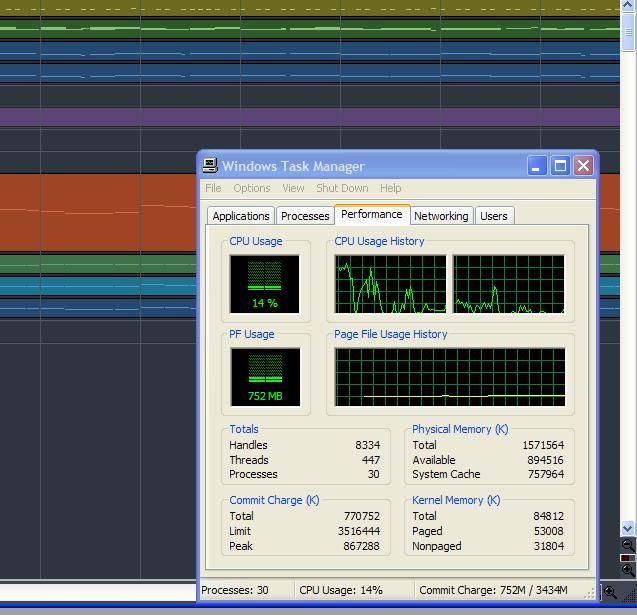
post edited by Cactus Music - 2012/12/20 16:12:23
|
focus1
Max Output Level: -90 dBFS
- Total Posts : 17
- Joined: 2012/12/19 11:23:09
- Status: offline
Re:Live Recording Sonar 8.5SE
2012/12/20 17:27:17
(permalink)
@ Cactus
Thanks again for following up,
Yeah, I am not sure what s going on. It seems like Sonar is taking over the CPU for itself. I dont really mind but I ll check to see what s the case on my desktop.
Something that is even more odd... I just recorded 8 test tracks and looked at their info at the Sonar Audio Folder and the files were 44KHz/16bit. Which of course is what I wanted... So the official explanation of Focusrite about recording 24bit on ASIO is nonsense or I am missing something here.
@bit
Thanks for your advice,
I dont use the wireless adapter anyways and it s always off.
The drives are checked for errors defragmented and they are good to go.
Unfortunatelly I wont have anyone to help me with the recording. I ll have to do everything by myself.
Start-Stop-Save-Start probably will be the way to go I just need to find a way to have the laptop close to me.
Does anyone know if long USB cables have any effect to the recording?
Thanks again everyone you ve been so helpful!
Asus P5K Premium, Q9550@3.40GHz, 4X Kingston KHX8500D21GN 1GB DIMM DDR2 PC2-8500U DDR2-1066, GeForce 8800 GTS 320MB 320-bit, Seagate 250GB SATA, WD 1TB, SATA, WD 320GB SATA, HP DVD Writer 1070r, Thermaltake SMART Series 850W PSU, Focusrite Scarlett 18i6, Mbox 2, EMU 1820, Windows XP SP3 32bit/Windows 7 Pro 32bit/Windows 8Pro 32bit
|
Cactus Music
Max Output Level: 0 dBFS
- Total Posts : 8424
- Joined: 2004/02/09 21:34:04
- Status: offline
Re:Live Recording Sonar 8.5SE
2012/12/20 22:25:20
(permalink)
there was a thread about this not that long ago, X1 forum? Anyhow I think they said 25' and if you use a powered usb hub you might go further
|
focus1
Max Output Level: -90 dBFS
- Total Posts : 17
- Joined: 2012/12/19 11:23:09
- Status: offline
Re:Live Recording Sonar 8.5SE
2012/12/20 22:49:15
(permalink)
Thanks again Cactus you ve been so helpful!
I just did some audio editing using Sonar on my desktop and I opened the task manager to see what s going on. To my surprise it was barely hitting 14% on the max. Other than that it was between 01-06%.
I will investigate further to find out why Sonar is idling on my lap top at 90%.
Such great news about the 25' USB cable! That will give me a good chance to have the laptop close to me! I ll try to find the discussion thanks for sharing!
Have a good night and thanks again!
Asus P5K Premium, Q9550@3.40GHz, 4X Kingston KHX8500D21GN 1GB DIMM DDR2 PC2-8500U DDR2-1066, GeForce 8800 GTS 320MB 320-bit, Seagate 250GB SATA, WD 1TB, SATA, WD 320GB SATA, HP DVD Writer 1070r, Thermaltake SMART Series 850W PSU, Focusrite Scarlett 18i6, Mbox 2, EMU 1820, Windows XP SP3 32bit/Windows 7 Pro 32bit/Windows 8Pro 32bit
|
bitflipper
01100010 01101001 01110100 01100110 01101100 01101
- Total Posts : 26036
- Joined: 2006/09/17 11:23:23
- Location: Everett, WA USA
- Status: offline
Re:Live Recording Sonar 8.5SE
2012/12/21 10:09:00
(permalink)
Test that long USB cable ahead of time! It may or may not work reliably. Another possible solution might be a wireless keyboard. (The ideal solution is, unfortunately, a product you can no longer buy, but might be available on eBay: a Frontier Designs Tranzport.)
Also take a look at the Korg Nanokontrol controller. It's got the necessary transport controls and it's cheap, but the downside is that it also requires a USB connection to your computer and is therefore restricted by USB cable-length limitations. I don't have one myself, but it's long been on my list as a potential replacement for my Tranzport, should that treasured device ever stop functioning.
All else is in doubt, so this is the truth I cling to. My Stuff
|
focus1
Max Output Level: -90 dBFS
- Total Posts : 17
- Joined: 2012/12/19 11:23:09
- Status: offline
Re:Live Recording Sonar 8.5SE
2012/12/21 10:56:17
(permalink)
Thank you Bit!
I tested last night the longest USB cable I have (15') and recorded a few long notes from a sine wave patch I generated from my keyboards. I did not find an issue. The 8 minute and the 15 minute recordings were identical with the ones I recorded using the USB cable provided with the interface.
I am not in a position right now to spend even a dime. I wish I could, but I live tough times. I feel blessed you guys go out of your way to help me and provide advice and input.
I do have an old M-Audio Axiom 25 key keyboard controller that I might be able to have with me. I havent used it in ages, but I remember that the transport controlls were working pretty well with Sonar. I am wondering if I will be able to map the "Save" command to the "Rewind" button or something like that. I ll give it a try.
One more thing I tried was to use the Teamviewer app from my android phone to remote control my laptop. It worked and it was relatively fast, but needs a lot of zooming to hit the "Save" button from my phone screen. It s a hassle and I am going to need to bring my router with me.
I still havent found out why the SONARSTD.exe is constantly on 90-100%. Damn you task manager! I was happy living in ignorance not knowing that it taxes the processor so much!
Thank you all again! Have a nice day!
Asus P5K Premium, Q9550@3.40GHz, 4X Kingston KHX8500D21GN 1GB DIMM DDR2 PC2-8500U DDR2-1066, GeForce 8800 GTS 320MB 320-bit, Seagate 250GB SATA, WD 1TB, SATA, WD 320GB SATA, HP DVD Writer 1070r, Thermaltake SMART Series 850W PSU, Focusrite Scarlett 18i6, Mbox 2, EMU 1820, Windows XP SP3 32bit/Windows 7 Pro 32bit/Windows 8Pro 32bit
|
focus1
Max Output Level: -90 dBFS
- Total Posts : 17
- Joined: 2012/12/19 11:23:09
- Status: offline
Re:Live Recording Sonar 8.5SE
2012/12/21 18:58:06
(permalink)
SONARSTD.exe Problem solved! I uninstalled Pro Tools and for some reason everything is working as it should! 8 Mono tracks recording and the processor doesnt even sweat! You were right and thank you so much for your help!  Cactus Music
That's odd about your Task Manager. I just tried it on 2 different computers and they both are showing a low reading with a song playing, This one is a few audio tracks and MIDI via TTs1. Both computers are XP P4 and 1.5 GIG RAM 2.5 Mz. single core. This screen shot is from my office computer and it's so full of apps and software, It is not optimized at all. The CPU usage history shows it was high during Sonar loading then it settled down to 5-15%
post edited by focus1 - 2012/12/21 19:01:23
Asus P5K Premium, Q9550@3.40GHz, 4X Kingston KHX8500D21GN 1GB DIMM DDR2 PC2-8500U DDR2-1066, GeForce 8800 GTS 320MB 320-bit, Seagate 250GB SATA, WD 1TB, SATA, WD 320GB SATA, HP DVD Writer 1070r, Thermaltake SMART Series 850W PSU, Focusrite Scarlett 18i6, Mbox 2, EMU 1820, Windows XP SP3 32bit/Windows 7 Pro 32bit/Windows 8Pro 32bit
|