razor
Max Output Level: -59.5 dBFS

- Total Posts : 1557
- Joined: 2004/05/10 16:53:27
- Location: Irvine, CA
- Status: offline

Question About V-Vocal Time Correction
Happy Friday All--
I watched a couple of You Tube videos on how to use v-vocal to correct some audio timing issues. I've used it for pitch correction for some time, but I really like how if a certain part of a wave file is a little off beat, I can just drag it over without artifacts.
I'm having one challenge though. When I drag the part of the wave file over that needs a little timing correction, say the attack of one note, it pulls the adjacent note(s) over which makes them off tempo. I'm guessing to sound natural the sustain, etc part of the wave forms have to move relative to the part I'm dragging, but these note attacks are so close together, that by fixing one, I mess up another.
There might be a very easy solution (I hope) but I just started using the tool for timing and can't seem to get that part down. In the videos, I see the adjacent wave forms moving with the drag, but the other note attacks look far enough away from the one being corrected, that it doesn't move them off tempo.
I'm not sure I'm explaining this clearly, so ask if I'm not. I figure anyone that uses v-vocal for timing correction probably knows what I'm trying to explain.
As always==I appreciate any help!
Stephen Davis Cakewalk by Bandlab Windows 7 Pro 64-Bit ADK DAW - (out of business 2018) Intel i7 4930K CPU Core i7 SB-E MOBO 16 GB DDR3 RAM 7 TB Storage Layla 3G SoundCard (11.5 ms Roundtrip Latency) UAD-2 DSP WaveLab 8 Pro 64-bit Sound Forge 10 Pro
|
Bristol_Jonesey
Max Output Level: 0 dBFS

- Total Posts : 16775
- Joined: 2007/10/08 15:41:17
- Location: Bristol, UK
- Status: offline

Re:Question About V-Vocal Time Correction
2013/01/12 05:06:52
(permalink)
☄ Helpful
Yep, I know what you mean, and the solution is quite simple
Assuming you're looking at the Time tab in V-Vocal (Press the 'T' button)
Double click where you want an anchor point and you'll get a green line.
Now double click again on the transient that you want moved. Drag this second line so that it lines up where you want and nothing will move beyond your anchor point
CbB, Platinum, 64 bit throughoutCustom built i7 3930, 32Gb RAM, 2 x 1Tb Internal HDD, 1 x 1TB system SSD (Win 7), 1 x 500Gb system SSD (Win 10), 2 x 1Tb External HDD's, Dual boot Win 7 & Win 10 64 Bit, Saffire Pro 26, ISA One, Adam P11A,
|
Bristol_Jonesey
Max Output Level: 0 dBFS
- Total Posts : 16775
- Joined: 2007/10/08 15:41:17
- Location: Bristol, UK
- Status: offline
Re:Question About V-Vocal Time Correction
2013/01/12 05:12:13
(permalink)
☄ Helpful
Like this: 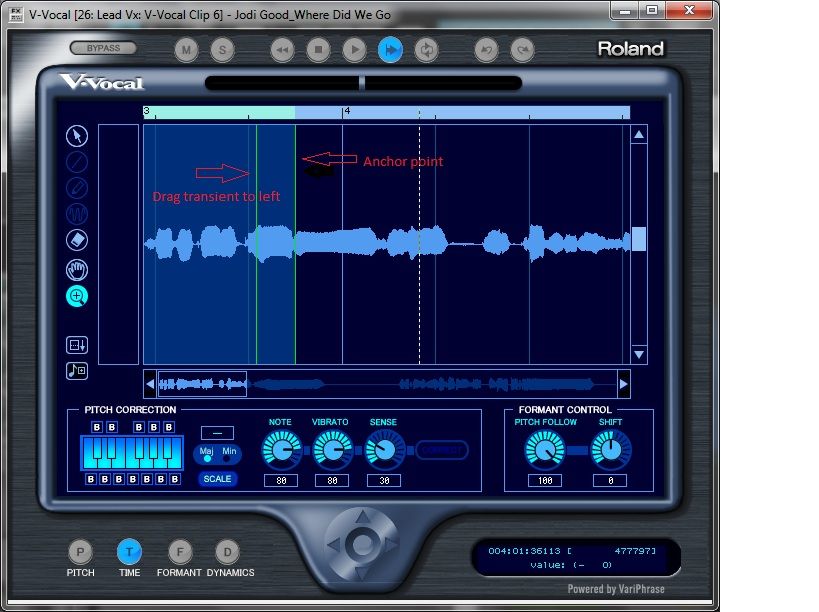
CbB, Platinum, 64 bit throughoutCustom built i7 3930, 32Gb RAM, 2 x 1Tb Internal HDD, 1 x 1TB system SSD (Win 7), 1 x 500Gb system SSD (Win 10), 2 x 1Tb External HDD's, Dual boot Win 7 & Win 10 64 Bit, Saffire Pro 26, ISA One, Adam P11A,
|
Bristol_Jonesey
Max Output Level: 0 dBFS
- Total Posts : 16775
- Joined: 2007/10/08 15:41:17
- Location: Bristol, UK
- Status: offline
Re:Question About V-Vocal Time Correction
2013/01/12 05:13:25
(permalink)
☄ Helpful
You might also want to put another anchor point to the left of the transient to stop the rest of it from moving
CbB, Platinum, 64 bit throughoutCustom built i7 3930, 32Gb RAM, 2 x 1Tb Internal HDD, 1 x 1TB system SSD (Win 7), 1 x 500Gb system SSD (Win 10), 2 x 1Tb External HDD's, Dual boot Win 7 & Win 10 64 Bit, Saffire Pro 26, ISA One, Adam P11A,
|
Cactus Music
Max Output Level: 0 dBFS
- Total Posts : 8424
- Joined: 2004/02/09 21:34:04
- Status: offline
Re:Question About V-Vocal Time Correction
2013/01/12 11:56:14
(permalink)
Hey, thanks, I never tried that and will try it next time.
|
razor
Max Output Level: -59.5 dBFS
- Total Posts : 1557
- Joined: 2004/05/10 16:53:27
- Location: Irvine, CA
- Status: offline

Re:Question About V-Vocal Time Correction
2013/01/12 11:58:09
(permalink)
Bristol_Jonesey
You might also want to put another anchor point to the left of the transient to stop the rest of it from moving
Buddy, I don't think I've ever had you reply to any of my posts before, and I see that you've been around  , but this is the most awesome and thorough reply I can recall in a long time. I saw the anchor points in the YT videos, but didn't see how they got there. Thank you very much!
Stephen Davis Cakewalk by Bandlab Windows 7 Pro 64-Bit ADK DAW - (out of business 2018) Intel i7 4930K CPU Core i7 SB-E MOBO 16 GB DDR3 RAM 7 TB Storage Layla 3G SoundCard (11.5 ms Roundtrip Latency) UAD-2 DSP WaveLab 8 Pro 64-bit Sound Forge 10 Pro
|
Kev999
Max Output Level: -36 dBFS

- Total Posts : 3922
- Joined: 2007/05/01 14:22:54
- Location: Victoria, Australia
- Status: offline
Re:Question About V-Vocal Time Correction
2013/01/12 18:47:44
(permalink)
That's useful. I was not aware of these extra features in V-Vocal. I have only ever used it for pitch correction.
SonarPlatinum∞(22.11.0.111)|Mixbus32C(4.3.19)|DigitalPerformer(9.5.1)|Reaper(5.77)FractalDesign:DefineR5|i7-6850k@4.1GHz|16GB@2666MHz-DDR4|MSI:GamingProCarbonX99a|Matrox:M9148(x2)|UAD2solo(6.5.2)|W7Ult-x64-SP1
Audient:iD22+ASP800|KRK:VXT6|+various-outboard-gear|+guitars&basses, etc.
Having fun at work lately
|
razor
Max Output Level: -59.5 dBFS
- Total Posts : 1557
- Joined: 2004/05/10 16:53:27
- Location: Irvine, CA
- Status: offline
Re:Question About V-Vocal Time Correction
2013/01/12 21:28:24
(permalink)
Used it today, it worked as described. Very nice tool. I do hear a little clicks, but that might be my RAM being taxed and after I bounce down the v-vocal clips that will go away.
Stephen Davis Cakewalk by Bandlab Windows 7 Pro 64-Bit ADK DAW - (out of business 2018) Intel i7 4930K CPU Core i7 SB-E MOBO 16 GB DDR3 RAM 7 TB Storage Layla 3G SoundCard (11.5 ms Roundtrip Latency) UAD-2 DSP WaveLab 8 Pro 64-bit Sound Forge 10 Pro
|