DigitalBoston
Max Output Level: -88 dBFS

- Total Posts : 110
- Joined: 2013/01/17 07:06:02
- Status: offline
update on my issue's with sonar pencil tool
this must be somthing iv broken or something http://youtu.be/pq8qFmKQELY vidio of a clip from a freind rapin as sonar crahsed when penil was used on the vocal buss but seems to haapen on every buss and master win 7 64 sonar x2 delta 1010 ASAO buffer 64 driver 5 10 0 5074 crutial SSD raid 1 and a 2T WD asus 990fx AMD 6870 no third party noncence for gaming just music software input 2.4. 107 output 2.1 92 RT 4.5 199 playback at 256 playback I/0)512 record I/O512 ADBDepth 24 any thought on how i can get better stability im open for. thanks to all who care.and love PC music
|
chuckebaby
Max Output Level: 0 dBFS

- Total Posts : 13146
- Joined: 2011/01/04 14:55:28
- Status: offline

Re:update on my issue's with sonar pencil tool
2013/02/15 01:46:56
(permalink)
link is not working
To help protect the security of information you enter into this website, the publisher of this content does not allow it to be displayed in a frame.
This content cannot be displayed in a frame
Windows 8.1 X64 Sonar Platinum x64 Custom built: Asrock z97 1150 - Intel I7 4790k - 16GB corsair DDR3 1600 - PNY SSD 220GBFocusrite Saffire 18I8 - Mackie Control
|
thebiglongy
Max Output Level: -80 dBFS

- Total Posts : 502
- Joined: 2006/01/29 19:20:31
- Status: offline
Re:update on my issue's with sonar pencil tool
2013/02/15 06:08:07
(permalink)
Sonar x2a Win 7 x64 // i7 930 @ stock speed // Gigabyte x58a-ud3r (rev 1) // 6gb corsair 1600mhz triple channel // ATI HD5450 Samsung EVO 128gb SSD // 2 x WD Black 1tb. M-Audio Fast Track Ultra 8R
|
DigitalBoston
Max Output Level: -88 dBFS
- Total Posts : 110
- Joined: 2013/01/17 07:06:02
- Status: offline
Re:update on my issue's with sonar pencil tool
2013/02/15 10:27:32
(permalink)
|
Bristol_Jonesey
Max Output Level: 0 dBFS
- Total Posts : 16775
- Joined: 2007/10/08 15:41:17
- Location: Bristol, UK
- Status: offline
Re:update on my issue's with sonar pencil tool
2013/02/15 11:07:16
(permalink)
What are you trying to automate?
CbB, Platinum, 64 bit throughoutCustom built i7 3930, 32Gb RAM, 2 x 1Tb Internal HDD, 1 x 1TB system SSD (Win 7), 1 x 500Gb system SSD (Win 10), 2 x 1Tb External HDD's, Dual boot Win 7 & Win 10 64 Bit, Saffire Pro 26, ISA One, Adam P11A,
|
DigitalBoston
Max Output Level: -88 dBFS
- Total Posts : 110
- Joined: 2013/01/17 07:06:02
- Status: offline
Re:update on my issue's with sonar pencil tool
2013/02/15 11:13:45
(permalink)
the vocal master. its not like i always do this. i just though i was moving faster for a quick mix. but every time i touch anything in busses with pencil it frezzes up
as you can see when i drag a line across , , i have to restart sonar as it wont even let me kill the song
even contol alt deleat wont get me back it has to be a restart..??
specs?
|
sharke
Max Output Level: 0 dBFS
- Total Posts : 13933
- Joined: 2012/08/03 00:13:00
- Location: NYC
- Status: offline
Re:update on my issue's with sonar pencil tool
2013/02/15 11:58:33
(permalink)
I find that a lot of stuff makes Sonar crash if you do it during playback. Clicking around in the console, opening stuff, drawing automation etc. One of the most annoying things for me at the minute is Sonar crashing if I select a clip and shift-L for looping during playback. Crashes 50% of the time.
JamesWindows 10, Sonar SPlat (64-bit), Intel i7-4930K, 32GB RAM, RME Babyface, AKAI MPK Mini, Roland A-800 Pro, Focusrite VRM Box, Komplete 10 Ultimate, 2012 American Telecaster!
|
DigitalBoston
Max Output Level: -88 dBFS
- Total Posts : 110
- Joined: 2013/01/17 07:06:02
- Status: offline
Re:update on my issue's with sonar pencil tool
2013/02/15 12:04:06
(permalink)
is there some reason like drive trans rates, buffer or bit setting that sonar needs tweeked.
i dont want to trash cake it seems folks here have better luck and have some ideas of what it could be?like a whats everyone using record and playback specs?/that would help me eliminate those isssues first
|
Bristol_Jonesey
Max Output Level: 0 dBFS
- Total Posts : 16775
- Joined: 2007/10/08 15:41:17
- Location: Bristol, UK
- Status: offline
Re:update on my issue's with sonar pencil tool
2013/02/15 13:57:37
(permalink)
CbB, Platinum, 64 bit throughoutCustom built i7 3930, 32Gb RAM, 2 x 1Tb Internal HDD, 1 x 1TB system SSD (Win 7), 1 x 500Gb system SSD (Win 10), 2 x 1Tb External HDD's, Dual boot Win 7 & Win 10 64 Bit, Saffire Pro 26, ISA One, Adam P11A,
|
Bristol_Jonesey
Max Output Level: 0 dBFS
- Total Posts : 16775
- Joined: 2007/10/08 15:41:17
- Location: Bristol, UK
- Status: offline
Re:update on my issue's with sonar pencil tool
2013/02/15 13:59:17
(permalink)
Bristol_Jonesey
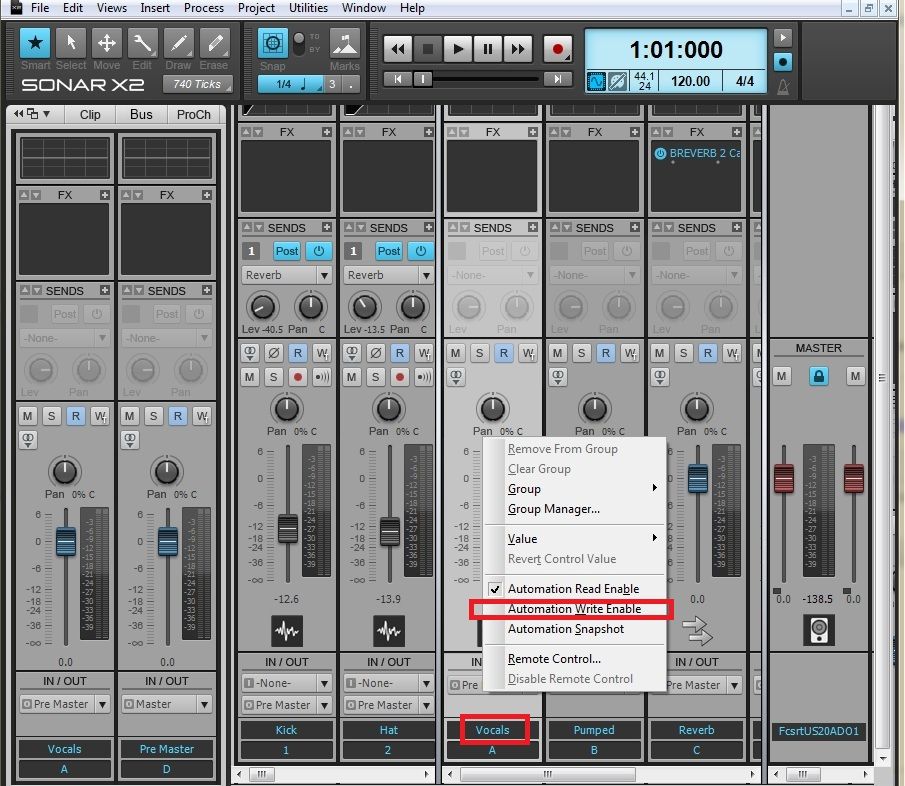
Personally, I wouldn't use the Pencil tool for that.
You'd be much better off automating the volume via the bus fader itself
Just write click the fader & select Automation Write Enable. Play your project back and adjust the fader in real time.
You'll have much finer control using the fader - better still - map it to a real fader or knob on your controller, if you have one.
Don't forget to switch Write Enable OFF when you've finished
Another good reason for mapping to a real controller is you should be using your ears, not your eyes, grab the fader and close your eyes while you're writing the envelope. You can always go back in and edit your moves manually when you've finished
CbB, Platinum, 64 bit throughoutCustom built i7 3930, 32Gb RAM, 2 x 1Tb Internal HDD, 1 x 1TB system SSD (Win 7), 1 x 500Gb system SSD (Win 10), 2 x 1Tb External HDD's, Dual boot Win 7 & Win 10 64 Bit, Saffire Pro 26, ISA One, Adam P11A,
|
DigitalBoston
Max Output Level: -88 dBFS
- Total Posts : 110
- Joined: 2013/01/17 07:06:02
- Status: offline
Re:update on my issue's with sonar pencil tool
2013/02/15 16:46:20
(permalink)
Bristol_Jonesey
Bristol_Jonesey
Personally, I wouldn't use the Pencil tool for that.
You'd be much better off automating the volume via the bus fader itself
Just write click the fader & select Automation Write Enable. Play your project back and adjust the fader in real time.
You'll have much finer control using the fader - better still - map it to a real fader or knob on your controller, if you have one.
Don't forget to switch Write Enable OFF when you've finished
Another good reason for mapping to a real controller is you should be using your ears, not your eyes, grab the fader and close your eyes while you're writing the envelope. You can always go back in and edit your moves manually when you've finished
yes i have a control surface and use it for this but, when i mix vocals after comp and limit it still needs a quick tweek. i like the feeling of painting music levels, but have been using the faders since the paint or pencil too dont work.on a buss, but eather this is just one thing that crashed it the last week, some things like a direct drop in the middle of a live recording must be fixable. i trying i issues at a time to get some stability, belive me if i had the money i would just use a simpler dAW but i knee deep into sonar and need to stay positive and work threw these issues .thanks for the input so far. her are a few setting to glance at for my stupidity. before i go further these are basic setting i used on X1 input 2.4. 107 output 2.1 92 RT 4.5 199 playback at 256 playback I/0)512 record I/O512 ADBDepth 24
|