OldNick
Max Output Level: -68 dBFS

- Total Posts : 1149
- Joined: 2005/12/14 20:35:17
- Location: Perth...W Australia, the sunset home
- Status: offline
Sonar X1 track MIDI Chn assignment?
This is probably something very basic that have forgotten. So how do I get Piano Roll-entered notes to automatically be placed to the MIDI channel of a track that the Piano roll is set to? Here is the trouble. Although the track is set to say, MIDI chn 3, every time I enter a new note event in the Piano Roll, it gets sent to Chn 1. I am trying to get to terms with TTS-1 and this requires that I assign multiple MIDI tracks to it. So I create a few tracks and assign them to the TTS-1. I then set each track to MIDI Chn 1,2,3,4 etc. I then set TTS-1 to different voices by either trying to insert a Patch from the Insert Menu, or by actually manually inserting one on the Event List, making sure that each track's patch change is set to the MIDI channel for that track. But when I use Piano roll to insert a note, it goes to Chn 1. TTS-1 then happily plays it with Chn 1's voice. Any help appreciated
Nick Aced : Zither Mush (I no longer have ANY idea what this means) Ancient Seeker of Artifacts Platinum 23.4.0, Win 7 64 bit
|
Cactus Music
Max Output Level: 0 dBFS

- Total Posts : 8424
- Joined: 2004/02/09 21:34:04
- Status: offline

Re:Sonar X1 track MIDI Chn assignment?
2013/02/28 11:02:02
(permalink)
Somehow old nick you've posted in the wrong forum. I wish they would change the name because there's nothing about it to indicate that this is NOT for x1 and 2.
Sorry I don't have a clue why that would happen as it's sure doesn't do that for me, Been using Piano roll for years with all channels and TTs-1.
Something strange has been toggled, one of those stupid hot keys?
|
OldNick
Max Output Level: -68 dBFS
- Total Posts : 1149
- Joined: 2005/12/14 20:35:17
- Location: Perth...W Australia, the sunset home
- Status: offline
Re:Sonar X1 track MIDI Chn assignment?
2013/02/28 17:54:08
(permalink)
Thanksw for the reply. Yeah I am in the wrong forum. Rats. But hey, you are here now :D. Could you please let me know about the following? When you use TTS-1, do you have a track for each channel in TTS-1? When you enter a MIDI note in a track that has been assigned to a MIDI channel, what MIDI channel does that note go to? When you enter that note, does it play the right voice?ATM the ONLY way I can get the thing to remotely behave is by doing a Find/Change on all notes in each track and setting them to the right MIDI channel for that track. Then it _seems_ to work.
Nick Aced : Zither Mush (I no longer have ANY idea what this means) Ancient Seeker of Artifacts Platinum 23.4.0, Win 7 64 bit
|
OldNick
Max Output Level: -68 dBFS
- Total Posts : 1149
- Joined: 2005/12/14 20:35:17
- Location: Perth...W Australia, the sunset home
- Status: offline
Re:Sonar X1 track MIDI Chn assignment?
2013/02/28 18:01:08
(permalink)
WOW! This screwed. Now I have opened a track that still has Piano 1 set as the voice. It plays OK, but when I scroll up and down the pianjo roll KB, I get this weird EG plunging the note as each one plays. tew tew tew....then the normal piano note if I sit one one key. I do not think TTS-1 HAS that power of synthing! This is scary.
Nick Aced : Zither Mush (I no longer have ANY idea what this means) Ancient Seeker of Artifacts Platinum 23.4.0, Win 7 64 bit
|
bitflipper
01100010 01101001 01110100 01100110 01101100 01101

- Total Posts : 26036
- Joined: 2006/09/17 11:23:23
- Location: Everett, WA USA
- Status: offline
Re:Sonar X1 track MIDI Chn assignment?
2013/02/28 20:55:59
(permalink)
As long as you have a MIDI channel specified in the track header, all notes entered into that track will be sent to that channel regardless of their individual MIDI channel assignments. The only time that's not the case is when you have the MIDI channel set to "none".
So it's not a matter of forcing MIDI channel assignments onto notes; SONAR does that for you when you select a MIDI channel for the track. Your problem may be simply you're not specifying a MIDI channel for the track.
The TTS-1 is kind of old-fashioned in that each voice is hard-wired to a MIDI channel. Because each of the 16 voices defaults to piano, any time you inadvertently send notes to the wrong channel you get that piano.
 All else is in doubt, so this is the truth I cling to. My Stuff
|
OldNick
Max Output Level: -68 dBFS
- Total Posts : 1149
- Joined: 2005/12/14 20:35:17
- Location: Perth...W Australia, the sunset home
- Status: offline
Re:Sonar X1 track MIDI Chn assignment?
2013/02/28 21:32:03
(permalink)
Thanks for dropping in. That's the trouble though. I am definitely assigning a channel to each track. In the Track Inspector I use the button that assigns channels and set a new MIDI channel for each track (remembering to go back and remove Chn 1 because the track ends up with 2 channels!). Then in Piano Roll I enter a new note. That note will play Channel 1's voice, no matter what track I am in, if it's the first note I enter for a session. However if I then edit that note and make its channel, say, 10, it will play the drums...no matter what track I am in! Any note I enter after that is set to Channel 10 and plays drums. Also, if I go to another track, with MIDI channel assigned, and enter a note, that note will have the same MIDI Chn assigned to it, and will play the voice of that channel...no matter what track I am in....So if X1 is supposed to send to the correct midi channel depending on track Chn assignment and not on note assignment (which is what I understood), something is wrong. Sorry to sound grumpy, but this has really played with my head and I just wish I was doing something wrong that someone can ID.
Nick Aced : Zither Mush (I no longer have ANY idea what this means) Ancient Seeker of Artifacts Platinum 23.4.0, Win 7 64 bit
|
RobertB
Max Output Level: 0 dBFS
- Total Posts : 11256
- Joined: 2005/11/19 23:40:50
- Location: Fort Worth, Texas
- Status: offline
Re:Sonar X1 track MIDI Chn assignment?
2013/03/01 00:07:55
(permalink)
Nick, you have mentioned selecting channels, but the bank and patch settings are what really matter, and I am not entirely clear on how you are selecting those. There is a hierarchy to patch settings, that I think has more to do with GM in general rather than TTS-1 in particular. The Event list will override everything. The MIDI track is where you usually want to specify your patch. It will fall prey to the Event list, but will override the synth GUI. The synth GUI will fall to either of these. The key element in getting TTS-1 to respond properly is setting your bank and patch in the track. It is vitally important to see the boxes that allow you to do that. In the following view, you will se a button near the top labelled "All". This is not a default setting, but it must be selected to reveal your bank and patch fields. When you make your selections here, you will see the TTS-1 GIU follow suit. I would strongly urge you not to make changes in the Event List for now. Case in point: When you selected Ch 10 in the Event List, any subsequent notes would be directed to Ch 10. The channel itself does not mean much. It just so happens that the default for Ch 10 is the Standard Drum Set. Also, PRV may not necessarilly open to the track you think you are in. Verify your track. PRV is not capable of redirecting notes to other tracks. Study the screen shot. If something doesn't make sense, please ask. 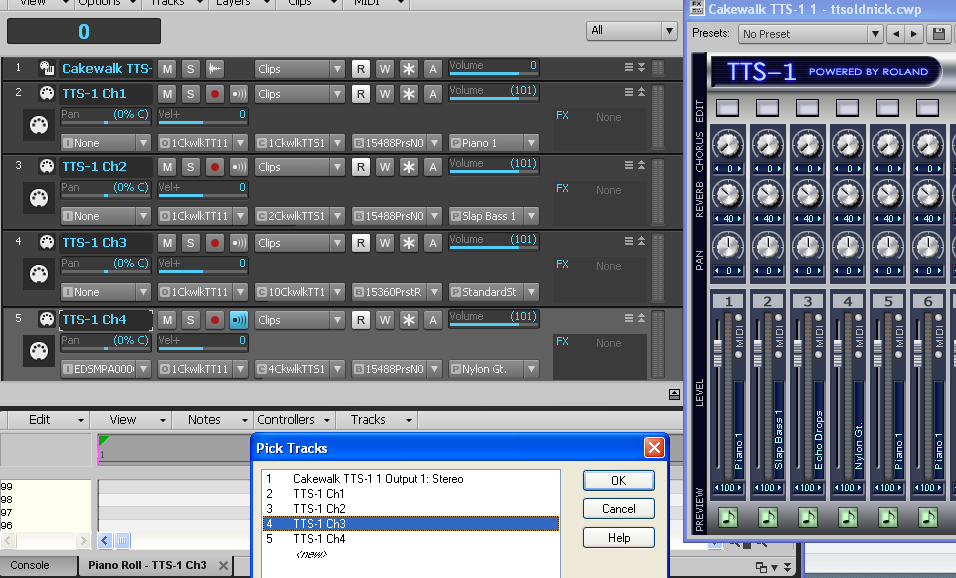
My Soundclick Page SONAR Professional, X3eStudio,W7 64bit, AMD Athlon IIx4 2.8Ghz, 4GB RAM, 64bit, AKAI EIE Pro, Nektar Impact LX61,Alesis DM6,Alesis ControlPad,Yamaha MG10/2,Alesis M1Mk2 monitors,Samson Servo300,assorted guitars,Lava Lamp Shimozu-Kushiari or Bob
|
bitflipper
01100010 01101001 01110100 01100110 01101100 01101
- Total Posts : 26036
- Joined: 2006/09/17 11:23:23
- Location: Everett, WA USA
- Status: offline
Re:Sonar X1 track MIDI Chn assignment?
2013/03/01 00:52:53
(permalink)
Good call, Bob. It may not be an issue with MIDI channel assignments at all, but rather not specifying the patch. I haven't used the TTS-1 for so long I'd forgotten about that gotcha.
All else is in doubt, so this is the truth I cling to. My Stuff
|
OldNick
Max Output Level: -68 dBFS
- Total Posts : 1149
- Joined: 2005/12/14 20:35:17
- Location: Perth...W Australia, the sunset home
- Status: offline
Re:Sonar X1 track MIDI Chn assignment?
2013/03/01 01:08:54
(permalink)
WOW! Thanks and now it is all clear. But no wonder I was confused. I cannot find anywhere that button to direct to the TTS-1 channel, other then by asking for All, then opening up the track depth to see it. I was working with MIDI Channels, which is all that is available in the Track Inspector AFAICS. This is all a lot different from the way things were in older Cakewalks/Sonars that I used. The only thing that puzzles me is that the PRV WAS sending MIDI events to other TTS-1 sections/parts, if the MIDI Channel of that event matched the MIDI channel of that other section/part. So if I placed a MIDI Channel 1 event in the PRV track that matched TTS-1 channel 10, it would play the voice that TTS-1had set in its #1 section/part. If I changed the event's MIDI Channel to 10, it would play the Channel 10 sound (drums)....anyway, now that I get the interface this is a MUCH better way to handle a multi-timbral synth than used to be there. So all is on order and thank you.
Nick Aced : Zither Mush (I no longer have ANY idea what this means) Ancient Seeker of Artifacts Platinum 23.4.0, Win 7 64 bit
|
OldNick
Max Output Level: -68 dBFS
- Total Posts : 1149
- Joined: 2005/12/14 20:35:17
- Location: Perth...W Australia, the sunset home
- Status: offline
Re:Sonar X1 track MIDI Chn assignment?
2013/03/01 01:12:34
(permalink)
No, actually I was setting the patch, by 3 different methods: (1) Using the Patch Browser (2) Using the Menu Insert Bank/Patch Change (3) After all else failed to stick, using the Event List. The even list way was the only way it used to work back in my darkest memories. It was the TTS-1 section assignment I was not seeing.
Nick Aced : Zither Mush (I no longer have ANY idea what this means) Ancient Seeker of Artifacts Platinum 23.4.0, Win 7 64 bit
|
Cactus Music
Max Output Level: 0 dBFS
- Total Posts : 8424
- Joined: 2004/02/09 21:34:04
- Status: offline
Re:Sonar X1 track MIDI Chn assignment?
2013/03/01 12:56:32
(permalink)
Since I discovered the fact that the TTS-1 GUI has way more instruments to choose from than the properties page, I never use any other option. Anyone who hasn't done so yet should take the time to get to know the GUI interface for the TTS-1. If you ever owned a multi channel sound module you'll be right at home.
First like I say, if you point the mouse at the instrument name a list will open with "presets" that leads to sub menus of instruments. Look at the piano and you'll see a lot more to offer than standard GM lists.
You can even edit these sounds and save them.
You can apply 2 efxs which are also can be edited.
You can save the whole mixer layout with your own custom "band" as a pre set.
Coming from using sound modules as my backing band for years I have always used certain channels for certain instruments. Ch1 Bass, Ch2,Organ and so on. So I have my "band tts-1 " loaded in certain templates ready to go for song writing and for creating my backing tracks.
If I'm about to record an Organ part all I have to do is insert a MIDI track and assign it's output to TTS-1 CH 2. Drums Ch 10 and so on.
The only time I do it differently is when "Opening" a pre made MIDI track. I have a bunch of my own from my sound module days too. Then I have to change the instruments sounds as the Korg Module used different #'s. But buy loading my "band" pre set this takes 2 seconds.
|
OldNick
Max Output Level: -68 dBFS
- Total Posts : 1149
- Joined: 2005/12/14 20:35:17
- Location: Perth...W Australia, the sunset home
- Status: offline
Re:Sonar X1 track MIDI Chn assignment?
2013/03/01 23:35:10
(permalink)
Interesting. How many Performance Files do you have and how often do you change them? I ask because my memory recalls a lot of trouble with using the TTS GUI to work things, with lost settings and such, to the point where it seemed silly to keep it in Cakewalk's line-up. I do agree that the GUI gives a lot of easy power over the synth. Having played with it for a while this morning, it does seem to be working by saving and loading performance files.
Nick Aced : Zither Mush (I no longer have ANY idea what this means) Ancient Seeker of Artifacts Platinum 23.4.0, Win 7 64 bit
|
RobertB
Max Output Level: 0 dBFS
- Total Posts : 11256
- Joined: 2005/11/19 23:40:50
- Location: Fort Worth, Texas
- Status: offline
Re:Sonar X1 track MIDI Chn assignment?
2013/03/01 23:46:41
(permalink)
Glad that helped, Nick. In the Track Inspector, if you click Display, there is an option to show Sends/Bank/Patch. I have grown accustomed to working in the track view, but there are several ways to show the same information. It's just a matter of what you are most comfortable with. As Cactus noted, TTS-1 is a GM2 synth, and offers a lot more than the standard GM1 sound set. You may find this article of interest, especially the table that shows the patches and which banks they reside in. http://en.wikipedia.org/wiki/General_MIDI_Level_2
My Soundclick Page SONAR Professional, X3eStudio,W7 64bit, AMD Athlon IIx4 2.8Ghz, 4GB RAM, 64bit, AKAI EIE Pro, Nektar Impact LX61,Alesis DM6,Alesis ControlPad,Yamaha MG10/2,Alesis M1Mk2 monitors,Samson Servo300,assorted guitars,Lava Lamp Shimozu-Kushiari or Bob
|
OldNick
Max Output Level: -68 dBFS
- Total Posts : 1149
- Joined: 2005/12/14 20:35:17
- Location: Perth...W Australia, the sunset home
- Status: offline
Re:Sonar X1 track MIDI Chn assignment?
2013/03/01 23:55:03
(permalink)
Well I would have been a right ninny if it had not helped, Bob! :D You out enough effort into preparing it! Thank you. Yes I NOW see the same button that I NOW see in the Track Pane. :( I am happy working in the Track Pane as well, but it had the best bits hidden by default At least it seems to keep that All setting when I close and reopen the project.
Nick Aced : Zither Mush (I no longer have ANY idea what this means) Ancient Seeker of Artifacts Platinum 23.4.0, Win 7 64 bit
|
Cactus Music
Max Output Level: 0 dBFS
- Total Posts : 8424
- Joined: 2004/02/09 21:34:04
- Status: offline
Re:Sonar X1 track MIDI Chn assignment?
2013/03/04 11:26:18
(permalink)
Not exactly sure what you are asking but I'll guess that by performance files you are referring to how many live performance MIDI files I have? I started making my own with an Atari in 1984 so I got a couple of hundered I made myself. In those day's the only other option was to fork over $20 a song. There was no internet to share files on but a few of us locals did via floppy disk. My tracks are simple because I play guitar, Drums, Bass and a horn stab or a bit of traditional organ /Piano. 80% are just drums & Bass. So they are not demanding on a sound modules Polyphony ( 32 parts). There is absolutely no CC info. Just Tempo and PG. In those day one was very limited by the amount of data that could fit on the floppy's, I think 40 songs = 1.44 MB. I have not used MIDI for live performance since the invention of the Sony Mini Disk. ( 1992?) All my tracks since then have been in a digital audio format. I started replacing all midi sounds first with real bass and a mix of real and midi drums too. I'm still working on it!! I have over 400 wave backing tracks I have arranged and recorded myself. If I work out a new song I do occasionally use a download track now, but only if the drums are properly done. That's the only part I keep. Most free downloads are real badly done. Monkey on a keyboard I think.
post edited by Cactus Music - 2013/03/04 11:33:02
|
OldNick
Max Output Level: -68 dBFS
- Total Posts : 1149
- Joined: 2005/12/14 20:35:17
- Location: Perth...W Australia, the sunset home
- Status: offline
Re:Sonar X1 track MIDI Chn assignment?
2013/03/05 02:18:46
(permalink)
HAH! I have never been as organised as that. I _had_ a lot of files over the years and they just get lost with crashes and upgrades, then I stop doing music...and so on. Anyhoo....What I was referring to was the files that TTS-1 saves when you save the whole setup. System/Option/Options/Save-Load...a gmf file. The reason I ask is that as I say, I remember there was a lot of hassle about losing settings and stuff. I am not sure what level file (gmf, or the individual settings for instruments ...User Normals)
Nick Aced : Zither Mush (I no longer have ANY idea what this means) Ancient Seeker of Artifacts Platinum 23.4.0, Win 7 64 bit
|
Cactus Music
Max Output Level: 0 dBFS
- Total Posts : 8424
- Joined: 2004/02/09 21:34:04
- Status: offline
Re:Sonar X1 track MIDI Chn assignment?
2013/03/05 11:03:13
(permalink)
All I do is tweak the TTS=1 and save it as a pre set
=" my band". Each Channel has an instrument I might use and that I have always used that channel since day one for those parts. Like I say, I don't use many instruments per song as I find that borders on sounding Karaoke. I cringe when I hear a solo act using those 12 track pre made midi files with the wheezy sounds singing harmony etc.
I know the drunk audience won't care, But I have to listen to myself night after night and I also play in a live band,,, a live band does not sound like that for sure. My mission is to sound like a traditional 4 piece band. Drums, Bass, Guitar and Keyboards.
PS , I still have my original MIDI files on floppy disk, I still have an old PC with a floppy drive and it can read them. Atari Mega computers could use IBM formatted disks.
|