DPTrainor
Max Output Level: -87 dBFS

- Total Posts : 162
- Joined: 2009/02/18 23:11:48
- Status: offline
Keyboard shortcuts / Mouse equivalents
I am going through the X2 groove training and many useful keyboard short cuts are explained. But, I am truly a "mouse guy". Quick Question: Does X2 have an equivalent mouse menus for each and every keyboard command? thanks! dan
|
Beepster
Max Output Level: 0 dBFS

- Total Posts : 18001
- Joined: 2012/05/11 19:11:24
- Status: offline

Re:Keyboard shortcuts / Mouse equivalents
2013/03/03 12:21:04
(permalink)
Not really. You can do a lot of stuff by switching tools, accessing right click menus, using the various view menus and the global menus but it's a real pain and will slow down your workflow significantly and there are some things that I don't think are possible at all with out modifier keys. It's pretty much designed to be used with both the keyboard and mouse.
|
Beepster
Max Output Level: 0 dBFS
- Total Posts : 18001
- Joined: 2012/05/11 19:11:24
- Status: offline
Re:Keyboard shortcuts / Mouse equivalents
2013/03/03 12:22:52
(permalink)
However if you got one of those fancy gaming mice with the ridiculous amount of buttons you mind be able to bind a lot of that stuff to the extra buttons.
|
scook
Forum Host

- Total Posts : 24146
- Joined: 2005/07/27 13:43:57
- Location: TX
- Status: offline
Re:Keyboard shortcuts / Mouse equivalents
2013/03/03 12:37:54
(permalink)
Most everything has a menu equivalent but one that comes to mind that does not is quick grouping.
|
DPTrainor
Max Output Level: -87 dBFS
- Total Posts : 162
- Joined: 2009/02/18 23:11:48
- Status: offline
Re:Keyboard shortcuts / Mouse equivalents
2013/03/03 12:40:22
(permalink)
problem is I am older and can't keep all these keyboard shortcut combinations in my head.
|
Paul P
Max Output Level: -48.5 dBFS

- Total Posts : 2685
- Joined: 2012/12/08 17:15:47
- Location: Montreal
- Status: offline
Re:Keyboard shortcuts / Mouse equivalents
2013/03/03 12:42:16
(permalink)
I don't think there are that many functions that don't have mouse based equivalents.
I hardly ever use the pc keyboard other than to enter values.
A lot of shortcuts require both hands, or even just the right hand, which I find awkward.
Some functions involve holding down a key like Alt or Ctl while sweeping with the mouse.
This is the case with the scrub function in which you press J (for jog) while moving the mouse.
The ruler also has some zoom function that work this way.
|
Beepster
Max Output Level: 0 dBFS
- Total Posts : 18001
- Joined: 2012/05/11 19:11:24
- Status: offline
Re:Keyboard shortcuts / Mouse equivalents
2013/03/03 12:52:00
(permalink)
DPTrainor
problem is I am older and can't keep all these keyboard shortcut combinations in my head.
You can print out the shortcuts straight from the PDF manual and keep them near your DAW or do what I've been doing and typing them all up in notepad with your own descriptions (sometimes easier to understand what they do if it's in your own words) and keep the file on your desktop for easy access. Cheers.
|
scook
Forum Host
- Total Posts : 24146
- Joined: 2005/07/27 13:43:57
- Location: TX
- Status: offline
Re:Keyboard shortcuts / Mouse equivalents
2013/03/03 12:57:13
(permalink)
Never bothered to learn many of the keyboard shortcuts myself and don't mind using a mouse. Still get stuff done in X2 though.
|
Beepster
Max Output Level: 0 dBFS
- Total Posts : 18001
- Joined: 2012/05/11 19:11:24
- Status: offline
Re:Keyboard shortcuts / Mouse equivalents
2013/03/03 13:37:00
(permalink)
When I first started getting into computers keyboard commands drove me nuts. I just couldn't remember them all. Now I couldn't imagine working without them... especially with such a complicated program as Sonar. Fortunately my memory seems to have improved over the years. Probably just from my brain rewiring itself to more computer based thinking and the fact I'm not such a drunk. lol
|
scook
Forum Host
- Total Posts : 24146
- Joined: 2005/07/27 13:43:57
- Location: TX
- Status: offline
Re:Keyboard shortcuts / Mouse equivalents
2013/03/03 13:38:49
(permalink)
And then there is that fondness for mice, right?
|
Beepster
Max Output Level: 0 dBFS
- Total Posts : 18001
- Joined: 2012/05/11 19:11:24
- Status: offline
Re:Keyboard shortcuts / Mouse equivalents
2013/03/03 13:41:42
(permalink)
lol... hate the little buggers.
Worst... HID... EVAR!
|
Bristol_Jonesey
Max Output Level: 0 dBFS
- Total Posts : 16775
- Joined: 2007/10/08 15:41:17
- Location: Bristol, UK
- Status: offline
Re:Keyboard shortcuts / Mouse equivalents
2013/03/04 05:17:57
(permalink)
If any one would like an Excel File with all X2 Keybindings listed, please PM me with your email address.
CbB, Platinum, 64 bit throughoutCustom built i7 3930, 32Gb RAM, 2 x 1Tb Internal HDD, 1 x 1TB system SSD (Win 7), 1 x 500Gb system SSD (Win 10), 2 x 1Tb External HDD's, Dual boot Win 7 & Win 10 64 Bit, Saffire Pro 26, ISA One, Adam P11A,
|
RJN
Max Output Level: -87 dBFS
- Total Posts : 178
- Joined: 2003/11/16 11:59:16
- Location: Michigan
- Status: offline
Re:Keyboard shortcuts / Mouse equivalents
2013/03/04 06:28:15
(permalink)
I made pictures of the keyboard shortcuts into .bmp files suitable for use as wallpaper inside SONAR. There are 2 sizes available. Info and download links here. 
Rob -------- Core i7, 3.4 GHz, 16Gb RAM, Win 10 Pro (64-bit), 2 Tb HD, SONAR Platinum Producer , Roland Quad Capture, Alesis QS8 rjnorwich.worpress.com
|
icontakt
Max Output Level: -32.5 dBFS

- Total Posts : 4266
- Joined: 2012/03/04 08:18:02
- Location: Tokyo
- Status: offline
Re:Keyboard shortcuts / Mouse equivalents
2013/03/04 06:55:52
(permalink)
DPTrainor
problem is I am older and can't keep all these keyboard shortcut combinations in my head.
That's when your brain starts losing more and more cells. Remembering shortcut keys are good for you and it's not that difficult. For example, I is for Inspector, D is for multiDock, and adding Ctrl/Alt/Shift keys do related things, such as Shift+I opens the Clip pane in the Inspector, and Shift+D maximizes the multiDock pane. Also, you can assign shortcut keys as you like. I use the combination of Ctrl+Alt for my own shortcut keys, like Ctrl+Alt+T opens Process > Transpose, and Ctrl+Alt+F opens Find/Change. Another reason why it's good to remember shortcut keys is because you could accidentally press some key that might change some important settings. If you know what E or X does, you won't have to wonder "Why did my mix suddenly started sounding so dry?" or "Where the hell has the Aim Assist gone?" Don't worry, take in lots of proteins and vitamins (especially folic acid) and enjoy the shortcut keys! 
|
Glyn Barnes
Max Output Level: -0.3 dBFS

- Total Posts : 7564
- Joined: 2009/06/10 05:12:31
- Location: A Stone's Throw from the Line
- Status: offline
Re:Keyboard shortcuts / Mouse equivalents
2013/03/04 06:56:25
(permalink)
I am not a great fan of keyboard commands, most of the problems I seem to get come from accidentaly touching a key and changing something I never meant to change But they are not going away and they seem to be more important in X2 than they ever were in 8.5 I like the look of RJN's wall paper and I will give it a try. I wonder if any one has tried one of the fancy gaming keyboards with Sonar like this one. Seems like the colour coded lighting and the programmable keys could be useful, if for example the programable "Cyborg Keys"  could be programmed to the most used Alt+shift+cntl combiantions I could see it being useful.
|
chuckebaby
Max Output Level: 0 dBFS
- Total Posts : 13146
- Joined: 2011/01/04 14:55:28
- Status: offline
Re:Keyboard shortcuts / Mouse equivalents
2013/03/04 07:34:36
(permalink)
im not a keyboard pusher either but i have found about 10 commands that i use a lot.
dont think because your old you cant remember 10.
youll get used to them :)
Windows 8.1 X64 Sonar Platinum x64 Custom built: Asrock z97 1150 - Intel I7 4790k - 16GB corsair DDR3 1600 - PNY SSD 220GBFocusrite Saffire 18I8 - Mackie Control
|
Paul P
Max Output Level: -48.5 dBFS
- Total Posts : 2685
- Joined: 2012/12/08 17:15:47
- Location: Montreal
- Status: offline
Re:Keyboard shortcuts / Mouse equivalents
2013/03/04 09:16:21
(permalink)
Then there's this guy : 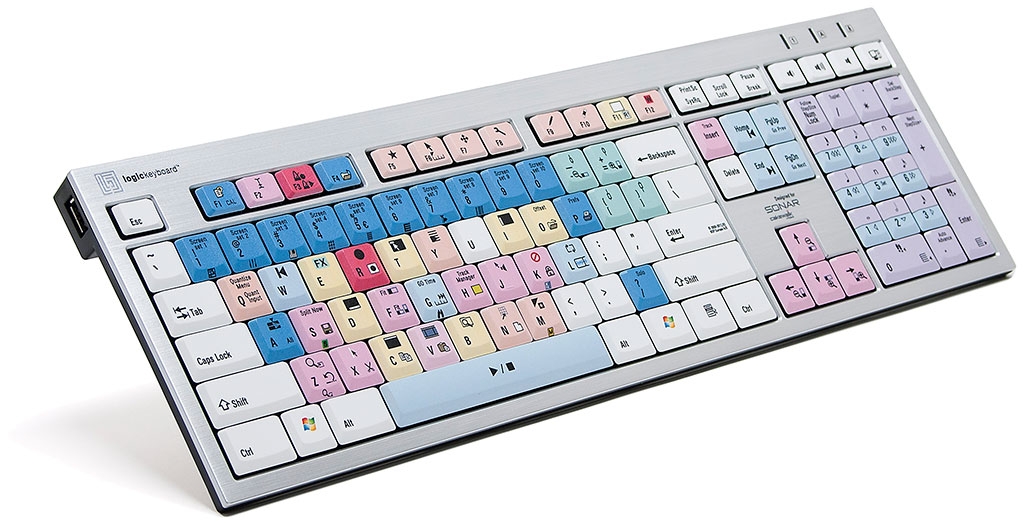
|
Beepster
Max Output Level: 0 dBFS
- Total Posts : 18001
- Joined: 2012/05/11 19:11:24
- Status: offline
Re:Keyboard shortcuts / Mouse equivalents
2013/03/04 09:19:03
(permalink)
They did have an X1 keyboard... http://blog.cakewalk.com/...gickeyboard/#more-8321 but it seems it's been removed from the store because of changes in X2. Was kind of expensive at $100 though. There were also Sonar keyboard sticker sets but again I think those were for earlier versions. I thought maybe I'd need to invest in one or the other at some point but I'm sure glad I didn't considering I jumped to X2 pretty fast. My notes work fine for when I get stuck. I find the actual shortcut charts in the manual to be a little confusing/misleading which is why I prefer to type things up in my own words as I learn them. It certainly takes longer but just like writing notes in school it helps things stick better.
|
Beepster
Max Output Level: 0 dBFS
- Total Posts : 18001
- Joined: 2012/05/11 19:11:24
- Status: offline
Re:Keyboard shortcuts / Mouse equivalents
2013/03/04 09:20:05
(permalink)
Haha. Beat me to it... but yeah, I don't think that would be as effective with X2. Maybe it would work if you changed some binding settings around.
|
DPTrainor
Max Output Level: -87 dBFS
- Total Posts : 162
- Joined: 2009/02/18 23:11:48
- Status: offline
Re:Keyboard shortcuts / Mouse equivalents
2013/03/04 20:00:18
(permalink)
I like this wallpaper. I am trying it. Brilliant thanks!
RJN
I made pictures of the keyboard shortcuts into .bmp files suitable for use as wallpaper inside SONAR.
There are 2 sizes available. Info and download links here.
|
RJN
Max Output Level: -87 dBFS
- Total Posts : 178
- Joined: 2003/11/16 11:59:16
- Location: Michigan
- Status: offline
Re:Keyboard shortcuts / Mouse equivalents
2013/03/05 06:17:31
(permalink)
You're welcome.
I have a fairly good memory for keyboard shortcuts, but I needed help on the "where to click/drag" changes, that are illustrated in the small cut outs of the track view/PRV.
Rob -------- Core i7, 3.4 GHz, 16Gb RAM, Win 10 Pro (64-bit), 2 Tb HD, SONAR Platinum Producer , Roland Quad Capture, Alesis QS8 rjnorwich.worpress.com
|
SteveStrummerUK
Max Output Level: 0 dBFS
- Total Posts : 31112
- Joined: 2006/10/28 10:53:48
- Location: Worcester, England.
- Status: offline
Re:Keyboard shortcuts / Mouse equivalents
2013/03/05 07:14:58
(permalink)
Hi there Daniel Like you, I wasn't much for keyboard shortcuts, but I have grown to find them extremely useful. For me, changing to using shortcuts instead of the mouse had to offer a better workflow option than using a mouse, and bearing in mind that I've got a guitar or bass strapped on when I'm tracking and overdubbing, I've set up my key-bindings so that the functions I use most frequently are all mapped (with just two exceptions) to a single key. It might sound a bit daft, but on a purely practical level, this means I can hang on to my guitar neck with one hand and operate X2 quickly and easily with my free hand. Also like your good self, I'm terrible at learning shortcuts, so I've printed them out and have them hanging above one of my monitors. Here's my (mostly) 'One-Finger' set of keyboard shortcuts to give you an idea of how useful they are to me: 
|
DPTrainor
Max Output Level: -87 dBFS
- Total Posts : 162
- Joined: 2009/02/18 23:11:48
- Status: offline
Re:Keyboard shortcuts / Mouse equivalents
2013/03/07 01:17:25
(permalink)
Hi Steve, thanks for your 1 key shortcuts. Brilliant. I copied picture. I try this too. Thanks Much! Dan
|