swamptooth
Max Output Level: -53 dBFS

- Total Posts : 2229
- Joined: 2012/04/16 15:44:21
- Status: offline

how to tell sonar which cpus to use on startup
i posted this as a comment on another thread and thought some of you would like to know how to do this without opening task manager every time sonar runs...
setting affinity in windows is a two-step process. the first is in sonar: in preferences/config file you need to set "enablesetthreadidealprocessor" to false step two is creating a bat file that will look something like this: start "sonar 7cpu" /affinity 0xFE "C:\Program Files\Cakewalk\SONAR X2 Producer\SONARPDR.exe" the affinity option is a hex representation of the processors you want to use converted from a binary number made up of all your cpus. i have 8 cores on my system so it would be an 8 bit binary mask ie. 11111111 where each digit represents a core. the cores are read from right to left, so it's laid out like this: core # 76543210 my start option wants to use cores 1 thru 7, so the binary is 11111110 which converts to hex of FE. say you want to use cores 4567, then the binary would be 11110000 and the hex F0 and the resultant start command would be start "<YOURSHORTNAMEHERE>" /affinity 0xF0 "C:\Program Files\Cakewalk\SONAR X2 Producer\SONARPDR.exe" just thot i'd toss that out there if anyone's interested.
Arvid H. PetersonSonar X3E Prod / X2A / X1PE | Cubase 9.5.1 | Reason 9.5 | Sibelius7 | Pure DataNative-Instruments Komplete 10 Ultimate and a smattering of other pluginsHome-brewed VSTs Toshiba Satellite S855-S5378 (16GB RAM, modified with 2x 750GB HDDs, Windows 8.1 x64) Samson Graphite 49, M-Audio Oxygen 49, Korg nanoPAD2, Webcam motion tracking programs M-Audio Fast Track UltraMember, ASCAP
|
jbraner
Max Output Level: -57 dBFS

- Total Posts : 1830
- Joined: 2003/11/06 14:38:35
- Location: Edinburgh, Scotland
- Status: offline
Re:how to tell sonar which cpus to use on startup
2013/03/04 16:51:12
(permalink)
Why would you want to do that?
|
swamptooth
Max Output Level: -53 dBFS
- Total Posts : 2229
- Joined: 2012/04/16 15:44:21
- Status: offline
Re:how to tell sonar which cpus to use on startup
2013/03/04 17:56:04
(permalink)
some people want to use dedicated cpus for processing. maybe you want a background process to run without causing cpu spikes in sonar, so set that process to its dedicated logical core and sonar to the others. seems like there were a few people wondering from the other post, like sharke...
one of the things that i'm doing right now is using math formulas based around crowd analysis and video analysis and real-time acoustical analysis. so, something i can do is have reaktor and pure data running on cpus 1-2 doing the math and generating the 4-500 midi events per second that are being sent into sonar, which is running on procs 3-8. i was having a bit of trouble keeping sonar in sync with pure data sending 75 midi messages every 250msec across 15 different midi channels into 15 instances of kontakt recording real-time in sonar. playing with the processor options gives me a bit of flexability. still working on stabalizing it but it works pretty well for several hours with maybe about 12 msec of drift in the timings here and there.
Arvid H. PetersonSonar X3E Prod / X2A / X1PE | Cubase 9.5.1 | Reason 9.5 | Sibelius7 | Pure DataNative-Instruments Komplete 10 Ultimate and a smattering of other pluginsHome-brewed VSTs Toshiba Satellite S855-S5378 (16GB RAM, modified with 2x 750GB HDDs, Windows 8.1 x64) Samson Graphite 49, M-Audio Oxygen 49, Korg nanoPAD2, Webcam motion tracking programs M-Audio Fast Track UltraMember, ASCAP
|
jbraner
Max Output Level: -57 dBFS
- Total Posts : 1830
- Joined: 2003/11/06 14:38:35
- Location: Edinburgh, Scotland
- Status: offline
Re:how to tell sonar which cpus to use on startup
2013/03/05 08:19:10
(permalink)
Oh well, good luck to you  I think 99% of us are quite happy to just let the OS decide which cores to use for which threads - but I guess there's always an exception.
|
Beepster
Max Output Level: 0 dBFS

- Total Posts : 18001
- Joined: 2012/05/11 19:11:24
- Status: offline
Re:how to tell sonar which cpus to use on startup
2013/03/05 08:37:27
(permalink)
one of the things that i'm doing right now is using math formulas based around crowd analysis and video analysis and real-time acoustical analysis. so, something i can do is have reaktor and pure data running on cpus 1-2 doing the math and generating the 4-500 midi events per second that are being sent into sonar, which is running on procs 3-8. i was having a bit of trouble keeping sonar in sync with pure data sending 75 midi messages every 250msec across 15 different midi channels into 15 instances of kontakt recording real-time in sonar. playing with the processor options gives me a bit of flexability. still working on stabalizing it but it works pretty well for several hours with maybe about 12 msec of drift in the timings here and there. o_O ouch... my brain.
|
John
Forum Host

- Total Posts : 30467
- Joined: 2003/11/06 11:53:17
- Status: offline
Re:how to tell sonar which cpus to use on startup
2013/03/05 08:45:09
(permalink)
See the use of Sonar for any purpose is endless. Here an anthropological investigation is being done via Sonar. Maybe the name has something to do with it. 
|
Beepster
Max Output Level: 0 dBFS
- Total Posts : 18001
- Joined: 2012/05/11 19:11:24
- Status: offline
Re:how to tell sonar which cpus to use on startup
2013/03/05 08:53:32
(permalink)
I had a weird dream last night that I had to do some crazy math calculations for something or other. All of a sudden I was looking at a huge bare motherboard that an extra big arsed processor aside from the CPU that said MATH on it. Then I watched little jolts of electricity sweep across it and at the end a bunch of digital style number came pouring out of it and the calculations saved the day.
My brain is a very strange place.
|
John
Forum Host
- Total Posts : 30467
- Joined: 2003/11/06 11:53:17
- Status: offline
Re:how to tell sonar which cpus to use on startup
2013/03/05 08:56:20
(permalink)
Thats why you were drawn to Sonar! All of us suffer the same disorder Beep.
|
dlesaux
Max Output Level: -70 dBFS

- Total Posts : 1034
- Joined: 2009/09/13 09:25:18
- Status: offline
Re:how to tell sonar which cpus to use on startup
2013/03/05 12:39:26
(permalink)
setting affinity in windows is a two-step process. the first is in sonar: in preferences/config file you need to set "enablesetthreadidealprocessor" to false step two is creating a bat file that will look something like this: start "sonar 7cpu" /affinity 0xFE "C:\Program Files\Cakewalk\SONAR X2 Producer\SONARPDR.exe" the affinity option is a hex representation of the processors you want to use converted from a binary number made up of all your cpus. i have 8 cores on my system so it would be an 8 bit binary mask ie. 11111111 where each digit represents a core. the cores are read from right to left, so it's laid out like this: core # 76543210 my start option wants to use cores 1 thru 7, so the binary is 11111110 which converts to hex of FE. say you want to use cores 4567, then the binary would be 11110000 and the hex F0 and the resultant start command would be start "<YOURSHORTNAMEHERE>" /affinity 0xF0 "C:\Program Files\Cakewalk\SONAR X2 Producer\SONARPDR.exe" just thot i'd toss that out there if anyone's interested.
Yeah. I do that all the time.
Peace! Daniel Sonar Platinum - 2017.10 and PreSonus Studio One 3.5.5
Windows 10 64 bit
Studiocat Skylake Desktop PC with Intel i7 6700k processor @ 4.20 GHz / 16G RAM
Focusrite Scarlett 2i2 Audio Interface and Cakewalk UM-2G Midi Interface Check out my website
|
swamptooth
Max Output Level: -53 dBFS
- Total Posts : 2229
- Joined: 2012/04/16 15:44:21
- Status: offline
Re:how to tell sonar which cpus to use on startup
2013/03/05 13:02:12
(permalink)
lol. beep you made me spit my coffee! that was the best!
Arvid H. PetersonSonar X3E Prod / X2A / X1PE | Cubase 9.5.1 | Reason 9.5 | Sibelius7 | Pure DataNative-Instruments Komplete 10 Ultimate and a smattering of other pluginsHome-brewed VSTs Toshiba Satellite S855-S5378 (16GB RAM, modified with 2x 750GB HDDs, Windows 8.1 x64) Samson Graphite 49, M-Audio Oxygen 49, Korg nanoPAD2, Webcam motion tracking programs M-Audio Fast Track UltraMember, ASCAP
|
Beepster
Max Output Level: 0 dBFS
- Total Posts : 18001
- Joined: 2012/05/11 19:11:24
- Status: offline
Re:how to tell sonar which cpus to use on startup
2013/03/05 13:32:40
(permalink)
;-)
I actually think I had that dream because I read this thread before bed last night. lol
Weird arse brain.
|
guitardood
Max Output Level: -82 dBFS

- Total Posts : 413
- Joined: 2004/08/02 21:12:50
- Status: offline
Re:how to tell sonar which cpus to use on startup
2013/03/05 13:45:31
(permalink)
Sorry to chime in and chime out, but for all the naysayers here:
You could actually give Sonar 3 of your 8 cores and give bit bridge 3 different out of 8 cores and more evenly distribute the load across the CPUs. Or how about 3 cores for sonar and 1 core each for 3 different rewired synths?
Obviously, do what you want. But for FWIW, it's a shame to have all the smart aleck replies to what for some might be a real solution for a few users. Especially for someone trying to run on only two cores. Even if it only helps one user. I thought this was supposed to be a helpful place for Sonar users.
But whatever.
Best, Guitardood Reverb Nation: http://www.reverbnation.com/ChuckFletcher "Life is like a box of chocolates. You know, eventually you're going to get the one filled with alien-like nasty tasting goo and have to spit it out and say YUCK"
|
Frostysnake
Max Output Level: -76 dBFS

- Total Posts : 722
- Joined: 2006/10/26 14:31:38
- Status: offline
Re:how to tell sonar which cpus to use on startup
2013/03/05 13:56:27
(permalink)
WOW...such extremes in here...I'm going elsewhere..(beep-beep...roadrunner sound...)
Sonar Platinum Windows 7 64-bit 1 TB Hard Drive\Seagate 500 GB Slave VS-100 MOTU 2408 MK3 A-Pro 800
|
jbraner
Max Output Level: -57 dBFS
- Total Posts : 1830
- Joined: 2003/11/06 14:38:35
- Location: Edinburgh, Scotland
- Status: offline
Re:how to tell sonar which cpus to use on startup
2013/03/05 14:46:55
(permalink)
Just for the record - my reply wasn't a smart ass reply. I sincerely question the relevance of this, and I think the OS can make better decisions than I can wrt which cores to place different threads on. I'm quite happy to be told that I'm wrong and that there are some great uses for this - but personally I would never pin SONAR to 3 cores while the other 5 were twiddling their thumbs waiting for a bitbridge, or rewired synth process to come along ;-) But that's just me - you guys do what you want
|
guitardood
Max Output Level: -82 dBFS
- Total Posts : 413
- Joined: 2004/08/02 21:12:50
- Status: offline
Re:how to tell sonar which cpus to use on startup
2013/03/05 15:10:46
(permalink)
jbraner
Just for the record - my reply wasn't a smart ass reply.
I sincerely question the relevance of this, and I think the OS can make better decisions than I can wrt which cores to place different threads on. I'm quite happy to be told that I'm wrong and that there are some great uses for this - but personally I would never pin SONAR to 3 cores while the other 5 were twiddling their thumbs waiting for a bitbridge, or rewired synth process to come along ;-)
But that's just me - you guys do what you want
No worries dude. I was not at all referring to you or your legit question. In another post, Sharke asked how to do this and I gave a quick reply that probably begged for a better explanation. I think Swamptooth was just expounding on my vague answer for Sharke and anyone else who want to try and squeeze the most out of their system. This kind of bleeding edge stuff is surely not for everyone, but still valid advice just the same. In most situations the OS cpu decisions would due just fine. It doesn't do the best choices, it does the average choices and again, for most folks this is just fine. btw, thanks swamptooth. EDIT: one other thing. There are specific reasons why MS built these affinity options into the OS, some of which swamptooth explained.
post edited by guitardood - 2013/03/05 15:17:31
Best, Guitardood Reverb Nation: http://www.reverbnation.com/ChuckFletcher "Life is like a box of chocolates. You know, eventually you're going to get the one filled with alien-like nasty tasting goo and have to spit it out and say YUCK"
|
Danny Danzi
Moderator

- Total Posts : 5810
- Joined: 2006/10/05 13:42:39
- Location: DanziLand, NJ
- Status: offline
Re:how to tell sonar which cpus to use on startup
2013/03/05 15:29:17
(permalink)
jbraner
Just for the record - my reply wasn't a smart ass reply.
I sincerely question the relevance of this, and I think the OS can make better decisions than I can wrt which cores to place different threads on. I'm quite happy to be told that I'm wrong and that there are some great uses for this - but personally I would never pin SONAR to 3 cores while the other 5 were twiddling their thumbs waiting for a bitbridge, or rewired synth process to come along ;-)
But that's just me - you guys do what you want
I feel exactly the same way, j. I didn't consider what you said to be negative or anything....I think it's ok to question anyone that comes on here posting a registry edit. This of course is not to take away from swamp's finding or sharing his advice....I think it's great that we have this capability. But I also don't think it's wrong to question it...especially when it involves registry stuff and some of the non-advanced users may make a mistake if they try it or try it while not quite understanding it. There's also a thread scheduling option in Sonar prefs for aud.ini which may be helpful to swamp and others if they haven't tried it yet. Preferences/audio/configuration file. Look for "Thread Scheduling". Make sure to read up on how to edit aud.ini as you don't just make a change in here. This variable goes in the [Wave] section and controls the interaction of the main audio thread and worker threads on multiprocessor systems when the Use Multiprocessing Engine option is enabled. Depending on the system, a particular model may result in less glitching and better overall performance. The values are as follows: 0 = Same as previous versions of SONAR. 1 = (default) Better thread balance. Model is more efficient and can provide cycles for other tasks. 2 = Additional worker thread is created. This may result in improvement with Quad processor systems or higher. Not recommended for Dual processor systems. So it may be worth a try to do it here as it's a super simple fix to revert back without literally going into the registry. It's probably not as powerful as what swamp is teaching us...but it's something worth visiting for those that may be up for a test tweak. I've tried the above and noticed I was better with option 1 for all my boxes including my big quad core i7 and my octo. Something to think about. I do appreciate what swamp has shared...thanks swamp! :) -Danny
My Site Fractal Audio Endorsed Artist & Beta Tester
|
guitardood
Max Output Level: -82 dBFS
- Total Posts : 413
- Joined: 2004/08/02 21:12:50
- Status: offline
Re:how to tell sonar which cpus to use on startup
2013/03/05 15:59:44
(permalink)
Preferences/audio/configuration file. Look for "Thread Scheduling". Make sure to read up on how to edit aud.ini as you don't just make a change in here. Thanks Danny, didn't know about that one.
Best, Guitardood Reverb Nation: http://www.reverbnation.com/ChuckFletcher "Life is like a box of chocolates. You know, eventually you're going to get the one filled with alien-like nasty tasting goo and have to spit it out and say YUCK"
|
swamptooth
Max Output Level: -53 dBFS
- Total Posts : 2229
- Joined: 2012/04/16 15:44:21
- Status: offline
Re:how to tell sonar which cpus to use on startup
2013/03/06 04:16:49
(permalink)
wow i had no clue that this would be so controversial!!! i for one would never recommend registry edits for anything... i see a lot of that concerning multisamples and programs for cakes synths but i basically just move folders to external disks and create symbolic links to their locations and above all i almost always use installation defaults. processor affinity is pretty benign but for the love of god never try to run sonar in realtime mode!!!
thanks though for all the support guys. ive learned a ton here and have some geekitude to pass along in a techie kinda way.:D
Arvid H. PetersonSonar X3E Prod / X2A / X1PE | Cubase 9.5.1 | Reason 9.5 | Sibelius7 | Pure DataNative-Instruments Komplete 10 Ultimate and a smattering of other pluginsHome-brewed VSTs Toshiba Satellite S855-S5378 (16GB RAM, modified with 2x 750GB HDDs, Windows 8.1 x64) Samson Graphite 49, M-Audio Oxygen 49, Korg nanoPAD2, Webcam motion tracking programs M-Audio Fast Track UltraMember, ASCAP
|
swamptooth
Max Output Level: -53 dBFS
- Total Posts : 2229
- Joined: 2012/04/16 15:44:21
- Status: offline
Re:how to tell sonar which cpus to use on startup
2013/03/06 04:28:26
(permalink)
i think for me this is a question of system balance... how am i going to balance processing sensor input and video analysis and possibly mobile device input in real time... how much does sonar need, how much do the analysis processes need... i can run about 30-40 kontakt and reaktor combos and clip about 10-15 percent of all 8 cores so why use them all wwhen it runs at 30% on 4 and the other 4 can do otherr stuff without interference. yup geek city.
Arvid H. PetersonSonar X3E Prod / X2A / X1PE | Cubase 9.5.1 | Reason 9.5 | Sibelius7 | Pure DataNative-Instruments Komplete 10 Ultimate and a smattering of other pluginsHome-brewed VSTs Toshiba Satellite S855-S5378 (16GB RAM, modified with 2x 750GB HDDs, Windows 8.1 x64) Samson Graphite 49, M-Audio Oxygen 49, Korg nanoPAD2, Webcam motion tracking programs M-Audio Fast Track UltraMember, ASCAP
|
Bald Eagle
Max Output Level: -90 dBFS

- Total Posts : 25
- Joined: 2013/01/05 08:53:38
- Status: offline
Re:how to tell sonar which cpus to use on startup
2013/03/06 13:28:52
(permalink)
Many people incorrectly think that Processor Affinity is used to dedicate one or more cores to a process and that is incorrect. It limits the process to only make use of the subset of cores that you specify.
While this has a purpose I don't find it useful for Sonar. I would prefer an option to dedicate some cores to Sonar without the possibility of being interrupted by some background process. And while this can be achieved to some degree you would have to play with the settings of all active processes in order to accomplish something like that.
That being said I haven't run into any performance problems yet with my hyperthreaded quad core I7 3770 @ 3.9GHz. Then again I can't say that I've really stressed Sonar yet having a max of 16 soft synths and 8 audio tracks recording simultaneously.
In the end it's probably best to let Windows schedule the use of CPU resources and use well behaved multi-core aware applications.
|
swamptooth
Max Output Level: -53 dBFS
- Total Posts : 2229
- Joined: 2012/04/16 15:44:21
- Status: offline
Re:how to tell sonar which cpus to use on startup
2013/03/06 14:49:43
(permalink)
right. there is no simple way in windows to dedicate cores to a process. most windows processes will hit cpu 0 the hardest and i've seen spikes in sonar on that cpu in unexpected places at unexpected times. from what i've read this might have something to do with the integrated ibm graphics chipset that's on my laptop but i haven't narrowed it down yet... i don't have a problem right now running 135 audio tracks on the last 4 cores with several prochannel modules on and automated eq, coming in at about 50% utilization, which is fine. the other thing that i need to look at is piping all the data via networked midi running on maybe 3 machines so i don't have to run it all of the daw machine - which is an accident waiting to happen.
post edited by swamptooth - 2013/03/06 15:01:34
Arvid H. PetersonSonar X3E Prod / X2A / X1PE | Cubase 9.5.1 | Reason 9.5 | Sibelius7 | Pure DataNative-Instruments Komplete 10 Ultimate and a smattering of other pluginsHome-brewed VSTs Toshiba Satellite S855-S5378 (16GB RAM, modified with 2x 750GB HDDs, Windows 8.1 x64) Samson Graphite 49, M-Audio Oxygen 49, Korg nanoPAD2, Webcam motion tracking programs M-Audio Fast Track UltraMember, ASCAP
|
guitardood
Max Output Level: -82 dBFS
- Total Posts : 413
- Joined: 2004/08/02 21:12:50
- Status: offline
Re:how to tell sonar which cpus to use on startup
2013/03/06 22:51:38
(permalink)
FWIW, here's a program called "Process Lasso" that can aid in tuning and balancing CPU usage as well as hard-set affinity settings per program.
Best, Guitardood Reverb Nation: http://www.reverbnation.com/ChuckFletcher "Life is like a box of chocolates. You know, eventually you're going to get the one filled with alien-like nasty tasting goo and have to spit it out and say YUCK"
|
Middleman
Max Output Level: -31.5 dBFS

- Total Posts : 4397
- Joined: 2003/12/04 00:58:50
- Location: Orange County, CA
- Status: offline
Re:how to tell sonar which cpus to use on startup
2013/03/06 23:19:49
(permalink)
I just bought a motherboard with more procs than any DAW should need and let er rip. 12 cores and I sleep peacefully at night.
|
swamptooth
Max Output Level: -53 dBFS
- Total Posts : 2229
- Joined: 2012/04/16 15:44:21
- Status: offline
Re:how to tell sonar which cpus to use on startup
2013/03/07 00:15:53
(permalink)
i'm still saving for this! 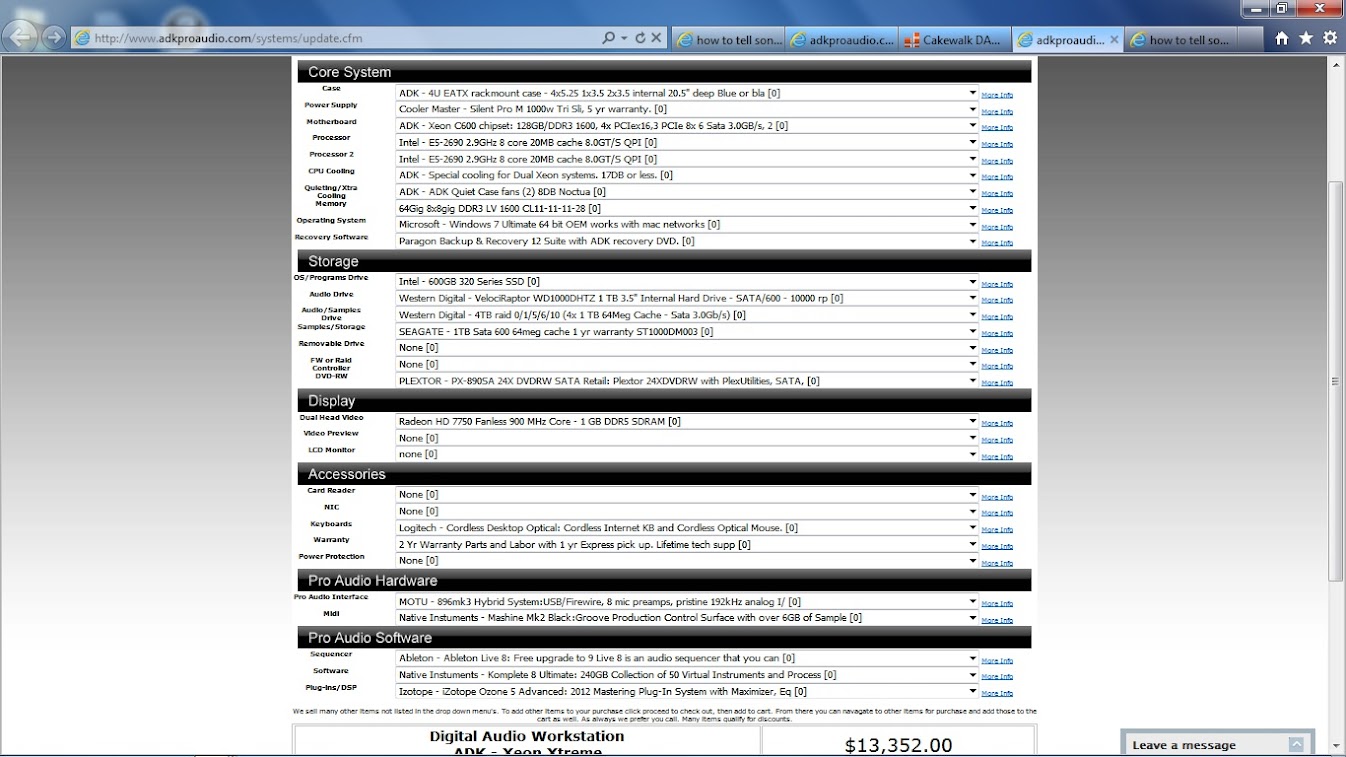
Arvid H. PetersonSonar X3E Prod / X2A / X1PE | Cubase 9.5.1 | Reason 9.5 | Sibelius7 | Pure DataNative-Instruments Komplete 10 Ultimate and a smattering of other pluginsHome-brewed VSTs Toshiba Satellite S855-S5378 (16GB RAM, modified with 2x 750GB HDDs, Windows 8.1 x64) Samson Graphite 49, M-Audio Oxygen 49, Korg nanoPAD2, Webcam motion tracking programs M-Audio Fast Track UltraMember, ASCAP
|
Stipes Vigilo
Max Output Level: -89 dBFS

- Total Posts : 96
- Joined: 2013/02/28 12:56:15
- Status: offline
Re:how to tell sonar which cpus to use on startup
2013/03/07 04:48:22
(permalink)
I find all of this quite interesting.
I just jumped into a basic workstation which can be upgraded to two 8c Xeon Proc and 64gb Ram for each (128g total); (just starting with one 4c Xeon and 20gb ram). But I am setting it up for OS on first drive & DAW/Audio on second so it seems just as reasonable that if I could at least specify what program uses each processor without getting into the individual cores, then I'm very interested to hear more specifics (maybe with less math detail and more hands on edits to do it).
So yeah, I'm glad this got thrown out to the community!
|
swamptooth
Max Output Level: -53 dBFS
- Total Posts : 2229
- Joined: 2012/04/16 15:44:21
- Status: offline
Re:how to tell sonar which cpus to use on startup
2013/03/09 01:44:39
(permalink)
cool little system you have there!! how do you find the xeons working out for you?? i've heard they can be a bit finicky to work with. what kind of work are you going to be doing with it? if you're doing orchestral simulations with vsl can you share some feedback?
Arvid H. PetersonSonar X3E Prod / X2A / X1PE | Cubase 9.5.1 | Reason 9.5 | Sibelius7 | Pure DataNative-Instruments Komplete 10 Ultimate and a smattering of other pluginsHome-brewed VSTs Toshiba Satellite S855-S5378 (16GB RAM, modified with 2x 750GB HDDs, Windows 8.1 x64) Samson Graphite 49, M-Audio Oxygen 49, Korg nanoPAD2, Webcam motion tracking programs M-Audio Fast Track UltraMember, ASCAP
|
Paul P
Max Output Level: -48.5 dBFS

- Total Posts : 2685
- Joined: 2012/12/08 17:15:47
- Location: Montreal
- Status: offline
Re:how to tell sonar which cpus to use on startup
2013/03/09 10:48:17
(permalink)
What I like about the Xeons (I have the E5-1620) is that you get the power of the i7, you don't get onboard graphics because you don't need it,
and you can run ECC memory.
|